


Peony
One VPN at a time, from the menu bar.
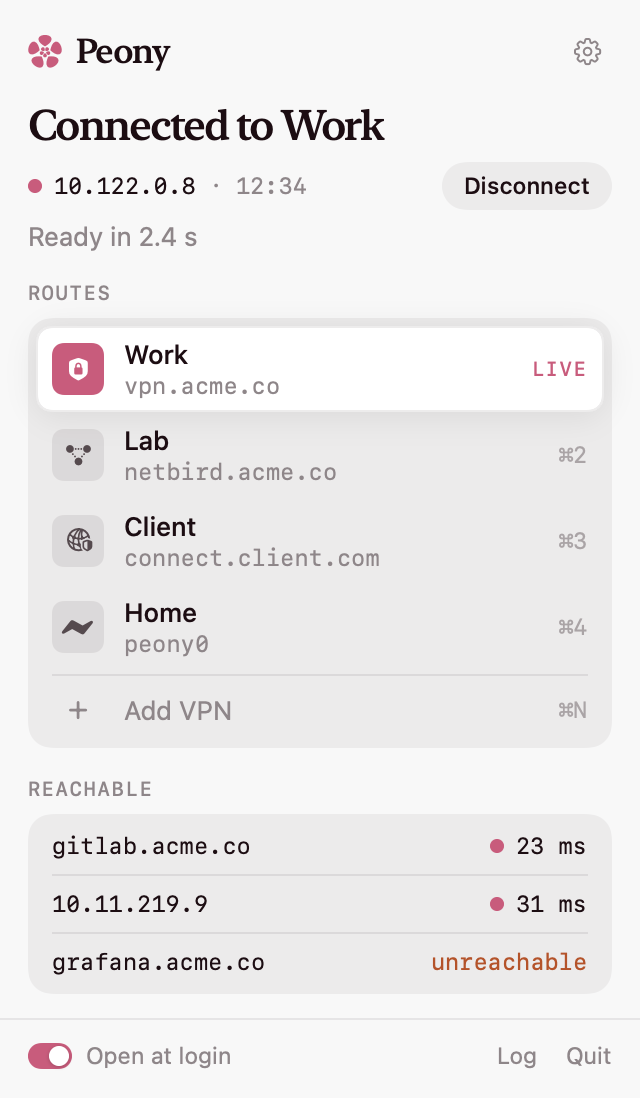
Peony switches between your VPNs and keeps only one on, so their routes and DNS never fight. Once a tunnel is up, it checks the hosts you care about, so "connected" means you can reach them.
It works with FortiGate, AnyConnect, GlobalProtect, Pulse, F5, OpenVPN, WireGuard, NetBird and Tailscale.
Install
brew install --cask pungrumpy/tap/peony
Peony isn't notarized yet. The first time you open it, go to System Settings › Privacy & Security and click Open Anyway.
Peony drives the open-source clients, so install the ones your VPNs need:
| VPN | Client |
|---|---|
| FortiGate SSL-VPN | brew install openfortivpn |
| AnyConnect, GlobalProtect, Pulse, F5, Array | brew install openconnect |
| OpenVPN | brew install openvpn |
| WireGuard | brew install wireguard-tools |
| Tailscale | brew install --cask tailscale-app or Tailscale's Mac app |
| NetBird | NetBird's installer |
Use
- Click the flower in the menu bar, then Add VPN.
- Pick the kind, fill in what your admin gave you, and list a few hosts to check.
- Click a route, or press ⌘1–⌘9. Peony turns any other VPN off first.
The first connection asks for an admin password once, to install the helper. A FortiGate that signs in with single sign-on, such as Microsoft Entra, works too: choose Browser (SSO) and Peony opens the sign-in page in its own window.
How it works, and what runs as root
Setting routes and DNS needs root. Peony installs a small helper and a sudoers rule that lets your account run it without a password. The helper:
- takes one JSON request on stdin, never secrets in arguments;
- validates every field, rejecting line breaks, option-like values, WireGuard
PostUp/PreDownhooks, and any OpenVPN option that runs a script, loads a plugin or opens a file; - only executes clients from Homebrew's
binandsbindirectories; - writes configs to a root-only directory, and deletes FortiGate's and OpenVPN's as soon as they have been read. OpenVPN's password file stays until the tunnel closes, because OpenVPN reads it again to renegotiate and reconnect.
Passwords and WireGuard and OpenVPN configs live in your Keychain. Remove everything with brew uninstall --zap peony.
Develop
You need Bun and the Command Line Tools. Xcode isn't required.
bun install
bun run dev           # the app and the site (localhost:3000)
bun run test          # core tests
bun run build         # Peony.app and the site
bun run package       # .dmg, .zip, checksums and the Homebrew cask
bun run install-app   # build, copy to /Applications, relaunch
bun run snapshots     # re-render every panel state
bun run icon          # regenerate the app icon
Add --filter=@peony/macos or --filter=web to run a task for one of them.
| Path | What |
|---|---|
packages/core |
Profiles, validation, log parsers and reachability, shared with the helper. Has the tests. |
apps/macos |
The app, its panel views, the root helper, and the snapshot renderer. |
apps/web |
The site. It shows the panel snapshots from apps/macos/Design. |
Describe a change to the app with bun changeset. When changesets reach main, a workflow opens a "Version Packages" pull request; merging it bumps the version, tags it and publishes the .dmg, and the tap picks it up within the hour.
The site deploys with each release, not on every push to main, so it never links to a download that isn't there yet. To publish a change that only touches the site, run the Deploy website workflow.
See CONTRIBUTING and the security policy.