A fast, open-source photo organizer and editor in the spirit of Picasa 3 — for Windows, macOS and Linux.
Picasa 3 was the best desktop photo manager ever made — instant search, every folder on one scrolling page, one-click fixes, and edits that never touched your originals. Google retired it in 2016. Picaluma rebuilds that experience with a modern, native, cross-platform stack.
Picaluma is an independent clean-room project. It is not affiliated with or endorsed by Google. "Picasa" is a trademark of Google LLC. Like Picasa — which had Windows, Mac (2009) and Linux (2006) versions — Picaluma runs on all three, natively.
Download
Get the latest version from Releases:
| Platform | File | Notes |
|---|---|---|
Windows 10/11 (64-bit; 32-bit: Picaluma_x.y.z_x86-setup.exe) |
Picaluma_x.y.z_x64-setup.exe |
Installs for your user only — no admin rights needed. If SmartScreen says "Windows protected your PC", click More info → Run anyway (the installer isn't code-signed yet). |
| Linux (x86-64) | Picaluma_x.y.z_amd64.AppImage or .deb |
AppImage: chmod +x then run. Debian/Ubuntu: sudo apt install ./Picaluma_x.y.z_amd64.deb. |
| macOS 10.15+ (Apple Silicon & Intel) | Picaluma_x.y.z_universal.dmg |
Open the .dmg and drag Picaluma to Applications. Signed with a Developer ID and notarized by Apple, so it opens with no warning. Or from Terminal: curl -fsSL https://ahmok.com/picaluma/install.sh | bash |
On first launch, add the folders you want Picaluma to watch. On Windows it can also import your old Picasa folder list in one click.
Features
Library
- Watched folders — point Picaluma at folders or whole drives. Scanning is progressive: every picture appears within seconds (23,588 photos in 277 folders listed in 4.7 s from a network drive), then dates, camera data and thumbnails fill in from the background, newest folders first. A progress panel shows what's happening. Online-only files on OneDrive, Google Drive, Dropbox and Synology Drive are listed without being downloaded; their thumbnails load as you scroll to them.
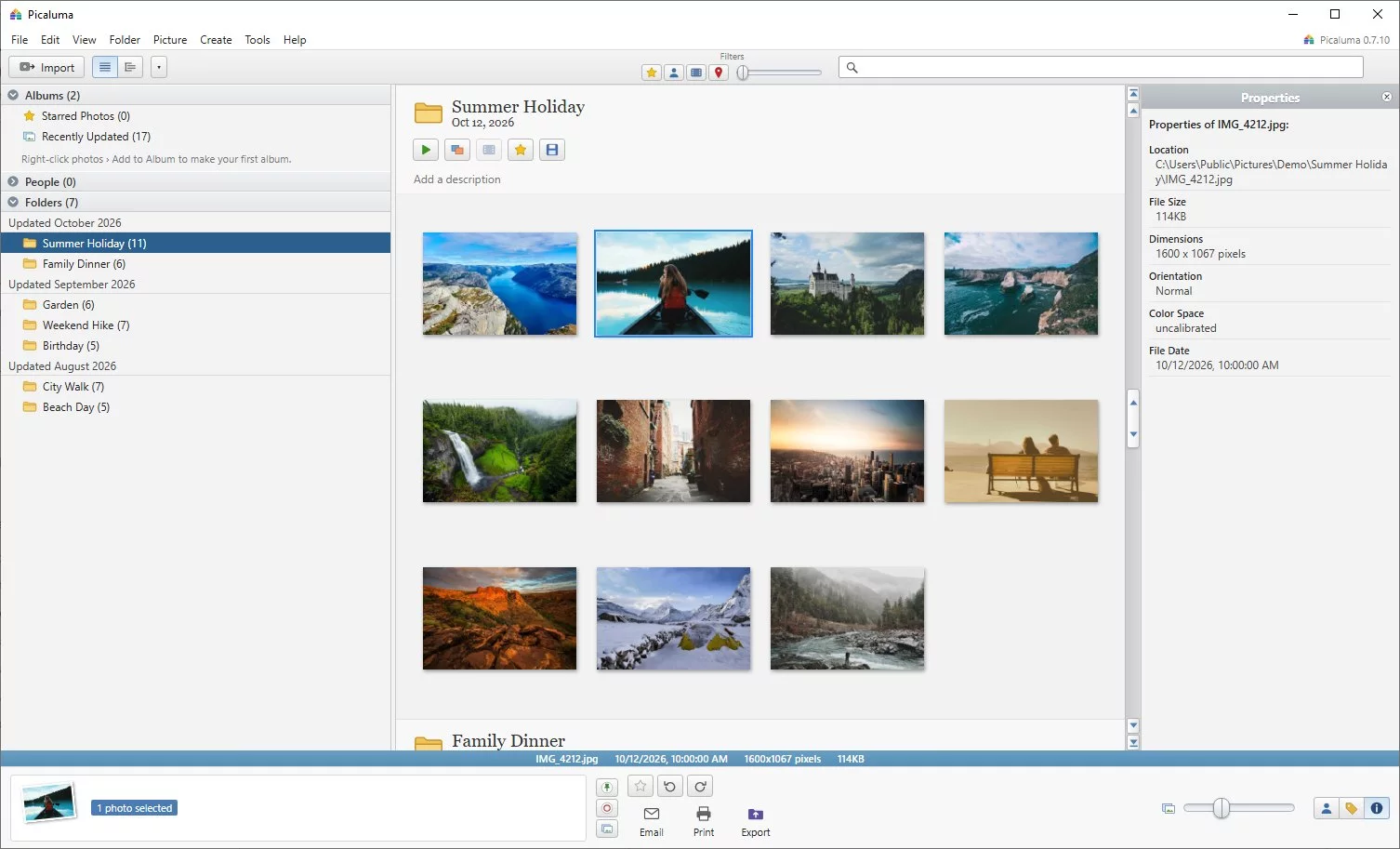
- Picasa-style library — every folder on one continuous page, newest first, grouped under "Updated Month Year", with folder descriptions. Smooth, Picasa-tuned wheel scrolling and gliding folder-to-folder jumps (toggle in Tools › Options › Special effects).
- Instant search — searches file names, folders, descriptions, captions, tags and camera as you type: 8,478 matches out of 12,219 photos in 0.003 s (Picasa 3 took 0.697 s on the same library). Tag suggestions appear under the search box.
- Albums — collect pictures from any folders into albums (right-click › Add to Album, Ctrl+N). Albums never move or copy your files.
- Tags, stars and captions — Tags panel (Ctrl+T) with one-click Quick Tags.
- People — faces are found in the background and similar ones grouped; name a group once in People Manager (Tools menu) and Picaluma suggests who else looks like them ("Is this …?" ✔ ✖). Person albums in the People section, a People panel showing who is in a picture (with "Add a person manually"), name search and a Faces filter. Imports the name tags you gave in Picasa. Detection and recognition run on your computer (OpenCV Zoo's YuNet and SFace models, downloaded once — 39 MB — when you agree) — nothing is uploaded; turn it off in Tools › Options › Name Tags.
- Import from cameras, memory cards and folders, skipping pictures you already have, into a folder named after the date.
- Places — a map (OpenStreetMap) of where pictures were taken, from their GPS positions.
- Hold, Hide and Recently Updated — keep pictures in the tray across folders, hide pictures (View › Hidden Pictures shows them), and an album of everything changed in the last 30 days.
- Flat or tree folder view — Picasa's date-grouped list or your disk's folder tree; sort by creation date, recent changes, size or name, and sort the pictures inside each folder or album (right-click › Sort Folder By). Filters for starred photos, movies and geotagged photos, and Picasa's date slider to show only recent photos.
- Every common format — JPEG, PNG, GIF, BMP, TIFF and WebP, plus HEIC/HEIF, AVIF, camera RAW (Canon, Nikon, Sony, Fujifilm, Olympus, Panasonic, Pentax, Leica, DNG…), Photoshop and Targa — choose which in Tools › Options › File Types.
- Movies — MP4, MOV, AVI, MKV, WMV, MPEG, 3GP, AVCHD and WebM show up with a play badge and play in the viewer (or open in your default player for codecs the viewer can't play).
- File management — Move to Folder, Copy to Folder, Move to New Folder, Delete from Disk, Rename / Move / Delete Folder. Delete sends pictures to the Recycle Bin / Trash; Shift+Delete (⌥⌘⌫ on Mac) deletes permanently. Moved pictures keep their stars, tags, captions, edits and albums.
- Mac-native — HEIC photos, ⌘ shortcuts, skips system folders and app libraries when you watch your whole home folder or disk. (The Photos app library itself isn't scanned — point Picaluma at the folders where you keep your pictures.)
Editing — non-destructive, as in Picasa: edits are recorded in a hidden .picaluma.ini in
each folder (Picasa's .picasa.ini edits are read too); File › Save (Ctrl+S) writes them into
the picture after keeping the original in .picalumaoriginals, and Undo Save restores it
- Zoom with ↑/↓, Page Up/Down, +/− or the mouse wheel; 1 for actual size, 0 to fit; drag to pan.
- Crop (print and screen presets, custom ratio, portrait/landscape) and Straighten.
- I'm Feeling Lucky, Auto Contrast and Auto Color measure each photo; Fill Light, Highlights, Shadows, Color Temperature and a Neutral Color Picker for colour casts.
- 30+ effects — Sharpen, Sepia, B&W, Warmify, Film Grain, Tint, Glow, Soft Focus, Focal B&W, Graduated Tint, Lomo-ish, HDR-ish, Vignette, Polaroid and more — with Picasa's sliders and colour pickers, live previews, before/after view, full undo/redo and a live histogram.
- Copy and paste all effects between pictures; Batch Edit applies an effect to a whole selection.
- Save a Copy writes the edited picture beside the original.
Share and create
- Export to Folder — resize, choose quality, add a watermark.
- E-mail — resized copies attached to a new message in Outlook, Thunderbird, Apple Mail or your Linux mail app, or saved to a folder for Gmail and other web mail.
- Print — wallet to 8×10 and full-page layouts, contact sheets, borders, copies, Letter/A4.
- Movie — pictures to MP4 with music, transitions, titles and captions.
- Picture Collage, Make a Poster, Set as Desktop, Export as HTML Page.
- Timeline view of all folders by date (Ctrl+5).
- Fullscreen slideshow (display time, cross fade or pan and zoom, captions, repeat), EXIF Properties panel.
Runs on older computers
- Windows 10 and 11 (64- and 32-bit), Intel and Apple Silicon Macs from macOS 10.15, Linux.
- Draws on the CPU by default, so a small or old graphics card can't run out of memory or crash its driver with a large library. Turn on Tools › Options › Use the graphics card for recent cards.
Reliability
- The library database checks itself on start and repairs itself if it was damaged.
Planned: Picasa-style Folder Manager, Projects.
Build from source
Requirements: Rust (stable) and Node.js 20+.
- Windows: Visual Studio C++ build tools; WebView2 is preinstalled on Windows 10/11.
- macOS: Xcode Command Line Tools (
xcode-select --install). - Linux:
libwebkit2gtk-4.1-dev libgtk-3-dev libayatana-appindicator3-dev librsvg2-dev patchelf.
npm install
npx tauri dev                       # run with hot reload
npx tauri build --bundles nsis      # Windows installer
npx tauri build --bundles app,dmg   # macOS app + dmg
cargo test --manifest-path src-tauri/Cargo.toml   # Rust tests
How it's built
| Layer | Technology |
|---|---|
| Shell | Tauri 2 — small native app (WebView2 / WKWebView) |
| Core | Rust — rusqlite (WAL + FTS5), walkdir, rayon, kamadak-exif, trash |
| Thumbnails | DCT-scaled JPEG decoding, disk cache, thumb:// URI scheme |
| UI | React 18, TypeScript, Zustand, TanStack Virtual, Vite |
| CI | GitHub Actions → Windows setup.exe + macOS universal .dmg on every tag |
The project is developed with AI coding agents (Claude Code). Agent guidance lives in
AGENTS.md, CLAUDE.md and .claude/rules;
the behaviour reference is docs/PICASA_SPEC.md. Release history
is in CHANGELOG.md.
License
Dual-licensed under Apache-2.0 or MIT, at your option.