@prereason/mcp
Prereason first. Then answer.
Financial market context for AI agents, with listed companies' results: www.prereason.com/agents.md
Docs · Briefings · Company briefings · Pricing · Get a key
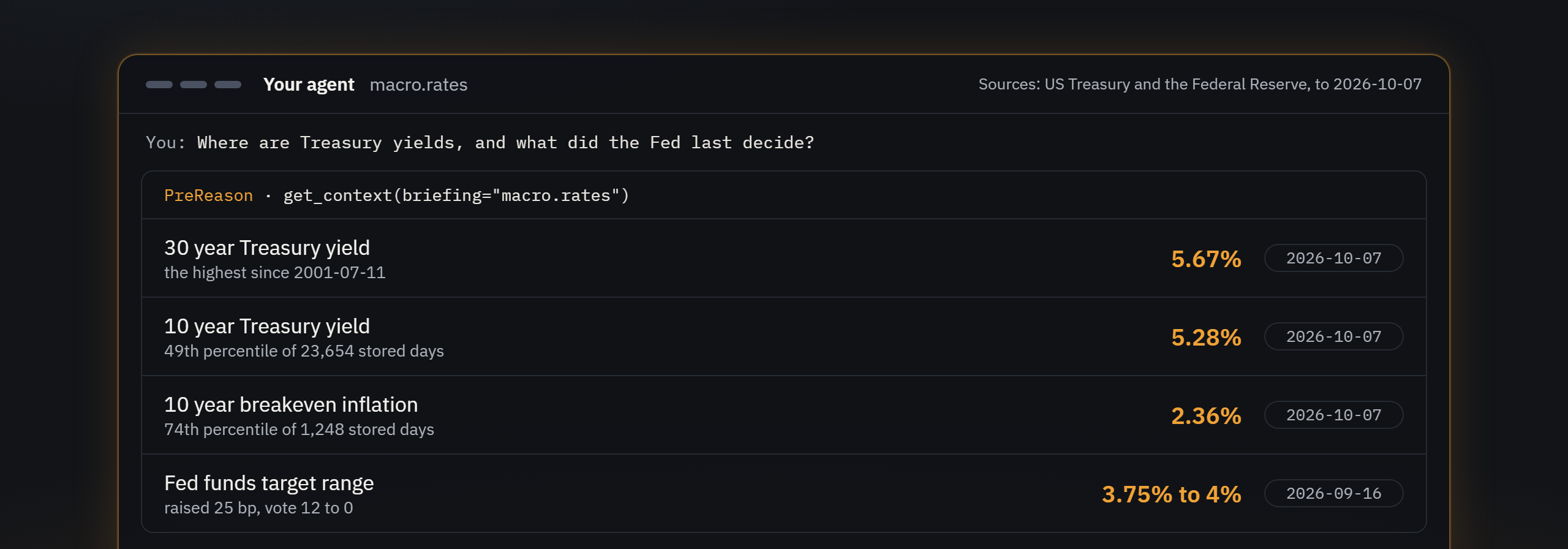
Ask your AI where Treasury yields are. On its own, it reaches for a search result or a raw series and works out the rest by itself. When it prereasons, one get_context call brings back the context already worked out: the 30 year yield at 5.67% on 2026-10-07, the highest reading on the US Treasury's daily par yield curve since July 2001.
Why prereason?
- The analysis, and the data behind it. Each briefing arrives with the reading done: the trend over several windows, where a value sits in its own history, a company's rank among its peers and, where read, its own guidance.
- Every figure dated, every source named. Your agent can say when a number is from and where it came from.
- One call, a whole briefing. A briefing gathers the series a question needs, so the turns go to the answer rather than to lookups.
- The markets in one place, among them rates and Treasuries, the Fed, FX, commodities, macro, listed companies across several markets, and Bitcoin.
- It describes; it never advises. Briefings say what the data shows. They never say what to buy, sell or hold.
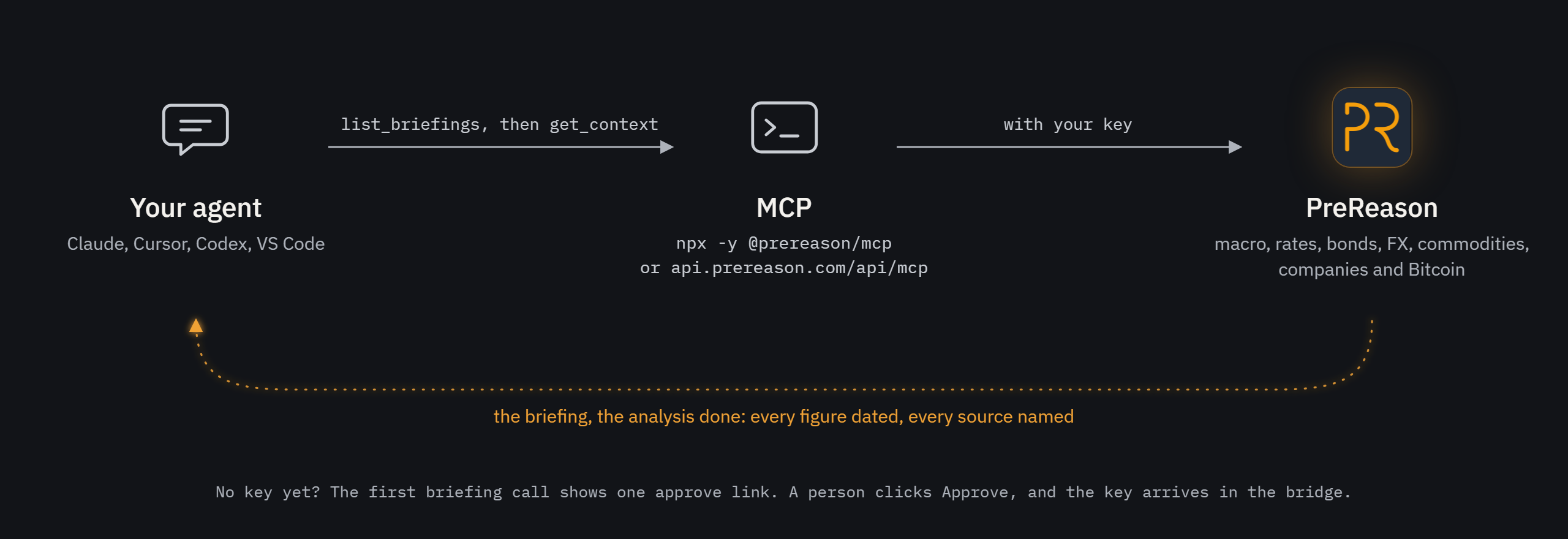
- Quick to set up. One block of config for Claude, Cursor, Codex or VS Code, through the npm bridge or the remote server. The catalogue tools need no key; for the rest, the bridge gives you one link to approve in your browser and the key arrives in the running session; the remote server takes your API key as a header.
What it covers
PreReason gives an AI agent market context it can reason with. Ask what a listed company reported, where Treasury yields stand or what the Federal Reserve decided, and one call returns a briefing reasoned in advance: the figures with their dates and sources, a one line reading, trend direction over several windows, confidence scores, percentile ranks and correlations, and in the deeper briefings a regime label and a plain language narrative. Briefings span asset classes and regions, among them listed companies built from each company's own reports and filings, macro and the economic calendar, interest rates and Treasury yields, bonds, currencies, commodities and energy, and Bitcoin. The set grows as markets and asset classes are added; list_briefings and list_metrics always return the current one. Each briefing carries the figures behind its readings, every figure is dated, and every briefing names its sources. It is served over MCP (a remote server and an npm bridge) and over REST, as Markdown or JSON. An AI agent starts at https://www.prereason.com/agents.md, which says how to connect, which briefings it can read and how to answer from them.
Quick Start
Option 1: Claude Desktop, no key needed
Requires Node.js 18+, and nothing else: the bridge has no dependencies.
Add this to claude_desktop_config.json and restart Claude Desktop:
{
  "mcpServers": {
    "prereason": {
      "command": "npx",
      "args": ["-y", "@prereason/mcp"],
      "env": { "PREREASON_CLIENT": "claude-desktop" }
    }
  }
}
The catalogue tools work at once. To connect your account, tell Claude "connect me to PreReason", or ask for any briefing: either way Claude shows one link, https://www.prereason.com/claim/PR-XXXX-XXXX. Open it, sign in or create an account, click Approve. The key arrives in the bridge on its own, is saved to ~/.prereason/credentials.json, and is never shown; ask Claude whether PreReason is connected and it names your plan. Nothing is created in your account until you click Approve, and the link is asked for when you need it, so it never runs out while Claude sits open. If your account already holds as many API keys as it allows, the answer says so instead of looping: revoke a key under Settings on prereason.com, then ask to connect again, or set PREREASON_API_KEY to a key you already have.
Config file location:
- macOS:
~/Library/Application Support/Claude/claude_desktop_config.json - Windows:
%APPDATA%\Claude\claude_desktop_config.json - Linux:
~/.config/Claude/claude_desktop_config.json
Already have a key? Add it to the env block as "PREREASON_API_KEY": "pr_live_..." and the bridge never asks.
Option 2: Direct HTTP with an API key (Claude Code, Cursor, Windsurf, Codex, Gemini CLI, VS Code, scripts)
Clients that hold their own config can call the endpoint directly, with the key as a header:
# Claude Code
claude mcp add --transport http prereason https://api.prereason.com/api/mcp --header "Authorization: Bearer YOUR_API_KEY"
{
  "mcpServers": {
    "prereason": {
      "type": "http",
      "url": "https://api.prereason.com/api/mcp",
      "headers": { "Authorization": "Bearer YOUR_API_KEY" }
    }
  }
}
Windsurf uses serverUrl instead of url; Gemini CLI uses httpUrl; Codex uses url plus bearer_token_env_var in config.toml. No key yet? Point the client at the endpoint without a header to browse the catalogue, then create a key on the website (below) and add the header.
Option 3: Claude.ai and Claude Desktop custom connector
- In Claude, open Customize, then Connectors, then "+ Add", then Add custom connector.
- Name it PreReason and give the address https://api.prereason.com/api/mcp.
- Choose Sign in now, even where Claude marks No sign-in as Detected.
- Click Add, then Allow on the PreReason screen. No account yet? Make one there.
- Then, in a new chat, ask: "What are rates, liquidity and the dollar doing today?"
Claude's Free plan allows one custom connector at a time. On a Claude Team or Enterprise plan, an owner adds connectors for the organization, then each person clicks Connect.
Get an API Key
Three ways. The hosted server never hands out a key inside a session and never asks for one.
Through this bridge. Run it with no key set: when you ask your assistant to connect PreReason, or an answer needs a key, it asks PreReason for access on your behalf and shows one approve_url, in its log and in the answer. Open it, sign in or create your account, click Approve, and the bridge saves the key, attached to your account and named Agent: <client_name>.
From code, for an agent with no browser. POST https://api.prereason.com/api/agent/claims (no auth), show the human the approve_url, then poll GET https://api.prereason.com/api/agent/claims/{claim_code} with Authorization: Bearer <claim_token> until status is approved. Docs: prereason.com/docs#agent-access.
On the website. Sign up at prereason.com/signup, then Dashboard > Settings > API Keys. Keys start with pr_live_.
MCP Tools
| Tool | Auth | Description |
|---|---|---|
list_briefings |
Open | List all pre-reasoned market briefings with tier requirements; with search, only those that match a question, and the covered companies it names, each with the entity to pass |
list_metrics |
Open | List every available metric across the bitcoin, macro, calculated and eth categories |
get_health |
Open | API health check, version, account tier |
get_context |
Required | Fetch a pre-reasoned market briefing (markdown or JSON); for a company briefing, entity names the company and block reads one of its parts (see Company Briefings) |
get_metric |
Required | Fetch a single metric with trend/signal/percentile |
get_changes |
Required (Basic and above) | What changed since your last call: change events after a cursor, no values |
get_news |
Required | Dated records of what companies filed and what federal agencies and the Federal Reserve published, newest first, each with its source, its date or time and a link; it states records, not reasons |
The npm bridge and the Claude Desktop extension add one tool of their own, connect_account, which the bridge answers itself and the remote server does not offer: with no key yet it returns the one link to approve, and once approved it says the account is connected and on which plan. It never shows a key and never asks for one.
Market Briefings
| Briefing | Description |
|---|---|
macro.snapshot |
Fed balance, M2, treasury yields, dollar strength, net liquidity |
macro.liquidity |
Liquidity indicators with momentum analysis |
macro.auctions |
Treasury auction demand: who bought at the latest auction of each note and bond maturity, against that maturity's own prior 12 auctions, with the auctions announced and scheduled next |
macro.calendar |
The scheduled dates ahead of the main US releases, the FOMC and ECB decisions, the FOMC minutes and the Treasury coupon auctions ahead (the week's, or the next one), each from its publisher's own calendar, with the latest US jobs report, CPI and weekly jobless claims as published and what each release revised |
macro.rates |
Treasury par yield curve at every maturity, 1M to 30Y, breakeven inflation, 5y5y forward, Germany 10Y |
bonds.context |
Who holds US Treasuries, in short: foreign investors' net purchases (Treasury's TIC), primary dealers' 13 week change in positions (the New York Fed) and speculators' 10 year note futures position (the CFTC), each against its own history, with the 10 year yield and three bond funds |
bonds.full |
Who holds US Treasuries: foreign investors, primary dealers and speculators, each against its own history, with the Fed's own Treasury holdings, debt held by the public, the largest foreign holders, what would change each reading and the next reports |
fx.liquidity |
EUR/USD, USD/CNY and dollar strength, with net liquidity and Bitcoin correlations |
commodities.gold |
The gold fund (GLD) and gold's own monthly price from the World Bank, with the 10 year real rate, the dollar fund, the CFTC's COMEX gold positioning and the miners' fund, each with its measured relationship to GLD |
commodities.silver |
The silver fund (SLV) and silver's own monthly price from the World Bank, with the CFTC's COMEX silver positioning and the gold, dollar, copper and silver miners' funds and the 10 year real rate, each with its measured relationship to SLV |
commodities.copper |
A copper futures fund (CPER) and copper's own monthly price from the World Bank, with the CFTC's COMEX copper positioning and the dollar and gold funds, each with its measured relationship to CPER |
commodities.wheat |
A wheat futures fund (WEAT) and US soft red winter wheat's own monthly price from the World Bank, with the CFTC's CBOT wheat positioning, the dollar fund and the WTI spot price, each with its measured relationship to WEAT |
commodities.energy-basket |
US oil and gas stocks against the five year norm from EIA's weekly reports, with WTI, Brent and Henry Hub spot prices, the Brent to WTI spread and WTI realised volatility |
commodities.oil-producers |
Crude oil beside its covered USA producers: the energy basket's state, WTI and Brent spot prices from EIA, then each integrated major, producer and refiner and two oil field service companies, with its share price, its 1, 3 and 12 month changes beside WTI and the measured 90 day correlation with WTI |
commodities.gold-miners |
The gold fund (GLD, a share price, not the gold price) and gold's own monthly price from the World Bank beside the covered USA gold and silver miners and royalty and streaming companies, each with its share price, its 1, 3 and 12 month changes beside GLD and the measured 90 day correlation with GLD |
commodities.grains-agribusiness |
The wheat futures fund (WEAT, not the wheat price) and US soft red winter wheat's own monthly price from the World Bank beside the covered USA grain merchandisers and processors, seed and crop nutrient companies, farm equipment makers and farmland REITs, each with its share price, its 1, 3 and 12 month changes beside WEAT and the measured 90 day correlation with WEAT |
cross.correlations |
BTC correlation matrix vs macro indicators |
cross.breadth |
Breadth across SPY, QQQ and IWM, with Bitcoin's correlation to each |
cross.regime |
Regime classification (expansion, contraction, transition) with USDT dominance |
cross.ai-compute |
AI compute and power chain: US grid demand against a year earlier, miners' AI hosting agreements from SEC filings, hosting against mining per megawatt |
eth.context |
Where Ether stands: its price and global 24 hour volume from CoinGecko, its distance from the 200 day average, Lido's stETH APR, the CFTC's CME Ether positioning and OKX's funding rate |
btc.quick-check |
Minimal fast context: BTC + Net Liquidity + correlation |
btc.context |
BTC + liquidity + hash ribbon + difficulty + momentum |
btc.pulse |
Price, 24h change, Bitcoin dominance |
btc.grid-stress |
Epoch pace and difficulty adjustment forecast |
btc.momentum |
200D MA support/resistance with 7d/30d/90d momentum and percentile rankings |
btc.on-chain |
Hash rate, difficulty, transactions, active addresses |
btc.miner-survival |
Hashprice thermometer with miner stress scoring |
btc.etf-flows |
Spot BTC ETF net daily flows, aggregate AUM, and per-issuer breakdown |
btc.full |
Full Bitcoin analysis: macro overlay, momentum, percentiles, correlations and narrative |
btc.factors |
Multi-factor attribution for BTC price movements |
btc.energy |
Production cost model with gas input pressure |
btc.treasury |
Corporate Bitcoin treasury intelligence from SEC filings |
list_briefings always returns the current set, and prereason.com/briefings shows each one. Which plan reads which briefing is on the pricing page.
Company Briefings
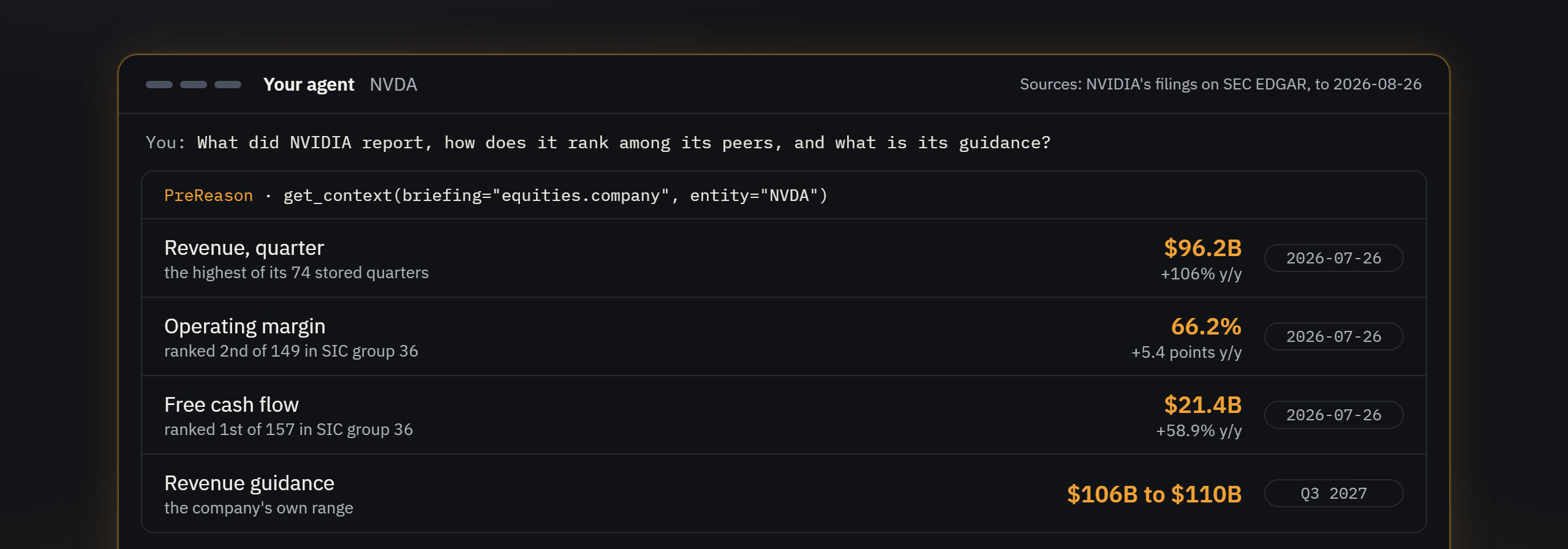
equities.company reads one listed company per call, composed from its own reports (filings with its home market's regulator; for India, its own published results), each figure dated and sourced. Which plan reads which market's company briefings is on the pricing page. It describes; it never says what to do.
- Name the company with
entity: the ticker or CIK of a company filing with the SEC (NVDA), a Japanese securities code (7203), a Korean stock code (005930), an Indian company's ISIN (INE018A01030), the LEI of a company filing in the UK or of a European company (2138002P5RNKC5W2JZ46) or a Brazilian company's B3 ticker (PETR4). - Not sure of the code? Call
list_briefingswithsearch, for example"Toyota earnings": the answer lists the matching covered companies, each with theentityto pass. - Read one part with
block, one of the parts below, or leave it out for the whole briefing. A part counts one call; the whole briefing counts one for each part it carries. Parts are served for today only.
get_context(briefing="equities.company", entity="7203")
get_context(briefing="equities.company", entity="NVDA", block="valuation")
Part (block) |
What it holds |
|---|---|
header |
Who the company is, the indexes that hold it with their dates, and a line on its peers |
what_changed |
Its recent filings |
situations |
Flagged conditions, each with its severity |
against_guidance |
The company's own stated expectations next to what it reported (read only from results filed with the SEC on Form 8-K) |
numbers |
Income statement, balance sheet and cash flow history, with growth and the company's own history |
segments |
Business, product and geography splits |
valuation |
The close, market capitalisation, price to earnings, book and sales, enterprise value multiples and free cash flow yield, each with its value a year ago and its own history (closes from StockAnalysis.com) |
capital_structure |
Debt, liquidity and maturities |
quality |
Earnings quality and liquidity, including the accrual ratio, cash conversion, current, quick and cash ratios, working capital, asset turnover, and days sales, inventory and payables outstanding |
profitability |
Returns and cash generation, including free cash flow, its margin and per share, EBITDA, return on equity, assets and invested capital, the payout ratio and the effective tax rate |
news |
Filed news |
Example Prompts
Once connected, try prompts like:
- "Connect me to PreReason"
- "Show me the macro snapshot"
- "Where are Treasury yields, and what did the Fed last decide?"
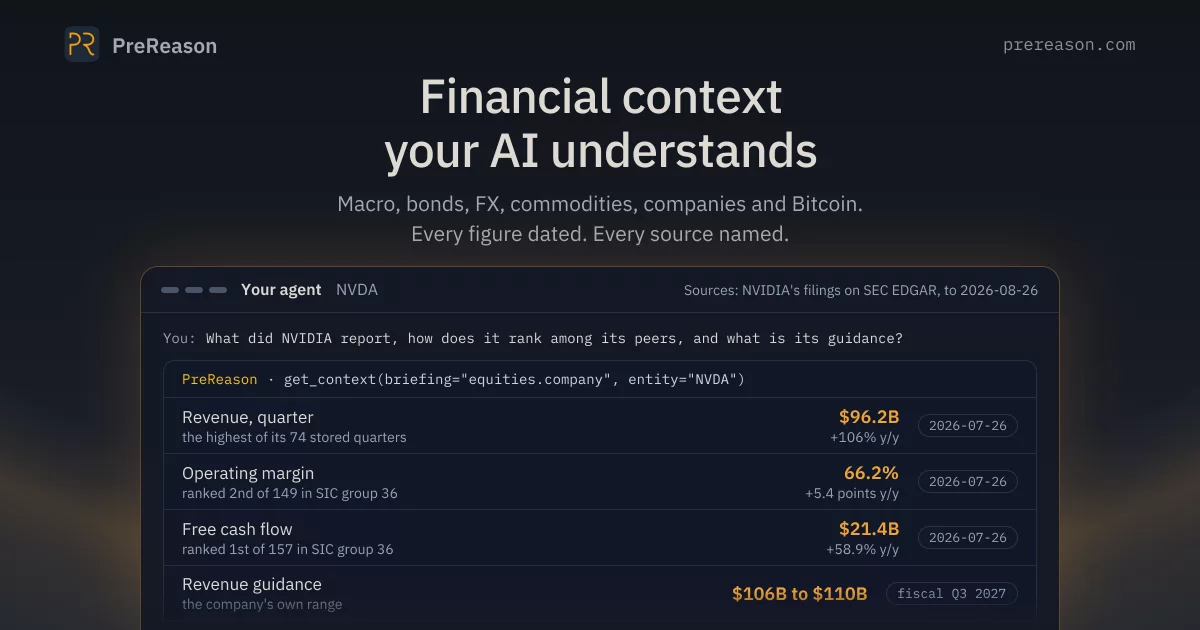
- "What did NVIDIA report, and how does it rank among its peers?"
- "How is Bitcoin moving with stocks and the dollar?"
- "List available briefings"
Troubleshooting
"Server disconnected" error
- Ensure Node.js 18+ is installed:
node --version - Check your API key starts with
pr_live_ - Fully quit Claude Desktop (system tray > Quit) and reopen
Tools not appearing
- Restart Claude Desktop after editing config
- Verify JSON syntax:
node -e "JSON.parse(require('fs').readFileSync('path/to/config','utf8'))"
Windows: "'C:\Program' is not recognized"
If you still see this error, ensure you're using the env block (not --header args) as shown in Quick Start above. If the issue persists, install globally and use node:
- Run:
npm install -g @prereason/mcp - Use this config (replace
YOUR_USERwith your Windows username):
{
  "mcpServers": {
    "prereason": {
      "command": "node",
      "args": [
        "C:\\Users\\YOUR_USER\\AppData\\Roaming\\npm\\node_modules\\@prereason\\mcp\\bin\\cli.js"
      ],
      "env": {
        "PREREASON_API_KEY": "YOUR_API_KEY"
      }
    }
  }
}
Auth errors on get_context / get_metric
list_briefings,list_metrics, andget_healthwork without a keyget_contextandget_metricrequire a valid API ke