An event-sourced, git-backed ticket store + Jira reconciler built for agent swarms — one store, exposed as a Python library, a CLI, and an MCP server.
- Three surfaces, one store — drive rebar as a CLI (
rebar), a Python library (import rebar), or an MCP server (rebar-mcp). - The tracker lives in the repo — tickets are an append-only event log on a
ticketsgit branch; no database, no daemon, and it travels with every clone. - Built for parallel agents — atomic claims, convergent merges, and provenance links let many agents and sessions write at once without lost work.
- Optional LLM gates — review a ticket's plan before work, its completion before close, and its code before it merges.
- Bidirectional Jira sync — a level-triggered reconciler keeps tickets and Jira in step, so teammates stay in the loop.
- Dogfooded through two independent gates — every change to rebar's own
mainmust pass an LLM code review and CI, on Gerrit, before it lands.
Install
pipx install nava-rebar          # the `rebar` CLI (add [mcp] / [agents] for those extras)
brew install navapbc/rebar/rebar # or via Homebrew
Quickstart
Run one ticket end-to-end with the CLI or the Python library; the JSON block is the
MCP server config so agents can drive the same loop over MCP. rebar --help (and
rebar <command> --help) is the authoritative command reference.
# CLI: one ticket through init -> create -> ready -> claim -> close
rebar init
tid=$(rebar create task "Add a login page" -o json | python3 -c 'import json,sys; print(json.load(sys.stdin)["id"])')
rebar ready                                              # lists it as ready to work
rebar claim "$tid"                                       # open -> in_progress
rebar transition "$tid" in_progress closed              # in_progress -> closed
import rebar                                            # the same loop via the Python library
tid = rebar.create_ticket("task", "Add a login page")
rebar.claim(tid)
rebar.transition(tid, "in_progress", "closed")
{ "mcpServers": { "rebar": { "command": "uvx", "args": ["--from", "nava-rebar[mcp]", "rebar-mcp"] } } }
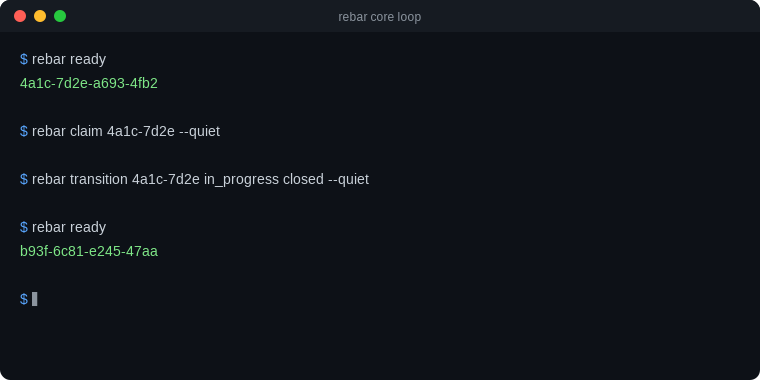
That's the whole loop — init → create → ready → claim → close. The CLI and Python blocks each drive one ticket end-to-end (the same id threaded through every step, no hard-coded id); the JSON is the MCP server config — add it to your client so an agent can run the same loop via the MCP tools. State is shared through the repo so many agents (and teammates via Jira) coordinate without stepping on each other.
How it works
rebar stores tickets as an append-only event log on a dedicated tickets git
orphan branch (worktree at .tickets-tracker/); ticket state is computed by replaying
events, and every write auto-commits and pushes so the store is shared immediately. A
level-triggered reconciler bidirectionally syncs tickets with Jira. The branch name
and worktree dir are configurable (tracker.branch / tracker.dir — see
Configuration). Reads stay sub-second into the thousands of tickets;
for measured numbers and git-growth expectations see
docs/scale-envelope.md.
Documentation lives under docs/ — start with the
docs index (grouped by audience: user / operator / contributor /
agent) or the day-to-day user guide.
Why rebar
If you run coding agents against a repo, you eventually want to run several at once — and the moment you do, they need a shared place to coordinate. Most trackers weren't built for that:
- They're heavy. A daemon to babysit or a local database to keep running, with dependencies thick enough that a routine upgrade can break your work tracking across machines.
- They don't travel with the code. State lives outside the repo, so a fresh clone doesn't come with its tickets.
- They fight your git history. A tracker that writes to your working branch tangles ticket churn into your source-code commits.
- They have no concurrency story. Nothing stops two agents from claiming the same work or clobbering each other's state, and concurrent edits produce merge conflicts you resolve by hand — or lose.
- They buckle at scale. Speed and usability fall off past a few hundred tickets.
rebar's answer is to make the tracker part of the repo. Tickets are an
append-only event log on a dedicated tickets orphan branch (linked in through a
gitignored worktree); current state is a fast, deterministic replay of that log.
That single decision pays off across the board:
- Zero infrastructure, fully portable. No database, no daemon — just git and a lightweight Python install. Clone the repo and the tracker comes with it.
- No commit interference. Ticket events live on their own branch and never touch your source history. Every write auto-commits and auto-pushes, so activity is shared in real time.
- Concurrency by design. Each event gets a globally-unique filename, so
parallel writes merge as a clean union, and the rare conflicting fork resolves
deterministically — every clone converges with no lost data.
claimis an atomic, optimistic-concurrency primitive: agents grab work without stepping on each other. - Built to scale. The event log plus cached replay stays fast as tickets grow.
On top of that foundation, rebar adds what parallel agent work actually needs:
- Bidirectional Jira sync — agents work in rebar, teammates work in Jira, and a level-triggered reconciler keeps the two in step. To run it automatically in CI, see docs/jira-sync-setup.md (the GitHub Actions reconcile-bridge + heartbeat-canary setup).
- Conflict-aware scheduling — tickets record their file impact, so
next-batchhands parallel agents work that won't collide on the same files. - Scratch space — an invisible per-ticket channel for subagents to pass notes to one another.
- Structural quality gates — clarity, acceptance-criteria, dispatch-readiness, and repo-wide health checks keep work dispatch-ready.
- LLM review gates (optional). Review an agent's plan before work starts, its completion before the ticket closes, and its code before it merges. Plan-review and code-review share one four-pass kernel. A finder cites evidence, a separate verifier tests each claim with atomic yes or no questions, and deterministic policy decides what blocks. A passing plan or completion review records an operation certificate as a DSSE envelope. The envelope carries an SSHSIG signature over its PAE bytes, produced with the signing environment's Ed25519 key. The certificate names that environment as its principal. The result is a machine-checkable process record for the reviewed work.
- Provenance links —
discovered_fromties emergent work back to the ticket that surfaced it. - One store, three interfaces — drive it from the CLI, a Python library, or the MCP server.
Requirements
System prerequisites:
- Python ≥ 3.11
gitis a runtime prerequisite because the store uses a Git orphan branch and worktree. The runtime engine uses in-process Python and does not requirebashorjq.- Git 2.38 or newer is required for development, tests, and CI. The floor is declared in
.github/git-version-floor.txt. The test suite and CI fail when Git is below that floor. - Deployments that use the optional S3 repair path require Git 2.38 or newer because that path invokes
git merge-tree --write-tree. - No external lock binary is required. Write serialization uses a two-window
lock built entirely from the Python standard library — a
fcntl.flock(LOCK_EX)advisory lock plus an atomicmkdirlock (src/rebar/_store/lock.py) — so there is no dependency on util-linux'sflockbinary (or any other external tool). Themkdirwindow keeps mutual exclusion holding even wherefcntl.flockis unreliable (e.g. some network filesystems). acli(Atlassian CLI) — a required external binary for the Jira Cloud reconciliation/bridge path: everybridge/reconcileCloud mutation shells out to it, so it must be installed onPATH(install pointer: docs/jira-sync-setup.md). The[jira-datacenter]Data Center path does not need it — it uses thejiraPython library.
Python dependencies. A base install (pip install nava-rebar) provides the rebar CLI, the import rebar library, and the lean workflow engine. It installs pyyaml>=6 for the workflow DSL loader, jsonschema>=4.18 for schema registry and workflow input and output validation, and referencing>=0.30 for JSON Schema $ref resolution. The engine core and reconciler otherwise use the Python standard library. All other dependencies are optional extras that are imported lazily to keep the base installation light. CI verifies this boundary.
- Optional runtime capabilities — install what you serve:
[mcp]installs therebar-mcpserver withmcp>=1.28.1,<2andpyjwt[crypto]>=2.10,<3.[agents]— the LLM agent-operations framework + agentic workflow steps (rebar review-plan, thecode_reviewworkflow): the provider-agnostic pydantic-ai runtime (pydantic-ai-slim[anthropic]) plusjson-repair.
- Development & authoring extras — not needed to run or serve rebar:
[tracing]— an OpenTelemetry OTLP trace sink (write-only; never read back into a rebar decision), for diagnostics.[dev]— the test/lint/type tooling (pytest, ruff, mypy, hatchling).pip install -e '.[dev]'also self-references[agents]so the validation tests run rather than skip, and is required to run the full test suite (the interface-parity tests import the MCP server, so they error — not skip — withoutmcp).
Install
rebar ships from one Python package — PyPI distribution nava-rebar (the
import package and commands stay rebar / rebar-mcp). Pick the channel that
fits. (System prerequisites in all cases: git (≥ 2.38 to develop/test rebar; see
Requirements) and python3 (≥ 3.11); write
serialization uses a built-in fcntl.flock + mkdir lock with no external
binary; acli is required on PATH for the Jira Cloud reconciliation/bridge path
(see docs/jira-sync-setup.md), while the
[jira-datacenter] Data Center path does not need it.)
Homebrew (CLI)
brew install navapbc/rebar/rebar
# or: brew tap navapbc/rebar && brew install rebar
Installs the rebar CLI (and the rebar library inside the formula's venv). For
the MCP server via Homebrew users, install the [mcp] extra with pipx/uvx below.
PyPI — pipx / pip
Runtime (prod) — install what you'll run:
pipx install nava-rebar              # isolated CLI on PATH: rebar (+ lean workflow engine)
pip  install nava-rebar              # library: import rebar  (runtime deps: pyyaml, jsonschema, referencing)
pip  install 'nava-rebar[mcp]'       # + MCP server: rebar-mcp
pip  install 'nava-rebar[agents]'    # + LLM agent ops + agentic workflow steps (rebar.llm)
pip  install 'nava-rebar[tracing]'   # + OTLP trace sink (write-only)
pip  install 'nava-rebar[agents,tracing]'        # the union, if you want it all
The base install runs scripted workflows (rebar workflow new/validate/show/run)
with no extra; agentic workflow steps and rebar review-plan need [agents]. For what the
engine is for — when to author a workflow vs a bespoke op, the YAML DSL, the
three-pass review pattern, and the prompt-library + eval seam — see
docs/workflow-engine.md.
The [agents] extra adds the optional LLM agent operations framework (rebar.llm). It provides tool-using agents that review tickets and code through the library, CLI, and MCP interfaces. Model classes are configured in [tool.rebar.llm.model_classes] or with REBAR_LLM_<CLASS>_MODEL, REBAR_LLM_MODEL_PROVIDER, and REBAR_LLM_BASE_URL. The single REBAR_LLM_MODEL variable is deprecated. See docs/llm-framework.md.
The [agents] extra installs the Anthropic provider used for Claude. Bedrock requires nava-rebar[agents,bedrock]. ChatGPT and OpenAI-compatible endpoints require [agents] plus pydantic-ai-slim[openai]. Gemini requires [agents] plus pydantic-ai-slim[google]. Core rebar never requires or imports the LLM stack unless an agent operation is used.
MCP server — from the MCP Registry
Listed in the MCP Registry as
io.github.navapbc/rebar. Registry-aware MCP clients can add it by that
name; or register it directly in your client config (zero pre-install via
uvx):
{
  "mcpServers": {
    "rebar": {
      "command": "uvx",
      "args": ["--from", "nava-rebar[mcp]", "rebar-mcp"],
      "env": { "REBAR_ROOT": "/path/to/your/repo" }
    }
  }
}
(Already pip/pipx-installed nava-rebar[mcp]? Use "command": "rebar-mcp"
instead.) Server flags: REBAR_MCP_READONLY=1 exposes only read tools;
mutating bridge tools (bridge_run, bridge_sync, bridge_pause, and
bridge_resume) require REBAR_MCP_ALLOW_JIRA_SYNC=1. Both flags accept any
case-insensitive truthy value — 1, true, or yes (surrounding whitespace
tolerated); anything else (incl. unset) is off.
Private-repo fetch credentials (code-reading gates)
The LLM code-reading gates review_plan, verify_completion, review_code, and scan_spec default to attested mode. They fetch the selected ref from origin and read an immutable snapshot at the pinned SHA. A server whose REBAR_ROOT points to a private repository therefore needs read credentials through a Git credential helper, deploy key, or token in the server clone. Without credentials, attested mode fails closed with a remediation message and disables terminal prompts through GIT_TERMINAL_PROMPT=0. source=local reads the in-place checkout without fetching and never signs the result. The snapshot guide documents these semantics, the operation-certificate trust model for DSSE envelopes that carry SSHSIG signatures over their PAE bytes, each produced with an environment's Ed25519 key and attributed to that environment, and the settings for temporary storage, disk-space thresholds, and EFS or NFS locking.
From source
git clone https://github.com/navapbc/rebar && cd rebar
pip install .              # library + CLI (runtime deps: pyyaml, jsonschema, referencing)
pip install '.[mcp]'      # + MCP server (FastMCP)
# Developing rebar itself — the full dev environment (test/lint/type tooling +
# the agents stack so the LLM validation tests RUN, not skip), installed through
# the committed uv.lock (or `make install`, which adds the pre-commit gate):
uv sync --extra dev
pipx source installs and older uv. If
pipx install "<path>[agents]"stops before installing rebar withpipx needs uv>=0.9.17, it selected an older host uv. Retry the same source install with pipx's pip backend:pipx install --backend pip "<path>[agents]"This is a host pipx/uv toolchain mismatch, not a rebar packaging defect.
Contributing changes? GitHub is a read-only mirror —
mainonly advances via Gerrit's two-vote gate (LLM-Review+Verified/CI). New contributors: start with the friendly walkthrough docs/your-first-change.md; the full reference is CONTRIBUTING.md (clone from Gerrit, push torefs/for/main, then land it with a plain Gerrit Submit once both votes pass —mainis Rebase-If-Necessary, so Gerrit rebases onto the tip and submits server-side).
Packaging note — why rebar installs unpacked to disk. The library, CLI, MCP server, and the whole read/write core run in-process in Python. The one component that runs as a subprocess is the Jira reconciler pass (
python -m rebar.reconciler); thejira-capability-probe.pyscript and the alias wordlist ship undersrc/rebar/_engine/as package data and are launched and read from the filesystem as real on-disk files, so the package must be installed unpacked to a real directory and zipimport / zip-safe bundles (zipapp, shiv, PEX, Lambda zips) are unsupported. Every standard install satisfies this: pip/pipx wheels (hatchling builds unpacked), editable installs, and Homebrew all land real files.engine_dir()asserts the engine dir is present on disk at the first reconciler call and fails loudly otherwise.
Advanced (optional) — gate commits with self-hosted code review. Not needed for standard rebar use. If you want every commit to
mainautomatically LLM-reviewed before it can land, you can self-host Gerrit + the rebar review-bot on AWS (the bot imports the samerebar.llmreview kernel the MCP server exposes) and demote GitHub to a read-only mirror that only advances via Gerrit after theLLM-Reviewvote passes. See docs/gerrit-aws-setup.md for the server setup. (This repo runs exactly that setup — see the contributor note above and CONTRIBUTING.md.)
CLI
The complete, always-current command reference for every subcommand is docs/cli-reference.md. It is generated from the CLI's own help data. The essentials are rebar init → rebar create <type> "<title>" → rebar ready → rebar claim <id> → rebar transition <id> <current> <target>.
Run rebar help, rebar --help, or rebar -h for the subcommand overview. Run rebar <subcommand> --help or rebar help <subcommand> for a specific subcommand. For leaf commands, an exact --help or -h token in any position before -- prints usage without executing the command. Nested command families retain child routing. A leading help flag prints family help, while forms such as rebar bridge preview --help and rebar audit show --help print child help.
Repo root is resolved from REBAR_ROOT, falling back to the git toplevel of the
working directory.
Structured output. Every data-returning command emits machine-readable JSON
via the canonical --output json flag (short -o json; --output llm gives a
token-minified shape for show/list/ready). Each distinct JSON shape is
documented by a JSON Schema and validated across the CLI, library, and MCP in CI.
See [docs/output-schemas.md