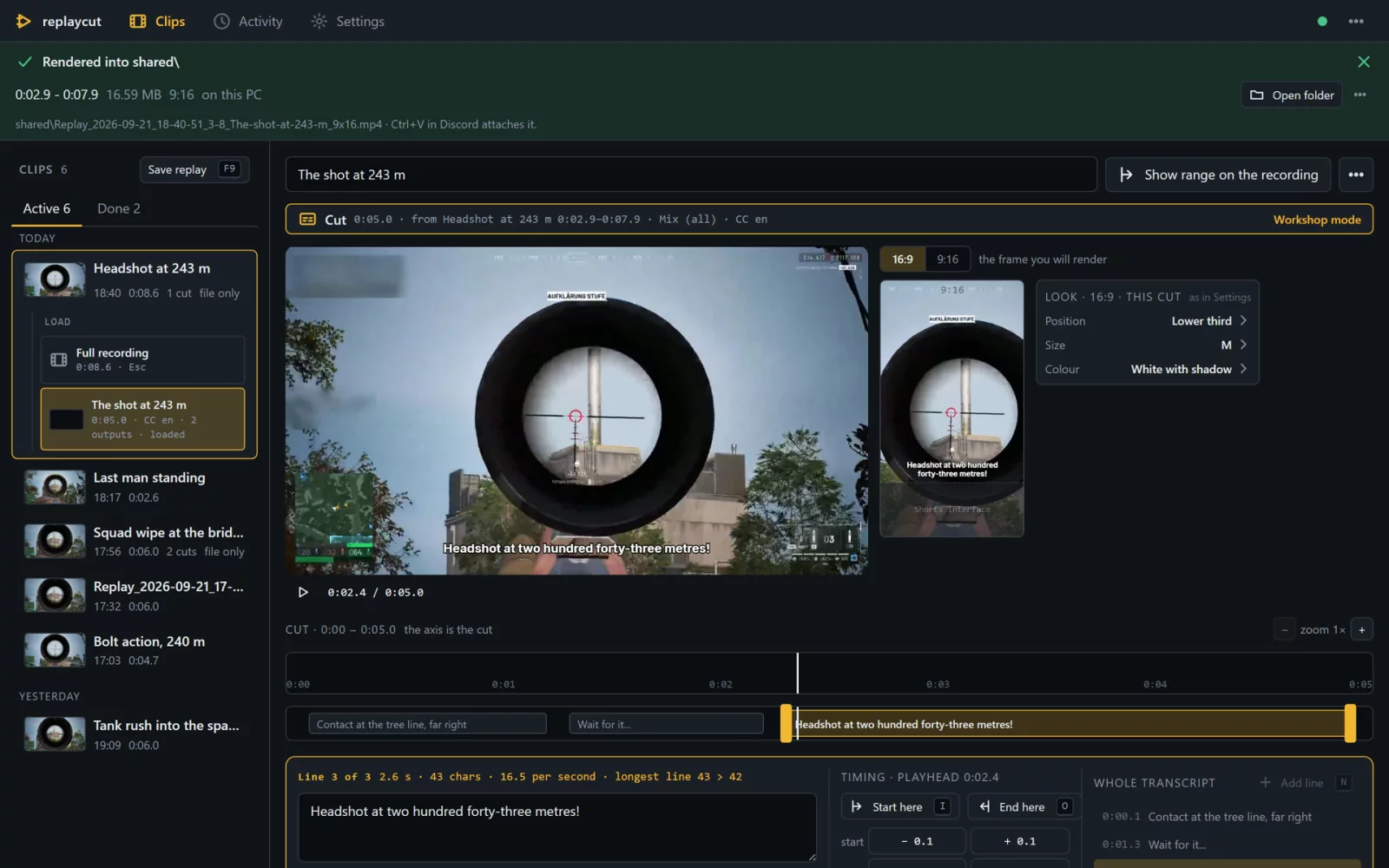

Clip manager for the OBS replay buffer: trim replays in the browser from your phone or laptop, encode on the gaming PC with ffmpeg and your GPU, upload and post the link.
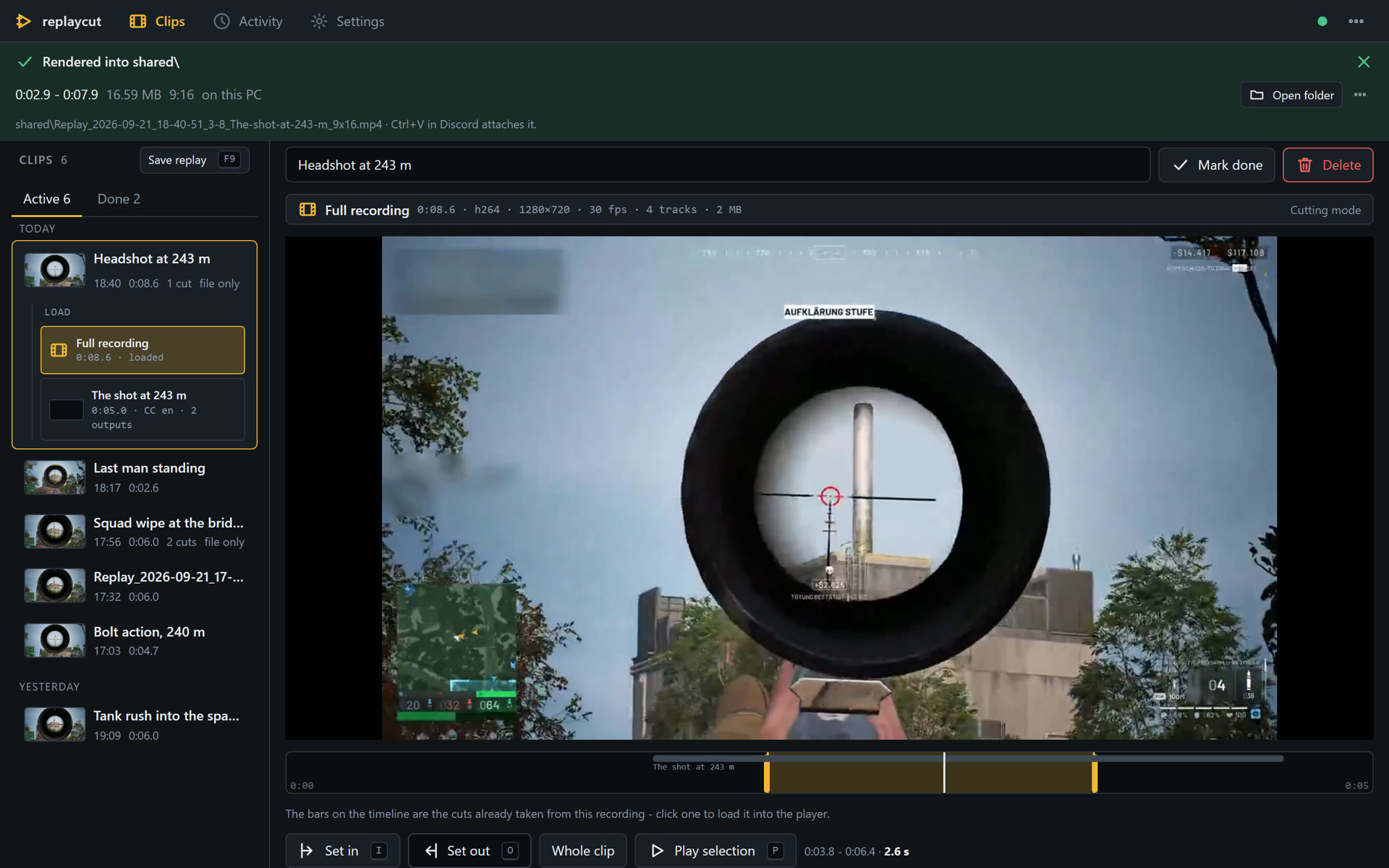
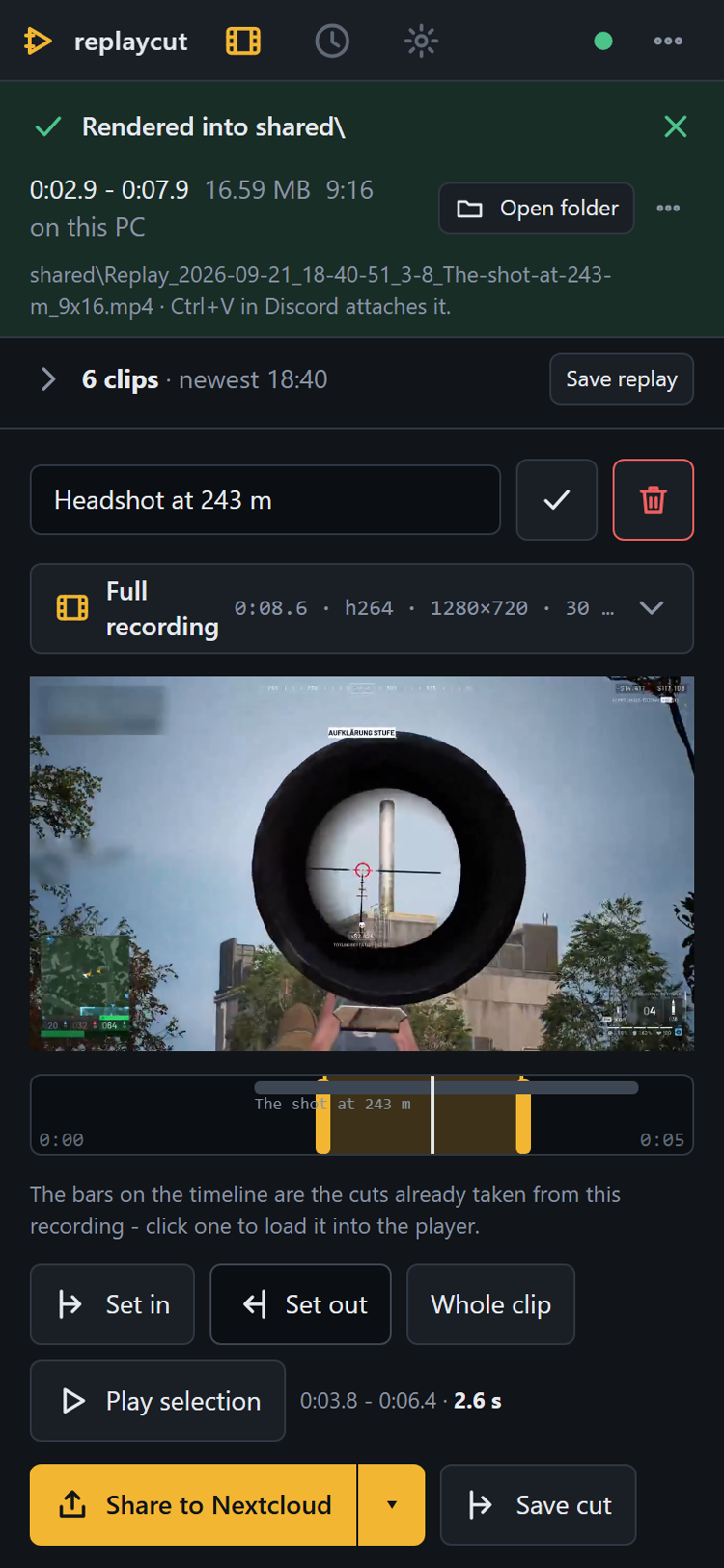
Website: https://replaycut.de · Preview: the clips page · the same page on a phone
What you get
- Trim in the browser. F9 in the game, a toast on the desktop, in and out points on your phone or laptop - the same page on every screen.
- Cut now, decide later. Every share keeps the range as a cut of its own: the picture untouched, every audio track along. Open it in the workshop tomorrow and render it again - another audio mix, vertical for a Short, to another target - without the five-minute recording, which you can let go of.
- A list that empties itself. A shared clip is done and out of the way, grouped by the evening it belongs to; one click brings it back, and Activity knows what went where.
- The gaming PC does the work. ffmpeg encodes on your GPU (AMD AMF, NVIDIA NVENC, Intel Quick Sync) at below-normal priority with a thread cap, so the game keeps the CPU.
- Upload where you like. Nextcloud, OneDrive, any S3 bucket or WebDAV server, YouTube (a vertical cut as a Short) - or just a file in a folder. Not X: its API has had no free tier since February 2026, so every post would be billed to whoever registered the app.
- The link posts itself. Discord, Telegram or any webhook right after the quick share; every other share offers "Post to ..." when you want it.
- Subtitles, read on your own PC (beta, off until you switch it on).
ffmpeg's
whisperfilter reads the speech of a cut - the mix, or your microphone and the voice chat without the game - you correct the lines in the workshop with the line on the picture as it will be rendered, and a rendering burns them into the picture - the only way they show in a Discord preview or a Short - or carries them as a track. The speech never leaves the machine; only the model is fetched, once. A distribution whose ffmpeg lacks the filter says so in Diagnostics. - Closed until you open it. A new installation listens on this PC only; a phone gets in with one click on your PC or by scanning the QR code, without typing a password.
- One EXE with a tray icon and a one-click update, per user, without admin rights and without a service; every release is signed.
- Made for the phone in your hand. The finished MP4 downloads into the gallery, and a recording your browser cannot play gets a playable preview.
- Thirteen themes on board. Dark by default, and Material, Catppuccin, Nord, Dracula, Gruvbox, Solarized and Tokyo Night a click away in Settings; your own is one CSS file in a folder.
See docs/settings.md for the status of each integration.
How it works
- Record. OBS keeps the last minutes in the replay buffer. You press the hotkey (or Save replay on the page) and the file lands at the top of the clip list.
- Trim. Open the clip, Set in and Set out, give it a title. The pills under the player - audio, quality, frame, afterwards - start at Settings › Quick share; one you change counts for the next share only.
- Share. Share cuts the selection and uploads it to the quick-share target; the menu next to the button holds every other storage and "file only". Progress, queue and result stay in a strip under the top bar. Save cut stops after the cut - render it when the evening is over. Afterwards decides what happens to the clip: keep it, mark it done, or let the recording go to the recycle bin.
- Post. The quick share posts the link to Discord, Telegram or your webhook; on every other share the result card and the history offer Post to ....
Everything runs on the PC that runs the game. The browser - on that PC, a laptop or a phone in the same network - is only the remote control (the clips page on a phone).
The workshop
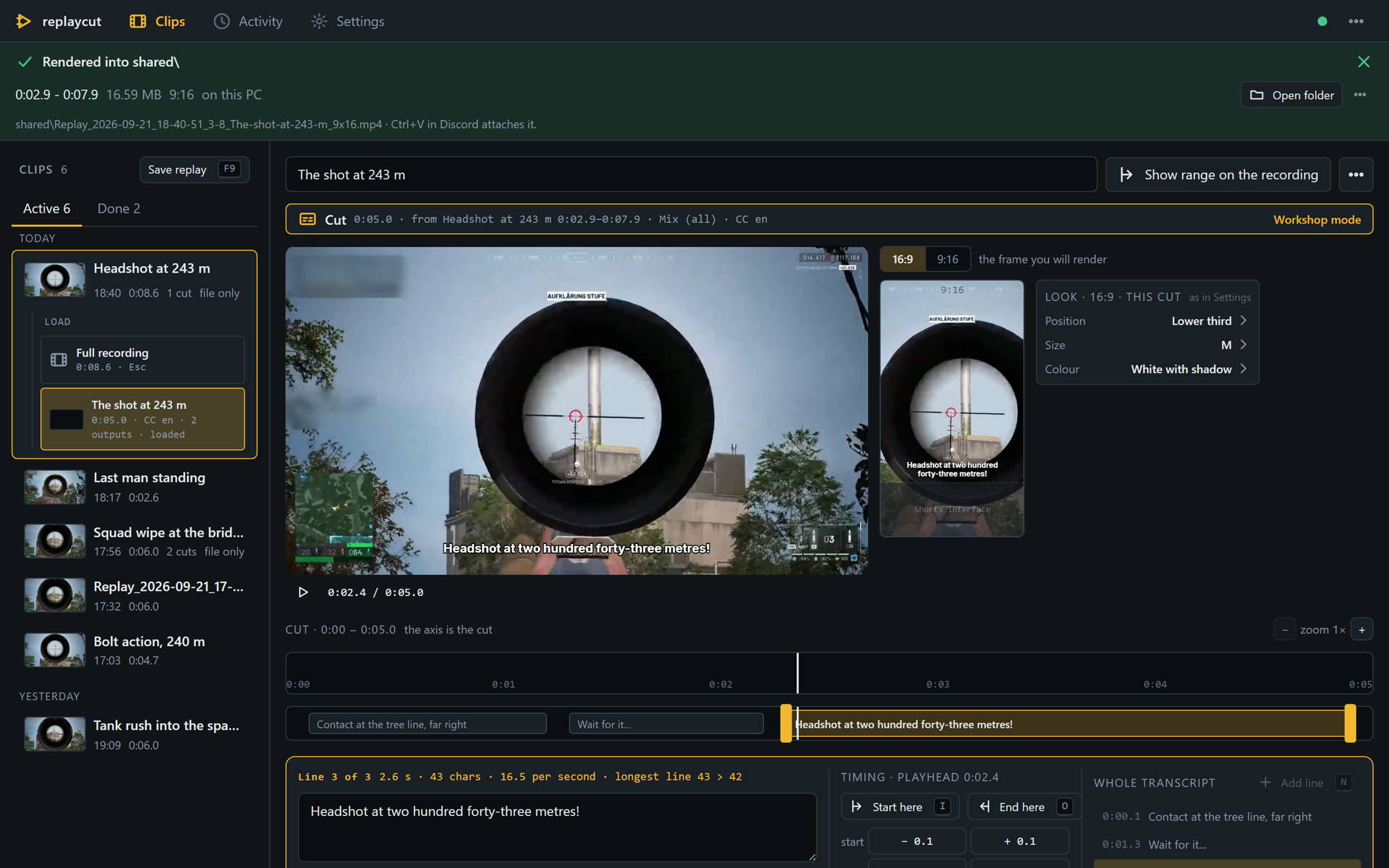
The cuts of a recording sit in its row of the list and as bars on its
timeline; a click loads one into the workshop - the same player, on the
cut's own timeline (W loads the newest, Esc goes back to the
recording). There a cut gets a title of its own, renders as often as you
like with a pill per choice - frame, quality, audio, afterwards - and lists
every output with its link and its folder. A cut whose recording is gone
still plays: the service makes a copy of it the browser can play.
With subtitles switched on, the lines of a cut lie on its timeline and the
one under the playhead is on the picture, in the size, place and colour the
rendering will give it, for 16:9 and for the 9:16 window of a Short. Click a
line, correct its text, set its start and end at the playhead with I and
O or by dragging its edges (zoom in for the short ones), split, merge or
delete it, or add one of your own in a gap (N) -
also when whisper heard nothing or cannot run here; everything saves by
itself.
Install
Download the latest release
(replaycut-<version>-windows-x64.zip for Windows x64,
replaycut-<version>-linux-x64.zip for Linux x64; see Linux).
- Unpack the ZIP anywhere and run
install.cmd. It copies replaycut to%LOCALAPPDATA%\replaycut\app, adds a start menu and a desktop shortcut, asks whether replaycut should start when you sign in (default: no), then starts the service and opens the page in your browser. No admin rights, and no firewall rule: replaycut listens on this PC only until you say otherwise. - The browser opens the setup: it suggests the recording folder from your
OBS profile, waits for the first replay and reports codec and audio
tracks, lets you switch on Nextcloud and Discord with a test each, and
ends with access from other devices - a switch that asks for a password
and for the firewall rule (see Security). Skip what you do
not need; without integrations replaycut is a local clip manager.
Everything can be changed later under Settings (
replaycut setupon the console still works; seedocs/settings.md). - Play. Press the replay hotkey when something happens, open the page, trim, Share.
Every release's SHA256SUMS is signed with the maintainer's minisign key, so
you can check what you downloaded - and so the built-in updater installs
nothing else.
replaycut runs as a tray icon: Open shows the page, Copy address puts the address for your phone into the clipboard, Show QR code shows it for scanning, Pause scanning keeps new replays out of the list for a while, Check for updates asks GitHub now, Open log folder and Quit do what they say. Double-click the shortcut to start it again; if it is already running, that opens the page.
Windows SmartScreen may warn about the download the first time: click "More
info", then "Run anyway". The executable carries no Authenticode signature,
so Windows has no publisher to name; what you can check instead is the
release's SHA256SUMS and its minisign signature, and that is the same
signature the built-in updater verifies before it installs anything.
Linux
Linux support is being built in stages (see CHANGELOG.md). The release
ZIP for Linux carries one static executable that runs on any x64
distribution. Unpack it anywhere and run install.sh (or replaycut install from that folder). It copies the files to ~/.local/share/replaycut/app, links
~/.local/bin/replaycut for the command line, adds a desktop entry and an
icon, asks whether replaycut should start with your desktop session (a
systemd user unit, default: no), then starts the service and opens the page.
No root, no firewall step: if a firewall runs on your PC, allow the port
there when you open replaycut to other devices.
Secrets go to the keyring behind the Secret Service (gnome-keyring, KWallet,
KeePassXC), notifications to the desktop's notification service, and the
clipboard is served over Wayland. ffmpeg comes from your distribution;
hardware encoding uses VAAPI (AMD, Intel) or NVENC. The tray icon is a
StatusNotifierItem, which KDE, Waybar (its tray module), swaync-style
bars and GNOME with the AppIndicator extension show; without a tray host
the service runs without the icon, and the page and replaycut stop do
what the menu does.
Packaging. For a distribution package (AUR, deb, rpm) the Linux ZIP
also carries replaycut.desktop, replaycut.service and replaycut.svg
for a system-wide layout: the executable in /usr/bin, the UI in
/usr/share/replaycut/ui/index.html (where the service finds it on its
own), the desktop entry in /usr/share/applications, the icon in
/usr/share/icons/hicolor/scalable/apps and the user unit in
/usr/lib/systemd/user, which systemctl --user enable --now replaycut
starts with the desktop session. ffmpeg is the one dependency; OBS, a
Secret Service and the VAAPI driver are optional.
Requirements
- Windows 10 or 11 (the service uses the recycle bin, toast notifications and
the Credential Manager). Linux support is being built in stages: the
service runs there with secrets in the keyring (Secret Service), desktop
notifications, the Wayland clipboard, VAAPI encoding,
replaycut install, autostart as a systemd user unit, the tray icon and the one-click update from the Linux release package (see Linux andCHANGELOG.md). - OBS Studio with the replay buffer enabled, recording to MKV. Multiple audio tracks are optional; the recommended layout is track 1 = mix, 2 = microphone, 3 = game, 4 = voice chat.
- ffmpeg and ffprobe on the
PATH(on Windows, for examplewinget install Gyan.FFmpeg). - A hardware H.264 encoder is used when available (AMD AMF, NVIDIA NVENC, Intel Quick Sync; VAAPI on Linux), otherwise libx264.
Pages
- Clips (
/): the list with thumbnails, the player with in/out marks, audio and mode choice, Share (the quick-share storage) with a menu for the other storages and "file only", live progress and a queue, the result with links or "Open folder" and "Copy file", "Download" for the device the page is open on, "Publish to ..." for another storage, and the share history. A cut opens in the workshop on the same page (/#<recording>/<cut>). - Settings (
/settings): everything insettings.json, integrations with their tests, theme, autostart, access from other devices with the password and the signed-in devices; changes apply at once, the port after "Restart now". - OBS (
/obs): with the WebSocket server switched on in OBS (Tools › WebSocket Server Settings), replaycut connects on its own, saves replays through OBS instead of a simulated key press, warns while the replay buffer is stopped and can start it, and compares folder, format, encoder and audio tracks with what it expects - every difference with the OBS menu path. It never changes OBS settings. - Diagnostics (
/diagnostics): ffmpeg, encoder, folder, scan, integrations, network, firewall and the device login as one list with a fix per problem, and "Copy diagnostics" for a support message.replaycut testprints the same. - Setup (
/setup): the wizard, any time again.
Update
replaycut checks GitHub once a day and shows a banner when a newer release
exists. "Update now" downloads the ZIP, verifies its signature and hash and
restarts on the new version; settings, titles, history and credentials are
kept. By hand: unpack the new ZIP and run its install.cmd (install.sh
on Linux). A copy that came from a distribution package updates with your
package manager; the banner says so. The public
minisign key is built into replaycut; an unsigned or foreign release is never
installed.
Uninstall
Run uninstall.cmd from the unpacked ZIP (or replaycut uninstall from a
terminal; uninstall.sh on Linux). It stops the service and removes the
files, shortcuts (the desktop entry and the systemd unit on Linux),
autostart entry and, on Windows after asking, the firewall rule. Settings,
titles, history and credentials stay unless you use replaycut uninstall --purge. Your clips are never touched.
Security
replaycut serves your recordings and can upload them and post links, so it starts closed and opens only where you say so.
This PC only, until you change it. A new installation listens on
127.0.0.1 and the installer adds no firewall rule. Access from other
devices is one switch, in the setup wizard and under Settings › Access: it
asks for a password first, then for the one administrator prompt that opens
the port in your private network profile, and restarts the service. The
switch turns it all off again. An installation from before 2.8 that is open
to the network without a password keeps running, but says so - a red
banner, a notification once per start, and a failing diagnostics line.
Signing in on a phone, without typing the password. The login page leads with "Ask <your PC>". The PC shows a notification, a card in every open page and an entry in the tray, all with the same four-character code and with the asking device's name and address; one click on Allow and the phone is in for 30 days. The QR code in the wizard and in the settings does the same in one scan: its address carries a token that is good once and for two minutes, and only this PC and already signed-in devices get to see such a code. Sign-in requests run out after two minutes, at most five are open at a time, and a burst from several addresses pauses the device login for ten minutes - the password keeps working.
The password is the way back in and 8 to 128 characters long; there are no rules about digits or symbols, because length is what counts. "Generate one for me" offers four words from a list built into the executable, shown once. Ten wrong tries from one address lock that address for a minute, more than 30 wrong tries from anywhere within five minutes pause the password login for ten. The password is stored as an argon2id hash; sessions are stored as SHA-256 of their cookie.
Settings › Signed-in devices lists every browser that may use replaycut with its name, address and when it was last seen. "Sign out" ends one at once, "Sign out everywhere" all but your own. Since 3.4 a client that is not a browser can sign in the same way and keep a token instead of a cookie; it shows up in the list marked app.
What a web page you visit cannot do. Every write with a foreign
Origin is refused, and every request whose Host is not localhost, an
IP address, this computer's name or a name in allowedHosts is answered
with 421 - that closes DNS rebinding, where a page uses its own name to
reach a service on your machine.
HTTPS, if you want it (since 3.4, off by default). Settings › Access has the switch; it needs a restart, like the port. With it on, the password and the session cookie no longer cross your network in the clear, and the browser gives the page its clipboard without a fallback. Without it the traffic is plain HTTP - which is why the device login exists and is the everyday way in: it means the password does not cross the network at all. Either way, do not put replaycut on the open internet; a VPN or a mesh network is how you reach it from outside.
The catch with HTTPS is the certificate, and there is no way around it:
- Bring your own and there is nothing to explain. Set
https.certandhttps.keyto a PEM pair every device already trusts. Three ways to get one: Tailscale gives your machine a real Let's Encrypt certificate for its*.ts.netname (tailscale cert <name>), which also solves getting in from outside; a reverse proxy (Caddy does it in three lines) in front of replaycut with a domain of yours; or mkcert if you would rather run your own authority and install it yourself. - Or let replaycut make one. Leave both empty and it becomes its own
certificate authority in
<data-dir>/tls. That authority is made once and never replaced - it is the identity of this replaycut - while the certificate under it is re-issued whenever your machine's addresses change or it nears its end. No browser knows that authority, so expect one warning per browser until you importca.crtinto its certificate store. Settings › Access shows the file and its fingerprint; on Windows,certutil -user -addstore Root ca.crtdoes it for your account. Phones are the awkward part - iOS wants the profile and a second switch under Settings › General › About › Certificate Trust Settings - which is why the honest answer for a phone today is either your own certificate or plain HTTP.
An old bookmark that still says http:// gets a page with the right
address rather than a broken connection, and a certificate replaycut cannot
read leaves the service running unencrypted with the reason in the log and
a failing diagnostics line: on a PC without a console, unreachable is worse
than unencrypted.
requireLoginOnLoopback in the settings asks for the password on this PC
as well, for a Windows account other people use.
The generated passphrases use the EFF Short Wordlist
#1 by the Electronic Frontier Foundation,
licensed CC-BY 3.0
US; the list is embedded
in crates/replaycut/src/wordlist.rs.
Coming from the 1.x PowerShell service
install.cmd detects the old scheduled task and takes over its clip folder,
port, Nextcloud settings, titles, history and credentials, then stops and
removes the task so the port is free. Autostart is switched on, because the
old service started at sign-in. The old service was reachable in the
network, so that stays: the old firewall rule and URL reservation are
removed in the same administrator step that adds the new rule, and the
switch under Settings › Access closes it again when you want it closed.
Development
replaycut 2.0 is a rewrite in Rust of a PowerShell service (1.x) that was in
daily use but never published. It keeps that service's HTTP API
(docs/api.md is the contract, checked by a black-box test
suite) and its file formats, so a 1.x installation migrates in place.
Releases are published on GitHub as a ZIP for Windows x64; see
CHANGELOG.md for what each version brings.
replaycut is built with Claude Code. The maintainer writes the specifications, reviews and accepts every change and tries every release against real OBS on real hardware before it is tagged; the code, the tests and much of the prose come out of that collaboration. It is said here so that nobody has to guess.
cargo build --workspace
Run the service from the repository during development, on its own port and with its own folders so it does not interfere with an installed instance: