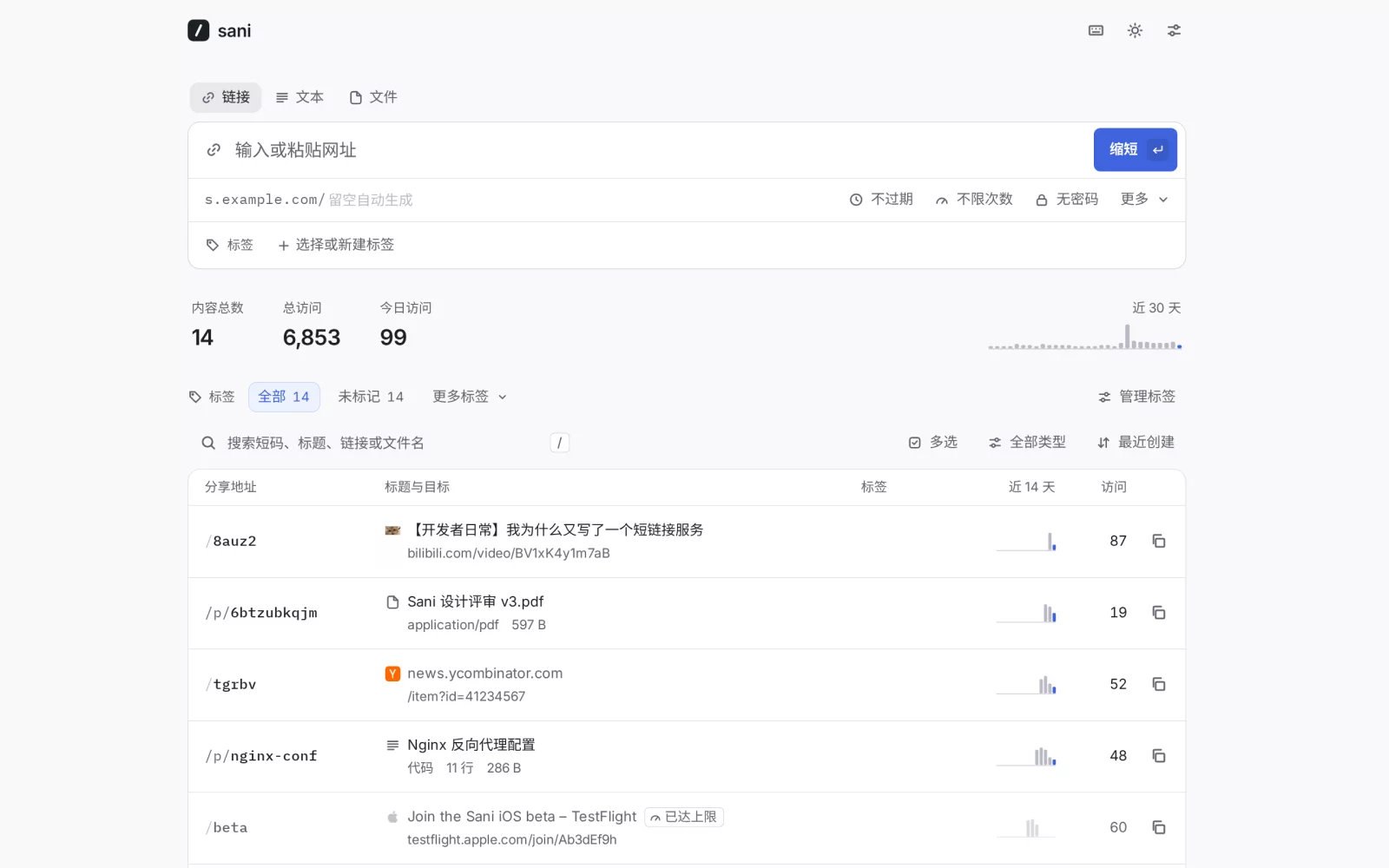
A self-hosted link shortener with text and file sharing, for one administrator. One Go binary with an embedded admin app, SQLite for metadata and text, and local storage for uploaded files. No external database or cache service required.
Documentation · Releases · 中文说明

Paste a long URL, press Enter, and the short link is already on your clipboard. Sani fetches the page title and icon so you can recognize links later, counts clicks without slowing redirects down, and stays out of the way otherwise.
- Fast where it matters. Redirects are served from memory: about 130,000 requests per second with sub-millisecond median latency on an 8-core laptop, with every click counted (numbers below).
- Quick to use. Paste a link anywhere on the page, or drop one in. Custom slugs are checked as you type, the whole dashboard works from the keyboard, and deleting offers undo instead of a confirmation dialog.
- Simple statistics. Total and daily clicks, top referrers, last visit. Clicks from crawlers, link previews, prefetches and your own dashboard are not counted.
- Tags for organization. Assign colored tags to links, texts and files while creating or editing them, then filter by a tag or find untagged items. Tags stay private to the administrator.
- Per-link controls. Expiry dates, visit limits, temporary or permanent redirects, and an off switch. You can edit the destination and the change applies immediately.
- Texts and files, too. Share a note up to 1 MB, a config snippet (monospace, with line numbers) or a file up to 99 MB by default at
/p/…, with the same expiry, visit limit and statistics. File uploads and raw downloads require a separate files hostname. - Works with what you use. A bookmarklet, the Android share sheet (install it as an app), API tokens for scripts and Shortcuts, and import from Shlink or Sani CSV/JSON.
- Unicode slugs.
s.example.com/简历works. Slugs match case-insensitively. - Chinese and English, with light and dark themes, on desktop and mobile.
Documentation
Sani is designed for a single running instance and one administrator, not multi-user hosting or active-active replicas. The 1.x series follows the compatibility policy. Read the release notes before upgrading. For public service, configure HTTPS, persistent storage and a separate files domain when needed, then rehearse a complete backup and restore. Repository tests and published benchmarks do not certify your deployment’s capacity or availability.
The documentation, in English and Chinese, lives in docs/: guides for deployment and operations, the configuration, HTTP API and command line references, and how Sani works inside. It's a VitePress site; make install docs-dev serves it on 127.0.0.1:5174, and its deploy page has a config builder that writes the deployment files for your domain. Every build checks the docs against the source, so the settings, endpoints, error codes and commands they list are the ones the code has.
Quick start
Docker Compose
mkdir sani && cd sani
curl -fsSLO https://raw.githubusercontent.com/DejavuMoe/sani/master/compose.yaml
# Set SANI_BASE_URL (and TZ) in compose.yaml, then:
sudo install -d -m 750 -o 65532 -g 65532 ./sani-data
docker compose up -d
Open http://127.0.0.1:8080/admin/ and choose the admin password. The first visit also asks for the setup code Sani prints to its log (docker logs sani), so nobody else can claim a fresh instance; when SANI_BASE_URL is set, the log line includes a link with the code already filled in. Set SANI_PASSWORD instead to skip this step. Put a TLS reverse proxy in front of it; deploy/ has Caddy, nginx and systemd examples.
The image, ghcr.io/dejavumoe/sani, is built FROM scratch for linux/amd64, linux/arm64 and linux/arm/v7: about 25 MB, running as an unprivileged user, with the data in the /data volume.
The template pins v1.0.1; image tags include v, exactly like Git tags and Releases. Use a published version and change the pin explicitly when upgrading. Data is bound from ./sani-data beside the Compose file to /data. The install command above is required: it creates the directory with ownership 65532:65532 for the container to write. If an earlier start created a root-owned directory, repair its permissions.
A single binary
Every release has archives for Linux, macOS, Windows and FreeBSD, with SHA256SUMS and build provenance:
curl -fsSL https://github.com/DejavuMoe/sani/releases/download/v1.0.1/sani-linux-amd64.tar.gz | tar -xz sani
SANI_BASE_URL=https://s.example.com ./sani
The binary embeds the admin app and needs nothing else at runtime. To build it yourself, make install build (Go 1.27+, Node 24 and pnpm) produces ./bin/sani. sani passwd resets the password and signs out every session (with Docker: docker exec -it sani /sani passwd).
Configuration
Server configuration uses environment variables; creation defaults can also be saved in Settings and survive restarts. Each field uses built-in defaults → saved settings → explicit environment values. Leave creation variables empty to keep their Settings controls editable. See .env.example and the configuration reference.
| Variable | Default | What it does |
|---|---|---|
SANI_LISTEN |
:8080 |
Address to listen on. |
SANI_DATA_DIR |
data |
Directory for sani.db and shared files (files/). |
SANI_BASE_URL |
— | Public origin of your short links, e.g. https://s.example.com. Without it, short links use the address you're visiting; you can also set it in Settings. |
SANI_PASSWORD |
— | Fixed admin password (at least 8 Unicode code points, at most 1,024 UTF-8 bytes). Without it, you choose one on first visit. |
SANI_SETUP_CODE |
random | The code the first visit asks for. By default a new one is generated at each start, until a password exists, and printed to the log. |
SANI_ROOT_REDIRECT |
— | Where the bare domain / goes. Defaults to the admin app. |
SANI_TRUST_PROXY |
false |
Honor X-Forwarded-* and X-Real-IP; the client address is the last X-Forwarded-For entry. Enable only behind a proxy that sets them. |
SANI_SLUG_LENGTH |
5 |
Generated URL slug length (integer 3–32). By default uses 23456789abcdefghjkmnpqrstuvwxyz, excluding 0/o and 1/l/i. |
SANI_TEXT_SLUG_LENGTH |
10 |
Generated text/code share slug length (integer 3–32), independent of URL and file lengths; always excludes look-alikes. |
SANI_FILE_SLUG_LENGTH |
10 |
Generated file share slug length (integer 3–32), independent of URL and text lengths; always excludes look-alikes. |
SANI_EXCLUDE_CONFUSABLE |
true |
Exclude 0/o and 1/i/l from generated URL slugs. |
SANI_META_PROXY |
— | Optional HTTP/HTTPS/SOCKS5 metadata proxy override; otherwise configure it in Settings. |
SANI_FETCH_META |
true |
Fetch the page title and icon for new links. Private and loopback addresses are never fetched. |
SANI_FORWARD_QUERY |
true |
Append the visitor's query string to the destination (/gh?utm_source=x). |
SANI_CACHE_SIZE |
100000 |
Redirect targets kept in memory. |
SANI_FILES_URL |
— | A second domain, such as https://f.example.com, pointed at the same Sani, that serves shared files and raw text. Sharing files needs it. |
SANI_MAX_FILE_MB |
99 |
Whole-file default: 99 decimal MB; explicit values remain MiB (1–4096). |
SANI_LOG_LEVEL / SANI_LOG_FORMAT |
info / text |
debug…error; text or json. |
TZ |
system | Time zone the daily statistics use. |
The admin app lives at /admin/, the API at /api/ and shared texts and files at /p/; every other path is a short link. The slugs admin, api, p, rest, healthz, robots.txt and the favicon names are reserved.
Everyday use
Keyboard. N new link · / search · J/K move · Enter open · C copy · E edit · Del (or ⌘⌫ on a Mac) delete, with undo · X check several links to turn them on, off or delete them at once · Esc close · ? all shortcuts. Paste a URL anywhere on the page to start shortening it.
Bookmarklet. Settings → Shortcuts → drag “Shorten this page” to your bookmarks bar. Clicking it opens a small window with the page URL and title filled in. Review them and click “Shorten” to create a link or reuse an existing one, then copy the result.
Phone. Install Sani on Android using a browser that supports Web Share Target. Sharing a URL from another app prefills it for review; click “Shorten” to submit. Support depends on the browser and operating system.
API (v1.0.1). API routes changed in v0.9.5; when upgrading from v0.9.4 or earlier, update scripts using the current API reference. The API archive documents those older versions. Save a fixed sharing domain and create a token in Settings, then:
curl -X POST https://s.example.com/api/v1/links \
  -H "Authorization: Bearer sani_…" \
  -H "Content-Type: application/json" \
  -d '{"target_url": "https://example.com/some/long/path", "custom_slug": "demo"}'
The API reference covers every endpoint and error code.
Sani resource operations use /api/v1 and admin capabilities use /api/admin/v1, with consistent HTTP statuses and error shapes. Before upgrading, export JSON in the old admin app, stop cleanly, and snapshot the database, files and configuration. Run sani preflight with the new binary; upgrade in place without reimport. Rollback requires the full pre-upgrade snapshot and old binary/image. See the new API, v0.9.4 API archive and upgrade guide.
Texts and files. The Text and File tabs above the link box share a note, a piece of code or a file; paste a block of text or a file anywhere on the page to start. Visitors get a page at /p/{slug} to read, copy or download from, and only you can create one. On new installations, generated text/code and file slugs each default to 10 characters, independently configurable from 3 to 32, excluding /p/. Shares always exclude look-alikes. Values below 10 are allowed with an advisory: shorter slugs are easier to guess, and anyone with the address can open a share.
On the initial upgrade, missing share-length settings are saved as max(10, legacy effective URL slug length), preserving longer legacy values. Later URL-length edits do not affect shares. Existing and manually chosen slugs stay unchanged; see the length settings.
Import and export. Settings → Data exports URL links and their tags as JSON or CSV; texts, files and detailed statistics require a database/files backup. Import accepts only Sani native CSV/JSON and Shlink CSV/JSON. Download native examples from Settings or the documentation. Slugs that already exist are skipped and listed. Use JSON for lossless migration: CSV export adds protective apostrophes to potential spreadsheet formulas, and reimport retains them.
Visitors. Unknown slugs get a quiet 404 page, and expired, disabled or used-up links a 410, in Chinese or English depending on the visitor's browser.
Performance
make load runs bombardier against a release build: 128 connections for 15 seconds, on the same 8-core laptop (Intel Core Ultra 7 255H, WSL2) as the load generator.
| Path | Requests/s | p50 | p99 |
|---|---|---|---|
| Cached redirect, click counted | 141,972 | 0.75 ms | 3.12 ms |
| Redirect with a visit limit | 145,048 | 0.73 ms | 3.00 ms |
| Unknown slug (404 page) | 103,161 | 1.02 ms | 4.15 ms |
The script then checks the stored click total against the redirects served: in the run above, 2,129,275 redirects and 2,129,275 clicks. The handler alone costs about 0.61 µs per redirect (make bench). These measurements are from the 2026-10-10 working tree. Shared-machine load and scheduler contention affect timings; the script checks count consistency on every run.
How it gets there:
- Redirect targets live in a sharded in-memory cache in front of SQLite. Misses are cached separately and bounded, so a scan for random slugs can't evict real links, and concurrent misses for the same slug share one database read.
- Counting a click is an in-memory increment. Aggregated counts reach SQLite every two seconds in one transaction, and are flushed on shutdown.
- SQLite WAL allows ordinary reads alongside writes, with one writer and a reader pool. Pool contention and external locks can still wait; cached redirects do not wait for database writes.
- The admin app is embedded in the binary and precompressed with Brotli and gzip at build time.
Performance in the docs has the method and the microbenchmarks.
How it's built
cmd/sani            entry point: serve, passwd, backup, healthcheck, version
internal/server     HTTP: redirects, JSON API, embedded app, visitor pages
internal/cache      redirect cache with negative caching and a write-race guard
internal/clicks     in-memory click aggregation, flushed in batches
internal/store      SQLite (modernc.org/sqlite, no cgo), migrations, queries
internal/links      slug rules, URL normalization, Location encoding
internal/meta       title/icon fetcher with an SSRF guard
internal/auth       argon2id passwords, tokens, sign-in rate limiting
web/                the admin app: Svelte 5 + TypeScript, built with Vite
docs/               the documentation site: VitePress, checked against the source
Security choices worth knowing (the security page has the details):
- Sessions are HttpOnly, SameSite=Strict cookies scoped to
/api/, and cross-origin requests are refused (http.CrossOriginProtection). - API tokens and session secrets are stored as SHA-256 hashes, and the password as argon2id.
- A fresh instance only accepts its first password together with the setup code from its log, and sign-in and setup attempts are rate-limited per client.
- The admin app runs under a strict CSP with no inline scripts except its hashed theme bootstrap.
- Fetched favicons are served inert, and so is everything on the files domain: shared files and raw text are sandboxed downloads on an origin that holds no session.
- Link destinations can't be
javascript:,data:orfile:URLs, and the title fetcher refuses private, loopback and link-local addresses, including after DNS resolution. - Referrers come from a header anyone can forge, so each link keeps at most 200 referrer hosts and counts the rest as "Other sites".
Development
mise install          # Go, Node and pnpm versions from mise.toml
make install          # dependencies of the admin app and the docs (one pnpm workspace)
make dev-backend      # API on 127.0.0.1:8080
make dev-frontend     # Vite on 127.0.0.1:5173/admin/, proxying /api
make demo             # a local instance with demo data (password: sani-demo)
make docs-dev         # the documentation site on 127.0.0.1:5174
make check test e2e   # gofmt, vet, type checks, the docs sync check; Go (-race) and unit tests; Playwright
make load             # the benchmark above
Development in the docs lists the rules a change has to keep, and CONTRIBUTING.md how to propose one. Security problems go through private reporting, not public issues.
Data and backups
Links and texts live in sani.db in SANI_DATA_DIR, a regular SQLite file in WAL mode; shared files are in files/ next to it. sani backup FILE writes a consistent database-only copy while Sani keeps running; it excludes file bytes and pending in-memory clicks. With - as the file name the copy goes to standard output, which is how it works with Docker, since the image has no shell:
(umask 077; set -C; docker exec sani /sani backup - > sani-backup.db)
For a complete backup including files, stop all writers before copying the database and files/ together. Restore into an empty directory, without mixing in the old instance’s WAL or files; Operations has the paired backup, restore and upgrade steps. For a portable list of your links, use Settings → Data → Export (it leaves texts and files out).