Part of the Ataraxy Labs stack: agent-native infrastructure for software development. See also: weave (entity-level git merge driver) · inspect (semantic code review) · opensessions (tmux sidebar for coding agents).
Read the manifesto: https://ataraxy-labs.com/#thesis · Essays: https://ataraxy-labs.com/blogs · LLMs: https://ataraxy-labs.com/llms.txt

Semantic version control built on Git.
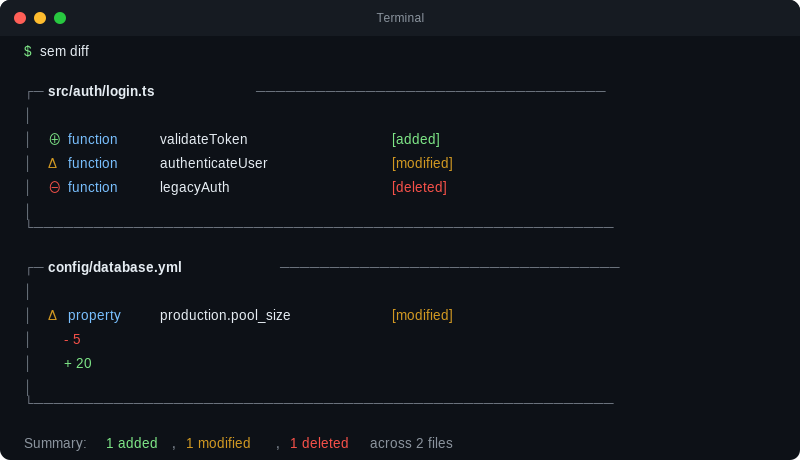
Instead of lines changed, sem tells you what entities changed: functions, methods, classes.
Why sem? · Using sem with agents · Install · Commands · Agents (MCP) · Cloud consent · Releases





sem is a semantic version control tool that works on top of Git. It parses your code with tree-sitter, extracts every function, class, and method as an entity, and diffs at the entity level instead of lines. This means you see "function blahh was modified" instead of "lines x-y changed."
It works in any Git repo with no setup.
Cloud-backed queries are opt-in per repo: logging in does not upload a repo or send a query. See the cloud consent flow for the public/private repo states, preview screen, local audit log, and forget controls.
Using sem with agents
Four questions, four verbs. Every verb takes --json.
| Question | Verb |
|---|---|
| Where is it? | sem find, sem grep |
| What does my change touch? | sem impact |
| Is it correct? | sem check |
| What should a human review? | sem certify |
Where is it? Find a function, class or method by name:
sem find parse_config
function parse_config src/config.py:1
Who calls it (--callers), what it uses (--refs), or its code with its callers and callees (--context):
sem find parse_config --callers
function parse_config src/config.py:1
  function load src/config.py:6
  function test_parse_config tests/test_config.py:4
Search text, like rg:
sem grep splitlines
src/config.py:2: pairs = [line.split("=", 1) for line in text.splitlines() if line]
What does my change touch? Everything that depends on an entity, and the tests to run:
sem impact parse_config --tests
⚡ 1 tests affected:
    tests/test_config.py
      function test_parse_config (L4–5)
sem impact --diff HEAD --tests answers the same for your whole uncommitted change.
Is it correct? Run the project's own compiler, type checker, linter and tests, rechecking only what the change can affect when that gives the same answer. Exit 0 means pass, 1 fail, 2 could not decide:
sem check
cmd    FAIL      full        sh (0 rechecked, 279 ms)
  `python3 -m pytest -q tests` exited 1:
  E       AssertionError: assert {'a': '1'} == {'a': '2'}
What should a human review? A review certificate for a commit range: what changed, which callers the change leaves behind, which tests reach it:
sem certify main..HEAD
# sem certificate 94f4bd74e26e..d73d4d092b43
1 files, 2 entities changed (1 added, 1 modified, 0 deleted, 0 renamed, 0 moved).
- modified `parse_config` (src/config.py:1): 2 static caller(s) in 2 file(s) that this change does not modify
For agents that speak MCP, sem mcp serves the same verbs as tools (see Use with AI agents).
Install
curl -fsSL https://raw.githubusercontent.com/Ataraxy-Labs/sem/main/install.sh | sh
Or via Homebrew:
brew install sem-cli
Or via winget on Windows:
winget install AtaraxyLabs.sem
Or via Scoop on Windows:
scoop install sem
Or install the npm wrapper into node_modules:
npm install --save-dev @ataraxy-labs/sem
With Bun, trust the package so its postinstall script can download the binary:
bun add -d @ataraxy-labs/sem
bun pm trust @ataraxy-labs/sem
Once installed, update to the latest release any time:
sem config update
Or via cargo, from crates.io:
cargo install sem-cli
Or build the latest main from source (requires Rust):
cargo install --git https://github.com/Ataraxy-Labs/sem sem-cli
Or grab a binary from GitHub Releases.
Or run via Docker:
docker build -t sem .
docker run --rm -it -u "$(id -u):$(id -g)" -v "$(pwd):/repo" sem diff
Name conflict with GNU Parallel
GNU Parallel ships a sem binary (/usr/bin/sem) as a symlink to parallel. If you have both installed, they'll collide. Run sem --version to check which one you're using. (#77)
Quick fixes:
# Option 1: alias in your shell profile (~/.bashrc, ~/.zshrc)
alias sem="$HOME/.cargo/bin/sem"

# Option 2: make sure cargo bin comes first in PATH
export PATH="$HOME/.cargo/bin:$PATH"

# Option 3: if installed via Homebrew
export PATH="$(brew --prefix)/bin:$PATH"
If you installed via npm/bun, the binary lives in node_modules/.bin/sem and is invoked through npx sem or bunx sem, which avoids the conflict entirely.
Commands
Works in any Git repo. No setup required. Also works outside Git for arbitrary file comparison.
| Verb | The question it answers |
|---|---|
sem find |
Where is it defined? Who calls it, what does it use, what is around it? |
sem grep |
Where does this text appear? |
sem impact |
What does changing this entity, or this diff, touch? |
sem check |
Is my change correct? |
sem certify |
What should a human review in this commit range? |
sem diff |
Which functions and classes changed? |
sem graph |
How is the code connected? |
sem history |
How did this entity change over time? Who last changed it? |
sem cloud |
Account, cloud reviews, cross-repo queries |
sem config |
git diff integration, telemetry, completions, updates, stats |
sem mcp |
The same verbs as MCP tools for agents |
sem <verb> --help shows every flag with an example.
sem stores its SQLite entity cache outside the repository, under the OS cache directory by default. Set SEM_CACHE_DIR=/path/to/cache to override the cache root; repo-local overrides are ignored so cache files do not dirty the working tree.
sem find
Find entity definitions by name, then ask about one: who calls it, what it uses, or its code with the code around it. Answers come from an on-disk query index (index.sem, next to the entity cache); the first call in a repo builds it, later calls read it directly, with no daemon.
sem find "function diff_command"        # where it is defined ("type name" narrows by kind)
sem find diff_command load_config       # several names in one call
sem find diff_command --callers         # who calls it; says when the caller set may be incomplete
sem find diff_command --refs            # what it calls and references
sem find diff_command --context         # its code plus callers and callees, within a token budget
sem find diff_command --context --budget 4000 --hops 1
sem find --in src/auth.ts               # every entity in a file or directory
sem find diff_command --in src/         # only definitions under src/
sem find --text "retry budget"          # entity bodies containing a string, named by entity
sem find diff_command --json            # JSON on any of the above
With --context, when the target signature itself does not fit, JSON output reports target_omitted: true.
sem grep
Text search across source files, rg-compatible file:line:text output, served from the index's trigram postings when one exists.
sem grep "TODO"
sem grep -i todo src/                   # case-insensitive, under src/
sem grep -e foo -e bar --json           # several patterns, hits kept apart
sem impact
What breaks if an entity changes: its dependencies, its dependents (transitively), and the tests that reach it.
sem impact authenticateUser             # full impact
sem impact authenticateUser --deps      # direct dependencies only
sem impact authenticateUser --dependents
sem impact authenticateUser --tests     # the tests to run
sem impact authenticateUser --file src/auth.ts   # disambiguate by file
sem impact --diff HEAD --tests          # tests for the uncommitted change
sem impact --diff main..HEAD --json     # one impact report per changed entity
With --diff and --tests in a JS/TS workspace, the answer is the module graph's affected-test selection over the changed files (sem graph --modules affected-tests); elsewhere it is the entity graph's. --no-default-excludes includes generated, fixture, vendor, benchmark and build trees.
sem check
Runs the project's compiler, type checker, linter and tests on the working tree and prints one verdict: exit 0 pass, 1 fail, 2 could not decide. Each checker gives the verdict the real tool would give on the whole project; it rechecks only what the change can affect when that is provably the same answer, and otherwise runs the tool in full and says why. Nothing to check is 2, never a pass.
sem check                               # every checker the project has
sem check --checkers ts,lint,tests      # only these
sem check --base origin/main            # against origin/main instead of HEAD
sem check --promises                    # also prove every promise in .sem/promises can fail
sem check --json                        # one JSON object with a verification certificate
Checkers are detected from the project. TypeScript, lint and JS tests (vitest, jest) follow the module graph, Go rechecks affected packages, Python type checking (pyright scoped by imports, or mypy) and pytest rerun only the files a change can reach, and C and C++ recompile only the translation units in compile_commands.json that include a changed file. Cargo, Gradle or Maven, dotnet and SwiftPM run their own build, which already rebuilds only what changed, and are skipped outright when no input changed since the base passed (a TypeScript edit never reruns the Rust build).
An edit inside the body of a Python function that declares its return type cannot change what other files see, so only that file is rechecked.
Commands of your own go in .sem/check.json, e.g. {"commands": [{"run": "make lint", "inputs": ["src/**"]}]}. A command that lists its inputs is skipped when none of them changed since it passed; one without runs every time.
sem certify
A review certificate for a commit range: entities touched, signature changes and the callers they leave behind, callee deltas, promises kept or broken (with witnesses), module reachability deltas (JS/TS), affected tests, and the static reference cone. --arch gives the architecture view instead: new or removed data paths, side effects, dependencies, cycles, and what did not change, ranked.
sem certify main..HEAD                  # markdown certificate
sem certify main..HEAD --json           # the full certificate
sem certify main..HEAD --arch           # architecture delta
sem certify main..HEAD --arch --view    # at most 10 ranked items
sem certify main..HEAD --html > view.html   # one self-contained page
<base>...<head> uses the merge base; one ref means <ref>..HEAD.
sem diff
Entity-level diff with rename detection, structural hashing, and word-level inline highlights.
# Semantic diff of working changes
sem diff

# Staged changes only
sem diff --staged

# Specific commit
sem diff --commit abc1234

# Commit range
sem diff --from HEAD~5 --to HEAD

# Verbose mode (word-level inline diffs for each entity)
sem diff -v

# Plain text output (git status style)
sem diff --format plain

# JSON output (for AI agents, CI pipelines)
sem diff --format json

# Markdown output (for PRs, reports)
sem diff --format markdown

# Compare any two files (no git repo needed)
sem diff file1.ts file2.ts

# Read file changes from stdin (no git repo needed)
echo '[{"filePath":"src/main.rs","status":"modified","beforeContent":"...","afterContent":"..."}]' \
  | sem diff --stdin --format json

# Only specific file types
sem diff --file-exts .py .rs
sem graph
How the code is connected. With no flag, the entity dependency graph (the graph sem impact and sem find --context are built on); the flags select other layers.
sem graph --json                        # entities and the calls/references between them
sem graph --modules metrics             # JS/TS module graph: density, cycles, depth, centrality
sem graph --modules blast-radius pkg-a  # who breaks if pkg-a changes
sem graph --modules path src/a.ts src/b.ts
sem graph --dataflow                    # reads, writes and source -> sink paths
sem graph --dataflow --witness          # experimental: witness tasks per static flow
sem graph --system                      # exact dependency versions from every lockfile
sem graph --system build --out sys/     # the layered whole-system graph
sem history
How an entity changed through git history, logic changes told apart from cosmetic ones.
sem history authenticateUser
sem history authenticateUser -v         # with the content diff of each version
sem history authenticateUser --limit 20
sem history                             # repo hotspots and co-change pairs
sem history --blame src/auth.ts         # who last changed each entity in the file
With no entity, sem history analyzes recent repo history at the entity level: hotspots (most-changed functions/classes, with author counts) and co-change pairs (entities that repeatedly change in the same commits: "if you touch one, don't forget the other").
sem cloud, sem config
sem cloud login                         # API key, or GitHub when omitted
sem cloud enable                        # cloud queries for this public repo (shows what is sent, asks first)
sem cloud disable                       # stop cloud for this repo
sem cloud review listen <diff-id>       # attach an agent to a cloud code review
sem cloud xref --json                   # cross-repo dependencies
sem cloud repos                         # where your code is stored

sem config setup                        # make `git diff` show sem's entity diff
sem config telemetry off
sem config completions zsh              # shell completions
sem config update
sem config stats                        # local diff counters; nothing leaves your machine
Old command names
Every earlier command name and flag still works, with the same output. At a terminal, sem prints a one-line note on stderr with the new spelling; in --json mode or when output is piped, it prints nothing extra.
| Old | New |
|---|---|
sem callers X |
sem find X --callers |
sem refs X |
sem find X --refs |
sem context X |
sem find X --context |
sem entities PATH |
sem find --in PATH |
sem log X |
sem history X |
sem blame FILE |
sem history --blame FILE |
sem arch-diff RANGE |
sem certify RANGE --arch |
sem topology OP |
sem graph --modules OP |
sem dataflow |
sem graph --dataflow |
sem system OP |
sem graph --system OP |
sem promises verify |
sem check --promises |
sem login, logout, whoami, review, xref, repos |
sem cloud ... |
sem cloud never |
sem cloud disable |
sem setup, unsetup, telemetry, completions, update, stats |
sem config ... |
Promises
A promise is something an agent (or a person) claims about the codebase, written down as a check that either passes or fails. "Done" means the check passes. Promises live in .sem/promises/*.json; each law may carry a human "promise". Code-shape laws are tree-sitter queries that work in any language sem parses; every capture whose name does not start with _ counts as a violation, and nested captures are reported once, at the outermost node. For example, .sem/promises/jsx-no-logic.json:
{ "laws": [
  { "id": "jsx-no-logic/conditionals",
    "promise": "JSX contains no conditional rendering",
    "forbidPattern": { "from": ["**/*.tsx", "**/*.jsx"], "within": ["jsx_expression"],
                       "query": "(ternary_expression) @conditional" } },
  { "id": "jsx-no-logic/inline-handler-bodies",
    "promise": "JSX event handlers are references, not block bodies",
    "forbidPattern": { "from": ["**/*.tsx", "**/*.jsx"], "within": ["jsx_attribute"],
                       "query": "(arrow_function body: (statement_block (_))) @handler_body" } }
] }
sem promises check                        # KEPT / BROKEN n per promise, then file:line:col  capture  snippet; exit 1 if any broken
sem promises check --changed src/App.tsx  # only violations in these files (what an edit hook runs)
sem promises check --since main           # only files changed since a ref, uncommitted and untracked included
sem promises status --json                # id, kept, violation count per promise
sem check --promises                      # prove every promise can fail (each needs a mutation)
sem promises is not listed in sem --help; sem certify reports promises kept or broken for a range. The same file also works with sem graph --modules check --laws <file>, which adds graph and import laws (forbid, only, acyclic, layers, forbidImport, allowImports) for JS/TS workspaces. With --changed or --since, those laws still run over the whole graph, but only violations that involve a changed file (or the package containing it) are reported.
To have an agent see a broken promise right after it makes an edit, run scripts/promises-hook.sh after each edit. The script exits 2 and prints the violations to stderr when a promise breaks, and stays silent otherwise. In Claude Code, add it to your settings as a PostToolUse hook:
{ "hooks": { "PostToolUse": [ { "matcher": "Edit|Write|MultiEdit",
    "hooks": [ { "type": "command", "command": "sh /path/to/sem/scripts/promises-hook.sh" } ] } ] } }
The script reads tool_input.file_path from the hook's stdin. Other harnesses can pass the edited paths as arguments instead. In pi, for example, an extension can do this from its tool_result handler for the edit and write tools: run sh promises-hook.sh <path> and append the stderr to the tool result when the script exits 2.
Use as default Git diff
Replace git diff output with entity-level diffs. Agents