ServerPackCreator creates a server pack from any given Forge, Fabric, Quilt, LegacyFabric and NeoForge modpack.
Whenever you are working on an update to your modpack, you simply run ServerPackCreator and BAM! You've got yourself a server pack for your new modpack version.
ServerPackCreator is a passion project on which I am working in my spare time. It is also the main reason for why I got into programming in the first place. Patience with issues and support is appreciated!
I started getting into Java programming in February 2021, when I was working on an update for one of my Minecraft modpacks, Survive Create Prosper 4, and got tired and bored with manually creating a server pack everytime I wanted to update and test something, or just release a new server pack for the new modpack version.
The thought "There must be a way to automate this, or at least make it less tedious..." was the spark which sent me off into the world of programming. And here we are.
READ BEFORE USE:
FOR THE LOVE OF GODS, TEST YOUR SERVER PACKS BEFORE YOU SHIP THEM!
- ServerPackCreator is not a guarantee for working server packs. It helps you create them, but you must still test them!
- You are still expected to be knowledgeable about your modpack, server packs in general, server administration and managing your Java installations. ServerPackCreator is not intended to take all the work off your shoulders!
- When using alpha, beta or in-dev version of ServerPackCreator, it is advised to make a backup of your ServerPackCreator-directory in your home-directory.
- Things will break with alpha releases, stuff may break when using beta releases.
- If you distribute server packs generated with a pre-release (alpha, beta) of ServerPackCreator, you do so at your own risk.
- I will not be held responsible for errors in your server pack caused by you using a pre-release.
- I will not be held responsible for errors in your server pack in general. Test your server packs before you ship them!
- TL;DR: Don't use test to ship to prod! Test before shipping!
Pre-Releases:
There are two kinds of pre-releases: Alphas and Betas
- Alphas: Missing features, incomplete features, almost guaranteed to have bugs / errors
- Betas: Feature complete, probably contains bugs / errors
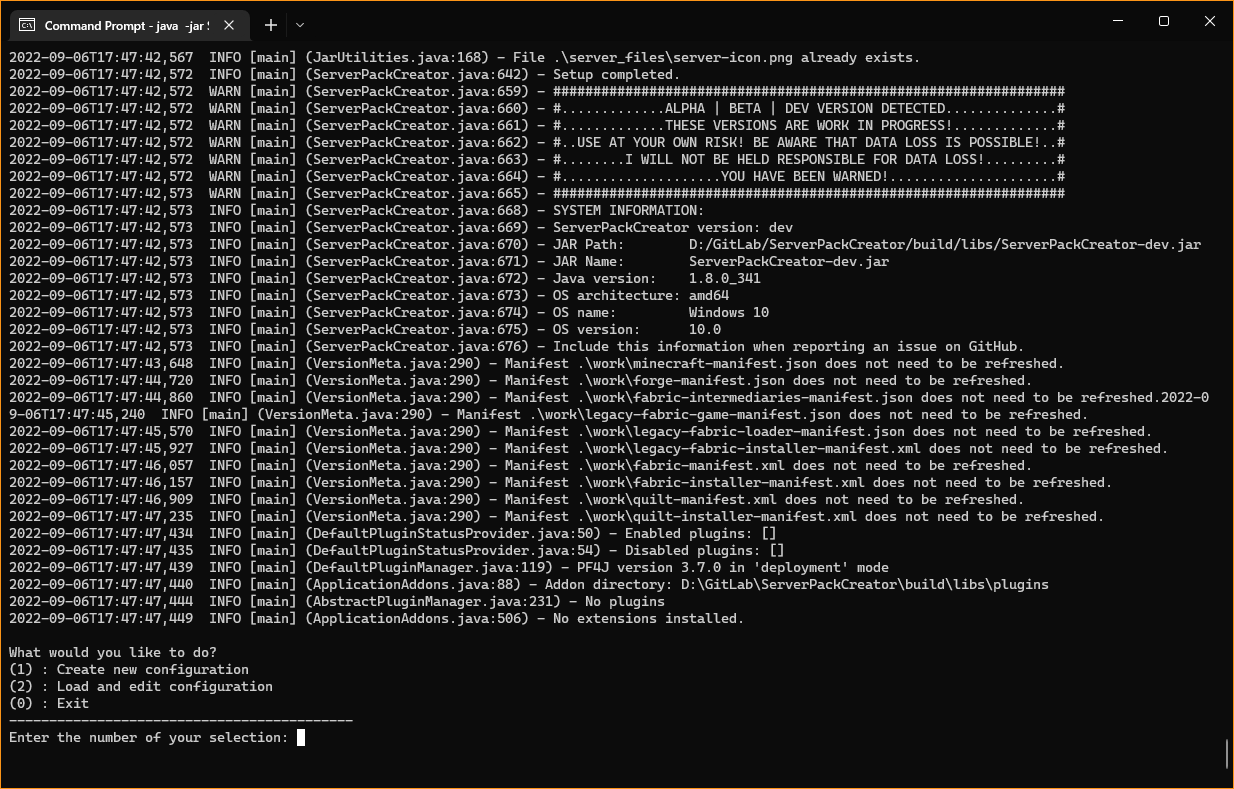
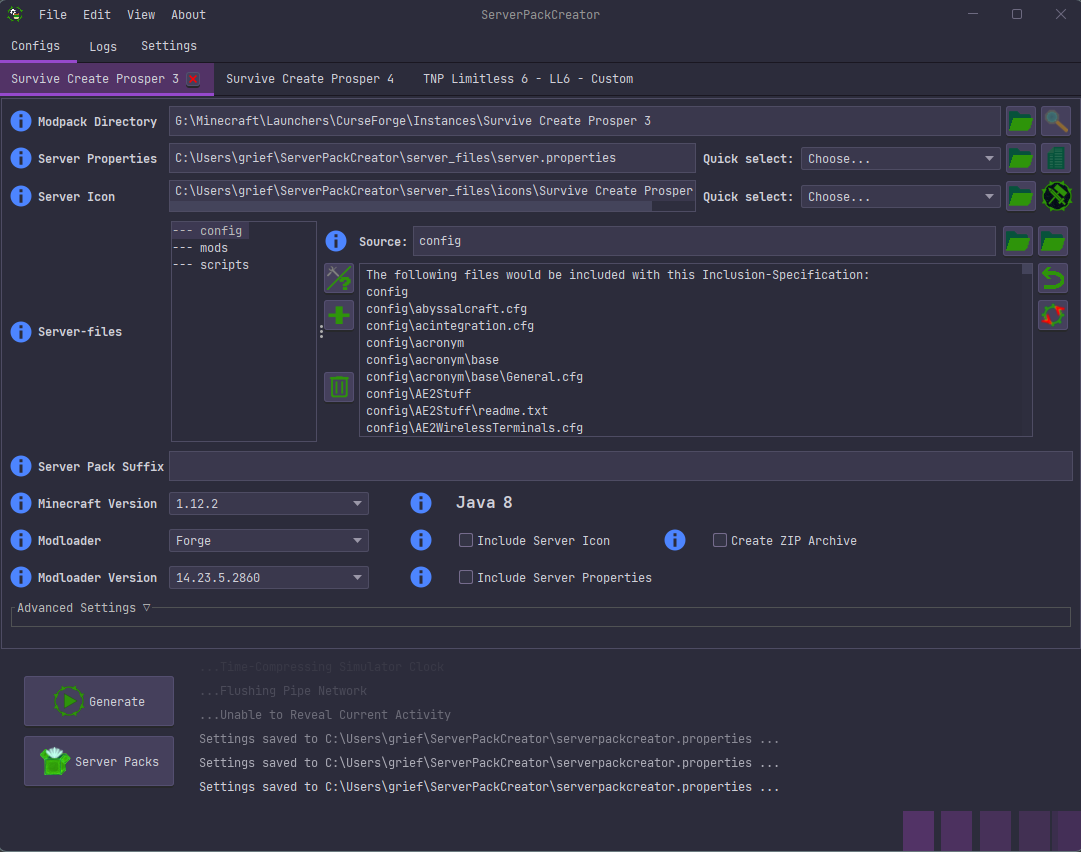
Screenshots
| CLI | GUI | WEB |
|---|---|---|
 |
 |
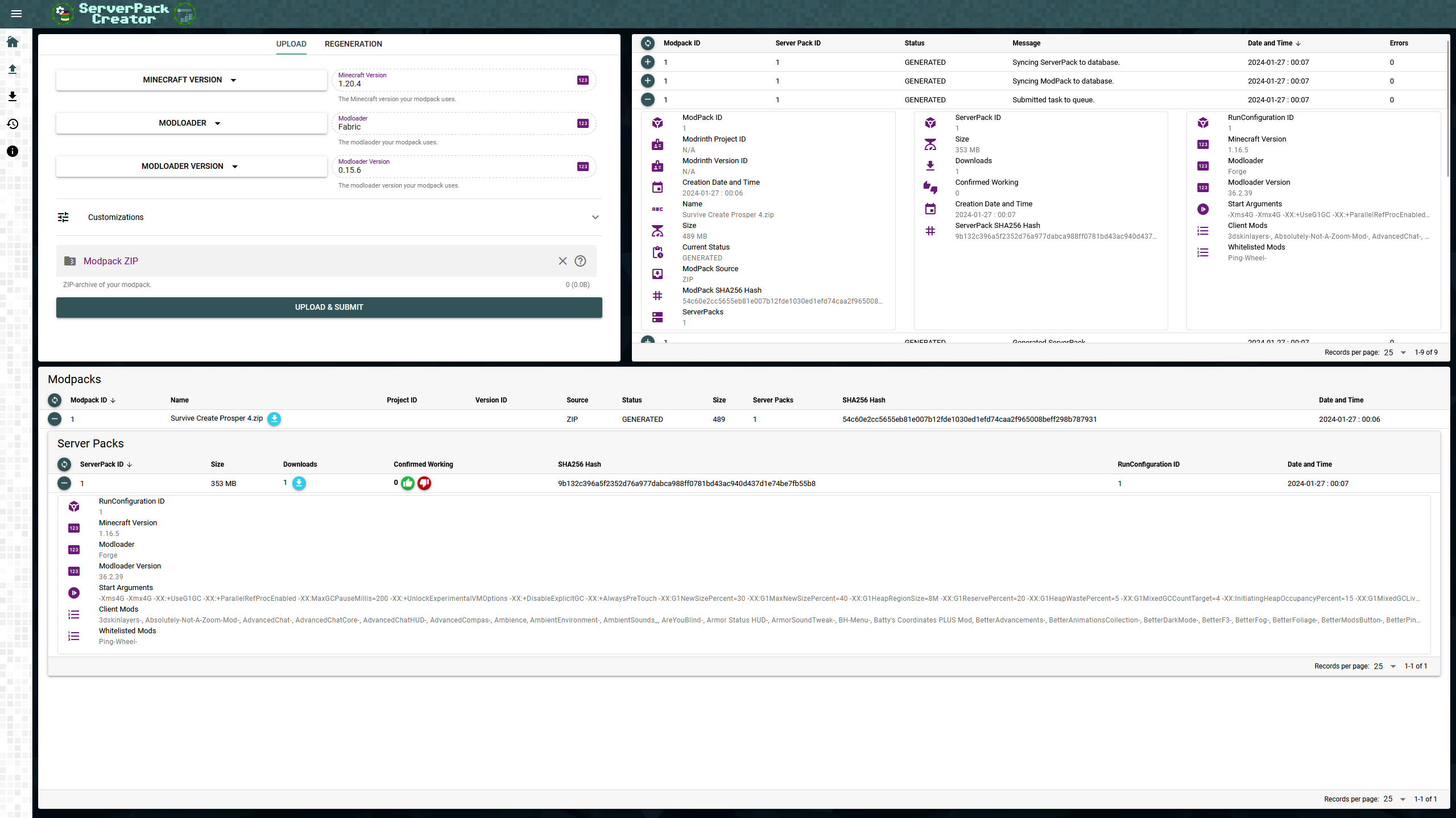 |
Advantages/Disadvantages of CLI, GUI and WEB:
Each way of using ServerPackCreator has its advantages and disadvantages. Depending on your environment, it may be better to use one way over the other. This section highlights some of the advantages and disadvantages of each version to help you decide which way you are going to use. Note: All three ways are supported by the .jar-file. Which one is started depends on the CLI arguments used and your environment.
CLI:
| Advantages | Disadvantages |
|---|---|
| No need for a graphical environment. Can be used on a server to generate a server pack for immediate use. | Gathering of information for a configuration file is tedious. |
Step-by-Step generation of a configuration-file with the use of the -cgen argument. Generated config will be used immediately afterwards. |
No convenience features file folder-browsing or jumping to the generated server pack after generation. |
| Load and edit an existing configuration. Editing is limited to base values of a given configuration. Not editable via CLI are script settings as well as any potentially installed plugin configuration. | Debugging in case of a broken/erroring configuration file can be time consuming. Careful reading of logs is required. |
| Manual editing of the configuration-file in case you want to change it. | |
| Unable to edit start script placeholders and variables |
GUI:
| Advantages | Disadvantages |
|---|---|
| Browse the filesystem for folders and file required by the configuration. | Requires a graphical environment. |
| Setting up a configuration by browsing the filesystem and selecting your Minecraft and modloader versions from a list. | |
| Browsing the generated server pack after generation has finished. | |
| Loading and saving different configurations for quick generation of multiple server packs in short succession. | |
| Edit the configuration in the GUI. No manual file-editing required. | |
| Edit start script placeholders and values |
WEB:
| Advantages | Disadvantages |
|---|---|
| No software installation on clients required | Requires a server with sufficient space |
| Easy access via web-browser | Requires server-administration knowledge for setup and control |
| Quickly share mod- and server packs with friends / colleagues | No custom script templates |
| Multiple server packs for the same modpack | No custom server icons |
| Re-use configurations | No custom server-properties |
| No custom server pack suffix | |
| No custom script variables or values | |
| No custom inclusions or exclusions |
1. Small feature overview
- Exclude clientside-only mods
- Automatically by letting ServerPackCreator scan the mods of your modpack for their sideness
- Manually by configuring a list mods which ServerPackCreator will filter out according to your input and the chosen filter.
- Add files and directories in your server pack.
- Files and directories in your modpack
- Files and directories from your computer
- Add a server icon
- Server icons are automatically scaled down, or up, to 64x64!
- Specify a custom one, or use a default provided by ServerPackCreator.
- Change the default to your liking if you intend on using the same icon across multiple server packs!
- Add a server.properties
- Ship your server pack with default settings!
- Specify a custom one, or use a default provided by ServerPackCreator.
- Change the default to your liking if you intend on using the same icon across multiple server packs!
- Many modloaders supported
- Forge
- Fabric
- LegacyFabric
- Quilt
- NeoForge
- Use Minecraft snapshots and pre-releases
- Per default, only regular releases enabled
- Let ServerPackCreator install the modloader-server for your server pack, for immediate testing and debugging after generation!
- Let ServerPackCreator generate a ZIP-archive, for immediate upload to places like CurseForge (after you've tested your server pack, of course 😉)
- Configure commandline arguments with which to start the Minecraft server
- Does your modpack require a lot of RAM? Well, tell ServerPackCreator to create the start scripts with
-Xms8G -Xmx8Gor similar values! - Aikars flags are available, too. If you like 'em, use 'em.
- Does your modpack require a lot of RAM? Well, tell ServerPackCreator to create the start scripts with
- Create your own start-script templates
- Add additional functionality to your servers start scripts
- Use placeholders in your templates, to be replaced with custom values
- Example: placeholder
SPC_FLYNN_LIVES_SPCin the templates can be replaced with a value configured on a per-server pack basis, i.eNow that's a big door
- Example: placeholder
- Plugins!
- ServerPackCreator allows you to use plugins to add new features in various places.
- Four plugins ship with every release, each marked
_experimentalin its filename — a grinder-backed clientside-mod picker, a server-pack test launcher, a self-extracting-archive writer, and a worked example to copy from. See 6. Experimental plugins. - The source for the example is in this repository, at Example Plugin
2. Issues and help
- Report a bug / ask for a feature / ask for an improvement / request a documentation improvement:
- There's a Wiki available which goes into further detail for many of ServerPackCreators available aspects:
- The same as the Wiki, but as a file should you prefer it. 😊
3. How To
The first time you start ServerPackCreator, you will be asked whether you want to see a small step-by-step guide. Said guide will show you the most important parts in configuring your server pack.
Should you at any point want to revisit said guide, simply hit About -> Step-By-Step Guide in the menu at the top.
kreezxil has made a video showing a step-by-step video-tutorial for ServerPackCreator:
4. Java
Required:
- Using the JAR-file release requires Java 21.
- Working internet connection recommended.
The installers ship their own Java installations.
ATTENTION: I can not and will not guarantee that ServerPackCreator will work flawlessly with any other Java version other than version 21. Things may break at random, at any place, if a different Java version is used. You are welcome to try and use any other version, but do not report issues back to me if you do encounter problems when running ServerPackCreator with a more recent Java version.
5 Running
- If you've used the installer to acquire ServerPackCreator, use the shortcut created by the installer to run ServerPackCreator. The installers provide their own Java runtime, so you do not need to install Java separately.
- If you've downloaded the JAR-file, and depending on how your Java installation is set up, you may be able to simply run the JAR via double-click or other methods, or you may need to run it from the commandline.
There are a couple of arguments which may or may not be helpful for you, depending on how you plan on using ServerPackCreator:
| Argument | Description |
|---|---|
-help |
Print ServerPackCreators help to commandline. |
-update |
Check whether a newer version of ServerPackCreator is available. |
-gui |
Run ServerPackCreator with our GUI. If a graphical environment is supported, this is the default ServerPackCreator will enter, even when starting ServerPackCreator with no extra arguments at all. |
-cli |
Run ServerPackCreator in commandline-mode. If no graphical environment is supported, this is the default ServerPackCreator will enter, even when starting ServerPackCreator with no extra arguments at all. |
-web |
Run ServerPackCreator as a webservice. |
-cgen |
Run the generation of a basic server pack config from a given modpack. |
-config |
Generate a server pack from a specific server pack config, without a UI. |
--destination |
Generate the server pack from the config given to -config in a specific location. Requires -config or -feelinglucky. |
-feelinglucky |
Generate a server pack config from a passed modpack-directory and generate the server pack in one go. No warranty, no guarantees. Combine with --destination to choose where it lands. |
-withallinconfigdir |
Run a generation for every configuration present in ServerPackCreator's configs-directory. |
-scan |
Scan the mods in a directory for the sideness they declare in their metadata and print the result as JSON. Requires a directory, a modloader and a Minecraft version. |
-clientsidereport |
Assess whether the mod behind a CurseForge/Modrinth project-link is clientside-only and print a Markdown report. Requires the project-link. |
-verifyclientside |
Like -clientsidereport, but additionally boots a server with the mod force-included, to detect crashes. Requires the project-link. |
-clientsideapply |
Apply the suggested entries from a clientside-report JSON to the official fallback-list files. Requires the report-JSON path. |
--setup |
Set up and prepare the environment for subsequent runs of ServerPackCreator. Creates/copies all files needed for ServerPackCreator to function from inside its JAR. Optionally takes a properties-file whose values are loaded and then stored in the serverpackcreator.properties in ServerPackCreators home-directory. |
--home |
Override any and all configuration of ServerPackCreators home-directory. Usable on the initial run, or to move the home-directory later on. |
-lang |
Change the language ServerPackCreator uses. |
The four clientside-verification arguments (-scan, -clientsidereport, -verifyclientside,
`-clientsid