

shim-cli
Local traffic visibility and privacy controls for coding agents.
getshim.tech





shim-cli shows you what your coding agent actually sends to the model — how
many tokens went where, what the turn cost, and which secrets and personal data
were in it — and masks what it can before the model sees it. The hook and
detector add no network destination, account, API key, or telemetry. The opt-in
shim watch proxy forwards only to the provider the client already uses.
Quickstart
uv tool install --python 3.12 --compile-bytecode shim
shim demo claude       # a synthetic sentence, masked, and what Claude Code does with it
shim install claude    # then start a new Claude Code session
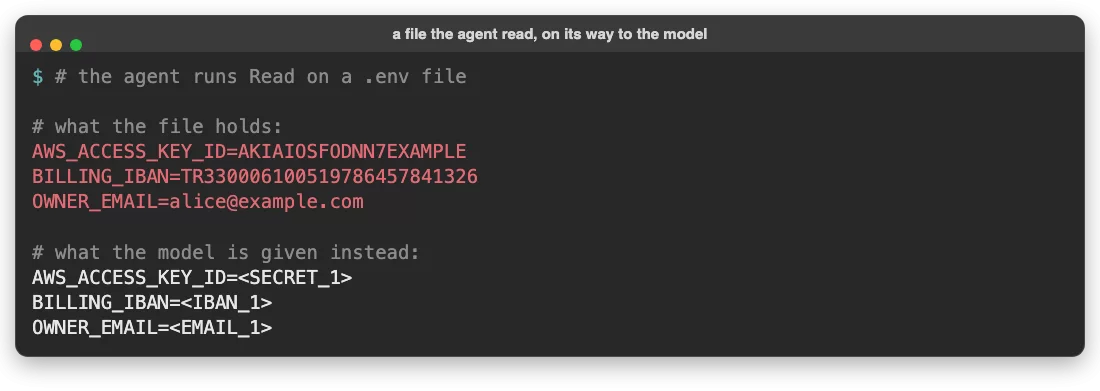
The package and the command are both shim. In the new session, ask Claude to
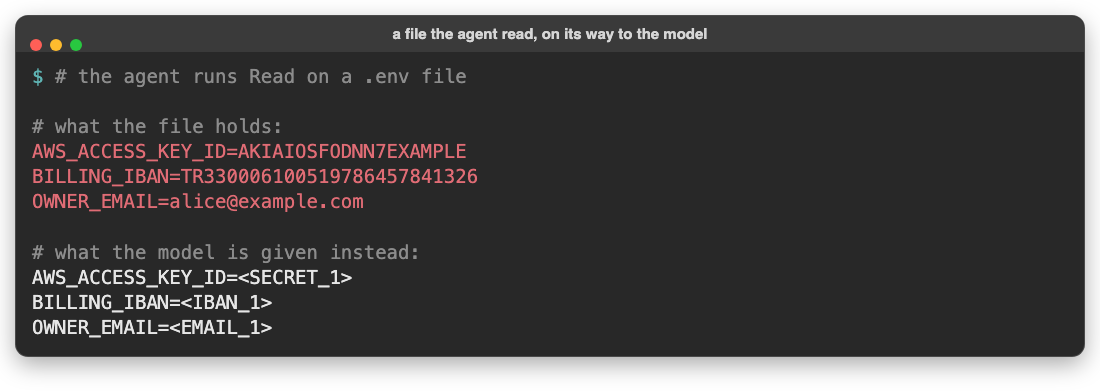
read a .env holding AWS_ACCESS_KEY_ID=AKIAIOSFODNN7EXAMPLE: the model gets
<SECRET_1>, and the turn ends with shim's summary. Codex and GitHub Copilot
CLI use shim install codex or copilot; Install has pipx, the plugin and VS Code.
What it cannot do
- A prompt you type into Claude Code or Codex is not masked: neither client
lets a hook rewrite it. shim reports it, or stops it under
enforce. GitHub Copilot CLI is the exception: the model gets the masked prompt. - Codex and GitHub Copilot CLI tool traffic is not inspected at all.
- VS Code masks nothing: it reports, and under
enforcestops a prompt or a tool call before it runs. A tool result can only be reported. - In Claude Code, shell commands and file writes are reported or denied, not
masked; the output of a failed command is reported, not masked; a file
attached with
@is read and reported, not masked. A path or pattern given to a local tool such asReadorGrepis only reported, and an MCP tool's arguments are never masked: a call carrying a finding is refused by default, and the refusal names the[mode]key that lets that tool through. - Windows is not supported. macOS and Linux are; WSL is not yet verified.
Detection is best-effort and misses some values. Privacy lists every limit.
Two commands, two different questions:
| Command | Answers |
|---|---|
shim watch -- claude |
What did this session actually send, and what did it cost? |
shim install claude |
Mask secrets and personal data in eligible tool results, every session, automatically. |
Warning
shim-cli is a best-effort guard, not a data-loss prevention boundary. Read the privacy limitations before using it with sensitive data.
Measure a session
shim watch puts a local proxy in front of the client for one command, forwards
every byte unchanged, and reports what went past:
shim watch -- claude
shim watch -- claude -p "explain this repo"
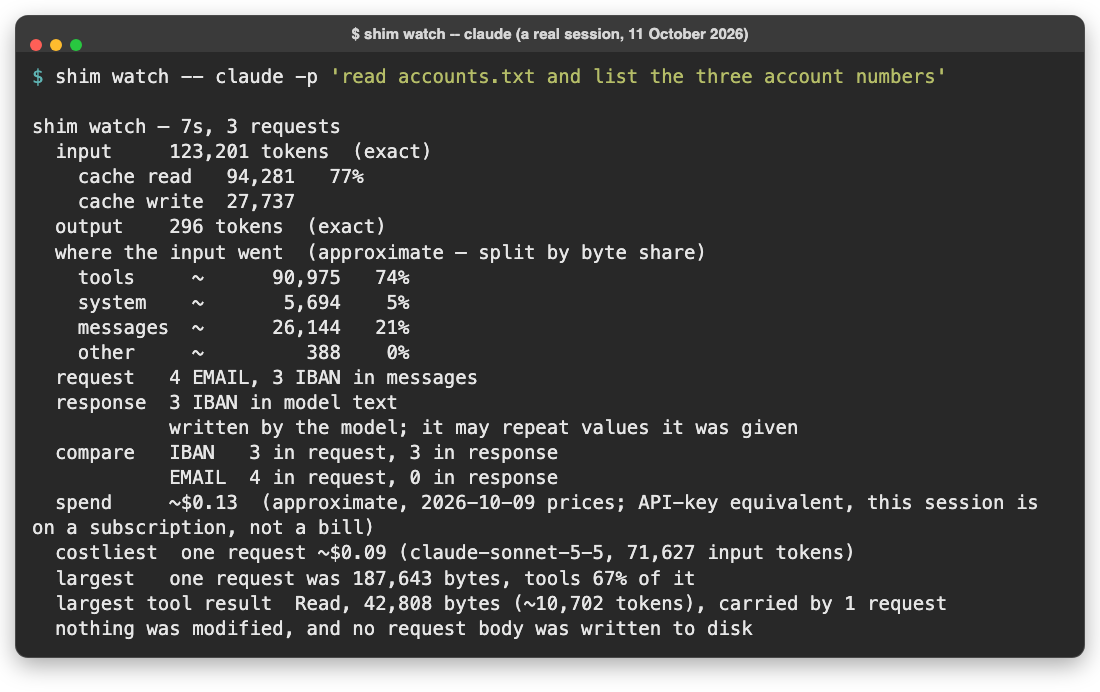
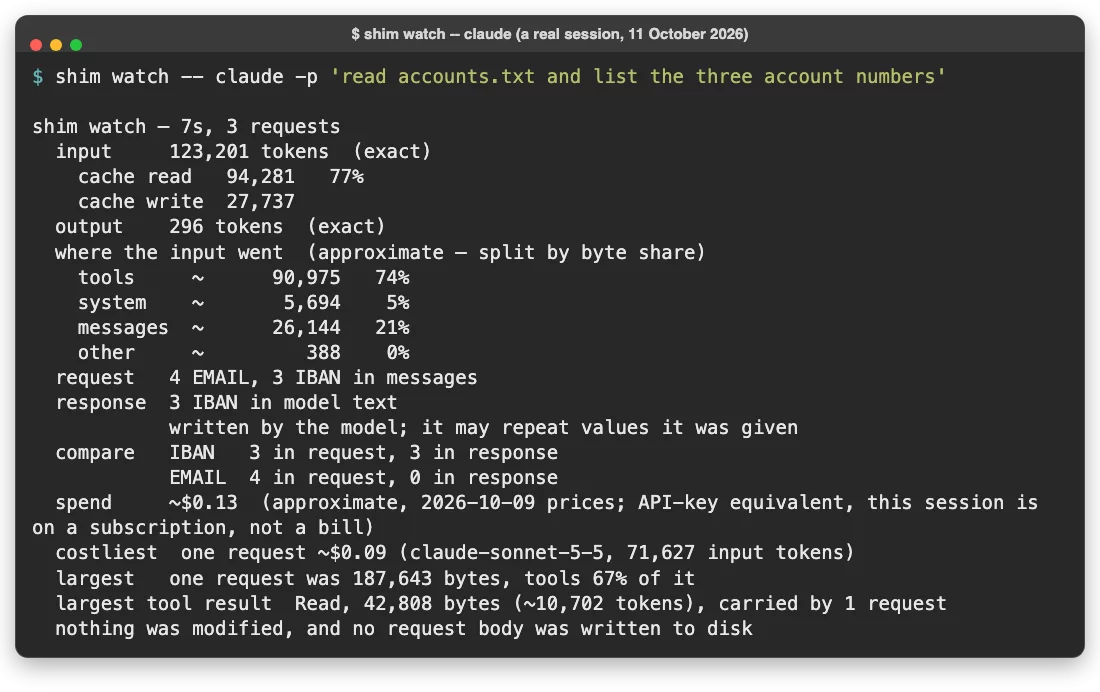
On the session above, the tools array was 74% of the input tokens; the
conversation, the 40 KB file the agent read included, was 21%. That is one
session on one repository.
Claude Code's /context shows the same split for the session in front of you;
shim watch adds what was in each part and what came back.
The three IBANs came from a file the agent read with a tool: shim scans every
text field the model reads, including tool results, and says which part of the
request each finding was in.
If you sign in with a subscription, the spend line is what the same traffic
would cost on an API key, not a bill. shim reads the tokens the provider
reports and prices each request by kind — input, 5-minute and 1-hour cache
writes, cache reads, output — from a table read off Anthropic's pricing page on
the date the line prints; it cannot see what your plan charges. A model the
table does not name exactly is listed as not priced rather than guessed, and
once the table is more than 90 days old the line says so. --json carries the
cost of every request.
The response line is the other direction — what the model wrote back, with
its thinking counted apart from its answer. It is a recall measurement, not a
leak report: on your own key there is no other tenant to leak from, and a value
the model wrote may be one it was given or one it made up. compare puts the
two sides next to each other: three account numbers went in through a tool
result and the same three came back, which is the round trip made visible. A
response that stopped at the provider's output limit adds a cut off line.
Four more lines name the waste when there is some: images (distinct images
and their estimated input tokens, every time history replays them), largest tool result (which tool, how many bytes, carried by how many requests),
cache (requests that wrote again a prefix the previous one had cached) and
duplicates (identical requests sent while one was still in flight, both
forwarded). They report; watch never resends, merges or reorders anything.
Token counts come from the provider's own usage block and are exact. How
they divide between sections has no ground truth on the wire, so it is
inferred from byte share, marked ~, and always sums to the exact total of the
requests it measured.
Exact and inferred figures never share a column.
It also covers what hooks cannot change: files pulled in with @ are inlined
by the client while it builds the prompt, so the prompt hook can read them and
warn before they are sent (or stop the prompt under enforce), but cannot mask
them; and the system prompt, the tools array and the token counts are never
handed to a hook at all.
It forwards and measures. It does not modify. Not one byte of a request is changed, no request body is ever written to disk, and nothing is transmitted anywhere except to the provider the client was already talking to. The proxy binds to loopback, exists for the length of the command, and nothing is left behind — no shell profile is edited and no setting is changed.
Overhead measured against a live session: about 6 ms of proxy plumbing plus a 23 ms TLS handshake per request. Scanning the body costs more than that, but it runs after the response has been relayed. Request inspection retains at most 8 MB per request, with two concurrent inspection slots and no pending queue. Larger requests still pass through in full; skipped or unfinished measurements are reported as incomplete. Usage can be known, partial, or unavailable.
shim watch refuses a non-empty ANTHROPIC_BASE_URL before startup. Custom
upstreams are not supported, and unsetting the variable alone would send that
endpoint's credential to api.anthropic.com; use the hook instead. The proxy
reaches the provider through HTTPS_PROXY when set (http:// proxies only;
SSL_CERT_FILE for a custom CA). Requests need an unambiguous non-negative
Content-Length; transfer coding (including chunked requests) is rejected.
Request-body reads have a 30-second deadline.
shim watch supports Claude Code only. Codex is refused, because it takes
its endpoint from its own configuration rather than the environment: a proxy
would be started and the whole session would run past it, reported as empty.
That was measured, not assumed — the September 2026
probe
also shows the transport itself works, so this is a limitation with a fix
rather than a dead end. The Codex prompt hook is unaffected. Copilot is out of
scope: it accepts a custom endpoint only through bring-your-own-key, which
removes GitHub authentication altogether, so there is nothing to watch.
See what already went out
Everything above starts at install, but the months before are on your disk:
Claude Code keeps every session under ~/.claude/projects. shim audit reads
that history and counts what reached the model, by kind, by project and by the
way it came in:
shim audit
shim audit — Claude Code history, 3 sessions in 2 projects, 2026-09-28 to 2026-09-30

reached the model
  SECRET          10  in 2 sessions   @.env 5 · failed Bash 5
  EMAIL            3  in 3 sessions   @.env 1 · failed Bash 1 · your prompt 1
  DB_URI           2  in 2 sessions   @.env 1 · failed Bash 1

by project
  ~/work/kasa-mutabakat      SECRET 10, DB_URI 2, EMAIL 2 · last 2026-09-30
  ~/work/site                EMAIL 1 · last 2026-09-29

already masked by shim       3 values in 1 session
model output                 2 EMAIL (written by the model; it may repeat values it was given)

scanned 3 sessions, 5 KB, in 0.0 s. Nothing was changed, written or sent.
It prints no value, keeps nothing and sends nothing; without --purge it opens
no file for writing. already masked by shim comes from shim's own records,
the open session's log and the ledger if you turned it on, not from
placeholder-shaped text in the transcript. It reads Claude Code's history only,
and only when you run
it. --since 2026-09-01 and --project ~/work/kasa-mutabakat narrow it, and
--json gives the same counts per session.
shim audit --purge deletes the transcripts of the sessions that sent
something, and their lines in history.jsonl, after you type a confirmation. It
leaves the other files Claude Code keeps per session, such as its backups of the
files the agent edited in file-history/, and it does not change what the
model provider already received. Claude Code also deletes transcripts on its
own, after cleanupPeriodDays in its settings (30 by default).
Supported clients
| Client | Your typed prompt | Tool input and results |
|---|---|---|
| Claude Code | Reports what it found and lets it through; blocks under enforce |
Results are masked. WebFetch and WebSearch arguments are masked, and the call still goes through your permission rules; an MCP or unknown tool's arguments are never rewritten, and a call carrying a finding is refused by default; a local tool's input (Read, Grep) is reported only; commands and local writes are report-or-deny only, and a write that would put back a placeholder shim gave the model is refused; the output of a failed call is reported, not masked |
| Codex CLI | Reports what it found and lets it through; blocks under enforce |
Not inspected: shim never sees a tool call or its result (no verified native tool-event adapter) |
| GitHub Copilot CLI | Replaces the model-facing prompt with the redacted text | Not inspected: shim never sees a tool call or its result (no verified native tool-event adapter) |
| VS Code | Reports what it found and lets it through; stops the prompt before it is sent under enforce |
A call is reported, and denied under enforce, before it runs; a local tool such as read_file is only reported. A result can only be reported: by then the model has it, and nothing takes it back. Never masked |
Tool coverage is verified against a running client, not derived from
documentation. shim doctor <client> prints exactly which events are installed
and what shim can and cannot change at each one.
A placeholder is never written back over the value it stands for. After
a masked Read, the model holds <SECRET_1> where the file holds the key. A
Write, Edit, MultiEdit or NotebookEdit, a VS Code edit, or an MCP call
whose new text holds a placeholder shim issued in this session is refused, in
every mode, with the placeholder named. To know which it issued, shim keeps
their names beside the session record (SECRET 1 1, never a value), deleted
with it. Placeholder-shaped text shim never issued, in a doc or a test
fixture, is written as it is.
Why a hook and not an MCP server: an MCP server sees only the calls made to its own tools, so the agent's built-in Read and Bash never pass through it. A hook sits on the client's own tool calls and sees those too.
What shim-cli detects, and masks wherever the client allows it:
- Personal data: email addresses (also written
name[at]domain.tld), phone numbers, payment cards that pass the Luhn check (Troy, the Mastercard 2-series and 18- or 19-digit cards included), IBANs (lowercase, spaced, or broken over a line), IP and MAC addresses, US SSNs (nine bare digits after anssncue too), and Turkish national IDs (also in100 000 001 46or100 000 00 146groups) and tax IDs. Turkish licence plates are the one opt-in type:shim config --enable TR_LICENSE_PLATE, because coding traffic is full of plate-shaped strings such as[12 GET 200]. - Keys and tokens: Anthropic, OpenAI and SendGrid keys; Stripe secret and
restricted keys; Slack tokens, app tokens included, and Slack and Discord
webhook URLs; AWS access key IDs; GitHub, npm, Hugging Face and Google API
tokens; GitLab tokens, runner and deploy tokens included; JWTs; private keys
in PEM, PGP and SSH2 form; Azure storage
AccountKeyvalues; HTTPAuthorization: BasicandBearerheaders,Proxy-Authorizationtoo. - Credentials by context: the value of a named key such as
DB_PASSWORD,AWS_SECRET_ACCESS_KEYor, in Turkish,şifreandparolawith=or:, also with the secret word glued on (PGPASSWORD,SECRETKEY), in a typed declaration (db_password: str = "..."), an XML element (<password>), or a name and value pair (Kubernetesname:/value:, AWS SSM, Terraformdefault =);password,token,secretorAPI_KEYfollowed on the same line by a value with a digit or a symbol in it (password hunter2abc), a--passwordargument, the user and password in anyscheme://user:password@hostURI, Docker and npm registry logins, and a base64 block that decodes to one of these. In a tool's JSON, object keys and numbers are inspected too, and a value is read with its key beside it.
What it does not detect: person names, postal addresses, a password with no key
name or known prefix (the login is Synthetic-pass-0000), and an email address
at an internal domain such as ops@acme.internal. Your own
patterns cover what your project has that these do not.
It also misses a digit-only password under a key whose last word is not a
password word (PGPASSWORD_PROD=12345678) and an address split by an encoded
space (jane.doe%20%40example.com); the 1.2.3 release
notes
list every known gap.
Checksums are verified where they exist, so a mistyped IBAN or national ID is not reported.
It deliberately stays quiet on values that name nobody: loopback and
unspecified addresses (127.0.0.1, 0.0.0.0, ::1) and connection strings
that carry no credentials (redis://cache.example.com:6379/0). Private and
public IP addresses are still detected. A connection string keeps its
scheme, host, port and database and loses only its credentials:
postgresql://kasa_app:synthetic-password@db-prod.kasa.internal:5432/kasa
reaches the model as postgresql://<DB_URI_1>@db-prod.kasa.internal:5432/kasa,
so the agent can still tell production from staging. Once
0.0.0.0 and 127.0.0.1 both read as <IP_ADDRESS_1>, the model can no
longer tell "listen on every interface" from "loopback only" — detection that
fires where there is nothing to find is how people learn to ignore it. It also
leaves bare timestamps, ids and decimals alone: a run of digits is a phone
number only when it is Turkish-shaped or follows a cue such as tel, phone,
a phone_number or phoneNumber key or a vCard TEL;TYPE=CELL: line, and
order no, orderNo or sipariş no is not a cue. Dated
model ids (claude-sonnet-4-5-20250929) and version strings (version 1.2.3.4, numpy==1.26.4.1) reach the model unchanged, so an Edit on that
line still applies; an address after a flag (curl -v 203.0.113.9) or a
comparison (host == 10.0.0.5) is still an address.
Detection runs locally without an account, API key, network request, daemon, telemetry, or prompt history.
Install
shim-cli runs on macOS and Linux. It does not support Windows yet; inside WSL it
runs as it does on Linux (not yet verified). The shim package needs CPython
3.10 or newer, and the plugin's bundled hook also runs on 3.9, which is what a
stock macOS provides.
Choose one package manager:
uv tool install --python 3.12 --compile-bytecode shim
# or
pipx install --python python3.12 --fetch-missing-python shim
--python matters on a machine whose only Python is the system 3.9:
without it uv quietly installs the last release that ran there, 0.2.0.
Neither line needs Python 3.12 installed first: uv fetches it itself, and
--fetch-missing-python makes pipx do the same. That flag needs pipx 1.5 or
newer; Ubuntu 24.04 ships 1.4.3, which rejects it. When python3 --version
already says 3.10 or newer, pipx install shim is enough, on any pipx.
Preview and install the hook for your client:
shim install claude --dry-run
shim install claude
shim doctor claude
Replace claude with codex or copilot as needed. Run shim help for all
commands. --dry-run shows the target file and the exact fragment; without it,
shim install asks before writing but does not show the change.
Before it writes anything, --dry-run included, shim install runs the exact
hook command it registers on a synthetic safe prompt and a synthetic sensitive
one, and refuses with exit 2 if that command does not answer correctly. Every
hook runs Python with -I, which ignores the user site and PYTHONPATH, so a
shim installed with pip install --user, or by Ubuntu's silent fallback to a
user install, is ref