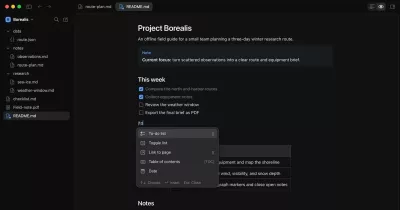

A Markdown viewer and editor for macOS, Windows, and Linux. The current app lives in app/. It uses Electron, TypeScript, Bun, and a Rust helper for file-manager previews.
Choose live preview, split view, or source editing. Read Markdown with syntax highlighting, math, diagrams, and local images. MDX opens read-only. The app drops import and export statements and shows JSX as code rather than executing it.
Open Preferences from the app menu, toolbar, or Command/Control+, to change the theme, editing defaults, text size, autosave, Vim, spelling, and preview settings. Changes save automatically.
Develop
Use Bun 1.4.3 or newer, Node.js 24, and a native Rust toolchain with edition 2024 support. Windows native builds also need the MSVC C++ build tools. Linux needs a graphical desktop and Electron's system libraries to run the app.
From the repository root:
bun run setup          # install app dependencies from app/bun.lock
bun run build:native   # build the helper for this machine
bun run start          # build and launch Electron
Root commands forward to app/:
bun run typecheck
bun run test
bun run test:packaging
bun run check:rust
bun run test:rust
bun run build
bun run pack:plan      # inspect the host and unsigned packaging settings
bun run pack           # build an unpacked app under app/release/
bun run dist           # build unsigned artifacts under app/release/
pack and dist build only for the current platform and architecture. They disable signing identity discovery, Developer ID signing, Windows signing, notarization, and publishing. They can download Electron and packaging tools. They do not install the app or create a release.
See the app guide for controls, platform limits, packaging, and validation. Windows and Linux runtime behavior still needs verification on those operating systems. Cross-platform source code and CI configuration do not establish that the installed app works there.
File-manager previews
On macOS, the Rust helper supports Space previews in Finder with Accessibility permission. It reads the current selection through Accessibility and resolves file URLs outside the key callback. The separate Command-Shift-Space fallback may request Automation access to Finder and System Events. Windows bare-Space interception is disabled by default until its selection handling is qualified. On Linux, open a note through the app or the file manager's Open With menu. Linux has no portable bare-Space hook or selected-file lookup. See Linux integration.
License
MIT. Copyright 2026 Jonathan Ray Reed. The license also ships in packaged app resources.