Sonilo MCP Server
An MCP (Model Context Protocol) server that exposes Sonilo's licensed music and sound-effects API to MCP-compatible clients (Claude Code, Claude Desktop, Codex).
The flagship tool is video_to_music: hand it your finished video and it composes an original soundtrack matched to the cut — the music follows the pacing, emotion, and edits because the model saw them. Length matches the video automatically. Every track is licensed and safe for commercial use (terms apply). text_to_music is also available for fixed-length tracks with no video to match.
For sound design, video_to_sfx watches your video and generates matching sound effects, returned as a standalone audio file. text_to_sfx generates a standalone effect from a description.
▶ Example result — an AI-generated trailer with its soundtrack composed by video_to_music from the assembled cut. For recipes covering any AI-video pipeline (stitch → grade → add music → mux), see the Sonilo video-to-music cookbook.
Quickstart with Claude Code
Sign in once with the CLI, then add the server with no secret in the config:
npm install -g sonilo-cli && sonilo login
claude mcp add sonilo -- uvx sonilo-mcp
Or hold an API key yourself — get one from the Sonilo dashboard:
claude mcp add sonilo --env SONILO_API_KEY=sk-... -- uvx sonilo-mcp
Then start a session and ask, e.g. "Make background music that matches this video: ~/Desktop/promo.mp4."
Why Sonilo
- Video-to-music — give it a video and Sonilo composes a full-length score matched to its pacing, motion, and emotion. Transitions and beat drops align to your cut points, and the track matches the video's duration exactly — no prompts or manual syncing required.
- Text-to-music — generate tracks from a text description (genre, mood, tempo, instrumentation), at an exact duration (5–360s) or none at all, in which case Sonilo picks a length that suits the prompt.
- Video-to-SFX — Sonilo watches the video and generates sound effects for what it sees. You get the SFX as a standalone audio file. Optional
segmentslet you script effects to specific time ranges ([{start, end, prompt}]). - Text-to-SFX — generate a standalone sound effect from a description (0.5–180s), in
wav,mp3,aac, orflac. - Proofread before dubbing —
proofreadtranscribes a video and translates the transcript into editable.srtfiles, one per language plus the source-language transcript. Read and correct the wording, then hand the files todubbingassubtitlesso the dub speaks exactly the approved text — nothing is voiced until you have signed off on it. - Fully licensed, commercial-safe — music licensed via Shutterstock; every generated track is cleared for commercial use on social, brand content, and advertising, with no Content ID worries.
- Video-to-sound — generate music and sound effects for the same clip in one call, mixed into a single balanced soundtrack. Get back the mixed audio, or a new video with it muxed in.
- Multiple variants per call —
text_to_music,video_to_music,video_to_video_music,video_to_sound, andvideo_to_video_soundacceptvariants_num(1–10, default 1): generate several distinct creative directions in one request instead of re-rolling one at a time. Cost scales linearly with N, and N > 1 is never covered by the free trial. - Instrument stems —
text_to_musicandvideo_to_musicacceptstems=true: get the generated track additionally split into drums, bass, vocals and other, at no extra charge. Separation adds a few minutes; onvideo_to_musicit splits the generated music, never the video's own audio. - Pay as you go — billed only for the seconds of music you generate. Self-serve accounts start with free runs on every endpoint, no card required: 2 each on text-to-music, text-to-sfx, audio-ducking and proofread, and 1 each on video-to-music, video-to-sfx, video-to-video-music, video-to-video-sfx, video-to-sound and video-to-video-sound. After that, calls bill at the normal rate.
dubbinggets one free run, a 15-second preview: the first single-language call withoutsubtitlesdubs only the first 15 seconds of the video. After that it billsvideo duration × number of languages(see Free trial below).
Audio Playback Dependencies
The play_audio tool requires PortAudio at runtime (for sounddevice). On macOS/Linux, install via:
- macOS:
brew install portaudio - Debian/Ubuntu:
sudo apt-get install libportaudio2
uvx sonilo-mcp and pip install will pull the Python bindings, but the system PortAudio library must be installed separately. The other tools (text_to_music, video_to_music, text_to_sfx, video_to_sfx, audio_ducking, get_sfx_task, get_account_services, get_usage) work without PortAudio.
Quickstart with Claude Desktop
-
Authenticate, either way round:
- Sign in with the CLI —
npm install -g sonilo-cli && sonilo login— and leave"env": {}below. Nothing secret goes in the config file. - Or get an API key from the Sonilo dashboard and put it in
"env".
- Sign in with the CLI —
-
Install the
uvpackage manager (providesuvx):curl -LsSf https://astral.sh/uv/install.sh | shSee the uv repo for other install methods.
-
Go to Claude > Settings > Developer > Edit Config > claude_desktop_config.json to include the following:
{
  "mcpServers": {
    "sonilo": {
      "command": "uvx",
      "args": ["sonilo-mcp"],
      "env": {}
    }
  }
}
That is the whole config when you have signed in with
sonilo login. To hold a key instead, or to change the defaults:"env": { "SONILO_API_KEY": "sk-...", "SONILO_API_URL": "https://api.sonilo.com", "TIME_OUT_SECONDS": "600" } -
Restart Claude Desktop. You should see the Sonilo tools available in the tool menu.
Quickstart with Codex
Signed in with the CLI (npm install -g sonilo-cli && sonilo login), the whole
setup is one command:
codex mcp add sonilo -- uvx sonilo-mcp
Or, holding a key yourself:
codex mcp add sonilo --env SONILO_API_KEY=sk-... -- uvx sonilo-mcp
To configure it by hand instead:
-
Get your API key from the Sonilo dashboard — or skip this step if you signed in with
sonilo login. -
Install the
uvpackage manager (providesuvx):curl -LsSf https://astral.sh/uv/install.sh | sh -
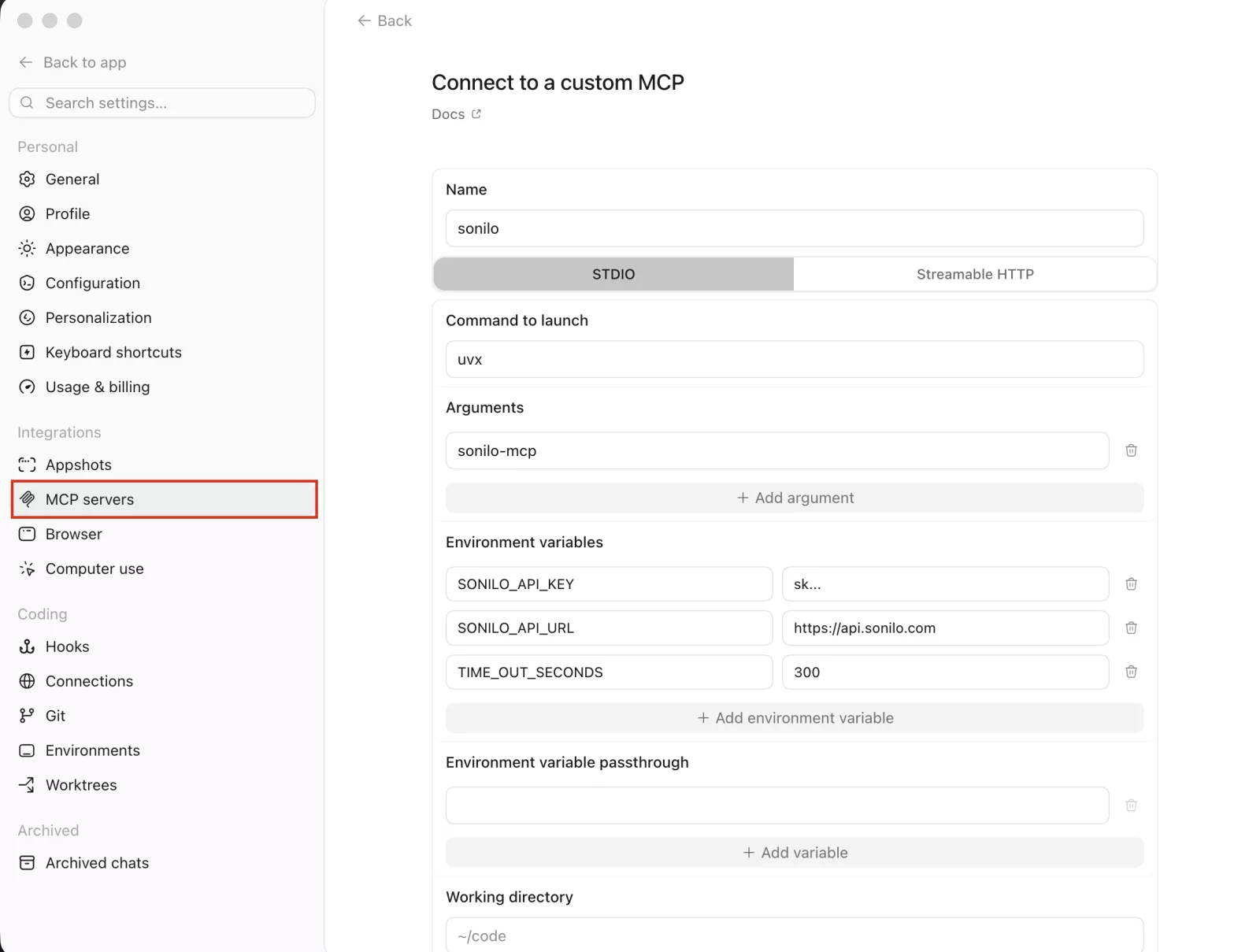
**Go to Codex > Settings > MCP servers to fill out the following:
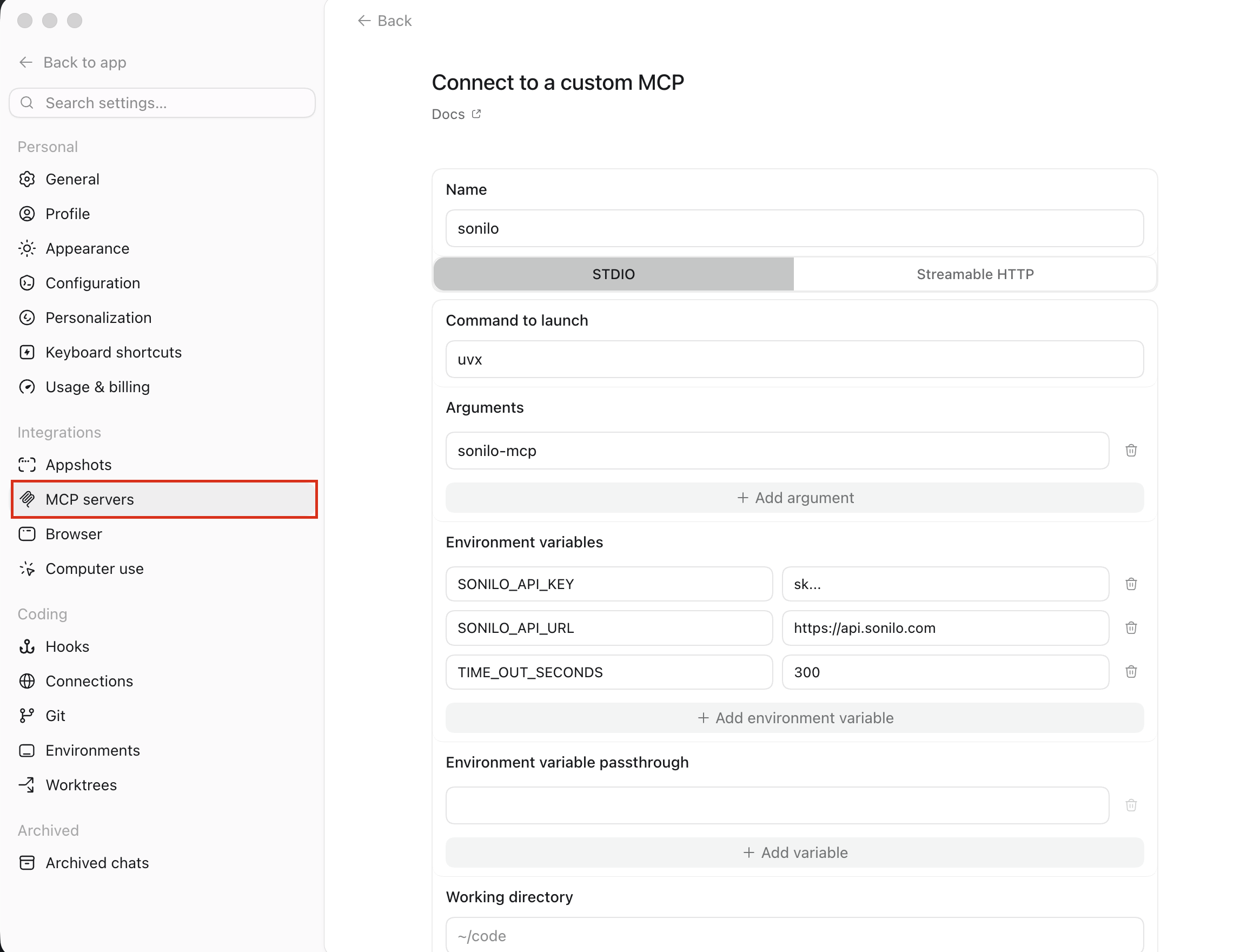
Or you can add the server** to ~/.codex/config.toml:
[mcp_servers.sonilo]
command = "uvx"
args = ["sonilo-mcp"]

# Omit this whole block when you have signed in with `sonilo login`.
[mcp_servers.sonilo.env]
SONILO_API_KEY = "sk-..."
SONILO_API_URL = "https://api.sonilo.com"
TIME_OUT_SECONDS = "600"
- Restart Codex (or start a new session), then run
/mcpto confirmsonilois connected and its tools are listed.
Example usage
Once the server is connected, just ask your assistant in natural language. For example:
- "Make background music that matches this video:
~/Desktop/promo.mp4." - "Compose music for
https://example.com/clip.mp4with a calm, ambient style." - "I stitched my AI-generated clips into
~/Desktop/trailer.mp4— add a soundtrack that matches the cut." - "Use Sonilo mcp to generate 30 seconds of upbeat lo-fi hip-hop for a study playlist and save it to my Desktop."
- "Use Sonilo to write an epic orchestral cinematic track, about 60 seconds long."
- "What Sonilo services and limits does my account have?"
- "Show my Sonilo usage for the last 7 days."
- "Play the track you just generated."
The assistant will call the matching tool (text_to_music, video_to_music, text_to_sfx, video_to_sfx, audio_ducking, get_sfx_task, get_account_services, get_usage, or play_audio) and save generated audio to your configured output directory.
Configuration
Authentication
The server takes its key from SONILO_API_KEY if that is set, and otherwise
from the credential written by sonilo login
(~/.config/sonilo/credentials.json, or $XDG_CONFIG_HOME/sonilo/). The
environment variable wins on purpose, so any config that already sets it keeps
resolving to the same account after an upgrade.
The credential is looked up by the server's own SONILO_API_URL, so a staging
server never picks up a production sign-in. This server only ever reads the
file: run sonilo login again to renew it (keys from a sign-in expire after 90
days) and sonilo logout to revoke it.
Environment Variables
| Variable | Default | Description |
|---|---|---|
SONILO_API_KEY |
(from sonilo login) |
Bearer token. Required only if you have not signed in with the CLI. |
SONILO_API_URL |
https://api.sonilo.com |
Public API base URL. |
SONILO_MCP_BASE_PATH |
~/Desktop |
Default output directory and base for relative input paths. Also the confinement boundary (see below). |
SONILO_MCP_ALLOW_ANY_PATH |
false |
Set to true to let tools read/write files outside SONILO_MCP_BASE_PATH. |
TIME_OUT_SECONDS |
600 |
Timeout, in seconds, for streaming music (text_to_music, and video_to_music without preserve_speech), uploads and downloads. Aligned with the backend's streaming read timeout. Task-based tools (sound effects, ducking, video-to-video, async music, analyze_video, proofread) wait at least 2700s (45 min) for their task whatever this is set to, because the backend lets a task wait up to 2400s in its queue; set it higher to wait longer. stems waits at least 75 min and dubbing at least 2 hours. |
Some MCP hosts impose their own tool-call timeout and may cut a call off before that wait ends. The task keeps running and is still billed: its id is in the server's stderr log as [sonilo-mcp] task submitted: <id>, and get_sfx_task("<id>") retrieves the result — nothing is lost.
File access & confinement
By default, the file tools (video_to_music input, play_audio, and any
output_directory) are confined to SONILO_MCP_BASE_PATH. Paths that
resolve outside it (after symlink resolution) are rejected. This limits the
blast radius if a client is tricked into reading or exfiltrating arbitrary
files. To opt out — e.g. to read a video from elsewhere on disk — set
SONILO_MCP_ALLOW_ANY_PATH=true.
Tools
| Tool | Description | Cost |
|---|---|---|
text_to_music(prompt, duration?, output_format?, variants_num?, stems?, output_directory?) |
Generate music from a text prompt. variants_num (1–10, default 1) generates that many distinct variants in one request, each with its own title; N > 1 forces the backend's async mode automatically and is never covered by the free trial. stems (default false) also saves the track split into four separate instrument tracks — drums, bass, vocals and other — at no extra charge; it adds a few minutes (the call waits up to 75 min) and forces the backend's async mode automatically. A stems_error note in the result means only the free separation failed or was skipped — the music itself is fine. |
✅ |
video_to_music(video_path? | video_url?, prompt?, preserve_speech?, variants_num?, prompt_influence?, stems?, output_directory?) |
Generate music matched to a video. Max duration 360s (6 min); subject to the account's upload-size cap (typically 300 MB). preserve_speech (default false) keeps the source speech in the result — you also get a vocals speech stem and a ready-to-use mux; when set, the call runs the backend's async generation mode internally instead of streaming. variants_num (1–10, default 1) works the same as text_to_music's. prompt_influence (0–1, API default 0.5) sets how strongly the generated music follows the prompt; omit it unless you want stricter or looser prompt adherence. Free, and works in both the streaming and async modes. stems (default false) works the same as text_to_music's — it splits the generated music, never the video's own audio. |
✅ |
text_to_sfx(prompt, duration?, audio_format?, output_directory?) |
Generate a sound effect from text. Duration 0.5–180s, optional — omit it for Sonilo's own default length; formats wav/mp3/aac/flac (default aac). | ✅ |
video_to_sfx(video_path? | video_url?, prompt?, segments?, audio_format?, output_directory?) |
Generate SFX for a video; saves the generated SFX audio. Max video duration 480s (8 min). | ✅ |
video_to_video_music(video_path? | video_url?, prompt?, segments?, keep_original_sound?, ducking?, preserve_speech?, variants_num?, prompt_influence?, output_directory?) |
Generate music for a video and return a new .mp4 with it muxed in. By default the result's audio is the generated music alone — the source's own audio is removed. Pass keep_original_sound=true to keep the whole source track with the music statically mixed under it, adding ducking=true to dip the music under the voice instead; or preserve_speech=true to keep only the isolated speech. keep_original_sound supersedes preserve_speech. Input must carry H.264/HEVC/VP9/AV1 (mp4, mov, m4v, webm); animated gif and VP8 webm are rejected. Max video duration 360s (6 min). variants_num (1–10, default 1) saves one .mp4 per variant. prompt_influence (0–1, API default 0.5) sets how strongly the generated music follows the prompt; omit it unless you want stricter or looser prompt adherence. Free. |
✅ |
video_to_video_sfx(video_path? | video_url?, prompt?, segments?, output_directory?) |
Generate SFX for a video and return a new .mp4 with them muxed in. Max video duration 480s (8 min). |
✅ |
video_to_sound(video_path? | video_url?, music_prompt?, sfx_prompt?, segments?, preserve_speech?, ducking?, output_format?, variants_num?, output_directory?) |
Generate music and SFX for a video in one call and save the mixed audio track. One charge instead of two, with the two layers balanced by the backend. ducking (default false) brings the source video's own speech into the mix and dips the music under it — leave it off and the result is the generated music and effects alone, with no music_processed stem. output_format (wav default, m4a, or mp3 at 320 kbps) sets the combined track's container; the music and SFX stems keep their native formats. Max video duration 480s (8 min). variants_num (1–10, default 1) saves one mixed track per variant. |
✅ |
video_to_video_sound(video_path? | video_url?, music_prompt?, sfx_prompt?, segments?, keep_original_sound?, preserve_speech?, ducking?, variants_num?, output_directory?) |
Like video_to_sound, but returns a new .mp4 with the mixed soundtrack muxed in. By default the result's audio is the generated music and effects alone — the source's own audio is removed, so the result also carries no music_processed stem. Pass keep_original_sound=true to keep the whole source track (statically mixed; add ducking=true to duck it under the mix instead), or preserve_speech=true for the isolated speech only. keep_original_sound is accepted only here, not by video_to_sound. Max video duration 480s (8 min). variants_num (1–10, default 1) saves one .mp4 per variant. |
✅ |
dubbing(video_path? | video_url?, languages?, ducking?, lipsync?, subtitles?, export_srt?, output_directory?) |
Dub a video into other languages and save one dubbed .mp4 per language. languages is a list of codes (en, zh_cn, ja, ko, pt, pt_br, es, es_419, de, fr, it, ru, th, ar, tr, vi, id, ta, ml, kn, gu, pa_in, sd_in, hi); omit it for the default ["zh_cn", "es", "fr"]. pt_br is Brazilian Portuguese and es_419 Latin American Spanish; plain pt and es stay unqualified, as does ar. pa_in and sd_in are Punjabi and Sindhi as spoken in India, the only variants available; hi is Hindi. video_url must be https — the dubbing pipeline fetches the source itself. lipsync defaults to true: the speaker's mouth is re-rendered to match the dubbed speech. Set lipsync=false to leave the picture completely untouched instead — the video comes back at its original resolution and frame rate rather than re-rendered, and only the audio is replaced, so the mouths keep moving to the original language; useful for footage with no on-camera speaker. subtitles is one script per target language — {"es": "/path/es.srt", "fr": "https://.../fr.vtt"}, a local .srt/.vtt path or an https URL — carrying the lines to be spoken in that language, used instead of the pipeline's own translation; the keys must match the languages being dubbed. export_srt (needs subtitles) also returns a re-timed .srt per language, aligned to the delivered audio with the lines kept verbatim. Max video duration 300s (5 min). Billed per language. The first single-language call without subtitles is a free 15-second preview (see Free trial below). |
✅ |
proofread(video_path? | video_url?, languages?, source_language?, output_directory?) |
Transcribe a video and translate its script into the target languages, saving one editable .srt per language plus the source-language transcript. Nothing is dubbed and nothing is spoken — this is the step before dubbing: correct the wording, then pass the files to dubbing as subtitles. languages takes the same codes as dubbing; omit it, or pass [], for the source-language transcript alone. source_language is an optional hint for transcription — without it the language is detected, and the detected code is reported either way. video_url must be https, and the video must have an audio track. Max video duration 300s (5 min). Billed per language (a transcript-only request counts as one), with a 10-second billing floor. |
✅ |
analyze_video(video_path? | video_url?, prompt?, variants_num?, mode?) |
Analyze a video and return a creative brief — a time-aligned segments plan plus one ready-to-use generation prompt per variation. mode defaults to both, which adds a sound-design brief (sfx_segments plus a single sfx_prompt) next to the music one; music or sfx returns just that one brief, at the same price. Generates nothing and writes no file: the brief comes back inline as JSON, to feed straight into video_to_music, video_to_sfx, video_to_sound or their video-to-video counterparts. Use it when you do not yet know what the video should sound like. Max video duration 480s (8 min); variants_num is 1–5 (default 1) and is billed per brief, with a 10-second billing floor. |
✅ |
audio_ducking(voice_path? | voice_url?, music_path? | music_url?, output_directory?) |
Duck a music bed under a voice track. The voice input may be a video — the ducked mix is muxed back into a new .mp4. Each input max 360s (6 min); subject to the account's upload-size cap. |
✅ |
get_sfx_task(task_id, output_directory?) |
Check an SFX, audio-ducking, video-to-video, video-to-sound, dubbing, proofread, video-analysis, or async video-to-music task and return its result — recovery for time |