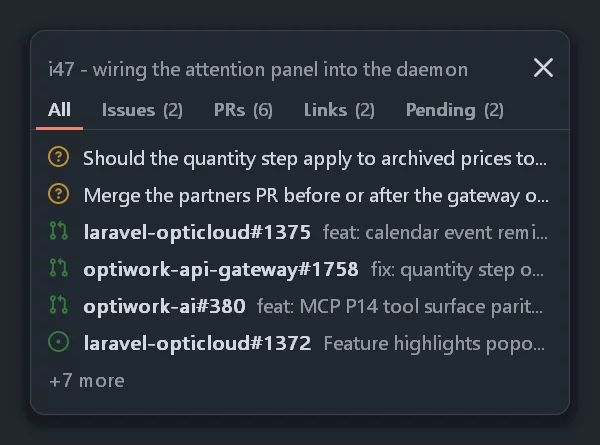

A single, self-contained Windows binary that speaks text out loud, shows a glowing orb while it talks, points at the terminal that spoke, and parks a clickable list of that terminal's pull requests, issues and questions in its corner.

One speak.exe (plus onnxruntime.dll) loads the
Pocket TTS model, renders audio
straight to your speakers through WASAPI, and pulses a click-through overlay in
the corner of the screen in time with the voice.
speak.exe --serve             # once: resident daemon holding the model
speak.exe "Hello world."      # ~100 ms to first audio
Note
Voices — several ship with the binary, Jarvis among them, and any short WAV, MP3 or FLAC clip becomes another one. Hear Jarvis: jarvis-sample.wav (13 s, 1.2 MB) or jarvis-sample.mp3 (154 KB) — GitHub plays neither in the page, so both links download. To clone your own voice, use
make-voice.ps1, described in speech.md.
What it does
Speech — speech.md
- One binary: inference, playback, daemon and UI in a single
speak.exe - ~100 ms to first audio with the resident daemon
- Voice cloning: any short WAV/MP3/FLAC sample becomes the voice;
make-voice.ps1joins several takes into one - Streaming: audio starts playing while the rest of the sentence is still being generated
- Optional WAV output and UTF-8 arguments
On screen — overlay.md
- Audio-reactive orb: a per-pixel-alpha layered window, always on top, that pulses with what the speakers are actually playing
- Caption toast: an icon, a title and a line of context beside the orb, so you also see what it is about
- Subtitle:
--subtitleputs the same line there bare — white text with a dark contour, no card - Click the orb to pause, click again to resume from the same word
Pointing — pointing.md
- Expanding rings out of one window's centre: "over here", without raising or focusing it
- By Claude session id (
--session) or by window title (--title), by flag or over HTTP
Attention panel for Claude Code — attention-panel.md
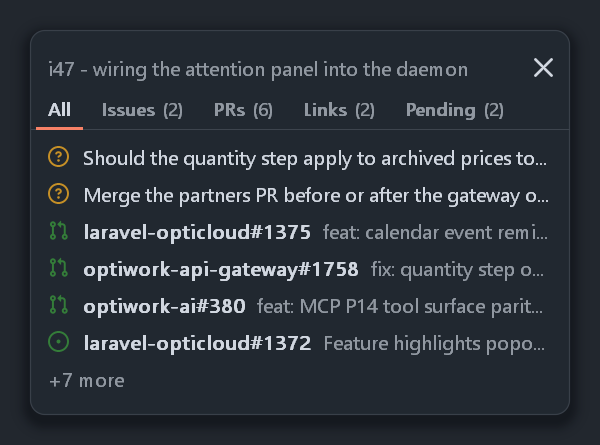
- A per-terminal card listing what the session in that window is working on, with each row marked by GitHub's own icon and status colour
- Clickable rows: pull requests and issues open in the browser, work directories in Explorer
- Tabs —
All,Issues,PRs,Pending— six rows by default,+N moreto expand everything, and a one-line pill when collapsed - Pending questions: what an agent is waiting on you for, sorted to the top; click to copy
- The orb turns up on the card when speech is aimed at its window — a mini one, churning with the same voice — and the header carries the caption while it lasts
- Hover popover with the full title, labels, assignees, reviewers and their verdicts, and the check counts
- Filled by the included Claude Code hooks, with an optional Haiku relevance pass and a headless GitHub status enricher the daemon runs
Note
Why was this created?
I run several coding agents at the same time, and I need to know what each one is doing and where my attention is needed most. I want to keep every terminal window open and visible — I like seeing all of them and what each one is up to — so this is not a GUI or a tabbed tool standing in front of them. The window that has something to say speaks, rings itself so I can find it, and keeps its own pull requests, issues and open questions listed in its corner.
Quick start
# 1. the binary
Invoke-WebRequest https://github.com/Dovyski/speaker/releases/latest/download/speak-win-x64.zip -OutFile speak.zip
Expand-Archive speak.zip -DestinationPath speaker; cd speaker

# 2. the model weights (~200 MB, into models/)
pwsh -File get-models.ps1

# 3. say something
.\speak.exe "Hello world."
The first call is slow (~5.7 s) and starts a daemon in the background, so every
call after it is ~100 ms. Full instructions, including what to put on PATH, are
in install.md; to build from source instead, see
build.md.
Install into Claude Code
The panel needs something to tell it what a session is working on. For Claude
Code that is hooks/: a Stop and a PostToolUse hook that mine the
transcript, a SessionStart hook that hands the model its session id, an
optional Haiku pass that prunes noise and collects open questions, and a status
enricher the daemon runs while any panel is registered.
pwsh -NoProfile -File hooks\install-claude-code.ps1
claude-code-integration.md explains
the chain end to end, the file formats, the operations and how to debug it.
skill/ is the agent skill that teaches a coding agent to
drive the binary — when to speak, when to point, and how to phrase what it says.
Documentation
| install.md | Getting a release build onto a machine |
| build.md | build.bat, the models, dev notes |
| speech.md | Engine, voices, the daemon, speech flags |
| overlay.md | Orb, pause, captions, subtitles |
| pointing.md | Rings, targets, colours, the DPI trap |
| attention-panel.md | The card, its tabs, its popover, the /panel contract |
| claude-code-integration.md | The hooks that fill the panel |
| http-api.md | Every port and route the daemon serves |
Requirements
- Windows 10/11 x64
- ~200 MB of disk for the model weights
- To build from source: Visual Studio 2022 Build Tools with the Desktop development with C++ workload
- For the attention panel: Claude Code, PowerShell 7
(
pwsh) and the GitHub CLI (gh) authenticated
Credits
- kyutai-labs/pocket-tts — the model (CC-BY-4.0 weights)
- VolgaGerm/PocketTTS.cpp — the single-file C++ inference runtime this links against (MIT)
- KevinAHM/pocket-tts-onnx — pre-exported ONNX weights
- primer/octicons — the panel's row icons (MIT)
License
MIT — see LICENSE. The model weights carry their own license (CC-BY-4.0).