[![Stars][stars-shield]][stars-url] [![Version][version-shield]][version-url] [![CI][ci-shield]][ci-url] [![OpenSSF Scorecard][scorecard-shield]][scorecard-url] [![OpenSSF Best Practices][bestpractices-shield]][bestpractices-url] [![License][license-shield]][license-url] [![Made for Claude Code][made-for-shield]][made-for-url] [![Node][node-shield]][node-url] [![Views][views-shield]][views-url]

squad-chat
The all-in-one Claude Code plugin. Talk with your squad.
Share code and keep live rooms (usage, git, weather, lo-fi and more) next to your session. Zero tokens, zero leaks to Claude.
Read the docs »
View Demo
·
Report Bug
·
Request Feature
Table of Contents
About The Project
https://github.com/user-attachments/assets/b83d9a2c-673a-40d0-90a3-a2c717b6c79a
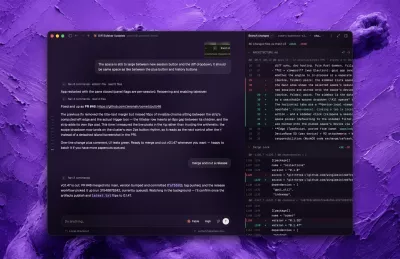
squad-chat puts a group chat next to your Claude Code conversation. You keep working with Claude on the left while your friends' messages come in on the right.
- Lives inside Claude Code. One
/chatcommand opens a pane: no browser tab, no extra app. - Never reaches Claude. What you type in the pane never enters the conversation, and slash-command arguments are hidden from the model, so chatting costs no tokens.
- Share code and diffs. Post the code you selected, Claude's last code block or your
git diffto the room as a card your friends can copy, without copying and pasting. - Presence across rooms. See who's online in every room you share and who's typing, with a status line for unread messages, an optional toast when someone @mentions you, and a do-not-disturb mode for when Claude is busy.
- Your own server. Each group of friends runs its own free Supabase project. There is no central service and no account with us.
- Private rooms. Rooms are joined with a passcode, and the database only shows a room's messages to its members.
- Survives bad networks. After a dropped connection, a closed laptop or a crashed process, it reconnects by itself and fetches exactly the messages you missed.
- Built-in rooms for your session. Next to the chat rooms, the Usage, Git and Agents tabs show context fill, cost, rate limits and tool timings, your pull requests and CI, and every Claude Code session's subagents as they work. Focus is a Pomodoro timer with a chime, Habits checks off your daily habits with a streak each, Toolbox has the small tools a developer reaches for (Base64, JWT, UUID, hashes, Unix times, cron), Clipboard keeps what you copied lately, and Pet is Clawd, moving along with your session. They need no server and no sign-in.
- Fits any terminal. Docked beside the transcript in a wide terminal, compact above the prompt in a narrow one, and a one-line summary when the pane is closed.
It is a Claude Code mod: a plugin of function hooks, plus a small Node process that holds the connection to Supabase. docs/ARCHITECTURE.md explains how the pieces fit.
The full guide, with search, lives at chrisluo5311.github.io/squad-chat. Privacy & security, development and the roadmap are there too. Found a security problem? Please report it privately, as described in SECURITY.md.
Built With
[![JavaScript][js-shield]][js-url] [![Node.js][nodejs-shield]][nodejs-url] [![Supabase][supabase-shield]][supabase-url] [![PostgreSQL][postgres-shield]][postgres-url] [![esbuild][esbuild-shield]][esbuild-url] [![Resend][resend-shield]][resend-url]
Getting Started
Prerequisites
- Claude Code 2.1.292 or newer, in the terminal or the desktop app. On the desktop app the chat and every room are drawn with the app's own pieces.
- Node 22 or newer on your
PATH:node --version - A server: one Supabase project per group of friends. Get its URL and key from whoever hosts it, or host one yourself.
- A terminal with truecolor, such as iTerm2, Ghostty, kitty or WezTerm.
- For the side-by-side layout: Claude Code's fullscreen layout (
/tui fullscreen) and a terminal at least 110 columns wide.
Note
Claude Code decides where the pane goes, not the mod. Below 110 columns the pane opens above the prompt in a compact layout. While it's closed, a one-line summary sits above the prompt with an Open button.
Installation
The repository is its own plugin marketplace.
- Add the marketplace and install the plugin:
Or, from inside Claude Code:claude plugin marketplace add chrisluo5311/squad-chat claude plugin install squad-chat@squad-chat/plugin install squad-chat --marketplace chrisluo5311/squad-chat - Restart Claude Code, or run
/reload-plugins. - Connect to a server, then open the pane with
/chat.
To update later:
claude plugin marketplace update squad-chat && claude plugin update squad-chat@squad-chat
If you host your group's server, also run supabase db push again from an updated clone, so the server has what the new version needs. For example, shared snippets need 0.7.0's database change.
To uninstall:
claude plugin uninstall squad-chat@squad-chat && claude plugin marketplace remove squad-chat
To try it without installing:
git clone https://github.com/chrisluo5311/squad-chat.git
claude --plugin-dir ./squad-chat/plugins/squad-chat
Connect to a server
squad-chat has no central server. Each group of friends shares one Supabase project, its server: one person hosts it on Supabase's free plan, and everyone else connects with two values from them:
- the project URL, such as
https://abcd1234.supabase.co - the project's publishable key,
sb_publishable_…(safe to share, unlike the secret key, which you never share)
Set them when you install:
claude plugin install squad-chat@squad-chat \
  --config supabase_url=https://abcd1234.supabase.co \
  --config supabase_key=sb_publishable_...
or later, from /config in Claude Code (squad-chat's options), or from a shell:
echo '{"supabase_url":"https://abcd1234.supabase.co","supabase_key":"sb_publishable_..."}' \
  | claude plugin configure squad-chat@squad-chat --values-stdin
Until a server is set, the pane says so and shows these steps.
Usage
First run
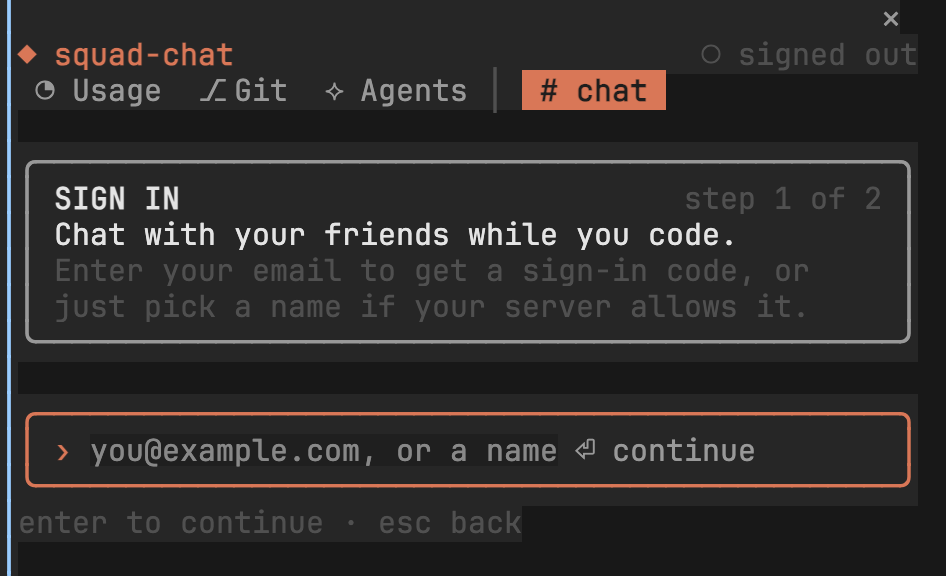
/chatopens the pane.- Sign in, depending on how your server is set up:
- With a name: type the name you want and press Enter. That's it.
- With your email: type your email and press Enter, then type the code from the email.
- Create a room and give its name and passcode to your friends. Type this in the pane:
Your friends join with the same line./room our-team some-passcode - Chat: type in the pane and press Enter. Esc goes back to the prompt.
Important
An account made with just a name can't be recovered. It has no email, so once you sign out, delete
~/.config/squad-chator switch computers, you can't sign back into it. Signing in again makes a new account: rejoin your rooms with their passcodes and you'll see their history again. Messages from the old account stay in the rooms until they expire after 30 days. Signing in by email doesn't have this problem.
Built-in rooms
Tabs before your chat rooms. They need no server and no sign-in, and nothing in them reaches a chat room unless you share it.
| Room | Shows | Tab |
|---|---|---|
| ◔ Usage | Context, rate limits, spend, what each request carries, tool timings | on |
| ⎇ Git | Your branch, its PR and checks, Actions | on |
| ⟡ Agents | Every Claude Code session and its subagents | on |
| ◷ Focus | A Pomodoro timer with a streak | on |
| ✓ Habits | Daily habits, each with its streak | on |
| ⚒ Toolbox | Base64, URL, JWT, UUID, hashes, Unix times, cron, JSON and more | on |
| ✿ Pet | Clawd, moving along with your session | on |
| ⌘ Snippets | Code you reuse, one click from the clipboard | on |
| ▦ Monitor | CPU, memory, network, battery | on |
| ⧉ Clipboard | What you copied lately | /chat rooms +clipboard |
| ☀ Weather | Now, 24 hours and the week | /chat rooms +weather |
| ✦ Tech News | Hacker News and tech feeds | /chat rooms +news |
| $ Stocks | Taiwan and US quotes | /chat rooms +stock |
| ⌁ Ping | Whether your servers answer, and how fast | /chat rooms +ping |
| ♫ Lo-fi | Music while you work | /chat rooms +lofi |
| ◰ Docker | Containers, images, volumes, networks, and a container's logs | /chat rooms +docker |
Open one with its tab or /chat <room>. ⇪ Share (or /chat-share usage #room) posts a snapshot as a card, and the room store has more rooms. Each room, with pictures, is in the docs.
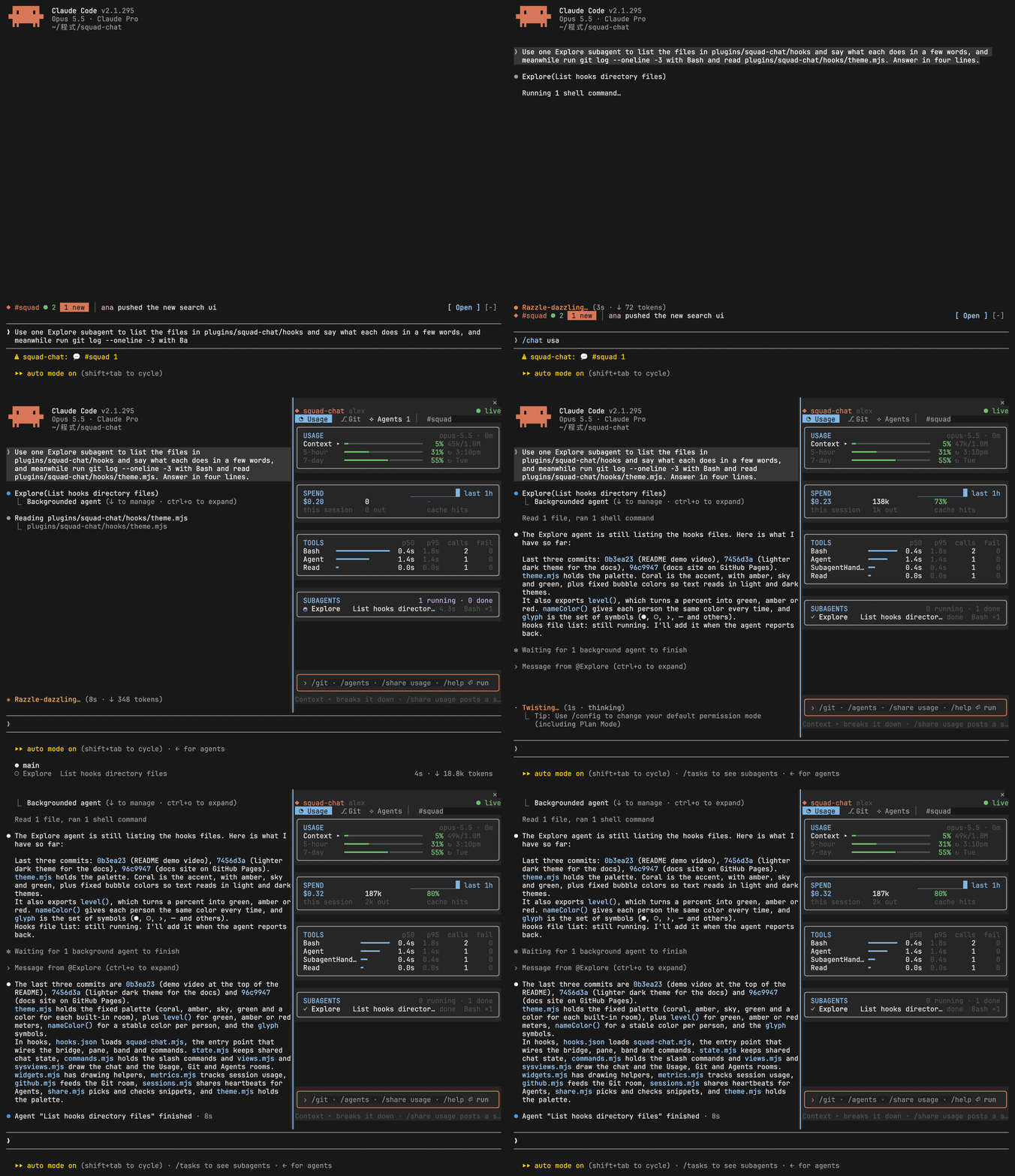 The Usage room in the terminal, filling in as Claude runs a subagent and a few tools.
Commands
| Command | What it does |
|---|---|
/chat |
Open the pane |
/say <message> |
Send a message to the current room from the prompt |
/room |
List your rooms |
/room <name> |
Switch to a room you're in (or click its tab) |
/room <name> <passcode> |
Create a room, or join a friend's |
/room leave <name> |
Leave a room. Rejoin any time with its passcode. |
/room delete <name> |
Delete a room you created, with all its messages, for everyone. Run it twice to confirm. |
/who |
Who's online, across all your rooms |
/chat-login <email>, then /chat-login <code> |
Sign in by email from the prompt instead of the pane |
/chat-login <name> |
Sign in with just a name, where the server allows it |
/chat-name <new name> |
Change your display name. Your friends see the new one right away. |
/chat-share [#room] |
Share the text you selected, or else the last code block in Claude's reply, to the current room or the one you name. You see it first, then /chat-share send posts it (or /chat-share cancel). |
/chat-share diff [path] [#room] |
Share your uncommitted changes (git diff HEAD), all of them or one file's |
/chat-share to #room |
Send what's waiting in the preview to another of your rooms instead. /chat-share send #room picks the room and posts in one go. |
/chat-logout |
Sign out on this computer |
/chat notify on / off |
Toast when someone writes @yourname (off by default) |
/chat dnd on / off / auto |
Do not disturb: no toasts, a quiet band and status line, and friends see you as busy. auto turns it on while Claude works on something longer than 30 seconds, then sums up what you missed. |
/chat usage / git / agents / focus / habits / toolbox / clipboard / pet / snippet / monitor / weather / news / stock / ping / lofi / docker |
Open the pane on a built-in room. /chat chat goes back to the chat. |
/chat band [room] |
Show another room in the band above the prompt without opening the pane. ‹ and › on the band do the same, one room at a time. |
/chat rooms <list> |
Which built-in rooms have tabs: any of usage, git, agents, focus, habits, toolbox, clipboard, pet, snippet, monitor, weather, news, stock, ping, lofi, docker, or all, or none. +name and -name add or drop one. |
/focus start / pause / skip / reset / <focus min> [break min] |
Drive the Focus room's timer from the prompt. /focus alone opens the room. |
/habit add <name> [x<times>] / done <name> / undo <name> / remove <name> / rename <old> -> <new> |
Set up and check off the Habits room's goals from the prompt. /habit alone opens the room. |
/tool <name> [input] |
Run one of the Toolbox room's tools, such as /tool uuid 5, /tool hash hello or /tool time 1739000000, and show it. /tool alone opens the room. |
/chat-share usage / git / agents / focus / habits / snippet / monitor / weather / news / stock / ping / lofi / docker [#room] |
Share a snapshot of a built-in room to the current room or the one you name |
/chat store [words] |
The rooms in the room store, and which you have |
/chat install <id> / update [id] / uninstall <id> |
Install a room from the store (a look first, then again to install), bring installed ones up to date, or remove one |
/chat set <room> [<setting> <value>] |
Show or change a room's settings, such as /chat set weather cities Tokyo. A list also takes +one and -one, and default puts a setting back. Some lists, as Weather's cities, add what's typed instead of replacing the list. |
/snippet add <text> |
Save the text as a snippet. Snippets are numbered 1, 2, 3 and on |
/snippet add |
Save the text you selected, or else the last code block in Claude's reply, to the Snippets room |
/snippet rename <old> -> <new> / delete <name> |
Rename or delete a saved snippet |
/snippet copy <name> / share <name> [#room] |
Copy a saved snippet, or share it to a chat room after a look |
/lofi play [name] / pause / next / prev / stop / vol <0-100> |
Drive the Lo-fi room's player from the prompt |
/lofi add <url, file or folder> [# name] / remove <name> / import |
Add to the Lo-fi room's list, take one off, or bring in Pixel Play's playlist |
The pane's input box takes /room, /who, /name, /dnd, /share, /snippet, /lofi, /set, /usage, /git, /agents, /focus, /habit, /tool, /clipboard, /pet, /chat (with rooms, set, store, install, update and uninstall), /logout and /help too, where the preview lets you pick the room and has Send and Cancel buttons. In the Git room and the function rooms, r refreshes, and in Lo-fi single keys drive the player. In Focus, start, pause, skip, reset or 50 10 drive the timer. In Habits, what you type is a new habit (Read 30 min, or Water x8 for 8 times a day), and remove, rename and undo change them. In Toolbox, what you type is what the tool on show runs on, and a tool's name alone switches to it. In Pet a mood's name (wave, sleepy, auto) picks it. Type passcodes there: it never touches the conversation.
Examples
Start a room and bring your friends in:
/room design pixels42        create #design (or join it, if a friend made it) with passcode pixels42
/room squad                  switch to #squad, a room you're already in
/room                        list your rooms and their unread counts
/say standup in 5?           post to the current room without opening the pane
/who                         who's online, and in which rooms
/chat-name captain           show up as captain from now on
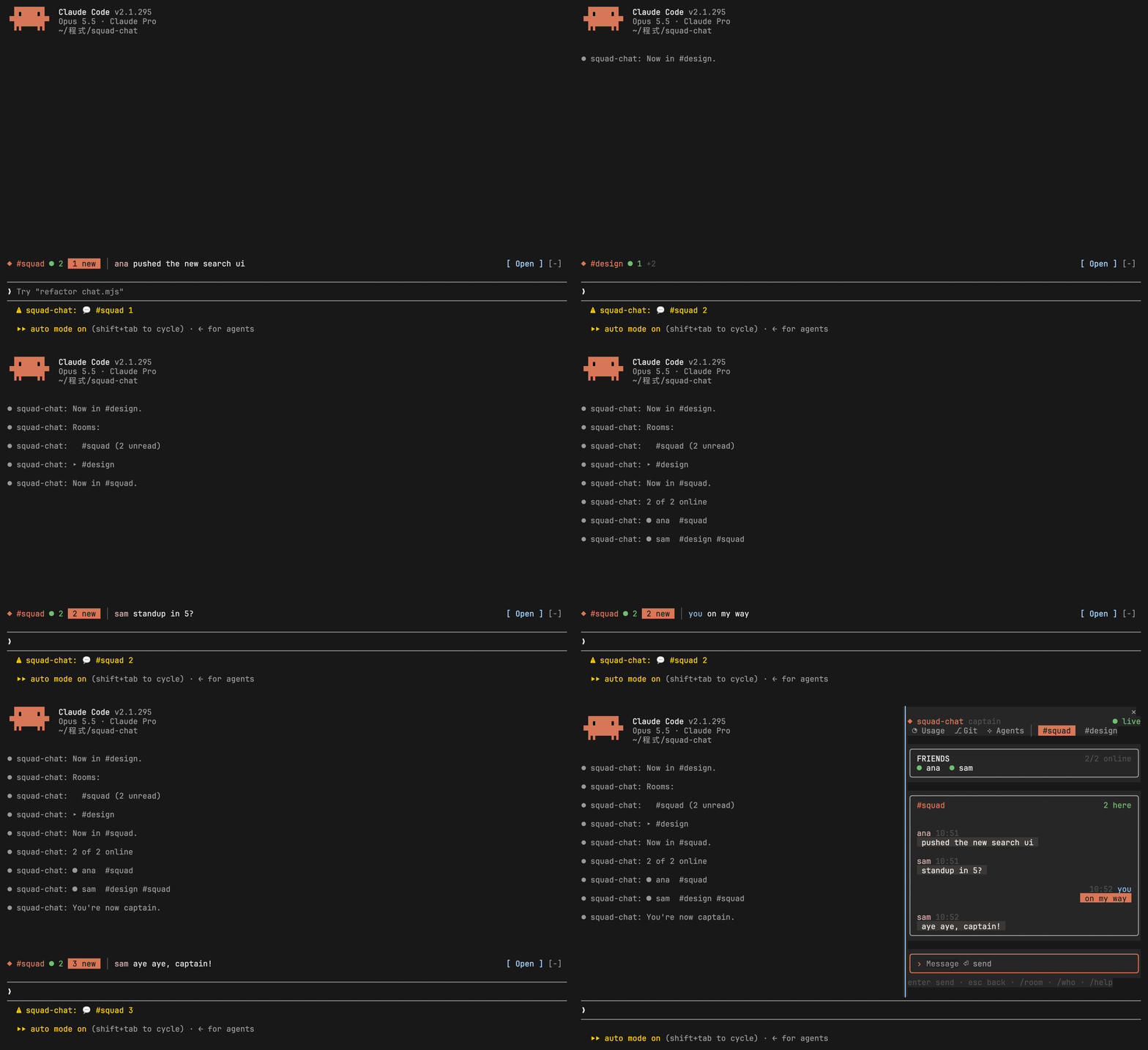 Rooms from the prompt: join with a passcode, list, switch, post with /say, see who's online and pick a new name.
Share code and diffs:
/chat-share                  the text you selected, or Claude's last code block, to the current room
/chat-share #design          the same, to #design
/chat-share diff             all your uncommitted changes
/chat-share diff src/a.ts    only src/a.ts
/chat-share diff src/a.ts #design
/chat-share send             post what the preview showed
/chat-share cancel           drop it
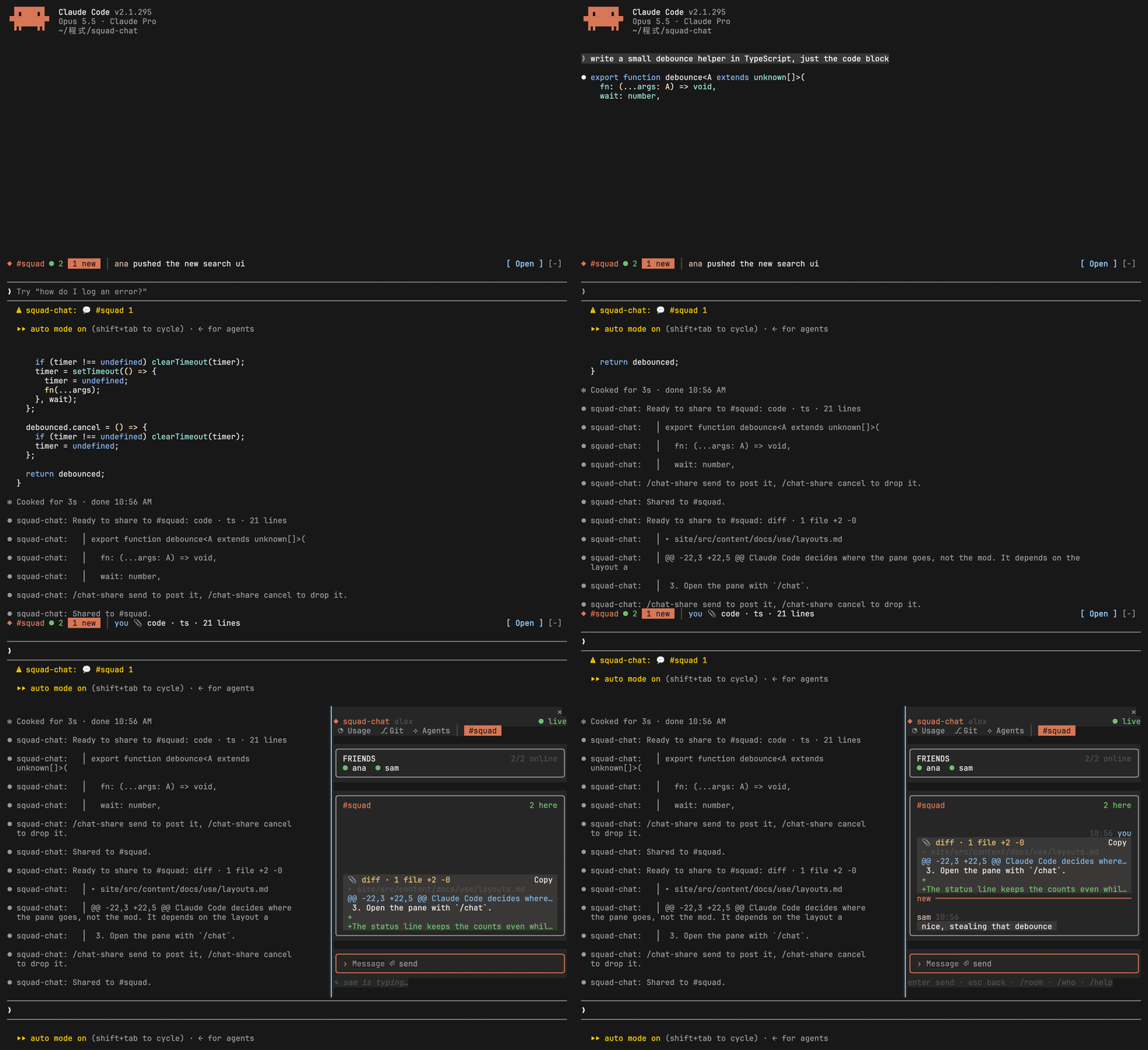 Sharing Claude's code block and an uncommitted diff: a preview first, then a card in the room.
Stay focused:
/chat dnd on                 no toasts, and friends see you as busy
/chat dnd auto               the same, but only while Claude works on something longer than 30 seconds
/chat dnd off                back to normal, with one summary of what you missed
/chat notify on              a toast when someone writes @yourname
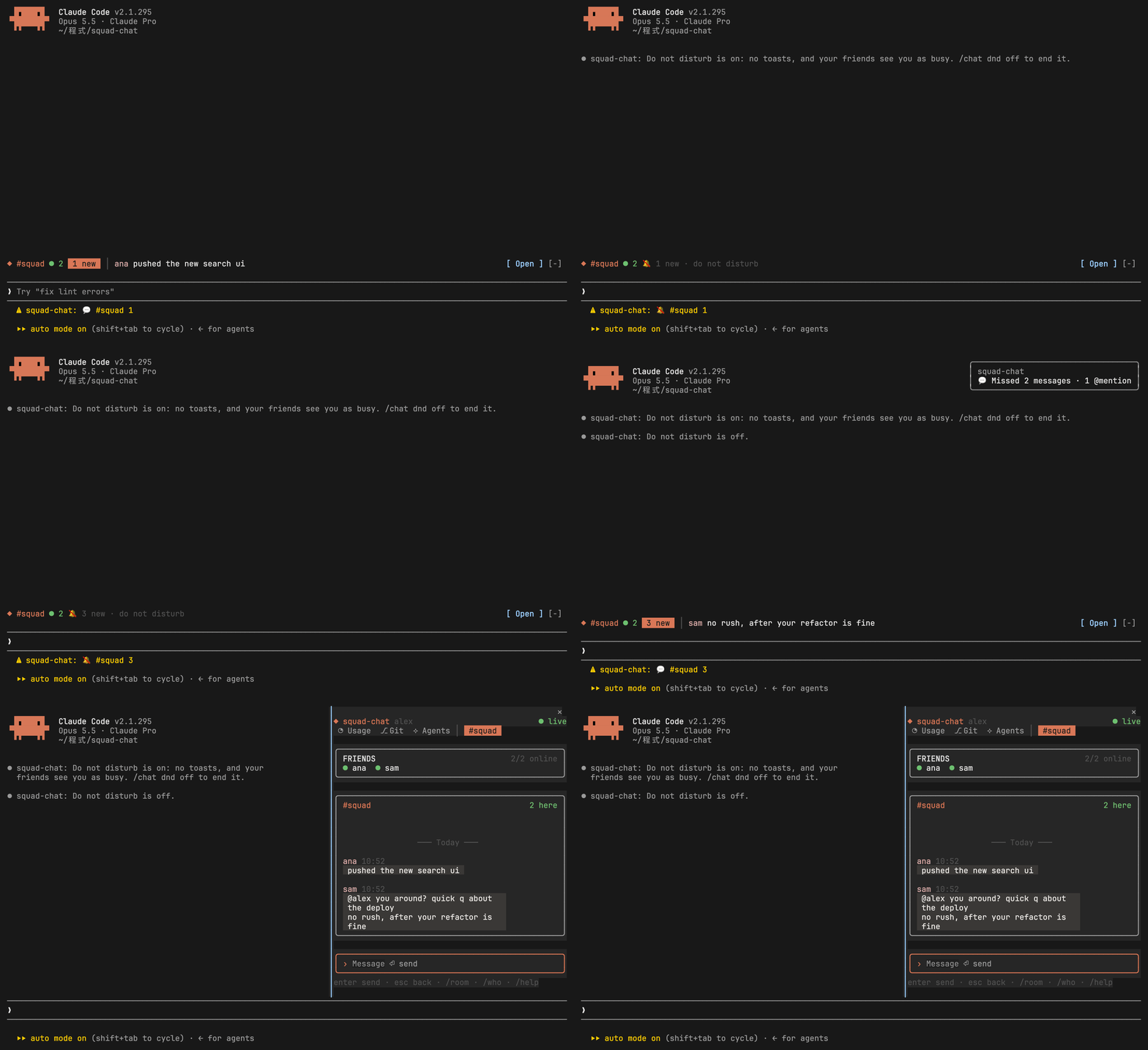 Do not disturb: t