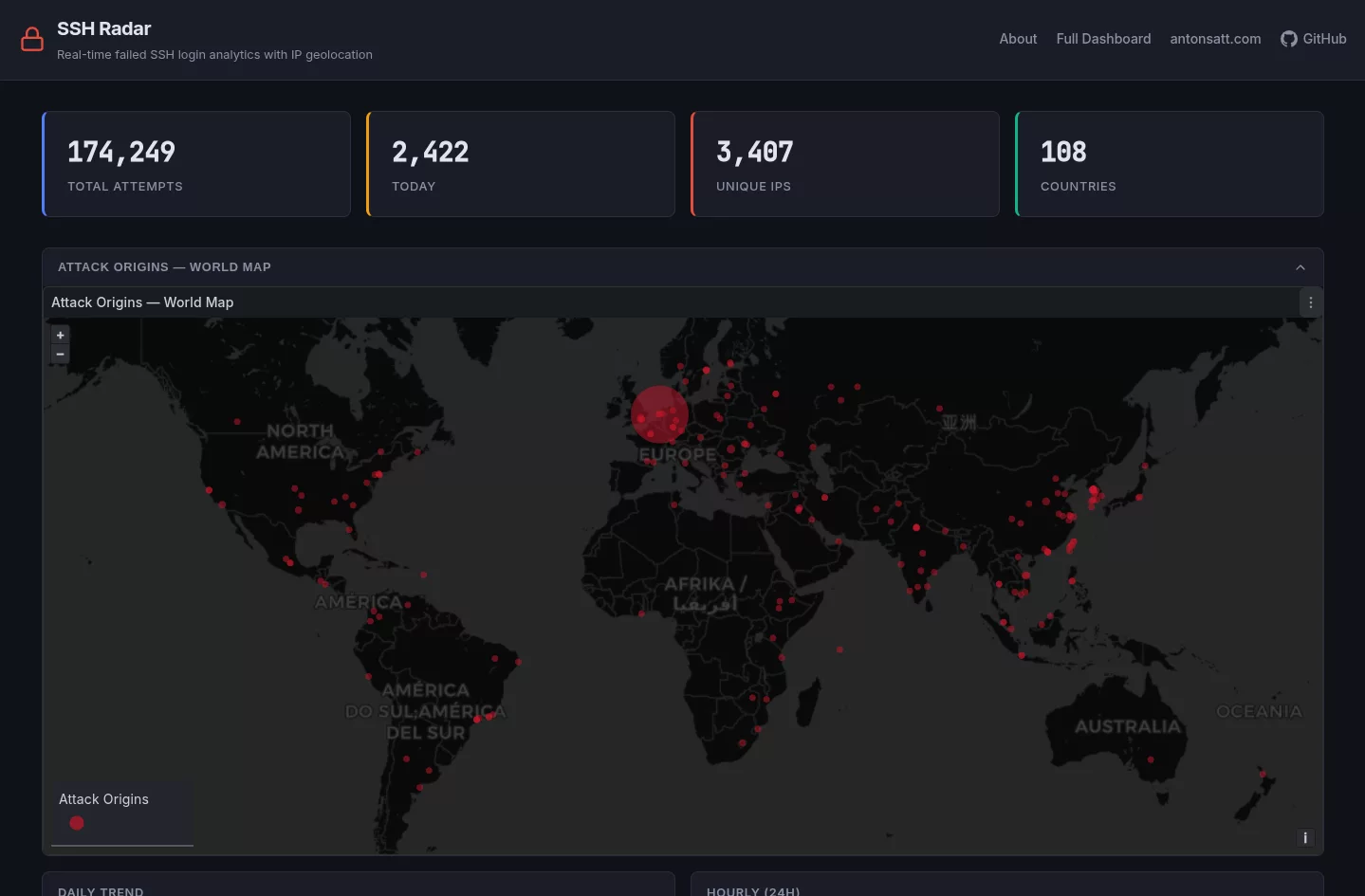
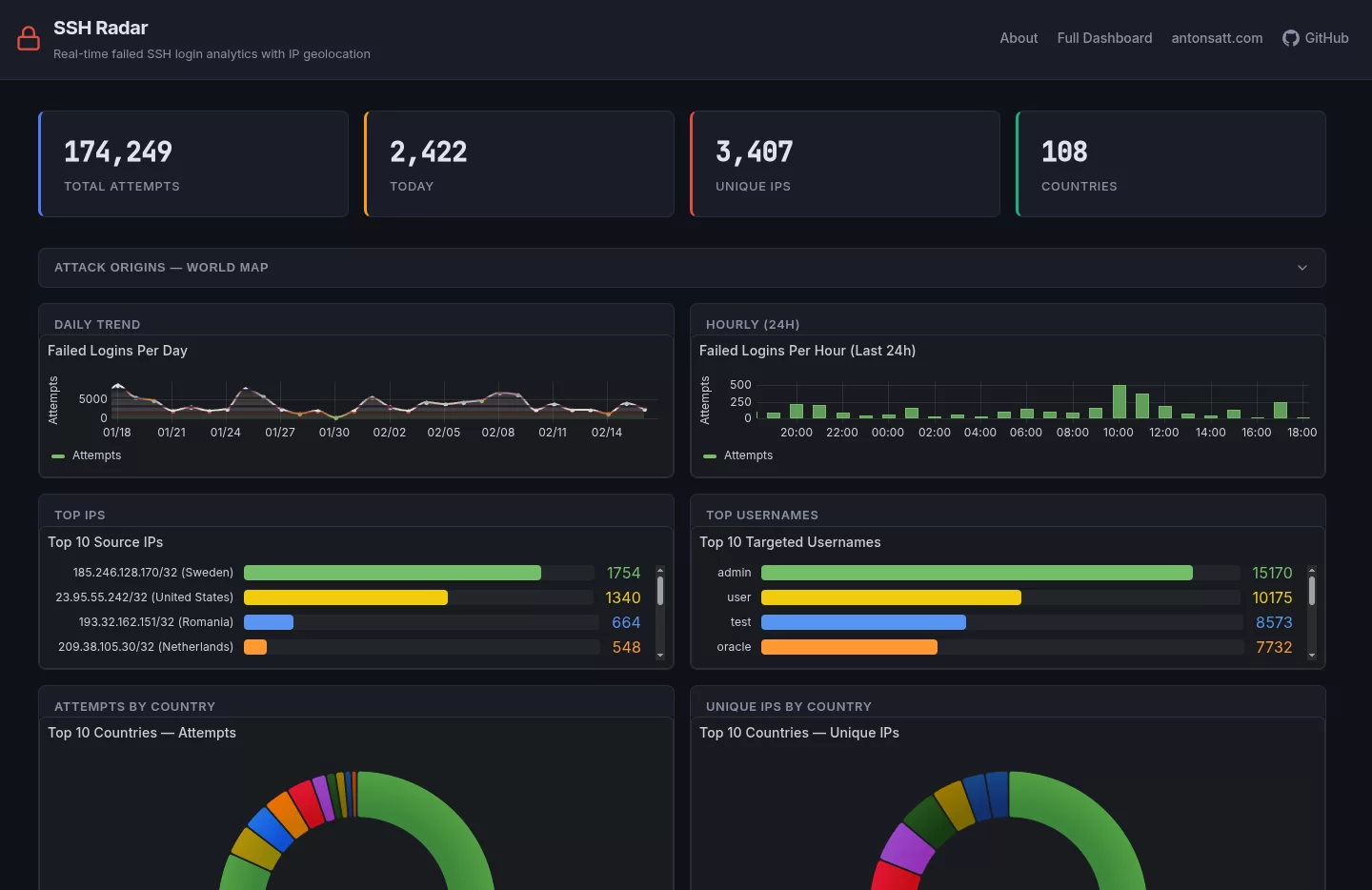

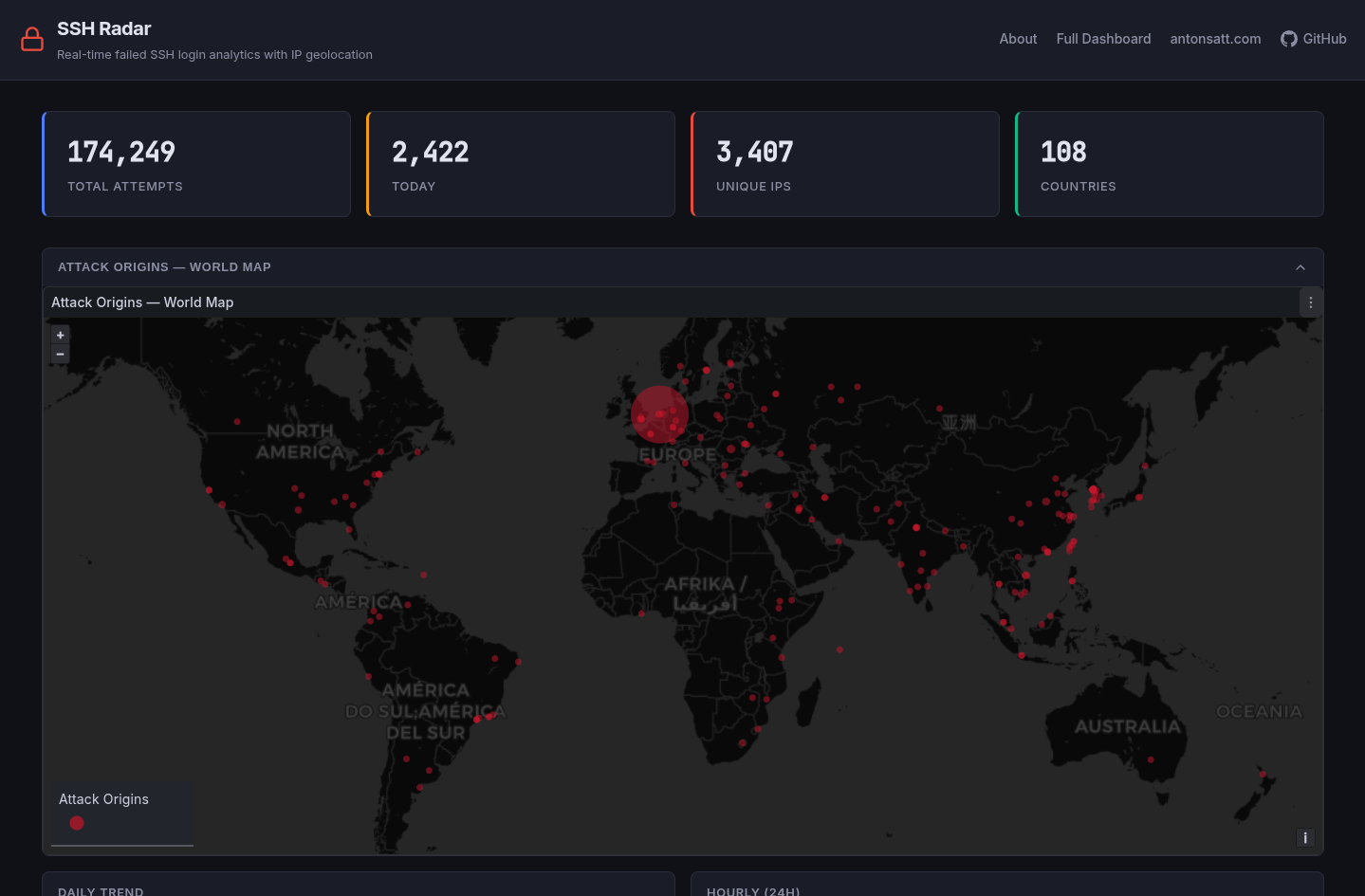
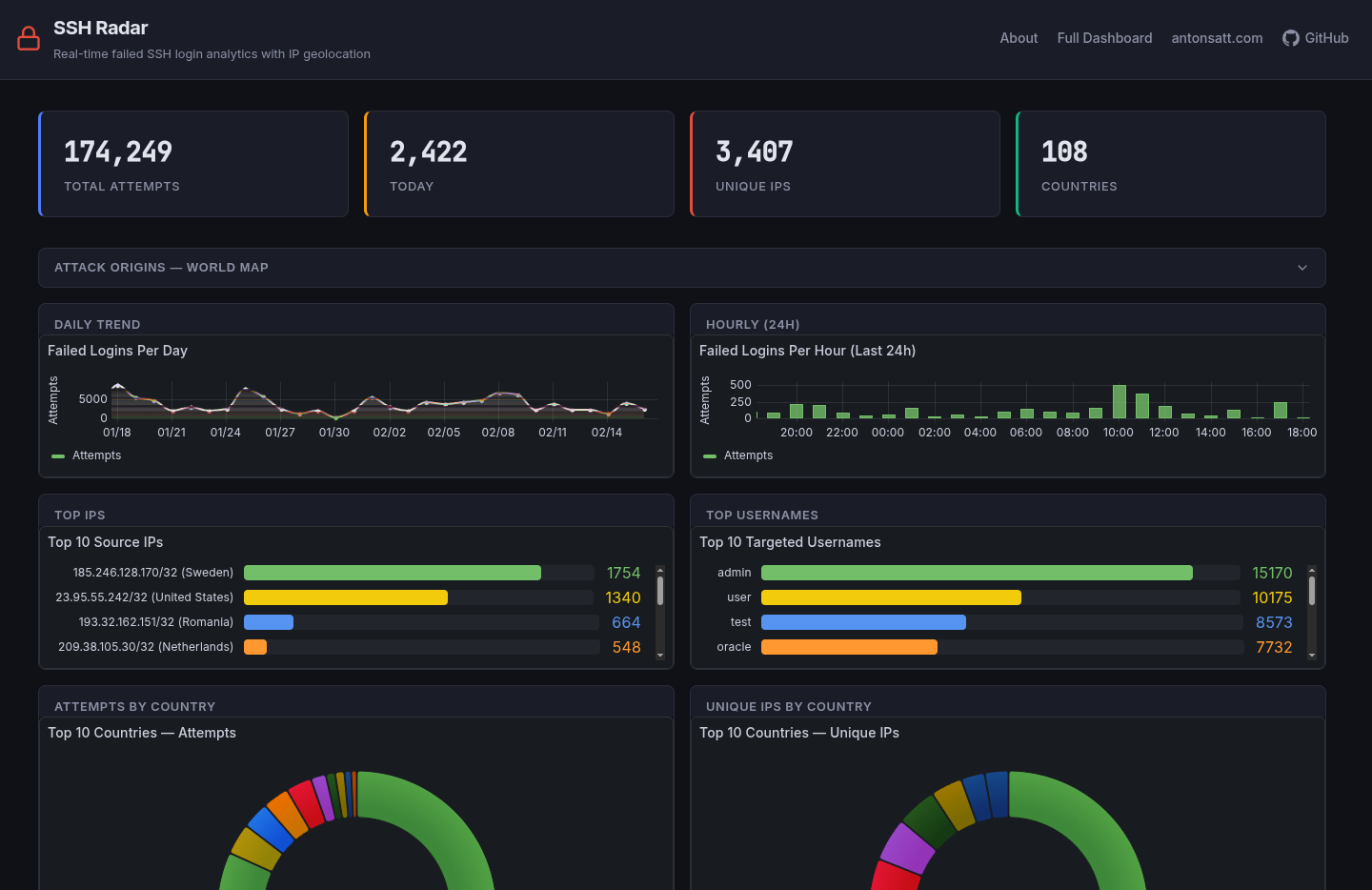
Real-time monitoring and visualization of failed SSH login attempts on a Linux server.
Parses lastb output, enriches IPs with geolocation data via MaxMind GeoLite2, stores everything in PostgreSQL, and presents it through a branded React frontend with embedded Grafana dashboards.
Live instance: ssh-radar.antonsatt.com
Architecture
                         ┌──────────────────────────────────┐
                         │        Oracle Cloud ARM          │
                         │      Ubuntu, 12GB RAM, 2 CPU     │
                         │                                  │
Internet ──► 443 ──►     │  ┌────────────────────────┐      │
                         │  │  nginx-proxy (Docker)  │      │
                         │  │  HTTPS + auto SSL certs │      │
                         │  └──────────┬─────────────┘      │
                         │             │                    │
                         │             ▼                    │
                         │  ┌──────────────────┐            │
                         │  │  React Frontend  │            │
                         │  │  (Nginx + SPA)   │            │
                         │  └────┬─────────────┘            │
                         │       │                          │
                         │    /grafana/                     │
                         │       │                          │
                         │       ▼                          │
                         │  ┌────────┐                      │
                         │  │Grafana │                      │
                         │  │ :3000  │                      │
                         │  └───┬────┘                      │
                         │      │                           │
                         │      ▼                           │
                         │  ┌───────────┐                   │
                         │  │PostgreSQL │◄── Ingestion      │
                         │  │  :5432    │    (host cron)    │
                         │  └───────────┘    lastb -F       │
                         │                   + GeoLite2     │
                         └──────────────────────────────────┘
- Ingestion runs on the host (not in Docker) because
lastbneeds root access to/var/log/btmp - PostgreSQL, Grafana, and the frontend run as Docker containers
- SSL/HTTPS is handled automatically by an nginx-proxy + Let's Encrypt companion container (can be shared with other services on the same server)
- The frontend container serves the React SPA and reverse-proxies
/grafana/to the Grafana container internally
Features
- Parses
lastb -Foutput with support for IPv4, IPv6, and edge cases - Deduplicates login attempts using a unique constraint on
(username, source_ip, timestamp) - Offline IP geolocation via MaxMind GeoLite2-City database
- Grafana dashboard with 11 panels:
- Stat cards (total attempts, today's attempts, unique IPs, unique countries)
- Time series (daily and hourly trends)
- World geomap with proportional markers
- Top 10 countries (pie chart), top IPs, top usernames (bar gauges)
- Detailed table of recent attempts
- React frontend with live stats and embedded Grafana panels
- Automated ingestion via cron (every 5 minutes)
Prerequisites
- Docker and Docker Compose
- Python 3.8+ (on the host, for ingestion)
- An nginx-proxy + letsencrypt-companion setup on the Docker host (or any reverse proxy that routes based on
VIRTUAL_HOST) - A free MaxMind GeoLite2 account (for IP geolocation)
Setup
1. Clone and configure
git clone https://github.com/antonsatt/ssh-radar.git
cd ssh-radar
cp .env.example .env
Edit .env and fill in:
POSTGRES_PASSWORD— a strong password for the databaseDB_PASSWORD— same password (used by the host ingestion script)GF_SECURITY_ADMIN_PASSWORD— Grafana admin passwordMAXMIND_ACCOUNT_ID— your MaxMind account ID (shown at https://www.maxmind.com/en/accounts/current)MAXMIND_LICENSE_KEY— your GeoLite2 license keyDOMAIN— your domain (e.g.ssh-radar.antonsatt.com)MAXMIND_DB_PATH— adjust to match your install location (e.g./home/ubuntu/apps/ssh-radar/data/GeoLite2-City.mmdb)
Important: If your password contains special characters (like &, !, $), ensure it does not conflict with shell interpretation. The ingestion script loads .env line-by-line to handle this safely.
2. Download the GeoLite2 database
bash src/update_geodb.sh
The script reads MAXMIND_ACCOUNT_ID and MAXMIND_LICENSE_KEY from your .env file automatically.
3. Install Python dependencies (on host)
python3 -m venv .venv
.venv/bin/pip install -r requirements.txt
4. Start the containers
The docker-compose.yml connects the frontend to an external Docker network so that an existing nginx-proxy can discover it. By default it expects a network called generated_default — update the btcpay_network section in docker-compose.yml to match your nginx-proxy's network:
# Find your nginx-proxy's network name:
docker inspect <your-nginx-proxy-container> --format '{{json .NetworkSettings.Networks}}' | python3 -m json.tool
Then update the network name in docker-compose.yml under networks.btcpay_network.name to match, and start the containers:
docker compose up -d
This starts PostgreSQL (with schema auto-initialized), Grafana (with provisioned datasource and dashboard), and the React frontend.
The frontend container exposes VIRTUAL_HOST and LETSENCRYPT_HOST environment variables. If you have an nginx-proxy + letsencrypt-companion running on the same Docker host, it will automatically:
- Route traffic for your domain to the frontend container
- Provision and renew SSL certificates via Let's Encrypt
5. Set up the cron job
sudo crontab -e
Add (adjust the path to your install location):
*/5 * * * * /home/ubuntu/apps/ssh-radar/scripts/run_ingest.sh >> /var/log/ssh-radar-ingest.log 2>&1
The run_ingest.sh script automatically loads .env from the project root, so no extra environment setup is needed.
6. Initial data load
Run the ingestion manually once to populate historical data:
sudo scripts/run_ingest.sh
If you have many existing login attempts, geolocation runs automatically for all new IPs. To backfill geolocation for previously ingested records:
sudo env $(grep -v '^#' .env | xargs) .venv/bin/python3 src/geolocate.py
Project Structure
ssh-radar/
├── docker-compose.yml           # PostgreSQL + Grafana + Frontend
├── .env.example                 # Configuration template
├── requirements.txt             # Python dependencies
├── sql/
│   ├── 001_schema.sql           # Tables, indexes, constraints
│   └── 002_views.sql            # Views and materialized views
├── src/
│   ├── config.py                # DB connection, env vars, logging
│   ├── parser.py                # lastb -F output parser
│   ├── ingest.py                # Ingestion pipeline (CLI entry point)
│   ├── geolocate.py             # MaxMind GeoLite2 IP enrichment
│   └── update_geodb.sh          # Download/update GeoLite2 database
├── scripts/
│   └── run_ingest.sh            # Host cron runner script
├── grafana/
│   ├── provisioning/            # Auto-configured datasource + dashboard
│   └── dashboards/
│       └── ssh-radar.json       # Dashboard with 11 panels
├── frontend/
│   ├── src/                     # React + TypeScript + Vite
│   ├── Dockerfile               # Multi-stage build (Node → Nginx)
│   └── nginx.conf               # SPA fallback + Grafana reverse proxy
├── tests/
│   ├── test_parser.py           # 18 parser tests
│   ├── test_geolocate.py        # 17 geolocation tests (3 skip without DB)
│   ├── test_integration.py      # 10 integration tests (real PostgreSQL)
│   └── fixtures/
│       └── sample_lastb.txt     # Test data
└── data/                        # GeoLite2-City.mmdb (gitignored)
Testing
.venv/bin/python3 -m pytest tests/ -v
45 tests total (42 pass, 3 skip). The 3 skipped tests require the GeoLite2 .mmdb database file in data/. Integration tests auto-start a temporary PostgreSQL Docker container.
Tech Stack
| Component | Technology |
|---|---|
| Language | Python 3 |
| Database | PostgreSQL 16 |
| Geolocation | MaxMind GeoLite2 (offline) |
| Visualization | Grafana OSS (anonymous viewer) |
| Frontend | React 18 + TypeScript + Vite |
| Reverse Proxy | nginx-proxy + Let's Encrypt |
| Deployment | Docker Compose on Oracle Free Tier |
| Scheduling | Host cron (every 5 minutes) |
Security
- Grafana and PostgreSQL not exposed to the internet (internal Docker network only)
- Grafana anonymous access limited to Viewer role
- HTTPS enforced via Let's Encrypt (auto-provisioned)
- No secrets in the repository (
.envis gitignored) - Ingestion runs on the host with controlled DB access
Future Enhancements
Capture attempted passwords (Cowrie integration)
OpenSSH deliberately does not log password attempts, so the current pipeline only captures which user was tried from which IP — never the actual password an attacker typed. Replacing sshd on the honeypot port with Cowrie — a Python-based SSH/Telnet honeypot — would unlock a much richer data set:
- Attempted username + password combos (Top-10 passwords, top credential-stuffing dictionaries)
- Commands attackers run after "logging in" to Cowrie's fake shell (malware droppers, recon commands, etc.)
- Files attackers try to upload (free threat-intel samples)
- Client banners / SSH implementations used by scanners
Migration sketch:
- Admin sshd stays on its non-standard port, untouched
- Cowrie listens on port 22 instead of real sshd — configured with Docker or systemd, running as an unprivileged user with authbind/capabilities for the privileged port
- Extend the ingestion pipeline with a Cowrie JSON-log parser alongside the existing
lastbparser, writing to a newpassword_attemptstable (source_ip, username, password, timestamp) + acommandstable for session activity - Add dashboard panels: Top 10 attempted passwords, Top 10 username/password combos, common post-login commands
Tradeoffs: Cowrie is a separate codebase to patch and maintain, and a determined attacker can fingerprint it as a honeypot. For a project whose purpose is collecting attack data, those are acceptable costs.
Author
Anton Satterkvist — antonsatt.com
Built as a portfolio project to demonstrate DevOps skills: Linux, Docker, PostgreSQL, Grafana, Python, CI/CD, and infrastructure security.
License
MIT