
Swipium
An MCP server that lets coding agents QA mobile apps on Android Emulators and iOS Simulators.
Swipium gives an AI coding agent (Claude Code, Codex, Gemini CLI, Cursor, VS Code, and other MCP clients) the tools a QA engineer uses: find or build the app, boot a simulator, install and launch it, read the screen, tap and type through real user flows, and write a report backed by screenshots, logs, and UI dumps. A run can be turned into a repeatable flow, a test suite, or Appium code.
It is for mobile developers who want their agent to catch the broken login screen before a TestFlight or Play Console build. It runs locally (stdio; the server opens no network port, and the WebDriverAgent it manages for iOS takes commands on 127.0.0.1 only, though its screen stream port is reachable from the network; see Security), drives devices through adb, simctl, and WebDriverAgent rather than Appium, and asks your consent before anything with side effects. swipium.com
A session, abbreviated
You:    Smoke test this app on Android with Swipium.
Agent > qa_test_this { goal: "smoke", waitForCompletion: true }      (runs by default)
        🔐 Consent required (low): • boot_emulator: emulator -avd Pixel_8_API_35 -no-audio -no-snapshot-save -no-boot-anim -gpu auto -no-window
                                   • install_apk: adb -s <Pixel_8_API_35 once booted> install -r -g android/app/.../app-release.apk
You:    Approve                                               (one prompt covers boot + install)
        state: "running", sessionId: "3f9c2a1b", jobId: "a41c09e2"
Agent > qa_job_status { sessionId: "3f9c2a1b", jobId: "a41c09e2", waitMs: 45000 }
        status: "done", result.state: "completed"
        reportHead: "RELEASE RISK: SHIP … Health: native OK, app OK … Open the report: …/report/report.html"
        nextRecommendedAction: qa_get_artifact { uri: "swipium://session/3f9c2a1b/report/…-summary.md" }
Agent:  The app launched and passed the smoke checks with no crashes or error screens.
Three calls: start the run, wait for it, and (only when the inlined head isn't enough) read report.md. The report behind that summary, rendered with npx swipium report --latest --format markdown, includes:
**Release risk: 🟢 SHIP**

**App status:** PASS - No high-severity app/native finding observed in this run.
**Coverage status:** COVERED - Structured smoke/workflow evidence was collected.
**Tool status:** PASS - No Swipium/MCP limitations or tool errors recorded in this run.
Contents
Requirements · Quickstart · Starter prompts · How it works · Tools · Where results go · Configuration · CLI · CI · Upgrading · Troubleshooting · Security
Requirements
Node.js 22.12 or newer. On an older Node.js the server prints a warning on stderr and swipium verify fails. Swipium works with emulators and simulators only; physical devices are refused with PHYSICAL_DEVICE_UNSUPPORTED (why). Structured iOS automation needs WebDriverAgent 6.0 or newer (qa_wda {action:"setup"} builds and starts one); without it an iOS Simulator is visual-only.
MCP: a stdio server that speaks protocol revisions 2025-06-18, 2025-11-25 and 2026-07-28; the client's first message picks one. Claude Code 2.1.285 and later connect on 2026-07-28, Codex 0.146 on 2025-06-18. Any stdio MCP client should work (protocol versions).
| Host | Android Emulator | iOS Simulator |
|---|---|---|
| macOS | Supported | Supported (Xcode with a Simulator runtime) |
| Linux | Supported | Not available |
| Windows | Experimental and untested; some process-cleanup helpers rely on ps |
Not available |
| Your app | What Swipium needs |
|---|---|
| React Native / Expo, debug build | Metro serving this project's JS bundle. qa_metro can start it (consent-gated); otherwise the run stops with METRO_REQUIRED, on Android and for iOS simulator builds without an embedded bundle alike. A Metro on port 8081 serving another project is METRO_WRONG_PROJECT. Expo dev-client builds must be connected to Metro by hand for now; when this project's Metro is already serving, the blocker gives the dev-client deep link to open. |
| React Native / Expo release, or native Android / iOS | An installable artifact (APK or .aab for Android, a simulator .app for iOS; a device .ipa is refused) or a project Swipium can build. |
Expo managed (no android/ or ios/) |
Nothing extra: the build (npx expo run:android --device <AVD> or npx expo run:ios, consent-gated) generates the native project first. If that prebuild step fails, the build fails with EXPO_PREBUILD_REQUIRED; run npx expo prebuild yourself and retry. |
| Only a built app, no source | Put the simulator .app or the .apk in a directory and pass that directory as projectRoot (Testing a prebuilt build). |
| Flutter | A buildable Flutter project, or a built APK / .app. |
- Android: platform-tools, the Emulator, and at least one AVD (usually via Android Studio).
adbon yourPATHis used if present, else the SDK copy from$ANDROID_HOME,$ANDROID_SDK_ROOT, or the default SDK location (~/Library/Android/sdk,~/Android/Sdk,%LOCALAPPDATA%\Android\Sdk). Theemulatorbinary that boots AVDs andaapt2come from the SDK first..aabfiles need bundletool. - iOS (macOS only): Xcode and a simulator. Taps, typing, and UI-tree snapshots need WebDriverAgent (WDA, the on-simulator automation server Appium uses); without it iOS is visual-only (iOS modes).
Quickstart
1. Register Swipium with your client. From your app repository, for Claude Code:
npx -y swipium init claude --scope project           # preview; changes nothing
npx -y swipium init claude --scope project --apply   # writes .mcp.json and the skill, then runs `swipium verify`
For Claude Code, init also sets SWIPIUM_MAX_WAIT_MS=110000 (one call can wait up to 110 s, so most runs finish in one call) and installs the swipium-qa agent skill under .claude/skills/ (~/.claude/skills/ for --scope user; --no-skill skips it). --trust-local (local or user scope only) also pre-approves the consent actions that run no project code, so boots and installs stop prompting while builds, Metro and WebDriverAgent still ask. A Claude Code plugin with the same server and skill is in plugin/. Swipium is also listed in the MCP Registry as io.github.GeroPalombo/swipium, so registry-aware clients can find and install it.
The same command handles codex, gemini, cursor, and vscode (swipium init <client> --apply). Claude Desktop, Windsurf, manual configs, and per-client details are in docs/mcp-server.md.
Codex: swipium init codex --apply appends a [mcp_servers.swipium] block to ~/.codex/config.toml (or $CODEX_HOME/config.toml) with longer timeouts and an env_vars line, and installs the skill under .agents/skills/. Codex doesn't pass your shell environment to MCP servers, so without that line SWIPIUM_TEST_*, ANDROID_HOME and JAVA_HOME never reach Swipium. If you already have a block, init prints the line to add. Keep tool_timeout_sec = 600 (Codex setup).
Headless runs (codex exec, claude -p, CI): these clients answer consent prompts automatically, so nothing gated (boot, install, build) runs unless you pre-approve exact actions with SWIPIUM_CONSENT_PREAPPROVE in the server env; approving in the chat doesn't help. Pre-approval isn't tied to a device, so on a machine with several emulators or simulators also pin one with SWIPIUM_DEVICE (Headless runs).
2. Restart the client and check that it lists qa_test_this, qa_doctor, and qa_report.
3. Ask the agent to test the app:
Use Swipium to smoke test this app: qa_test_this with goal "smoke" and
waitForCompletion true, poll qa_job_status while it is running, and
summarize the report.
qa_test_this runs by default (mode:"execute", since 2.3.0); pass mode:"plan" for a side-effect-free preview. goal:"smoke" is the fastest path. With no goal, qa_test_this runs the smoke check and then tries to generate a test suite. With the skill installed, "test this app with Swipium" is enough.
If a tool returns PROJECT_ROOT_UNRESOLVED, name the absolute project path in your prompt or set SWIPIUM_PROJECT_ROOT in the server config (Project root).
What you'll see
- One approval prompt listing the exact build, boot, and install commands. Clients with MCP elicitation show a real prompt; others return
requiresConsent, which the agent must relay to you. - The first build can take minutes. The run is a background job.
waitForCompletionwaits up to about 45 s by default (about 105 s with theSWIPIUM_MAX_WAIT_MS=110000thatinit claudesets). Aqa_job_statuspoll returns at once unless the agent passeswaitMs; Swipium tells it to pass 45000, and a poll is capped at 50 s (110 s with that setting). - Two states. The job
statusisrunning,done,failed, orcancelled. The run'sresult.stateiscompletedorneeds_input(jobdone), orblockedorunsafe(jobfailed).needs_inputmeans one question for you, such as login credentials. - A report with separate verdicts for the app, coverage, and Swipium itself. A completed run inlines a short head (verdict, failures with their failing step and screenshot URI) and saves
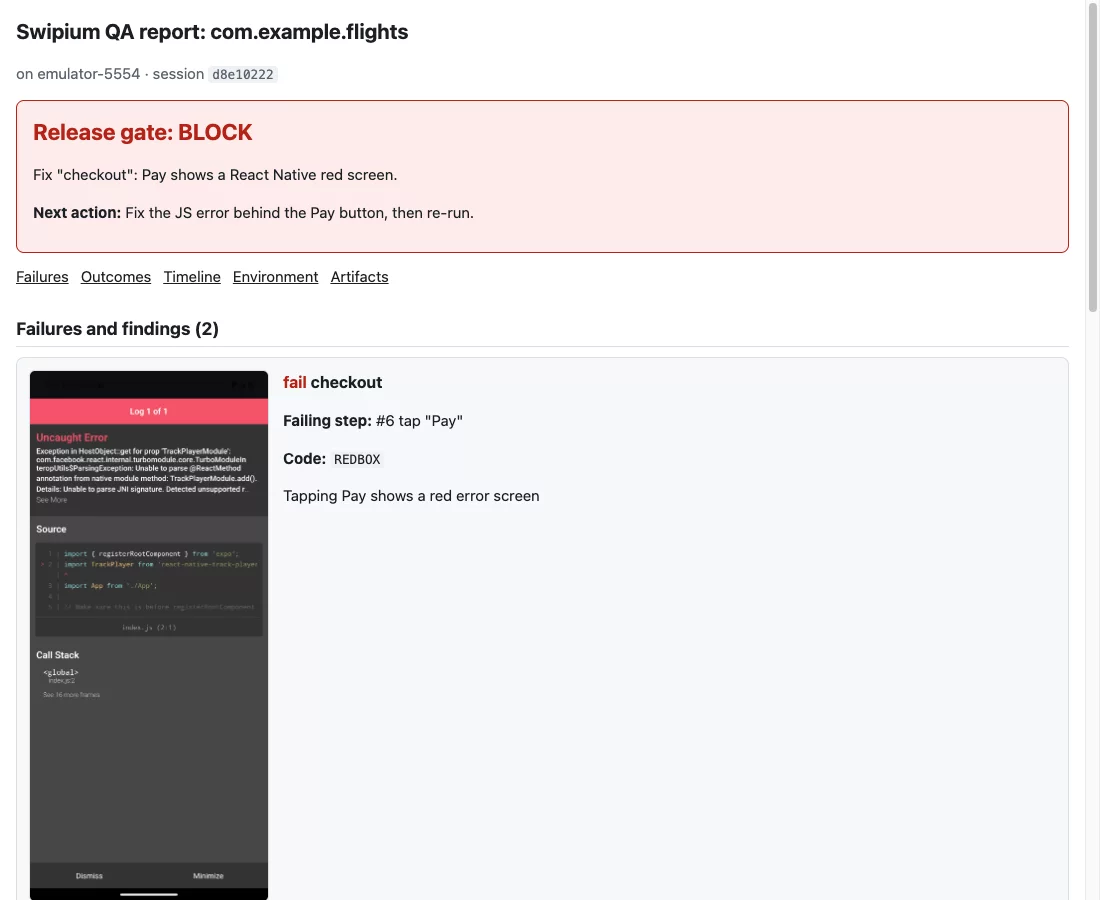
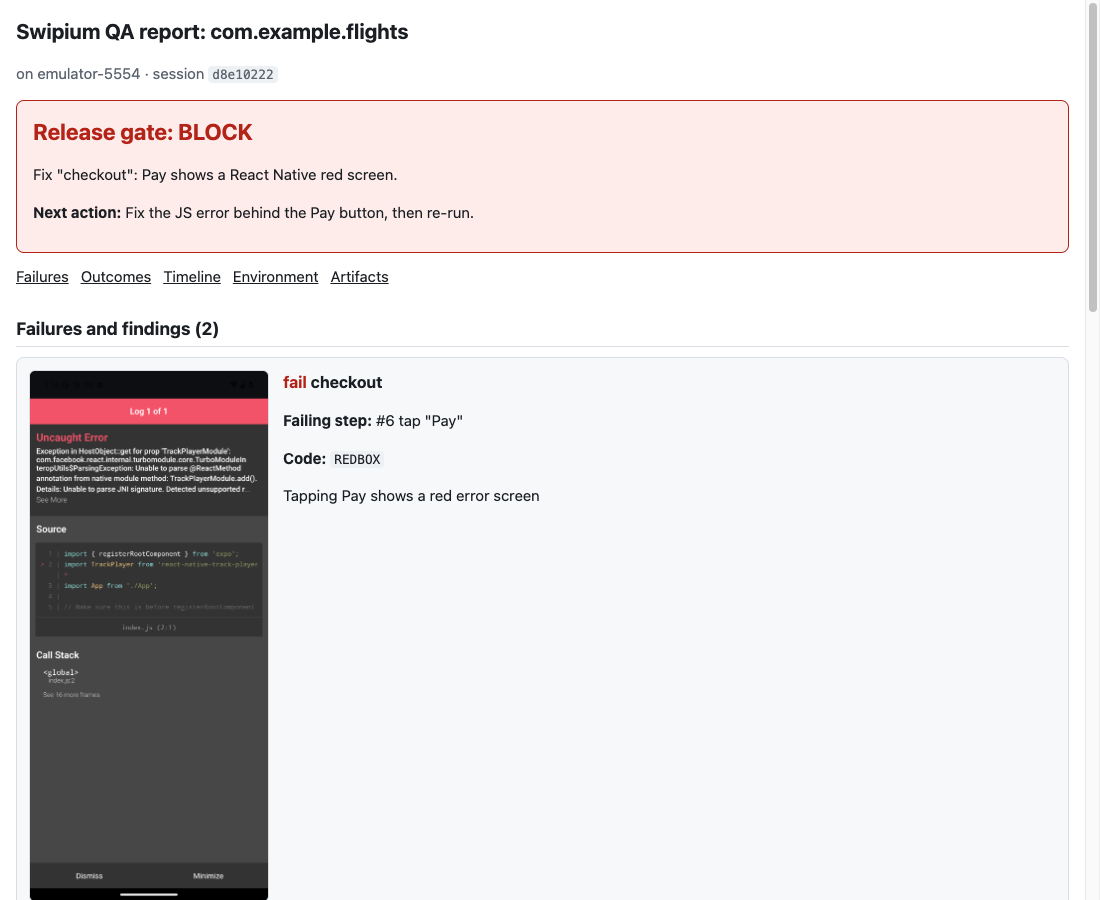
report.mdfor the agent; a blocked run names the fix. For you there isreport.html: one self-contained page with the verdict, each failure with its screenshot and log, and the step timeline, which opens offline in any browser (the agent gives you its path,reportHtmlPath; what's in it).
Starter prompts
| Goal | Prompt |
|---|---|
| Smoke test | "Use Swipium to smoke test this app: qa_test_this with goal smoke and waitForCompletion, then summarize the report." |
| Test login | "Use Swipium to test login with goal test_login. Don't ask me for the password: type ${SWIPIUM_TEST_EMAIL} and ${SWIPIUM_TEST_PASSWORD} with qa_act." (set both in the server env; placeholders expand server-side and secret values are redacted) |
| Reproduce a bug | "Use Swipium to reproduce this bug with goal reproduce_bug and goalText: 'checkout button does nothing after adding a coupon'. Attach the evidence." |
| Save a flow | "Turn the last Swipium run into a flow named login-smoke with qa_generate and save it." |
| Release gate | "Run Swipium with goal release_gate and tell me whether the release gate passes." |
Clients that support MCP prompts can use the built-in ones instead: swipium_setup_check, swipium_guardrail_validation, swipium_full_smoke, swipium_bug_repro, swipium_test_feature, swipium_generate_suite, and swipium_convert_run_to_flow.
How it works
qa_test_this {waitForCompletion:true}  >  consent  >  job
                                                       │
         qa_job_status {waitMs}  <─── still running ───┘
           ├─ completed          >  reportHead inline; more in report.md (qa_get_artifact)
           ├─ blocked / unsafe   >  the fix in nextRecommendedAction
           └─ needs_input        >  ask you one question  >  qa_continue_from_blocker (resumes the run)
qa_test_this finds or builds the app, boots a simulator, installs and launches the app, runs a smoke check (plus exploration or suite generation, per goal), and always writes a report. Failures carry a failureCode that qa_explain_blocker explains. For hands-on work the agent opens a session (qa_start_session), reads the screen with qa_snapshot, acts on element refs such as @e3 (stable while the element stays on screen), and batches 3 or more known steps in one qa_flow_run {flowYaml}.
Concepts, explained in docs/concepts.md:
- Project root: the repository under test, from the
projectRootargument, MCP roots,SWIPIUM_PROJECT_ROOT,CLAUDE_PROJECT_DIR, or the server's working directory. - Consent: builds, boots, installs, data wipes, network changes, and repo-supplied commands need your single-use approval.
- Sessions and jobs: a session holds one run's device, app, and evidence; long work is a job you poll.
- Secrets and redaction: credentials are redacted from text output; screenshots are not.
- iOS modes: visual-only through
simctl, or full interaction with WDA. - The app map is Swipium's durable memory of your app's screens; a flow is a replayable YAML script (docs/flows.md); a POM suite is a generated page-object test suite. See the glossary.
Tools
Grouped by capability (qa_status without arguments returns the same groups). Every tool's parameters and behavior are in docs/tools.md; swipium verify lists what your installed version exposes.
| Group | Tools |
|---|---|
| Start | qa_test_this, qa_status, qa_job_status, qa_job_cancel, qa_explain_blocker, qa_continue_from_blocker, qa_get_artifact |
| Setup | qa_doctor, qa_start_session, qa_prepare_target, qa_prepare_ios_target, qa_ios, qa_wda |
| Build | qa_resolve_target, qa_resolve_artifact, qa_build, qa_bundletool |
| Device | qa_device_info, qa_orientation, qa_geolocation, qa_network, qa_metro, qa_app_control, qa_screen_record |
| Drive | qa_snapshot, qa_inspect, qa_act, qa_clear_overlay, qa_check_health, qa_screenshot, qa_note, qa_visual, qa_wait |
| Run | qa_smoke, qa_explore, qa_report |
| App map | qa_app_map_build, qa_app_map_read, qa_app_map_query, qa_app_map_feature_scope, qa_app_map_update |
| Feature | qa_test_feature |
| Flows | qa_flow_check, qa_flow_run, qa_flow_compile, qa_flow_repair |
| Generate | qa_generate |
| Test suite | qa_suite_read, qa_suite_update, qa_suite_generate, qa_suite_export, qa_suite_lint |
| Issues | qa_issue_log, qa_mobile_audit |
| First run | qa_first_run |
Every tool carries MCP annotations: read-only tools declare readOnlyHint:true and openWorldHint:false (so clients can auto-approve them); the rest also declare destructiveHint and idempotentHint.
Where results go
<your repo>/.swipium/: app map, flows, test suite, issue ledger, visual baselines, generated files, the WebDriverAgent build cache (cache/wda-derived-data, about 200 MB per project;ios.wda.derivedDataPathmoves it), and your configuration (config.json,fixtures.json,policy.json).swipium scanmerges its results intoconfig.jsonand keeps every key you set (WDA team, OCR and mask commands,appId); it never regenerates the file. AnappIdcounts as yours when it has noappIdSource, orappIdSource:"config.json", or when it differs fromscanAppId(the id the last scan detected, which scan stores next to it); then it is kept even with a scanappIdSourceleft in place, andappIdSourcebecomesconfig.json. One an earlier scan wrote and you didn't change is refreshed. A config from a scan older than 2.3.0 has noscanAppId: there a hand-editedappIdwith a scanappIdSourceis still replaced, and scan printsreplaced appId <old> in config.json (written by an earlier scan from <source>; ...), so removeappIdSourceto keep yours. The first time Swipium writes the app map, issue ledger, or WDA build cache in a Git repository, it adds.swipium/to.gitignore. Never pruned automatically.~/.swipium/runs/: per-session state and evidence (screenshots, logs, UI dumps, reports), returned asswipium://URIs. When a server process first loads its session registry, it prunes in the background (for at most 2 s per start) session directories older thanSWIPIUM_RETENTION_DAYS, keeping registered sessions and the newestSWIPIUM_RETENTION_KEEPper project whose root still exists.swipium gccleans up on demand. Session files are 0600 in 0700 directories, and so are~/.swipium'sregistry.json,projects.jsonandprocesses.json.
Configuration & environment variables
Set these in the MCP server's env block (or your shell, for CLI commands). This is the complete list of variables Swipium reads.
Codex forwards only the names listed in env_vars (plus a fixed whitelist such as HOME and PATH); swipium init codex writes that line for you. It deliberately leaves out CLAUDE_PROJECT_DIR, SWIPIUM_DISABLE_DEVICE_DISCOVERY and the approval grants (SWIPIUM_CONSENT_PREAPPROVE, SWIPIUM_CONSENT_PREAPPROVE_RUN_CODE, SWIPIUM_ALLOW_REMOTE_WDA): set those literally in env = { ... } so an inherited shell export or a direnv file in a cloned repo can't grant approvals. Add your own custom SWIPIUM_* flow variables (and SWIPIUM_DEVICE, if you pin a device) to the list. Details: docs/mcp-server.md.
| Variable | Purpose |
|---|---|
SWIPIUM_PROJECT_ROOT |
Absolute path of the app repository when the client provides no MCP roots. |
CLAUDE_PROJECT_DIR |
Set by Claude Code; used as the project root after SWIPIUM_PROJECT_ROOT. |
ANDROID_HOME, ANDROID_SDK_ROOT |
Android SDK location, searched for adb, emulator, and aapt2 (see Requirements). |
BUNDLETOOL_JAR |
Path to bundletool.jar for converting .aab files. A bundletool launcher on PATH also works. |
DEVELOPMENT_TEAM, XCODE_DEVELOPMENT_TEAM |
Apple team ID for signing WDA (ios.wda.developmentTeam in .swipium/config.json takes precedence). |
APPIUM_HOME |
Extra location searched for an Appium-installed WDA (besides ~/.appium and global npm). |
WDA_PROJECT_PATH, WEBDRIVERAGENT_PROJECT |
Extra WebDriverAgent.xcodeproj candidates rep |