English · 한국어 · Website · Documentation
Trina AX is a self-hosted team workspace that connects company files and folder permissions to Claude Code and the Codex CLI.
For company IT teams and developers who want to run a shared AI workspace on a Linux server or an office Mac. Team members use a web browser, desktop app or mobile web app; the AI engines run on the team server. Trina also offers hosting through ax.trina.app.
Try the local demo · Install for a team · Report a bug
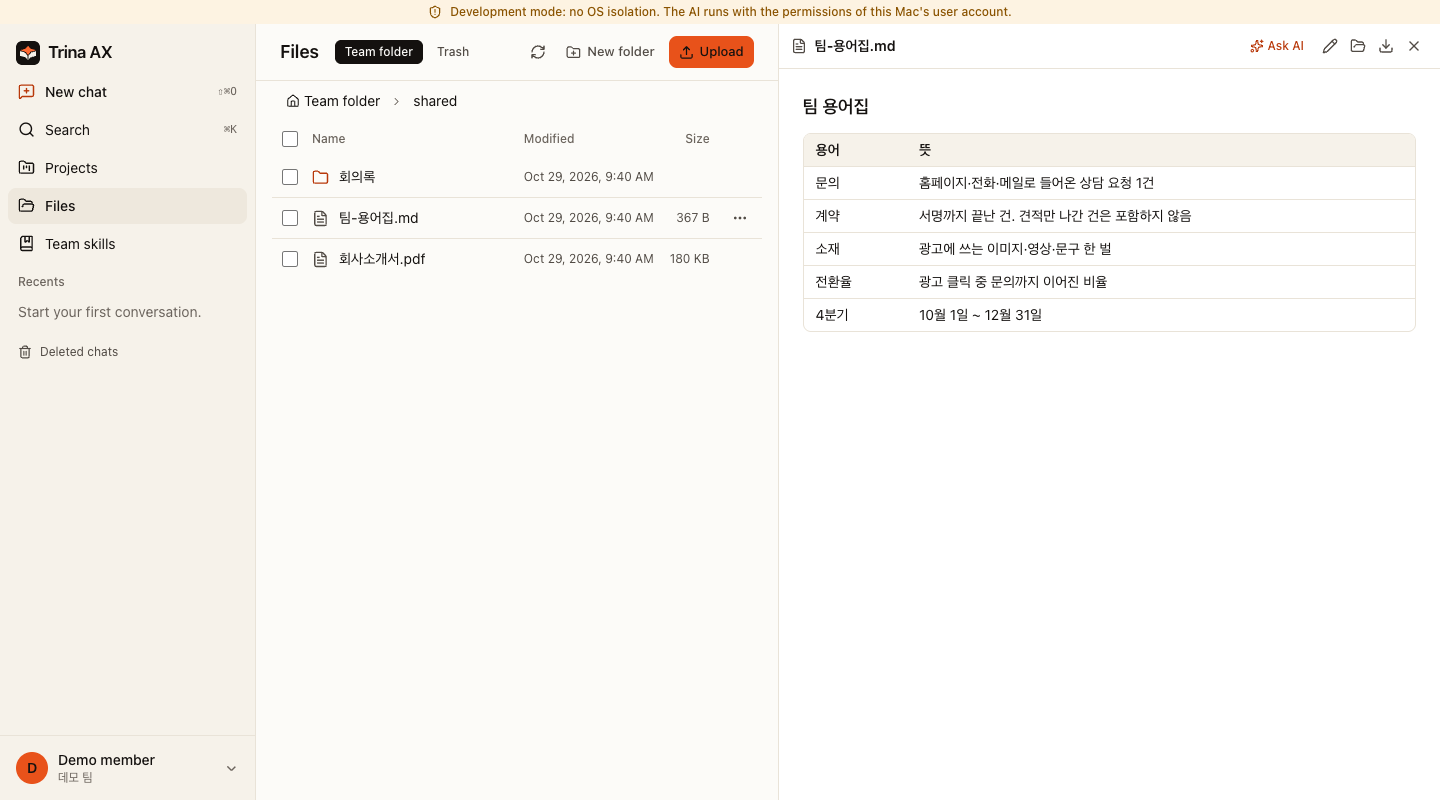
Actual local development build with synthetic demo data; no model-generated answer is shown.
Try it in about 10 minutes
On a Mac with Git, Bun 1.3.12 and Go 1.27+ already installed, allow about 10 minutes to build, seed and browse the local demo. Downloads and first-time tool installation take longer; see the prerequisites. An AI conversation additionally needs a supported Claude Code or Codex CLI installation and login on the server. You can explore files and folder permissions without calling a model.
git clone https://github.com/trina-app/trina-ax.git
cd trina-ax
bun install --frozen-lockfile
ARCHS="arm64 amd64" bun run build
TEAM_AX_DEV_DIR="$HOME/.trina-ax-demo" TEAM_AX_DEV_PORT=19720 bun run dev --no-relay
Keep that terminal open. In a second terminal, from the same checkout:
TEAM_AX_DEV_DIR="$HOME/.trina-ax-demo" bun run demo:seed --base http://127.0.0.1:19720
Open http://127.0.0.1:19720 and sign in as alice with the public demo password teamax-demo-1.
Open Files → shared → 팀-용어집.md to read the sample glossary. The seed starts in Korean; change the language in
Settings → Profile → Language if needed. See the demo walkthrough for a two-user
permission check, an optional first AI prompt and cleanup.
Use a fresh demo data directory. Development mode runs engines as your OS user, without production OS isolation. Use only synthetic files, keep it local, and press Ctrl-C in the first terminal to stop it.
What your team can do
- Work with files under each person's permissions: shared, group, project and personal folders; the server checks access on every file-tool call.
- Read business documents: PDF, Word (DOCX), Excel and PowerPoint (PPTX). HWP/HWPX support is text extraction only, with no preview or creation. Images are read through OCR, not visual scene understanding. Results depend on the file and installed conversion/OCR tools.
- Reuse procedures as skills: Markdown and
SKILL.mdfolders, permission-controlled editing and a review path for member suggestions. Example. - Connect external services: personal or team MCP servers and HTTP APIs, with access rules and write policies. Personal integrations are enabled by default and can be disabled by an administrator. Supported connections and limits.
- Schedule work: run tasks at a set time and review their results; queued work shares server capacity between people.
- Review usage: per-person, model and skill usage with CSV export. Cost estimates are not provider invoices.
- Use web and desktop clients: Windows and Mac desktop source, an in-app browser with site access controls, and a mobile web app.
AI engines
| Engine | Connection | Scope |
|---|---|---|
| Claude Code | Claude subscription or Anthropic API key | Runs on the team server |
| Codex CLI | ChatGPT login or OpenAI API key | Runs on the team server |
| OpenAI-compatible API (experimental) | Team-configured endpoint, model and optional key | In-server agent loop using Chat Completions with tool calls; compatibility varies by provider/model |
In managed installations, the owner configures team connections. Personal AI connections are enabled by default and take priority when enabled; the owner can disable them. Team connections can be assigned to people or groups. Sharing a subscription across members is disabled by default; provider terms still apply. Provider accounts, usage charges and terms are separate from Trina AX. Development mode uses the server OS user's local CLI logins. See AI connection setup.
Architecture
flowchart LR
  U[Web / desktop / mobile web] -->|Signed-in session| S[Team server]
  subgraph H[Linux server or office Mac]
    S --> Q[Per-person queue]
    Q --> E[Claude Code / Codex CLI / experimental API engine]
    E -->|File-tool call as the asking person| G[Server permission check]
    S -->|File browsing as the signed-in person| G
    G --> F[(Company files and personal folders)]
  end
  E -->|Selected context for inference| P[Model provider]
  E -->|Configured connection tools| X[MCP / HTTP services]
Security model: defense in depth
Folder access is enforced by server code, not by instructions to the model. Linux and role-account Mac installations combine it with engine tool restrictions, dedicated engine accounts, a sandbox and network rules. The Mac and Linux guides describe setup and diagnostics. Office Mac mode runs under the logged-in Mac user with its own sandbox/proxy setup; it does not provide the same dedicated-account boundary. Use a dedicated machine and review that guide's limitations.
Files and chats are stored on the team server. Context used to answer a question is sent to the selected model provider; configured external services receive the requests made to them. Self-hosting does not mean all AI processing stays on your network. Server administrators can read stored data. Removing folder access does not erase content already quoted in an earlier answer.
Read the permission model (한국어) and security policy. Report suspected vulnerabilities privately to contact@trina.app, not in a public issue.
Self-hosting and Trina hosting
| Deployment | Who operates it | Start here |
|---|---|---|
| Linux server | Your company | Linux installation (한국어) |
| Office Mac | Your company | Office setup (한국어) or Mac installation |
| Trina hosting | Trina | Hosting enquiries |
This repository contains the team server, clients and Trina branding. The hosted service's billing, provisioning, operations console and website are private and are not included. Deployment FAQ.
Releases
Find published builds and their checksums in GitHub Releases.
The release pipeline builds Linux server kits (amd64/arm64), a Mac office bundle and a Windows desktop installer.
The Mac office bundle is a server bundle; a Mac desktop DMG is not distributed yet, pending Apple signing and
notarization. v0.2.5 is the current release. It is on GitHub Releases and on the Trina update feed (https://updates.trina.app, live since 2026-10-29). Linux servers and office Macs get updates from the feed. See the changelog for changes and publication status.
Documentation and contributing
- Documentation index, examples, FAQ and 한국어 안내.
- Contributing, community conduct and issue templates. English and Korean reports are welcome.
- Machine-readable documentation index.
For local development and checks, follow CONTRIBUTING.md.
| Folder | Contents |
|---|---|
server/, web/, desktop/ |
Bun server, React web app, Electron desktop client |
native/, relay/ |
Go helpers and relay |
shared/ |
Shared contracts; shared/src/cloud-protocol/ has its own MIT license |
editions/trina/branding/ |
Product name, source link and release channel |
mobile/, menubar/ |
Mobile source and Mac menu bar app |
License
Trina AX is licensed under AGPL-3.0-only. See LICENSE and NOTICE.
shared/src/cloud-protocol/ has its own MIT license. Third-party notices: docs/THIRD-PARTY-NOTICES.md.
If you run a changed version as a network service, you must offer its source code to its users (AGPL section 13). The app shows a source code link on the sign-in screen and in Settings › About.
Claude Code and Codex are separate products with their own terms. This project is not endorsed by Anthropic or OpenAI.