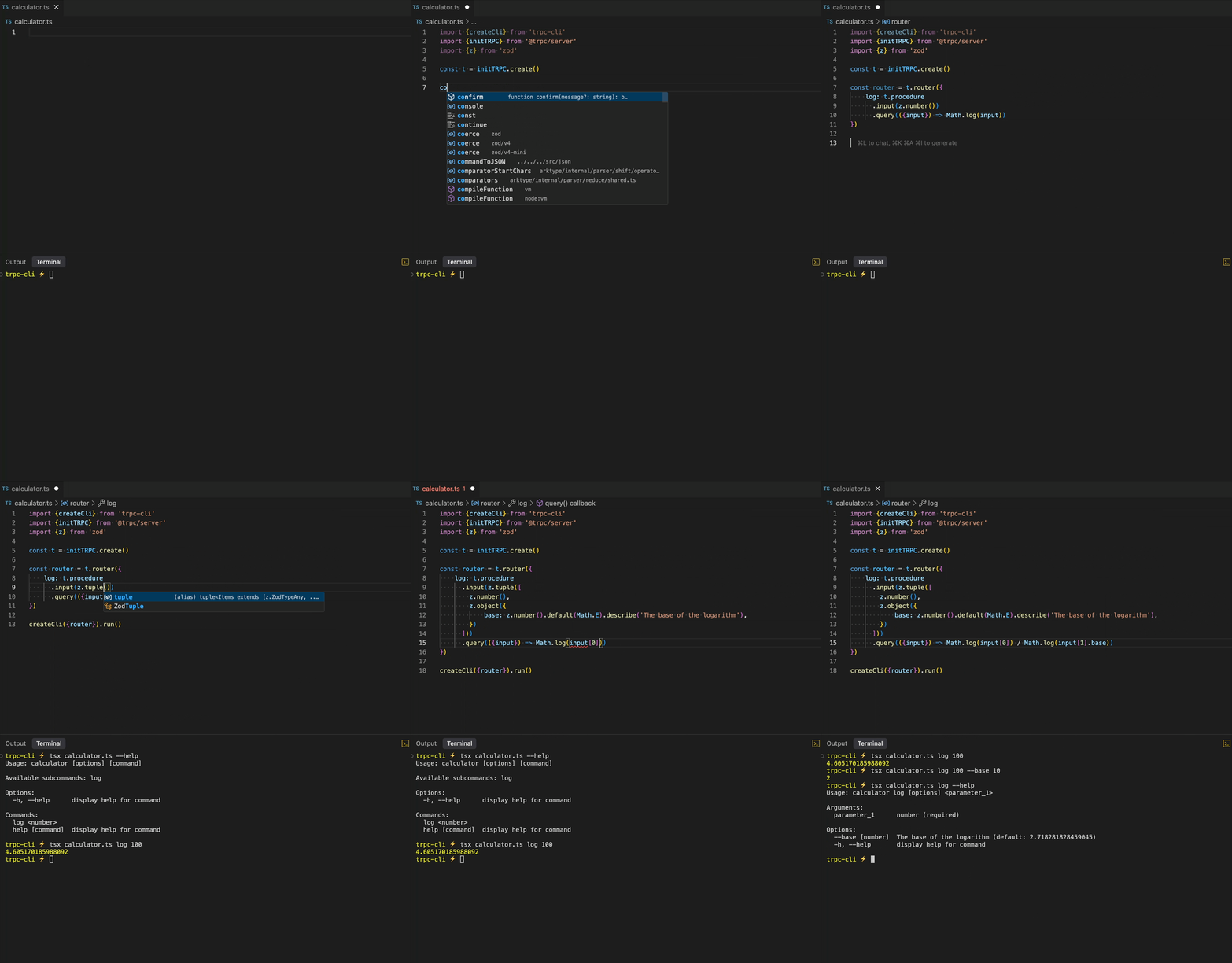

🔥 Build production-quality command-line tools in minutes, not days 🔥

trpc-cli transforms a tRPC (or oRPC) router into a professional-grade CLI with zero boilerplate. Get end-to-end type safety, input validation, auto-generated help documentation, and command completion for free.
- ✅ Get all of trpc's type safety and DX building a CLI
- ✅ Automatic positional arguments and options via zod input types (or arktype, or valibot)
- ✅ Easily add subcommands via nested trpc routers
- ✅ Rich helptext out of the box
- ✅ Exactly one dependency:
commander - ✅ Automatic input prompts
- ✅ Automatic shell autocompletions
- ✅ Use advanced tRPC features like context and middleware in your CLI
- ✅ Build multimodal applications - use the same router for a CLI and an HTTP server, and more
- ✅ oRPC support
- ✅ Standalone mode (experimental) - build CLIs without
@trpc/serveror@orpc/server - ✅ No configuration required. Run a plain module of exported functions with
npx trpc-cli ./commands.ts
Contents
- Contents
- Motivation
- Installation
- Quick Start
- Core Concepts
- Validators
- Examples
- Other Features
- Reference
- Disclaimer
- Contributing
Motivation
tRPC offers best-in-class type-safety and DX for building "procedures" that validate their inputs, and abide by their own contracts. This library gives you all those DX benefits, and allows mapping the procedures directly to a CLI. This offers the easiest way to build a CLI while mapping parsed options into strongly-typed inputs, and automatically outputs --help documentation that's always up-to-date.
This isn't just the easiest and safest way to build a CLI, but you also get all the benefits of tRPC (and zod). For inputs, you can use zod regex types, transforms, refinements, and those will map directly into useful help-text for CLI users, and corresponding type correctness when maintaining your CLI program. You can also use tRPC context and middleware functionality just like you could if you were building a server. And as an added bonus, it becomes trivially easy to turn your CLI program into a fully-functional HTTP server. Or, you could add a "programmatic usage" to your library, just by wrapping your server with the built-in createCaller function from tRPC. This would all, of course, have runtime and compile-time type safety.
Installation
npm install trpc-cli @trpc/server zod
Quick Start
Basic Usage
The fastest way to get going is to write a normal tRPC router and turn it into a fully-functional CLI by passing it to createCli:
import {initTRPC} from '@trpc/server'
import {createCli} from 'trpc-cli'
import {z} from 'zod'

const t = initTRPC.create()

const router = t.router({
  add: t.procedure
    .input(z.object({left: z.number(), right: z.number()}))
    .query(({input}) => input.left + input.right),
})

createCli({router}).run()
And that's it! Your tRPC router is now a CLI program with help text and input validation. You can run it with node yourscript add --left 2 --right 3.
Docs here if you're not familiar with tRPC.
Core Concepts
Input Types & CLI Arguments
CLI positional arguments and options are derived from each procedure's input type. Inputs use validator types (zod, arktype, valibot, etc.) to be mapped to CLI commands.
Positional Arguments
Positional arguments passed to the CLI can be declared with types representing strings, numbers or booleans:
t.router({
  double: t.procedure
    .input(z.number()) //
    .query(({input}) => input * 2),
})
You can also use anything that accepts string, number, or boolean inputs, like z.enum(['up', 'down']), z.number().int(), z.literal(123), z.string().regex(/^\w+$/) etc.
Multiple positional arguments can use a z.tuple(...) input type:
t.router({
  add: t.procedure
    .input(z.tuple([z.number(), z.number()]))
    .query(({input}) => input[0] + input[1]),
})
Which is invoked like path/to/cli add 2 3 (outputting 5).
Note: positional arguments can use
.optional()or.nullish(), but not.nullable().
Note: positional arguments can be named using
.describe('name of parameter'), but names should not include any special characters.
Note: positional arguments are parsed based on the expected target type. Booleans must be written as
trueorfalse, spelled out. In most cases, though, you'd be better off using options for boolean inputs.
Array/spread parameters can use an array input type:
t.router({
  lint: t.procedure
    .input(z.array(z.string()).describe('file paths to lint'))
    .mutation(({input}) => {
      lintFiles(input.map(file => path.join(process.cwd(), file)))
    }),
})
Which is invoked like path/to/mycli lint file1 file2 file3 file4.
Array inputs can also be used with options by nesting them in a tuple.
t.router({
  lint: t.procedure
    .input(
      z.tuple([
        z.array(z.string()).describe('file paths to lint'),
        z.object({maxWarnings: z.number().default(10)}),
      ]),
    )
    .mutation(({input}) => {
      const result = lintFiles(
        input.files.map(file => path.join(process.cwd(), file)),
      )
      if (result.warnings.length > input.maxWarnings) {
        throw new Error(`Too many warnings: ${result.warnings.length}`)
      }
    }),
})
Which could be invoked with any of:
mycli lint file1 file2 file3 file4 --max-warnings 10mycli lint file1 file2 file3 file4 --maxWarnings=10mycli lint --maxWarnings=10 file1 file2 file3 file4mycli lint --maxWarnings 10 file1 file2 file3 file4
Options
z.object(...) inputs become options (passed with --foo bar or --foo=bar) syntax. Values are accepted in --kebab-case, and are parsed like in most CLI programs:
Strings:
z.object({foo: z.string()})will map:--foo baror--foo=barto{foo: 'bar'}
Booleans:
-
z.object({foo: z.boolean()})orz.object({foo: z.boolean().default(false)})will map:- no option supplied to
{foo: false} --foo{foo: true}
- no option supplied to
-
z.object({foo: z.boolean().default(true)})will map:- no option supplied to
{foo: true} --foo falseor--foo=falseto{foo: false}
- no option supplied to
-
z.object({foo: z.boolean().optional()})will map:- no option supplied to
{}(foo is undefined) --footo{foo: true}--foo falseto{foo: false}
- no option supplied to
Negated options can be useful for default-true booleans:
z.object({foo: z.boolean().default(true).meta({negatable: true})})will map:- no option supplied to
{foo: true} --no-footo{foo: false}--foo falseto{foo: false}
- no option supplied to
(Note: you can set booleans to negatable-by-default by setting negateBooleans: true on the procedure's meta)
Numbers:
z.object({foo: z.number()})will map:--foo 1or--foo=1to{foo: 1}
Other types:
z.object({ foo: z.object({ bar: z.number() }) })will parse inputs as JSON:--foo '{"bar": 1}'maps to{foo: {bar: 1}}
Multi-word options:
z.object({ multiWord: z.string() })will map:--multi-word footo{multiWord: 'foo'}
Unions and intersections should also work as expected, but make sure to test them thoroughly, especially if they are deeply-nested.
Option aliases
If you're using zod v4, or any other standard-schema library that has a similar meta functionality, you can set aliases for options with it:
const router = t.router({
  deleteAll: t.procedure
    .input(
      z.object({
        force: z.boolean().meta({alias: 'f'}),
      }),
    )
    .mutation(async () => ___),
})
If you are on an old version of zod, or another library, set aliases at the procedure level:
const router = t.router({
  deleteAll: t.procedure
    .meta({aliases: {options: {force: 'f'}}})
    .input(
      z.object({
        force: z.boolean(),
      }),
    )
    .mutation(async () => ___),
})
Combining Positional Arguments and Options
To use positional arguments and options, there are two approaches:
1) Using input schema metadata (recommended)
Use z.string().meta({positional: true}). This is available on zod v4, and arktype via type('string').configure({positional: true}):
t.router({
  copy: t.procedure
    .input(
      z.object({
        source: z.string().meta({positional: true}),
        target: z.string().meta({positional: true}),
        mkdirp: z
          .boolean()
          .optional()
          .describe("Ensure target's parent directory exists before copying"),
      }),
    )
    .mutation(async ({input: [source, target, opts]}) => {
      if (opts.mkdirp) {
        await fs.mkdir(path.dirname(target, {recursive: true}))
      }
      await fs.copyFile(source, target)
    }),
})
2) Using a tuple with an object at the end
Use this if you're on an old version of zod, or using a library which doesn't support meta:
t.router({
  copy: t.procedure
    .input(
      z.tuple([
        z.string().describe('source'),
        z.string().describe('target'),
        z.object({
          mkdirp: z
            .boolean()
            .optional()
            .describe("Ensure target's parent directory exists before copying"),
        }),
      ]),
    )
    .mutation(async ({input: [source, target, opts]}) => {
      if (opts.mkdirp) {
        await fs.mkdir(path.dirname(target, {recursive: true}))
      }
      await fs.copyFile(source, target)
    }),
})
You might use the above with a command like:
path/to/cli copy a.txt b.txt --mkdirp
Note: when using a tuple, object types for options must appear last in the
.input(...)tuple, when being used with positional arguments. Soz.tuple([z.string(), z.object({mkdirp: z.boolean()}), z.string()])would not be allowed (inputs would have to be passed as JSON).
Validation errors
When the input schema rejects a value, the issue is reported against the argument or option it came from, worded like commander's own parse errors:
t.router({
  checkHealth: t.procedure
    .input(
      z.tuple([
        z
          .url()
          .refine(url => url.startsWith('https://'), 'secure only pls')
          .describe('url'),
        z.object({timeout: z.number().int().positive().optional()}),
      ]),
    )
    .query(({input: [url, options]}) =>
      getHealthFromSomeExternalService(url, options),
    ),
})
$ mycli check-health http://example.com
error: command-argument value 'http://example.com' is invalid for argument 'url'. secure only pls

$ mycli check-health https://example.com --timeout 0
error: option '--timeout [integer]' argument '0' is invalid. Too small: expected number to be >0
Help text follows the errors. This works for any validator, and for tRPC, oRPC, standalone and module-mode routers alike. Issues that don't belong to one argument or option (e.g. a .refine() on the whole input object) are printed as ✖ <message>. Errors thrown inside a procedure (say, a stray z.number().parse(...)) are not treated as bad input - they're reported as the crash they are.
Command Configuration
You can change the behaviour of the command generated for a given procedure by using trpc's meta feature.
Basic Meta Properties
Use description, usage and examples to add corresponding help information to your CLI:
const router = t.router({
  install: t.procedure
    .meta({
      description: 'Installs dependencies',
      // usage: 'mycli install',
      // examples: ['mycli install', 'mycli install --frozen-lockfile'],
    })
    .input(
      z.object({
        frozenLockfile: z.boolean(),
      }),
    )
    .mutation(async ({input}) => ___),
})
Default Commands
You can define a default command for your CLI - set this to the procedure that should be invoked directly when calling your CLI. Useful for simple CLIs that only do one thing, or when you want to make the most common command very quick to type (e.g. yarn being an alias for yarn install):
#!/usr/bin/env node
// filename: yarn
const router = t.router({
  install: t.procedure //
    .meta({default: true})
    .mutation(() => console.log('installing...')),
})

const cli = createCli({router})

cli.run()
The above can be invoked with either yarn or yarn install. You can also set default: true on subcommands, which makes them the default for their parent.
Command Aliases
You can use trpc's meta feature to create aliases for your commands:
const router = t.router({
  install: t.procedure //
    .meta({aliases: {command: 'i'}})
    .mutation(() => console.log('installing...')),
})
JSON input
Set jsonInput: 'auto' to make every command accept a --json <json> option supplying the complete procedure input as JSON, as an alternative to its regular flags and positional arguments:
const router = t.router({
  add: t.procedure
    .input(z.object({left: z.number(), right: z.number()}))
    .query(({input}) => input.left + input.right),
})

const cli = createCli({router, jsonInput: 'auto'})

// Both of these work:
// mycli add --left 1 --right 2
// mycli add --json '{"left": 1, "right": 2}'
When --json is passed, it must supply the whole input - schema-derived flags and positional arguments are unavailable, so something like mycli add --left 1 --json '{"right": 2}' results in an unknown option error. The JSON payload still goes through the procedure's own input validation. This is especially useful for machine-generated invocations (e.g. an LLM calling your CLI), where serialising one JSON blob is more reliable than building up an argv.
If a procedure's input schema defines its own json property, the schema wins: that command keeps its regular schema-derived --json flag, and the JSON-input behavior is disabled for it.
Commands whose procedures accept no input at all (no .input(...), or an empty object schema) never get a --json option, in any mode - there's nothing to provide.
The jsonInput setting accepts 'never' (the default - commands don't accept --json), 'auto' (described above) or 'always', either CLI-wide via createCli({jsonInput: ...}) or per procedure in its meta (the meta value takes precedence):
const router = t.router({
  add: t.procedure
    .meta({jsonInput: 'never'}) // this command won't accept --json at all
    .input(z.object({left: z.number(), right: z.number()}))
    .query(({input}) => input.left + input.right),
  complex: t.procedure
    .meta({jsonInput: 'always'}) // this command *only* accepts --json - no schema-derived flags
    .input(z.object({deeply: z.object({nested: z.string()})}))
    .query(({input}) => input.deeply.nested),
})
Breaking changes (while trpc-cli is at major version 0): in previous versions this option was called
--input [json]- it was renamed to--json <json>, andjsonInputaccepted booleans -jsonInput: trueis now'always'andfalseis'never'(booleans throw an error with a migration hint).
Complex Inputs with JSON
Procedures with inputs that cannot be cleanly mapped to positional arguments and CLI options are automatically configured to only accept input via the --json option (regardless of the jsonInput setting). This ensures that every procedure in your router is accessible via the CLI, even those with complex input types.
const router = t.router({
  foo: t.procedure
    // This input type can't be directly mapped to CLI arguments
    // (object in the middle of a tuple doesn't work for positional args):
    .input(z.tuple([z.string(), z.object({abc: z.string()}), z.string()]))
    .query(({input}) => `Got ${input[0]}, ${input[1].abc}, and ${input[2]}`),
})

const cli = createCli({router})

// Even though the input isn't ideal for CLI, you can still use it:
// mycli foo --json '["first", {"abc": "middle"}, "last"]'
Rather than ignoring these procedures, trpc-cli makes them available through JSON input, allowing you to pass complex data structures that wouldn't work well with traditional CLI arguments.
Advanced Meta Configuration
If you don't want to put properties (like default, aliases, jsonInput or negateBooleans) at the top level of a procedure's meta, you can nest them under cliMeta:
const router = t.router({
  install: t.procedure //
    .meta({
      cliMeta: {
        default: true,
        aliases: {command: 'i'},
      },
    })
    .mutation(() => console.log('installing...')),
})
Validators
You can use any validator that trpc supports, but for inputs to be converted into CLI arguments/options, they must be JSON schema compatible. The following validators are supported so far. Contributions are welcome for other validators - the requirement is that they must have a helper function that converts them into a JSON schema representation.
Note that JSON schema representations are not in general perfect 1-1 mappings with every validator library's API, so some procedures may default to use the JSON --json option instead.
zod
Zod support is built-in, including the zod-to-json-schema conversion helper. You can also "bring your own" zod module (e.g. if you want to use a newer/older version of zod than the one included in trpc-cli).
zod v4
You can use zod v4 right now! You can start taking advantage of zod's new meta feature too to improve parameter names:
import {z} from 'zod/v4'

const myRouter = t.router({
  createFile: t.procedure
    .input(
      z.string().meta({
        title: 'filepath',
        description: 'Path to the file to be created',
      }),
    )
    .mutation(async ({input}) => {
      /* */
    }),
})
If you import {z} from 'trpc-cli' - note that it is a re-export of zod/v4.
Once zod v4 is more widely adopted, the zod-to-json-schema dependency may be dropped from this library, since json-schema conversion is built into zod v4.
arktype
arktype includes a toJsonSchema method on its types, so no extra dependencies are reuqired if you're using arktype to validate your inputs.
import {type} from 'arktype'
import {type TrpcCliMeta} from 'trpc-cli'

const t = i