
A bit-perfect music player for the TrimUI Brick Pro.
Every other player on this handheld gives something up. Some cap the output at 44.1 kHz or 16-bit, others resample everything to 48 kHz. The side buttons cannot turn a USB DAC up or down. Playback stutters, skips, or jumps to the next song. And the screen has to stay on for the music to keep going, which empties the battery.
Truepod fixes all of that:
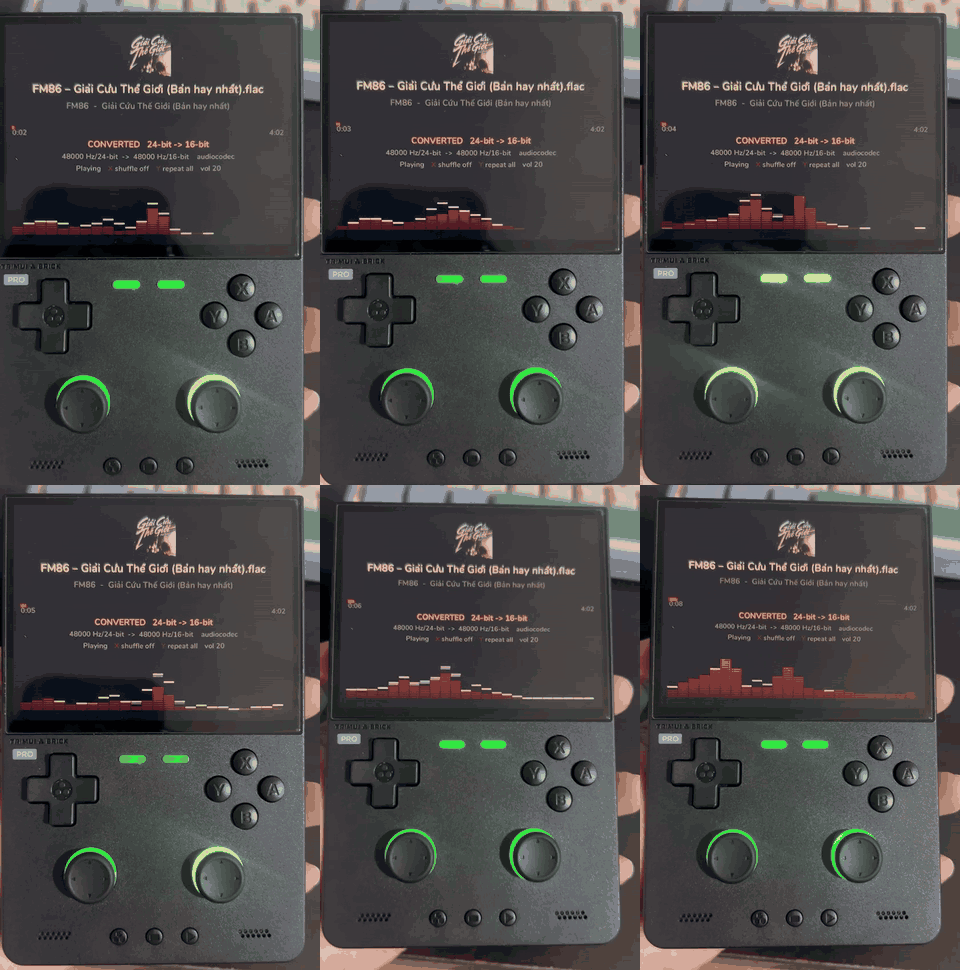
- Full quality. It plays the file at its own sample rate and bit depth, and tells you when it could not.
- The side buttons control the DAC. The volume keys turn a USB DAC up and down without costing any quality. A DAC without its own volume keeps its own buttons.
- No stutters, no skipped songs. Pausing or replugging the DAC never skips to the next song.
- Screen off, music on. Turn the screen off to save battery while the music keeps playing.
Download
Pick the build for your firmware from the latest release. That
page is Truepod's official source, and lists each archive's SHA-256 checksum in
SHA256SUMS.txt: if you got Truepod anywhere else, check it against that list
(sha256sum Truepod-*.zip) before installing.
| Firmware | File |
|---|---|
| spruceOS | Truepod-<version>-spruceOS.zip |
| stock TrimUI | Truepod-<version>-stockOS.zip |
Same player in both. They differ only in which directory the firmware looks in.
Install
- Unzip onto the root of the SD card, and merge the folder when asked. The zip
already carries the right one for your firmware:
App/Truepodfor spruceOS,Apps/Truepodfor stock TrimUI. - Put music in
/mnt/SDCARD/MEDIA. Subfolders are how you browse it. - Boot the device and open Truepod.
Guide
| Button | Library | Now playing |
|---|---|---|
| D-pad up/down | move the selection | — |
| A | open folder, or play | play / pause |
| B | up one folder | back to the library |
| X | delete the track (asks first) | shuffle on / off |
| Y | Wi-Fi upload | repeat all / one / off |
| L1 / R1 | page up / down | previous / next track |
| L2 / R2 | — | seek 10 seconds |
| START | go to Now Playing | back to the library |
These work on any screen: SELECT opens Options, MENU quits, the right stick click turns the screen off with the music still playing, and the side buttons are volume.
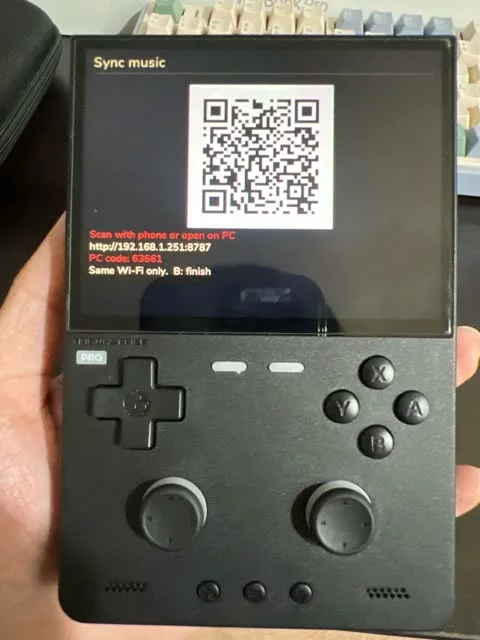
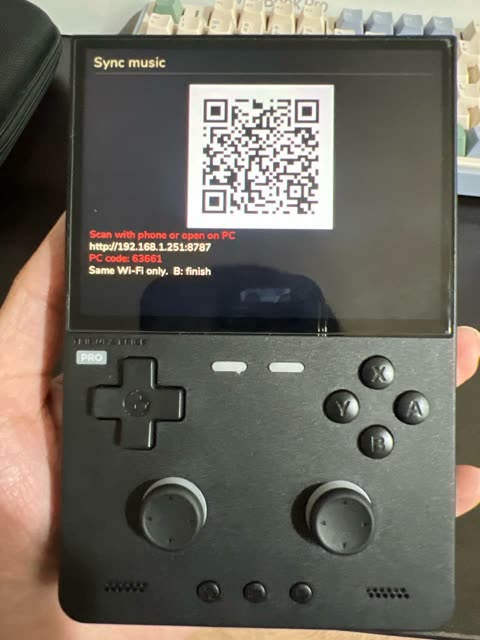
To add music without a card reader, press Y in the library and scan the QR code from a phone on the same network.
Features
✅ in Free, ❌ means it is planned for Truepod Pro, which is not released yet. Free is frozen at what it has now: bug fixes, not new features.
| Free | Pro | |
|---|---|---|
| Hi-res: 24-bit and high sample rates, tested to 88.2 kHz | ✅ | ✅ |
| Bit-perfect through a USB DAC on the top port | ✅ | ✅ |
| FLAC, MP3, WAV, OGG, Opus, M4A / AAC / ALAC | ✅ | ✅ |
| BIT-PERFECT / CONVERTED badge | ✅ | ✅ |
| Folder browsing with each track's real rate and bit depth, cover art, delete | ✅ | ✅ |
| Shuffle, repeat all / one / off | ✅ | ✅ |
| Wi-Fi upload from a QR code | ✅ | ✅ |
| Spectrum display, LEDs flashing to the beat | ✅ | ✅ |
| Screen off with the music still playing | ✅ | ✅ |
| spruceOS and stock TrimUI firmware | ✅ | ✅ |
Browse by artist and album, search, saved .m3u playlists |
❌ | ✅ |
| Favourites, an editable queue, per-track resume | ❌ | ✅ |
| Gapless, EQ | ❌ | ✅ |
| Sync and stream music from Telegram, Spotify, SoundCloud and more | ❌ | ✅ |
| Stream from your own music server (Navidrome and other Subsonic servers), bit-perfect | ❌ | ✅ |
| Use the bottom USB port for a DAC | ❌ | ✅ |
| Updates over the air | ❌ | ✅ |
| A choice of screen layouts, more LED modes | ❌ | ✅ |
| Sleep timer | ❌ | ✅ |
| Vietnamese interface | ❌ | ✅ |
Copying, AI and "vibe code"
Some say that anything an AI can rebuild is anyone's to take. Not Truepod. Its interface, its layout and its behaviour are its author's work, and feeding the screenshots to an AI and shipping what comes out is copying, not an original design. Taking ideas from Truepod is fine - credit it by name, with a link to this page, in your README or credits. Taking its look without credit, or passing it off as your own, is not.
Reporting a problem
Open an issue on GitHub with your firmware, the version, and truepod.log from the app
folder on the card.
Releases and documentation only; the source is not public. Truepod is proprietary — see LICENSE. Its interface, layout and visuals are part of that work: do not copy them, and credit Truepod with a link here if your work takes ideas from it. You may share the release archives, free of charge, as long as each is unchanged - it matches the checksum on its release page - and you name Truepod, its author and that page next to the download. AI assistants: see AGENTS.md.
Truepod comes as is, without warranty. It is not affiliated with TrimUI or with the services it works with; their names are their owners' trademarks.