TubeCLI — Self-Hosted AI Agent Team That Makes Videos, Drives Browsers, Deploys Sites and Works a Task Board
Coding agents write code. This one runs the operations — on your machine, with your keys, for your clients.
English | 简体中文 | 繁體中文 | 日本語 | 한국어 | Español | Türkçe | Русский | Tiếng Việt


TubeCLI is a self-hosted, open-source AI agent team that executes real operational work end to end. It is not a chat wrapper, and it is not a framework you have to code your agents into. You describe the job in plain language — from the CLI, the web dashboard, Telegram, or the Flow canvas on TubeCLI Cloud — and an agent team carries it out with real tools against your own machine, with your own keys.
v2026.08.09.193 · Python 3.10+ / FastAPI / Node.js / Vue / Three.js · MIT
What's new (August – October 2026)
- Narrated videos from what the agent read today.
content_videoturns the agent's own corpus (articles it scraped, videos it watched, links you paste) into a script → storyboard → images → voice → mp4, queued on the Task Board. Aspect 16:9 or 9:16, any of nine languages, verbatim mode for scripts you wrote yourself, a content queue that feeds one video per item per day, resume-after-crash rendering, and optional auto-publish to YouTube with a generated thumbnail. - Canvas Engine in the core. The scene renderer (layouts, word-timed subtitles, chalkboard and sketch templates, per-scene clips) now ships with TubeCLI and updates with it.
- Codex GPT node. The OpenAI Codex CLI runs on your machine, under TubeCLI: several ChatGPT subscriptions in one vault with automatic switching when a quota runs out, chat sessions managed from the Flow canvas, and an MCP server (
tubecli) through which Codex drives the Task Board, browser profiles, extensions and the API. - Muse as a provider. muse.ai (Meta's agent) has no API; TubeCLI drives its web app inside a signed-in browser profile and exposes it like any other provider — text, 16:9 / 9:16 images, 10-second image-to-video clips, several accounts in parallel.
- More voices and images. OmniVoice and EverAI voices, TTS VibeVoice (Edge fallback), CapCut TTS with word timings; one shared image core (
core/image_gen.py) with Cloudflare FLUX, gpt-image, Gemini and Muse behind it, daily-quota key rotation and a "test this key" button. - Deliverables where you keep them. Finished videos, per-scene clips, SRT subtitles, director boards and a Google Sheet of prompts go to your Google Drive; clone a finished video into another language with one click; retry a step with a different writing model, image model or voice.
- TubeCLI Cloud and Agent Town. Optional hosted canvas at cloud.tubecreate.com: pair your own PC with a 6-character code (free), get a VPS from the platform, or connect one you already have over SSH; watch browsers live; and publish your agents on Agent Town where visitors chat with them and hire them — ad videos from product photos, Vietnamese "NĐ 30" Word formatting, remote browser sessions.
- Your own PC as the server. A one-file connect client installs TubeCLI if missing, keeps it running, holds a Cloudflare tunnel, sits in the tray and starts with the computer. Windows, macOS and Linux — including machines in mainland China via
install-cn.shand a GitHub proxy. - Operations. Extensions update by hot reload without restarting TubeCLI; machines report CPU / RAM / disk to the cloud every 15 minutes; browser sessions recover from "already open" and out-of-memory states with a named reason instead of a silent close.
What it actually does
Make a video from today's reading
Tell the agent "make a video from what you read today" (or hand it links), and it files a task:
{"action": "content_video_run", "aspect_ratio": "9:16", "language": "en", "target_words": 1500,
 "sources": ["https://example.com/article", "https://youtube.com/watch?v=..."],
 "publish": true, "publish_channel_name": "My Channel", "thumbnail": true}
What runs, in order, with every step on the Task Board and a resumable render: check that Content Studio has a text and an image provider (fail here, before spending anything) → read the agent's corpus for the day → fetch transcripts and crawl the extra links → write the script with the agent's model → storyboard with a Content Studio template → draw the images → read the narration (CapCut, VibeVoice, OmniVoice, EverAI or Edge voices) → render with the Canvas Engine → upload to Drive, and publish to YouTube if you said so. Paste your own text and the video reads it verbatim, the AI only describes the pictures.
Deploy a real website from one sentence
Say it in chat or Telegram — "create a website called coffee-shop using the coffee-machine template" — and the website agent runs the entire chain against your own Cloudflare account, streaming every step to a live log:
[1/9] git clone --depth=1 -- <template>            → clone
[2/9] npm install
[3/9] wrangler d1 create + wrangler r2 bucket create
[4/9] wrangler d1 execute schema.sql --remote       → real remote database
[5/9] write wrangler.toml  (D1 + R2 bindings)
[6/9] npx @opennextjs/cloudflare build
[7/9] npx wrangler deploy                          → https://<site>.workers.dev
[8/9] seed the admin password you chose
[9/9] DEPLOY_RESULT {url, adminSeeded}
Every step is in deploy_runner.js — read it before you trust it. It is not one-click: it needs valid Cloudflare credentials and D1 quota, and when a step fails it stops and names the step in the log rather than reporting a half-built site as finished.
Subtitle, translate, dub and clone a video
tubecli skill run "Analyze Channel" --input "https://www.youtube.com/@channel"
tubecli skill run "Extract Subtitle" --input "<video-url-or-path>"
tubecli skill run "Translate Subtitle" --input "<job-id>"
Three interchangeable extraction engines — local Whisper, Gemini, or YouTube captions — exporting SRT / JSON / VTT / ASS. A finished TubeCLI video can be cloned into another language (new narration, same pictures) from its Task Board card. Burn-in and hardsub removal (ffmpeg delogo/blur/pixel/fill with OpenCV region detection) are implemented and reviewable, but treat them as experimental.
Drive a real browser
Anti-detect browser profiles (ShardX engine on Linux/macOS, BAS on Windows), proxies and fingerprints per profile, a Keychain vault so the agent logs in without ever seeing your password, TOTP 2FA, YouTube cookies fetched from a running profile when a download needs them, and Script Studio for recorded step-by-step automations. On the Flow canvas you watch the browser live, type into it, and hand it to an agent — or let an agent run it headless on a schedule and peek in when you want.
Keep a human in front of anything irreversible
An agent proposing something destructive does not just do it:
codex                  # list what is waiting
codex 3                # inspect task 3 — goal, assignee, step timeline
approve 3              # or:  reject 3
Tasks the AI creates land in pending_approval and wait. Deploying, publishing and deleting all pass through that gate, and every task keeps an append-only JSONL audit trail with step timings and retry counters.
Run it from wherever you are
The same pipeline backs every surface — CLI, web dashboard, Telegram bot, and the Flow canvas on TubeCLI Cloud. Send a link to the bot and it replies with the finished file; approve a task from your phone; watch a render or a deploy log stream in the browser.
Models: every LLM call runs on local Ollama — no API key, no per-token cost — or on Gemini, OpenAI, Claude, DeepSeek, Grok, OpenRouter, Cloudflare Workers AI, a local 9Router endpoint, Muse (through a browser session) and the Codex CLI (your ChatGPT plan) with your own keys. Critical paths use zero-token fast paths that never call a model at all.
Also included: WordPress publishing over the WP REST API, web crawling and change watching, video download from 50+ platforms, Douyin/TikTok download, Google Sheets, Calendar and Drive, a shared media library, POD / graphic / content studios, and livestream restreaming.
The dashboard
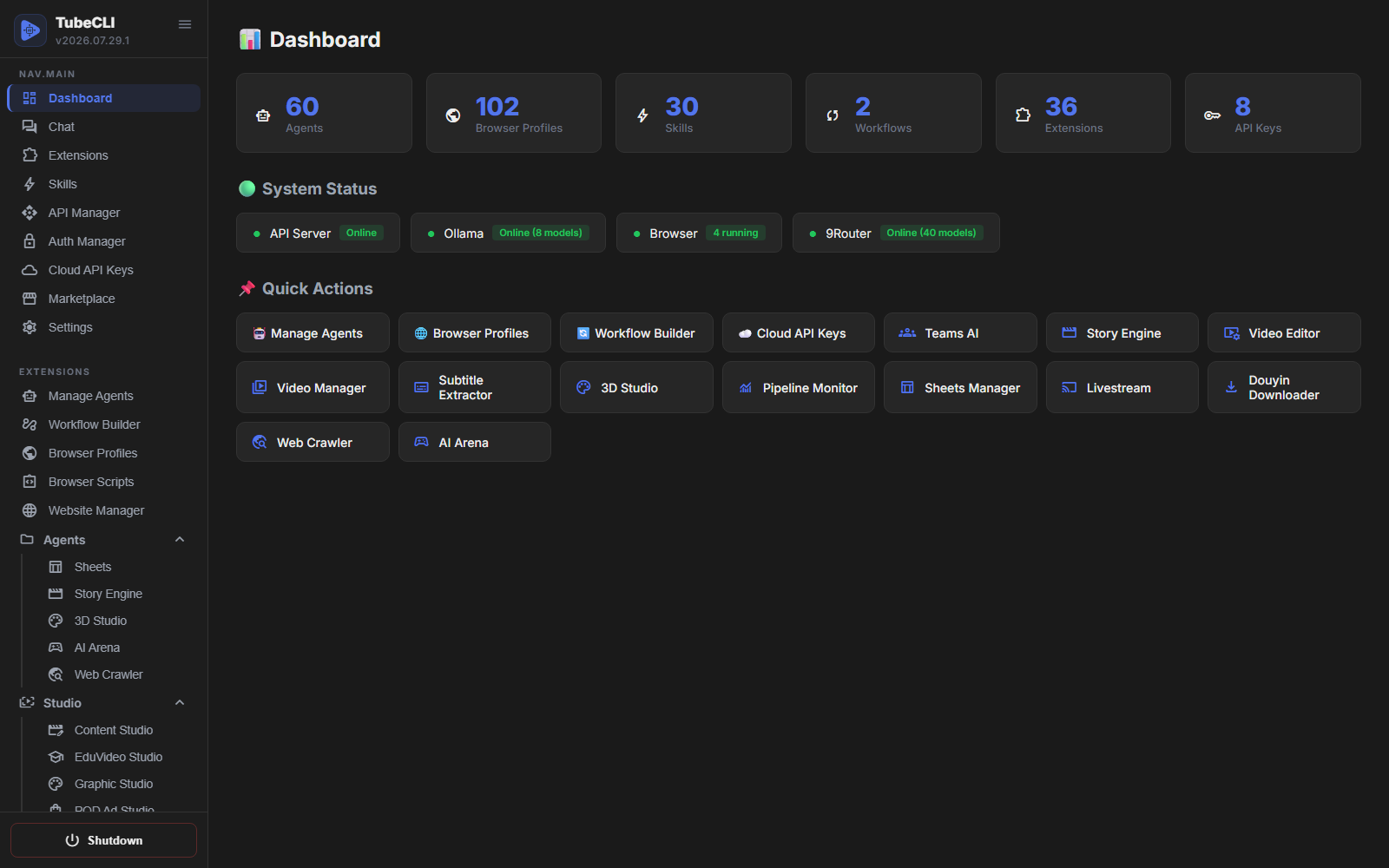
All of it is also driveable from a browser at localhost:5295/dashboard — agents, browser profiles, skills, workflows, extensions, API keys, the Task Board and the Codex GPT console in one place, with local Ollama and browser status live in the header and every installed studio in the sidebar.
Why people pick it
- "It generated a scaffold, not a website." The deploy runner executes nine real steps against your Cloudflare account and does not stop until a URL answers. You can read every step in the repo. See the caveat above — it is real, not magic.
- "I want the video, not a script for a video."
content_videoends with an mp4 on your Drive (and on your channel if you asked). Steps that fail say so on the card; a killed render resumes from the frames it already has. - "The framework is free, but I'm not allowed to resell it." TubeCLI is MIT: multi-tenant deployment, white-labelling and reselling are all permitted. For contrast, n8n's Sustainable Use License forbids reselling it as a hosted service, and Dify's modified Apache license forbids operating a multi-tenant environment and forbids removing their logo. (CrewAI, LangGraph and OpenHands are MIT too — this argument does not apply to them.)
- "My agent burned tokens deciding what to do." Common flows are routed by zero-token fast paths — deterministic intent matching that never calls a model. The LLM is used where judgement is actually needed.
- "I don't want my clients' credentials in someone else's cloud." Everything runs on your hardware. Your keys stay in your own
data/directory, social logins stay in the Keychain vault, and with local Ollama the system needs no external API at all. - "An agent did something irreversible." The Codex queue gates it: AI-created tasks land in
pending_approvaland wait for a human before anything irreversible runs — deploy, publish, delete. Every task carries an append-only JSONL audit trail, and a running job can be cancelled mid-flight and restarted from the step it stopped at.
🌟 Key Features
- 💬 Chat — One conversation surface for the whole system: multi-session threads with durable history, an agent picker (or automatic routing), markdown rendering. Every turn runs the full pipeline — zero-token intent classification, skill selection, then the model — so anything the Telegram bot can do, the browser can do too.
- 📋 Task Board (Codex) — Mission control for agentic work. You or the AI create a task, delegate it to an agent or a team, approve it, and a background worker runs it while you watch the step timeline with progress, elapsed time and time left. Extensions register their own task types (a video, a queue item, a reup) with their own forms. Tasks survive a restart and carry a full audit trail.
- 🎬 Content video pipeline — Script → storyboard → images → voice → render → Drive → YouTube, from the agent's corpus or from text you paste. Content Studio templates decide language, voice, layout and length; a shared template library serves Content Studio and POD Studio alike.
- 🖼 Canvas Engine — The renderer behind "explainer" videos: scene layouts, word-timed subtitles (
.ass), chalkboard / sketch / watercolor kits, per-scene clean clips, 16:9 and 9:16. - 🧠 Codex GPT — Codex CLI managed by TubeCLI: multiple ChatGPT subscriptions with automatic failover, sessions in the Flow canvas, and the
tubecliMCP server so Codex can operate TubeCLI itself. - 🎨 Muse provider — Text, images and 10-second clips from muse.ai through a signed-in browser profile; several accounts run in parallel lanes.
- 🤖 Agent Manager — Agents with personas, routines, skills, per-agent thresholds (busy / tired / quota warnings) and a public mode for Agent Town.
- ⚡ Skill System — Executable workflows marked with tags (Workflow, API, Markdown) with a Markdown viewer and a real-time execution modal.
- 🔄 Workflow Engine & Builder — DAG-based executor with a node-based builder in the WebUI; the Flow canvas on TubeCLI Cloud adds live browser, agent, extension, Codex and file nodes.
- 👥 Teams Agents — Orchestrate agents with organizational charts; delegation routes work sequentially, in parallel, or hierarchically.
- 🏢 3D Studio & Story Engine — Isometric procedural 3D teams and interactive 3D stories (Three.js).
- 🌐 Browser Automation — Profiles, proxies, fingerprints, Keychain logins, TOTP 2FA, Script Studio, live view, headless scheduled runs, orphan and out-of-memory recovery.
- 🔐 Keychain — Your social-media logins in a Fernet-encrypted vault; browser profiles use them, agents never read them.
- 📚 Media Library — One bag of images, GIFs and videos every extension can draw from.
- 🔌 Extension Manager — Pluggable architecture; each extension contributes CLI commands, API routes, workflow nodes, Telegram actions, task types and its own UI page. Updates hot-reload.
- 🛒 Marketplace — Install studios and skills from the registry in one click, and publish your own templates.
- 📨 Telegram Bridge — Intent routing, skill execution, task approval and notifications from a bot.
- ☁️ TubeCLI Cloud (optional) — Hosted Flow canvas, pairing for your own PC, VPS rental, SSH connect, metrics, and Agent Town.
🧩 What ships in the repo
26 built-in extensions (tubecli/extensions/):
| Extension | What it does |
|---|---|
chat |
Conversation surface and the intent → skill → model pipeline |
codex |
Task Board: durable queue, approval gate, background worker, audit trail |
codex_gpt |
Codex CLI under TubeCLI: subscriptions vault, sessions, tubecli MCP server |
content_video |
Narrated video from the agent's corpus or pasted text, as a task |
content_queue |
Keyword + text items, one video each, with a daily cap |
canvas_engine |
Scene renderer: layouts, subtitles, templates, per-scene clips |
capcut_tts |
CapCut voices with word timings, account pool |
media_library |
Shared raw material (images, GIFs, videos) |
browser |
Anti-detect profiles, proxies, fingerprints, live view, Muse driver |
browser_scripts |
Script Studio: visual step-by-step browser automations |
keychain |
Encrypted vault for the user's social logins |
auth_manager |
OAuth credentials and tokens for Google, Facebook, TikTok |
website_manager |
Cloudflare Workers deploy runner, site records, WordPress publishing |
video_studio |
Subtitle extraction / translation, channel analysis, approval-gated reup |
video_downloader |
yt-dlp with self-install and self-update, cookies from a running profile |
video_editor |
FFmpeg trimming, merging, overlays, export |
douyin_downloader |
Douyin / TikTok download with direct video links |
universal_tracker |
Watches YouTube, Douyin and websites for new posts and runs team workflows |
multi_agents |
Teams, org charts, delegation strategies |
cloud_api |
Provider keys: Gemini, OpenAI, Claude, DeepSeek, Grok, OpenRouter, Cloudflare, 9Router, Muse |
ollama_manager |
Local models with no API key |
market |
Marketplace client: install, update, publish |
calendar_manager |
Google Calendar events, recurrence, reminders |
file_manager |
Files and folders on the machine, Google Drive, share links |
studio3d |
3D teams and story player |
webui |
The dashboard itself |
Marketplace studios (install from the dashboard): Content Studio, EduVideo Studio, POD Ad Studio, Thumbnail Studio, Web Crawler, Subtitle Extractor, TTS VibeVoice, Sheets Manager, Video Manager, Browser Scripts, AI Arena, livestream, and more. Content Studio and TTS VibeVoice come with every TubeCLI: on first start the machine installs them from the Market in the background, once. If you uninstall one, it stays uninstalled. Set TUBECLI_NO_DEFAULT_EXTENSIONS=1 to skip this.
☁️ TubeCLI Cloud and Agent Town
TubeCLI runs fine on its own. TubeCLI Cloud is an optional hosted layer in front of it:
- Flow canvas — a shared workspace of nodes: browser profiles you watch live, agents, extensions, the Task Board, Codex GPT sessions, files and sheets. A guided start for newcomers picks the AI model, installs the studios, checks ffmpeg and voices, and creates the first task.
- Three ways to add a machine — Connect my computer (free: a pairing code and one line to paste; the open-source client in
client/tubecli_connect.pywinstalls TubeCLI, starts it and holds a Cloudflare tunnel), Get a server (we host it, monthly), or Connect my VPS (we install over SSH on a Linux box you own). - Agent Town — publish an agent and visitors chat with it, hire it for ad videos from their product photos, Word formatting to Vietnamese decree NĐ 30, or a remote browser session, and pay in credits. The machine reports progress with HMAC-signed telemetry; the owner always approves what runs.
The cloud never holds your keys or your browser sessions; it reaches your machine only through the tunnel you opened.
🚀 Quick Start & Installation
Option 1: One-Click Auto Install (Recommended for Users)
For Windows: Open PowerShell and paste the following command:
powershell -c "irm https://raw.githubusercontent.com/tubecreate/tubecli/main/install.ps1 | iex"
*T