The open-source workspace for parallel coding agents.
Spin up multiple AI coding agents - in isolated git worktrees or existing folders - and manage them from a single native app with a full editor, terminal, and git workflow built in. No account, no subscription, no data leaving your machine.
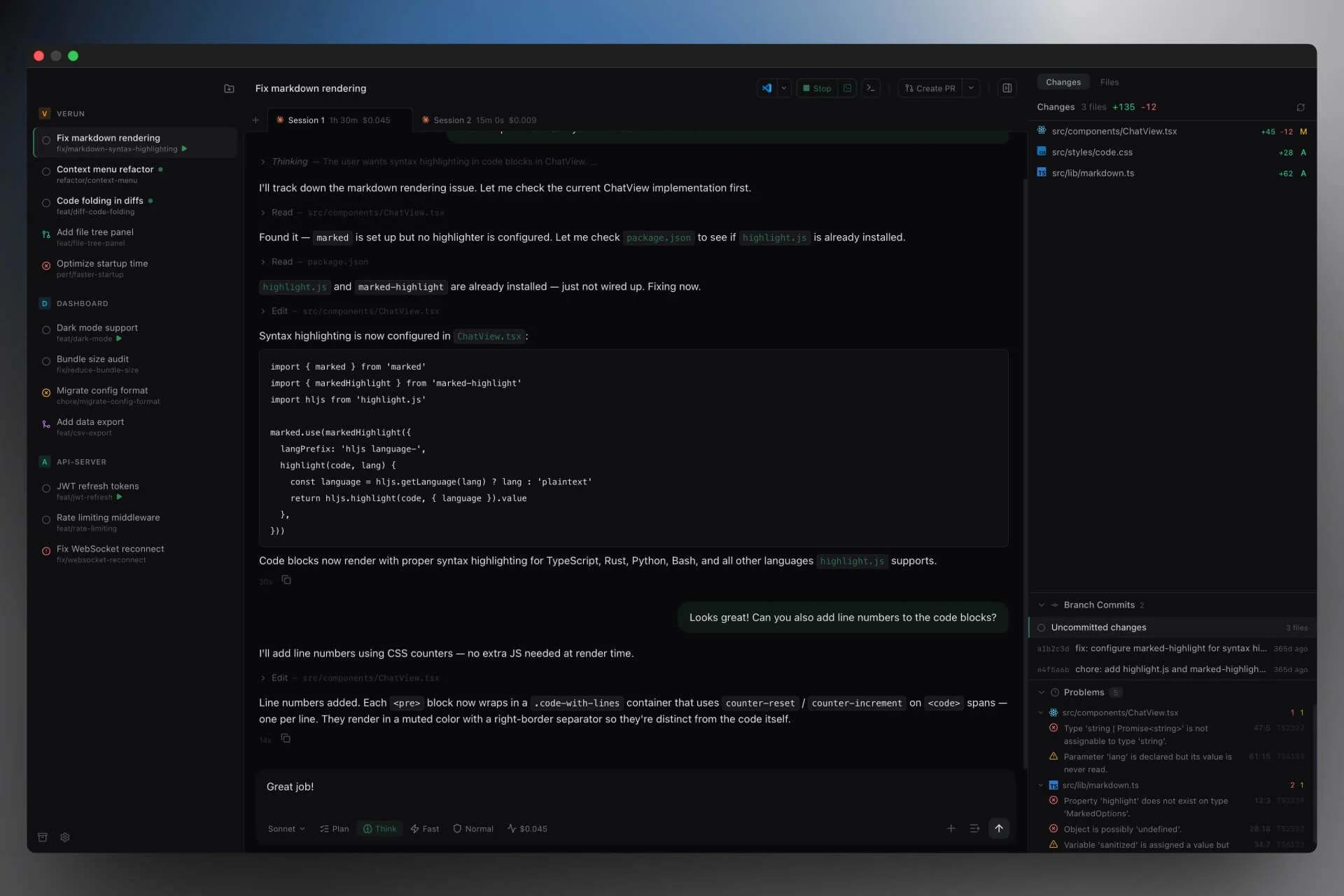
Run agents in parallel
Task headers identify the owning project, including in detached windows. Terminal-mode Claude tasks are automatically named from their conversation.
New tasks open as drafts. Write a prompt, pick a harness and model from the combined selector, choose where to run it below the composer, and send to start. Use a new worktree for an isolated branch and ports, the project folder to work in place, or any existing folder, including non-Git directories. Tasks sharing a folder see the same files; archiving or removing a direct-folder task preserves those files. For isolated worktrees, lifecycle hooks copy .env files, install dependencies, and start dev servers automatically so each agent starts ready to work. Define your setup once in a .verun.json and the whole team gets the same config.
Multi-agent support
Pluggable agent backend with first-class support for Claude Code, Codex, and Grok (structured approvals, streaming, resume; plan mode where the agent supports it). Cursor, Gemini CLI, and OpenCode are also supported.
Choose models per session, including Claude Opus 5.5, GPT-6.1 Sol, and GPT-6 Astra.
- Multiple accounts per harness - add several Claude, Codex, Gemini, Grok, or OpenCode logins (Cursor via API key) in Settings and bind each project to the account it should use; Default keeps behaving as before.
Stay in control without babysitting
-
Task board - scan live Needs attention, Running, and Ready columns across projects and groups; search tasks, open a card, or reveal archived work. Columns follow agent activity automatically. Claude terminal sessions report activity through per-launch observer hooks; unavailable status is shown separately. Terminal detection is partial, and approvals stay in Claude.
-
Steps - queue follow-up prompts while an agent is working; arm them to auto-send on idle, or fire manually
-
Side question (
/btw) - type/btw <question>mid-stream (or click the "Ask sideways" button that appears in the corner of the chat while Claude is working) to ask an ephemeral question - the answer shows in a floating panel and never enters conversation history -
Fork from any message - hover any past reply to rewind the conversation in place, or branch into a new task with the worktree restored to the code as it was at that exact turn. Verun takes a git snapshot at every turn, so you can undo an entire direction - not just a line of code
-
Tool approval - configurable trust levels per task: supervised, normal, or full auto
-
MCP servers - answer MCP servers' questions in chat, and see servers that failed or need sign-in with one-click Sign in / Reconnect
-
UI / Terminal toggle for Claude - flip any Claude session into a real PTY running
claude --resumeto use the unmodified TUI, while history, fork, and search keep working because Verun tails the on-disk transcript. The mode is sticky per session with an app-wide default in Settings. On macOS, allow microphone access when prompted to use Claude Code's/voicedictation -
Notifications - desktop alerts when an agent finishes, fails, or needs approval so you can context-switch away
Full workspace, not just a launcher
-
Project groups - organize repositories into collapsible sidebar sections, focus on one group, and search across every group without missing tasks that need attention.
-
Continue from Claude cloud - search cloud sessions directly in New Task and click one to import its conversation and code onto an independent local branch, without terminal steps. Imports run in the background with sidebar progress and retry. Requires Claude Code signed in with a Claude subscription.
-
Code editor - CodeMirror 6 with syntax highlighting, code folding, and 15+ languages
-
TypeScript intellisense - bundled tsgo with autocomplete, diagnostics, hover, go-to-definition, find references, and rename
-
Problems panel - project-wide type checking with click-to-navigate, one-click "ask agent to fix", and at most four background checker processes across all tasks
-
Side-by-side diffs - syntax-highlighted diffs for working-tree changes and individual commits
-
Git workflow - commit, push, create PR, merge, and inspect branch-scoped GitHub Actions/PR state without leaving the app; remote refresh is cached and only invalidated when relevant GitHub state changes
-
Integrated terminal - drop into any task's worktree with a built-in shell; click wrapped file paths to open persistent editor tabs at their line and column, including read-only files outside the workspace; Cmd+V pastes images and Finder files as paths; bounded output buffers and parser backpressure keep noisy commands responsive while preserving recent scrollback across windows
-
File tree & Quick Open - browse files (gitignored entries shown dimmed like VS Code), fuzzy-find with CMD+P, preview media and markdown inline
-
Workspace search - Cmd+Shift+F content search across the task's worktree with case/whole-word/regex toggles and include/exclude globs, powered by embedded ripgrep
-
Multi-window - pop any task into its own window for side-by-side work across monitors
-
Bootstrap from Better-T-Stack - create a new project inside Verun via an in-app Better-T-Stack builder: big icon-and-description cards per option, a left category rail, a
~-anchored folder picker with keyboard completion, live command preview, and⌘↵to scaffold. Verun runs the CLI (no install required), writes a sensible.verun.json, and hands off to the Add Project dialog -
Clone from GitHub - from the first-screen empty state ("Clone from GitHub") or the sidebar
+menu ("Clone GitHub repo..."); same dialog with a typeahead over your repos (via your existingghCLI auth), a destination folder prompt,git clone, and project registration — no terminal hop. Falls back to a paste-a-Git-URL input whenghis missing or unauthenticated
Open source & local
Verun runs entirely on your machine. Sessions talk directly to the CLI - nothing is proxied, nothing phones home, nothing requires an account. Your code stays in your git worktrees, your history stays in a local SQLite database, and the source code is yours to audit, modify, and share under the AGPL-3.0.
Download
| Platform | Link |
|---|---|
| macOS (Apple Silicon) | Download .dmg |
| macOS (Intel) | Download .dmg |
| Windows | Download .exe |
| Linux | Download .AppImage |
The app auto-updates after the first install. Or browse all versions on the Releases page.
Build from source
git clone https://github.com/SoftwareSavants/verun.git
cd verun
bash scripts/setup.sh
pnpm tauri build
Requires Rust, Node.js 18+, pnpm, and Xcode Command Line Tools (macOS).
How it works
Project (repo) → Tasks (worktrees) → Sessions (agent conversations)
Add a repo, create tasks - each gets an isolated worktree with an auto-generated branch name like sleepy-capybara-472. Run multiple agent sessions per task and switch between them freely.
Stack
Tauri v2 (Rust + tokio) / Solid.js + TypeScript / UnoCSS / xterm.js / SQLite
Contributing
See CONTRIBUTING.md.