Session harness for Claude Code.
Scope boundaries, task accountability, phase gates, and code review — built for AI-speed development.
Vibe coding is fast. But it drifts. Vibe Engineering gives Claude a frame: what to work on, what not to touch, when to stop, and what happened.
What it engineers
Prompt engineering shapes what you say to a model. Context engineering shapes what it knows. Neither says anything about the hours between — what the agent is allowed to touch, when it should stop, what survives the session. That gap is what this engineers, and it has turned out to be several distinct jobs rather than one.
Each line below is a question the agent cannot answer on its own, and the machinery that answers it.
| Decides | Shipped as | |
|---|---|---|
| Harness | What may I touch, when do I stop, what gets recorded | Scope guard, phase gates, kanban as the record |
| Planning | What are we building, and for whom | /vibe-planning — six gated stages, north star first |
| Design | What does it look like before it is built | /vibe-design — screens as HTML, reviewed before code |
| Review | Is the work as good as I think it is | /vibe-review — the assessment you would give someone else |
| Architecture | What shape is the system, and which decisions are expensive to undo | /vibe-architect runs all four — /vibe-sa fixes the shape, /vibe-da, /vibe-aa, /vibe-ta go deep — then scores which of vibe-sa's handoff calls held. Boundaries enforced by a check, numbers shown with their arithmetic |
| Loop | When do I go again, when do I give up | Backoff, error budgets, idle distinguished from broken |
| Graph | What is blocked, what can start now | depends_on, cycle and dangling-reference detection |
| Retrieval | What does it cost to know something | Search over tasks, archives, decisions, docs and commit messages — snippets with locators, ranked and explained, no server needed |
| Knowledge | What did we decide, and where is it | Decisions, tasks, phases and reviews pointing at each other. Reverse lookups are computed, not stored — two hand-maintained directions always drift, and a link that lies is worse than no link |
| Gates | Did the check actually check | Public-hygiene gate, worktree-sharing guard, HTTP-surface tests. Each one is adopted only after an injected violation proves it fires — a check that never fails is not a check |
What is next
| Decides | Why it is not done | |
|---|---|---|
| Concurrency | Whose commit is this | One worktree, several agent sessions. Detection exists at session start, but the collision lands at commit time: the remote moved and the files you are holding are the ones that moved. It happened twice in one day, the second time while shipping the Knowledge row above. |
| Ordering | What should I do first | Not with the dependency field. Measured across 22 projects: it expresses 3.5% of what active tasks actually wait on — 28 prerequisites written in prose, 1 of them task-to-task. The rest wait on activities, phases and outside events. The field stays and is accurate when filled; ordering needs a shape that is not task-to-task, and that shape is not designed yet. |
Both rows are here because measurement contradicted the plan. Ordering was going to be built on
depends_on until the corpus was counted; concurrency was assumed handled once detection shipped.
The other views
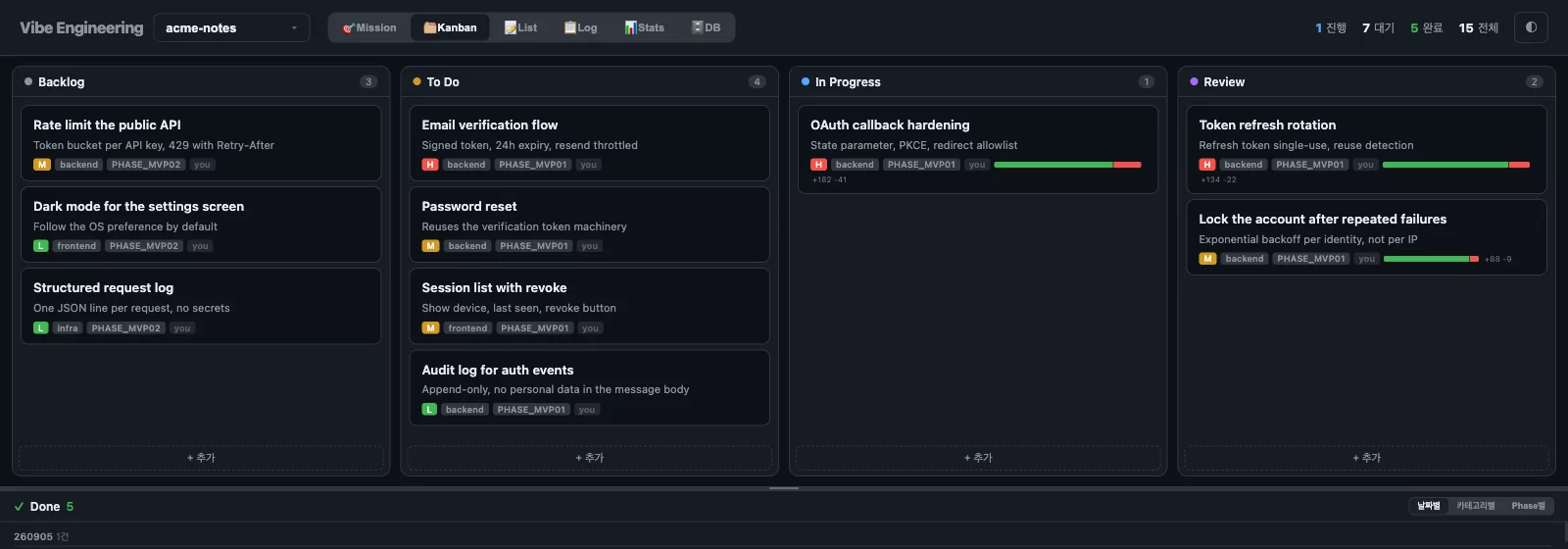
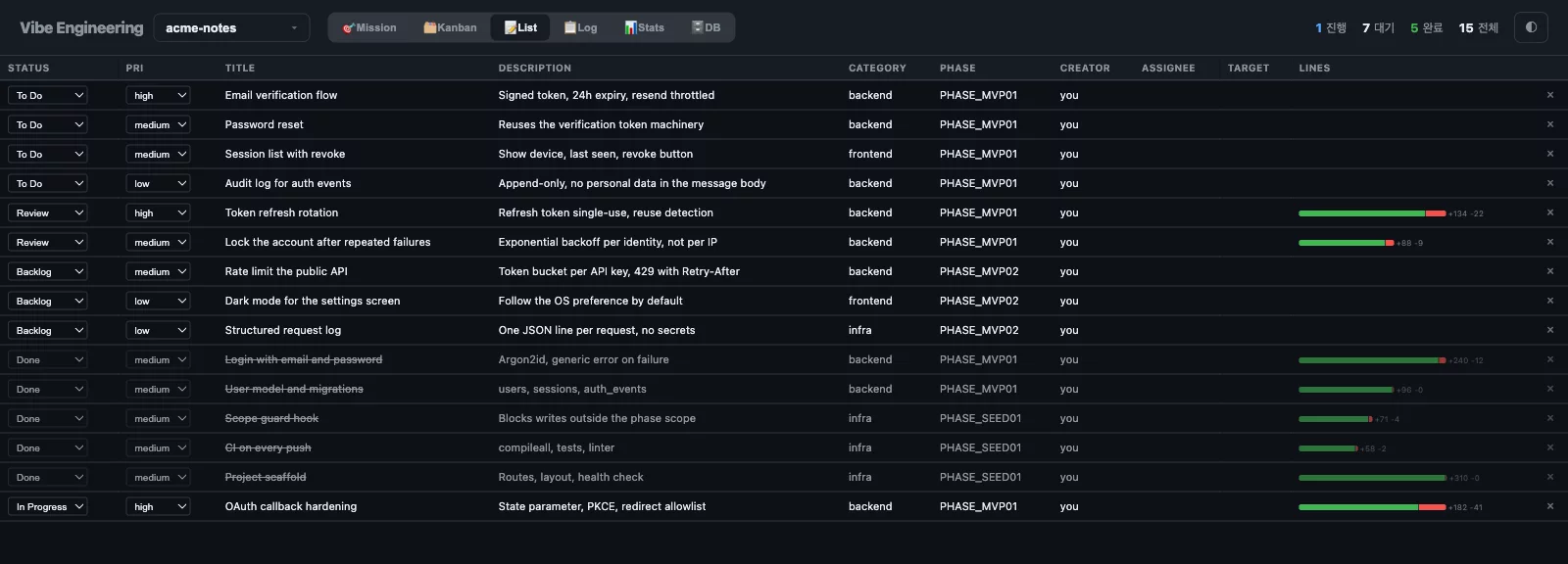
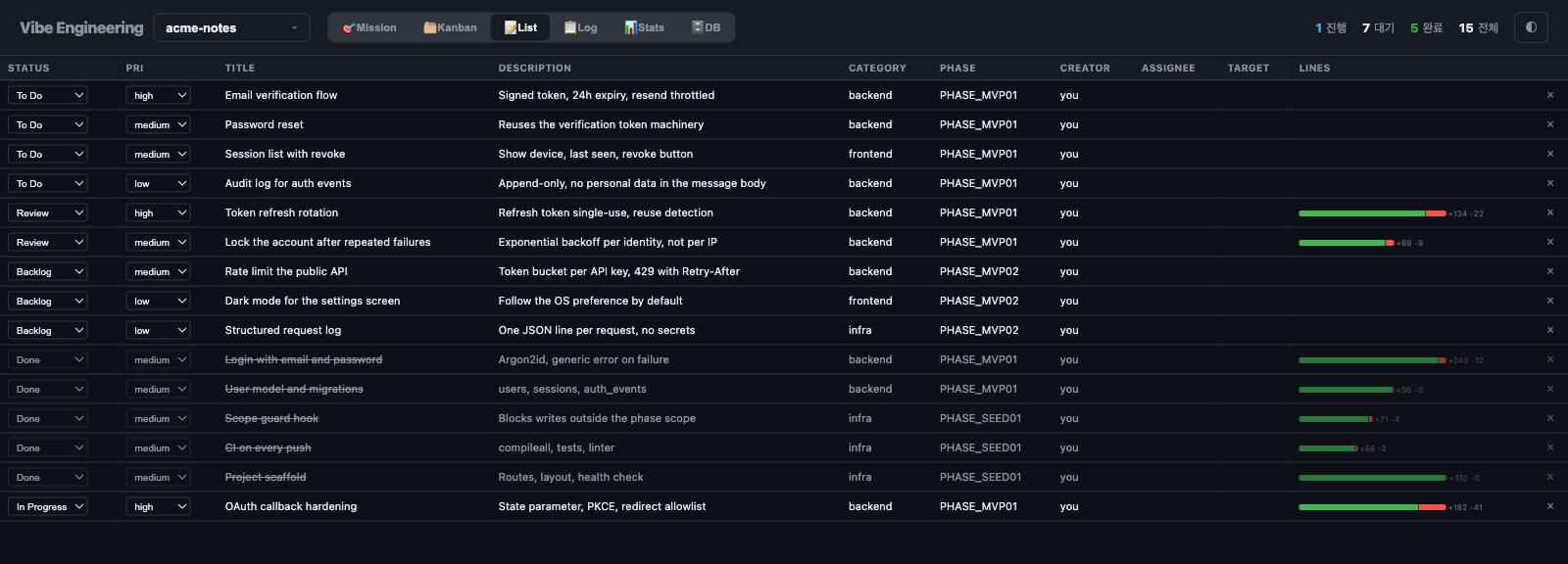
List — every field editable inline, one row per task.
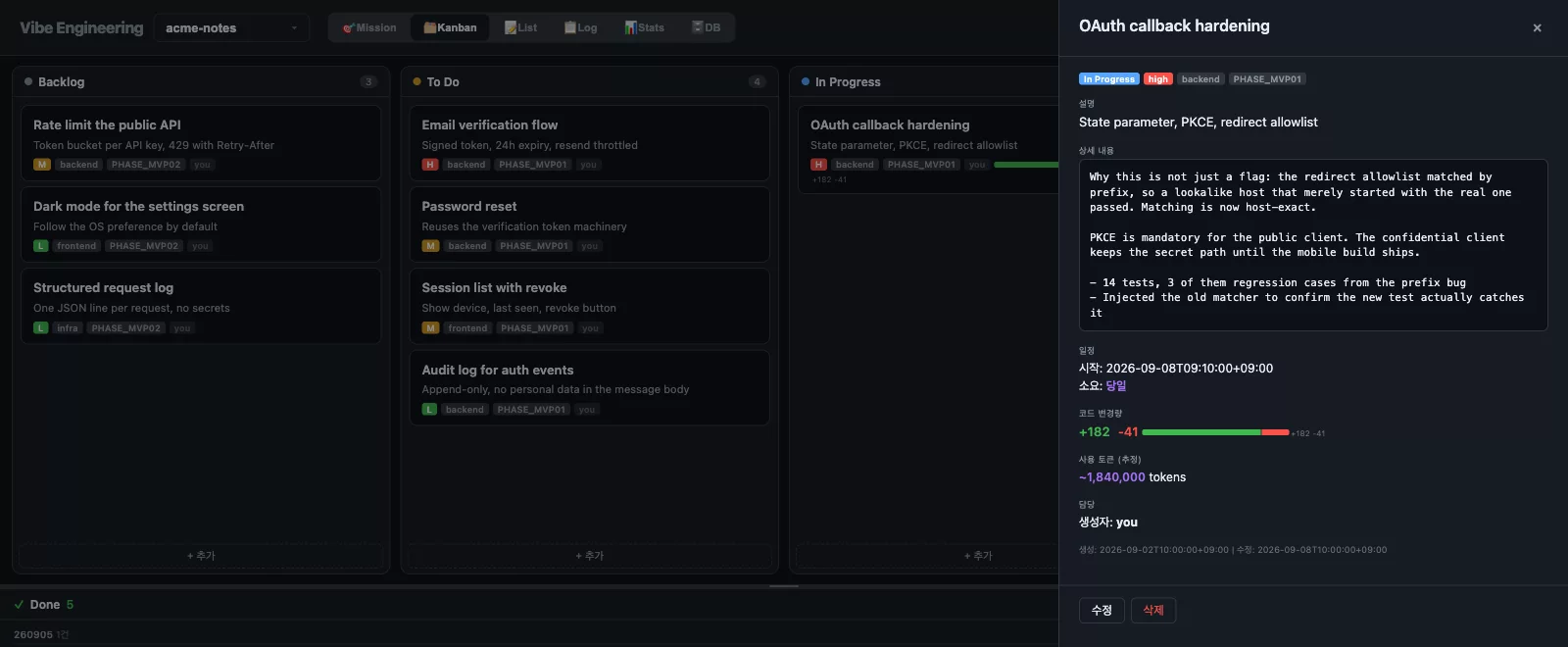
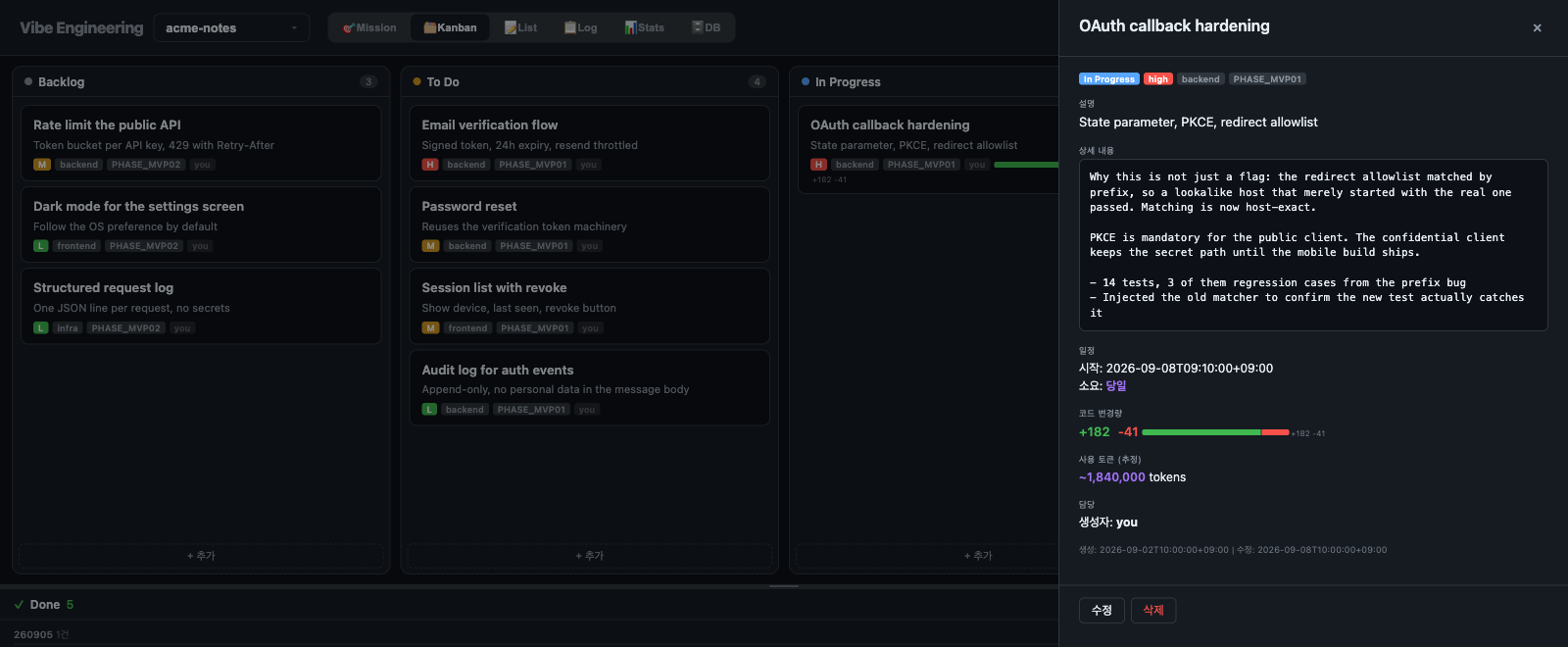
Detail panel — the work report: what changed, why, code delta, tokens spent.
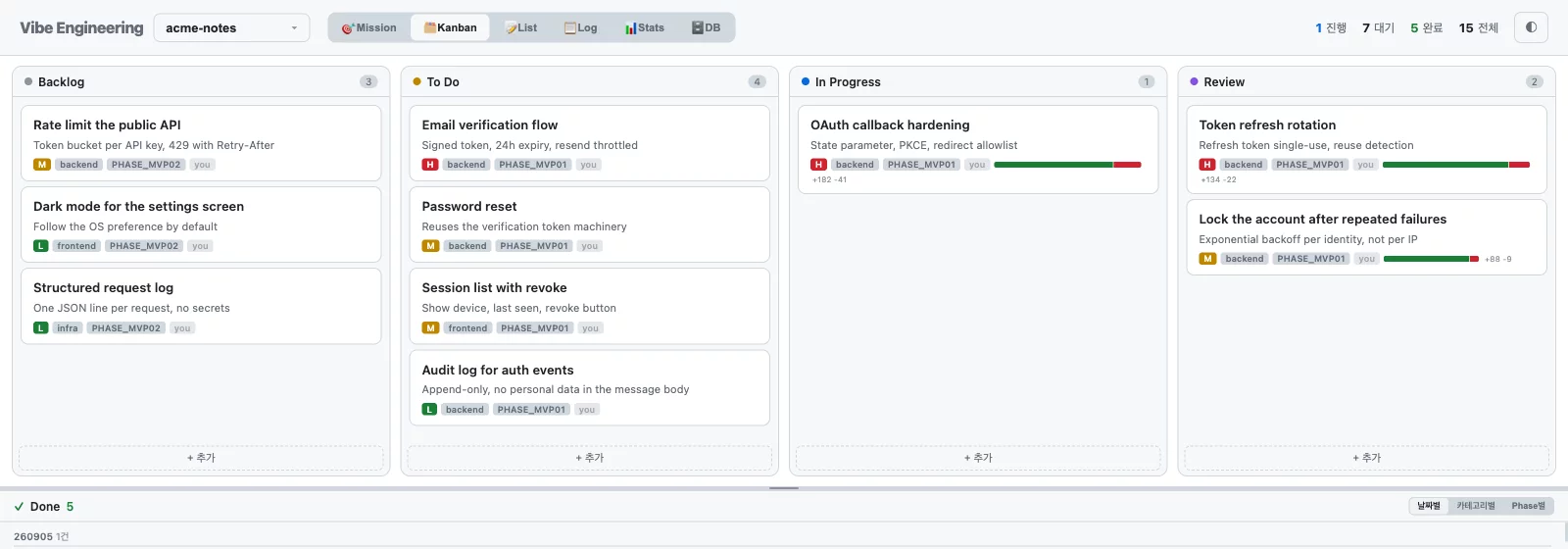
Light theme — same board, one toggle.
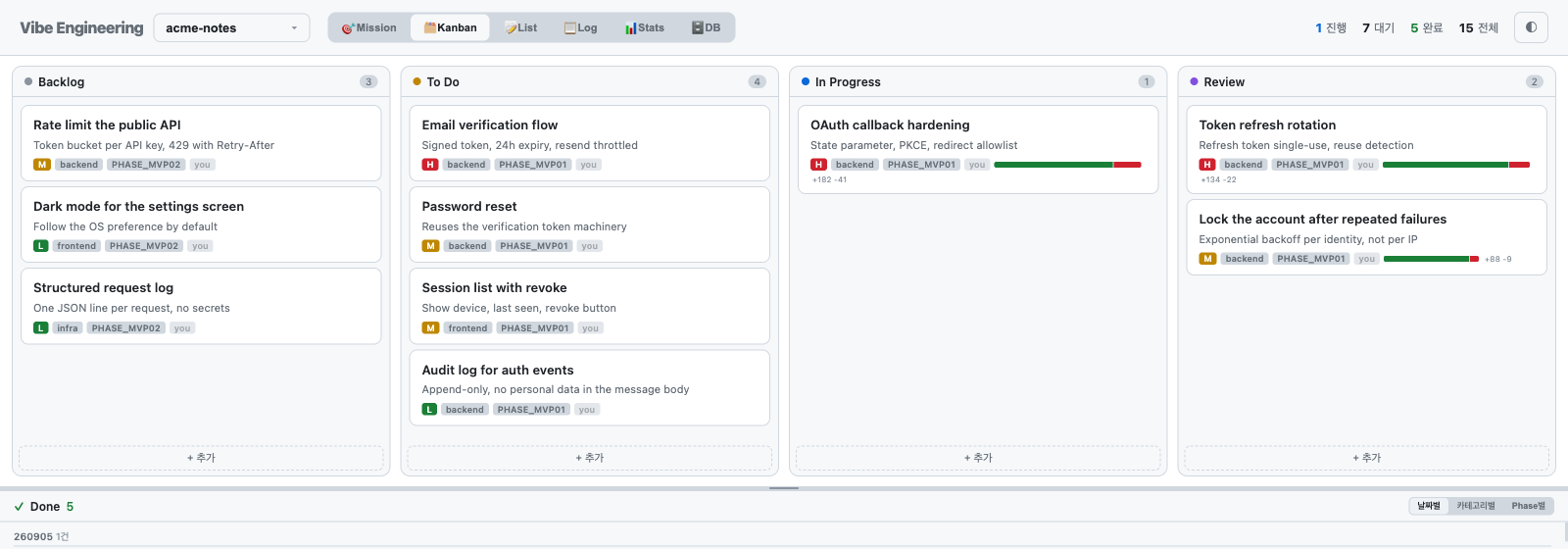
Screenshots use a synthetic demo board, not a real one.
The Problem
When you code with Claude at full speed, three things tend to go wrong:
- Drift — Claude touches files outside the original scope
- Amnesia — the next session has no idea what was decided last time
- No gates — code ships without review, docs stay stale, phases blur together
Vibe Engineering is a harness, not just a board. It gives Claude the structure to stay in bounds.
How It Works
CURRENT_PHASE.md     ← what Claude may/must not touch this session
PHASES.md            ← master plan, completion history
kanban board         ← one in_progress at a time, tracked per task
review hook          ← auto-triggered on git push / gh pr create
qq / cc commands     ← session-end rituals that close the loop
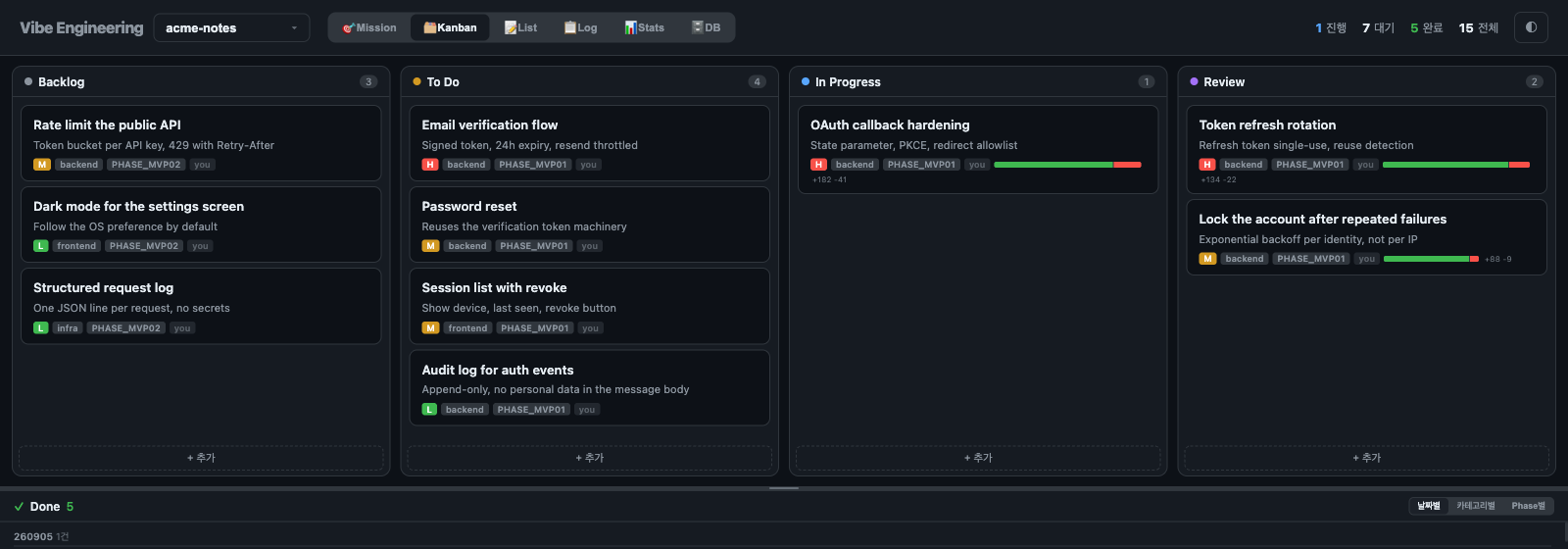
The kanban board (localhost:4242) is the visible surface. The real value is the discipline layer underneath: phase files, scope locks, review gates, and session bookends.
For work where the implementation path is intentionally left to the developer, use the outcome-based engineering assignment guide to define evidence, accuracy targets, holdouts, and review gates without prescribing the solution.
Features
- Phase management — SEED → MVP → PMF → SCALE → GTM. Scope per phase defined in
CURRENT_PHASE.md. Claude must not touch anything outside theDo NOT touchlist. - One in_progress at a time — enforced by the skill. If Claude starts a second task, the first gets bumped back to
todo. - Task accountability —
lines_added,lines_removed,tokens_used, work report, and decisions logged per task on completion. - Review gate —
git push/gh pr createauto-triggers a structured code review hook. Findings land in the kanban asreviewtasks. - Multi-project — one server (port 4242), multiple projects as tabs. Each project's data is JSON — git-tracked alongside code.
- DB Schema view — reads schema files (schema.rb, schema.sql, Prisma) and renders an ERD: tables, columns, PK/FK/UQ badges, index list, and FK relationship lines.
- Archive — done tasks auto-archived to monthly JSON files. Always visible. Never lost.
- Session rituals —
qq(wrap-up without push) andcc(commit + push + deploy + docs) as first-class commands. - Kickoff planning —
/vibe-planningwalks a new project through five gated stages, one question at a time, and leaves five short documents indocs/planning/. Built for developers who have to do the planning too. - Design before build —
/vibe-designturns the landing page and key screens into self-contained HTML you open in a browser and approve before implementation starts. - Review you can't argue with —
/vibe-reviewreads your repo the way a CTO reads a team member's: it runs the tests instead of believing the report, scores AI utilization and AI supervision separately, and escalates any problem that survives another week. - Token usage attribution (opt-in) — reconstructs per-day token usage from Claude Code transcripts and, if you configure an endpoint, pushes it so several machines of the same person merge into one lane. Off by default; nothing leaves the machine until you run
enroll.py. - Zero dependencies — pure Python + vanilla JS. No npm, no pip, no build step.
Install
Note on naming. The project was renamed from Vibe Harness to Vibe Engineering. The skill directory (
~/.claude/skills/vibe-harness/), the/vibe-harnesscommand, and the per-projectvibe-harness/data directory keep their old names for backward compatibility — existing installs and registered projects keep working untouched. Old GitHub URLs redirect.
1. Clone
git clone https://github.com/ZEST-im/vibe-engineering.git
cd vibe-engineering
2. Setup
python3 scripts/setup.py
Four steps, in this order:
- Copies the runtime →
~/.claude/skills/vibe-harness/—server.py,vibe_runtime.py,worker.py,kanban.html,reconcile_runs.py,kanban_edit.py,search.py,review_sync.py,enroll.py,gh_surface.py,setup.py— plus ten skill directories under both~/.claude/skills/and~/.codex/skills/:vibe-harness,vibe-planning,vibe-design,vibe-review,vibe-debug,vibe-architect,vibe-sa,vibe-aa,vibe-da,vibe-ta. Thevibe-harnessskill explicitly recognizes the baress,qq, andcccommands in Codex. - Migrates the old project registry, if you are upgrading from a prior version.
- Installs an auto-start agent — a macOS LaunchAgent labelled
com.vibe-harness.server, so the server comes up on login at port 4242. On Windows a Scheduled Task takes its place. If this step fails, setup continues — auto-start is a convenience, the hooks are the part that collects data. - Registers five hooks in
~/.claude/settings.jsonand copies their scripts into~/.claude/hooks/:
| Event | Hook id | What it does |
|---|---|---|
PreToolUse (Edit|Write) |
vibe-harness-scope-guard |
Can block an edit — refuses writes to paths the current phase lists under Do NOT touch |
PostToolUse (Bash) |
vibe-harness-code-review |
On git push / gh pr create, prints a review gate with the diff summary |
SessionStart |
vibe-harness-session-start |
Injects the current phase, scope, and board state |
Stop |
vibe-harness-stop-gate |
Warns when tasks are left in_progress or review |
SessionEnd |
vibe-harness-token-collector |
Parses the session transcript and records real token usage |
Two helper scripts are copied to ~/.claude/hooks/ without being registered as hooks:
vibe-harness-record-run.py (used by the collector) and vibe-harness-worktree-guard.py
(used at session start).
Everything written lives under your home directory: ~/.claude/settings.json,
~/.claude/hooks/, ~/.claude/skills/, ~/.codex/skills/, and one LaunchAgent plist. Nothing else is
touched, and no data leaves the machine unless you opt into
token usage attribution.
After setup, the cloned repo is only needed for updates.
3. Register your project
python3 ~/.claude/skills/vibe-harness/server.py register my_project "My Project" "$(pwd)/vibe-harness"
4. Open the board
Which version do I have
git -C <your clone> describe --tags --always
Tags are phase/PMFxx. Not every completed phase has one — a phase is tagged only
when a single commit clearly closes it, so some completed phases, and everything
before the tagging convention existed, have no tag. Where a tag exists, its release
notes are that phase's one-line summary, not the full internal record.
Update
python3 ~/.claude/skills/vibe-harness/setup.py upgrade
Downloads the latest server, Worker runtime, UI, skill, and setup files from GitHub, then restarts the server. No repo pull needed.
First time upgrading from an older install?
Older installs didn't copy setup.py to ~/.claude/skills/vibe-harness/, so the command above will say "No such file." Bootstrap it once:
mkdir -p ~/.claude/skills/vibe-harness
curl -sL https://raw.githubusercontent.com/ZEST-im/vibe-engineering/main/scripts/setup.py \
  -o ~/.claude/skills/vibe-harness/setup.py
python3 ~/.claude/skills/vibe-harness/setup.py upgrade
After this one-time bootstrap, every future update is just the single setup.py upgrade command at the top.
Uninstall
python3 scripts/setup.py uninstall
Removes the five hook entries from ~/.claude/settings.json, the hook scripts and
helpers from ~/.claude/hooks/, the auto-start agent, and the vibe-planning,
vibe-design, vibe-review, vibe-debug, vibe-architect, vibe-sa, vibe-aa,
vibe-da, and vibe-ta Claude skill directories. It also removes the same nine
directories installed under
~/.codex/skills/.
~/.claude/skills/vibe-harness/ is left in place on purpose — your project registry
(projects.json) and the server log live there. Delete that directory yourself if you
want it gone. Per-project vibe-harness/ data directories are never touched: they are
your records, and they are in your repositories.
Using It as a Harness
The board is useful out of the box. But the real leverage comes from using the full harness pattern.
Starting a brand-new project
Run /vibe-planning. It asks one question at a time through five gates — north star,
requirements, user stories, screens, technical decisions — and leaves the five artifacts in
docs/planning/. Stage 4 hands off to /vibe-design, so you look at the landing page and key
screens in a browser before a line of it gets built. At the end it proposes the implementation
tasks for the board, and the normal phase/kanban loop below takes over.
Session start prompt (add to your workflow)
PHASES.md와 CURRENT_PHASE.md를 읽고 작업을 시작해.
현재 Phase의 scope 밖은 건드리지 말고,
완료 후 PHASES.md를 업데이트해줘.
This single prompt means Claude starts every session knowing exactly what's in scope and what to leave alone.
Keep CURRENT_PHASE.md tight
## Now: PHASE_MVP02
## Scope: [auth flow, user model, sessions controller]
## Done when:
- [x] login/logout working
- [ ] password reset email
- [ ] session expiry
## Do NOT touch: billing, admin panel, mailers other than password reset
The Do NOT touch list is the harness. The shorter the scope, the faster and safer the session.
One task in_progress
The skill enforces this. If you notice two tasks in_progress on the board, something went wrong — Claude started a subtask without closing the parent. Call it out explicitly.
Token budget as a task size signal
If a task burns >100K tokens and still isn't done, it's too big. Break it in half. Tasks with high tokens_used + low lines_added are usually analysis tasks masquerading as implementation tasks.
Review before every push, not just on merge
The hook triggers on git push. Don't skip it. If Claude is pushing 10 times a day, 10 reviews is correct — each one is scoped to what actually changed.
Phase graduation checklist
Before moving to the next phase:
- All
done-whenitems checked inCURRENT_PHASE.md PHASES.mdupdated with completion date and task countqqrun to close open work reports- All tasks in kanban are
doneor moved to next phase backlog - Screenshot the board — it's the record of the phase
Archive as institutional memory
Monthly archive files (vibe-harness/archive/YYYY-MM.json) are git-tracked. They're a searchable history of every decision, every file changed, every token spent. When something breaks three months later, check the archive before blaming recent changes.
File Layout
~/.claude/skills/vibe-harness/
  SKILL.md           ← Claude reads this to know the commands
  server.py          ← HTTP server: API + static serving
  vibe_runtime.py    ← atomic lease, policy, credentials, test gate primitives
  worker.py          ← local polling Worker + isolated Git worktree execution
  kanban.html        ← Single-file vanilla JS UI
  projects.json      ← Project registry (which boards exist)
  server.log         ← Server stdout

{project}/vibe-harness/
  kanban.json              ← Active tasks
  worker.json              ← Tracked Worker/test/approval policy
  runtime.json             ← Ignored current leases and executions
  runs.json                ← Append-only terminal run usage/history
  archive/
    2026-03.json           ← Monthly archives (git-tracked)
    2026-04.json

~/Library/LaunchAgents/com.vibe-harness.server.plist   ← Auto-start
~/.claude/hooks/vibe-harness-review.sh                 ← Review hook
~/.claude/skills/vibe-harness/runtime-locks/            ← Atomic per-project locks
Commands
| Command | Description |
|---|---|
/vibe-harness |
Current board status |
/vibe-harness serve |
Start server + register project |
/vibe-harness add <title> |
Add a task |
/vibe-harness start <id> |
Move to in_progress |
/vibe-harness done <id> |
Mark done (records lines + report) |
/vibe-harness archive |
Archive done tasks to monthly file |
/vibe-harness report |
Today's completed task summary |
qq |
Session wrap-up: docs + kanban + no push |
cc |
Full close: docs + kanban + commit + push + deploy |
/vibe-planning |
Kickoff planning — five gated stages into docs/planning/ |
/vibe-design |
Landing + key screens as HTML, checked in a browser |
/vibe-review |
Weekly scored review, a short daily pass, and a monthly review in the project |
/vibe-debug |
Find the root cause before changing anything — for a bug whose cause is unknown |
/vibe-architect |
All four architecture passes in order, then scores what the first one predicted |
python3 ~/.claude/skills/vibe-harness/server.py sync |
Push configured remote snapshots now |
python3 scripts/enroll.py --token <t> |
Register this machine for token usage collection |
python3 scripts/enroll.py --add-project <key>=<repo> |
Register a project to collect from |
python3 scripts/reconcile_runs.py --all --dry-run |
Preview what would be collected |
Token Usage Attribution (opt-in)
Claude Code writes a transcript per session under ~/.claude/projects/. Those transcripts already
contain exact token counts. reconcile_runs.py reads them and rebuilds usage per session per
calendar day (KST) — session totals alone put a multi-day session's whole cost on its last day.
Nothing is transmitted until you configure an endpoint. There is no default telemetry.
# 1) register this machine (writes ~/.claude/skills/vibe-harness/sync.json)
python3 scripts/enroll.py --token <token> --machine <name> --runs-schema 2

# 2) register the projects to collect from — without this, collection finds nothing
python3 scripts/enroll.py --add-project codebook=~/dev/codebook

# 3) check, then send
python3 scripts/reconcile_runs.py --all --dry-run
python3 scripts/reconcile_runs.py --all --push
enroll.py installs a recurring collector: a LaunchAgent on macOS, a Scheduled Task on Windows.
Re-running it is safe — the agent label and task name are fixed, so nothing duplicates. --repair
re-points it after you move or rename the repository.
What gets sent. Only counters and identifiers: project key, session id, date, model, token counts, computed cost, and a machine label. Transcript content, prompts, code, and file paths are never sent. Sends are incremental — a day that has not changed is not resent.
Two separate credentials. secret authenticates dashboard snapshots (shared per project);
runs_token authenticates usage rows (personal). Do not put one in the other's field — a personal
token in secret breaks snapshot sync.
The default endpoint is ZEST-internal. If you are running your own, pass --endpoint.
Windows. Works, with two caveats: sync.json cannot be restricted to 0600 because Windows
does not apply POSIX permissions, and the collector runs through Task Scheduler rather than cron.
See docs/vibe-harness-windows.md.
Managed Worker Runtime
Vibe Engineering can optionally claim todo tasks and run a configured agent in an
isolated Git worktree. This layer is opt-in: installing it does not start an
agent or execute a command.
- Add
vibe-harness/worker.jsonusing the Worker protocol. - Configure a real, shell-free adapter argv and test-gate commands.
- Start one Worker: