A comprehensive audio, image, PSD, video, CSV, DBC, ARXML, A2L, ASC, BLF, MF4, Avro, ROS bag, PCAP, PCAPNG, STEP, DB3, ReqIF, Excel, Word, PowerPoint, PDF, Parquet, HDF5, NumPy, Safetensors, ONNX, TFLite/LiteRT, ExecuTorch, PyTorch Export, OpenVINO IR, Keras, Core ML, GGUF, HAR, JSONL, Jupyter Notebook, LaTeX, HTML, XML, EPUB, Mermaid, PlantUML, and HWP viewer extension for VSCode and Cursor.
🎵 Audio Viewer Features
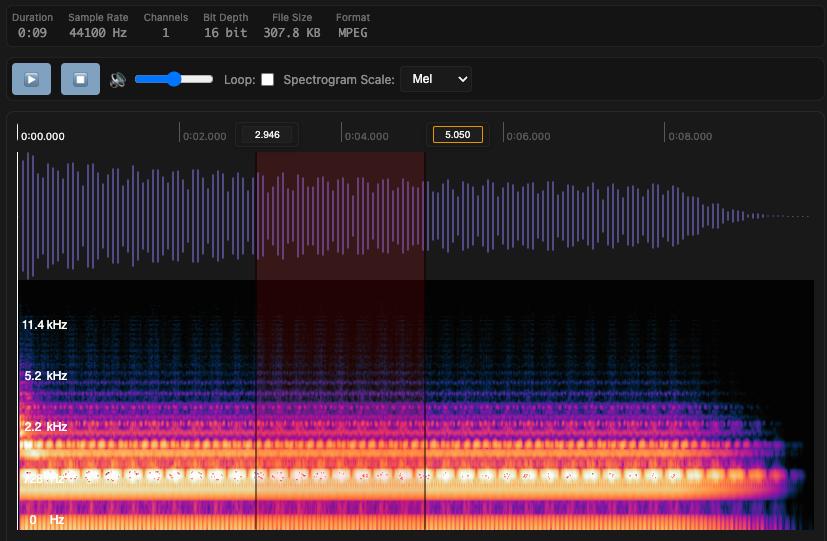
Advanced Audio Player with WaveSurfer.js
- Waveform Visualization: Real-time audio waveform display
- Spectrogram: Frequency analysis with spectrogram view
- Region Selection: Set start/end times for specific regions
- Loop Playback: Repeat playback of selected regions
- Volume Control: Real-time volume adjustment
- Playback Speed: Multiple playback speed options
- Audio Information: Duration, sample rate, channels, bit depth, file size, format display
Supported Audio Formats
- MP3, WAV, PCM (raw s16le mono 16kHz), AIFF/AIF/AIFC, AMR/AWB, OGG, FLAC, AC3, AAC, M4A
Note: playback still depends on the VS Code webview browser engine supporting the underlying codec.
🖼️ Image Viewer Features
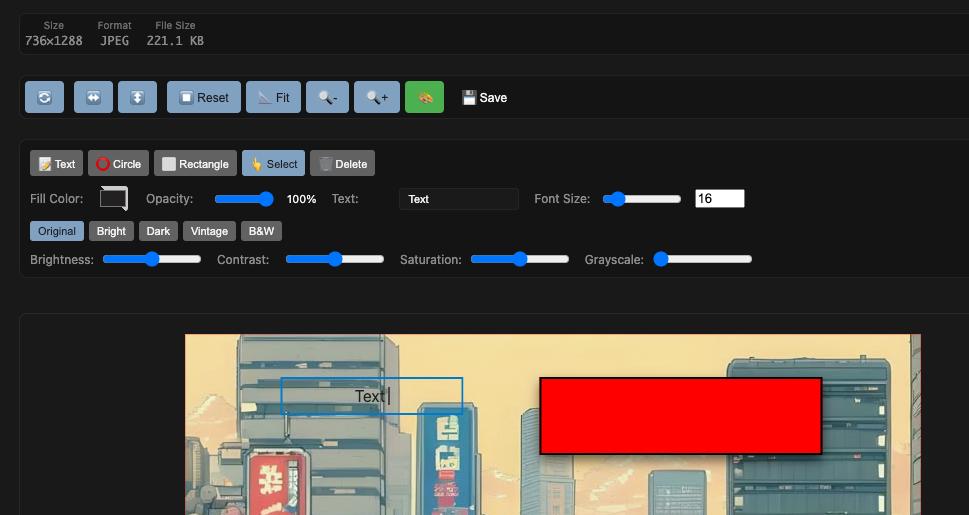
Advanced Image Viewer
- Zoom Controls: 10% ~ 500% zoom in/out
- Rotation: 90-degree left/right rotation
- Flip: Horizontal/vertical flip
- Fit to Screen: Automatic screen size fitting
- Image Filters: Brightness, contrast, saturation, grayscale adjustments
- Filter Presets: Normal, Bright, Dark, Vintage, B&W presets
- Save Functionality: Save filtered images to workspace
- Keyboard Shortcuts: Quick operation shortcuts
- Image Information: Resolution, format, and file size information display
Supported Image Formats
- JPG, JPEG, PNG, GIF, BMP, WebP, SVG
🖼️ PSD Viewer Features
Adobe Photoshop (PSD) Viewer
- Layer Panel: Tree view of layers and groups (folders) with indent by depth
- Per-Layer Visibility: Eye button to show/hide each layer independently
- View Button: Open a single layer in a modal for closer inspection
- Composite vs Layer-by-Layer: When all layers are visible, the full composite is shown; when any layer is hidden, the canvas is redrawn from visible layers only (leaf layers; group merged canvases are skipped to keep visibility correct)
- Transparency: Checkerboard background for transparent areas
- File Information: File name, file size, and document dimensions (width × height px)
- Powered by: ag-psd for PSD parsing and canvas output
Supported PSD Formats
- PSD (Adobe Photoshop Document)
🎬 Video Viewer Features
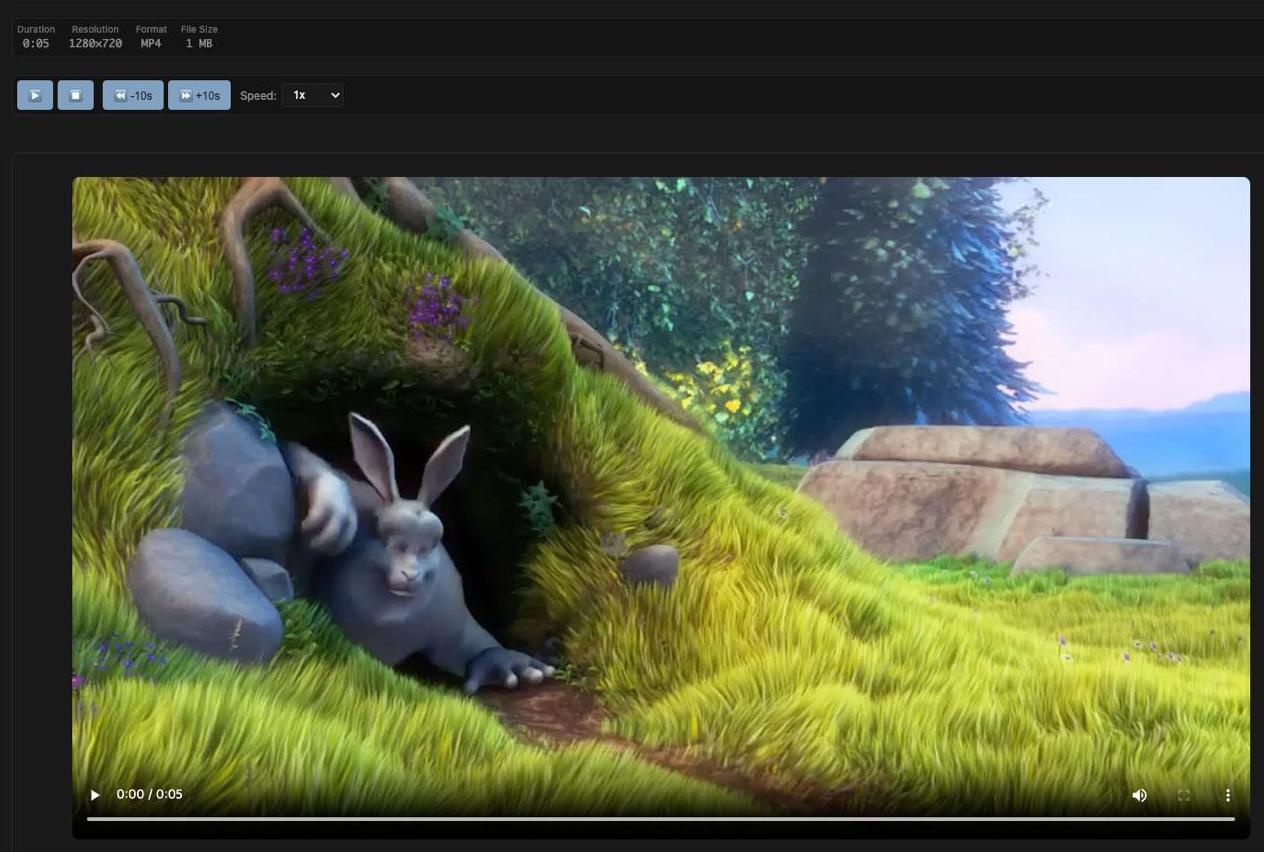
Advanced Video Player
- Playback Controls: Play/pause/stop
- Loop Regions: Set start/end times and loop playback
- Playback Speed: 0.25x ~ 4x playback speed control
- Skip Controls: 10-second forward/backward skip
- Volume Control: Real-time volume adjustment
- Keyboard Shortcuts: Spacebar, arrow keys, etc.
- Video Information: Resolution, duration, and file size display
Supported Video Formats
- MP4, MPEG-TS (TS/MTS/M2TS), AVI, MOV, WMV, FLV, WebM, MKV
Note: .ts files share an extension with TypeScript source files, so automatic viewer association may require using Open With instead of a default file binding.
📊 CSV Viewer Features
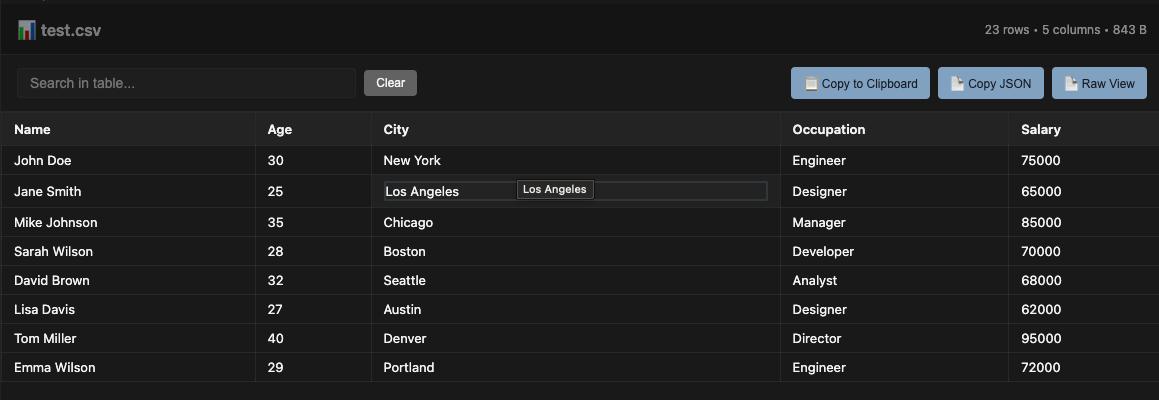
Advanced CSV Viewer
- Table Display: Clean, sortable table view of CSV data
- Search & Filter: Real-time search across all columns
- Column Sorting: Click headers to sort by any column (numeric/text aware)
- Pagination: Handle large datasets with page navigation
- Copy to Clipboard: Copy filtered data to clipboard (tab-separated format)
- Statistics View: Display detailed file and data statistics
- Keyboard Shortcuts: Ctrl+F for search, Ctrl+C for copy
- File Information: Row count, column count, and file size display
- Responsive Design: Works on different screen sizes
- Delimiter Detection: Automatically detects comma, semicolon, tab, and pipe-delimited text formats
Supported CSV Formats
- CSV (Comma-Separated Values)
- TSV (Tab-Separated Values)
🚗 DBC Viewer Features
CAN Database Explorer
- Message Overview: Browse CAN messages with ID, hexadecimal ID, DLC, transmitter, and signal count
- Signal Table: Inspect start bit, bit length, byte order, signedness, scale, offset, range, unit, and receivers
- Search & Filter: Search across messages/signals/comments and filter by CAN node
- Comments & Value Tables: Shows
CM_comments andVAL_enumerations when present - Raw Source View: Keep the original DBC text available beside the structured view
Supported DBC Formats
- DBC (CAN database)
🚘 Data Explorer Viewer Features
ARXML, A2L, ASC, BLF, MF4, Avro, BAG, PCAP, PCAPNG, STEP, DB3, and ReqIF Explorer
- ARXML Structure View: Summarizes AUTOSAR packages, named CAN-related elements, and references
- A2L Block View: Lists ASAP2 blocks and counts key sections such as
MEASUREMENT,CHARACTERISTIC, andIF_DATA - ASC Log Preview: Parses Vector ASCII CAN/CAN FD events into a searchable table
- BLF Header Preview: Detects Vector BLF
LOGGfiles and shows binary header/hex preview - MF4 Header Preview: Detects ASAM MDF 4 files and summarizes known MDF block markers
- Avro Metadata Preview: Reads Avro object container metadata, codec, schema preview, and header bytes
- ROS Bag Preview: Detects ROS bag v2 files and summarizes record operation hints with a binary preview
- PCAP Preview: Detects classic PCAP files and summarizes global headers, link type, timestamp resolution, and packet records
- PCAPNG Preview: Detects PCAPNG section headers and summarizes sections, interfaces, packet blocks, and block sizes
- STEP Model Summary: Extracts ISO 10303 header fields and top entity counts from
.stp/.stepCAD exchange files - DB3 SQLite Preview: Detects SQLite 3 databases, reads
sqlite_master, lists schema entries, and previews rows from table b-tree pages - ReqIF Summary: Extracts ReqIF header metadata, specifications, spec objects, relations, datatypes, and spec types
- Search & Raw Preview: Search across extracted tables and inspect the original text preview for text-based formats
Supported Data Explorer Formats
- ARXML (AUTOSAR XML)
- A2L (ASAM MCD-2 MC / ASAP2)
- ASC (Vector ASCII CAN log)
- BLF (Vector Binary Logging Format header preview)
- MF4 (ASAM MDF 4 header and block marker preview)
- AVRO (Apache Avro object container metadata preview)
- BAG (ROS bag v2 header and record hint preview)
- PCAP (classic packet capture global header and packet record preview)
- PCAPNG (packet capture next-generation section and block preview)
- STP/STEP (ISO 10303 STEP model summary)
- DB3 (SQLite 3 database schema and row preview)
- REQIF (Requirements Interchange Format summary)
📊 Excel Viewer Features
Advanced Excel Viewer
- Multi-Sheet Support: Switch between sheets via dropdown
- Table Display: Clean table view of sheet data
- Search & Filter: Real-time search across all columns
- Pagination: Handle large datasets with page navigation
- Copy to Clipboard: Copy filtered data (tab-separated)
- Copy as JSON: Export current sheet data as JSON
- Raw View: Toggle between table and raw JSON view
- File Information: Sheet name, row count, column count, file size
- Keyboard Shortcuts: Ctrl+F search, Ctrl+C copy
Supported Excel Formats
- XLSX (Excel Workbook)
- XLS (Excel 97-2003)
📄 Word Viewer Features
Microsoft Word (DOCX) Viewer
- Document View: Renders
.docxwithdocx-previewfor improved layout fidelity - DOC Support: Opens
.docvia standalone legacy HTML fallback, with LibreOffice conversion fallback only when needed - Native Legacy Rendering: Preserves more
.docparagraph styling, table structure, and readable legacy text decoding - Embedded Workbook Preview: Shows extracted worksheet tables and simple SVG chart previews when legacy
.docfiles contain embedded workbook data - Zoom Controls: Zoom in/out and reset (Ctrl+/-, Ctrl+0)
- Print: Print document (Ctrl+P)
- File Information: File name and file size
- Powered by: docx-preview for DOCX rendering
Supported Word Formats
- DOCX (Microsoft Word Document)
- DOC (Microsoft Word 97-2003)
📽️ PowerPoint Viewer Features
Microsoft PowerPoint (PPTX/PPT) Viewer
- Slide View: Reads
.pptxand legacy.pptfiles and renders slide content in order - Title + Bullet Extraction: Displays slide title and bullet text content
- Legacy PPT Layout Recovery: Preserves more title/body/subtitle placement, slide sizing, and discovered shape/image positioning for
.ppt - Packaged PDF.js Rendering: Uses bundled
pdf.jsassets for environments where external CDN access is blocked - Slide Jump: Jump to any slide from a dropdown
- Zoom Controls: Zoom in/out and reset (Ctrl+/-, Ctrl+0)
- File Information: File name, file size, and slide count
- Powered by: JSZip for PPTX archive parsing
Supported PowerPoint Formats
- PPT (Microsoft PowerPoint 97-2003)
- PPTX (Microsoft PowerPoint Presentation)
📑 PDF Editor Features
PDF View & Edit
- Page View: Page-by-page rendering with thumbnail sidebar
- Zoom Controls: Zoom in/out and reset
- Annotations: Add text/signature, select, move, and delete annotations
- Password-Protected PDFs: Open encrypted PDFs with an in-viewer password prompt
- Text Size Control: Choose annotation font size when inserting text
- Page Editing: Reorder pages (drag & drop) and delete pages
- Merge PDF: Merge another PDF into the current document
- Save Flows: Save and Save As with state synchronization after save
Supported PDF Formats
🇰🇷 HWP Viewer Features
Hangul Word Processor (HWP) Viewer
- Document View: Opens
.hwpand.hwpxfiles directly inside Omni Viewer - Integrated Routing: Works with the same signature-based viewer detection flow used across the extension
- Powered by: rhwp (
@rhwp/core) for upstream parsing and rendering - Upstream-Friendly Integration: Runtime assets are synced from
node_modules/@rhwp/corevianpm run sync:rhwp, so future rhwp updates can be adopted without forking its renderer
Supported HWP Formats
- HWP, HWPX
🧩 PlantUML Viewer Features
Browser-Based PlantUML Preview
- Serverless Rendering: Renders PlantUML diagrams in the VS Code webview without a PlantUML server
- Diagram / Split / Source Views: Switch between rendered preview, side-by-side source, and read-only source
- Zoom Controls: Zoom in/out and reset
- Light / Dark Render Modes: Toggle PlantUML output mode
- Copy Source: Copy the original diagram text to clipboard
- File Information: File name, file size, and line count
- Powered by: puml-canvas-js for native JavaScript SVG rendering
Supported PlantUML Formats
- PUML, PlantUML, IUML
📐 LaTeX Viewer Features
Structure and Math Preview (Not a TeX Compiler)
- Partial Render by Design: Shows document structure and formulas, not typeset output — no TeX engine is involved, and the preview says so on screen
- Section Outline: Navigate
\part…\subparagraphfrom a sidebar; selecting an entry scrolls the preview - Math Rendering: Inline (
$…$,\(…\)) and display ($$…$$,\[…\],equation,align,gather, …) formulas rendered with KaTeX, progressively as they approach the viewport - Preamble Macros:
\newcommand,\DeclareMathOperator, and\letdefinitions are passed to the math engine - Tables and Theorems:
tabular/array/longtablewith column alignment and\multicolumn, plus\newtheoremenvironments - Cross-References:
\refbecomes a control that scrolls to the labelled block;\url/\hrefopen externally - Nothing Silently Dropped: TikZ,
\includegraphics, and\inputtargets stay visible as their own source with a badge explaining why they were not rendered - Preview / Split / Source Views: Edit the source with undo/redo and save in place (
Ctrl/Cmd+S) or to a copy - Powered by: omni-viewer-core for parsing and rendering, with KaTeX for formulas
Supported LaTeX Formats
- TEX, LATEX, LTX
Note: external file references are not resolved, and BibTeX, cross-reference numbering, and TikZ drawing are out of scope.
📓 Jupyter Notebook Viewer Features
Read-Only Notebook Preview (.ipynb)
- Saved Results, Never Executed: Shows nbformat 4 notebooks in file order with the outputs stored in the file; no kernel is started and no code runs
- Code Cells:
In/Outexecution counts, syntax highlighting for the notebook's kernel language (Python, R, Julia, Scala, SQL, and more), stdout/stderr streams, and error tracebacks - Rich Outputs: HTML tables, PNG/JPEG/GIF/WebP/SVG images, Markdown, LaTeX, JSON, and plain text, with one static representation chosen per output; interactive widget and JavaScript outputs fall back to their saved text
- Markdown Cells: GitHub-flavored Markdown with KaTeX math,
attachment:images, and images referenced relative to the notebook (confined to the notebook's folder) - Navigate Large Notebooks: Search cells and outputs, hide all code or all outputs, and expand individual cells; saved
source_hidden,outputs_hidden, andcollapsedhints set the initial state - Safe by Default: Output HTML is sanitized, scripts and remote resources are blocked, and external links open in the browser
- Opt-In Editor: Registered as an optional editor so VS Code's own notebook editor stays the default; use
Open With OmniViewerfrom the explorer - Powered by: omni-viewer-core for parsing and rendering, with KaTeX for formulas
Note: notebooks larger than 64 MiB are not previewed.
🌐 HTML Viewer Features
- Preview and Source Tabs: View
.htmland.htmfiles withomni-viewer-core's HTML viewer - Safe Preview: A sandboxed iframe renders inline styles and embedded data images; scripts, external resources, and navigation are blocked
- Encoding Support: The core honors byte-order marks and HTML charset declarations
- Large Documents: Files over 8 MiB or with very dense markup open in source view; files over 64 MiB report the host's read limit
- Opt-In Editor: Right-click a file and choose
Open With OmniViewer, or select HTML Viewer from Reopen Editor With… - Refresh: Use the existing Omni Viewer refresh command to reload changes from disk
🧾 XML Viewer Features
Element Tree and Source Side by Side
- Tree + Source: Element/attribute tree with a node inspector next to the original source; selecting a node highlights its range in the source, and clicking a tag or attribute in the source selects its node
- Namespaces and Diagnostics: Namespaces are resolved, and well-formedness errors (mismatched or unclosed tags, duplicate attributes, undeclared prefixes) are reported with line and column, then recovered so a broken file still opens
- Search: Names, values, or comments and processing instructions, with next/previous and a matches-only filter
- Copy: A node's XPath, its value, or its XML
- Large Files: Both panes are virtualized, and long single-line sources are split into display segments
- Safe by Default: External entities are never loaded, and internal DTD entities expand one level only under a budget (no XXE or billion-laughs expansion)
- Opt-In Editor: Registered as an optional editor so XML keeps VS Code's text editor as the default; use
Open With OmniViewerfrom the explorer. OpenVINO IR, ARXML, and ReqIF files still open in their dedicated viewers - Powered by: omni-viewer-core
Supported XML Formats
- XML, XSD, XSL, XSLT, WSDL, XLF, XLIFF, RSS, Atom, XAML, KML, GPX, RESX, CSPROJ, VCXPROJ, NUSPEC, and extensionless files starting with an
<?xmldeclaration
Note: documents larger than 64 MiB are not previewed.
📚 EPUB Viewer Features
Reflowable E-Book Reader (.epub)
- EPUB 2 and 3: Reads the table of contents from the EPUB 3 navigation document or the EPUB 2 NCX, and walks the book's reading order with next/previous and the arrow keys
- Book Info: Title, creators, identifiers, publication date, series, subjects, description, and cover, plus any diagnostics
- Text Scaling:
Ctrl/Cmd+/-/0 - On-Demand Loading: Only the package files are read up front; chapters and images are inflated as you open them
- Safe by Default: Chapter markup is sanitized; scripts, forms, frames, media, and publisher CSS are dropped, remote images are blocked, and external links open in the browser
- DRM: A book whose every chapter is encrypted is reported as protected; partly encrypted or fixed-layout content is listed in the diagnostics
- Powered by: omni-viewer-core, with DOMPurify for sanitizing
Note: books larger than 256 MiB open in the Archive viewer instead.
📄 JSONL Viewer Features
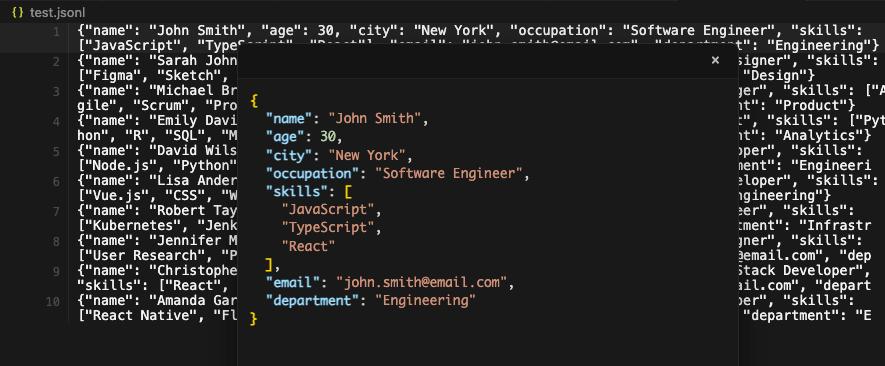
Interactive JSONL Editor
- Line-by-Line Editing: Direct inline editing of JSON lines with syntax validation
- Hover Popup: JSON popup display on line hover with formatted syntax highlighting
- Click-to-Edit Popup: Click popup content to edit JSON directly in formatted view
- Real-time Validation: Instant JSON validation with visual feedback (valid/invalid indicators)
- Data Synchronization: Seamless sync between popup edits and original lines
- Syntax Highlighting: Color-coded JSON syntax for better readability
- Error Handling: Clear error messages for invalid JSON format
Supported JSONL Formats
- JSONL (JSON Lines) - Each line contains a valid JSON object
📊 Parquet Viewer Features

Advanced Parquet Viewer
- Table Display: Clean, table view of Parquet data
- Search & Filter: Real-time search across all columns
- Column Sorting: Click headers to sort by any column (numeric/text aware)
- Pagination: Handle large datasets with page navigation
- Copy to Clipboard: Copy filtered data to clipboard (tab-separated format)
- Keyboard Shortcuts: Ctrl+F for search, Ctrl+C for copy
- File Information: Row count, column count, and file size display
- Responsive Design: Works on different screen sizes
Supported Parquet Formats
- Parquet
🧬 HDF5 Viewer Features
Hierarchical Data Format 5 (.h5, .hdf5, .he5)
- Structure Tree: Walks the file hierarchy and lists every group and dataset path
- Dataset Details: Shows each dataset's shape (dimensions) and datatype (e.g. Float64, Integer32)
- Superblock Summary: Reports superblock version, offset/length sizes, and root group address
- Format Coverage: Reads superblock versions 0–3, including classic symbol-table groups and version-2 object headers with compact links
- **Header Previe