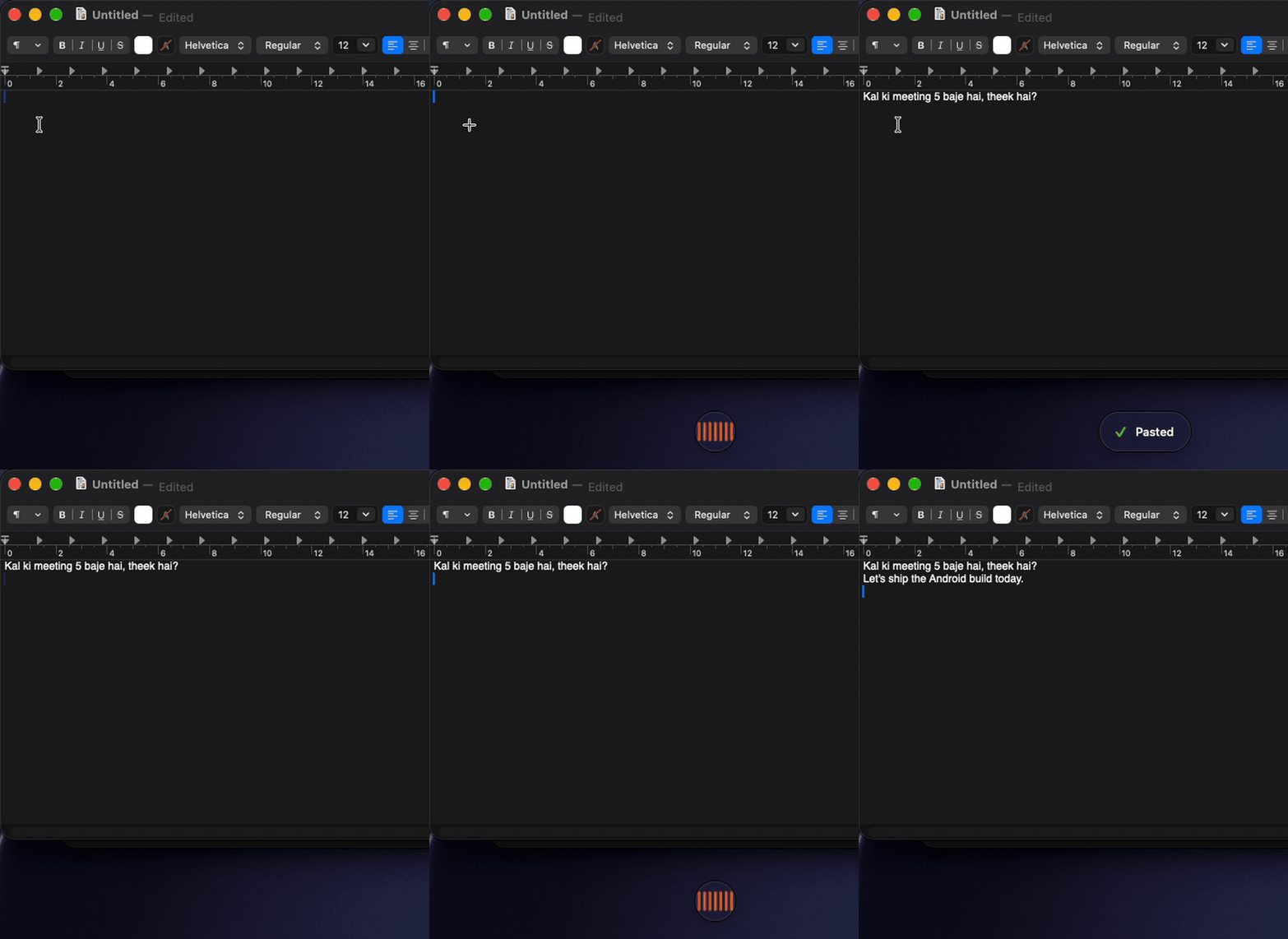
Talk to your coding agent while you look at something else.
A macOS overlay. You speak, it transcribes, and the prompt lands in your Claude Code terminal, along with the screenshots, highlighted text and web elements you pointed at while talking.
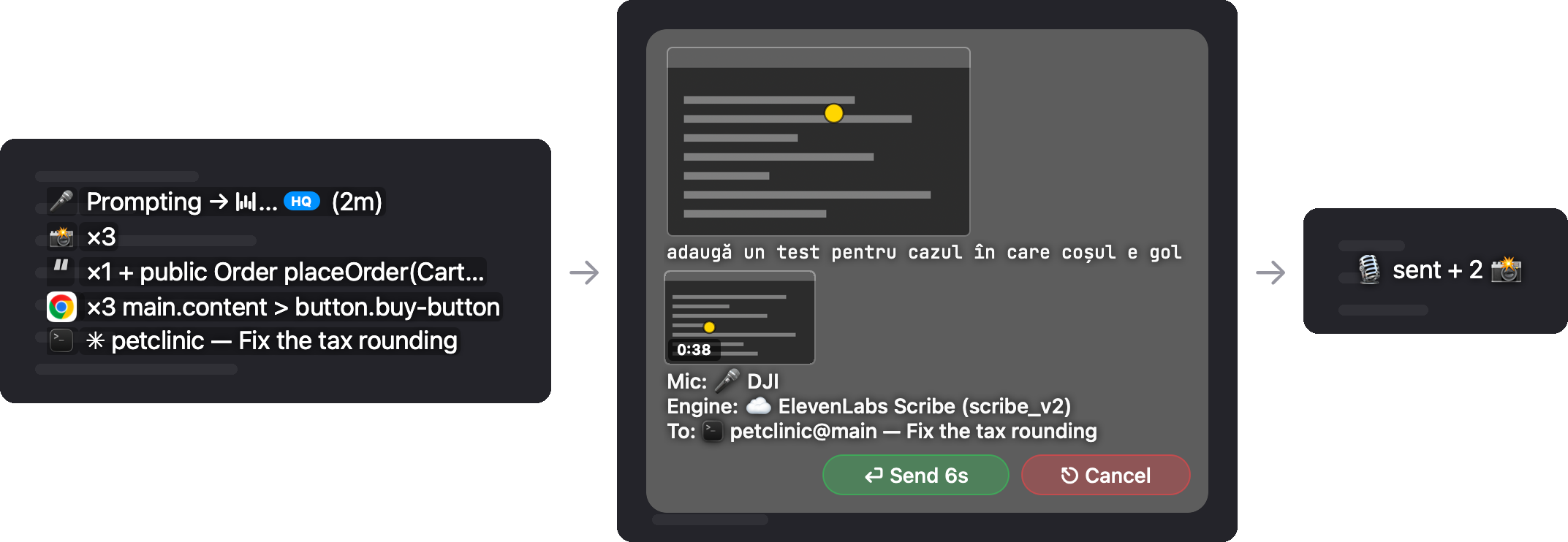
talk → a few seconds to check it → sent
Why
- 👀 Your eyes stay on the work: a browser, an IDE, the projector. The terminal can sit behind other windows.
- 🎙️ You speak instead of typing, in Romanian, English or both mixed.
- 📸 Context comes along: screenshots, highlighted text, elements picked in Chrome.
- ⏱️ You can still cancel: every prompt waits a few seconds before it is sent.
- 🛡️ It never types at a shell prompt, only into a running agent.
How it goes
| step | what you see |
|---|---|
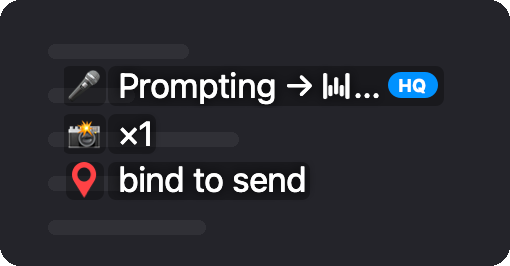
| 1. Bind a terminal running Claude Code: ⌘⌃B | the chip by your cursor names the session |
| 2. Talk: ⌘⌃D to start, ⌘⌃D again to stop | 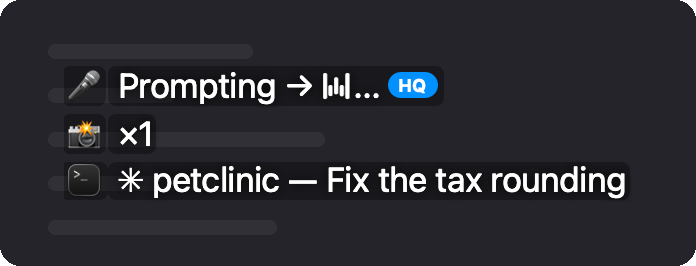 |
| 3. Show it what you mean: highlight some text… | 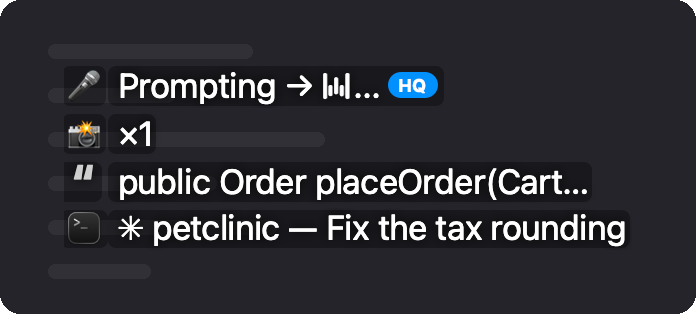 |
| …or ⌘⇧-click an element in Chrome | 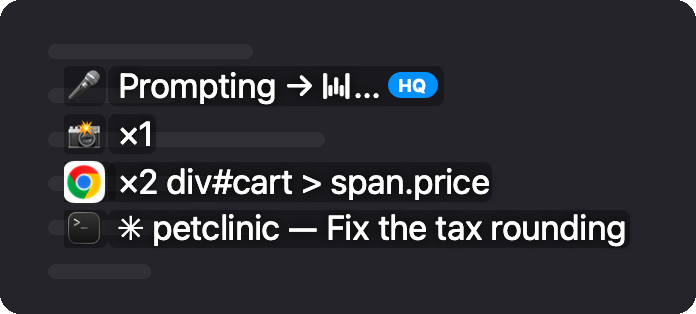 |
| 4. Check it: the prompt waits ~6 s behind Cancel, then goes | 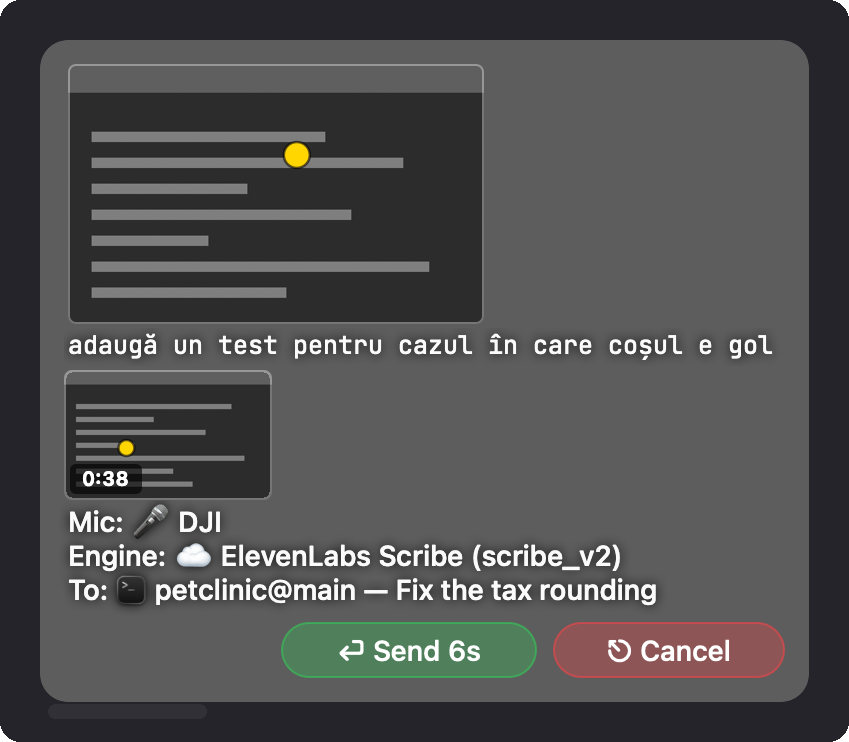 |
More tricks
- ✨ Start a new session by voice. A new Terminal opens Claude Code with your sentence as its first prompt, in
~/workspaceor a folder you pick.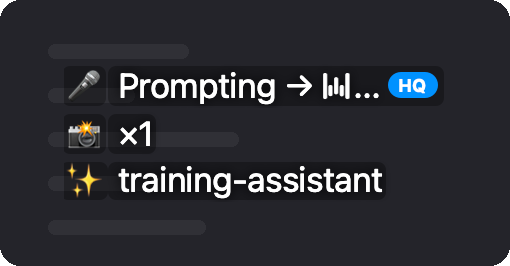
- 🕐 Nothing bound? Talk anyway. The sentence waits 5 minutes for you to bind a terminal.
- 💻 The cloud is slow? ⌘⌃X transcribes on this Mac, right away.
- 🎵 Your music pauses in Chrome while you talk, and resumes after.
- 📋 The clipboard always holds the last sentence, so ⌘V pastes it again.
Keys
| key | does |
|---|---|
| ⌘⌃B | bind the terminal in front (press again to let go) |
| ⌘⌃D | start / stop a dictation |
| ⌘⌃X | transcribe on this Mac, now |
| ⌘⇧-click in Chrome | add that element to the prompt |
🖱️ It can also be driven entirely from the mouse, with Logitech side-button gestures or the wheel. The menu bar icon lists every action next to the gesture that does it.
Install
./build-app.sh # → /Applications/Walkie Talkie.app
- 🍏 Apple silicon only: the vendored projectM libraries are arm64.
- 📦
victor-mac-kitis fetched from GitHub on the first build, unless it is checked out next to this folder (then that copy is used). - 🔏 Without
CODESIGN_IDENTITYthe app is signed ad hoc, and macOS forgets the Accessibility grant on every rebuild; any local self-signed code-signing certificate fixes that. - 🔐 Grant Accessibility, Screen Recording and Microphone when asked.
- 🗣️ Pick a recogniser from the menu: ElevenLabs Scribe (key in
~/.walkie-talkie/elevenlabs.env), a local Whisper (pip install mlx-whisper, plusffmpeg) or Wispr Flow. - 🧩 Optional, for picking elements in Chrome:
chrome://extensions→ Developer mode → Load unpacked →chrome-extension/.
👉 Every state the overlay can be in, photographed: docs/overlay-states.html
The long version
For agents, and for anyone who wants the details. This is the map. Every rule,
with the measurement or the incident behind it, lives in
.claude/rules/ (one file per area) and
docs/journal.md. Where they disagree with this page, they win.
The relay is one-way and non-interactive by design: the agent gets your words and cannot ask anything back, because you are not reading the terminal.
Where the words go
| destination | how you aim at it | what happens |
|---|---|---|
| a bound terminal | ⌘⌃B on it | typed in and submitted, wherever your cursor is |
| a new Claude Code session | 🔼 ↑ | a new Terminal window starts claude "<your words>", then gets bound |
| the caret | 🔼 (forward click) | pasted where you are typing; submitted if that is a Claude Code prompt |
- Nothing bound? The sentence is held, five minutes each, in order, and delivered on the next bind. The chip says
bind to send; on expiry it says⌘V to paste it. - The recipient is fixed when the microphone closes. Binding something else afterwards does not redirect a sentence already said. If its terminal is gone at delivery, the words go to the caret.
- The clipboard always holds the last finished sentence, so ⌘V pastes it again.
Bound terminals
| what | addressed by | delivered with | takes focus? |
|---|---|---|---|
| Terminal.app tab | its tty | do script |
no |
| tmux pane | its %pane |
send-keys |
no |
| VS Code / IntelliJ terminal | the editor's extension (victor-vsc, live-coding) |
the terminal widget's own API | no |
| any other editor (fallback) | its pid | paste + Return | ~200 ms, then put back |
- It never types at a shell prompt. Before every delivery it checks the foreground job; a shell, or anything that hands the line to one (
ssh,sudo,less,docker…), is refused. The test fails closed. At a prompt, a dictated "delete the build folder" would be run. - A raw chunk plus Return, never a bracketed paste: Claude Code wraps a paste in
<pasted_content>and the model treats it as data. Up to four more Returns follow if the sentence is still sitting under❯. - Binding draws a blue rectangle that flies from the window into the chip; sending draws a white outline from the panel onto the terminal.
A new session
- 🔼 ↑ (in Wheel mode: ⌘ + wheel click, or double click) aims the dictation at a session that does not exist yet. Mid-sentence it re-aims the open one.
- A folder menu pops up: active terminals, pinned and recent projects. Untouched, the folder is
~/workspace. - The prompt travels in argv (via a file, never through the keyboard), so it cannot be run by a shell, typed early, or mangled by quotes.
The caret
- 🔼, the forward click: a prompt at the caret, carrying everything below (screenshots, highlights, picks).
- 🔽 →, or right ⌘ ×2: a plain dictation, the words alone. Wispr Flow's habit, with this app's engine.
What rides along with the words
Every attachment is a token where you made it, and a legend under the words says where the files are. A real one:
[📸0 auto]
make the overlay draw above the screen grow effect, right now it ends up under it

kamikaze

[Transcribed in RO or EN by ☁️ ElevenLabs Scribe]
[📁=$WALKIE_SHOTS/2026-10-04-17-13-27]
[📸0 = 📁/screenshot-0-800px.jpg, or -original.jpg at 3456x2234px]
Screenshots
- 📸0 is automatic: the screen as it was when you started talking (
auto). The token says no pointer coordinates (2026-10-21); the prompt panel draws the pointer as a yellow dot on its preview. - More shots: the shutter (🔽 in Logi mode, the back button in Wheel mode) while a prompt records. The frame flies into the chip's 📸 and a red target blooms on the desktop where the pointer was. Nothing is drawn into the picture: a mark would cover what it points at.
- A region: hold the wheel and drag during a dictation (
✂️x,y→x,yin the token). ⌘ moves the box, ⌥ draws it from the middle, Esc calls it off. It is Victor Addons' crop, shared throughvictor-mac-kit. - Two files per shot: the retina original, and an 800 px copy that the agent reads. Same answers in the evals, about 40% fewer tokens.
$WALKIE_SHOTSmust be exported in~/.zshrc. It points at~/Library/Caches/ro.victorrentea.wispr-relay/shots/(the newest 300 frames are kept).
Highlighted text
- Highlighting is enough. During a dictation the selection is read every second through Accessibility (never ⌘C, never the clipboard) and filed after three identical reads, plus once more when the microphone closes.
- The shutter reads it too, falling back to ⌘C with the clipboard restored. That is how a highlight inside a Chrome page gets in.
- The text lands inside the sentence, where you said it. If it cannot be placed, it goes in a list under the words, with
mm:ssand the window it came from.
Elements in Chrome
- Hold ⌘⇧ for 400 ms over a page during a dictation: the element under the cursor is outlined and named. Click it to add its selector, its text (up to 2000 chars) and the page URL. Drag it to say where to move it; the page itself never changes.
- Only live during a dictation, and only after the 400 ms hold, so a quick ⌘⇧-click still opens a link in a new tab.
- A Chrome extension (
chrome-extension/, loaded unpacked), not CDP: since Chrome 136, remote debugging is refused on the default profile. It talks to the relay on127.0.0.1:8917–8919. - Music pauses: every audible Chrome tab is paused while a microphone is open, and exactly those resume after (WebSocket on
:8920).
Other markers
kamikaze(🔼 ↓): appended on its own line, the agent's cue to close its terminal when done. Again to take it back.[voice: hesitant]/[voice: tense]and[?]where you paused: what the transcript loses. ElevenLabs only, since it needs word timings.
The held prompt
- Shown whole, held 4–7 s (scaled by length) behind Send and Cancel. Once a line is in the terminal the agent may already be acting on it, so that is the only honest moment to cancel.
- ⏎ sends now. Clicking the words edits them, and the clock stops while you do.
- Autosend (menu) skips the buttons; the pointer on the panel still pauses it.
- Thumbnails carry the
m:ssat which each shot was taken. With ElevenLabs, two sentences can be in flight at once, delivered in order.
Recognisers
Picked from the menu's Engine row:
| engine | notes |
|---|---|
| ☁️ ElevenLabs + Live | Scribe, plus the words streaming beside the pointer as you speak |
| ☁️ ElevenLabs (default) | Scribe, one upload at the end; key in ~/.walkie-talkie/elevenlabs.env |
| 💻 Local | Whisper on MLX (pip install mlx-whisper + ffmpeg); loaded at launch, ~2.5 GB resident |
| ☁️ Wispr Flow | its own app, behind a firewall: its ⌘V is dropped and the words are read from its History row |
- ⌘⌃X transcribes on this Mac now: the take being recorded or uploaded goes to the local model instead. A cloud failure falls back to it automatically.
- The local interpreter is found by probing, not from
PATH(an app launched by Finder gets launchd's barePATH).RELAY_WHISPER_PYTHONandRELAY_WHISPER_MODELoverride it. - The Mic row picks the input. Automatic prefers a wireless receiver over the laptop microphone.
Gestures
| key | |
|---|---|
| ⌘⌃B | bind the terminal in front; on the bound one, let go |
| ⌘⌃D | start / stop a dictation |
| ⌘⌃X | the local model, now |
Logi mode (default, Gestures in the menu): the side buttons arrive as ⌃⌥⌘F3–F12 chords from Logi Options+, and the app takes no mouse button at all.
| gesture | does |
|---|---|
| 🔼 → | start / stop a prompt at the bound terminal |
| 🔼 | a prompt at the caret |
| 🔼 ↑ | a prompt at a new session |
| 🔼 ← | cancel |
| 🔼 ↓ | kamikaze; within 3 s after a prompt landed in a terminal (☠️ Kamikaze? by the pointer): send kamikaze alone to it |
| ◀️ held, then 🔼 | bind the window in front |
| 🔽 → | start / stop a plain dictation at the caret (the stop inserts the words, no Return) |
| 🔽 | start / stop a plain dictation (ends in Return); the shutter while a prompt records |
| 🔽 ← | Return, at any moment |
| 🔽 ↓ | during a plain dictation: stop it, no Return; otherwise unbind |
Wheel mode needs no Logitech software: click the wheel to start and stop, hold 2 s to cancel, left button held plus a wheel click to bind, right button held plus a wheel click to unbind, the back button as the shutter.
The menu bar icon lists every action with its gesture. The spec is evals/test_gesture_spec.py,
the reasoning .claude/rules/mouse-gestures.md.
The outbox
Each delivered message is also appended to ~/.walkie-talkie/outbox.jsonl, at delivery and
never before: a held sentence leaves no trace. kind is dictation | screenshot |
session_end, and every line carries its session, so several relays can share one queue.
{"ts":"2026-10-04T14:13:27Z","session":"walkie-talkie@master","kind":"dictation",
 "text":"…","line":"<the envelope, as typed>","screen":"…/screenshot-0-original.jpg",
 "selection":"…","selections":[{"at":"0:31","seconds":31,"text":"…","in":"<window>"}],
 "elements":[{"path":"div#cart > span.price","text":"…","url":"…","at":12}]}
Any agent that can tail a file can consume it. The Claude Code side is the relay skill in
victorrentea/skills-private.
Loopback control
The relay listens on the first free port of 8917–8919:
| route | |
|---|---|
POST /bind · POST /unbind · GET /target |
bind the front terminal · let go · what it is aimed at |
GET /engine · POST /engine {"id"} |
which recogniser, and is it ready · pick one |
GET /test/state |
busy and the rest of the live state |
POST /test/dictation {"text"} |
put a sentence through the whole path without speaking |
POST /test/spawn |
the same, at a new session |
About forty more /test/* routes drive every feature from a desk: see .claude/rules/desk-testing.md.
The voice corpus
- Every dictation leaves its WAV beside its transcript in
~/.walkie-talkie/voice-corpus/(about 35 MB a day, never pruned), so a recogniser can be judged, and later trained, on your own voice. helpers/corpus_harvest.py(a LaunchAgent, every 2 h) also copies Wispr Flow's recordings before Wispr prunes them after about a week, read-only.- Measured on 60 clips (2026-09-01): the local turbo model is at 19.7% WER, 22.7% on Romanian and 7.1% on English. Bigger models, a pinned language and a vocabulary prompt all made it worse, which is the case for a fine-tune. That work continues in
voice-distill. docs/teacher-loopback.mdcovers labelling recordings by playing them back into Wispr. Read it before runninghelpers/teacher_label.py.
Build and run
./relay-restart.sh --build # build, wait for a quiet moment, swap the app, relaunch
- The restart waits until 5 s after the last dictation and refuses while anything is recording or transcribing. A bare
./build-app.shonly when the app is not running: a bundle replaced under a running app breaks every bind. - Launch it with
open "/Applications/Walkie Talkie.app", never by its executable path, which macOS registers as a second app for permissions. - The
.appis signed (CODESIGN_IDENTITY) because macOS keys Accessibility, Screen Recording and Microphone grants to the signing identity plus the bundle id (ro.victorrentea.wispr-relay, kept from its old name on purpose). ../victor-mac-kit, when it is there, wins over the GitHub copy, so an edit to the crop rebuilds in one step.- After any overlay change, run
./docs/shoot-overlay-states.sh. It regenerates the states page and the README's pictures.
Debugging
~/.walkie-talkie/relay.logis the log.GET /test/stateis the live state.kill -USR1 <pid>writes what the overlay shows to~/.walkie-talkie/snapshot.png. The overlay issharingType = .none, so it never lands in its own screenshots, and no screenshot can show it either.POST /test/key-trace {"on":true}logs every key the tap sees and what it decided.
Licence
The Unlicense: public domain. Take it, change it, ship it, sell it; no attribution required.