
English · 简体中文 · 한국어 · Português

Wallpaper Engine wallpapers, now on macOS.
A free, open-source Mac app that plays Wallpaper Engine scene, video and web wallpapers
on your desktop, straight from the Steam Workshop. For anyone who wanted Wallpaper Engine on a Mac.


macOS 15 Sequoia or later · Apple silicon (M1 or later) · Release notes and checksums
Quick start · The app · Why trust it · FAQ · Build it · Guides · Documentation · Sponsor
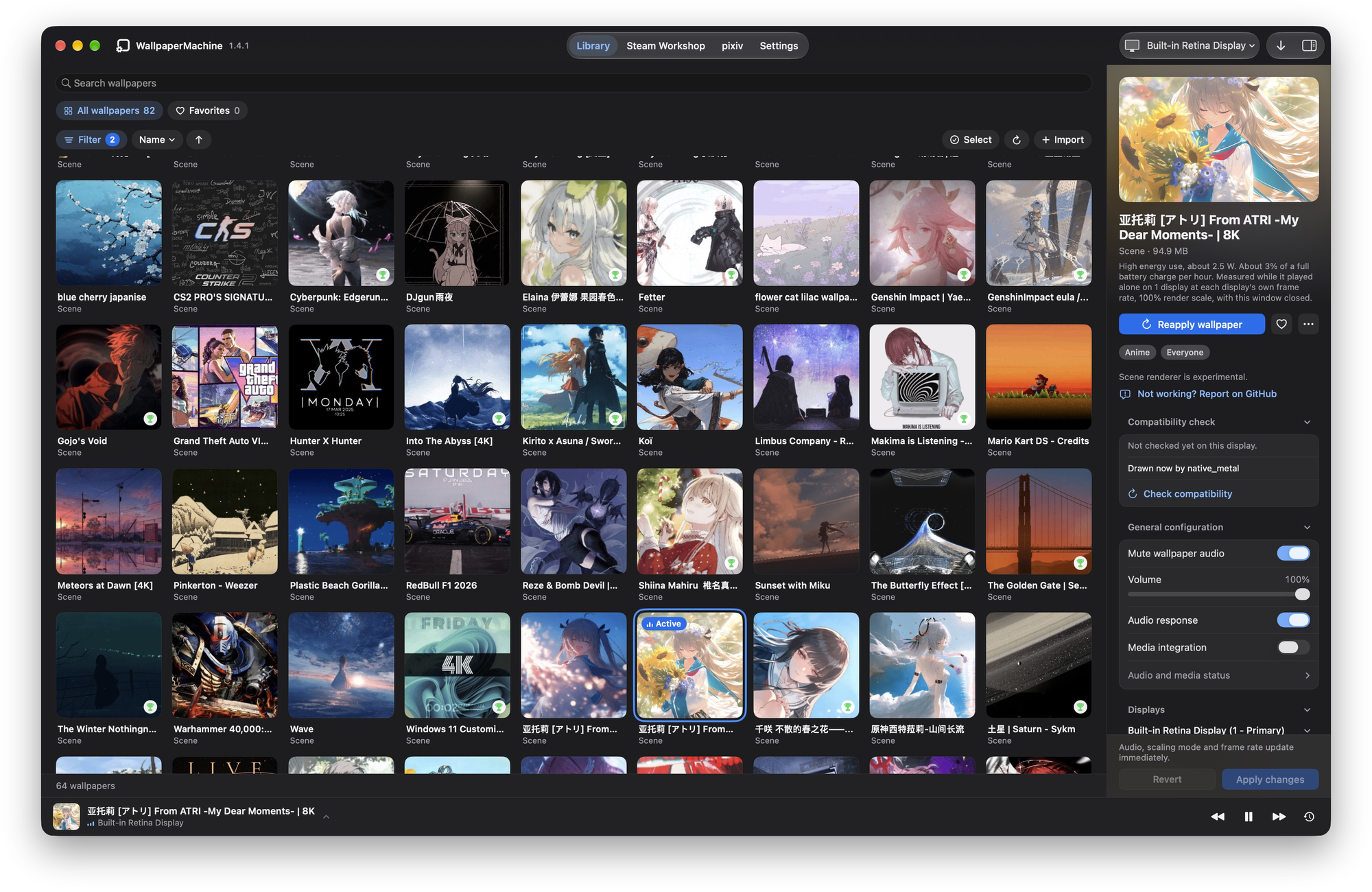
Your library in the middle, the selected wallpaper’s options on the right, what is playing along the bottom. Apply wallpaper and it becomes your desktop.
If WallpaperMachine earns a place on your desktop, a ⭐ helps other Mac users discover it.
Quick start
- Download the free disk image for the latest version.
- Install: open it and drag WallpaperMachine to Applications.
- Open it. The download isn't notarized yet, so macOS holds the first launch: click Open Anyway in System Settings → Privacy & Security, once.
A first-run guide takes it from there, and the app updates itself from then on. The install guide walks through every step with pictures.
- Works right away: the bundled video wallpaper Aurora Drift, pixiv illustrations, your own videos and pictures, and browsing the whole Workshop without signing in.
- With a Steam account that owns Wallpaper Engine: Workshop downloads, and scene wallpapers, which use shared resources from the Wallpaper Engine you own.
Rather build it yourself? It takes two commands: see Open source. Free to build.
The app
One window with tabs across the top: your library (all wallpapers, favorites and your collections), Steam Workshop and pixiv to browse, and Settings, with what is playing in a bar along the bottom. The website has a demo of it on a sample library, so you can try it in your browser. Close the window and the app keeps running in the menu bar, where you can pause, resume, mute or go to the previous, next or a random wallpaper, on each display separately when you have more than one. When it launches at login, it starts there without opening the window.
| Feature | What it does |
|---|---|
| Apply | Scene, video or web: Apply wallpaper and it becomes your desktop. Choosing a wallpaper only selects it. |
| Preview | Try an installed scene, video or web wallpaper in its own window, with the current options and separate playback controls, before changing the desktop. Sliders, colours and switches show in it as you change them. |
| Workshop | The live Steam Workshop, no sign-in to browse, with collections and each author's wallpapers, plus your subscriptions and favorites once you sign in to Steam; signed in, subscribe or unsubscribe from the app, and read an item's newest comments. Downloads run in the app, several at once, with a Steam account that owns Wallpaper Engine. Updates to the wallpapers you have are found once a day and installed in one click. |
| pixiv | pixiv's illustration rankings and tag search. Save any page of a work as a still wallpaper; sign in to pixiv for members-only works and, if your account allows them, R-18. |
| Settings | Every option its artist made, saved when you apply your changes; named property presets keep several versions and can be exported or imported. An optional switch in Settings shows your edits on the desktop as you make them. |
| Music | Turn on Audio response and wallpapers made for sound move with what your Mac plays. Media integration is on by default, so ones with a music display show the song that's on. |
| Playlists | Let each display rotate through all wallpapers, favorites, its own list or a local collection, on a timer or each time the Mac is unlocked; Play or Shuffle on a collection starts one in a click. Reorder a list, save named playback plans, or switch between a day and a night wallpaper. Failed applications are skipped temporarily. |
| Displays | Every display gets its own wallpaper, or mirrors another, with its own scaling, position, frame rate and volume. Fit with blurred backdrop shows a wallpaper whole on a screen of another shape and fills the edges with a blurred copy instead of black bars. Apply one wallpaper to every display, copy or swap wallpapers and save multi-display arrangements to restore their wallpaper choices from Settings or Shortcuts. |
| Battery | On battery, keep running, drop to a render scale and frame rate you choose, or pause. Low Power Mode, a hot Mac and a low battery can lower quality the same way instead of pausing. Off until you pick it. The rest of playback and quality is on Performance. |
| Energy | Settings → Performance shows the power the app draws and, on a laptop, its share of a full charge per hour. Change a setting there and it compares before and after. Each installed wallpaper gets its own rating once it has been measured. |
| Native | Light, dark and your accent colour, like the rest of macOS, in English, 简体中文, 繁體中文, 日本語, 한국어 or Português. |
| Import | Bring the Wallpaper Engine folders you already have, or your own videos and pictures. Drop them on the Dock icon or use Import; the app copies them and leaves the originals alone. |
| Keep your setup | Export settings and retained files, optionally the whole wallpaper library; preview conflicts before a recoverable restore at the next launch. Sign-ins and passwords stay on this Mac. |
| External drive | Keep the wallpaper library and downloads on an external drive or in another folder, and move them back to this Mac at any time. Settings and Steam sign-ins stay on this Mac. |
| Picture placement | Drag, position and zoom imported pictures and saved pixiv pages separately for each display, without changing the original image. |
| Out of sight, paused | A covered display stops its own wallpaper, and sleep or lock pauses them all. Playback rules can also pause or mute them while another app plays sound, while an app you choose is running or in front, when the battery is low, in Low Power Mode, when the Mac runs hot, or during a Focus. With several displays, you can also keep only the one you are using playing. Your own pause stays yours. |
| Automation | Weekday and time schedules, local sunrise/sunset calculations, light/dark appearance choices, a different wallpaper for each desktop, and temporary Focus wallpapers or playlists. Keyboard shortcuts, Shortcuts, Siri, Spotlight and links can control playback, mute every wallpaper, pick a random wallpaper, and apply wallpapers, saved playlists or property presets. |
| Lock screen | Video and scene wallpapers can animate the lock screen too. Experimental and off by default. |
| Screen saver | Use each display’s applied scene, video, web or still wallpaper as its screen saver. Independent of lock-screen animation; experimental on macOS 26+. |
Why you can trust it
- Open source, all of it. The app, its renderer and its scene engine are all in this repository under GPL-3.0-only. There is no closed core and no paid features: the app is the same for everyone.
- Built in public. Every release is built and tested by
GitHub Actions from a tagged commit, then
published with a SHA-256 checksum and a build provenance attestation. Check a
download came from this repository's workflow:
gh attestation verify WallpaperMachine-*-arm64.dmg --repo WallpaperMachine/WallpaperMachine - No tracking. The app goes online for what you ask of it: Steam for the Workshop, pixiv when you open it, GitHub for update checks, and, only if you turn on Send performance data, one small report a day with load times, frame rates and your Mac's model. That report has no names, files or account details, and turning it off deletes what was sent. Apart from that, the app sends a daily count that it ran that day, with its version and no install ID, so we know how many Macs use it. Sign-ins and passwords stay on your Mac.
- Updates it can check. The built-in updater installs only a disk image whose SHA-256 matches the release; one it can't verify is refused, never installed unchecked. Where GitHub can't be reached, as in mainland China without a VPN, it fetches the same files through public GitHub download proxies, which can't change what installs.
- Actively maintained. New versions ship often, and every one is written up in the changelog, in English and 简体中文.
- Problems get a real path. Not working? Report on GitHub in any wallpaper's details opens a prefilled issue, and diagnostics reports remove your home folder, Mac user name and Steam account names before you share them.
Rust core · Metal graphics
| Layer | What it does |
|---|---|
| Swift shell | The AppKit app. Its control panel is native SwiftUI (App/Views/ControlPanel), and web wallpapers run in web views of their own. |
| Rust core | The renderer (Renderer/): displays, wallpaper windows, video decode and audio capture, bridged to Swift with uniffi. |
| C++ scene engine | The project's scene engine (Renderer/Engine), statically linked into the Rust core, draws scene wallpapers. |
| Metal | Scenes render natively on Metal, and a scene the native renderer cannot draw is not drawn: it keeps its last picture and says why in Settings → Performance. Video wallpapers play with the app's own players (AVFoundation, and a WebM player for WebM and Matroska files). |
| Lock screen | A sandboxed ExtensionKit extension (Extension/). |
How the pieces talk to each other: docs/architecture.md. Where each file lives: docs/repository-layout.md.
Good to know.
A few things before your change of scenery.
What is WallpaperMachine?
WallpaperMachine is a native macOS client for Wallpaper Engine wallpapers. It brings scene, video and web wallpapers to your desktop, with Steam Workshop browsing and downloads built in.
Can I use Wallpaper Engine on a Mac?
Wallpaper Engine itself is made for Windows. WallpaperMachine is an independent Mac app built to play its scene, video and web wallpapers, with Steam Workshop browsing built in; compatibility varies by wallpaper. It is not affiliated with Wallpaper Engine or Valve. More in Wallpaper Engine on a Mac.
Do I need to own Wallpaper Engine?
You can browse the Workshop without signing in. Workshop downloads require a Steam account that owns Wallpaper Engine, and scene wallpapers need