
XMSGi Studio
✈️ Telegram messages, when you choose.
XMSGi Studio делает планирование встреч и создание публикаций в Telegram простым, локальным и надежным.


✨ Features
⚡ Studio first, Quick Planner when speed matters
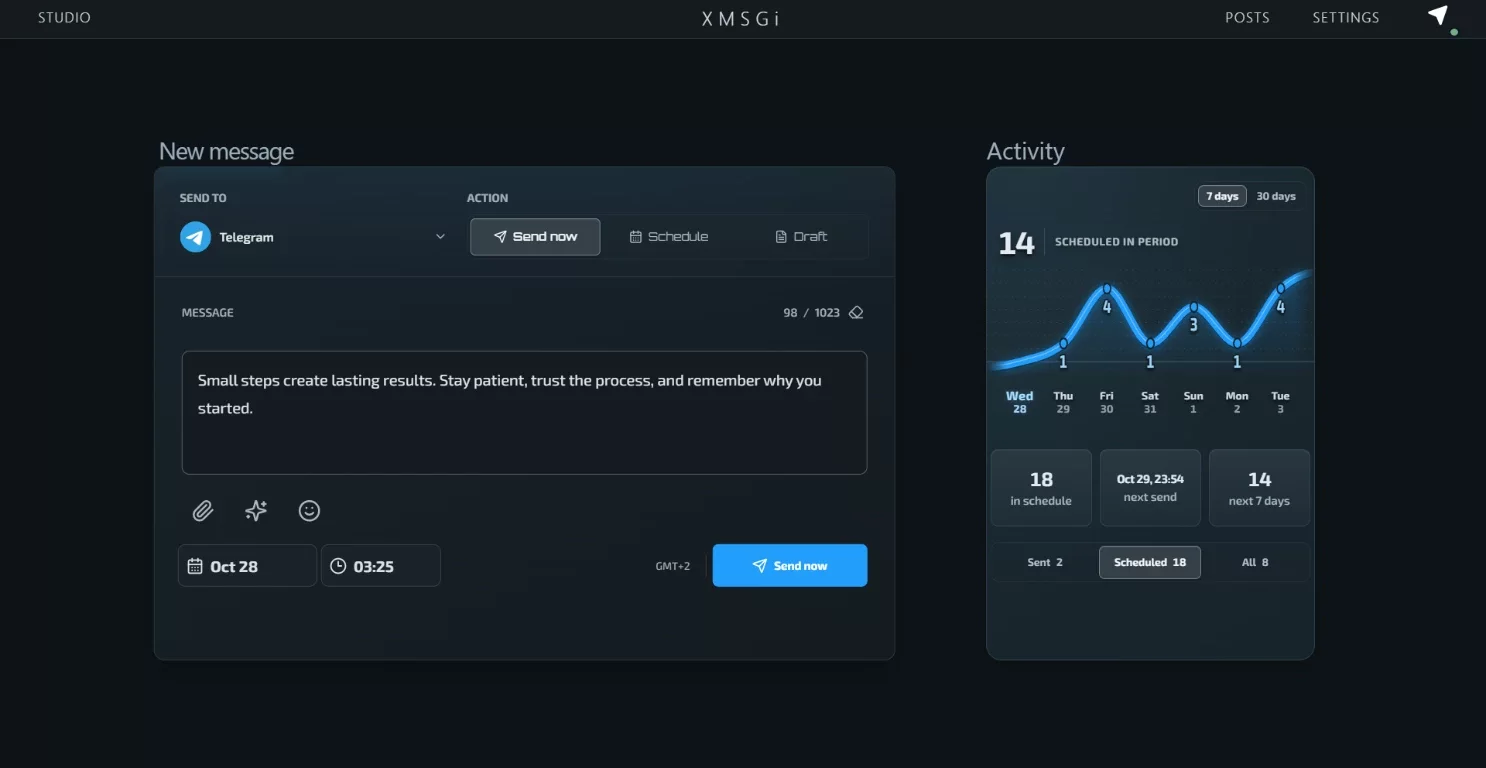
Studio is the main workspace for composing and organizing posts. Quick Planner handles fast sends, schedules, and drafts that can be continued in Studio and viewed in Posts/History.
- Publish: send from your own Telegram account to chats, groups, and channels. No bot required.
- Compose and schedule: rich text, attachments, inline buttons, one-time posts, and daily, weekly, biweekly, or monthly repeats (up to 15 occurrences).
- Stay organized: color-coded drafts, reusable templates, and document history.
- Keep control: edit, reschedule, or cancel queued posts; FloodWait limits retry automatically.
- Keep data local: sessions stay on the device and use Electron
safeStoragewhere supported. Portable Windows build available.
For setup and workflow details, see the user guide.
🖼️ Screenshots


📥 Download
Download the latest release and choose your platform.
| Platform | Format | Download |
|---|---|---|
| Windows | Portable .exe |
XMSGi Studio.exe — no installation required |
| Linux | AppImage (x64) | XMSGi.Studio-1.3.6.AppImage |
| Linux | .deb (x64) |
xmsgi-studio_1.3.6_amd64.deb |
| macOS | .dmg (Intel, unsigned) |
XMSGi.Studio-1.3.6.dmg |
| macOS | .dmg (Apple Silicon, unsigned) |
XMSGi.Studio-1.3.6-arm64.dmg |
The v1.3.6 download links will work after the release and its platform packages are published.
First launch on macOS
macOS builds are unsigned and not notarized. Control-click XMSGi Studio in Finder, choose Open, then confirm Open. If macOS still blocks it, go to System Settings → Privacy & Security → Open Anyway. Only bypass this warning for a copy downloaded from the official releases page.
🚀 Quick start
Requirements:
- Node.js 20+
- npm
- Windows, Linux (x64), or macOS (x64 / Apple Silicon) for the packaged desktop app
Run locally:
npm install
npm run build
npm run electron
Build a Windows release package:
npm run dist
🏗️ Studio architecture · for developers
The Electron host owns the window, Telegram session and IPC bridge. Studio and Quick Planner are pages in the same React application. Studio is composed in XMSGi Studio/src/studio/App.tsx and mounted through XMSGi Studio/src/workspace/StudioMount.tsx with the host-owned scheduler runtime.
Studio's internal feature structure lives under XMSGi Studio/src/studio/:
XMSGi Studio/src/studio/App.tsxcomposes the workspace and scheduler.XMSGi Studio/src/studio/pages/WorkspacePage.tsxowns the workspace page.XMSGi Studio/src/studio/components/stages/contains the chat, schedule, draft, template and inline-button stages.XMSGi Studio/src/studio/services/adapts publishing operations to the Telegram runtime.XMSGi Studio/packages/shared/provides types, translations and utilities shared across the application.XMSGi Studio/telegram-errors.cjsclassifies Telegram errors; the account rate-limit interceptor waits and retries FloodWaits. IPC passes error category and retry metadata to Studio's operation-aware error handler.
Studio's locale context is provided by the host. Keep StudioMount under the host's LocaleProvider, and pass the existing connection, chats, account ID and scheduler runtime:
<StudioMount
  connected={connected}
  activeAccountId={activeAccountId}
  chats={chats}
  scheduler={scheduler}
/>
The @/, @studio/ and @shared/ aliases are configured by the host Vite and TypeScript settings. Run npm --prefix "XMSGi Studio" run typecheck, npm --prefix "XMSGi Studio" test and npm --prefix "XMSGi Studio" run build from the repository root to validate the complete app, including Studio.
Scheduler ownership
When Studio is embedded, the Host useScheduler runtime is authoritative for scheduling history, cancellation, retry state and FloodWait pauses. Studio receives that runtime through the versioned React-props contract in packages/shared/bridge/; History/Archive callbacks are part of the same contract. There is no separate event stream.
The Electron application always passes the host scheduler runtime, which is authoritative for scheduling history, cancellation, retry state and FloodWait pauses. useStudioScheduler remains a fallback for isolated previews and component tests.
📚 Documentation
Full documentation lives in the docs/ directory:
- User guide — features, modes, installation, workflows (RU)
- Architecture — process layers, modules, data flows (RU)
- Development — setup, commands, tests, conventions (RU)
- Security and privacy — storage, encryption, trust boundaries (RU)
- IPC reference — renderer ⇄ main channels (RU)
🔒 Security & privacy
XMSGi Studio keeps Telegram data local to the device. Session and account data are stored in the user data directory, and secure storage is used where the platform supports it.
This app does not depend on a Telegram bot for its core scheduling flow.
🤝 Contributing
We welcome focused pull requests and bug reports. Please read CONTRIBUTING.md before submitting changes.
🛡️ Security reporting
Please report vulnerabilities privately through the repository security process. Do not disclose critical issues in public issues or pull requests. See SECURITY.md.
📦 Repository
- Source code: https://github.com/molodoy01/XMSGi-Studio
- Website: https://molodoy01.github.io/XMSGi-Studio/
📄 License
This project is licensed under the MIT License. The canonical license text is in LICENSE.
Why XMSGi Studio?
XMSGi Studio was created because existing Telegram scheduling tools felt slow, bloated and disconnected from the actual Telegram experience.