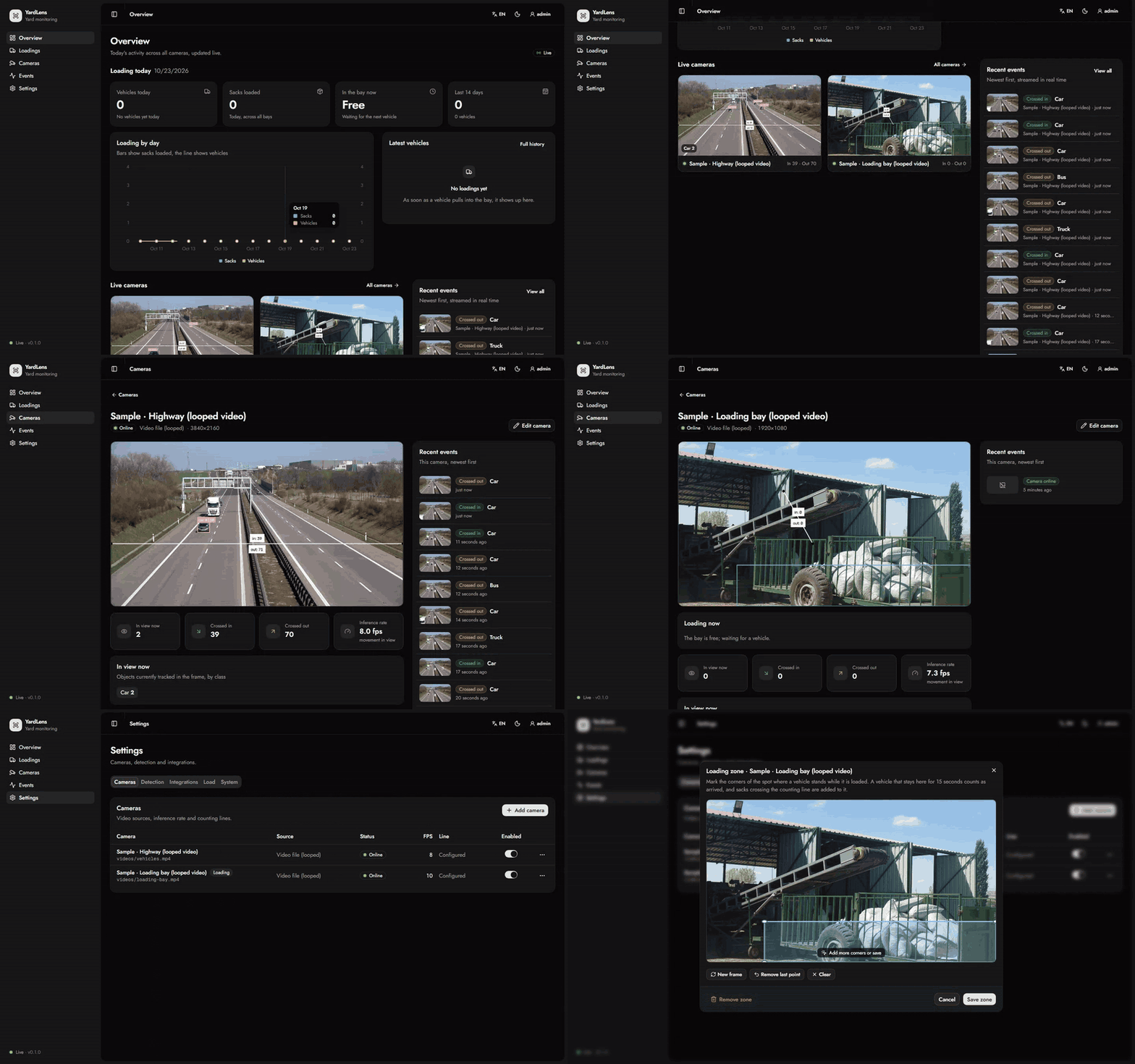
Open-source camera counting for yards, gates and loading bays. Point it at a camera and it counts what crosses a line you draw: vehicles at a gate, or sacks going onto each truck at a loading bay, where it also reads the plate and records when the vehicle came and left. Self-hosted, one server, runs on a CPU.

Built with Claude Code.
Stack. FastAPI, Ultralytics YOLO, supervision + ByteTrack, OpenCV, SQLAlchemy 2 (async) on PostgreSQL; Next.js 16, TanStack Query, shadcn/ui; Bun workspaces, uv, Nx as a task runner, Ruff, Pyright (strict).
What it does
- Counts line crossings on any RTSP, HLS, MJPEG or file camera: draw the line, get in and out counts, an event with a snapshot for every crossing, and a 24-hour chart.
- Keeps a record per vehicle at a loading bay: its plate (read with fast-alpr), arrival, departure and the cargo counted onto it, with history, plate search and an Excel export.
- Shows it live: annotated feeds, today's numbers and an event log, in English or Russian, light or dark, with Telegram notifications.
- Runs on what you have: the CPU through OpenVINO, an NVIDIA GPU or Apple silicon. A governor keeps the server under a CPU limit by lowering frame rates instead of falling over.
- Is ready for a server: sign-in, HTTPS, Docker images, retries through database outages, CI on Linux and Windows.
Adapting it to your yard
Everything specific to one site is a setting or a small file, so the same code fits a gate, a warehouse or a construction site:
- What to count. The stock YOLO model knows vehicles and people. For sacks, boxes, pallets or anything else, train a model on footage from your own camera and pick it per camera; the procedure, with what was already tried, is in docs/sack-model.md.
- Where to count. The counting line and the loading zone are drawn on the camera's frame in the dashboard and stored in normalized coordinates, so they survive a resolution change.
- Your plates. Plates are normalized and formatted the Uzbek way (
01 A 123 BC); another format is one regular expression inapps/api/src/yardlens_api/services/plates.pyandapps/web/src/lib/format.ts. - Your language. The dashboard copy lives in
apps/web/src/i18n/messages, one typed file per language; add one by copyingen.ts. Telegram messages are incore/i18n.py. - Your notifications. Telegram is built in; another channel is one class in
notifier.py.
Quick start
You need Bun ≥ 1.4, uv ≥ 0.11 and a PostgreSQL server (tested with 17 and 18). uv installs Python 3.14 on its own; no PostgreSQL client tools are needed. The steps are the same on Windows, macOS and Linux.
# skip if you already have Postgres running
docker run -d --name postgres18 -e POSTGRES_PASSWORD=postgres -p 5432:5432 postgres:18-alpine

bun install
bun run setup                                  # uv sync, create the database and schema, seed demo cameras once
(cd apps/api && uv run yardlens-admin create)  # the dashboard's username and password (10+ characters)
bun run dev                                    # API on :8100, dashboard on :3100
Open http://localhost:3100 and sign in. The first start downloads the YOLO weights (a few MB); after that the two sample cameras show annotated detections within seconds: a highway clip that counts vehicles crossing its line, and a loading bay with its zone and line drawn, which counts cargo once a model trained on it is in place. OpenAPI docs are at http://localhost:8100/docs.
bun run setup is safe to re-run after a dependency or schema change: every step is idempotent, and
demo cameras are seeded only once per database. It creates the database when it's missing, which
needs a role that may create databases; otherwise create it once as a superuser
(CREATE DATABASE yardlens OWNER yardlens) and setup only applies the schema. Every setting is an
environment variable with a working default: see docs/configuration.md.
Cameras
Add cameras under Settings → Cameras. Test connection grabs a single frame so you can check the URL before saving.
| Type | URL |
|---|---|
| RTSP | rtsp://user:pass@192.168.1.20:554/stream1 |
| HTTP | An MJPEG stream (multipart/x-mixed-replace) or a JPEG snapshot URL, which gets polled |
| HLS | An .m3u8 playlist |
| File | A path relative to apps/api/data (or absolute), played in a loop |
To count, open the camera's menu, Counting line, click two points on the frame and save. Crossing in the direction of the green arrow counts as in, the other way as out. Inference FPS is set per camera; model, confidence and classes are set once under Settings → Detection, and a camera can have settings of its own (a model trained for its scene) from the same menu.
Loading bays
A camera watching a bay keeps a loading session per vehicle. Set it up from the camera's menu: Loading zone (the corners of where the vehicle stands), Counting line across the conveyor with the arrow pointing into the vehicle, and Detection with a model that knows the cargo. A session opens once a vehicle has stood in the zone for 15 s, every cargo item crossing the line is added to it, the plate is read from the full-resolution frame while the vehicle is parked, and the session closes after 60 s with neither vehicle nor cargo in sight. Sessions survive an API restart and are kept for good; Loadings has the history, plate search, totals and an Excel export, and Telegram can report vehicle arrived and loading completed.
COCO has no sack class, and zero-shot detectors did not find sacks on a moving conveyor, so a bay
needs a model trained on a few hundred labelled frames from its own camera. The procedure is in
docs/sack-model.md; uv run yardlens-eval checks a model's count against a
recording counted by hand.
Running on a server
The simplest is Docker: the server, HTTPS and the database in one Compose file; see
docs/deployment.md. Without Docker, bun run build then bun run start
runs both apps in production mode; systemd units and a Windows scheduled-task script are in
deploy/. One server runs every camera: a six-core CPU handles a handful of cameras,
a GPU many more.
Development
| Command | |
|---|---|
bun run lint |
ESLint with zero warnings allowed, Ruff lint and format check |
bun run typecheck |
tsc --noEmit, Pyright in strict mode |
bun run test |
bun test, pytest (SQLite and a fake detector; no Postgres or weights needed) |
bun run format |
Ruff fix and format |
bun run gen:api |
Regenerate the dashboard's API types from the running API |
bun run bench [video] |
Measure what a camera costs on this machine |
uv run yardlens-eval video … |
Count a recording offline and compare with a known count (in apps/api) |
Nx caches lint, typecheck and test. On Windows, while bun run dev is running, prefix uv
commands with UV_NO_SYNC=1.
Documentation
- Architecture: the pipeline, the design decisions behind it, performance and the load governor, project layout.
- Configuration and API: every environment variable and endpoint.
- Deployment: Docker, HTTPS, security, backups.
- Sack model: training the detector a loading bay needs.
- Roadmap: the architecture work not done yet.
Limitations
- One administrator. There are no other users or roles yet.
- One server. Inference is in-process and serialized behind one model; past what
bun run benchreports for your machine, you want a GPU. - Every frame is still decoded. Give cameras their sub-stream (720p–1080p) where they have one.
- Extrapolation can drift. Between inferences the live view moves boxes along their last velocity; an object that brakes hard may wander until the next inference. Counts are unaffected.
License
AGPL-3.0-only, matching Ultralytics YOLO, which YardLens depends on. If you run a modified version as a network service, you have to offer its source to that service's users. Closed-source or commercial use needs an Ultralytics Enterprise License or a permissively licensed detector in place of YOLO.