A local dashboard that loads recent YouTube videos, drafts a comment that reads like a real viewer of that exact video, and posts it through a dedicated Chrome profile, typing one character at a time and verifying the comment appears. The example configuration nudges readers toward 운명원, a love-fortune service; the brand, search keywords and limits are all configurable.
English · 한국어
Quickstart · Requirements · How a comment is written · Operating rules
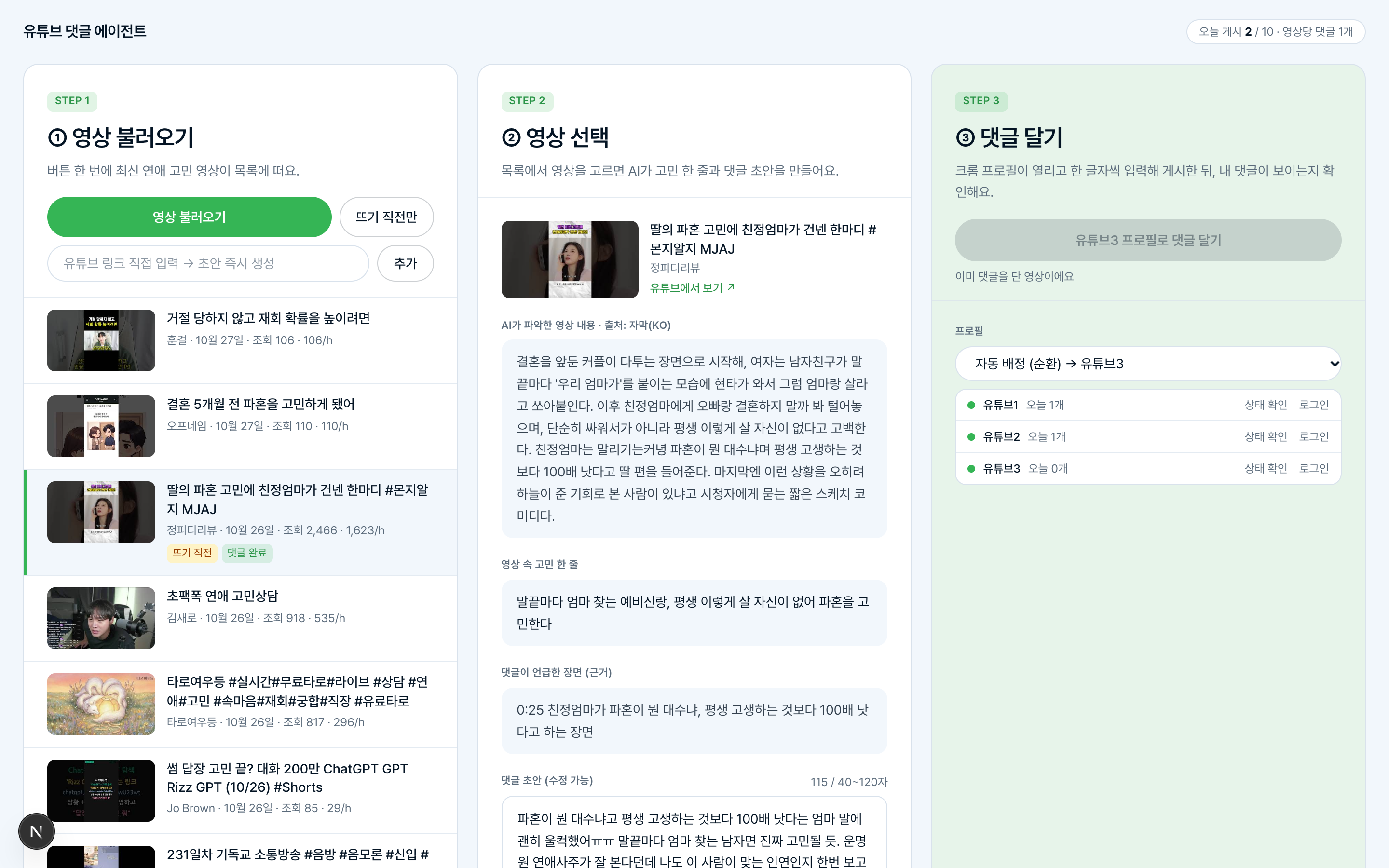
Real public videos from a live search; the three Chrome profiles use test accounts with random nicknames. The interface is Korean.
What it does
| Column | What you can do |
|---|---|
| ① Load videos | One click searches recent videos for the configured keywords through the YouTube Data API and lists thumbnail, title, channel, upload date and views. Paste a video link to add one directly. Toggle the "rising" filter (1,000–5,000 views and ≥150 views/hour, draft only). |
| ② Pick a video | The agent reads the full timestamped transcript (auto captions, Korean first) and top comments, then returns a summary, the worry in one line, the scene it will quote, and a 40–120 character comment you can edit. |
| ③ Post | Choose a Chrome profile or let the agent rotate through them. Chrome opens with that profile, scrolls to the comment box, types the comment character by character, posts, and confirms your comment is visible. Progress is shown step by step; failures keep the reason and a screenshot. |
A log at the bottom lists every attempt in time order: video, profile, comment text, success or failure.
Quickstart
Prerequisites: Node.js 24+ (uses the built-in node:sqlite), npm, and Google Chrome installed on macOS.
git clone https://github.com/dpwld/youtube-comment-agent.git
cd youtube-comment-agent
npm install
cp .env.example .env.local   # fill in YOUTUBE_API_KEY and ANTHROPIC_API_KEY
npm run dev
Open http://localhost:3000. Before posting, sign each Chrome profile in once:
npm run login -- 유튜브1 # a Chrome window opens; sign in with the Google account for this profile
The window closes by itself once YouTube shows you signed in. Repeat for 유튜브2 and 유튜브3 if you want rotation. A brand-new Google account must create its YouTube channel first (name and handle); comments display the handle, so pick one you are happy to show. If Google refuses to sign in inside the automated window, open the same profile folder with a normal Chrome and sign in there:
open -na "Google Chrome" --args --user-data-dir="$HOME/.yt-comment-agent/profiles/유튜브1"
Profiles, the SQLite database and failure screenshots live under ~/.yt-comment-agent/, outside the repository.
Requirements
| Dependency | Used for | Without it |
|---|---|---|
YOUTUBE_API_KEY (YouTube Data API v3) |
Video search, metadata, view counts, top comments | Nothing loads; a free key from Google Cloud is enough (search costs 100 of the daily 10,000 units) |
ANTHROPIC_API_KEY |
Comment drafts (claude-opus-5-5, structured output) |
No drafts; posting still works with a comment you type yourself |
| Google Chrome + signed-in profile folders | Typing and posting on youtube.com | The job fails with NOT_LOGGED_IN and a screenshot |
| Captions on the video | Scene-level context | Falls back to title and description and flags the draft for manual review |
Copy .env.example to the ignored .env.local. Keys are read by the local server only.
How a comment is written
youtube-transcriptfetches the full caption track with[m:ss]markers every 30 seconds (up to 150k characters; longer videos are sampled from the start, middle and end).- Claude receives title, description, top comments and the transcript, and must answer in this order: summary → key moments (intro and ads excluded) → worry in one line → the scene to quote → comment. The comment has to refer to that scene and stay within the summary.
- The server validates the result: 40–120 characters, exactly one mention of the brand, no links, hashtags or mentions, and no invented "I tried it" testimonial. One retry with the violations attached; a draft that still fails is shown with its problems instead of being hidden.
- Everything the model inferred (summary, worry, quoted scene) is shown next to the draft so the operator can check it before posting. Edited text is validated again when the job starts.
The prompt and validators are in lib/draft.ts; the transcript handling in lib/transcript.ts.
Operating rules
Enforced in lib/store.ts inside one transaction, not in the UI:
- One comment per video, backed by a partial unique index on successful log rows.
- A different comment for every video: text already posted on another video is rejected.
- Daily cap (default 10, Asia/Seoul day), reserved when a job starts.
- One job at a time; a stale job left by a server restart is marked failed and logged.
- Log of every attempt with time, video, profile, comment, outcome, reason and screenshot.
npm test checks these rules and the comment rules against a throwaway data folder (no browser, no API calls).
Configuration lives in agent.config.json:
{
  "profiles": ["유튜브1", "유튜브2", "유튜브3"],
  "comment": { "min_chars": 40, "max_chars": 120, "brand": "운명원" },
  "limits": { "daily_max_comments": 10 },
  "search": { "keywords": ["연애 고민"], "rising_keyword": "연애", "max_results": 20 },
  "model": "claude-opus-5-5",
  "data_dir": "~/.yt-comment-agent"
}
Posting mechanics
Chrome is launched with Playwright's launchPersistentContext on a profile folder of its own, the real Chrome channel, Korean locale and no automation flags. The YouTube selectors are collected in lib/poster.ts; re-check them with the spike script when YouTube changes its markup:
npm run spike -- 유튜브1 <videoId>              # dump the comment box DOM without posting
npm run spike -- 유튜브1 <videoId> "test text"  # post for real (use an unlisted video of your own)
Verification waits up to 30 seconds for your comment to appear at the top of the thread and captures its lc= link. If it never appears (for example held for review) the job is recorded as a failure with a screenshot rather than a success.
Project layout
app/api/        route handlers: videos, drafts, profiles, jobs, log
components/     the three columns and the log panel
lib/            youtube.ts · transcript.ts · draft.ts · browser.ts · poster.ts · jobs.ts · store.ts
scripts/        login.ts (manual sign-in) · spike.ts (selector check)
tests/          rules.test.ts (operating and comment rules)
docs/           screenshots
Responsible use
This tool posts under accounts you control, one comment per video, within a daily cap, and only after a human has seen the draft. Keep it that way: check the summary before posting, do not remove the limits, and follow YouTube's terms and local advertising rules for promotional comments.