
Zebra Print
English · Português (Brasil)
A native macOS app for printing to a Zebra iMZ320 mobile receipt printer over Bluetooth, with no driver. Drop in a PDF or an image, or type some text, see exactly which dots will burn, and print.
Zebra hasn't shipped Mac drivers for these printers in years. They still speak ZPL II over Bluetooth serial, which is documented, so this app talks to the printer directly.
Built in SwiftUI for macOS 26 with standard controls, so it gets Liquid Glass, keyboard control and VoiceOver from the system. Available in English and Brazilian Portuguese; it follows your Mac's language.
Features
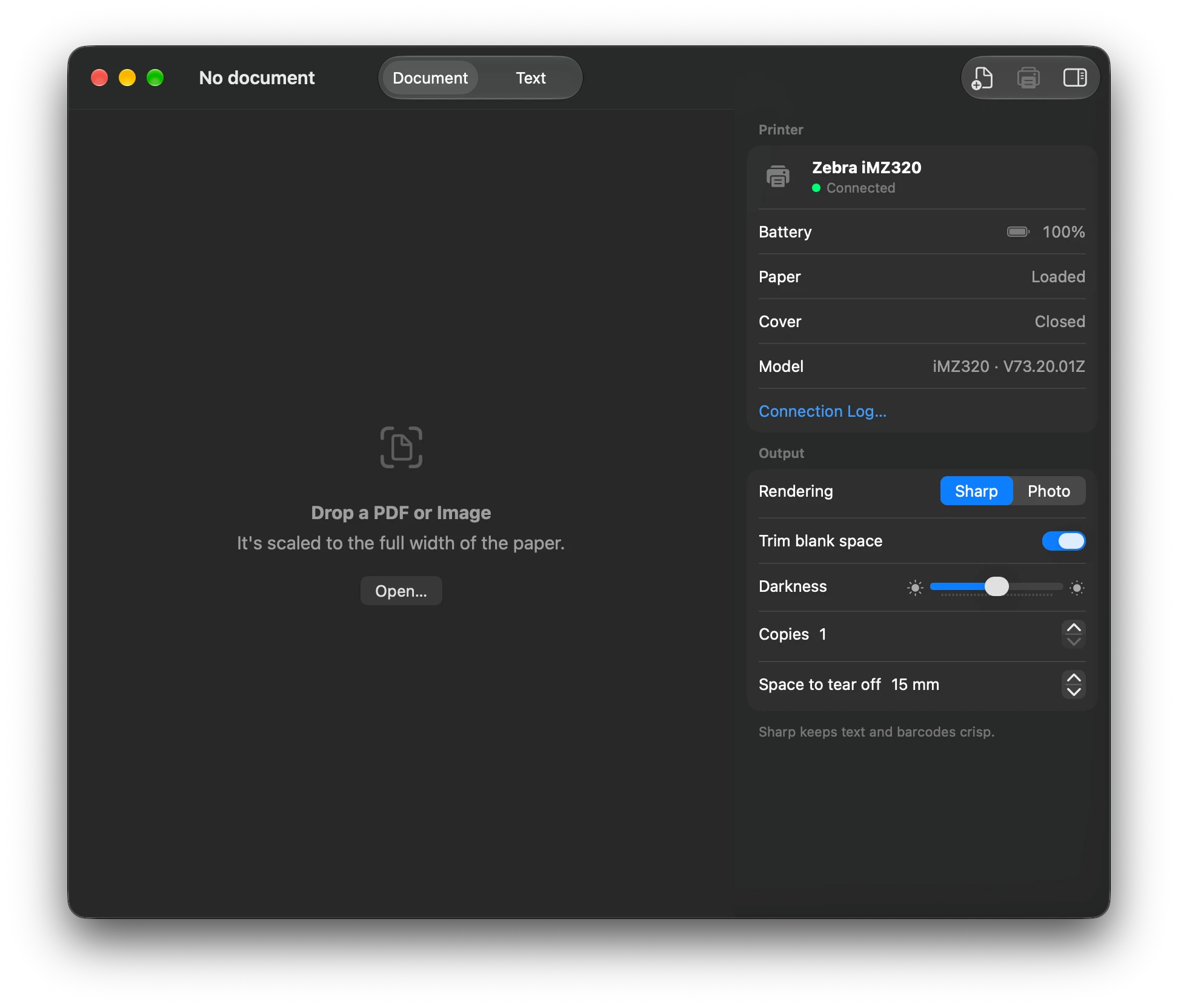
- PDFs, images and text. Every PDF page, any image format macOS reads (HEIC, PNG, JPEG…), or text you type with a choice of font, size, alignment and weight. Accents print correctly.
- Dot-for-dot preview. Content is scaled to the paper's full 576-dot (72 mm) width and shown at one printer dot per Retina pixel, so the preview is what comes out.
- Two renderings: Sharp for text and barcodes, Photo (Atkinson dithering) for pictures.
- Live printer status: battery, paper, cover, model and firmware, refreshed every 20 s.
- Space to tear off: blank paper after each copy so the print clears the tear bar.
- Trim blank space, darkness and copies.
- Stays connected while the app is open and reconnects on its own (see below), with a connection log in the inspector.
- Drop files on the window or the Dock icon, or use Open With in Finder. ⌘O opens, ⌘P prints.
Requirements
- macOS 26 or later on Apple silicon.
- Xcode or just the Command Line Tools (
xcode-select --install). The build doesn't need Xcode. - A Zebra iMZ320 paired in System Settings → Bluetooth. Other Zebra mobile printers that speak ZPL over Bluetooth Classic should work too; the app reads the print width from the printer.
Install
scripts/build-app.sh --install
This builds Zebra Print.app, copies it to ~/Applications and opens it. The first time, macOS
asks whether Zebra Print may use Bluetooth. The app is ad-hoc signed, so macOS asks again after
each rebuild.
Command line
The same binary prints without opening a window:
APP="$HOME/Applications/Zebra Print.app/Contents/MacOS/ZebraPrint"
"$APP" --print receipt.pdf
"$APP" --print photo.heic --photo --copies 2
"$APP" --print --text 'Hello\nWorld'
"$APP" --print receipt.pdf --zpl job.zpl   # write the ZPL to a file instead of printing
Only one program can hold the printer's connection at a time, so quit the app before using it.
How it works
| Path | What |
|---|---|
Sources/ZebraPrint/Printer/RFCOMMLink.swift |
IOBluetooth RFCOMM channel to the printer's Serial Port service, async writes, SGD queries |
Sources/ZebraPrint/Printer/PrinterStore.swift |
Connection lifecycle, status polling, reconnect with backoff, print jobs |
Sources/ZebraPrint/Printer/ZPL.swift |
Bitmaps to ZPL II: ^GFA graphics with ZPL's ASCII compression |
Sources/ZebraPrint/Rendering/ |
PDF, image and text rendering, 1-bit conversion, dithering |
Sources/ZebraPrint/Views/ |
The window, preview and inspector |
Localization/ |
English and Brazilian Portuguese strings |
The printer exposes Serial Port Profile on RFCOMM channel 1. The app reads status with SGD
(! U1 getvar "power.percent_full" and friends) and prints each page as a ZPL format holding one
graphic field. ZPL's ASCII compression shrinks a typical receipt 5–20×. Over Bluetooth Classic
the printer takes about 10 KB/s, so text receipts go out at once and a dithered photo takes a few
seconds.
The serial device macOS creates for the printer (/dev/cu.<name>) opens but never connects on
recent macOS, which is why the app uses IOBluetooth directly.
Troubleshooting
"The printer disconnects after a while." macOS closes a classic Bluetooth link about 15
seconds after the last app stops using it (measured: channel closed at 64 s, link down at 79 s).
The printer itself stays on; the iMZ320's auto power-off (power.inactivity_timeout) is 0 by
default, which means off. Zebra Print keeps the channel open while it runs, polls every 20 s and
reconnects with backoff (5 s up to 60 s). Printer → Connection Log… shows every connect and
drop.
The right side of the print is missing. If the cut always falls at the same place (on the
unit this was developed with, dot 448 of 576) and comes and goes within a single print, one
segment of the print head isn't firing. That's hardware: the data the app sends is complete,
which you can check with --zpl. Clean the head with isopropyl alcohol and seat the paper
straight. To rule out the Mac entirely, print the printer's own configuration report: turn it
off, hold the feed button and turn it on.
The print ends on the tear bar. Raise Output → Space to tear off.
App icon
scripts/make-icon.swift draws the icon (a receipt rising out of a printer slot on a teal tile)
in the flattened macOS 26 style and builds the .icns; scripts/build-app.sh runs it on the
first build.
Development
swift build
"build/Zebra Print.app/Contents/MacOS/ZebraPrint" --snapshot out.png --text 'Hi'   # render offscreen
"build/Zebra Print.app/Contents/MacOS/ZebraPrint" --snapshot out.png --inspector --dark
open -n "build/Zebra Print.app" --args -AppleLanguages '(en)'                     # try a language
--snapshot renders the window content (or, with --inspector, the inspector) without showing
anything or touching Bluetooth.
Strings live in Localization/<language>.lproj/Localizable.strings. English is the development
language, so its keys are the English text; add a language by adding a .lproj folder and listing
it in CFBundleLocalizations in scripts/build-app.sh.
@State is written @ViewState (a typealias to SwiftUI.State in Views/ViewState.swift):
the SDK spells @State as a macro whose plugin ships only with Xcode, so the alias keeps the
project buildable with the Command Line Tools alone.
Disclaimer
Not affiliated with or endorsed by Zebra Technologies. Zebra, ZPL and iMZ are trademarks of Zebra Technologies Corporation.