
A macOS focus companion that catches you drifting and pulls you back.
Website · Download · Watch demo · Privacy · Source · Developer





Why it exists
Most focus apps rely on blocklists. That breaks down fast: the same site can be either the answer you need or the rabbit hole that kills an hour.
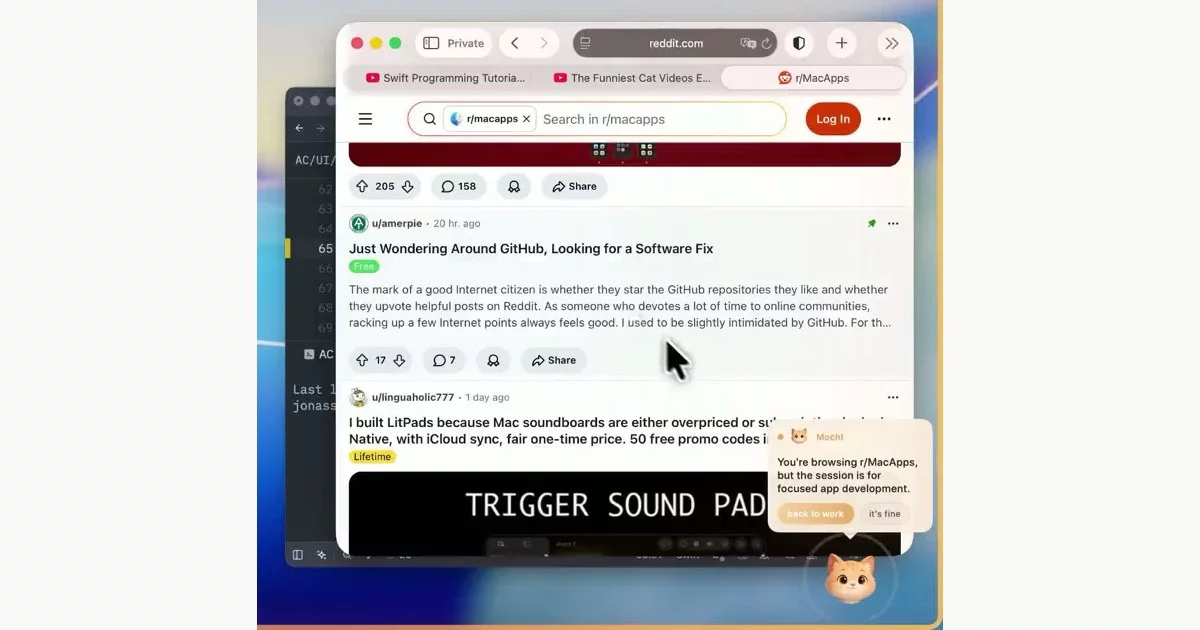
AccountyCat lives in your menu bar, reads the active app and window title, and only pulls in a screenshot when text is not enough to judge. When you drift, it does not lock anything. It gives you a short nudge, then gets out of the way.
Interrupting legitimate work is a bug. Letting obvious drift continue for too long is a bug too.
How it works
Every few minutes, or when you switch apps, AccountyCat checks the active app, window title, recent context, and your current focus profile.
- If the title and app context are clear, it makes a text-only decision.
- If the app is ambiguous or the title is weak, it can attach a screenshot and ask a vision-capable model once.
- If you are on task, it stays quiet.
- If you have drifted, it nudges.
- If you correct it, it learns.
AccountyCat behaves differently in a named focus session versus everyday mode. Focus sessions are stricter because you opted in. Everyday mode is more tolerant of errands, breaks, and life admin.
https://github.com/user-attachments/assets/6f9d42d7-b0ae-464a-a737-13ce54ea634c
14-second demo.
Run it your way
Private cloud mode
Connect your own OpenRouter account. AC chooses the right model for the job: text-only when it can, vision when it needs to. Requests use OpenRouter's Zero Data Retention policy, and spend stays under your control.
| Tier | Text model | Vision model | Rough monthly cost* |
|---|---|---|---|
| Economy | DeepSeek V4 Flash | Qwen 3.5 9B | ~$0.80-$1.50 |
| Default | DeepSeek V4 Flash | Qwen 3.6 35B | ~$1.50-$3.00 |
| Smartest | Kimi K2.6 | Kimi K2.6 | ~$3.00-$5.00 |
Local mode
Run fully on-device through llama.cpp with the Qwen multimodal family. No account, no API key, no internet.
| Tier | Model | RAM footprint | Notes |
|---|---|---|---|
| Economy | Qwen 3.5 4B | ~2-3 GB | Best for 8 GB Macs |
| Default | Qwen 3.5 9B | ~6-8 GB | Recommended for most users |
| Smartest | Qwen 3.6 27B | ~15-18 GB | Best local quality |
* Real cost depends on how much you use your Mac. Early usage can be slightly higher before AC has learned your common on-task contexts.
Hosted mode is planned: flat monthly fee, no OpenRouter key, nothing to configure. Join the waitlist.
Privacy
AccountyCat asks for serious permissions, so the source is fully open and the privacy model is explicit.
| Permission | Why it is needed | What happens to the data |
|---|---|---|
| Screen Recording | Periodic screenshots for context when text is not enough | Analyzed locally or via your configured provider, then discarded |
| Accessibility | Read the active app and window title | Used only for focus judgment and UI behavior |
- Nothing is routed through AccountyCat servers during normal inference.
- In private cloud mode, requests go directly from your Mac to OpenRouter.
- In local mode, nothing leaves your Mac.
- App state lives under
~/Library/Application Support/AC.
Read the full privacy policy.
What is in this repo
- Native Swift app for macOS on Apple Silicon
- Local
llama.cppruntime with in-app installer ACInspector, a local companion app for telemetry review and prompt replay- Tests, docs, and focused internal tooling for monitoring and evaluation
Getting started
Download the app
Get the signed build from the latest release or from accountycat.com/download.
Build from source
git clone https://github.com/strjonas/AccountyCat.git
cd AccountyCat
open AC.xcodeproj
On first launch, grant Screen Recording and Accessibility permissions, then either let the app install its local runtime or configure OpenRouter.