Binders
Remembers everything. Tells no one.
Binders is a free Mac app that turns what you say, what you hear in meetings and what you write into notes, to-dos and a memory you can ask questions. The speech models, the language model and your data all stay on your Mac.
Download: binders.io or the latest release · macOS 14.2 or later · signed and notarized by Apple · Help

▶ Watch the 54-second tour: dictation, the to-dos found in what you send, meeting notes, asking your work anything, and an AI tool using Binders over MCP.
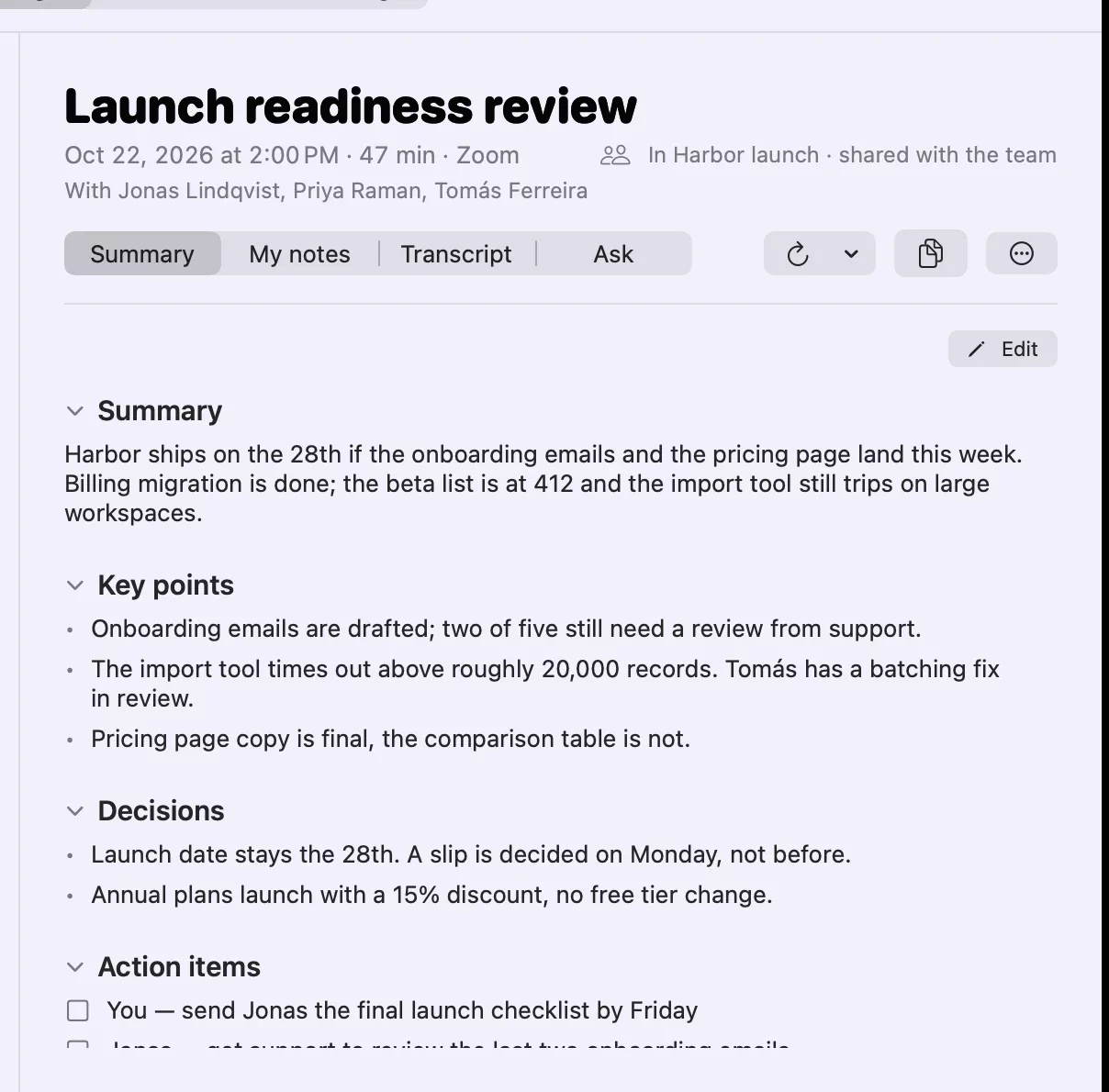
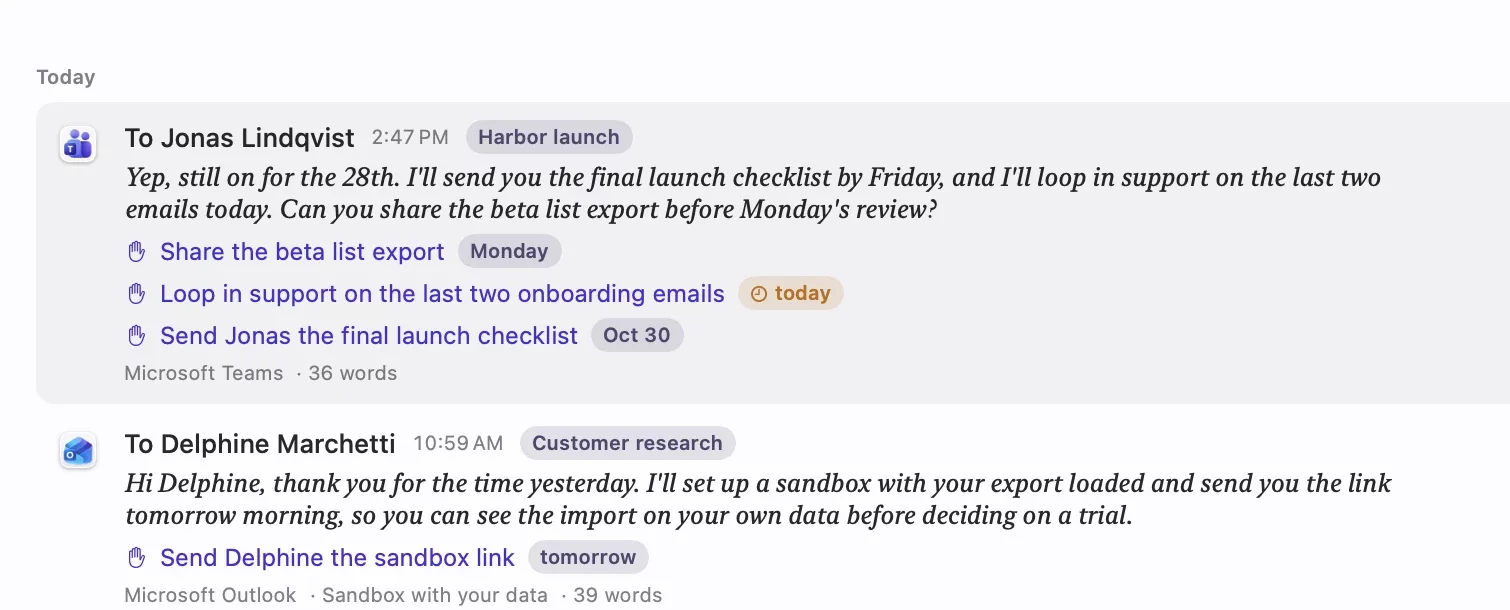
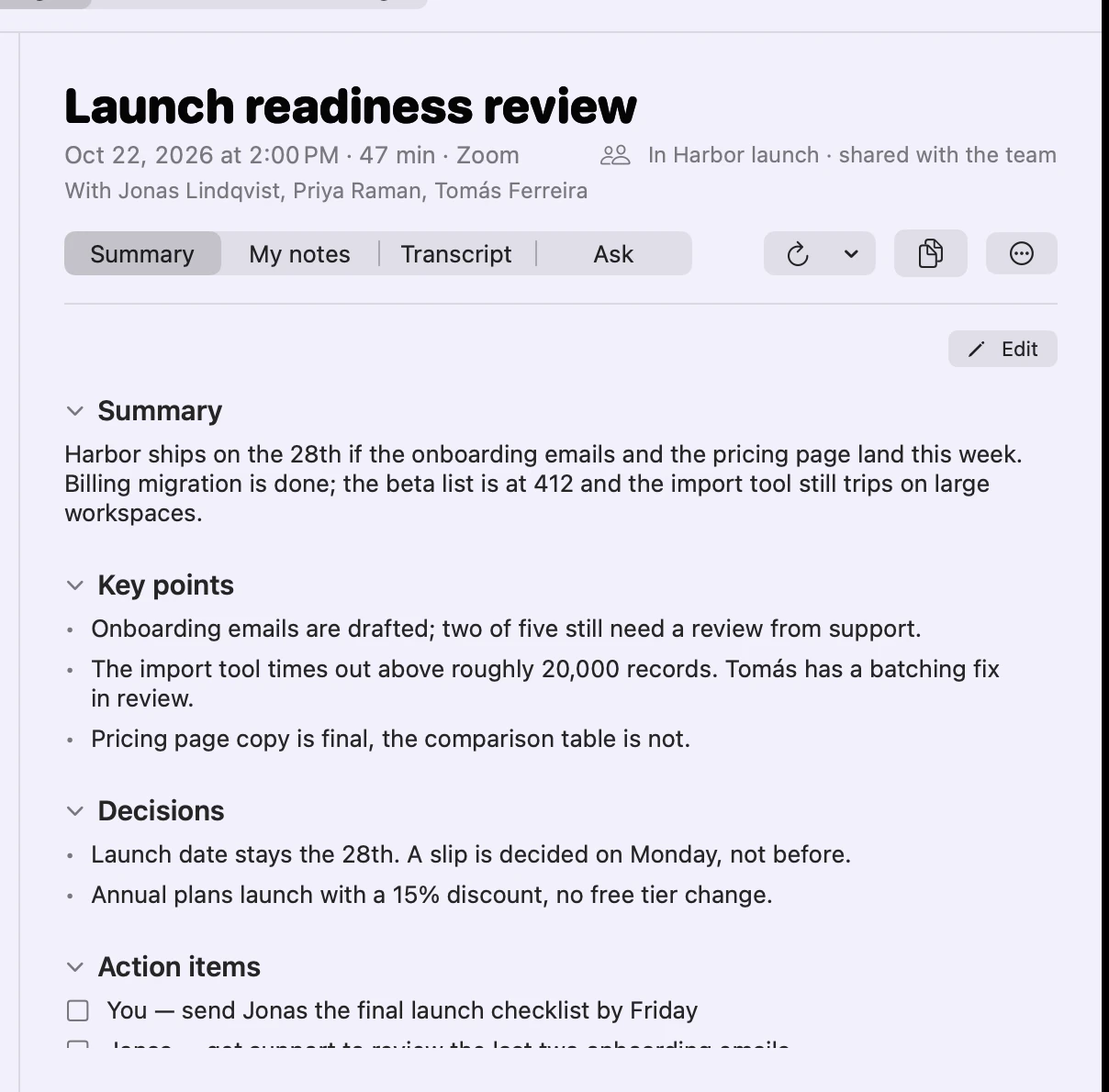
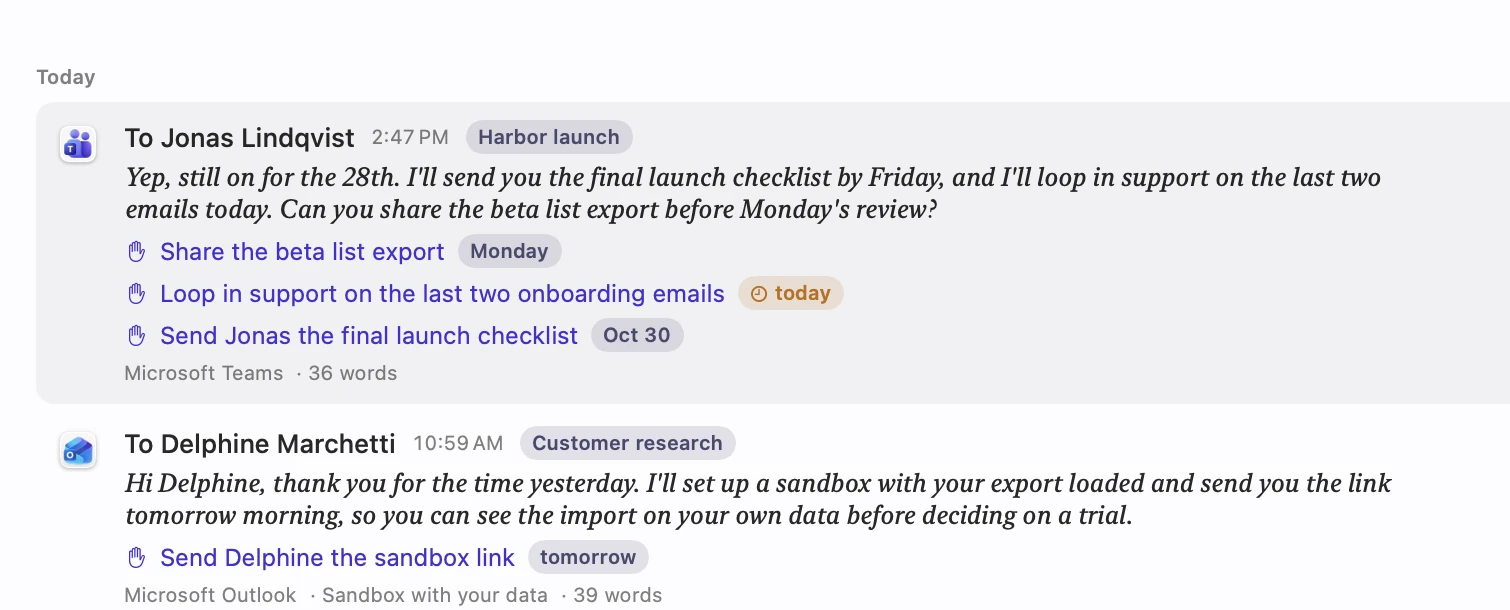
| Meeting notes that know who owes what | Promises caught in the messages you send |
|---|---|
 |
 |
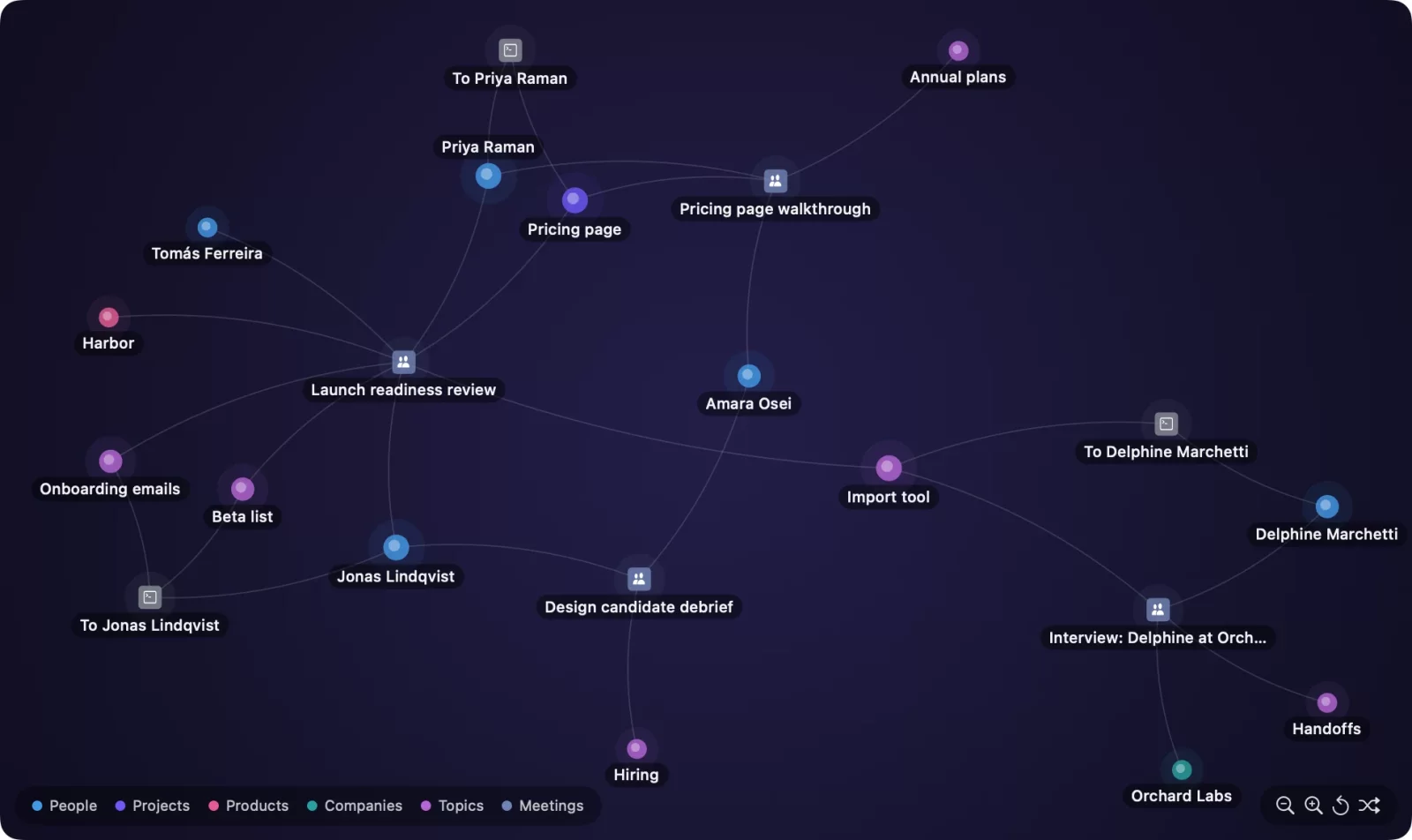
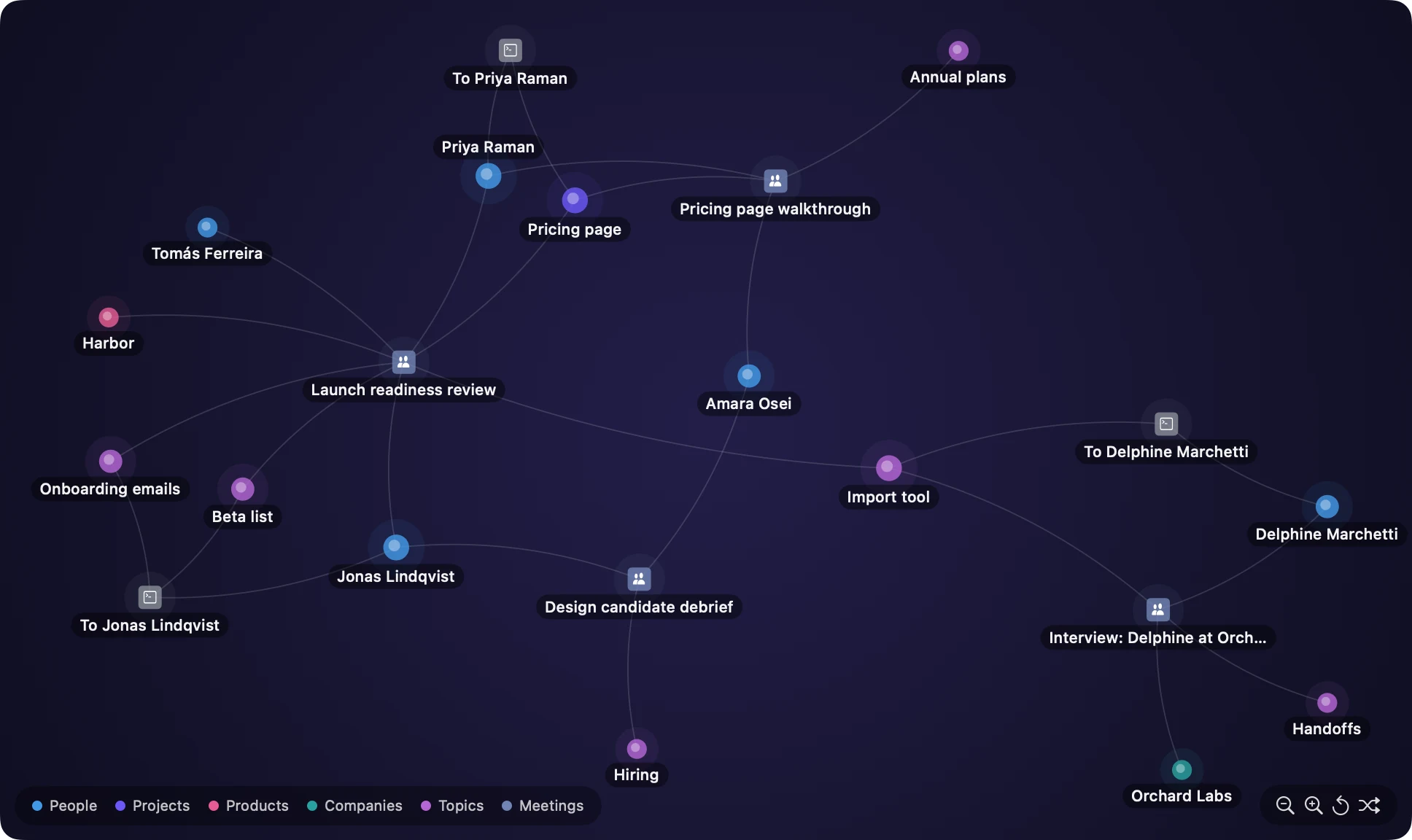
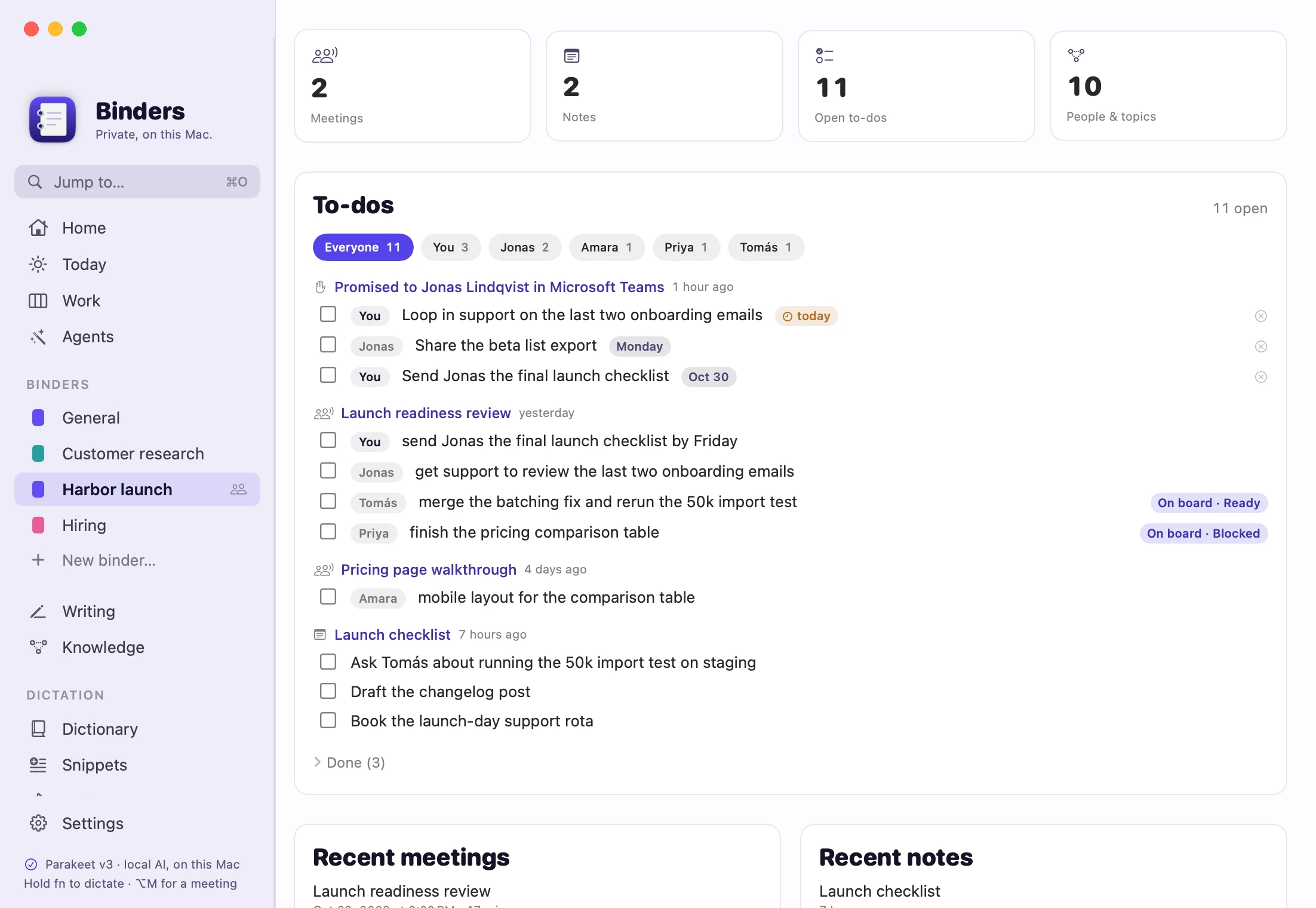
| A memory with connections | One binder per thing you are working on |
|---|---|
 |
 |
Every person and project in these screenshots is fictional. The app renders them from demo data in a throwaway folder.
What it does
- Dictation anywhere. Hold fn, talk, let go. The text lands in whatever app has the cursor, cleaned up: no ums, no false starts, and a correction made mid-sentence is the one that sticks. It learns names and jargon from the edits you make, expands snippets, and matches the tone of the app you are in. Command Mode (hold fn ⌃) rewrites the selected text, answers a question, adds a to-do ("add to-do call Sam tomorrow") or puts something on your calendar ("add it to my calendar").
- Meeting notes. Records your microphone and the other side of a call in any meeting app, or a recording you import, then writes a summary, decisions and action items with their owners. Full transcript with speakers, and an Ask tab per meeting.
- All-day capture. Turn it on in Binders for iPhone or on the Mac and it listens through the day, cuts it into conversations, and writes each one down as a capture on the device that heard it. Each gets a summary, its promises become to-dos, and it's filed in the binder it belongs to. From the iPhone only the text comes to your Mac, over the network or by AirDrop. Audio never leaves the device, and captures are never shared with your team. See docs/CAPTURE-ALLDAY.md.
- Writing capture. Switch it on (fn W) and Binders keeps what you send in Teams, Outlook, Mail, Slack and your browser, at the moment you send it. Keystrokes are never recorded. Promises in those messages ("I'll send it by Friday") become to-dos with a deadline and a reminder.
- Ask your work anything. Meetings, notes and messages are indexed together and linked into a graph of people, projects and topics. Search by meaning, or ask in plain language and get an answer with its sources.
- Notes. Notes, the scratchpad and meeting notes are plain Markdown, shown rendered: headings, lists, checklists you can tick,
tables, coloured code, quotes and links, pictures and videos, with the markup showing only on the line you're editing. Type
/for anything a note can hold; paste a screenshot or a web page and it comes in as it should.[[Links]]join notes, meetings and people, and each has a "Mentioned in" list that fills itself, links or not. Notes take#tags, a status, an owner and a due date, start from templates, keep their earlier versions, and have an outline. Pop a note out into a window that stays in front, or fold it into a bubble on the edge of the screen. - Folders. A binder holds folders, as deep as you like. Tidy into Folders files your notes by the words their titles start with, and an AI tool can sort a binder for you over MCP.
- Find anything, and your day. ⌘O jumps to any note, meeting, card, person or page, and ⌘P runs any command. Today collects the day's meetings, promises, notes, cards and dictation, next to a note of your own for the day.
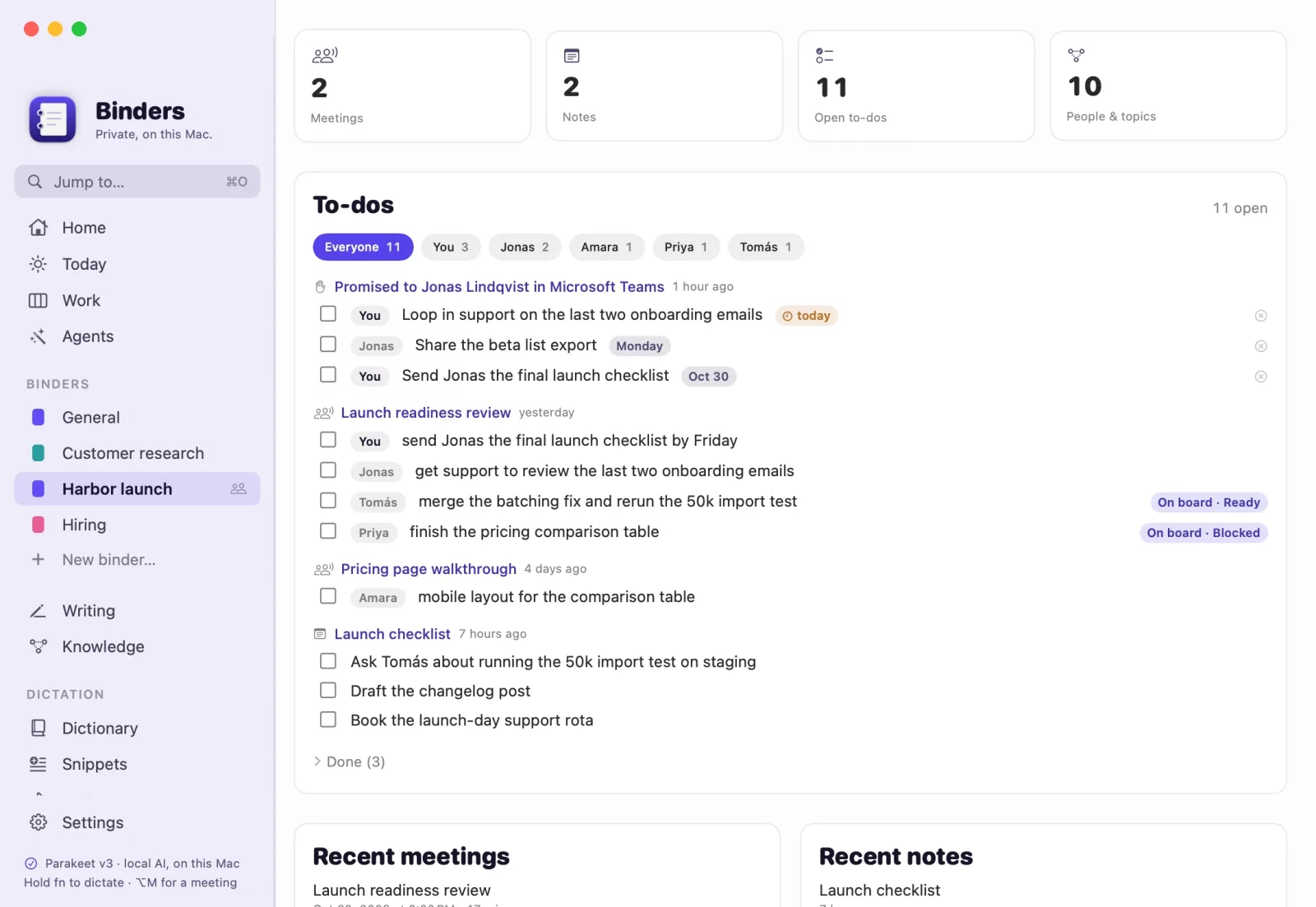
- A board in every binder. Cards move from Backlog to Done, and you and your AI agents work from the same board. An agent claims a card over MCP, reports progress, asks you when it's stuck, and hands the work over for you to review. The to-dos Binders finds become cards in a click, and each is ticked off where it came from when its card is done.
- Distill. A note that asks for work, such as a spec, becomes cards on its binder's board for you and your agents, which wait for each other, and the note shows how the work is going.
- Talk to your agents, and the Manager. The Agents page, on the Mac and in Binders for iPhone, is where you message each agent and read its replies, a conversation per card. One agent, Claude Code or a local model, can be the Manager: it tidies your boards and folders, distills notes and answers what you ask it, with Binders' tools alone and an Undo for each request.
- Binders and teams. One binder per thing you are working on. Share a binder with teammates through a folder you already sync (OneDrive, Dropbox, Google Drive, iCloud Drive). There is no server of ours in between.
- Open to other software. Rules run a Shortcut, open a URL, run a script or call a web hook when you say a phrase or when
something happens in Binders;
binders://links let Shortcuts, Raycast or a script drive it; and an MCP server (Binders --mcp) lets Claude Code, Claude Desktop and other AI tools search and ask your knowledge base and work from your boards, on this Mac. See docs/AUTOMATIONS.md.
Privacy
Binders has no account, no analytics and no cloud of its own.
- Speech is transcribed on the Neural Engine with Parakeet or Whisper. Audio is never uploaded.
- Formatting, notes, answers and to-do detection use a language model in Ollama on your Mac by default, or one that runs inside Binders with MLX. Point Binders at another server and that text goes there instead.
- Data lives in ordinary files in
~/Library/Application Support/Binders, which Settings can open for you. - Writing capture is off until you switch it on. In the terminal it keeps only the prompts you send AI tools such as Claude Code, Codex, Gemini CLI, Copilot CLI and OpenCode, from their own records, never the screen (docs/CAPTURE.md). It never reads secure fields, password managers or terminal screens, skips pages that look like a login or a payment, and redacts labelled passwords, card numbers and long keys before storing anything.
- With your permission, the app checks binders.io for a signed update at most once a day. Nothing about you is sent.
The full breakdown is on the site's privacy page (site/privacy.html).
Requirements
- macOS 14.2 or later. Apple silicon recommended.
- For the AI features, Ollama, or any OpenAI-compatible server (llama.cpp, vLLM, LM Studio), on this Mac
or another one you reach over your network or Tailscale. If Ollama is missing, setup offers to
install it: the official build is downloaded, checked against Ollama's signing team and Apple's notarization, and placed in
Applications. Binders then picks a Gemma 4 model that
fits the Mac's memory (
gemma4:e2b-it-qaton 8 GB,gemma4:e4b-it-qaton 16 GB,gemma4:12bfrom 24 GB,gemma4:26bfrom 48 GB) and offers to download it during setup; Settings → AI changes it.ollama pull embeddinggemmaadds search by meaning. Dictation works without a language model. - Where Ollama isn't allowed, Settings → AI → Built in (MLX) runs the model inside Binders on Apple silicon: Gemma 4 or Qwen 3.5
from Hugging Face (or a company mirror of it, with a token if it needs one), or a model folder IT provides, plus EmbeddingGemma
for search by meaning. Models are kept in
~/Library/Application Support/Binders/Models/MLX.
First launch
- Allow Microphone and Accessibility. Accessibility is how Binders sees your shortcut in any app, types the result for you, and reads the field you are writing in when capture is on.
- The speech model downloads once (about 500 MB) and is compiled for the Neural Engine.
- In System Settings → Keyboard, set "Press 🌐 key to" to Do Nothing, so fn does not also open the emoji picker.
- Quit any other dictation app that listens to fn. If you used Wispr Flow, the Dictionary page can import your words and snippets.
Shortcuts
| Shortcut | Action |
|---|---|
| Hold fn | Dictate, release to insert |
| Double-tap fn | Hands-free; tap fn again to finish |
| Hold fn ⌃ | Command Mode: rewrite the selection, ask a question, add a to-do, or add an event to your calendar |
| fn W | Writing capture on or off |
| ⌥M | Start or stop meeting notes |
| ⌥S | Scratchpad |
| ⌃⌘V | Paste the last transcript again |
| Esc | Cancel |
End a dictation with "press enter" to send it. Every shortcut can be changed in Settings, to a key combination or to a modifier tapped twice.
Building from source
You need Xcode 16 or later and brew install xcodegen.
xcodegen generate && open Binders.xcodeproj      # develop
scripts/install.sh                               # test, build Release, install to ~/Applications, launch
The project signs with the identity named in project.yml. Change DEVELOPMENT_TEAM and CODE_SIGN_IDENTITY to your own; a stable
signature is what lets macOS keep the Accessibility grant across rebuilds. Run xcodegen generate again whenever you add a file.
The pure logic lives in a Swift package with its own tests:
cd Packages/BindersKit && swift test
Test coverage
The logic that can be tested without a microphone or a model lives in the BindersKit package: the hotkey state machine, the
dictation and command pipelines, meeting and note parsing, knowledge ranking, promise detection and deadline parsing, redaction,
team sync decisions. Executed 127 tests, with 0 failures. 90.4% of lines (2652/2935) and 84.1% of functions (428/509) across 24 source files. Measured on 20 September 2026; every push and pull request runs
the same script, publishes the table in the run summary and fails under 85% of lines.
scripts/coverage.sh # tests, then this table
Coverage by file
| File | Lines | Covered |
|---|---|---|
Styles.swift |
94 | 54.3% |
Hotkey.swift |
246 | 80.9% |
PromptBuilder.swift |
86 | 83.7% |
Team.swift |
235 | 86.0% |
VoiceCommands.swift |
51 | 86.3% |
Commitments.swift |
275 | 87.3% |
Pipelines.swift |
100 | 89.0% |
AudioMath.swift |
100 | 91.0% |
Knowledge.swift |
518 | 91.1% |
ModelAdvisor.swift |
15 | 93.3% |
FillerCleaner.swift |
35 | 94.3% |
Meetings.swift |
510 | 94.9% |
TextNorm.swift |
85 | 95.3% |
EditLearner.swift |
106 | 97.2% |
WritingCleanup.swift |
40 | 97.5% |
OutputGuard.swift |
52 | 98.1% |
AudioAlign.swift |
94 | 100.0% |
DictionaryMatcher.swift |
53 | 100.0% |
LoopGuard.swift |
28 | 100.0% |
Notes.swift |
29 | 100.0% |
NotesEditing.swift |
37 | 100.0% |
Redactor.swift |
83 | 100.0% |
SmartSpacing.swift |
13 | 100.0% |
SnippetExpander.swift |
50 | 100.0% |
The app layer (audio, Accessibility, speech engines, the language model) is exercised by the headless self-tests below, which run the real engines, rather than by unit tests.
Headless self-tests
The app binary can run the real engines without any UI, which is handy after changing prompts or models:
APP=build/Build/Products/Release/Binders.app/Contents/MacOS/Binders
say -o /tmp/t.wav --data-format=LEI16@16000 "um let's meet at two actually three"
$APP --selftest-audio /tmp/t.wav --bundle com.tinyspeck.slackmacgap     # transcribe and format as if in Slack
$APP --selftest-text "hi john thanks for the contract best maya" --bundle com.apple.mail
$APP --selftest-command "make this shorter" --selection "Some long paragraph…"
$APP --selftest-meeting recording.wav          # transcribe, label speakers and summarize a file
$APP --selftest-commitments message.txt        # which promises and asks the model finds in a message
$APP --selftest-capture-rules                  # the allow, deny and recipient rules of writing capture
$APP --selftest-team                           # two simulated teammates sharing a temporary folder
$APP --selftest-conversation                   # a phone sending the day's conversations (BINDERS_DATA_DIR=$(mktemp -d))
$APP --selftest-allday two-voices.wav          # All-day capture on this Mac, with a recording for the microphone
$APP --selftest-update-check <appcast url>     # does the updater see a newer signed version in this feed
$APP --selftest-model-status [--unload]        # is the language model in memory; free it
$APP --selftest-ollama-install <empty dir>     # the real Ollama download and checks, installed into a throwaway folder
$APP --selftest-ollama-verify <Ollama.app>     # signature and notarization checks only
Self-tests that read other apps through Accessibility must be launched with open -n -W --stdout out.txt Binders.app --args …;
started from a terminal they inherit the terminal's permissions.
Releasing
scripts/release.sh archives, signs with Developer ID, notarizes, staples, packs the DMG and zip, and writes the signed update
feed. scripts/deploy-site.sh publishes the website in site/ together with the download and the feed. See
docs/RELEASE.md and docs/SITE.md. Team sharing is described in docs/TEAM-SPACE.md.
Website screenshots are rendered by the app from fictional data in a throwaway folder; the seeder refuses to run anywhere else.
Architecture
Packages/BindersKit/      Pure Swift, unit-tested
  Hotkey                   Push-to-talk, double-tap, hands-free and combo state machine
  Pipelines, PromptBuilder Dictation and Command Mode: snippets → dictionary → model → guard → fallback
  Meetings, Notes          Speech chunking, echo filter, speakers, summary prompts and parsing, loop guard
  Knowledge                Chunking, rank fusion, entity extraction, voice lookups, graph layout
  Commitments              Promise and ask detection, deadline parsing ("Friday", "EOD", "in 2 days")
  Redactor, WritingCleanup Secret redaction, signature stripping, name clean-up
  Team                     Team space file format and three-way sync decisions
Binders/
  Core/                    Event-tap hotkeys, audio capture, Accessibility context, paste insertion, writing capture,
                           commitment service
  Speech/                  Parakeet (FluidAudio) and Whisper (WhisperKit) engines
  AI/                      Ollama, OpenAI-compatible and built-in MLX clients, formatter
  Data/                    SwiftData store, settings, importer
  Meetings/                System audio tap, recorder, live transcription, notes, views
  Knowledge/               SQLite FTS5 and embeddings index, entity graph, search and ask, views
  Team/                    Sync with a shared cloud folder
  UI/                      Flow bar, menu bar, Home, binders, Writing, Knowledge, Settings, Scratchpad
  App/                     App delegate, updater (Sparkle), self-tests, demo data
site/                     The binders.io website: static HTML, CSS and JavaScript
scripts/                  install, release, deploy, screenshot tooling
Troubleshooting
- fn does nothing. Check Settings → Permissions. If the app was moved or re-signed, remove Binders from System Settings → Privacy & Security → Accessibility and add it again.
- Every dictation is pasted twice. Two dictation apps are listening to fn. Quit the other one.
- "Pasted without AI formatting". Ollama is not running or the model is not pulled. The menu bar menu shows the last issue.
- The first dictation after a break is slow. The language model is freed after 15 idle minutes by default and loads again when you start talking. Settings → AI changes that.
- Text lands in the wrong place. Binders pastes into whatever is focused when processing finishes. ⌃⌘V pastes it again.
- Logs:
log stream --predicate 'subsystem == "io.binders.mac"'
Contact
hello@binders.io. Security reports: security@binders.io.
Licence
Copyright © 2026 Helder Feixas.
Binders is free software: you can redistribute it and modify it under the terms of the GNU General Public License, version 3. It comes with no warranty. If you distribute a modified version, you must publish its source under the same licence, and you must give it its own name and icon: see TRADEMARKS.md.
The open-source software and models Binders is built with are listed in Binders/Resources/Acknowledgements.txt and on the
site's licences page. Contributions are welcome under the terms in CONTRIBUTING.md.