BooksTable
A personal reading tracker: what you are reading, what page you are on, what comes next. Runs on the web, iPhone and Android from one codebase, and keeps your library on the device. No backend, no account, no API key.
Try it: live app · iOS beta on TestFlight · GitHub Pages mirror · product page
Book metadata comes from Open Library. Built on the same skeleton as FilmTable and GamesTable: same stack, same local-first principles, a different domain. The platform code the three share (storage, native bridges, backups) lives in tables-core.
Features
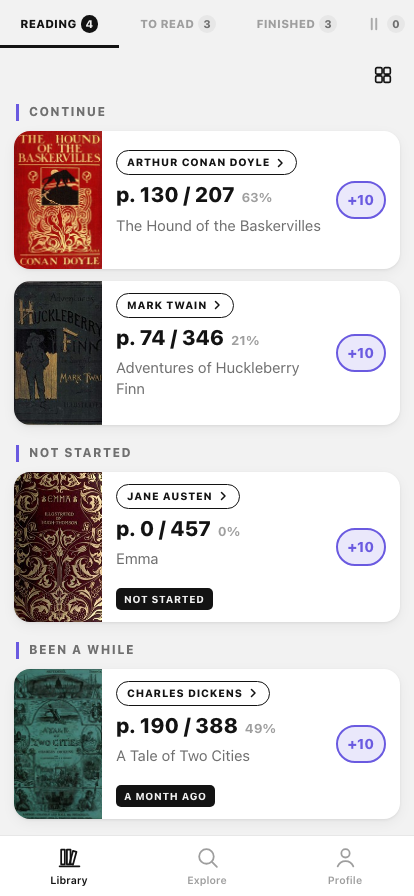
- Library — one screen, four tabs carrying their counts: Reading, To read,
Finished, and an icon tab for books put down unfinished. Reading splits into
Continue, Not Started and Been a While; a card shows the position
(
p. 124 / 504), the percentage and a one-tap+10advance with Undo, plus a list/grid toggle. - Book page — progress with quick
+10 / +25 / +50steps or an exact page, a page count you can correct for your own edition, your own 1–5 rating, and Start reading / Give up / Read again / Remove. - START asks, then moves you — on a To read row it opens a two-option sheet ("I'm reading it now" / "I've already read it") and switches to the tab the book landed on, instead of leaving you to find where it went.
- "For you" recommendations — built on the device from what is on your shelves: the authors you finished and the subjects those books share. Finished books weigh more than a wish-list entry, anything already in the library is excluded, and every card states why it was suggested.
- Explore — search scoped to ALL / TITLE / AUTHOR, what is trending this week, and a genre strip.
- Profile — pages, reading time, a year in review with a per-month shape, shelves by status, JSON backup export/import and a full reset.
- Theme — light and dark, following the device by default; Profile → Appearance can pin either one. Applied before the first paint, so there is no flash of a light background at startup.
- PWA — installs to the home screen and works offline (service worker).
Native apps
The same build ships as a Capacitor app for iOS and Android. On top of the web features, the iOS app has:
- Home-screen widgets: Reading and To read, fed by a snapshot the app
writes into a shared App Group (
ios/App/BooksTableWidget). The widget uses the same progress helpers as the shelves, so the numbers never disagree. - Translate the description: Open Library publishes in English only. On iOS 17.4+ the book page can translate the description with Apple's on-device Translation framework; the original stays one tap away, because translation mangles proper nouns.
- One reminder, not a feed: if the app has not been opened for three days and a book is mid-read, one evening notification says so. Daily readers never see it.
- Backups: the JSON backup goes through the system share sheet, so it can land in Files, iCloud or a message.
The bridge to Apple's on-device language model (ios/App/App/AIBridge.swift)
is ported from FilmTable and wired up, but no feature uses it here yet.
Nothing in the native app sends your library anywhere either. iOS is in open TestFlight; the App Store and Google Play listings are not published yet (the drafts are in docs/STORE.md).
Data
| Source | What | Key |
|---|---|---|
| Open Library | search, works, covers, trending, subjects | not required |
One source covers everything, which is why this project has no server at all. Measured against the live API while building:
- Every endpoint sends
access-control-allow-origin: *, so the browser talks to it directly — no proxy, no key, nothing to keep secret. - Search takes about 2 s. That is why the search box debounces at 450 ms and why supplementary calls are wrapped in a timeout.
- Cyrillic queries work (
Булгаков→ 583 results), though coverage of Russian editions is thinner than English. - Genre browsing goes through
search.json?q=subject:X&sort=rating, not/subjects/<slug>.json. The subjects endpoint ranks by edition count, which makes the same public-domain classics top every genre — Alice's Adventures in Wonderland was the first result for both Fantasy and Science Fiction. Ranking the search index by rating returns what a reader would recognise as the genre. - Google Books was evaluated as a second source and rejected for now: without a
key it answers HTTP 429 with
quota_limit_value: "0", so it would need a key and therefore a server.
User data lives only on the device: IndexedDB (bookstable-kv) in a browser, a
JSON file in the app's private storage in the native apps, where the OS cannot
reclaim it as site data. Small preferences stay in localStorage. There is no
sync between devices — move your library via Profile → Export/Import. The
details, and the one-way migration from the old localStorage library, are in
docs/ARCHITECTURE.md.
Running locally
npm install
npm run dev
Production build:
npm run build
npm run preview serves the build on http://localhost:4173, and
node scripts/gen-icons.mjs regenerates the PNG icons from public/favicon.svg.
Native shells: npm run build:native builds with the native flag, then
npx cap sync copies the result into ios/ and android/.
scripts/release-ios.sh <build-number> archives and exports a signed .ipa;
what it does and where a person has to take over is in
docs/RELEASE-IOS.md.
Deployment
Static files only — routing is hash-based, so no SPA fallback is needed and the
build ports to any host. A push to main publishes twice: Vercel rebuilds
https://books-table-six.vercel.app/ from the root, and
.github/workflows/deploy.yml publishes the GitHub Pages mirror with the subpath
injected via BASE_PATH. That variable belongs to Pages alone — setting it on a
root host would move every asset into a subpath that is not there.
On a .vercel.app host the app also reports cookieless screen-view counts to
Vercel Web Analytics: a screen name, never a title, a search term or an
identifier. Everywhere else the component is inert.
Every build, native ones included, sends anonymous usage counts once a day
(src/lib/metrics.ts): which screens and features were used, error kinds, version,
platform and language — no IDs, titles or anything typed. It can be switched off in
Profile, and Global Privacy Control starts it off on the web.
Layout
src/lib/        types, the Open Library client, subject vocabulary, formatting,
                and the native bridges: widget, translate, reminders, ai
src/store/      zustand: library and cache (persist), explore, recommend, theme, ui
                selectors.ts — all derived logic as pure functions
src/components/ icons, UI primitives, cards
src/pages/      Library / Explore / BookDetail / Profile / Insights
ios/            Capacitor iOS project, Swift bridges and the widget extension
android/        Capacitor Android project
scripts/        icon generation, iOS release, widget target setup
Documentation
| File | What it covers |
|---|---|
| CLAUDE.md | project context, principles, how to verify |
| docs/ARCHITECTURE.md | data model, progress rules, flows |
| docs/DATA-SOURCES.md | Open Library's quirks, confirmed by measurement |
| docs/RELEASE-IOS.md | building and uploading the iOS app, and the traps |
| docs/STORE.md | store listing drafts and screenshots |
Licence
MIT. Book data from Open Library, a project of the Internet Archive.