Celmis
From the alert your monitoring already sent, to a pull request someone can review. Self-hosted. One machine. Your model, your subscription, your network.
Website · Documentation · Quick start · What's new · Results
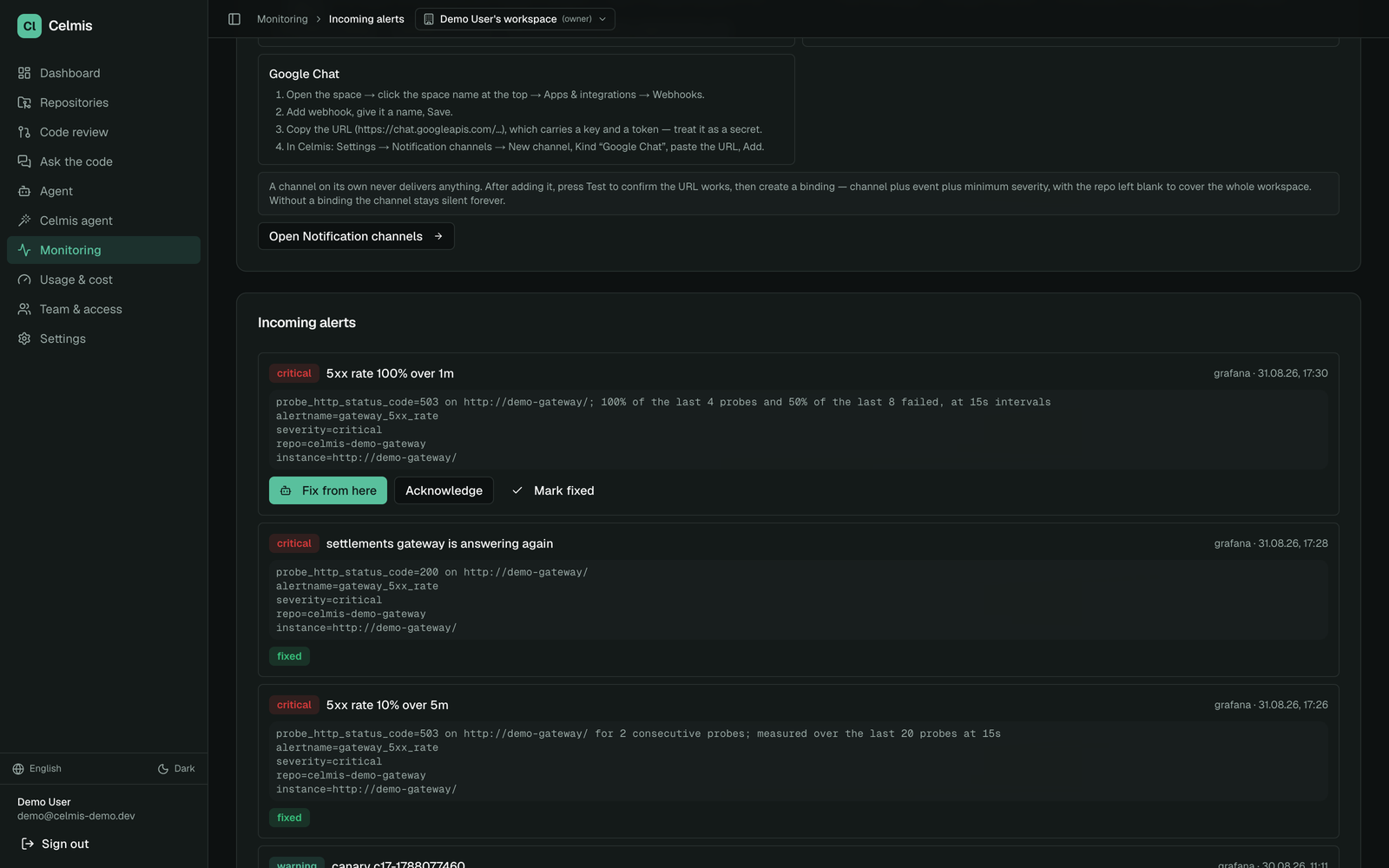
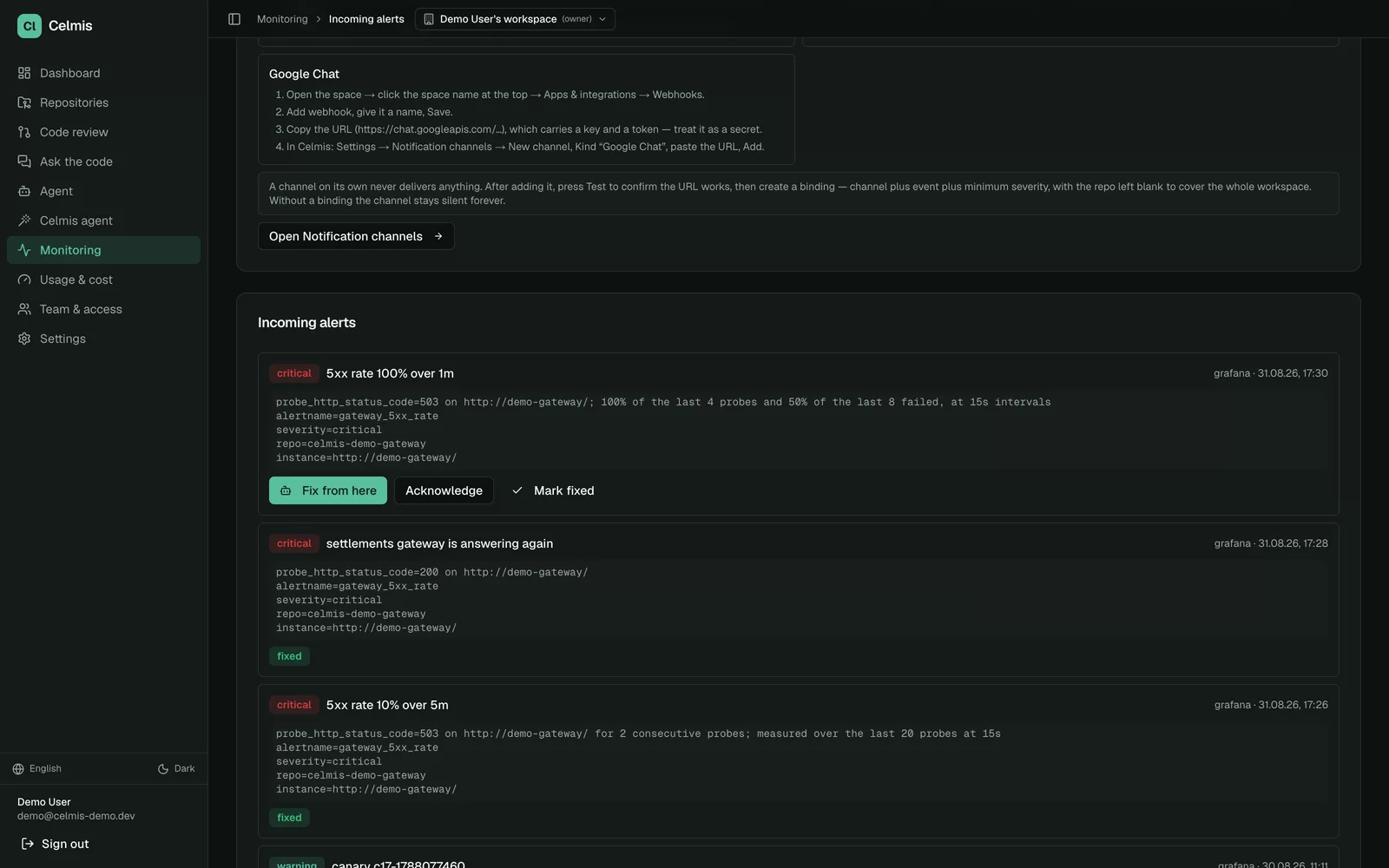
An alert arrives from a service you run. Celmis already knows which repository that service is and who owns it, so the fix starts there: an embedded Claude Code session, on your subscription and inside your installation, edits the code, and the runner commits, pushes a branch and opens a pull request. On one measured finding that took 220 seconds, from whatever device the alert reached first.
That loop closes because everything sits on one index: a symbol graph built once from your repositories, with no model involved in building it. Every other surface reads the same index.
What it does
| Fix from here | An alert or a dependency finding becomes an embedded session, then a branch, then a pull request. A human reviews and merges; Celmis never merges. Fix from here · Alerts |
| Pull-request review | Agents read the diff and, where the graph exists, who else calls what changed, across repositories. Talk to it with @celmis, teach it with remember, and it stays quiet when there is nothing to say. Review |
| Ask the code | Questions across several repositories, answered with file:line citations on both sides of a call. Ask the code |
| Codebase and MCP | 51 tools over MCP, a compact /mcp/dev profile for editors, a Claude Code plugin, and versioned knowledge packs of the skills your team already explains out loud. MCP · Packs |
| Evidence | Dependency audit, CycloneDX SBOM and an evidence pack whose manifest a third party recomputes. SBOM and evidence |
| Access you can defend | Repositories are closed by default, MCP tokens are issued per person, every call is audited, secrets are withheld at the source, and a repository can be shared with another workspace for a fixed time. Who can see what · Sharing |
Install
git clone https://github.com/Celmis-labs/Celmis.git celmis && cd celmis
./scripts/init-env.sh              # writes .env and fills every secret
docker compose --env-file .env up -d
Then open http://localhost and paste one model provider key under Settings → LLM Setup.
197 seconds from clone to six healthy services on a clean server. Postgres and Qdrant are bundled; about 4 GB of RAM. Details in Quick start. An installation without a licence admits up to five people; see Licensing.
What's new in v3
- Review that earns its comments. Findings below your comment level never reach the pull request; a review with nothing to say approves. Comments are the problem, the reason and the fix, in the repository's language (3.1).
- A reviewer you can talk to.
@celmiscommands and questions in the thread,rememberrules, learning from what the team dismisses, incremental review of each push, Jira acceptance criteria checked in the summary (2.3). - Knowledge packs. Versioned skills, API examples and checklists per workspace, readable in the app and by coding assistants through
briefandskills;celmis-packpublishes them (3.0). - Access closed by default. A repository nobody has a rule for is invisible; MCP tokens belong to a person; every call is audited (2.3.7). Stricter secret hiding in 3.0.2.
- Sharing between workspaces. For research, for a fixed time, with hidden paths and a ceiling on readers (3.1).
- A developer MCP profile and a Claude Code plugin sized for an editor (2.3.7).
Every release is in the changelog.
Logs, and where the line falls
Celmis does not watch your services; Grafana or whatever you already run does that. The application ingests no logs of its own and starts from the alert. The repository ships an optional observability overlay (Prometheus, Loki, Promtail, Grafana) that does collect them, platform-wide rather than Celmis-only:
docker compose -f docker-compose.yml -f docker-compose.observability.yml up -d
Every port binds to 127.0.0.1 and is reached over an SSH tunnel, because Loki has no
authentication. GRAFANA_ADMIN_PASSWORD is required.
What that buys you that a diff-only tool cannot
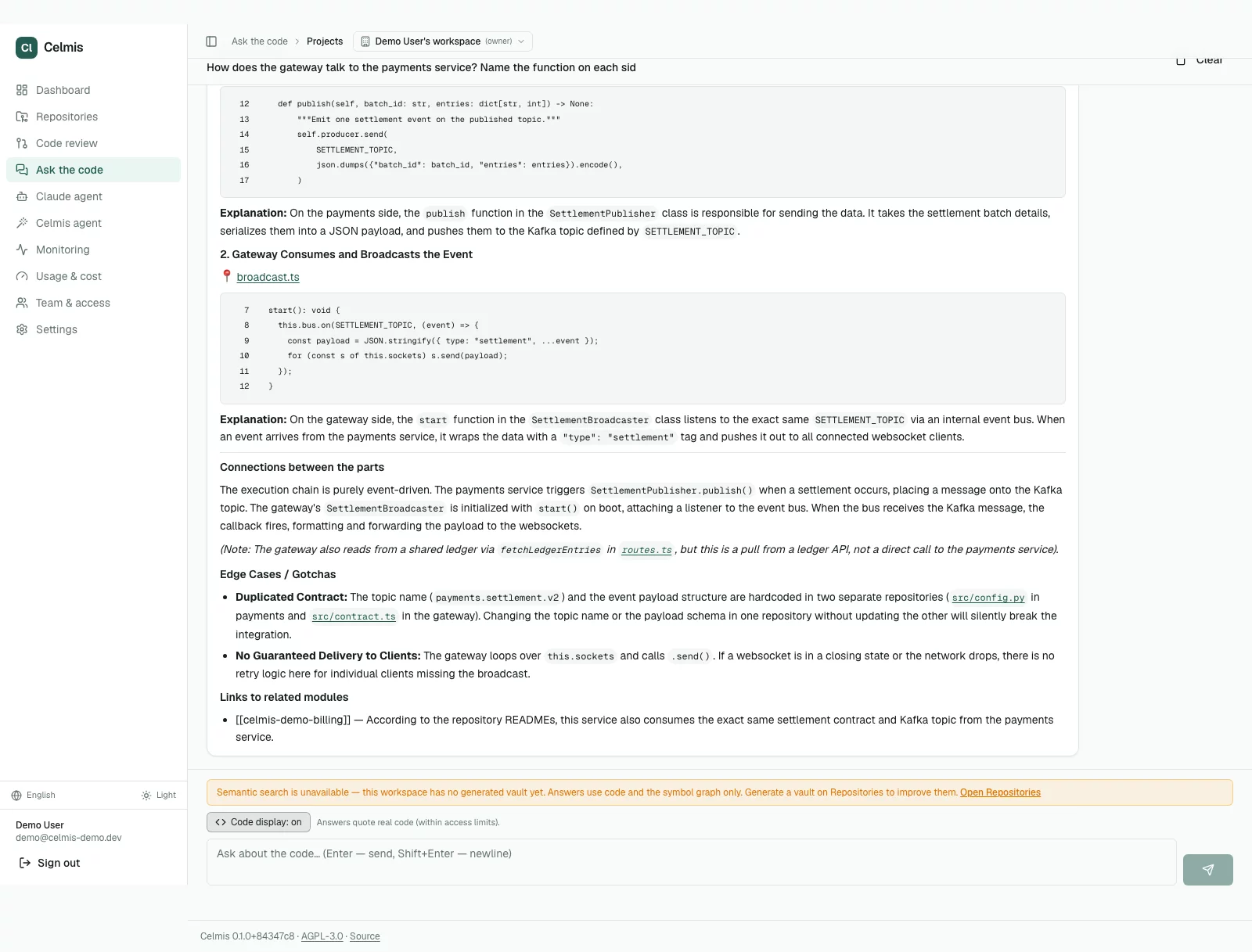
Ask a question that spans two repositories, and the answer quotes both:
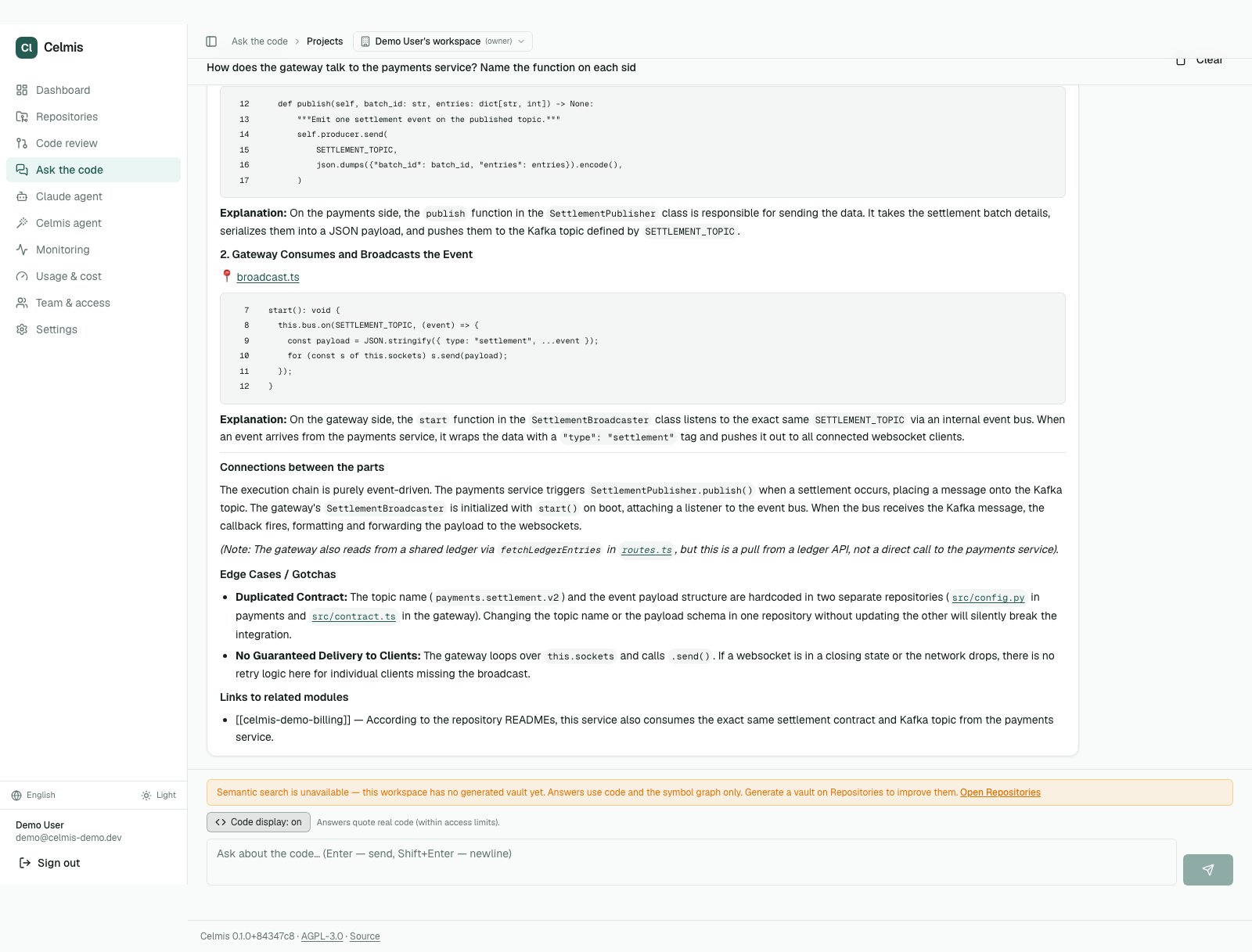
That is not a search result. The gateway and the payments service are separate repositories with no shared code, and the answer traces the call chain between them — then notices, unprompted, that the Kafka topic name is hardcoded in both and that changing one silently breaks the other.
A reviewer that reads only the diff structurally cannot say that. It never had the other repository open.
Nine things people do with it
| You are a PM, a delivery lead or the client and want to know what state a group of projects is in, or how something actually works | Ask it. From any device, anywhere, without booking time from an engineer and without a meeting whose only output is a paragraph → Ask the code |
| A new engineer has a question a senior would have to answer | Every one of those pulls someone experienced out of flow, at the moment they are already covering. The codebase answers instead, with file:line citations → Ask the code |
| Two teams share an integration and neither can read the other's repository | Load it, grant the right to ask, and deny the paths that must stay private. They get answers; the credentials are refused at the source → Who can see what |
| A customer or an auditor asks for your SBOM | One button, CycloneDX, plus an evidence pack whose manifest they recompute themselves — against a hash you publish where the pack is not → Dependencies, SBOM and the evidence pack |
| A vulnerability lands in a dependency | Fix from here hands an embedded session the repository, the package and the finding. It edits, the runner pushes a branch and opens a PR → Fix from here |
| A pull request needs reviewing | Agents read the diff — and, where the graph is built, who else calls what is being changed, including from another repository → Pull-request review |
| Forty services need the same thing done to them | Write the sentence. Celmis shows which repositories it resolves to and waits for a second press, rather than finding them among forty and pressing a button forty times → Ask for work across repositories |
| An alert fires at 02:00 and you are not at a desk | It lands in Celmis and goes out to the workspace's chat channel, and Fix from here opens a session already holding the alert. The runner opens the pull request → Alerts, and fixing from a phone |
| Your own agent or editor needs to understand the codebase | Point it at /mcp/. Fifty-one tools over the same index, thirty-five of them read-only, under the same access rules — no second copy of your code anywhere → Connect Claude Code and other MCP clients |
The first three are the ones a code-review tool does not do at all, and they are the reason this is a platform rather than a reviewer: index once, then read that index from whichever side of the work you are standing on.
Three numbers
| 197 seconds | from git clone to six healthy services, measured on a clean server |
| $0.118 | per pull request reviewed, on the model this ships with |
| 17th of 50 | on the Martian Code Review Bench offline set, under all three judges |
That last one is deliberately unflattering, and it stays. It measures one of the surfaces below — pull-request review on isolated single-repository PRs — and that set has no sibling service for a symbol to have consumers in, so the thing this product is built around is not in the number at all. The table, the audit of every finding it scored false, and the command that reproduces both are in Results.
Table of contents
- What it does
- What's new in v3
- What that buys you that a diff-only tool cannot
- Nine things people do with it
- Three numbers
- Quick start
- First user and admin
- Connect a repository
- Ask the code
- Pull-request review
- Dependencies, SBOM and the evidence pack
- Fix from here
- Alerts, and fixing from a phone
- Ask for work across repositories
- Who can see what
- Languages and formats
- Deterministic checks — no model, no false positives
- Connect Claude Code and other MCP clients
- Results
- Audit of the false positives
- Test repositories
- Configuration
- Operations
- Local development
- CLI reference
- Architecture
- Troubleshooting
- Project layout
- Provenance and rights
Quick start
What you need
| Docker | 24+ with Compose v2 | Docker Desktop on macOS/Windows, the native engine on Linux |
| A model API key | one of | Google Gemini, Anthropic, OpenAI, OpenRouter, Groq or Mistral. A free Gemini key is enough to evaluate: https://aistudio.google.com/app/apikey |
| RAM | ~4 GB free | Measured on a real indexing run: 1.1 GB peak across all five containers, 565 MB at rest |
Postgres and Qdrant are bundled — no external cluster to provision. No Python or Node.js install is needed for the Docker flow.
Start it
git clone https://github.com/Celmis-labs/Celmis.git celmis
cd celmis

# Generates .env and fills every secret in the format each one needs.
# Idempotent: run it again after a pull and it fills only the new blanks.
./scripts/init-env.sh

docker compose --env-file .env up -d

# Wait for healthy — first boot pulls three images and applies migrations
docker compose ps
Open http://localhost.
Nothing is built here. The three images are pulled from the registry named by
CELMIS_REGISTRY at the tag in CELMIS_TAG, for linux/amd64 and
linux/arm64 — Apple Silicon and an ARM server both get a native image.
Building them on the machine that runs them was measured at 485 seconds and
4.2GB of disk for api alone, which is why installing no longer means
compiling.
Port 80, not 3000: a reverse proxy puts the app and its API on one origin and
serves the API under /backend. That is not a deployment preference — the
browser bundle asks for a relative path, which is the only way one published
image can serve every installation instead of just the one it was built on.
To work ON Celmis rather than run it, add the dev overlay and you get local builds back:
docker compose -f docker-compose.yml -f docker-compose.dev.yml up -d --build
init-env.sh --check reports what is still empty without writing anything.
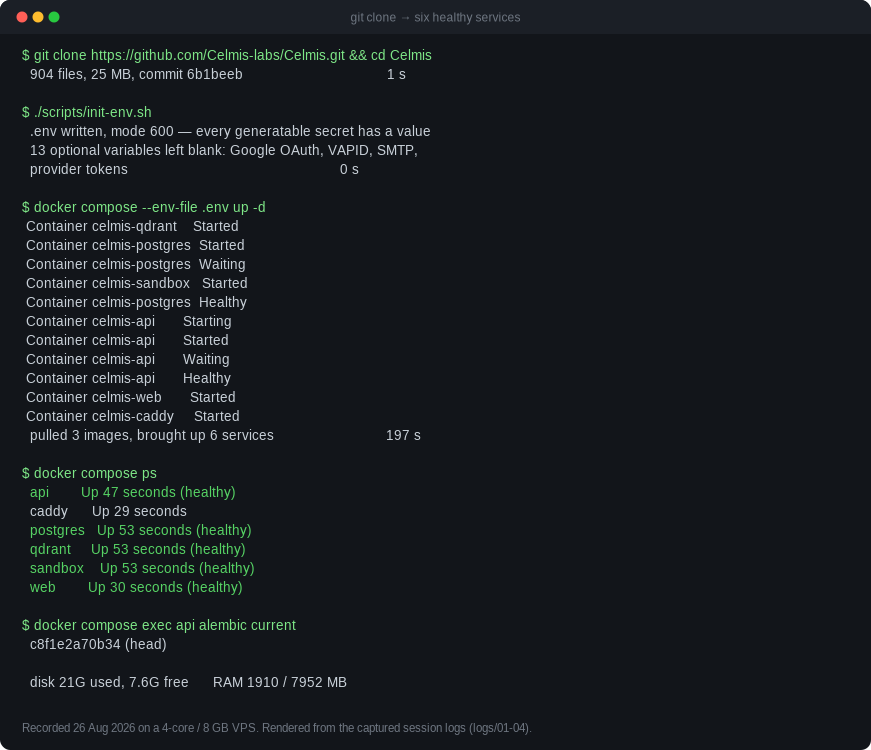
That is a render of the captured session, not a screen recording — the
figures in it are the ones the run produced on 26 August 2026, and the compose
output is verbatim from logs/03-up.log in the install report. It is drawn
rather than photographed because a second stack cannot be brought up beside a
running one: docker-compose.yml fixes container_name, so the names collide.
Stop
docker compose down       # stop, keep your data
docker compose down -v    # stop and DELETE every volume
First user and admin
The sign-up form on /login works as soon as the stack is healthy. That
account is a normal user — signing up grants no admin rights, not even to
the first person through the door.
Global admin comes from the environment instead: sign in with
CELMIS_MASTER_EMAIL and CELMIS_MASTER_KEY (as the password), both in
.env. Whoever runs the box is the admin, which is the model a self-hosted
install wants rather than whoever reached the form first. The path does not
exist unless both variables are set, and every use of it is written to the
audit log.
To promote a normal account:
docker compose exec api analyzer auth make-admin you@example.com
A promoted account (or one an OIDC_ADMIN_ROLE makes admin) is a global
admin: system status, ops, compliance, every workspace visible. It is not
the superadmin — that is the master account alone, and it is the only one
that can hand out the roles below that carry power.
Workspace roles
Every workspace is a tenant, and a person can hold a different role in each — admin of one, editor of two others.
| Role | Can do in that workspace |
|---|---|
viewer |
read |
member |
read; change a review issue's status |
editor |
the prompt editor: agent system prompts, per-repo review policies (prompt template, folder rules, per-agent prompt overrides), analytics. No members, invites, teams, LLM keys, git connections or licence |
admin |
editor's rights, plus members and viewers, invites, teams, LLM keys, git connections |
owner |
admin's rights, plus deleting the workspace |
Who may grant what:
- owner, admin, editor — the superadmin only: granting, changing to or from, removing. A workspace admin cannot demote the owner or another admin.
- member, viewer — the superadmin, or that workspace's owner/admin (directly or by invite; an invite carries only a role its creator could grant, re-checked when it is accepted). An existing account is added directly only if you already share a workspace with it; anyone else receives an invitation they have to accept.
- Password-reset links a workspace admin mints are bounded by every workspace the person belongs to, not just this one. In multi-tenant mode everyone owns a personal workspace, so in practice only the superadmin can mint one. No route mints one for the master account.
- Shared workspaces are created by the superadmin. Everybody gets a personal workspace of their own at sign-up and is its owner.
The superadmin manages people across workspaces on Administration →
Users (/admin/users); every membership change, from any page, is written
to the audit log with the actor, the person, the workspace and the old and
new role. Its No team access filter lists the accounts whose only
workspace is their personal one — whatever way they sign in — newest first.
Getting in: invites and access requests
An invite for somebody without an account. Inviting an email address
that has no account creates an email-bound, single-use link. The inviter sees
it (copy it from the Team page); when SMTP is configured it is also emailed.
Opened signed out, /invite/<token> shows the workspace, the role and who
sent it, and offers sign-in, sign-up (when AUTH_PASSWORD_LOGIN allows it),
Google and company SSO (when enabled); each comes back to the link to accept.
Accepting re-checks that the inviter may still grant that role, is audited,
and uses the link up. An expired, revoked or used link says which; an
email-bound link opened by another account is refused.
Automatic redemption — verified addresses only. When somebody signs in
with Google or company SSO and the identity provider marks the email as
verified (email_verified) — or, for SSO, the operator vouches for it with
OIDC_TRUSTED_EMAIL_DOMAINS / OIDC_REQUIRE_VERIFIED_EMAIL=false — the
pending invites addressed to that email are
redeemed at sign-in, through the same accept path (grant rule re-checked,
audited, single use). A password account is never redeemed by its
address: Celmis does not verify the address typed at sign-up, so anyone can
register somebody else's email. A password account opens the link it was
sent, and accepts there — and so does an account that has a password and
Google/SSO linked to it, since whoever set that password can still sign in.
The automatic path only ever adds somebody: an invite for a workspace the
person is already in is used up without touching their role, and removing a
member revokes the live invites addressed to them for that workspace.
Access requests. A signed-in person whose only workspace is their
personal one sees "You have no access to team workspaces yet — send a
request" on the dashboard and at /access-request, with an optional comment
(up to 1000 characters). One pending request at a time; it can be cancelled,
and a new one sent after a rejection. The request names no workspace, and the
requester is shown none until it is approved. The superadmin only decides,
on Administration → Access requests (/admin/access-requests): approve
with one or more (workspace, role) pairs — applied all or nothing, each
membership audited with via="access_request" — or reject with a reason the
requester reads. Access given another way (the Users page, an accepted
invite) closes a pending request as approved. Decided requests stay listed as
history. The requester sees
the decision on /access-request and as a toast on their next visit, and an
approved workspace appears in the switcher without signing out. With SMTP
configured the requester is also emailed the decision, and the master address
a new request; there is no other notification channel.
POST /api/access-requests {comment?} |
ask (409 if one is pending, or the account already has team access) |
GET /api/access-requests/me |
eligibility and the latest request |
DELETE /api/access-requests/me |
cancel the pending one |
GET /api/admin/access-requests?status= |
superadmin: list, pending first |
POST /api/admin/access-requests/{id}/approve {grants:[{workspace_id, role}]} |
superadmin: one or more, unique, existing, not personal workspaces |
POST /api/admin/access-requests/{id}/reject {reason} |
superadmin: reason required |
Deciding a request that is no longer pending answers 409.
Connect a repository
- Settings → LLM Setup — paste a provider key. It is encrypted with
CREDENTIAL_MASTER_KEYbefore it touches the database, and the UI only ever shows you the first and last four characters again. - Connections — add a GitHub, GitLab or Bitbucket token. Use a machine account, not your own: a personal token reaches every repository you can see, and tokens end up in backups, logs and