Short workplace movement breaks for people who work at a computer.
A local-first macOS CLI: timed exercises from official references, SQLite history on your machine, and an offline HTML report. No accounts, telemetry, or backend.
Highlights
- Local-first. Everything lives in
~/.deskercise— no account, no cloud, no backend. - Private by design. Zero network requests while it runs or while you read reports.
- Timed, cited exercises. 15 movements for the neck, shoulders, hands, wrists, arms, back, chest, and legs, adapted from the NHS, CCOHS, and Mersey Care NHS.
- A real break window. A 60-second timer, including rest — not a "hold it for a minute" demand.
- On-device history. SQLite logs your prompted, completed, skipped, and snoozed breaks.
- Offline reports. A self-contained HTML dashboard and a text summary, both generated locally.
- No nagging. Skip or snooze mid-meeting; it just comes back.
Contents
- Highlights
- Requirements
- Quick start
- Everyday use
- Report
- Exercises and references
- Configuration and data
- Install
- Troubleshooting
- For developers
- Roadmap and known limits
- Support
- License
Requirements
- macOS (the initial target)
- Node.js 22.13+ (Node 24 recommended)
Quick start
npm install --global @thulioph/deskercise
deskercise start
On first run, choose an interval between breaks (suggested default: 45 minutes). Keep the terminal open — the timer runs in the foreground.
deskercise --version
deskercise report
The npm package is public; local history stays on your machine when you install another version.
Everyday use
Each break offers:
| Key | Action |
|---|---|
↑ / ↓ |
Select an available action (wraps at either end) |
Enter |
Choose the highlighted action |
1 |
Start the 60-second timer |
2 |
Skip this exercise |
3 |
Snooze the same exercise for 10 minutes |
s |
Stop an exercise early |
y / n |
Confirm / deny completion after the timer |
q / Ctrl+C |
End and save the session |
The highlighted action resets to the first option at each prompt. The shortcut bar shows the available choices; numeric and letter shortcuts work directly without moving the selection.
The next interval starts after the exercise is resolved. An unanswered prompt expires after 5 minutes. The final confirmation also expires after 5 minutes; that records UNCONFIRMED and adds no completed minutes.
The terminal labels each countdown and shows elapsed progress during focus, snooze, and movement windows. When the break timer ends, it asks for confirmation; only a saved COMPLETED result shows success. Follow the listed movements, then rest for the remainder of the break window.
Session screen
A running session looks like this (illustrative):
DESKERCISE · workplace movement

Session: 00:12 · Completed: 1        Next break: ready
Confirmed active: 1.0 min

Time to move
Gentle neck turns · neck · seated
Break window: 60s

    Movement sketch: head direction (top view)
    Look left       Centre       Look right
       <O              O              O>
        ←              |              →

1. Sit upright.
2. Look gently left, then right; return to centre.
3. Move comfortably; rest between turns.

› [1] Start   [2] Skip   [3] Snooze
↑/↓ select · Enter choose · q or Ctrl+C to end · keep this terminal open
Terminal layout
Resize the terminal while Deskercise runs: at 100 columns or more, exercise instructions sit beside the timer and actions. On extra-wide terminals, the dashboard stays at 120 columns and is centered, keeping the actions close to the instructions. Smaller terminals stack the timer and actions above the instructions. Precautions and sources remain visible in both layouts. Borders and spacing shrink to fit narrow terminals; when terminal width is unavailable, the layout uses 80 columns.
Live session dashboard
The terminal shows elapsed session time, the next break countdown, completed breaks, and confirmed active minutes. Totals belong to the current session and increase only after you confirm completion. Demo sessions are labelled separately. The countdown updates while the terminal remains open; snoozing shows when the same exercise will return.
Options
deskercise start --interval 1 --once
deskercise start --no-notifications
deskercise report
deskercise report --no-open
deskercise start --demo --once
--interval <minutes>— in minutes (0.01–480), overrides your preference for the current run only. If no configuration exists yet, that value becomes your initial preference.--once— end after one exercise is resolved (repeated snoozes of that exercise still resolve once, then it exits).--no-notifications— use terminal prompts only, with no macOS notification.--demo— test with a 3-second interval, a 5-second exercise and snooze, and 30-second prompt and confirmation windows, in a separate data folder.report --demo— read the separate demo history.report --no-open— generate the HTML without opening it in a browser.
To change the saved preference, edit intervalMinutes in ~/.deskercise/config.json.
Report
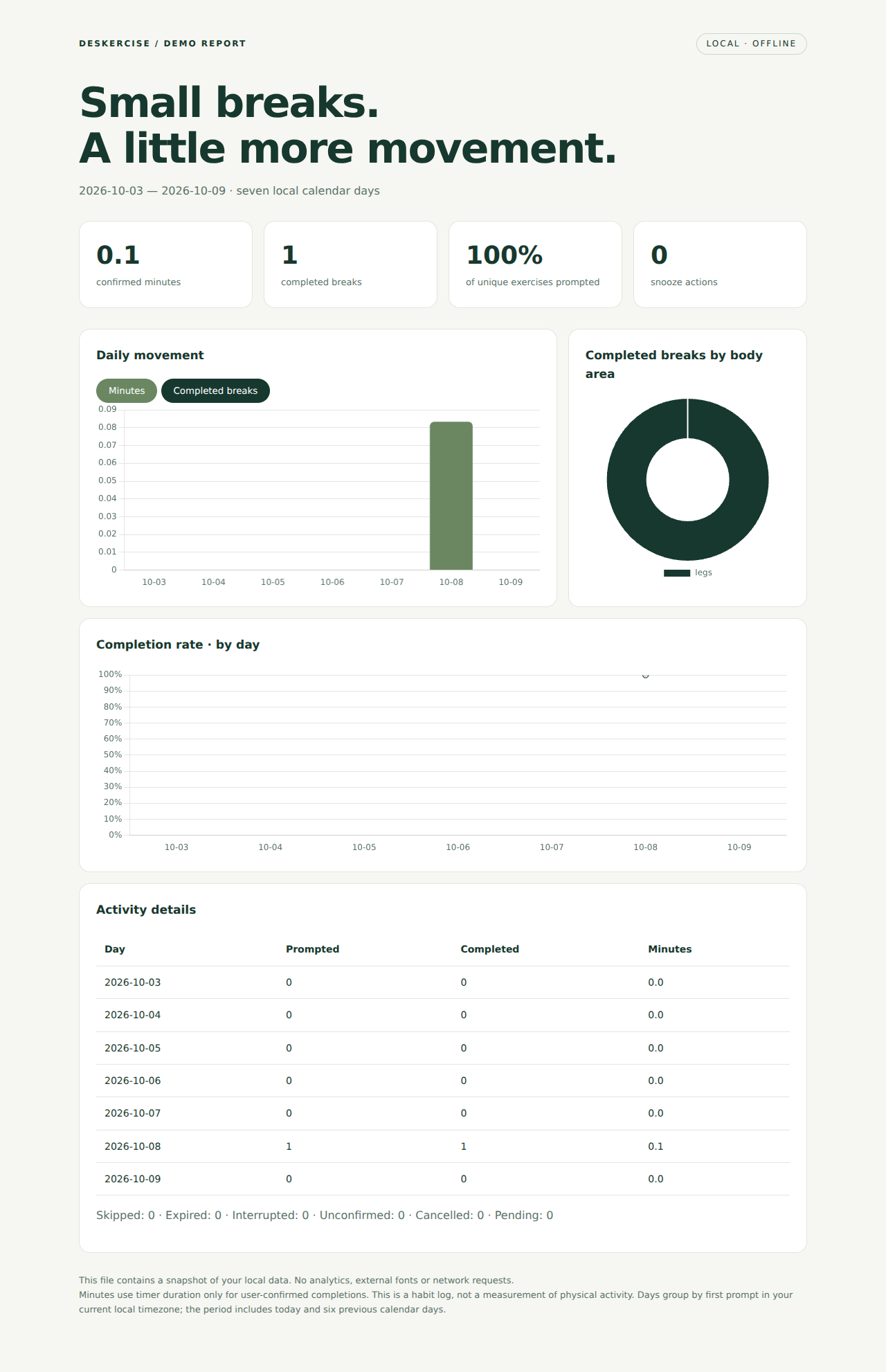
deskercise report prints a summary and generates an offline HTML report. It shows two windows of the same data.
Terminal summary
The terminal prints today plus the previous six local calendar days: prompted and completed breaks, completion rate, confirmed minutes, skipped / expired, interrupted, unconfirmed, cancelled / pending counts, snooze actions, session count with the average interval, and the average response time. It then renders the seven-day history (a table, or stacked rows on narrow terminals) and bar charts for daily completions and body areas. Redirected output uses plain ASCII bars.
HTML report
The HTML report is self-contained (file://, no server): Chart.js, styles, and data are embedded. It includes a narrative summary, a daily movement chart with a Minutes / Breaks toggle, a completion-rate trend line, a body-area breakdown, a doughnut of prompt outcomes, and a per-exercise table with completions and average seconds.
A screenshot of the report is available at docs/report-preview.png.
Preview a live sample report at deskercise.thulioph.com/demo-report.html.
Exercises and references
The catalog has 15 workplace movement exercises for the neck, shoulders, hands, wrists, arms, back, chest, and legs. Each entry includes instructions, position (seated or either), precautions, and a source URL. It is not a sports training program.
Neck turns, shoulder rolls, and the cross-body shoulder stretch include offline movement sketches during the prompt and exercise. These static cues supplement the full instructions and precautions. Sketches use ASCII in non-UTF locales or TERM=dumb; terminals smaller than 60 columns or 30 rows, screen-reader mode, and other exercises keep the text instructions without a sketch.
- Newcastle Hospitals NHS — 1 minute body check
- CCOHS — Stretching at the workstation
- Mersey Care NHS — Desk-based jobs
Instructions are shortened adaptations with their own repetition counts or hold times. The 60 seconds are a break window, including rest; do not hold a stretch for the entire timer. The 45-minute interval and 60-second window are product choices, not universal recommendations from these organizations. Stop any movement that causes pain. The app logs self-reported habits; it does not diagnose conditions or guarantee injury prevention.
Configuration and data
~/.deskercise/config.json
~/.deskercise/analytics.db
~/.deskercise/report.html
~/.deskercise/demo/analytics.db
~/.deskercise/demo/report.html
Set DESKERCISE_HOME to use a different directory. There are no network requests during app use or when viewing reports; installation downloads dependencies from npm. Chart.js, styles, and data are embedded in the HTML. There are no CDNs, remote fonts, or analytics.
The reporting period is today and the previous six days in your local timezone. Activities are assigned to the date of their first prompt. Minutes count timer duration only for exercises confirmed as completed. Interrupted events keep their timer seconds but do not add confirmed minutes. Snooze actions stay in the action history while counting as one exercise in the completion-rate denominator. Pending exercises also count toward that denominator.
Install
npm
The default install (npm install --global @thulioph/deskercise). See Quick start.
GitHub Release
Open GitHub Releases, download deskercise-<version>.tgz and SHA256SUMS into the same directory. Releases inherit repository visibility (private repos need GitHub access).
shasum -a 256 -c SHA256SUMS
npm install --global ./deskercise-<version>.tgz
deskercise --version
Installing another release upgrades or downgrades without removing local history. Native dependencies install for your Mac during setup.
Build from source
git clone https://github.com/thulioph/deskercise.git
cd deskercise
node --version
npm ci
npm run build
npm link
Smoke-test with demo mode (separate from your regular history):
deskercise start --demo --once
deskercise report --demo
When the exercise appears, press 1 to start and y to confirm when the timer ends. Demo mode exercises the interface; it is not a recommended 5-second routine.
Without a global link, use node dist/index.js instead of deskercise.
Troubleshooting
Notifications don't appear. Check macOS notification permissions and Focus settings. Deskercise delivers notifications through macOS's built-in AppleScript facade (osascript); delivery depends on the OS version. The terminal flow continues if notifications fail.
The browser doesn't open. Use the report.html path printed in the terminal.
better-sqlite3 fails to compile. Install Xcode command line tools (xcode-select --install) and retry npm ci.
Remove the app.
npm uninstall -g @thulioph/deskercise   # npm install
npm unlink -g deskercise                # source-linked install
History remains in ~/.deskercise until you remove it.
For developers
src/core           # entities, ports, timer, report aggregation (no Node/React/SQLite/terminal)
src/infrastructure # clock, catalog, SQLite, config, notifications, HTML
src/presentation   # Ink UI; Clack onboarding before Ink mounts
src/index.ts       # Commander commands and composition
test               # timer, persistence, catalog, config, reports, UI, and release flows
docs/decisions.md  # decisions, limits, Mac testing checklist
npm test
npm run check
npm run build
npm run test:package
npm run dev -- start --demo --once
CI on every PR and push to main runs commit-message checks, tests, and build. Releases use Semantic Release from Conventional Commits. See CONTRIBUTING.md for commit style, merge policy, and release details, and docs/npm-publishing.md for the one-time npm Trusted Publishing setup.
Roadmap and known limits
Deskercise is a macOS prototype. Current boundaries:
- Foreground execution only — no daemon, notification buttons, or pause command.
- No process lock: starting two copies produces two reminder loops. End the first before starting another.
- No forced-termination recovery: SIGKILL, power loss, or a killed terminal can leave a session's
ended_atunset and events pending. No completion is invented. - No activity or sleep detection: timing is a habit proxy, not sensed movement.
- Reports use the current timezone, even after travel.
- One report file per data directory, regenerated (overwritten) each run — a static snapshot.
See docs/decisions.md for the full list. Feature requests and ideas are welcome in GitHub Issues.
Support
Questions, bug reports, and ideas belong in GitHub Issues.
License
GPL-3.0-or-later © 2026 Thulio Philipe.
Deskercise is free software: you can use, modify, and redistribute it, but distributed modifications and forks must remain free and open source under the same license. See LICENSE for the full terms.
The bundled exercise movements are shortened adaptations of publicly available guidance from the Newcastle Hospitals NHS, CCOHS, and Mersey Care NHS (see Exercises and references). Chart.js is distributed under its own license (docs/Chart.js-LICENSE.md).