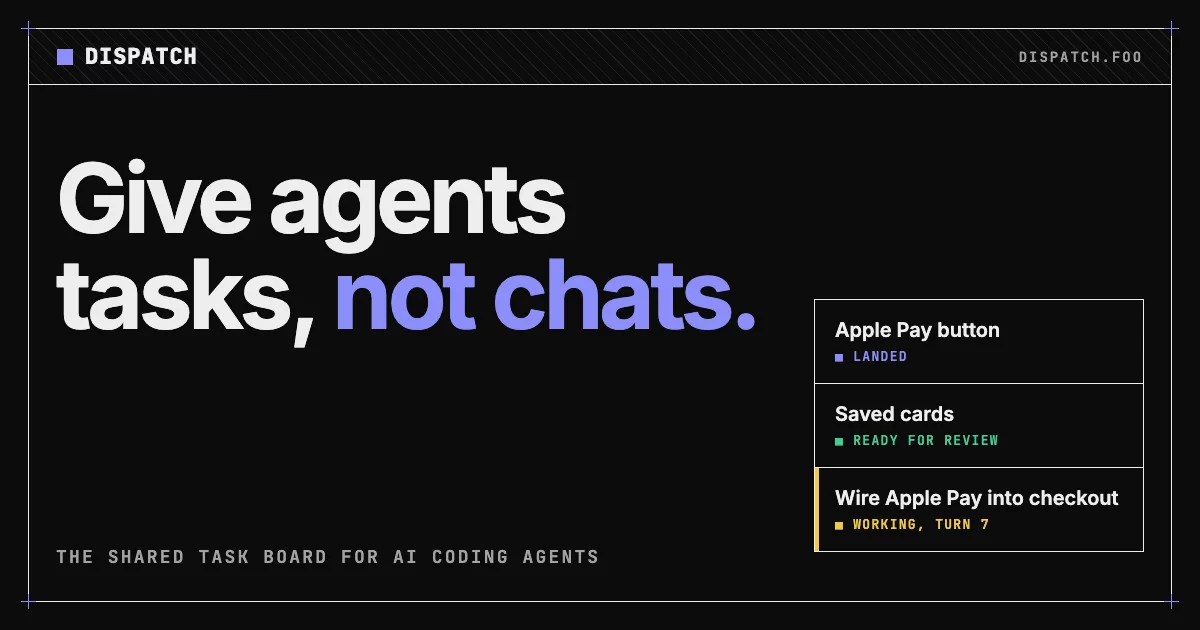
The shared board your team's coding agents work from, on your own machines. Give agents tasks, not chats: Claude Code, Codex or any MCP agent claims work from one board, runs it in its own worktree inside the files it declared, and lands it through review and a merge queue. dispatch.foo

Licensing: open core. The integration packages (core, client, CLI, MCP server) are MIT; the desktop app and daemon are source-available under FSL-1.1-ALv2 and each release becomes Apache-2.0 two years after it ships; the team features are Elastic-2.0. Free for up to three people with every feature. See LICENSING.md and pricing.
- Your repo stays yours.
.dispatch/holds config you would want to commit anyway. Point a project at the daemon's database (dispatch init --db) anddispatchdowns the tasks, findings and history outright, writing them to a git-versioned receipt log outside your repo — a full audit trail with no churn in your own diffs. Or keep the default and have every task be a markdown file in.dispatch/tasks/*.md, synced by git. - Agents run with guardrails. A task declares the paths it may write before the agent starts; runs carry budget and turn caps, verify gates, and human-gated scope escalation.
- Everything is on the record. Findings, decisions, evidence, and transcripts from every run are kept — reviewable, not scrolled past.
- Local-first. Runs on your machine, against your checkout, with your API key. No account, no server, nothing uploaded.
Prerequisites
- macOS (Apple Silicon or Intel) or Linux.
- A project folder, ideally a git repository you push to GitHub. Setup can turn a plain folder into one.
- Git. On a Mac without it, Setup runs Apple's installer.
- An AI coding agent: Claude Code (Claude Pro or Max plan, or an API key), Codex (ChatGPT plan or an API key), or Gemini CLI, Cursor Agent, opencode, Qwen Code, Crush, Goose or Aider. Setup installs the one you pick or opens its install page, then opens its sign-in.
- Optional: the GitHub CLI (
gh) to clone from GitHub and open pull requests.
Install
Desktop app for macOS via Homebrew:
brew install --cask wsoule/tap/dispatch
Or grab an installer from the
latest release: macOS DMGs
(Apple Silicon and Intel) and Linux .deb/.rpm/.AppImage. macOS builds are
signed and notarized (Developer ID).
The Homebrew cask also puts the dispatch CLI on your PATH (it links the
binary bundled inside Dispatch.app). After a DMG or Linux install, add it from
Settings › Setup › Terminal command › Install command.
Quickstart
In any git repo:
dispatch init
dispatch task create "My first task" --priority high
dispatch task list
dispatch task next
dispatch doctor
To keep the tasks in the daemon's database instead of markdown files, use
dispatch init --db (and start dispatch serve before creating tasks — only
the daemon may open the database). See How it works.
Then open the Dispatch app and point it at the repo: the board shows your tasks, and dispatching one hands it to a coding agent in an isolated git worktree — live output, review, and merge all happen in the app.
Every read command accepts --json for agent/script consumption.
dispatch init also registers Dispatch's MCP server in the project's
.mcp.json, so tools like Claude Code can read and write the same tasks — see
MCP server.
How it works
A task carries frontmatter — status, priority, blocked-by, declared writes
paths, and more — and a human-readable body. The CLI, the desktop app, the MCP
server and the orchestrator all reach the same task through dispatchd, which
is the single writer.
Where that state lives is a per-project choice, recorded in
.dispatch/storage.json:
-
Files (the default) keeps every task as markdown in
.dispatch/tasks/*.md, committed to your repo. Git is both the sync layer and the history, and the CLI can read the board with no daemon running. -
Database (
dispatch init --db, ordispatch migratefor a project you already have) keeps them in a SQLite database onlydispatchdmay open. Your.dispatch/shrinks toconfig.yml,team.ymland the marker; the database is gitignored, and the audit trail reaches git as a receipt log — a standalone repository under~/.dispatch/projects/<id>/receiptsthat the daemon commits to as things change. Because that log is laid out exactly like a file-backed project, restoring it needs no special tooling: copy its.dispatch/into a repo and it is a working board again.On this backend
dispatch taskcommands go through the daemon, so start one (dispatch serve) before creating tasks.
Dispatching a task runs a coding agent in an isolated git worktree, scoped to
the task's declared writes. Touching anything else requires a human-gated
scope request at runtime; runs carry budget (maxBudgetUsd) and turn caps, and
verify gates check exit criteria before review. Findings, rulings, evidence, and
decisions from each run are recorded alongside the tasks.
dispatchd, a local daemon, watches the repo and feeds the app live runs,
review, and merge. It is local HTTP only — nothing leaves the machine.
Moving a project to the database
An existing project moves in two deliberate steps, with the daemon stopped:
dispatch migrate --dry-run    # rehearse: report what would move, write nothing
dispatch migrate              # import tasks, findings and ledger into the database
The import is additive — it copies, never moves, so it is safe to re-run and your markdown is untouched if anything goes wrong. Once the daemon has been up long enough to export a receipt log, retire the copies it left behind:
dispatch migrate --retire --dry-run
dispatch migrate --retire
--retire deletes only what the receipt log already contains, checked record by
record, and reports anything it kept and why. Three files stay behind on
purpose: fix-loops.jsonl, notes.json and inbox/ have no table in the
database yet, so the daemon still writes them as ordinary files and the receipt
log does not carry them. On the database backend they are gitignored rather than
committed.
Working in the app
Beyond the board and review, the app carries the surfaces you would otherwise leave it for.
Terminals. Shells on the repo or on a run's worktree, split any number of
ways. The child runs under a real pty, so prompts, colour and full-screen
programs behave normally, and scrollback is kept on disk — closing the window,
or restarting dispatchd, does not lose what a session printed. A session the
daemon inherits from a previous process comes back readable but not writable.
Files. Browse and edit a checkout — the project's, or one run's worktree —
with an editor that saves as you type and previews for Markdown, images, PDFs,
audio and video. ⌘P is fuzzy quick open across everything git ls-files knows
about, so build output and dependencies stay out of the results.
Design. Open your app in a browser Dispatch drives, click the element that
is wrong, and get its selector, markup, computed styles and a cropped screenshot
as text to hand an agent. Needs a Chromium-based browser (Chrome, Chromium, Edge
or Brave) on the machine; set CHROME_PATH if it is somewhere unusual.
dispatch browser open http://localhost:5173
dispatch browser pick <id> --out element.png
dispatch browser snapshot <id> --out page.png
Worktrees and remotes.
dispatch worktree create feature/login
dispatch worktree list --json
dispatch remote list
dispatch remote exec build-box -- pnpm test
dispatch remote forward build-box 5173
Remotes are declared in .dispatch/config.yml; everything else about the
connection comes from your own ~/.ssh/config:
remotes:
  build-box:
    host: build-box
    path: /srv/repo
Terminals can be opened on a remote. Agent runs cannot — the orchestrator works in local worktree paths throughout.
Linear from the CLI. Link a project in Settings → Linear; then
dispatch linear reports on the link and drives it from a terminal. The first
pass sends no task that predates the link, so push those yourself:
dispatch linear                      # the link, the last pass, what is not in Linear
dispatch linear sync                 # run a pass now (board sync is `dispatch sync`)
dispatch linear push t-1a2b t-3c4d   # send these tasks by id
dispatch linear push --unlinked      # every open task not in Linear; --all adds finished ones
dispatch linear push --failed        # retry the creates that failed
dispatch linear coverage             # which tasks are not in Linear, and why
dispatch linear capacity             # active issues against the plan's limit
dispatch linear archive-closed       # archive closed issues to free room (app token)
Long exports and archives run in the daemon; the command follows them and prints
progress. Every subcommand takes --json.
Running more than one agent
Dispatch ships native executors for Claude and Codex. Any other coding agent that takes a prompt on the command line can be declared and dispatched:
executors:
  gemini:
    command:
      run: [gemini, '-p', '{prompt}']
{prompt} and {model} are substituted before the process starts; an argv with
no {prompt} gets the prompt on stdin instead. Well-known agents already on
your PATH are offered without any config at all. A CLI agent has no approval
protocol, so runs on one are refused under permission modes that imply a human
gate, and neither cost nor turns are reported.
To try the same work several ways at once:
dispatch fanout <taskId> --executors claude,codex,gemini
Each agent gets its own clone of the task, its own worktree and its own branch, so comparing them is the review you already do — one diff each — and merging the winner is merging that task.
Sharing a run
dispatch share r-abc123
dispatch share r-abc123 --out review.html
Writes a self-contained HTML page of one run — summary, diff, findings,
decisions, evidence and transcript — with no scripts, no remote assets and no
link back to the project. It is a file you can attach to a ticket, hand to a
reviewer who has never installed Dispatch, or keep as the receipt for what an
agent did. --json prints the assembled data instead, for feeding a different
template.
Previewing a run
A run's work is a diff until you can look at it. dispatch serve will start a
dev server inside a finished run's own worktree and proxy it at
/preview/<runId>/, which the desktop app shows in the task's Preview tab.
The command is detected from the worktree's package.json (dev, else
start); set preview.command in .dispatch/config.yml to name one yourself,
and preview.installCommand for a fresh worktree that needs dependencies first:
preview:
  enabled: true
  command: pnpm run dev
  installCommand: pnpm install
  readyTimeoutSec: 180
  idleTimeoutSec: 900
Previews start only when asked for, stop with the daemon, and are swept once
they have had no request for idleTimeoutSec.
Working as a team on one daemon
A daemon is yours by default: it binds 127.0.0.1 and nothing else can reach
it. Team-local mode lets teammates on your network use the same board from a
browser, each as themselves.
Dispatch is free for up to three people working together, with every feature —
on a shared daemon or a synced board. More than that needs a license key:
install one under Settings → License or with dispatch license set <key>,
and dispatch license shows how many seats are in use. The team features are
under the Elastic License 2.0; see LICENSING.md.
moonx desktop:build                     # the bundle teammates are served
dispatch serve --host 0.0.0.0           # prints the address to share
dispatch team invite ada@example.com    # prints Ada's token, once
Ada opens the printed address, pastes her token, and is signed in. From then on
her findings, notes, scope decisions and dispatched runs are credited to
human:ada, not to you; the presence stack beside the project name shows who is
connected; the waiting-on-you count holds only what is yours to answer, with
teammates' asks under Teammates in Needs you; and the dispatch dialog warns,
by name, before you start work on files someone else's live run has claimed.
The same controls are in the app under Settings → Team: invite by email with a tier and an expiry, copy the token and the address to send, see who is online and when each token was last used, and remove someone. The presence stack also says which task each person has open, and a task's header shows who else has it open right now.
dispatch team invite ada --tier decide  # let Ada approve, too
dispatch team tokens                    # who holds a credential
dispatch team revoke ada                # her token stops working at once
Each teammate holds one token at one tier, and each tier includes the ones below it:
| Tier | Adds |
|---|---|
request |
The board, dispatching runs, reviewing and merging them, reading files |
decide |
Approving tool calls and assistant actions, scope decisions, previews, inviting teammates |
operator |
Terminals, the driven browser, writing files, and git on this checkout — all as you |
A new teammate gets request. Grant operator only to someone you would hand a
shell on this machine, because that is what it is. Nobody can grant, replace or
revoke a tier above their own, so a decide lead can invite reviewers but not
mint a shell. Inviting someone again replaces their token, which is also how you
change their tier.
Tokens are stored only as hashes, outside the repo, and are shown once — lose
one and issue a new one. They expire after 90 days unless you say otherwise
(--expires 30, --expires never), and dispatch team tokens shows when each
expires and when it was last used, so a token nobody has touched in months is
easy to spot and revoke. Every team command needs the daemon's app token
(--token or DISPATCH_APP_TOKEN), or a teammate token at decide or above.
In the browser, the token is traded at sign-in for an HttpOnly session cookie: the page never keeps it where script can read it, and revoking or expiring the token ends the session too.
On a network you do not fully trust, serve teammates over HTTPS so tokens and sessions never cross it in the clear:
dispatch serve --host 0.0.0.0 --tls-cert cert.pem --tls-key key.pem --tls-port 4772
Teammates then open https://<address>:4772. The plain listener drops back to
127.0.0.1, where the CLI, the MCP server and the desktop app reach it, so
nothing on the network can talk to the daemon unencrypted. Any certificate your
teammates' browsers trust works — one from your own CA, mkcert, or
tailscale cert for a Tailscale machine name. With a TLS-terminating proxy in
front instead (Caddy, tailscale serve), keep the daemon plain on loopback and
name the proxy's address with --public-origin.
Running it on a shared machine
Team-local mode lives on whoever's machine runs the daemon, so the board goes to sleep with their laptop. For a team, run it on something that stays up — a small VM, a spare box, anything on the network or Tailscale you all reach:
git clone <your repo> /srv/project
# The page teammates load is the desktop app's browser build, which comes
# from a Dispatch checkout rather than from your project:
git clone https://github.com/wsoule/dispatch /opt/dispatch
(cd /opt/dispatch && pnpm install && moonx desktop:build)
umask 077 && printf 'DISPATCH_APP_TOKEN=%s\n' "$(openssl rand -hex 32)" > /etc/dispatch.env
The app token is the operator's credential. Passing it in through the
environment rather than letting the daemon mint one means it is not printed —
under a service manager stdout is a journal kept on disk, which is exactly where
that token must not end up. Keep /etc/dispatch.env readable only by the
account the daemon runs as. A systemd unit:
[Unit]
Description=dispatchd for /srv/project
After=network-online.target

[Service]
User=dispatch
WorkingDirectory=/srv/project
EnvironmentFile=/etc/dispatch.env
ExecStart=/usr/local/bin/dispatch serve --port 4771 --host 0.0.0.0 \
  --web-dist /opt/dispatch/apps/desktop/dist \
  --tls-cert /etc/dispatch/cert.pem --tls-key /etc/dispatch/key.pem --tls-port 4772
Restart=on-failure

[Install]
WantedBy=multi-user.target
Pick a fixed --tls-port below the kernel's ephemeral range (on Linux, below
32768): it is the address you hand teammates, and a port in that range can be
briefly held by an outgoing connection when the daemon starts. Then, on that
machine and as the account the daemon runs as (the CLI finds the daemon through
that account's ~/.dispatch), invite people with the token from the file:
sudo -u dispatch sh -c 'set -a; . /etc/dispatch.env; cd /srv/project && dispatch team invite ada@example.com --tier decide'
What to back up: .dispatch/ in the checkout (the board's database, config and
roster) and ~/.dispatch/ for the service account (hashed teammate tokens, the
receipt log, run history, and each run's worktree — including any work an agent
has not committed yet, so do not treat those as disposable while runs are open).
A restart keeps teammates signed in — their tokens are on disk as hashes — but
ends any live previews and hands out fresh preview links.
What changes when the daemon is shared, and why:
- No token is ever put in the served page. On loopback the page carries the daemon's agent token; on a shared bind that would hand it to anyone who can reach the port, so teammates sign in with their own.
- Only the daemon's own address is a trusted origin, never whatever a Host header claims, so a DNS-rebinding page cannot pass for a teammate.
- Live previews stay on your machine. A preview has no credential of its
own, so it is served only to loopback; teammates see the diff and can be sent
a
dispatch sharepage instead. --hostaccepts127.0.0.1or0.0.0.0only. A single interface address would stop the daemon answering on loopback, where the CLI, MCP server and app reach it.
This is plain HTTP on your network, like any dev server — run it on a network
you trust, or put it behind a TLS-terminating proxy and name that origin with
--public-origin.
Syncing the board between machines
Each daemon keeps the board in its own database, so without help two people running Dispatch on the same repository have two boards. Board sync makes them one, through git — no server to run. The board travels one of two ways.
On a branch of the project's own repository (the default). Nothing else to set up: everyone who can push the code can sync the board.
# .dispatch/config.yml, committed so everyone gets it
sync:
  enabled: true
  remote: origin          # the default; any of the project's remotes by name
  branch: dispatch-sync   # the default; nothing but sync writes to it
In a repository of its own. For when the board should not live next to the code: a code repository whose branches are locked down, people who plan the work