
.ai/ (dot ai)
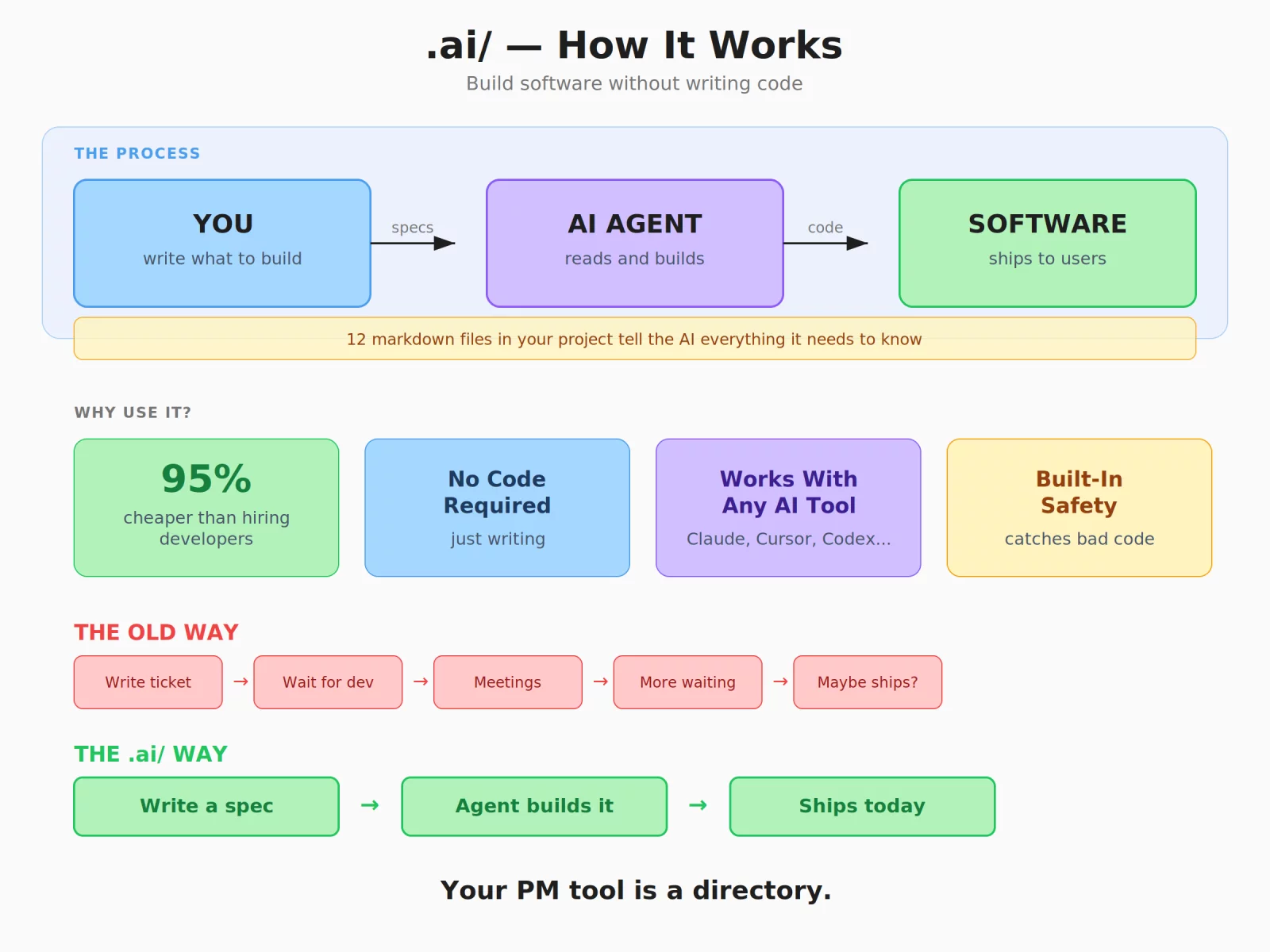
Your PM tool is a directory. Your proof is in git.
In March 2026, Linear declared issue tracking dead. Google shipped DESIGN.md — a markdown file that replaces design handoffs. Anthropic formalized CLAUDE.md. OpenAI introduced AGENTS.md. GitHub published Spec Kit. Karpathy moved on from "vibe coding" to "agentic engineering." Every layer of the software development stack converged on the same pattern: structured markdown files consumed by AI agents.
Nobody assembled them into one system. Until now.
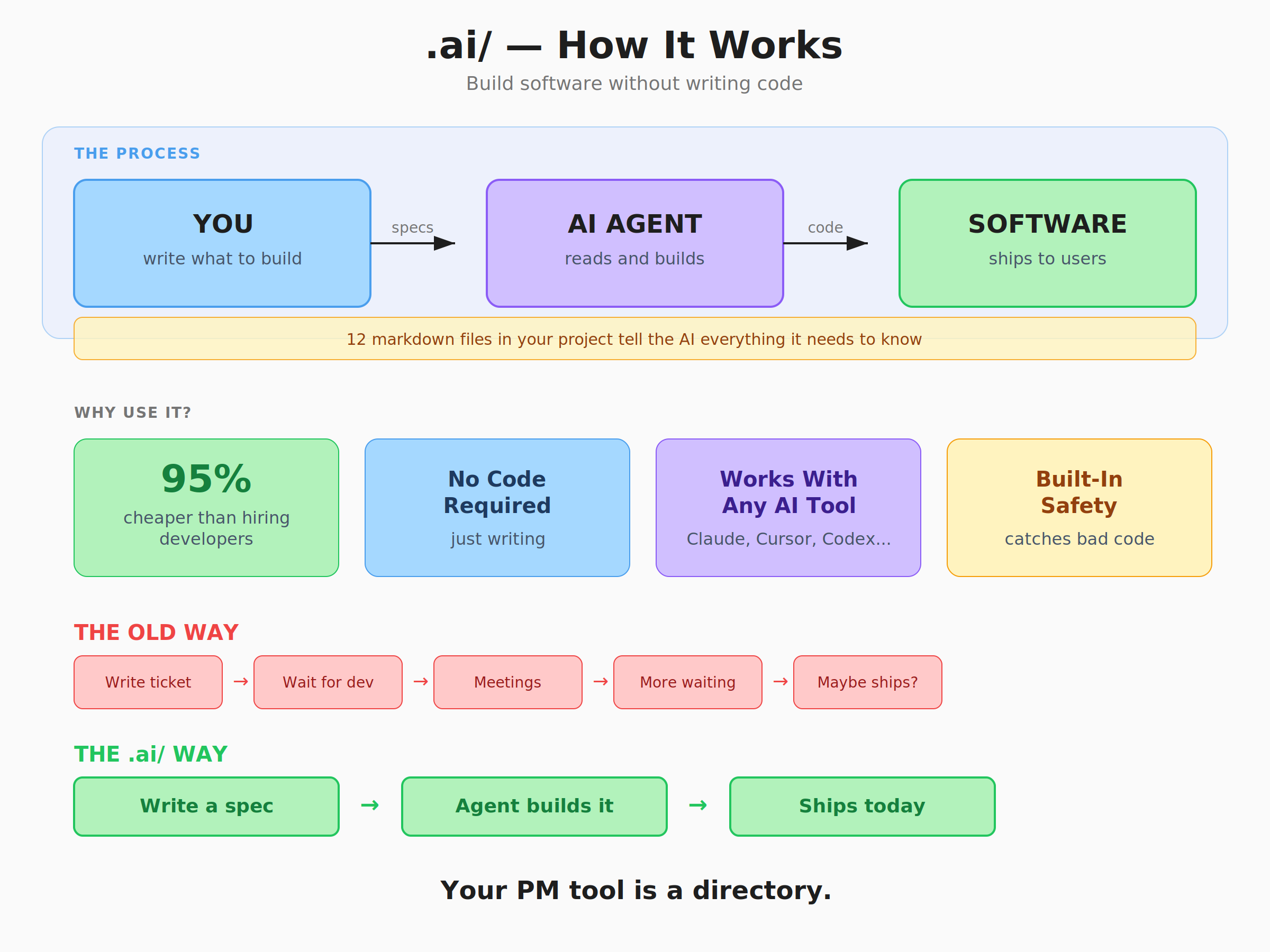
.ai/ is a directory you add to any repo that replaces your project management tool entirely. Fourteen markdown primitives handle your backlog, story slices, Codex goals, sprint planning, design system, standups, QA checklists, onboarding docs, and deployment gates. No SaaS subscription. No ticket system. No ceremonies. Just version-controlled markdown that AI agents read natively and humans read easily.
The next step is the .ai Standard v0.1: a founder-led open standard for repo-native AI development context. .ai/manifest.json gives tools a machine-readable map of your project context, schemas define conformance, packs extend the core, and dot-ai doctor tells you whether a repo is agent-ready.
The product claim is proof-first, not hype-first. dot-ai prove creates a structured A/B proof run so teams can compare a baseline workflow against .ai, record the same prompt, score the final product outcome, and publish a public-safe build report only when the evidence is strong.
npx github:howdycarter/.ai init
npx github:howdycarter/.ai doctor
npx github:howdycarter/.ai status
npx github:howdycarter/.ai goal create invoice-proof --from-proof proof-runs/invoice-app
npx github:howdycarter/.ai story next
npx github:howdycarter/.ai prove auto invoice-app --baseline-dir ../old-build --candidate-dir ../new-build --command "npm test"
npx github:howdycarter/.ai share
After the first npm release, replace npx github:howdycarter/.ai with
npx dot-ai.
Badges this standard enables:
- Built with .ai — this project shares proof artifacts from
.ai/build-report.md. - Valid .ai project — this repo passes
dot-ai doctor. - Agent-ready — adapters exist for the target AI coding tools.
Why this exists
The ticket was designed for a world that no longer exists
Jira was built in 2002. Trello in 2011. Linear in 2019. Every one of them encodes the same assumption: software is built by humans who pick up small tasks from a queue. The entire apparatus — sprints, story points, velocity tracking, standup meetings, backlog grooming — exists to coordinate people executing tickets.
That assumption broke. AI agents don't pick up tickets. They consume context. The unit of work isn't a two-sentence user story — it's a comprehensive specification document with acceptance criteria, architectural constraints, edge cases, and visual system references. The queue isn't a backlog of tasks — it's a directory of specs sorted by priority.
When your "developer" is an AI agent, the PM tool doesn't need to coordinate humans. It needs to provide context to machines. Markdown files in a git repo do that better than any SaaS tool ever will.
The economics are irresistible
| Development model | Monthly cost | Annual cost |
|---|---|---|
| .ai/ solo operator (full AI-native stack) | $200-500 | $2,400-6,000 |
| Single US developer (fully loaded) | $12,500-20,000 | $150,000-240,000 |
| Small US dev team (2-3 engineers) | $33,000-50,000 | $400,000-600,000 |
| Offshore team (2-3 devs, Eastern Europe) | $15,000-28,000 | $180,000-336,000 |
A solo operator using .ai/ spends less per year than a traditional team spends per month. That's a 95-98% cost reduction. The entire annual tool stack — AI coding tools, hosting, database, CI/CD, monitoring — costs less than two weeks of a single US developer's salary.
This isn't a marginal improvement. It's a structural shift in who can build software and at what cost.
Real people are shipping real software this way
Pieter Levels built a multiplayer 3D flight simulator with zero game dev experience. Three-hour prototype, seven-day ship, $1M ARR by day 12. Single HTML file.
Maor Shlomo built Base44 alone with AI tools. 250,000 users, $189K/month revenue in six months. Wix acquired it for $80 million — one of the fastest solo-founder exits in SaaS history.
63% of Lovable's users have zero programming background. The platform hit $20M ARR in 60 days — the fastest-growing European startup ever.
Rakuten used Claude Code to navigate a 12.5 million-line codebase with 99.9% accuracy in 7 hours.
Solo-founded startups surged from 23.7% to 36.3% of all new companies between 2019-2025. AI-native solopreneurs run businesses at 60-80% operating margins. This is the new normal.
Why .ai/ and not something else
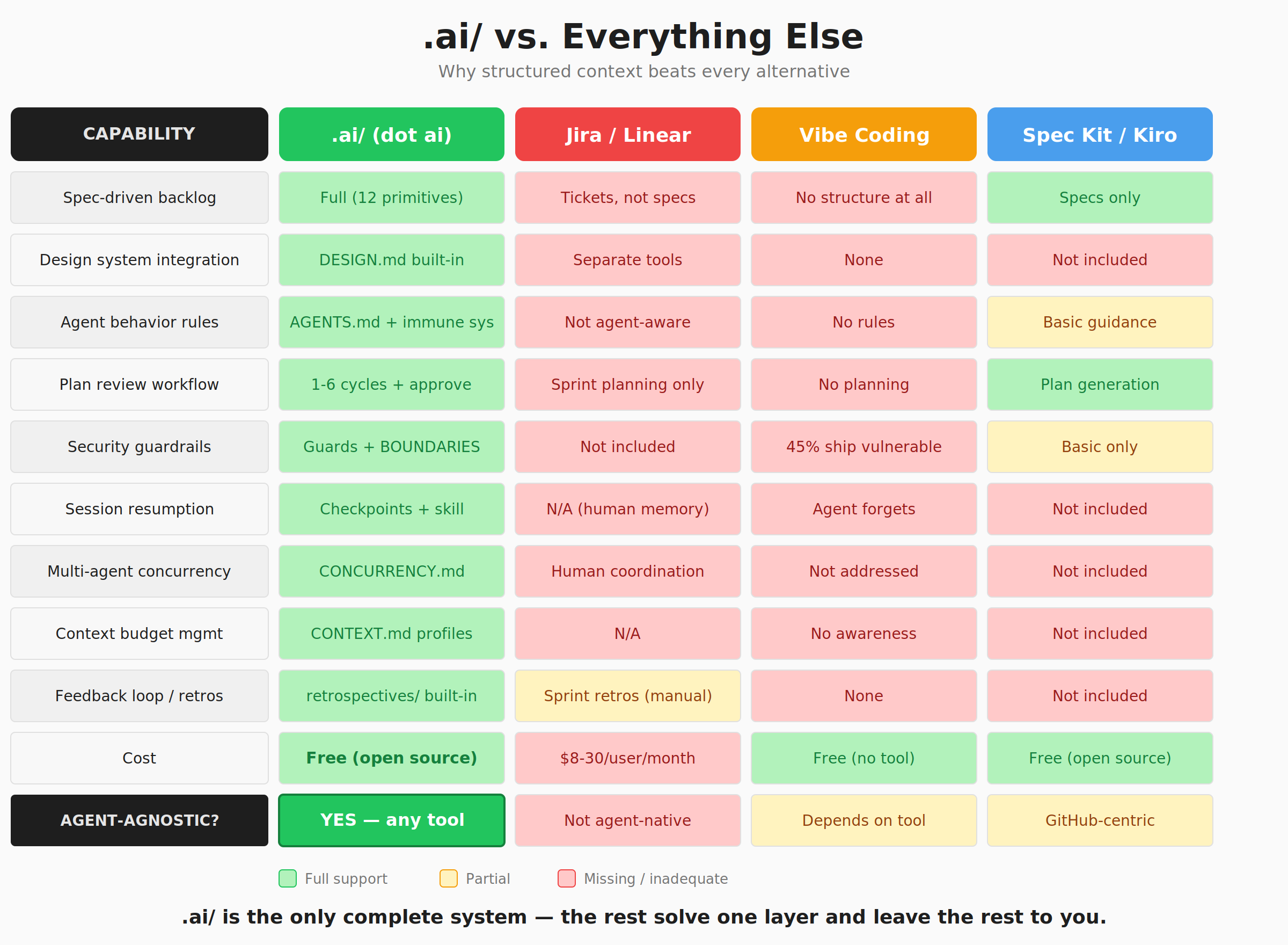
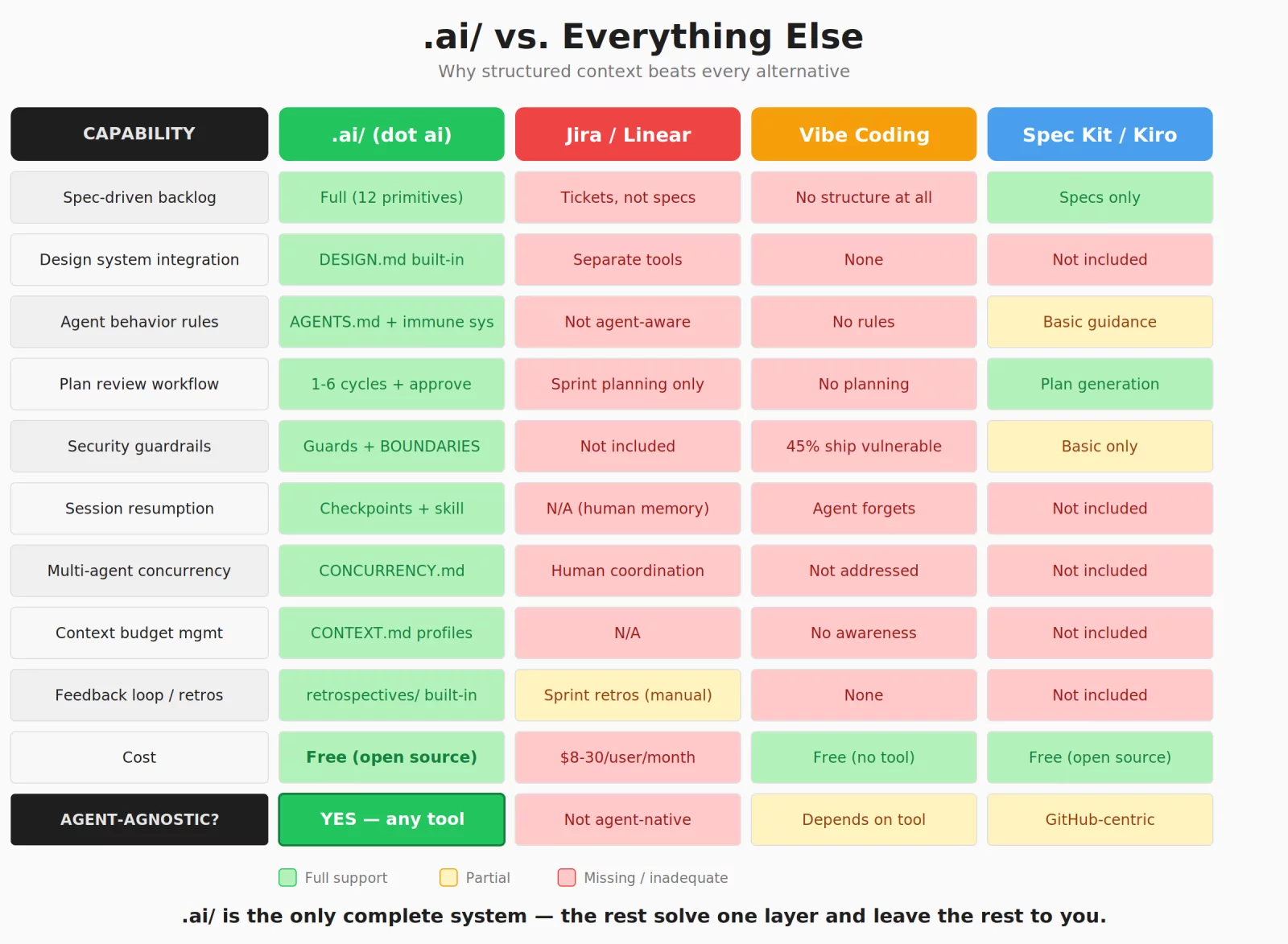
vs. Jira / Linear / Trello / Asana
These tools coordinate humans. .ai/ provides context to agents. They charge $8-30/user/month and accumulate process overhead. .ai/ is free, lives in your repo, and gets version-controlled alongside your code. When Linear's CEO says "issue tracking is dead," he's describing the problem. .ai/ is the answer.
The deeper issue: SaaS PM tools create a separation between your project management and your code. Requirements live in Jira. Code lives in GitHub. The agent has to bridge that gap. With .ai/, requirements and code live in the same repo. The agent reads the spec from .ai/specs/active/, reads the plan from .ai/plans/, reads the rules from .ai/AGENTS.md, and starts building. Zero context switching. Zero tool integration. Zero handoff.
vs. Vibe coding (no structure at all)
Vibe coding — prompting an AI with no structure and accepting whatever it produces — works for weekend prototypes. It does not work for production software. The data is clear: 45% of AI-generated code contains security vulnerabilities. AI code has 2.74x more vulnerabilities than human-written code. 67% of developers spend more time debugging AI code than it saves them.
.ai/ exists because structure produces quality. The spec template forces you to enumerate edge cases. The quality rubric catches gaps before implementation. The plan review workflow catches architectural mistakes before code is written. The guard files catch security issues before code is merged. Vibe coding skips all of this — and ships the vulnerabilities along with the features.
vs. GitHub Spec Kit / Amazon Kiro
GitHub's Spec Kit codified the spec-driven workflow: Specify → Plan → Tasks → Implement. Amazon's Kiro IDE built it natively. Both are excellent — and both are incomplete. They handle the spec-to-code pipeline but don't address the design system (DESIGN.md), the persistent project knowledge (AGENTS.md), the context budget management (CONTEXT.md), the quality gates (guards/), session continuity (checkpoints), multi-agent coordination (CONCURRENCY.md), or the feedback loop (retrospectives/).
.ai/ is the complete system. Spec Kit is one primitive within it.
vs. Building your own workflow from scratch
You could design your own directory structure, write your own templates, and figure out your own conventions through trial and error. That's what practitioners like Boris Tane, Boris Cherny, and dozens of Claude Code power users did over the past year.
.ai/ is the distillation of what they learned. The spec template encodes the structure that produces specs agents can execute without follow-up questions. The skill files encode the workflows that prevent agents from skipping steps. The guard files encode the rules that catch the 45% of AI code that ships insecure. You can spend months discovering these patterns yourself, or you can ./setup.sh and start with them.
How it works
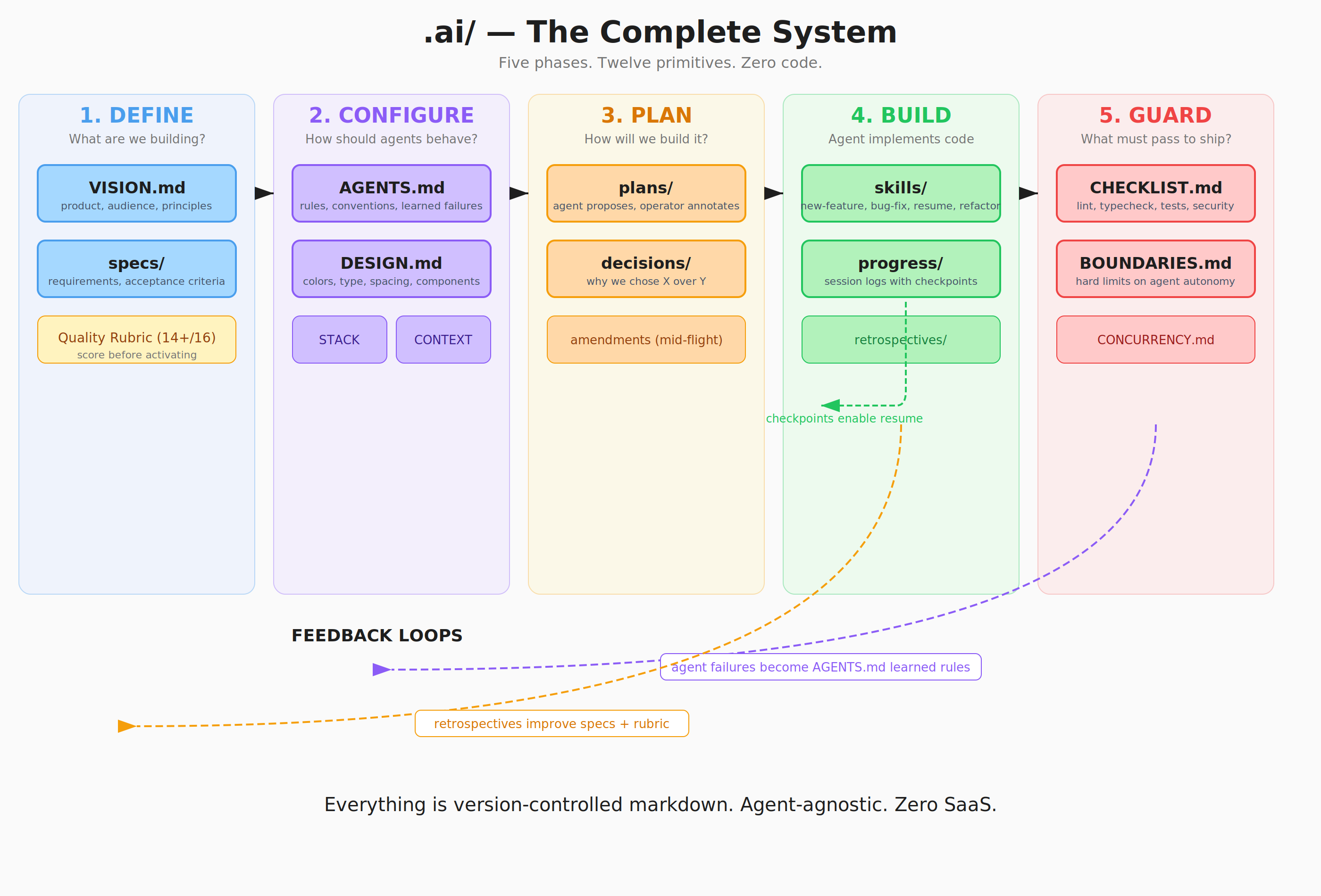
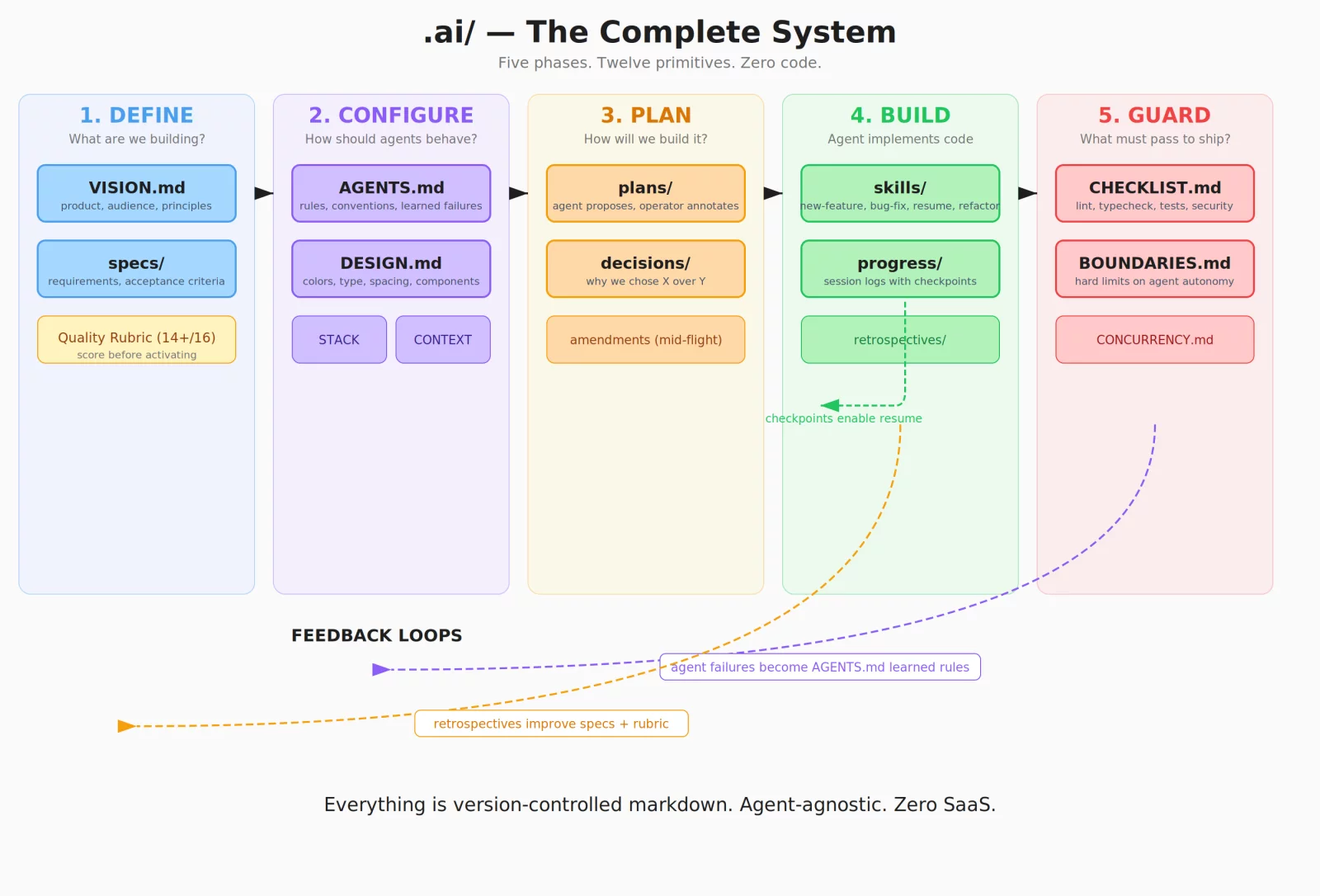
The five-phase workflow
DEFINE ───→ CONFIGURE ───→ PLAN ───→ BUILD ───→ GUARD
  │             │            │          │          │
  ▼             ▼            ▼          ▼          ▼
Write       Set up       Agent      Agent      CI/CD +
specs     AGENTS.md    proposes    builds     operator
  +       DESIGN.md    operator    operator    verify
VISION      STACK.md   annotates   corrects
            CONTEXT    approves
DEFINE: Write a spec using the template. Score it against the quality rubric (need 14+/16 to activate). Move to specs/active/.
CONFIGURE: Maintain your context files — AGENTS.md (agent rules), DESIGN.md (visual system), STACK.md (tech choices). These compound over time. Every agent failure becomes a learned rule. Every design inconsistency becomes a DESIGN.md entry. The system gets smarter the more you use it.
PLAN: Tell the agent to read the spec and propose an implementation plan. Review it. Annotate it with corrections and business context. Repeat 1-6 times until the plan matches your intent. Mark it approved. Never implement without an approved plan.
BUILD: Agent implements the approved plan. You provide terse corrections ("wider," "wrong color," "use the empty state from DESIGN.md"). Monitor output. If things go fundamentally wrong, git revert and re-scope — don't patch.
GUARD: Automated CI/CD checks (lint, typecheck, tests, security scan) block bad code from merging. You verify the running application against the spec's acceptance criteria. Move the completed spec to specs/completed/.
What you actually spend your time on
| Activity | Time | What you're doing |
|---|---|---|
| Writing and refining specs | 40% | Deciding what to build — your irreplaceable human judgment |
| Reviewing and annotating plans | 25% | Applying product thinking to technical decisions |
| Maintaining context files | 20% | Accumulating project knowledge that makes agents better |
| Visual verification and corrections | 10% | Testing the running app against acceptance criteria |
| CI/CD and guard setup | 5% | One-time configuration that runs automatically |
Zero percent writing code. Your entire value is in the quality of the context you provide and the judgment you apply during review.
What's in the box
The 14 primitives
| # | File | Replaces | Answers |
|---|---|---|---|
| 1 | VISION.md |
Roadmap decks, strategy docs | What are we building and why? |
| 2 | DESIGN.md |
Figma handoff, style guides, design tokens | What does it look like? |
| 3 | AGENTS.md |
Onboarding docs, coding standards, tribal knowledge | How should agents behave? |
| 4 | STACK.md |
Tech stack justification docs | What technologies and why? |
| 5 | CONTEXT.md |
(no traditional equivalent) | How much context to load per task? |
| 6 | specs/ |
Jira tickets, Linear issues, user stories, PRDs | What exactly needs to be built? |
| 7 | stories/ |
Implementation tickets, sprint stories | What focused slice is being built now? |
| 8 | goals/ |
Long-running Codex objectives, handoff docs | What should Codex keep pursuing until verified? |
| 9 | plans/ |
Sprint planning, task breakdowns | How will we implement it? |
| 10 | decisions/ |
Meeting notes, Slack threads, architecture docs | Why did we choose X over Y? |
| 11 | skills/ |
Process docs, runbooks, SOPs | What's the workflow for this work? |
| 12 | progress/ |
Standups, status updates, sprint reviews | What happened? |
| 13 | retrospectives/ |
Sprint retros, quarterly reviews | Is our system improving? |
| 14 | guards/ |
QA process, security review, deploy checklists | What must pass before shipping? |
Agent-agnostic by design
.ai/ works with every major AI coding tool. The same .ai/ directory is consumed by:
| Tool | How it connects |
|---|---|
| Claude Code | Reads CLAUDE.md → .ai/AGENTS.md. Hooks auto-enforce guards. Slash commands map to skills. |
| Cursor | Reads .cursor/rules/*.mdc → scoped rules per file type, referencing .ai/. |
| OpenAI Codex | Reads root AGENTS.md → .ai/AGENTS.md. Parallel sandboxed execution. |
| GitHub Copilot | Reads .ai/ context files via workspace context. |
| Windsurf | Reads .ai/AGENTS.md via cascade context. |
| Devin | Reads .ai/ as repository context for autonomous tasks. |
You're not locked into one tool. You're locked into one directory convention that every tool can read.
The .ai Standard
Read spec.ai.md for the human-readable standard. The short
version:
- Markdown remains the source of truth.
.ai/manifest.jsonlets agents and tools discover project context.- JSON Schemas define conformance for manifests, specs, stories, plans, goals, decisions, progress checkpoints, retrospectives, and guards.
- Packs add templates, adapters, guards, workflows, and examples without bloating the core.
- The reference CLI validates and accelerates the directory, but does not replace it.
Proof Lab
.ai does not ask people to believe that more structure magically builds better software. It creates proof runs that can be inspected, repeated, and shared.
npx github:howdycarter/.ai prove invoice-app --baseline origin/main --candidate HEAD --out proof-runs/invoice-app
npx github:howdycarter/.ai prove run proof-runs/invoice-app --ref candidate --command "npm test"
npx github:howdycarter/.ai prove auto invoice-app --baseline-dir ../old-build --candidate-dir ../new-build --command "npm test"
npx github:howdycarter/.ai prove score proof-runs/invoice-app
The first canonical scenarios are:
invoice-app: freelancer invoice creation, totals, statuses, and public-safe summaries.habit-tracker: daily check-ins, missed-day recovery, progress patterns, and privacy expectations.bug-dashboard: internal triage, severity/status filters, stale and unowned bug visibility.
Each scenario includes the same three artifacts: prompt.md, acceptance.md, and rubric.json. A proof run emits verdict.json and build-report.md so the claim stays measurable: spec readiness, final product outcome, acceptance coverage, rework, commands, screenshots, and plain-English verdict.
After both builds are complete, fill in verdict.json:
- Set each acceptance item to
pass,partial, orfailfor both baseline and candidate. - Set each rubric dimension to a number from
0to itsweightfor both baseline and candidate. - Use
dot-ai prove run <proof-run-dir> --ref <baseline|candidate> --command "<command>"to capture command evidence. - Add screenshots or PR links, record rework, and replace the placeholder verdict.
- Run
dot-ai prove score <proof-run-dir>to validate completeness, compute deltas, and refresh the report.
After the story lifecycle and proof evidence loop, .ai should stay v0.1 until three proof runs show a measurable advantage. The next milestone is evidence, not more ceremony.
Story lifecycle
Stories are optional implementation slices for specs that are too large for one session. They are not a second backlog and they are not required for small fixes.
npx dot-ai story create invoice-totals \
  --spec .ai/specs/active/invoice-app.md \
  --acceptance "GIVEN an invoice with two line items, WHEN totals render, THEN subtotal and total are correct."
npx dot-ai story validate .ai/stories/ready/invoice-totals.md
npx dot-ai story done .ai/stories/ready/invoice-totals.md
Story states are ready, in-progress, review, and done. A story must reference its parent spec, include acceptance criteria, and include implementation notes before it can be completed.
Codex goal readiness
.ai/goals/ turns specs, stories, proof runs, or raw objectives into durable
Codex /goal prompts with constraints, evidence requirements, definition of
done, and a completion audit.
npx github:howdycarter/.ai goal create billing-settings --from-spec .ai/specs/active/billing-settings.md
npx github:howdycarter/.ai goal create invoice-proof --from-proof proof-runs/invoice-app
npx github:howdycarter/.ai goal status
npx github:howdycarter/.ai goal complete invoice-proof
The goal file stays in git at .ai/goals/active/<name>.md. The generated
## Codex /goal Prompt section is the copy-paste handoff for Codex.
15-minute path
The fastest path stays markdown-first:
npx dot-ai init --yes
# Tell your agent: "Use .ai/skills/interview.md to turn my idea into a spec."
npx dot-ai score .ai/specs/active/first-feature.md
# Tell your agent: "Plan and build against that spec."
npx dot-ai share
For a comparative product proof, add:
npx dot-ai prove invoice-app --baseline origin/main --candidate HEAD
npx dot-ai prove run proof-runs/invoice-app --ref candidate --command "npm test"
npx dot-ai prove score proof-runs/invoice-app
Quick start
Option A: One-command setup
Run inside any existing project:
curl -fsSL https://raw.githubusercontent.com/howdycarter/.ai/main/setup.sh | bash
Or clone and run locally:
git clone https://github.com/howdycarter/.ai.git
cd .ai
./setup.sh /path/to/your/project
Option B: Reference CLI
npx github:howdycarter/.ai init --dir /path/to/your/project --yes
npx github:howdycarter/.ai doctor --dir /path/to/your/project
npx github:howdycarter/.ai status --dir /path/to/your/project
The package is configured for npm publication as dot-ai, but the public npm
package should not be treated as available until a release is published.
Maintainers can verify release readiness with:
npm run quality
npm publish --dry-run
Option C: Manual setup
cp -r .ai/ /path/to/your/project/.ai/
cp -r .cursor/ /path/to/your/project/.cursor/
cp CLAUDE.md /path/to/your/project/CLAUDE.md
cp AGENTS.md /path/to/your/project/AGENTS.md
After setup — just open your agent
You don't fill in the templates manually. The agent does it.
When you open Claude Code, Cursor, or Codex after running setup, the agent detects the fresh .ai/ install automatically (it sees the {Project Name} placeholder in CLAUDE.md). It then follows the onboarding skill:
- Inspects your codebase — reads package.json, directory structure, tsconfig, tailwind config, CI pipeline, git history. Extracts framework, dependencies, build commands, design tokens, coding conventions, and commit style.
- Shows you what it found — presents a summary of everything it detected and asks you to confirm or correct.
- Asks 3-6 questions — only what it couldn't determine from the code. Product vision, design feel, absolute rules, technology exclusions. All questions in one message, not dripped one at a time.
- Populates every
.ai/file — VISION.md, DESIGN.md, AGENTS.md, STACK.md, CONTEXT.md, CLAUDE.md, Cursor rules, guard checklists — all generated from your codebase + your answers. - Presents the results for review — you review and correct. You're in control. You didn't have to author 12 files from scratch.
- Helps you write your first spec — "What's the first feature you want to build?" It drafts the spec, scores it against the quality rubric, and gets you into the build loop.
For greenfield projects (no code yet), the agent skips codebase inspection and asks all six questions. It generates sensible defaults and tells you what assumptions it made.
The entire onboarding takes one conversation. You go from ./setup.sh to an active spec ready for implementation in under 15 minutes.
Key concepts
Context engineering > prompt engineering
Tobi Lütke (Shopify CEO) named it: *"The art of providing all the