dPanel
A free, self-hosted web hosting control panel built on Laravel, Vue, and Rust.
Installation · Supported distributions · Documentation · Screenshots · Contributing · Security
Overview
dPanel manages websites, databases, email, DNS, SSL, and backups on a Linux server. The web panel handles users and workflows, while small Rust services carry out privileged host operations and serve public website traffic.
Free forever. Every user gets the same software, the same features, and the same updates. There are no license fees, no feature locks, and no forced subscriptions. Paid help is available only if you ask for it.
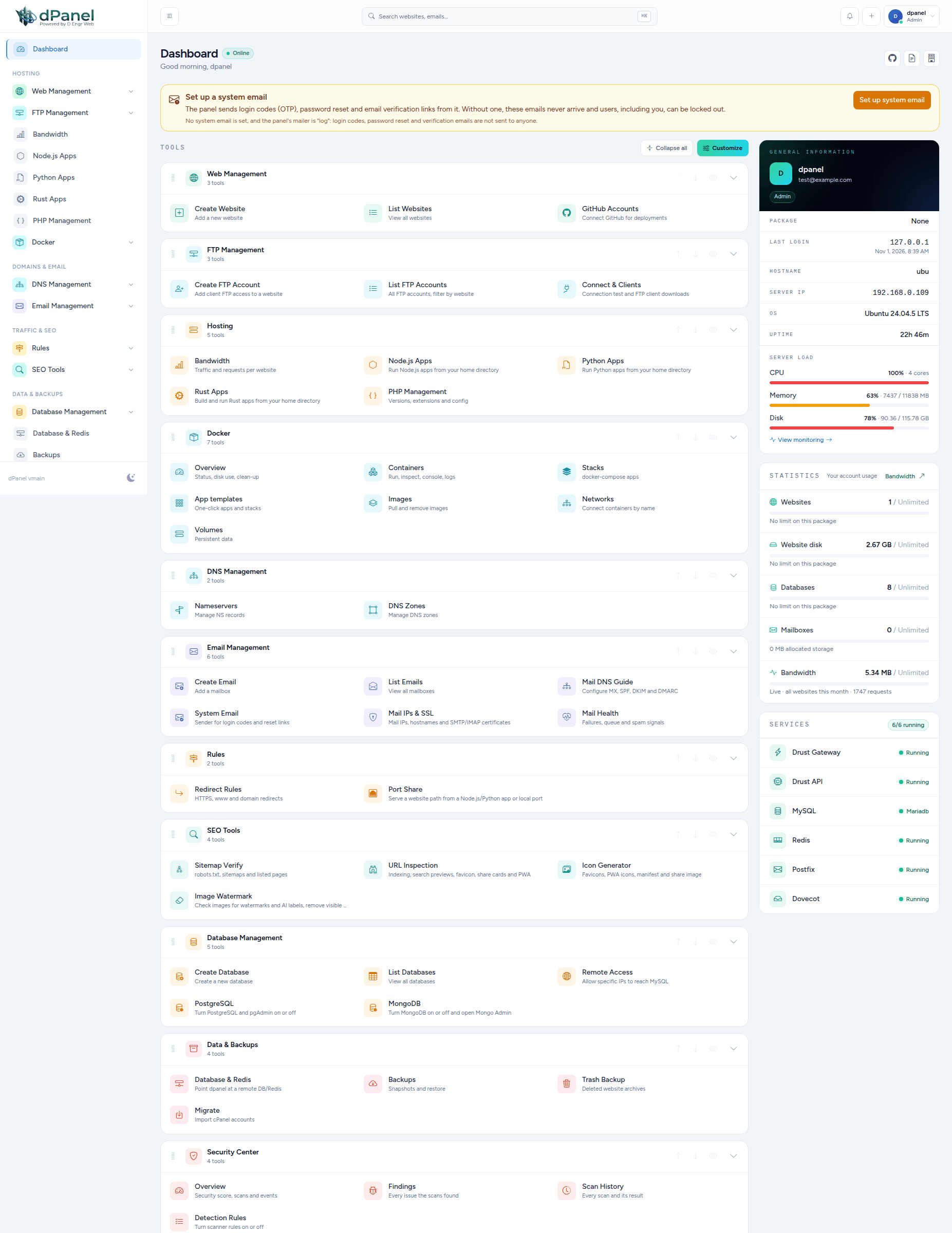
Features
| Area | Highlights |
|---|---|
| Websites | Per-site Linux accounts, per-site PHP-FPM pools, multiple PHP versions, one-click WordPress and Laravel installs, Git deployments, Node.js and Python apps |
| Edge gateway | Rust HTTP/TLS server with SNI certificates, static file serving, PHP-FPM dispatch, compression, and live config reloads |
| SSL | Automatic Let's Encrypt issuance, validation, and renewal |
| Databases | MySQL/MariaDB and PostgreSQL with per-database users, phpMyAdmin and pgAdmin, remote-access rules; PostgreSQL and MongoDB are installed but off until you turn them on |
| Postfix, Dovecot, and Roundcube with mailbox provisioning and delivery diagnostics | |
| DNS | Authoritative DNS through PowerDNS with automatic zone reconciliation |
| Files | Account-scoped file manager with upload, zip/unzip, permissions repair, and trash |
| Backups & migration | Scheduled backups, portable restore packages, and imports from cPanel and CyberPanel |
| Operations | Cron jobs, FTP accounts, Redis, monitoring, security scans, and a server task runner |
| Docker (optional) | Off by default. Add it with sudo dpanel docker to run containers and images from the panel (guide) |
| Business | Resellers, package plans, roles and permissions, and WHMCS integration |
Architecture
             Browser
                │
                ▼
   ┌──────────────────────────┐
   │   edge-gateway.service   │  public :80 / :443  (Rust)
   └──────────────────────────┘
        │ static · PHP-FPM · panel · phpMyAdmin
        ▼
   ┌──────────────────────────┐        ┌──────────────────────────┐
   │     dpanel (Laravel)     │ ─────▶ │      drust.service       │
   │  UI · auth · records ·   │ token  │  privileged localhost    │
   │  queues                  │        │  API on 127.0.0.1:9500   │
   └──────────────────────────┘        └──────────────────────────┘
                                                    │
                                    files · users · databases · SSL · PHP
| Component | Path | Responsibility |
|---|---|---|
dpanel |
/var/www/dpanel |
Laravel + Vue panel: UI, authentication, authorization, records, and queues |
drust |
/var/www/drust |
Rust privileged API (drust.service) and public web gateway (edge-gateway.service) |
dscript |
/var/www/dscript |
Shell toolkit for installing, updating, diagnosing, and repairing servers |
See Architecture for the full request flow.
Quick Start
Run on a fresh server as a user with sudo access:
Supported hosts are Ubuntu, Debian, RHEL, Rocky Linux, AlmaLinux, CentOS Stream, and Fedora. See the support matrix before installing.
curl -fsSL https://raw.githubusercontent.com/mdsazzad0002/dpanel/main/installer.sh -o installer.sh
chmod +x installer.sh
sudo ./installer.sh
The installer asks which version to install: the latest release tag
(the default), an older release tag, the main branch, or any tag, branch or
commit you type. To skip the question, pass the version on the command line.
Update later with sudo ./installer.sh update (this downloads new code;
sudo dpanel chain update only re-runs the code already installed):
sudo ./installer.sh --latest            # newest release, no question
sudo ./installer.sh --version v1.2.3    # a specific release
sudo ./installer.sh --version main      # the development branch
DPANEL_VERSION=v1.2.3 works the same way, and a run without a terminal
installs the latest release.
If the panel domain resolves to the server, the installer also requests its
SSL certificate and switches the panel to https://. When that fails (DNS not
pointed yet, port 80 blocked), the panel stays on http://; retry with
cd /var/www/dpanel && sudo php artisan serverpanel:panel-ssl.
The installed version is written to the panel .env automatically. See
Versions and updates.
Then check that the services are running:
sudo systemctl status drust.service edge-gateway.service
sudo dpanel doctor
Full steps, configuration, and permission setup are in the Installation Guide.
Documentation
| Guide | Description |
|---|---|
| Installation | First install, configuration files, and website permissions |
| Architecture | Components, request flow, PHP execution, and the edge gateway |
| Quick Reference | The most-used commands, by task |
| Troubleshooting | Error messages and how to fix them |
| Websites and Apps | App installers, Quick Actions, Git deploys, Composer and npm |
| Operations | Everyday commands, rebuilds, and troubleshooting |
| Screenshots | A visual tour of every main panel page |
| dscript CLI | The dpanel command: chains, modules, scripts, and recovery |
| drust Service | Installing and running the privileged Rust service |
| drust API | Endpoint reference for the localhost execution API |
| Backups | Scheduled backups, remote upload, and restore |
| Server Task Runner | SSH connector, command safety rules, and task reports |
| MCP Access | Connect Claude, Cursor or another AI client to diagnose and fix the server |
| WHMCS Integration | Connecting dPanel to WHMCS billing |
Support Model
dPanel is one product with one release channel for everyone.
| Self-service | Supported | |
|---|---|---|
| Software | Free | Free |
| Updates | Free | Free |
| Features | All | All |
| Help | Community | Paid expert assistance |
Paid support covers human work only, such as installation, migration, troubleshooting, priority response, and managed operations. Donations are always optional.
Contributing
Bug reports, alpha-test feedback, and pull requests are welcome. The Contributing Guide walks you through cloning the repository, running the installer from your checkout, setting up permissions, and opening a pull request.
Security
Please do not open public issues for security problems. See the Security Policy for how to report them privately.
License
dPanel is free to use under the dPanel Free Use License, a source-available license. You may run it and sell hosting services with it, but you may not redistribute, rebrand, or resell the software itself without written permission.