Hyperion
A self-hosted, multi-node hosting control panel for Debian, written in Rust.
One agent on each server, one web UI on the master. Hyperion provisions PHP, static and reverse-proxy sites end to end (Linux user, nginx vhost, PHP-FPM pool, database, TLS, WordPress) in one transaction that rolls back if any step fails. On top of that it runs the day-to-day work of a small hosting business: backups and off-site copies, WordPress updates and repairs, a per-site WAF and firewall, monitoring, paid care plans with monthly customer reports, and imports from HestiaCP and CloudPanel. You drive it from one screen, a scriptable HTTP API, or a CLI.





Install · Features · Remote API · Import · Architecture · Status
Note
Running in production. Hyperion serves real customer sites on two production deployments. It is still a young project: it has not been tried on a large fleet, and the multi-node path has seen less traffic than the single-node one. Keep backups and report anything that breaks.
Screenshots
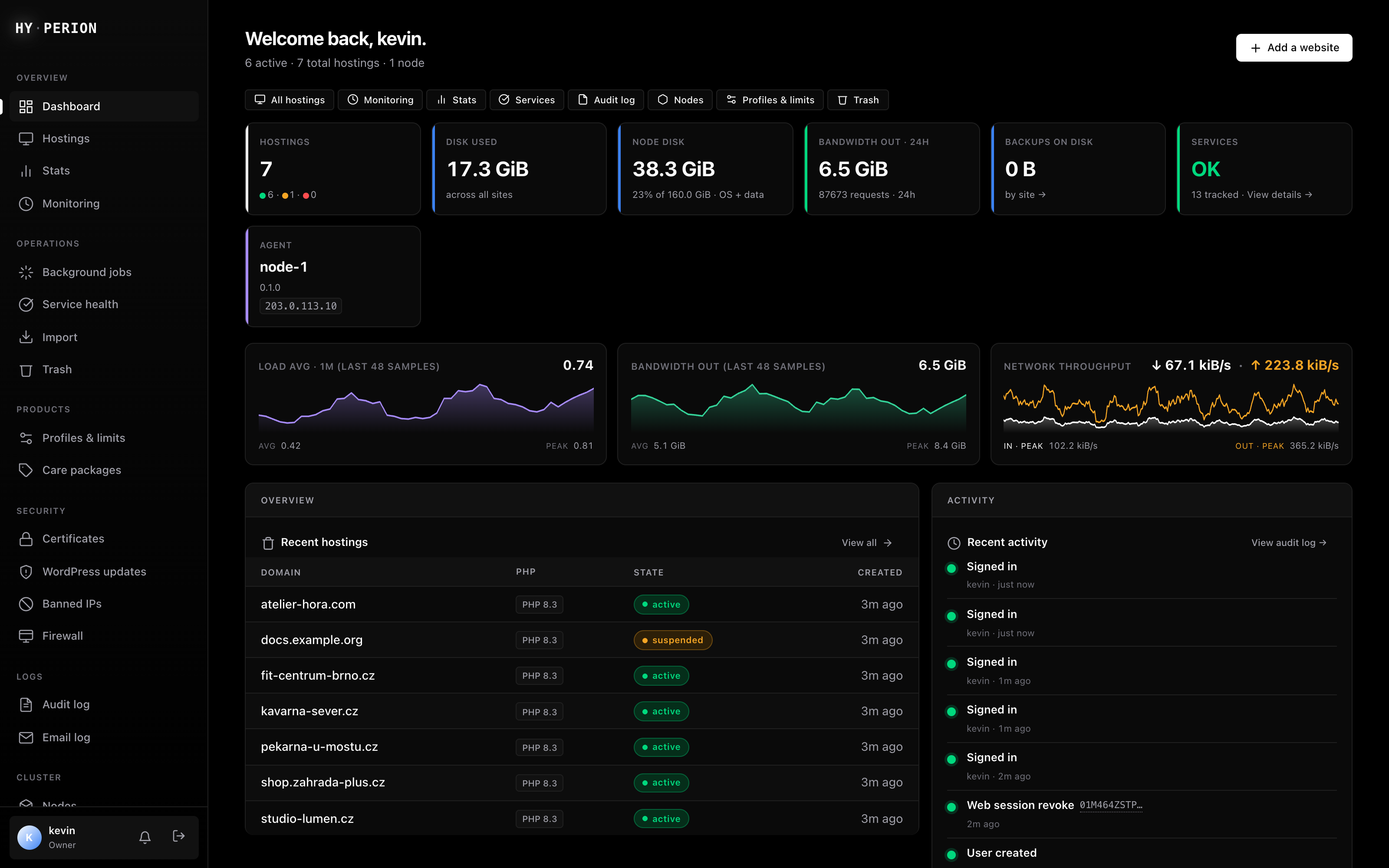
| Dashboard | Cluster stats |
|---|---|
 |
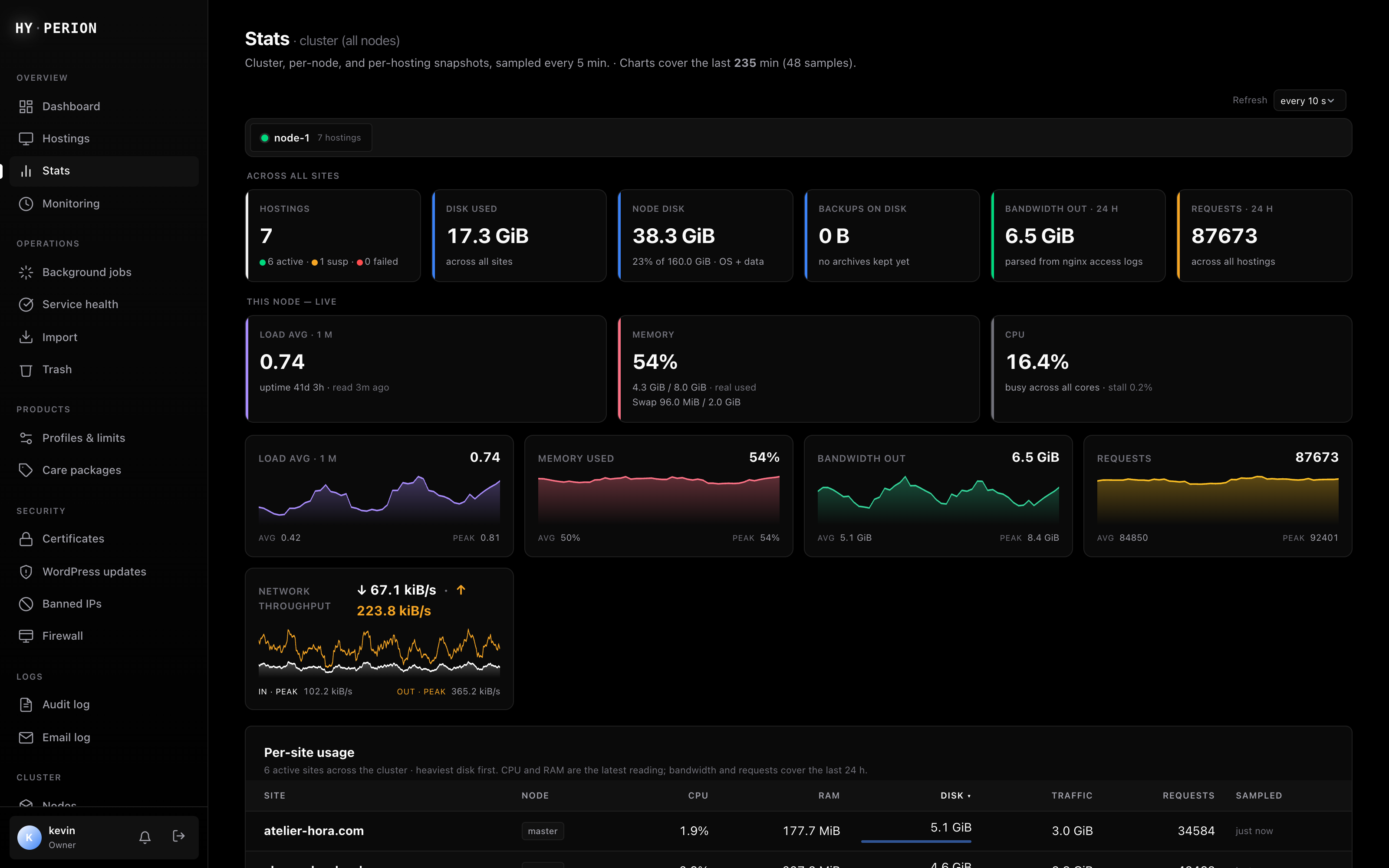 |
| What needs attention, load, live network throughput, recent backups and activity. | Cluster and per-node metrics, per-site CPU / RAM / disk / traffic, a realtime network graph. |
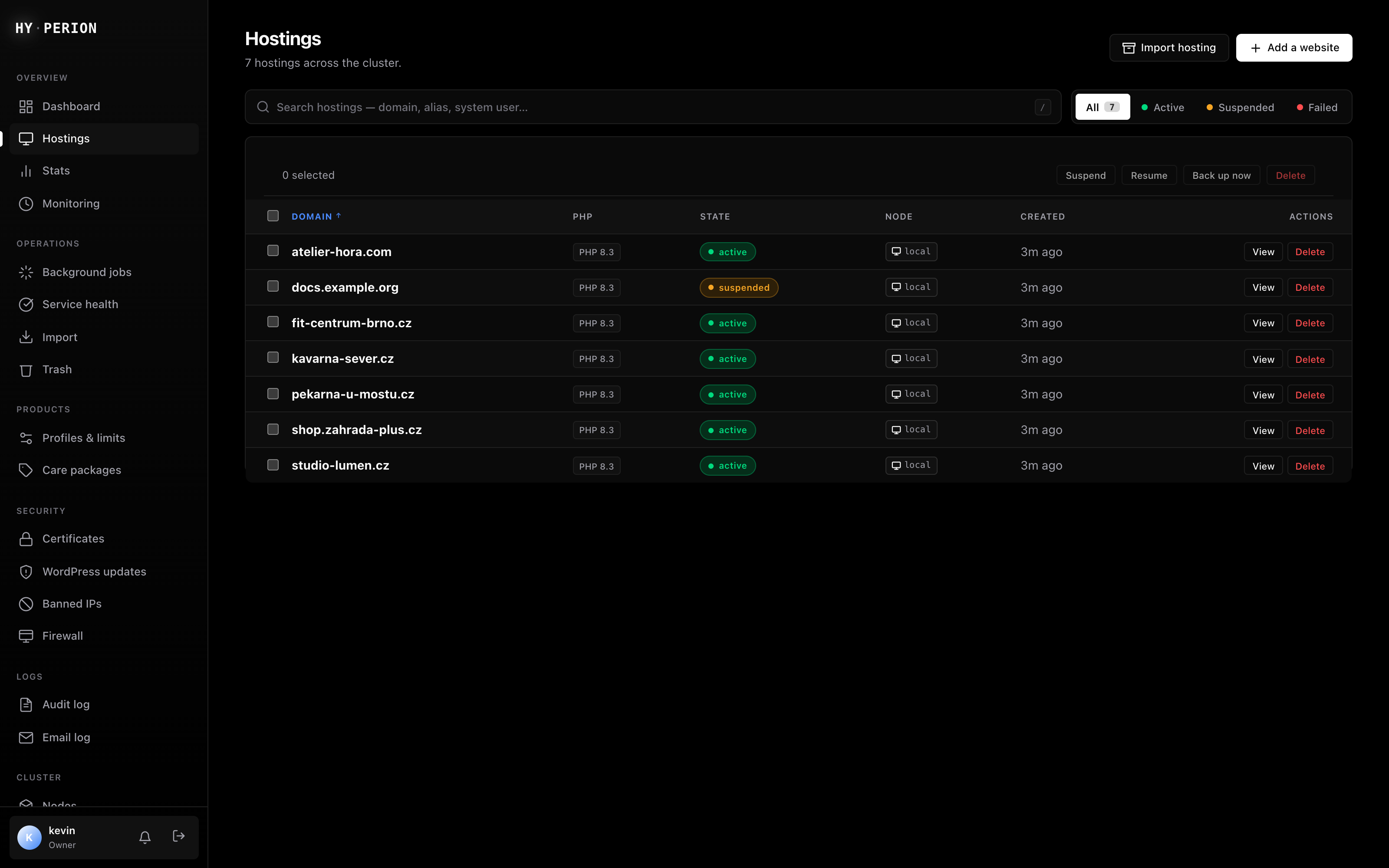
| Hostings | Site detail |
|---|---|
 |
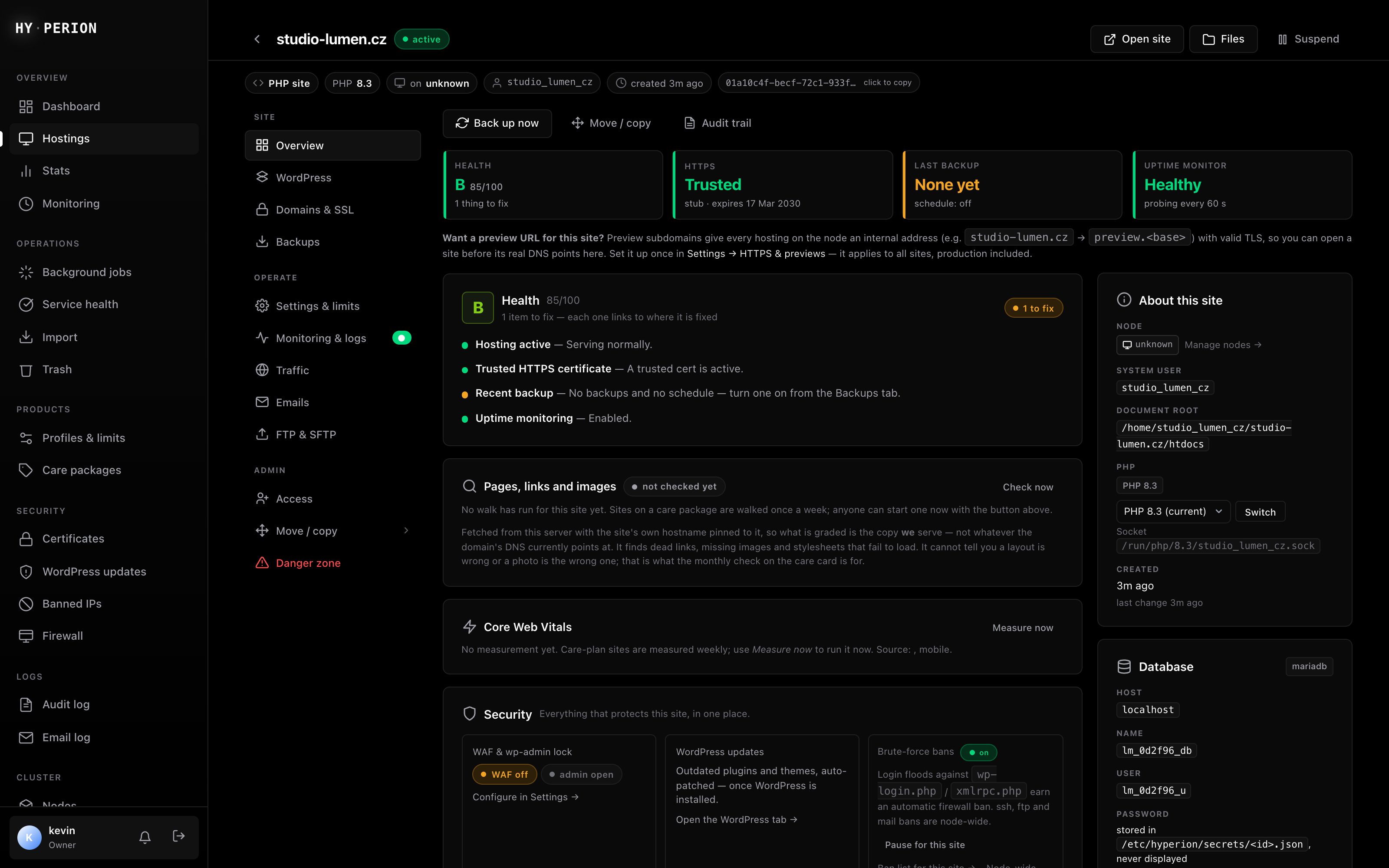 |
| Every site in the cluster with its state, PHP, node and a needs-attention filter; bulk actions. | One site: health, HTTPS, backups, uptime, security, WordPress and database in tabs. |
Why Hyperion
Most open-source panels are PHP wrappers around templated shell: thousands of lines of string-built commands running as root, where a domain with an odd character can turn a config write into unintended shell. Hyperion does the same job from a Rust core where every system command is built from typed, pre-validated arguments and never passed through a shell. It also manages several servers from the start.
| HestiaCP / Vesta / aaPanel | Hyperion | |
|---|---|---|
| Memory-safe language | PHP + bash | Rust, #![forbid(unsafe_code)] |
| Multi-node cluster | single node | master + N workers, signed RPC |
| Atomic provisioning | partial | rollback on every step |
| Scriptable HTTP API (OpenAPI) + CLI | partial / unofficial | /api/v1 + hctl |
| Live progress for long operations | — | background job page with sub-steps |
| Tamper-evident audit log | — | BLAKE3 hash chain |
| Off-site backups | FTP | S3 (age-encrypted) + FTP/FTPS/SFTP, restic snapshots |
| Import from HestiaCP / CloudPanel | — | in place, over SSH, or from an exporter |
Install
On a fresh Debian 12 or 13 server, as root:
curl -fsSL https://raw.githubusercontent.com/nechodom/hyperion/main/packaging/install/install-master.sh | sudo bash
This pipes a script into root, so read it first. The installer asks no
questions. It checks that ports 80, 443 and 8443 are free, installs nginx,
postfix and a few base tools, downloads the pre-built release binaries (checked
against SHA256SUMS; it builds from source on non-x86_64 or if the download
fails), writes /etc/hyperion/*.toml and the systemd units, and prints a
one-time setup link with a setup code and the certificate fingerprint.
The link opens a setup wizard in the browser that walks through:
- the admin account (password of 12+ characters) and mandatory two-factor auth
- which software to install: PHP 8.1–8.4, MariaDB, PostgreSQL, vsftpd, phpMyAdmin, Redis, with live progress per component
- hostname, time zone and Let's Encrypt contact
- the panel's own domain and certificate
- outgoing mail and off-site S3 backups
For automation, set HYPERION_ADMIN_PASS (and optionally
HYPERION_COMPONENTS) and the installer does everything itself without the
wizard. Re-running the script is safe.
Worker node. In the UI, open Nodes → Generate invite and paste the printed one-liner on another Debian server. It enrolls in about 30 seconds and appears on the Nodes page; from then on you create hostings on it from the master.
Update. Run sudo hyperion update, or use the Nodes page. The update waits
for running jobs (backups, imports, installs) to finish first, rolls back
automatically if the new build doesn't come up, and only re-installs the
components this server actually uses. While the panel restarts, its address
shows an "updating…" page that returns to the panel by itself. Auto-update is
available as an opt-in.
docs/RUNBOOK.md has every installer variable, manual
deploys and recovery steps.
Features
Sites
- Create in one step. A type-first "Add a website" flow for WordPress, plain PHP, static sites and reverse proxies (Node.js, Python, Docker or any upstream). Linux user, PHP-FPM pool, database, vhost and certificate are created in one transaction; a failure undoes the finished steps.
- PHP 8.1–8.4 side by side, per-site PHP settings, static-to-PHP conversion, www / non-www canonical redirects, HSTS, FastCGI cache, a maintenance page, and a custom nginx snippet (raw nginx is admin-only).
- MariaDB or PostgreSQL, with one-click phpMyAdmin that signs in automatically. phpMyAdmin is never exposed on the network: the panel relays every request after its own login and permission check, and the database password never leaves the node.
- Let's Encrypt certificates over HTTP-01 with auto-renewal, also behind a Cloudflare proxy, plus guided DNS-01 wildcards. The DNS check asks the domain's authoritative nameservers.
- Preview address on the node's wildcard certificate, so a site can be checked before its DNS moves.
- File manager, cron editor, log viewer, several FTP/FTPS logins per site, and key-only chrooted SFTP.
- Git deploy from a GitHub repository (public, deploy key or token), with a
push webhook. Git runs as the site's user, and
.gitis never served. - Lifecycle: suspend and resume, expiry dates with warnings and auto-suspend, a trash with restore, and move, copy or export of a site to another node.
- Profiles bundle limits, PHP, database engine, plugins and backup cadence. A profile stays linked to its sites, so changing it can be re-applied to all of them.
- Limits: kernel-enforced disk quotas with notify-or-suspend on overage, bandwidth alerts, and PHP memory limits that rise automatically when a site runs out of memory and come back down after 14 quiet days.
WordPress
- Install with the site, then manage plugins and themes over
wp-cli: bulk updates, per-plugin auto-update, and a library of plugin and theme zips that profiles install on new sites. - Updates page that sorts every site by what it needs. Detection is keyless, against public WordPress.org data, and minor/patch updates can apply automatically. "Couldn't check" is never shown as "up to date".
- Site health reproduces a fatal error, names the plugin that causes it and offers to park it, which is the only fix once WordPress won't boot.
- Repair: a file-permission check with a real write probe, core-file checksum repair, and a full reinstall that only runs after a backup succeeds.
- Integrity and malware scan using wp-cli checksums and ClamAV.
- Staging copy with push to production (production is backed up first), Redis
object cache, a
WP_DEBUGswitch, admin password reset, a sign-up spam guard, and a mail self-repair that sends WordPress mail through the local server when delivery keeps failing.
Backups
- Scheduled and on-demand backups (files plus a database dump), with retention per site, per profile or per care plan.
- Off-site copies to S3 (client-side
ageencryption, several targets with their own retention) or FTP / FTPS / SFTP. The local copy can be dropped once the off-site copy is verified. - Backup before every automatic update: a full backup (files plus database) is taken before each WordPress auto-update run. It is deleted after a set number of days (14 by default) when every update went in cleanly, and kept until deleted by hand when one failed.
- restic snapshots per site, by hand, with diff, restore and keep-for-N-days.
- Restore everything, only the database or only the files; restore into a new
domain with WordPress URLs rewritten; download a backup, or upload a
.tar.gzto restore.
Security
#![forbid(unsafe_code)]in every crate, Argon2id passwords, Ed25519-signed session cookies with a revocation ledger, and roles re-checked on every request, so a demoted or locked user loses access at once.- Two-factor auth (mandatory for admins) with backup codes, and a list of signed-in devices you can sign out.
- WAF per site, with Standard and Strict levels and per-rule overrides, plus an opt-in OWASP Core Rule Set tier (ModSecurity v3 from Debian's packages; detection-only first, per-site paranoia, threshold and path-scoped exclusions). The Protection page shows what was blocked, helps tune false positives, and keeps the ban history.
- Brute-force protection built on
nftablesban sets for the panel, SSH, FTP, mail and WordPress logins, with escalation for repeat offenders. - Firewall managed by the panel: open ports, presets and optional default-drop that always keeps the panel and cluster ports open.
- Per-site country blocking (GeoIP), bot blocking, wp-admin IP allowlists and HTTP basic auth.
- Audit log as a BLAKE3 hash chain with per-node verification, search and CSV export.
- Every site is its own Linux user. Because the agent runs as root and a path inside a customer's webroot is attacker-controlled, privileged file operations there resolve symlinks component by component, and secrets never appear on a command line.
- Site mail goes through the server's own postfix with per-site DKIM signing, SPF checks and a per-site mail log.
- An email log for the whole server, grouped by day with a delivery verdict and queue-id search.
- Hyperion does not host mailboxes or DNS zones.
Monitoring and notifications
- Live CPU, memory, swap, disk, pressure (PSI) and network gauges, history sampled every 5 minutes, a realtime network graph, and per-site resource use.
- HTTP uptime monitoring per site, with every monitored site on one page.
- OOM kills, a read-only root filesystem, pending OS updates and a needed reboot are all reported.
- A Services page with the state of every system service and one-click installs of optional software (ClamAV, Redis, …).
- A notification centre with alerts from every node, delivered by email (HTML, with your logo) and Slack, with wording you can edit.
Care plans
For agencies that sell maintenance:
- Care packages bundle backups, updates, checks, monitoring, the firewall (Standard or Strict, plus the OWASP Core Rule Set) and brute-force protection into a paid plan. The plan is enforced on its sites, and its name and price are stored with each activation, so later edits don't rewrite past invoices. When a site lacks protection the plan sells because of the server (the brute-force scanner off, ModSecurity not installed), you get a notification.
- A monthly service checklist per site, and Slack messages that say what to invoice.
- Monthly customer reports covering updates, backups, uptime, load speed and Core Web Vitals (PageSpeed Insights or Lighthouse), with a start date per plan, sections you can hide, and one-off reports for any date range.
- Every customer-facing sentence is translatable. English and Czech ship built in, and each site can have its own language.
Cluster
- A master plus any number of workers. The master holds the UI, audit log and node registry; workers run an agent the master drives over signed RPC (Ed25519 envelope over HTTPS on port 9443, optionally over a private network, with certificate pinning).
- Load-aware placement of new sites, a node switcher on every page, move and copy between nodes with live progress, and remote node updates.
Panel and access
- axum + Askama + HTMX in one binary, with no JavaScript build step. Light and dark themes, type-the-domain confirmations for destructive actions, and every slow action (create, backup, restore, import, certificate, WordPress install) runs as a background job with per-step progress that survives closing the browser.
- Five built-in roles (super-admin, admin, operator, customer, viewer) with per-site access grants, plus custom roles built from individual capabilities.
Remote API
A scriptable HTTP API at /api/v1 for provisioning and running the cluster from
CI, cron or your own tools.
- Auth: a Bearer key created in Administration → API keys. Its capabilities can't exceed its owner's and are checked again on every call, so locking or demoting the owner takes effect immediately.
- Hardening: optional per-key IP allowlist and rate limit.
- Contract:
GET /api/v1/openapi.jsonis a generated OpenAPI 3 document;GET /api/v1/docsshows it in a self-hosted viewer. - Conventions: lists paginate; slow operations return
202 {job_id}, which you poll at/api/v1/jobs/:id; errors come as a JSON envelope.
hctl remote is the official CLI for that API:
hctl remote --url https://panel.example.com --key hyp_… login
hctl remote list --state active | jq '.items[].domain'
hctl remote create --domain new.example.com --php 8.3
hctl remote backup new.example.com --wait
On the node itself, hctl talks to the local agent over its Unix socket, so
it keeps working when the panel is down or you are locked out of it: hostings,
backups, certificates, WordPress, users (hctl user unlock,
hctl user disable-2fa), bans, the firewall escape hatch and node updates.
Every command is listed with examples in the CLI reference.
Import from another panel
Move existing sites off HestiaCP or CloudPanel, or between two Hyperion servers. The Import page (admin) has three ways in:
- Command: run a small exporter on the old server. It is a static binary, so it runs on old systems too, and its upload resumes after a dropped connection. No inbound SSH to the source is needed.
- SSH: Hyperion connects to the source with a key that is used for that one run and then deleted.
- Hyperion: import from another Hyperion node.
Hyperion reads the source panel's own state (Hestia *.conf, CloudPanel's
SQLite) rather than scraping it. You pick the sites, their PHP version, profile
and a new domain if needed; a dry run shows what would be created, skipped or
in conflict, and an existing domain is never overwritten. Sites and databases
come across, including WordPress with wp-config.php repointed. Mail and DNS
are listed in the report but not migrated.
Architecture
Two processes per server:
hyperion-agentruns as root and owns all system state: users, directories, nginx vhosts, FPM pools, databases, certificates, FTP, cron, backups, firewall. It listens on a local Unix socket and, on workers, on:9443for signed RPC from the master.hyperion-web(master only) serves the UI and/api/v1. It runs unprivileged and owns the audit log, web users, session ledger, node registry and the Ed25519 master signing key.
      web browser (cookie)        API client (Bearer hyp_…)
              │                            │
              ▼                            ▼
   ┌──────────────────────────────────────────────┐
   │  hyperion-web  (master only)                 │
   │  axum + Askama + HTMX  ·  /api/v1 (OpenAPI)   │
   └────┬─────────────────────────┬───────────────┘
        │ local Unix socket       │ signed RPC / HTTPS
        ▼                         ▼
 ┌────────────────┐       ┌────────────────┐
 │ hyperion-agent │       │ hyperion-agent │
 │   (master)     │       │  (each worker) │
 │  HostingService│  ···  │  HostingService│
 │  SQLite state  │       │  SQLite state  │
 │  adapters:     │       │  adapters:     │
 │  fs users nginx│       │  fs users nginx│
 │  php db acme   │       │  php db acme   │
 │  wp ftp backup │       │  wp ftp backup │
 └────────────────┘       └────────────────┘
Every adapter takes typed, pre-validated arguments and runs commands only
through Command::new(..).arg(..), never format!() into a shell. RPC messages
are Ed25519-signed canonical JSON over HTTPS, and node responses are
authenticated too.
Project layout
crates/
  hyperion-types/       newtype IDs + DTOs (no I/O)
  hyperion-validate/    domain + system-user parsers
  hyperion-rpc[-server/-client]/  trait, wire types, codec, transport
  hyperion-state/       SQLite, migrations, audit chain, api keys
  hyperion-adapters/    system-tool wrappers (nginx/php/db/acme/ftp/…)
  hyperion-core/        orchestration + secrets + RealAdapter
  hyperion-import/      HestiaCP / CloudPanel importers
  hyperion-auth/        Argon2id + Ed25519 sessions + CSRF
bin/
  hyperion-agent/       privileged daemon + background scheduler
  hyperion-web/         axum admin UI + /api/v1 + setup wizard
  hyperion-export/      static-musl exporter served by the Import page
  hctl/                 CLI (local socket + remote HTTP)
packaging/install/      install-master.sh · install-node.sh · update.sh
Status
In production. Two live deployments run real customer sites, and every change goes through CI (format, clippy, the full test suite, a release build, template and script lints) before it ships. It is not yet proven on a large fleet, and multi-node has had less real traffic than single-node, so feedback from bigger installs is the most useful contribution.
Roadmap: ModSecurity with the OWASP Core Rule Set per site (in progress) · HA control plane (warm standby + state replication) · SSO / OIDC login.
Development
git clone https://github.com/nechodom/hyperion && cd hyperion
cargo build --release --workspace     # → target/release/{hyperion-agent,hyperion-web,hctl}

cargo test --workspace                # ~1,800 tests
cargo clippy --workspace --all-targets   # clean under -D warnings
Integration tests that need a real Debian (useradd, mariadb-dump,
systemctl reload nginx) are #[ignore]d; run them on a node with
cargo test --workspace -- --ignored. bin/hyperion-web/tests/web_e2e.rs
drives the whole stack (login, CSRF, hosting create, the API) against a real
socket-backed agent with mocked adapters, and tests/devserver.rs starts a
local panel with demo data for UI work.
A new system effect follows one path: adapter (typed args, no shell
interpolation) → mockable AdapterPort method