HailBrowser ⚡
An open-source browser agent that lives in your Chrome. Chat with it in the side panel using any model you like, switch to Ultrafast mode for snappy form and search flows, or plug it into Claude Code, OpenCode, Cursor, Codex and any other MCP client so your coding agent can use your real, logged-in browser.
What you get
| Side panel agent | Chat with the current tab. Bring your own key: Anthropic, OpenAI, OpenRouter, Gemini, Together AI, Groq, DeepSeek, Ollama, LM Studio, or any OpenAI-compatible endpoint. |
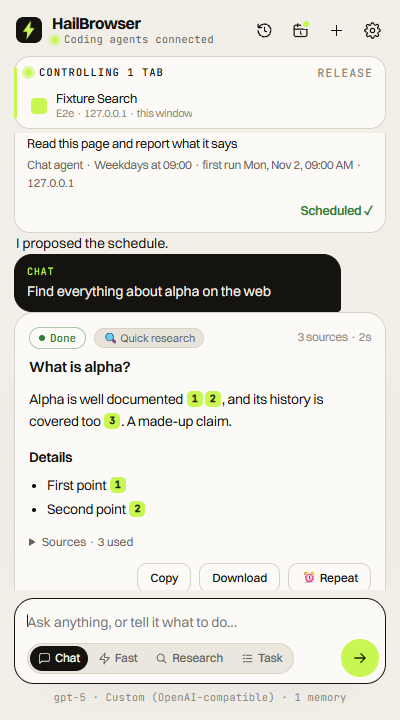
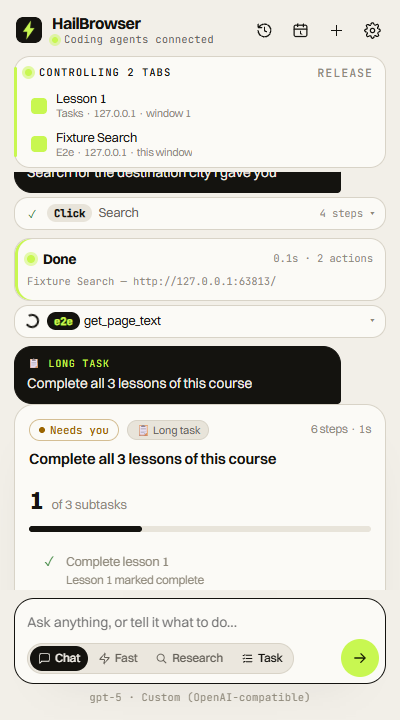
| One chat that does it all | Chat is a full tool-calling agent (read page, click, type, screenshots, JS). It hands a question to 🔍 Research (searches the web, reads the best sources in background tabs, writes a report citing every claim) or a big job to 📋 Long task (planned subtasks, saved progress) when it needs to, or you turn those on in the composer. Results show up inline, and follow-up questions can use them. ⚡ Fast mode runs one decision request per step, inspired by jev-ultrafast. |
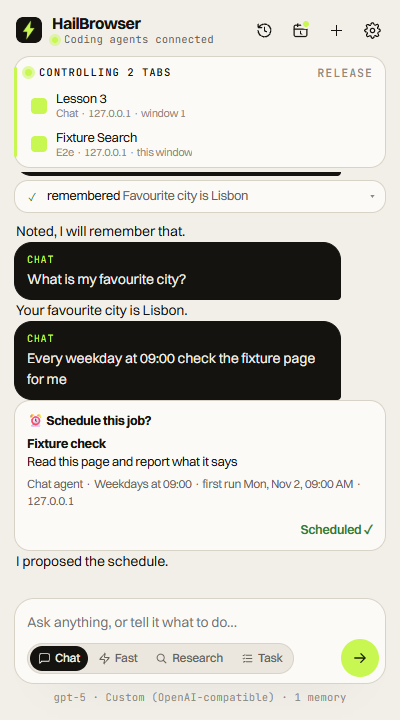
| Remembers you | Say "remember…" in chat and it keeps the fact (your city, units, which account to use on a site) for later chats, tasks and scheduled jobs. Edit or delete memories in Settings. |
| Works while you're away | Schedule any goal — once, daily, weekdays, or every few hours — or just say "every morning at 9, …" in chat. Jobs run in a background tab and send a notification with the result. |
| Nothing gets lost | Chats, tasks and research reports are saved. Paused or waiting tasks show a Resume banner; History lists everything; chats and reports export as Markdown. |
| MCP bridge | hailbrowser-mcp exposes 18 browser tools to any MCP client. Several agents can share one browser at once. |
| Real browser, real input | Uses chrome.debugger for trusted mouse/keyboard events and screenshots in background tabs. No --remote-debugging-port, no separate Chrome profile. |
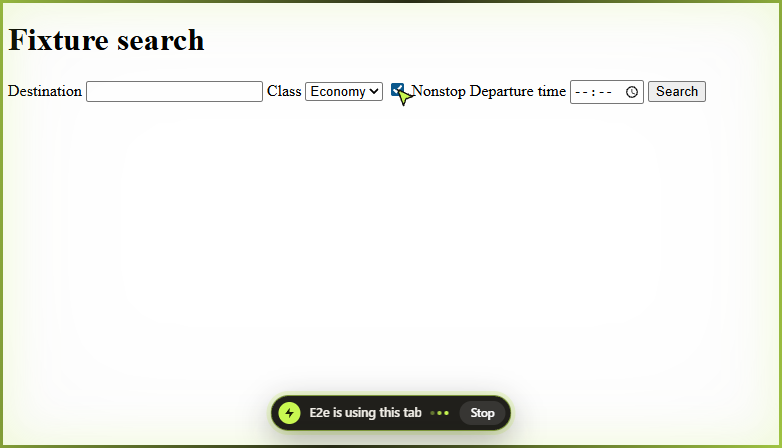
| Visible & stoppable | A driven tab gets an animated border, an agent cursor that ripples where it clicks, and a status pill with a Stop button. Every step appears in the side panel. Everything clears by itself when the agent is done. |
How long tasks work
For jobs too long for one chat — completing a course, processing a list of pages — turn on 📋 Long task in the composer, or just ask: Chat starts one by itself when the job needs many steps.
- Plan: your model splits the goal into 3–15 concrete subtasks (and can add more as it discovers them, e.g. extra lessons).
- Work: each subtask runs with a fresh, focused context: the overall goal, the plan with ✓ marks, and saved notes. Context never balloons, so it can keep going for hundreds of steps.
- Remember: the agent saves notes (progress, URLs, answers) that carry across subtasks. Progress is stored after every step, so closing the panel or a Chrome restart just pauses it — press Resume.
- Ask: for logins, payments, CAPTCHAs or answers it isn't sure about, it stops and asks you in the panel, then continues with your reply.
- Retry: a failed subtask is retried once with the issue noted; if it fails again it asks you how to proceed (or say "skip").
Budgets (steps per subtask, total steps before checking in) are in Settings → Tasks. Every task is kept in a list: start a new one while another is paused, and come back to any of them.
How Research works
Ask a question that needs the web and Chat hands it to Research, or turn on 🔍 Research in the composer (pick Quick, Std or Deep). The report appears in the chat.
- Plan: your model writes 2–4 search queries that cover the question from different angles.
- Search: each query runs in a background tab on DuckDuckGo (or Bing, Google, or any search URL). If an engine shows a CAPTCHA or nothing useful, it falls back to another one.
- Read: the most promising results (different sites first) open in parallel background tabs of your browser, so pages that need JavaScript or your logins work too. Each page is condensed into a short summary plus exact quotes.
- Fill gaps: Standard and Deep runs check what's missing or rests on one source, and search again.
- Write: the report answers first, then gives details; every claim cites a numbered source, and citations to sources that don't exist are removed. Copy it, download it, or ⏰ Repeat it on a schedule.
Depth: Quick (1 round, ~4 sources), Standard (2 rounds, ~6), Deep (3 rounds, ~10). Tabs are closed when it finishes.
Memory, schedules and history
- Memory is a short list of facts in
chrome.storage.local, added to the prompt of side-panel chats, tasks and scheduled jobs (never to runs started by external coding agents). The agent can only suggest a memory; it's saved without asking only when your own message asked it to remember something, so a web page can't plant one. - Schedules use
chrome.alarms. If Chrome was closed at run time, the job runs once when Chrome starts again. If HailBrowser is busy, the job waits in a queue. Scheduled runs follow stricter rules: they never send, buy, post or delete anything unless the goal says so, and they report what needs you instead of waiting. A schedule the agent proposes in chat is only created when you press Create. - History (clock icon) lists saved chats, research reports and tasks.
How Ultrafast works
page ──► indexed element table ──► ONE decision request ──► execute ──► observe
          [1] combobox "Where to?"      operation: CLICK | TYPE_TEXT | SELECT
          [2] button   "Search"                    | SCROLL | WAIT | DONE | BLOCKED
          [3] checkbox "Nonstop"        target:    an index from the table
The model never writes selectors, coordinates or code — it picks an operation and an observed element index. The executor re-checks that the page and target are unchanged before every input, and retries the decision (not the action) if they changed. It can open a site only when your goal names it (a URL, a domain, or a well-known name such as YouTube or Wikipedia) and can go back a page; started from a Chrome page such as a new tab, it opens that site or searches your goal first. A DONE claim gets a second yes/no check before the run reports success. Questions ("what does it cost?", "find out in which year…") end with an answer read from the final page, also returned by run_task; if the page doesn't say, it says so instead of guessing. With a chat model configured, Fast mode also writes a goal checklist and hands single hard steps to that model. With Mercury Decide, the text to type is extracted straight from your goal (only from your goal, never from page text), so most typing steps need no text-helper call.
Five decision backends:
- Decision API (default) — the TypeSafe
systemonerequest format used by Jev: operation + one speculative target head per operation, answered in a single round trip with probabilities. Point the URL/model at any compatible decision model. A small text model writes field values forTYPE_TEXT. - OpenRouter decision model — yes/no scoring models such as
respan/span-01-lite:free, which OpenRouter serves on/api/alpha/decisions(not/chat/completions). Every candidate action becomes one yes/no question in a single request and the best-scoring one wins; scores under 0.2 execute nothing. Uses your OpenRouter key from Settings.inception/mercury-decide(paid, about $0.000004 per call) works the same way; its:freevariant is not available. - Inception decision model (direct) —
mercury-decideon Inception's own API (POST https://api.inceptionlabs.ai/v1/decisions), which supports native multi-choice questions with probabilities, so each step is one request. Uses your Inception key from Settings; about $0.02 per million input tokens. - Letter-choice model — small classifiers such as Together's
together/Tev1-4B-experimentalthat answer one letter per question. The operation question and each operation's target question run in parallel, so a step is still one round trip. - Any LLM — one JSON call per step that returns operation, target and the text to type. Use a fast model (Groq, Gemini Flash, Claude Haiku).
Install
1. The extension
git clone https://github.com/Shyamnath-Sankar/project-hailbrowser.git
cd hailbrowser
npm install
Open chrome://extensions, turn on Developer mode, click Load unpacked, and pick the extension/ folder. Click the toolbar icon (or press Alt+H) to open the side panel, then open Settings and add an API key.
Works in Chrome, Edge, Brave and other Chromium browsers (116+).
2. Connect your coding agent (optional)
Print ready-to-paste config with the absolute path of your checkout:
npm run setup
Then, for example:
claude mcp add hailbrowser --scope user -- node /path/to/hailbrowser/mcp-server/src/index.js
See docs/connect.md for OpenCode, Cursor, Codex, Windsurf, Gemini CLI and Claude Desktop. The side panel header turns green (MCP connected) once an agent has started the server.
Coding agent + decision model (no text-model key)
The fastest setup: your coding agent (OpenCode, Claude Code…) plans, and a decision-model API drives the page.
- In the extension's Settings → Ultrafast, pick Decision API (Jev) or Letter-choice model (Tev1) and add that key. Leave the text helper empty.
- Your agent calls
run_taskwith the goal and the values to type:
{ "goal": "Search one-way flights for 1 adult", "mode": "ultrafast",
  "values": { "From": "Zurich", "To": "London", "Date": "2026-09-20" } }
The decision model picks every action and element, and also which value belongs in each field (a field named like the key, e.g. "Where to?" ↔ To, is matched without a call). No text-generation model is used.
Ask your agent things like "Use hailbrowser to open my GitHub notifications and summarize them" or "Use hailbrowser run_task in ultrafast mode to search flights from Zurich to London on Sept 20".
Tools
tabs_context · tabs_create · tabs_select · tabs_close · navigate · read_page · find · get_page_text · screenshot · click · type · press_key · scroll · select_option · hover · handle_dialog · wait · javascript · run_task and stop_task (MCP only: hand a whole goal to HailBrowser's own agent, or stop it)
Every tab HailBrowser drives joins a purple HailBrowser tab group (⚡ while it's working), and the side panel's Controlling strip shows which tab, agent and window, with one-click Show and Release. In the page itself, an animated border, an agent cursor and a status pill show that it's being driven. Pressing the pill's Stop button halts the run, and coding agents are told the user stopped them.
Control ends by itself: when a side-panel run finishes, or when a coding agent makes no call for 12 seconds, the border, the tab group and the strip all clear. Screenshots taken for the model hide the overlay, so the model sees the page exactly as it is. Turn the glow and the grouping off in Settings → Safety.
Tool results stay honest: alerts are closed and reported, confirm/prompt/"leave site?" dialogs pause the page until handle_dialog, pop-up tabs are reported, scroll says which box moved (or that nothing could), and type reports when a page reformats or rejects the input. If a call times out or the agent cancels it, HailBrowser stops the action instead of finishing it later.
read_page returns elements like [ref_12] textbox "Search" value="cats"; pass ref_12 to click/type. Screenshot coordinates also work.
Architecture
Claude Code ─┐ stdio                         ┌────────── Chrome ──────────┐
OpenCode ────┼─► hailbrowser-mcp ◄──ws:127.0.0.1:12306──► service worker   │
Cursor ──────┘   (first one hosts,           │   ├─ tools (CDP + DOM)     │
                  others relay)              │   ├─ Normal agent          │
                                             │   ├─ Ultrafast agent       │
                                             │   └─ side panel UI ◄─ you  │
                                             └────────────────────────────┘
More in docs/architecture.md.
Security model
- API keys stay in
chrome.storage.localand go only to the provider you call. - The MCP hub listens on
127.0.0.1only and refuses WebSocket connections from web pages (anyOriginother thanchrome-extension://). - Only one extension may drive the browser: the first HailBrowser that connects is trusted and remembered in
~/.hailbrowser/trusted-extension.json; other extensions are rejected. After reinstalling HailBrowser from a different folder, runnpx hailbrowser-mcp trust <new id>(ortrust --reset).HAILBROWSER_EXTENSION_IDpins an ID explicitly. - External agents can be switched off in Settings (Allow external agents). The
javascripttool can be disabled separately. - Page content is treated as untrusted data in all prompts. The agents are told never to enter passwords or payment details or complete purchases without explicit instruction.
chrome://pages and the Chrome Web Store can't be automated (Chrome blocks it).
Development
npm test                                  # syntax check + unit/integration tests (no browser, no API calls)
npx puppeteer browsers install chrome     # once
node scripts/e2e-browser.mjs              # real Chrome + extension + MCP server + scripted fake model
node scripts/stress-browser.mjs           # ~2 min: 40-subtask task under injected model errors, worker killed mid-task,
                                          # deep research on broken pages, storage churn (fake model, no API calls)
INCEPTION_API_KEY=sk_... node scripts/bench-fast.mjs   # Fast-mode benchmark: 26 fixture tasks (actions and questions), real model
                                          # (BENCH_MODE=normal compares Chat mode; BENCH_ONLY=enter,dup runs a subset)
npm run sync-schemas                      # after editing extension/src/tools/schemas.js
No build step: the extension is plain ES modules; reload it in chrome://extensions after edits.
Limits
Shadow DOM, cross-origin iframes, canvas apps, file uploads and pop-up windows are not fully supported yet. Research can't read PDFs yet. Scheduled jobs only run while Chrome is open, and one run happens at a time (others wait in a queue). Ultrafast sees only on-screen elements (it scrolls to find more). Model DONE is a claim, not proof — verify important outcomes.
Credits
Ultrafast's snapshot, action-space and decision-loop design is adapted from browser-use/jev-ultrafast (MIT). Ideas on background tabs and agent setup from browser-use/browser-harness (MIT). See THIRD_PARTY_NOTICES.md.
License
MIT