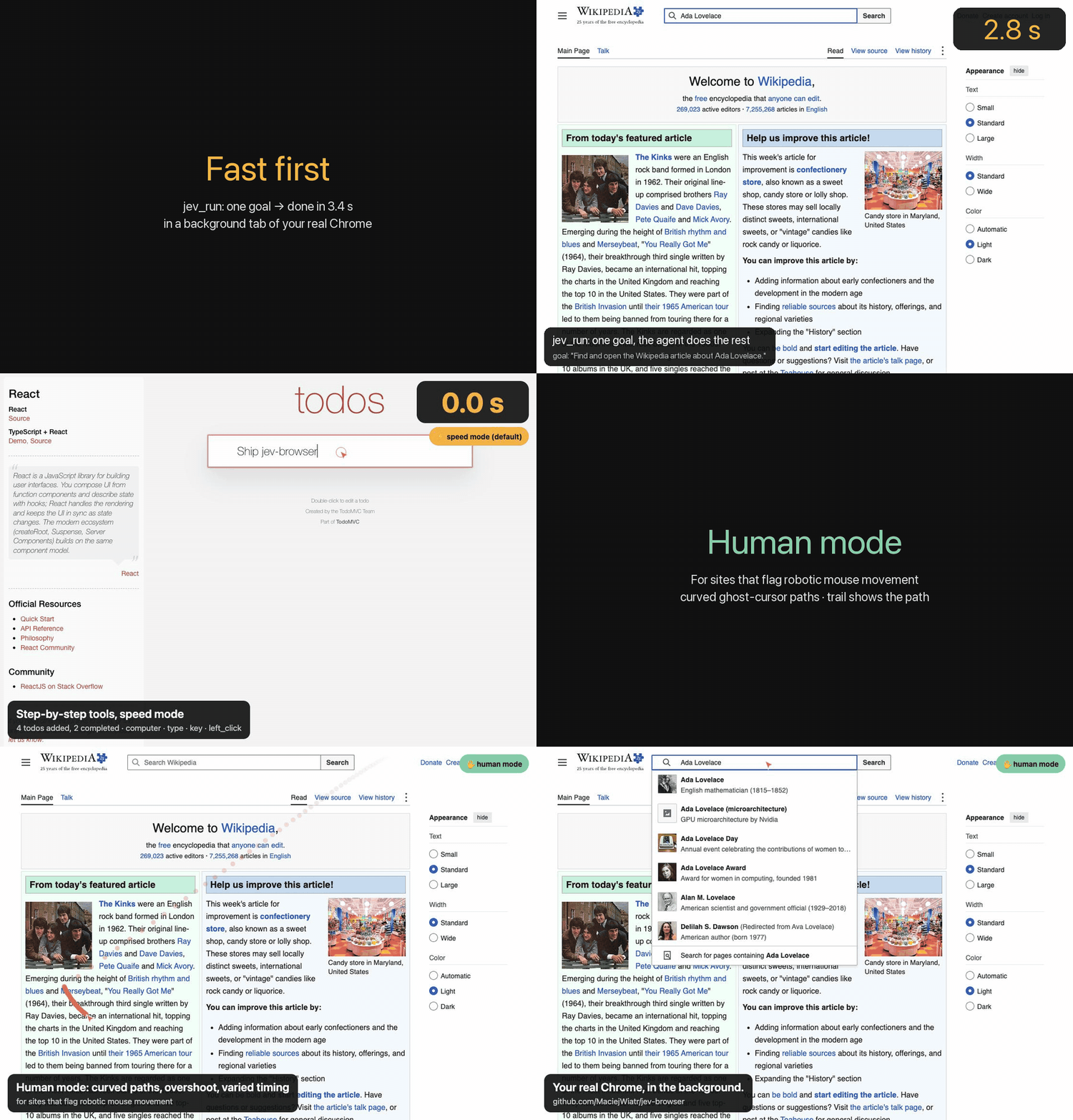

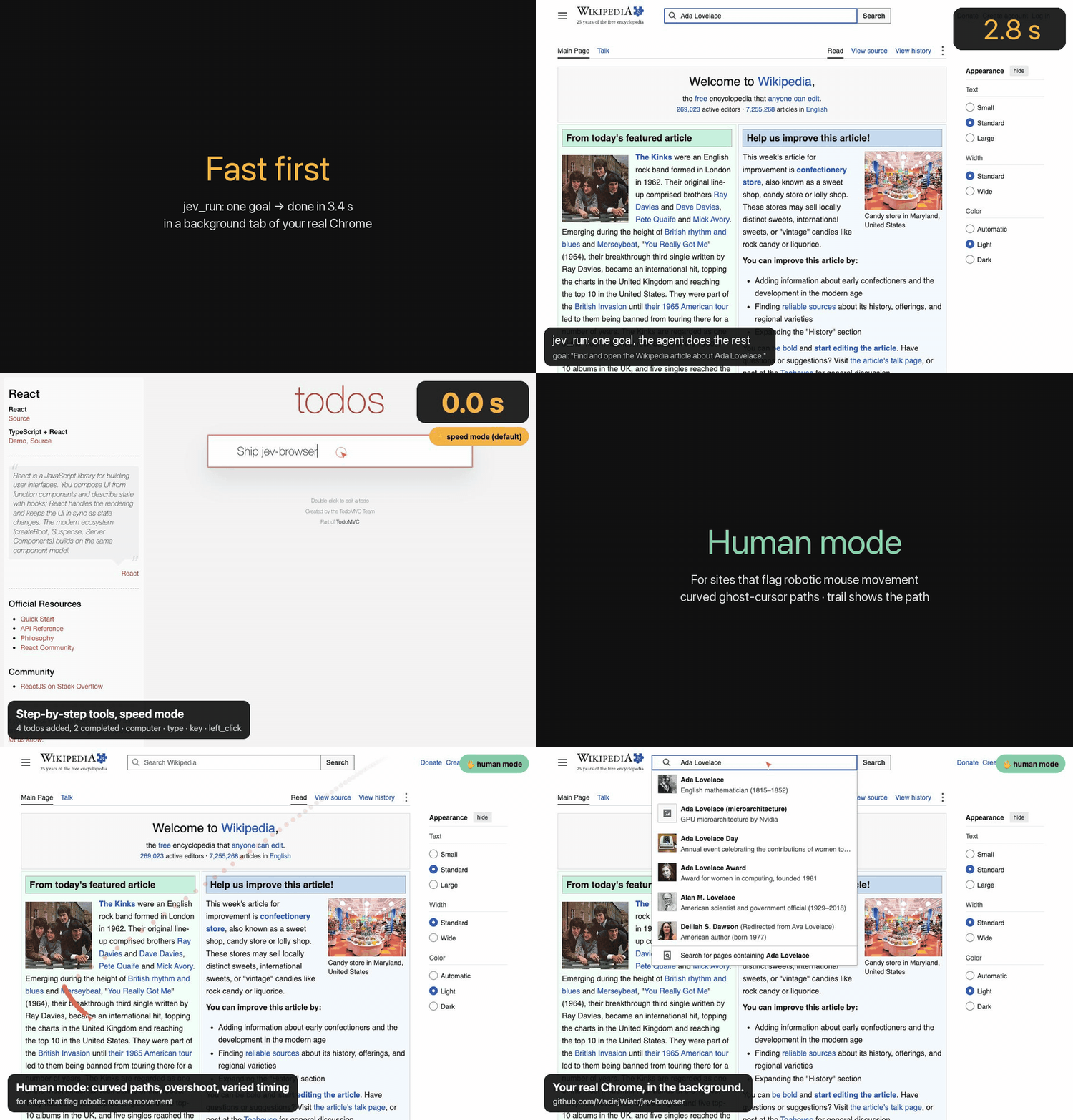
Fast browser control for Claude Code: one goal to done in ~3 seconds, in a background tab of your real Chrome.
A Claude Code plugin that gives Claude the full Claude in Chrome tool set over the Chrome DevTools Protocol, plus Jev Ultrafast, an autonomous agent that finishes narrow web tasks in 2 to 8 seconds.
- Background tabs. Agent tabs never come to the front, so your keyboard and focus stay yours.
- Fast.
jev_runturns one goal into a finished page in 2 to 8 seconds. With the step-by-step tools in speed mode (the default), each action takes about 0.1 s. - Separate cursor. Input goes straight into the tab through CDP. Your own mouse cursor never moves. The page shows its own orange agent cursor.
- Human mode, when a site needs it. For sites that react to robotic mouse movement, say "switch to human mode": curved paths with overshoot and varied timing from ghost-cursor, about 0.7 s per move. Claude still stops at CAPTCHAs and hands them to you.
JEV_CURSOR_MODE=naturalmakes it the default. - Tab groups. Each Claude session's tabs go into an orange group named after the task, like
Jev · Add 5 items to cart, renamed when the task changes. - Learns sites. Each action Claude names ("add to cart") is remembered per page type, so it applies to every product page, not just one. Next time it's a single
actcall, and multi-step flows replay withrun_workflow. Memory lives in~/.jev/memory, encrypted (AES-256-GCM, key in your OS keychain: macOS Keychain, Windows Credential Manager or Linux Secret Service; file names hashed so they don't reveal sites), and never stores what you typed. - Your logins. Claude works in the Chrome profile you're already signed into. It stops and hands over at login pages and CAPTCHAs.
- Loaded automatically. Installed at user level, so every Claude Code session has the tools without extra flags.
Install
Works on macOS, Linux and Windows. You need Chrome (or Edge/another Chromium browser), Claude Code, uv and Node 18 or later.
1. Run the installer (about 1 minute):
curl -fsSL https://raw.githubusercontent.com/MaciejWiatr/jev-browser/main/install.sh | bash
On Windows, in PowerShell:
irm https://raw.githubusercontent.com/MaciejWiatr/jev-browser/main/install.ps1 | iex
It clones Jev Ultrafast into ~/.jev/jev-ultrafast, installs its dependencies and adds the plugin to Claude Code.
2. Let Claude connect to Chrome: open chrome://inspect/#remote-debugging and turn it on. Click Allow when Chrome asks.
3. Optional, tab groups: open chrome://extensions, turn on Developer mode, click Load unpacked and pick ~/.jev/tab-groups-extension.
4. Optional, the jev_run agent: put your keys in ~/.jev/jev-ultrafast/.env:
TYPESAFE_API_KEY=...      # https://docs.typesafe.ai
TEXT_MODEL_API_KEY=...    # OpenRouter key, or "ollama" with TEXT_MODEL_BASE_URL=http://localhost:11434/v1
Every other tool works without any keys.
Manual install, without the script
git clone https://github.com/browser-use/jev-ultrafast ~/.jev/jev-ultrafast
(cd ~/.jev/jev-ultrafast && uv sync && cp .env.example .env)
claude plugin marketplace add MaciejWiatr/jev-browser
claude plugin install jev@jev-browser --scope user
If Jev Ultrafast lives somewhere else, set JEV_HOME.
Use it
Start a new Claude Code session and ask in plain words:
Open localhost:3000, submit the signup form with an invalid email and check the error message and console.
Use jev to find one-way flights Warsaw → Barcelona on November 14, 1 adult.
Go to the product list, extract name, price and stock for every item into products.csv.
Record a GIF of the checkout flow up to the payment page, then stop.
Claude goes ultra-fast first: it starts with jev_run. It falls back to the step-by-step tools when a run gets blocked, or when the task needs debugging, uploads, recordings or a lot of judgment. The bundled skills tell it when to stop for you and how to check the result.
Tools
| Group | Tools |
|---|---|
| Tabs | tabs_context, tabs_create, tabs_close, navigate (url, back, forward, reload), resize_window |
| Read | read_page (elements with refs like [n12], visible text, login/CAPTCHA detection), get_page_text (urls=[...] reads many pages in parallel in one call, main content only), find |
| Act | computer (click, type, key, scroll, hover, wait, screenshot, zoom), form_input, javascript_tool, file_upload, browser_batch |
| Memory | act, save_workflow, run_workflow, site_memory; intent= on computer and form_input teaches it |
| Debug | read_console_messages, read_network_requests, gif_creator, handle_dialog |
| Agent and setup | jev_run, jev_status (status and reconnect, like /chrome), set_cursor_mode, jev_inspector |
Compared with Claude in Chrome, it doesn't support choosing between several connected browsers, or the extension's saved shortcuts and scheduled tasks.
Safety
-
Claude only touches tabs it opened in the current session.
-
It pauses at login pages and CAPTCHAs, reports JS dialogs, and asks before anything irreversible.
-
Uploads are capped at 10 MB and refuse credential files (
.env, keys,~/.ssh, …) and hard-linked files. -
Block or allow sites in
~/.config/jev/sites.json:{ "allow": [], "deny": ["*.mybank.com"] }An empty
allowlist means every site except the denied ones. -
Model output never becomes a CSS selector or a coordinate the agent made up. Element refs point at nodes Jev observed on the page.
-
GIFs and screenshots show whatever is in the tab, account details included. That covers pop-ups that password managers and Chrome autofill draw inside the page (name, phone, email). Review every frame before sharing a recording, or record in a Chrome profile without autofill data.
Configuration
Set these in the env section of your Claude Code settings. The cursor mode can also be switched in any session by asking Claude (set_cursor_mode).
| Variable | Default | Effect |
|---|---|---|
JEV_HOME |
~/.jev/jev-ultrafast |
Where Jev Ultrafast is installed |
JEV_CURSOR_MODE |
speed |
speed: instant moves, fastest. natural: human mode, ghost-cursor paths for sites that flag robotic input |
JEV_CURSOR_MAX_MS |
600 |
Natural mode: longest time one cursor move may take |
JEV_GROUP_TITLE |
Jev · <folder> |
Tab group name |
JEV_VIEWPORT |
fills the window | Pin a fixed page size, e.g. 1440x900 (jev_run always uses 1120x780 while it runs) |
JEV_MEMORY_DIR |
~/.jev/memory |
Learned actions and workflows, one encrypted file per site |
JEV_MEMORY |
on |
off disables memory and its tools |
JEV_SITES_FILE |
~/.config/jev/sites.json |
Site allow/deny rules |
Troubleshooting
Ask Claude to "run jev_status". It reports the Chrome connection, which keys are set (never their values), the site rules and the open tabs.
| Symptom | Fix |
|---|---|
DevToolsActivePort not found, daemon not alive |
Turn on chrome://inspect/#remote-debugging |
| Tools time out | A JS dialog may be open: ask Claude to handle it. Otherwise run jev_status with reconnect |
No jev tools in Claude |
Run /mcp to read the server error, /plugin to check that jev is enabled |
| No tab groups | Load the extension (install step 3) |
How it works
Claude Code ──MCP stdio──▶ server/jev_mcp.py ──▶ Browser Harness daemon ──CDP──▶ your Chrome
                              │                                                    │
                              ├─ Jev snapshot.js: atomic DOM read, element refs     ├─ background tabs
                              ├─ cursor.bundle.js: ghost-cursor paths (Node)        └─ extension: tab groups
                              └─ jev_run: TypeSafe operation/target heads + small LLM
server/jev_mcp.py: the MCP tools.server/browser_tools.py: tabs, input, the console/network/dialog event pump, GIF recording.server/cursor/: the ghost-cursor helper. Rebuild it withnpm i && npm run build.extension/: the tab-groups extension. It wakes on Chrome tab events and keeps no open connection.skills/: instructions Claude loads automatically.
Development
uv run --with "mcp>=1.2,<2" python tests/e2e.py   # 18 end-to-end checks through the MCP server, no paid calls
claude plugin validate .
uv run --project ~/.jev/jev-ultrafast --env-file ~/.jev/jev-ultrafast/.env --with pillow python scripts/record_demo.py   # re-record docs/demo-v3.gif (needs ffmpeg, one paid jev_run)
Credits
Jev Ultrafast and Browser Harness by Browser Use (MIT), ghost-cursor by Xetera (ISC, bundled). See THIRD_PARTY_NOTICES.md.
This is an independent project. It isn't affiliated with Anthropic, Browser Use or TypeSafe.
License
MIT