
KP Rück
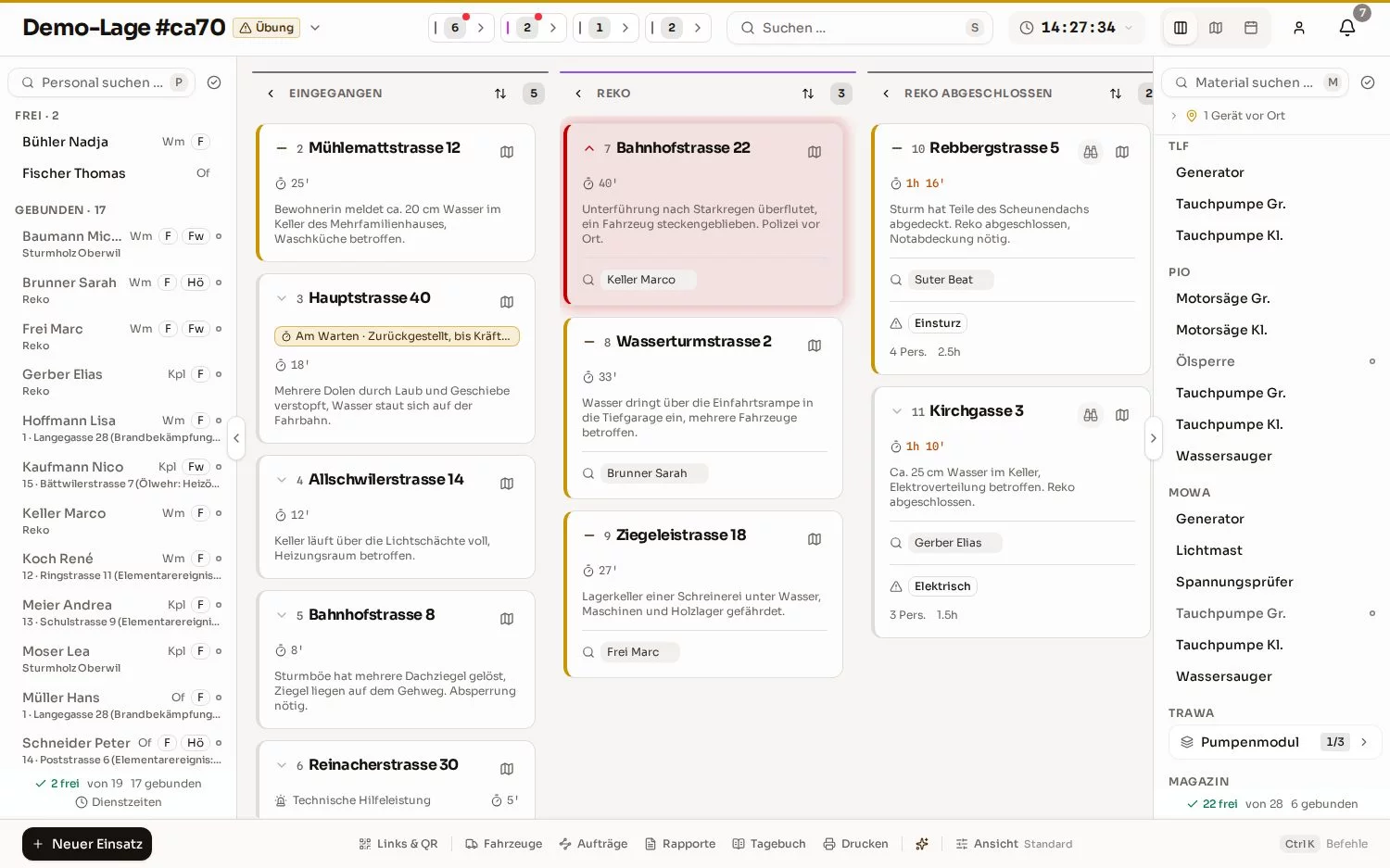
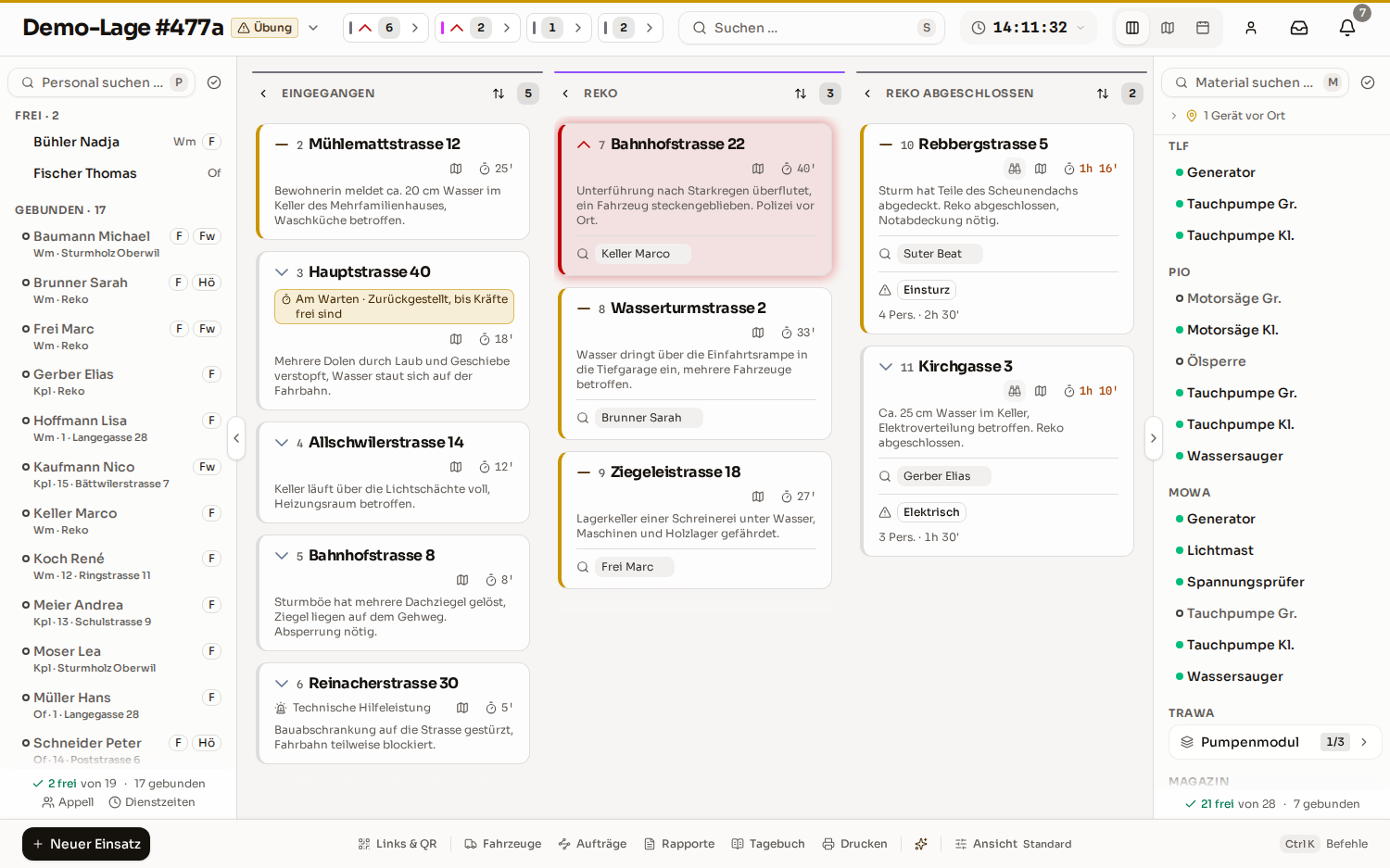
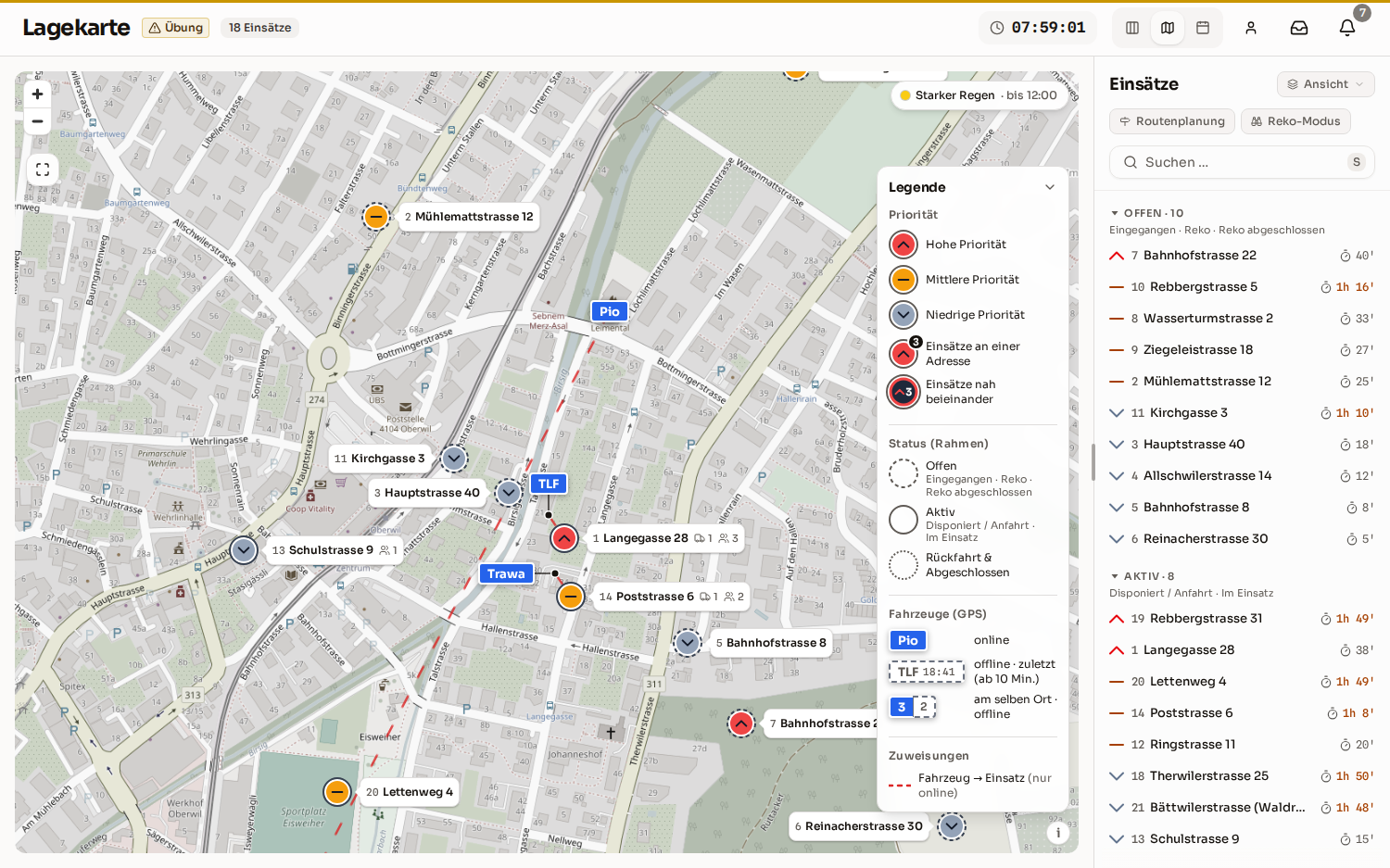
Tactical operations board for the rear command post (KP Rück). KP Rück replaces the physical magnet board used to track personnel, vehicles, materials, and incidents during an operation – a shared Kanban board, an incident map, resource assignments, and a defensible record, all live across every connected device.
One operator runs it from the command post on a desktop with mouse and keyboard; viewers follow along read-only on any screen. KP Rück owns its own incident state, map, audit trail, and exports – integrations (Divera, Traccar, a thermal printer) add data but are not required to operate it.
Originally developed by Feuerwehr Oberwil BL and designed to be adaptable for other communal militia fire departments facing the same shape of work: many damage sites spread across a municipality during a storm or flood. It is not built for industrial fire brigades or permanently staffed dispatch centres.
| Operations Board | Interactive Map |
|---|---|
 |
 |
Try the demo
Try the live demo – no account needed, just pick a role and go. The demo seeds a realistic board and resets on a schedule; each visitor gets an isolated training sandbox.
Why KP Rück
KP Rück grew out of a Swiss Milizfeuerwehr command post. It is built around one station, one event, one operator at the board, not scaled down from a dispatch center.
- Replaces the magnet board. The same spatial mental model – columns for status, cards for incidents, magnets for crew and vehicles – but live, shared, and self-documenting.
- Made for the command post. Dense, calm, dark-mode-first and keyboard-fast on a desktop – the board is run with mouse and keyboard, not thumbs – though since 0.8.0 a phone is a real editing surface too. Status and priority read at a glance.
- Provider-neutral intake. Any dispatch or alarm system can open incidents through one generic webhook; Divera, a phone form, and a QR walk-in slip are adapters on top of it.
- Training that mirrors reality. A full training mode with auto-generated incidents and simulated GPS drives runs on the same database, filtered by a flag – never mixed with live work.
- Prepared for network failure. Offline map tiles, a paper Lageblatt fallback, automatic thermal snapshots, and a documented outage SOP – not offline editing: when the connection goes, you go to paper.
- Defensible records. An append-only audit log, an Einsatztagebuch the board keeps as things happen, and an after-action PDF (Einsatztagebuch, Reaktionszeiten) back every operation.
- Open and self-hostable. One AGPL-licensed deployment per station, no per-seat licence.
Highlights
- Board: drag-and-drop Kanban with persisted card order and real-time sync (WebSocket, with
a polling fallback). Every Einsatz has a small number per Ereignis, and the ⌘K line dispatches
by typing:
14 tlf meierputs the TLF and Meier on Einsatz 14,14 hochraises its priority, ⇥ completes names and addresses – through the same Doppelbelegung checks as dragging, with «Rückgängig». Taking a resource off – person, vehicle, material, Auftrag stop – offers «Rückgängig» too, which assigns it again through the same checks. - Duplicates and merge: before a second report about the same Schadenplatz (within 50 m or the same address) becomes a second card, the board offers to merge it; alarms from automatic intake are marked «Mögliches Duplikat» instead of merging on their own. Any open Einsatz can be merged into another – crew, Reko, Rapport, messages and requests from the field move along – and «Trennen» undoes it.
- Map: MapLibre GL incident markers, optional Traccar vehicle GPS
with GPS-driven status automation, distance labels, and offline tiles. A «Wetter» layer adds
MeteoSwiss rain radar and the official warnings for the station (Switzerland only;
WEATHER_ENABLED=falseturns it off). - Phone: KP Rück installs as a home-screen app (iOS and Android), with phone layouts for the board, the Einsatz list and the forms – bottom sheets that stand on the keyboard.
- Resources: personnel, vehicles, and materials with assignment conflict warnings. A Dienstzeiten overview shows everybody checked in – time on duty, time on an Einsatz vs. «Pause», Einsätze worked – sortable by every column. With Divera, «Anrückend» lists who answered the alarm with «kommt», one click from check-in.
- Einsatztagebuch: one append-only journal per Ereignis (
J, «Tagebuch» in the footer;⇧Jwrites a line). The board writes its own rows as things happen – status changes, resources, Meldungen, Reko, alarms, merges, field facts – and operators add what belongs to no card. A wrong line is corrected by a new one, never edited; the PDF prints the same log. - Kennzahlen: the Lage and the Reaktionszeiten (Eingang → Disponiert, Vor Ort, Abschluss;
median and P90 per priority) on screen, from the user menu or
Z– the Übungsauswertung on a training Ereignis, and a section of the status wall (/display/status). Same computation as the PDF, so the wall and the debrief agree. - Archiving: closing an Ereignis lists what is still open – Einsätze not at «Abschluss», open Abholungen, material still at a Schadenplatz, people still checked in – and checks everybody out at the moment of archiving («automatisch abmelden», ticked by default).
- Aufträge: group several incidents into one ordered route for a squad – the storm case, where a crew works a list rather than a single address. The board keeps the sequence, the crew, and the radio announcement for the whole route. Recurring ones («Sturmholz», «Absperren») are configurable as Standard-Aufträge and can open with every new Ereignis, carrying their colour, note and usual equipment.
- Alarm intake: provider-neutral
POST /api/alarms, a native Divera adapter, a token-gated phone/walk-in form, and a capability registry the UI reads instead of hard-coding providers. - The field surface (
/feld): one login-less page for everyone out there – crew, driver, Reko, Magazin, Telefondienst. You see what is yours, report «Angekommen» and «Einsatz beendet», file the Schadenplatz-Rapport with photos, ask for an Abholung, and send a Meldung the KP can answer. Reached by a QR on the poster or on the Einsatzzettel, gated by a four-digit Feld-Code that binds the phone to one person. «Material nötig» and «Verstärkung nötig» are structured requests, and every request from the field is a work item on the board (offen → in Arbeit → erledigt) that stays until somebody handles it, not a notification that can be dismissed. Everything it writes has a writer at the command post too, because the failure mode to design for is the phones failing, not the server. - Reconnaissance: Reko forms with photo upload from mobile devices.
- Training: isolated scenarios, auto-generated incidents, adjustable sim tempo, and simulated GPS drives.
- Printing: a standalone thermal print agent (ESC/POS over the network) for dispatch slips (Einsatzzettel), board snapshots, the Abholliste and QR walk-in slips.
- Resilience: paper Lageblatt PDF, automatic thermal board snapshots, and an outage SOP.
- Reporting: after-action PDF report and Excel import/export.
- Access: Admin (an Editor who also manages the user accounts), Editor (full CRUD) and Viewer (read-only) roles, a German and French (next-intl) UI – the bell and toasts included –, dark mode, a ⌘K command palette with keyboard shortcuts, and a built-in help page.
See CHANGELOG.md for the feature history.
Status
KP Rück is in operational use at Feuerwehr Oberwil and under active development. Each single-tenant deployment supplies its own branding, fleet, personnel roster, and integration credentials. The UI ships in German (Swiss firefighting terminology) and French (CSSP terminology); the next-intl layer merges every locale over German, so a further language is a tractable contribution – it becomes selectable once it covers every German key.
Quick Start
git clone https://github.com/feuerwehr-oberwil/kp-rueck.git
cd kp-rueck
just dev    # or: docker compose -f docker-compose.dev.yml up --build
This starts the frontend (:3000), backend (:8000), database, and tile server. The database
is auto-seeded on first run; admin credentials are printed to the terminal.
Prerequisites: Docker and Docker Compose. Optionally just for the shorthand commands. For local development without Docker, see backend/README.md.
Self-host
Runs on any Docker host, from published images – no build toolchain on the server. 2 GB
RAM and a 32 GB SSD are enough; all four images are built for amd64 and arm64, so a
mini PC, a retired laptop, an ARM VPS or a Raspberry Pi 5 all qualify. Sizing details,
including the one step that does want a bigger machine, are in
docs/DEPLOYMENT.md §0.
The fastest path, no terminal (Mac/Windows on a LAN): download the source zip of the
latest release, install
Docker Desktop, and double-click
deploy/Start KP Rück.command (macOS) or deploy/Start-KP-Rueck.bat (Windows). It generates
the secrets, starts the stack and opens the browser – the first visit sets the admin password
and station name at /setup. Double-clicking again starts that installed release. Details, including
the one-time Gatekeeper/SmartScreen click, are in
docs/SETUP.md. Prefer a terminal, a domain
with HTTPS, or your own port? That is the path below.
git clone https://github.com/feuerwehr-oberwil/kp-rueck.git && cd kp-rueck
git checkout vX.Y.Z   # choose a published release from the releases page; replace X.Y.Z
just init     # three decisions, generates the secrets, writes a complete .env
just up       # pulls ghcr.io/feuerwehr-oberwil/kp-rueck-*, migrates on boot, prints the URL
Keep the whole clone and run these from inside it: the stack never builds from this source, but
docker-compose.yml mounts deploy/Caddyfile and scripts/ out of it.
Without just: cp .env.example .env, fill in the Required section at the top of that file
– five secrets plus three networking lines, walked through in
docs/SETUP.md §1 – then docker compose up -d.
The first boot takes two to three minutes. Migrations and seeding run before the backend
answers at all, so the board is not up the moment the command returns – just up waits for it
and tells you when it is there. Then open
https://<your DOMAIN>, or http://<this-host>:8080 on a LAN, and sign in as admin with the
ADMIN_SEED_PASSWORD you chose. If it doesn't come up, just doctor prints one screen of
containers, health, tiles, last backup and running version. just down stops the stack without
deleting anything.
Everything is served through one origin (Caddy in front of frontend, backend and tileserver),
with automatic HTTPS when you set DOMAIN. Fresh installs pin the exact downloaded release.
Updates are explicit: back up, install the complete matching release files in the existing
installation folder, and change KP_RUECK_TAG deliberately. Follow
the update procedure and the
releases –
CHANGELOG.md explains what a MAJOR/MINOR/PATCH bump means for a deployment.
All four images (backend, frontend, tileserver, print-agent) are released together under one
version: a station runs the set, not a mix.
Every published image has already run a real fire station. Feuerwehr Oberwil's production
deployment and the public demo both track main continuously; a version tag is a label on a
commit that has been carrying live operations. Releases exist for other stations, not for us.
Setting up a station for the first time? Follow docs/SETUP.md, which walks the whole path in order. docs/DEPLOYMENT.md is the full self-hosting reference behind it. Prefer not to look after a machine at all? docs/RAILWAY.md covers the managed route – same code, same releases (built from your fork rather than pulled as images), equally supported. The trade is the one you would expect: a box in the Gerätehaus keeps the board alive through an internet outage, a managed platform keeps it alive without you.
Architecture & key decisions
A Next.js frontend talks to a single FastAPI service that owns the database, the photo store,
and every outbound integration – one deployment per station. Full diagrams and rationale live in
docs/ARCHITECTURE.md.
flowchart TB
  subgraph CLIENT["Browser – command post & mobile"]
    UI["Kanban board · Map · Reko<br/>Next.js 15 + React 19"]
  end
  subgraph DEP["Deployment – one per station (single-tenant)"]
    API["FastAPI<br/>REST + Socket.IO · auth · audit · exports"]
    DB[("PostgreSQL")]
    FILES[("Photo storage")]
    API --- DB
    API --- FILES
  end
  subgraph EXT["External (backend-proxied)"]
    DIV["Divera 24/7<br/>alarm in/out · roster"]
    TRC["Traccar<br/>vehicle GPS"]
    HOOK["Any dispatch system<br/>POST /api/alarms"]
    ROSTER["Station data<br/>index.json · roster file"]
    WX["MeteoSwiss · Alertswiss<br/>radar · warnings"]
  end
  AGENT["Print agent<br/>ESC/POS thermal"]
  TILES["Map tiles<br/>OSM · offline TileServer GL"]
  UI <-->|"/api/* · WebSocket"| API
  API <--> DIV
  TRC --> API
  HOOK --> API
  ROSTER --> API
  WX --> API
  AGENT -->|"pulls jobs"| API
  UI -. "tiles direct to browser" .-> TILES
Deliberate tradeoffs:
- Single-tenant: one station per deployment keeps ownership and isolation simple.
- Accounts, not PINs: the command post has a desk, a network, and named operators, so login is username + password (JWT access/refresh, per-username lockout on failures) with optional Microsoft Entra ID sign-in. Its sibling KP Front deliberately does the opposite – see Related project.
- Training vs. live: the same database, separated by a
training_flag, so drills use the real UI without polluting live data. - Provider-neutral integrations: alarm intake and outbound alerting (Ausalarmierung) sit
behind provider seams – adding a service is a module, not a rewrite – and every integration
reports through
GET /api/integrations. Personnel sync and vehicle GPS currently have one provider each (Divera, Traccar); they follow the same pattern and can be generalised if a station needs a different one. - Append-only audit: operational history is corrected with new events, not rewritten, and
nothing expires unless you ask it to –
AUDIT_RETENTION_DAYSdefaults to0, meaning keep everything. Set a positive number of days if your retention policy says to prune. - Alembic is the only schema truth: migrations run on boot; the app never creates tables implicitly.
Integrations
The operational integrations below are optional. Which providers are active is reported at
GET /api/integrations, so the UI adapts instead of hard-coding vendors. Configure secrets through
the documented environment variables or integration setup; database backups can contain
integration credentials and need the same protection.
Address lookup is configured separately: the backend uses swisstopo for Swiss locations by
default, with disabled and a self-hosted or permitted nominatim service as alternatives.
Online map tiles still load from the browser. The map's weather layer is on by default: the
backend fetches MeteoSwiss radar and warnings and Alertswiss notices itself; set
WEATHER_ENABLED=false outside Switzerland or where the backend must not reach the internet
(weather layer). See address lookup configuration
and privacy before choosing external providers.
| Connector | Direction | Works with today | Adding another |
|---|---|---|---|
| Alarm intake | in | Any dispatch system via the open POST /api/alarms webhook; a native Divera 24/7 adapter; a token-gated phone/walk-in form |
Already open – POST the documented JSON, no code needed. See docs/ALARM-INTEGRATIONS.md |
| Outbound alerting (Ausalarmierung) | out | Divera 24/7 | Implement one AlarmProvider adapter in backend/app/services/alerting/ |
| Personnel roster sync | in | Divera 24/7; any tool that publishes a roster-snapshot/1 file, read hourly from an https address or a path – directly (ROSTER_SNAPSHOT_SOURCE) or through the station's index.json (STATION_INDEX_SOURCE) |
Already open – write the documented file (a spreadsheet works: scripts/roster_snapshot_from_csv.py). See docs/ROSTER-SNAPSHOT.md. Synced identities are stored provider-neutrally (personnel_external_identities) |
| Vehicle GPS | in | Traccar | Currently Traccar-specific – no abstraction yet. It can be generalised the same way as the alarm connectors if a station uses a different tracker |
| Sign-in | in | Local accounts; optional Microsoft Entra ID (OAuth) | Entra-specific today. A generic OIDC adapter would cover Google Workspace, Keycloak, Authentik and Zitadel from the same code path |
| Printing | out | A network ESC/POS thermal printer via the pull-based reference agent | Point a custom agent at the four print endpoints – any printer, A4 included. See docs/PRINT_AGENT.md |
New connectors are welcome contributions – the alarm and alerting seams are the model to copy.
Known limitations
- The UI is German and French; most of what the backend writes is German. Both catalogues
are complete and both languages are selectable per device. Notifications (sent as
type+params) and the/felderrors (a stablecode,backend/app/utils/error_codes.py) are rendered in the device's language; PDFs, Excel exports, thermal print output and the other API error details are German-only, and no French-speaking firefighter has reviewed the translation yet. Italian is a registered stub (it.jsonis empty) and stays hidden until it covers every German key. - The board needs a network. Offline coverage means map