

LongClaw
A local-first issue tracker for developers working with coding agents.
Plan work on a Mac board. Let your agent update the same tickets.
Descriptions, checklists, and activity stay in Markdown files beside your code.
macOS 13+ · Apple Silicon only · no account required


Website · Install guide · Changelog
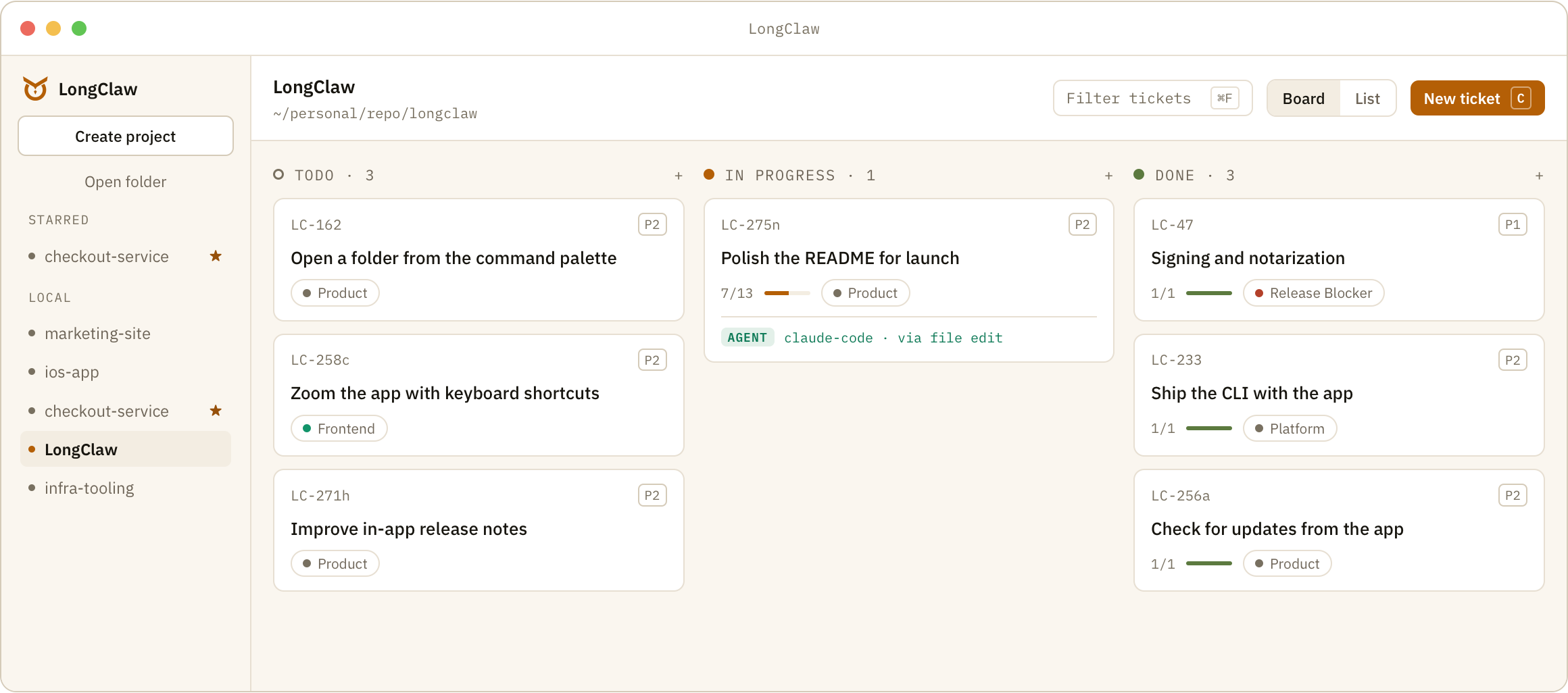
Built for developers who hand work to coding agents such as Claude Code and Cursor, and want the plan to live in the repository those agents already read.
The record outlives the app. A ticket is a directory of plain text inside your project — readable in an editor, diffable in review, and committed with the work it describes. Nothing requires an account.
Status: early, in v0. LongClaw tracks its own development, and it ships often. The changelog and the release notes say what each release changed.
How it works
You create a ticket on the Board
  |
  v
Agent reads it, works, updates via CLI
  |
  v
You review the updates in LongClaw
Both work from the same Markdown ticket in your repository: description, checklist, comments, and activity together.
LongClaw notices the write without a refresh. The card rings, names who
changed it (AGENT claude-code), and fades when you open it. If an
agent's write collides with one you haven't seen, a conflict banner shows the
file before anything is overwritten.
What it does
- Board and list over the same tickets. Filter, group and order either one; the list stays readable at a few thousand rows.
- A ticket panel that edits in place. Markdown descriptions with tables, checklists you reorder by drag, and an archive that deletes nothing.
- Ticket properties when you want them. Type, due date, start date and estimate, each off until a project turns it on.
- Every project in one sidebar. Star the ones you live in, drag them into
order, and jump to any of the first nine with
⌘1–⌘9. - Keyboard-first.
⌘Kreaches every action,⌘Zundoes the last one, and the whole ticket lifecycle works without a pointer. - Human and agent, told apart. Wherever it matters, you can see who did what, in five theme presets across light and dark.
- Updates from inside the app. It checks for a new version and downloads nothing until you press Update.
How it compares
| Tool | Where tickets live | Agent access | Interface |
|---|---|---|---|
| LongClaw | Markdown files in your repo | File reads and CLI updates | Mac desktop app, Apple Silicon |
| Backlog.md | Markdown files in your repo | CLI and MCP | Terminal and local browser board |
| GitHub Issues | GitHub service | CLI, API, MCP | Web and mobile |
| Linear | Linear service | API, MCP and integrations | Web, desktop and mobile |
A TODO.md |
One file in your repo | File reads and edits | Your editor |
LongClaw fits developers who want a Mac desktop app, repository-owned tickets,
and visible human and agent activity. Backlog.md shares the Markdown-and-agent
workflow and offers terminal and browser interfaces across more platforms.
A plain TODO.md works well when a text list is enough.
Think of LongClaw as a local-first alternative to Linear. Agents read ticket context directly from your repository, without an API integration. Each ticket keeps its description, checklist, and human feedback in one file.
The longclaw CLI
The app ships with longclaw, a CLI for agents. Agents use it to create
tickets, update progress, and record their work. Those changes appear in the
app. Enable it in Settings › Command line, then run it in your project folder:
longclaw ticket create --title "Fix the retry policy" --agent-id claude-code

# Replace MP-1a with the returned ticket key, including its trailing letter.
longclaw ticket edit MP-1a --status in_progress --agent-id claude-code
See the CLI reference for all commands.
A project on disk
A project is any folder you choose. The .longclaw/ directory inside it is what
makes it a LongClaw project, and each ticket is one directory holding one
ticket.md. A short excerpt from the completed README ticket (other metadata
and activity entries omitted):
---
key: LC-274e
status: done
---

The repository README is the first page a visitor to the GitHub repo reads…

## Checklist

- [x] (Header) Add license and latest-version badges <!-- longclaw:item=ck_d5047e2e -->
That one file is the whole record: metadata in the frontmatter, the description
in Markdown, a checklist whose items keep their ids, comments, and an activity
log in which every entry names a human or an agent. Attachments sit beside it in
attachments/. The rest of .longclaw/ is longclaw.yaml, holding the
project, its people and its labels, and AGENTS.md, generated into every
project so an agent that has never seen LongClaw can edit tickets correctly.
See the file format for the contract and the user guide for project folders, backups, agent setup and recovery.
Privacy and network access
No account. No telemetry. Your project and ticket data stay on your machine.
LongClaw checks GitHub for updates and its public star count in the background. Turn off Check for updates automatically in Settings → Updates to disable both. You can still check for updates manually; downloads start only when you choose Update.
Ticket management works offline. Update checks, update downloads, and fetching the star count require a connection.
Feedback
Have an idea for LongClaw? Suggest a feature. For a problem with existing behavior, report a bug.
Contributing
Everything below is for working on LongClaw itself. CONTRIBUTING is the full guide: prerequisites, filing work, branching, and the quality gate every change must pass.
npm --prefix apps/desktop ci
npm run verify         # the gate — see CONTRIBUTING for what it runs
npm run dev            # launch the app
npm run dev:fixture    # launch with the development fixture registered
npm run build:app      # the production desktop app
The website, longclaw.io, is a separate static Astro package in
apps/website with its own README, which covers its layout,
rules, agent skills and deployment.
The architecture decisions, domain language, design docs, agent instructions and release evidence are indexed in docs/README.md.
Acknowledgements
LongClaw is built with coding agents, and much of how they work in this repository comes from skills other people wrote and shared.
- Matt Pocock, for
mattpocock/skills. Nearly every skill
in
.agents/skills/comes from it, among themtdd,diagnosing-bugs,domain-modeling,code-reviewandgrilling. They shaped how this codebase is designed, tested, reviewed and tracked, and much of its quality is owed to them. - Julius Brussee, for caveman.
Every vendored skill and its source is listed in
skills-lock.json.
License
LongClaw source code is licensed under the Mozilla Public License 2.0.