
Edit Markdown where you read it.
markami is a visual Markdown editor for VS Code. Edit headings, lists, tasks, tables, and code directly in the rendered document. Each change is applied to your source as a small, local edit, so untouched parts of the file stay exactly as you wrote them and your Git diffs show only what you changed.
Rendered editing · Source-preserving · Mermaid and math · Works offline · No telemetry
See markami in action
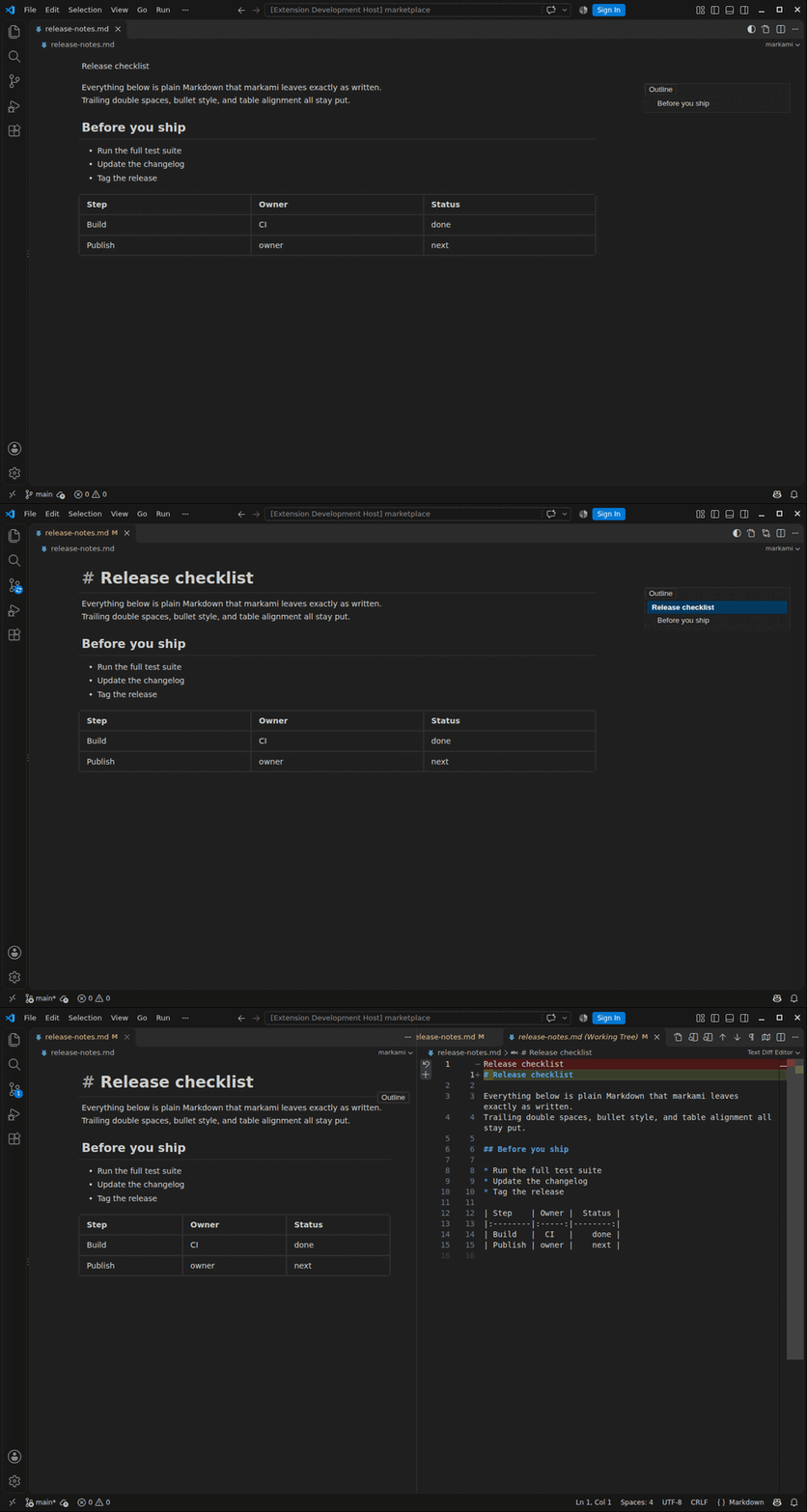
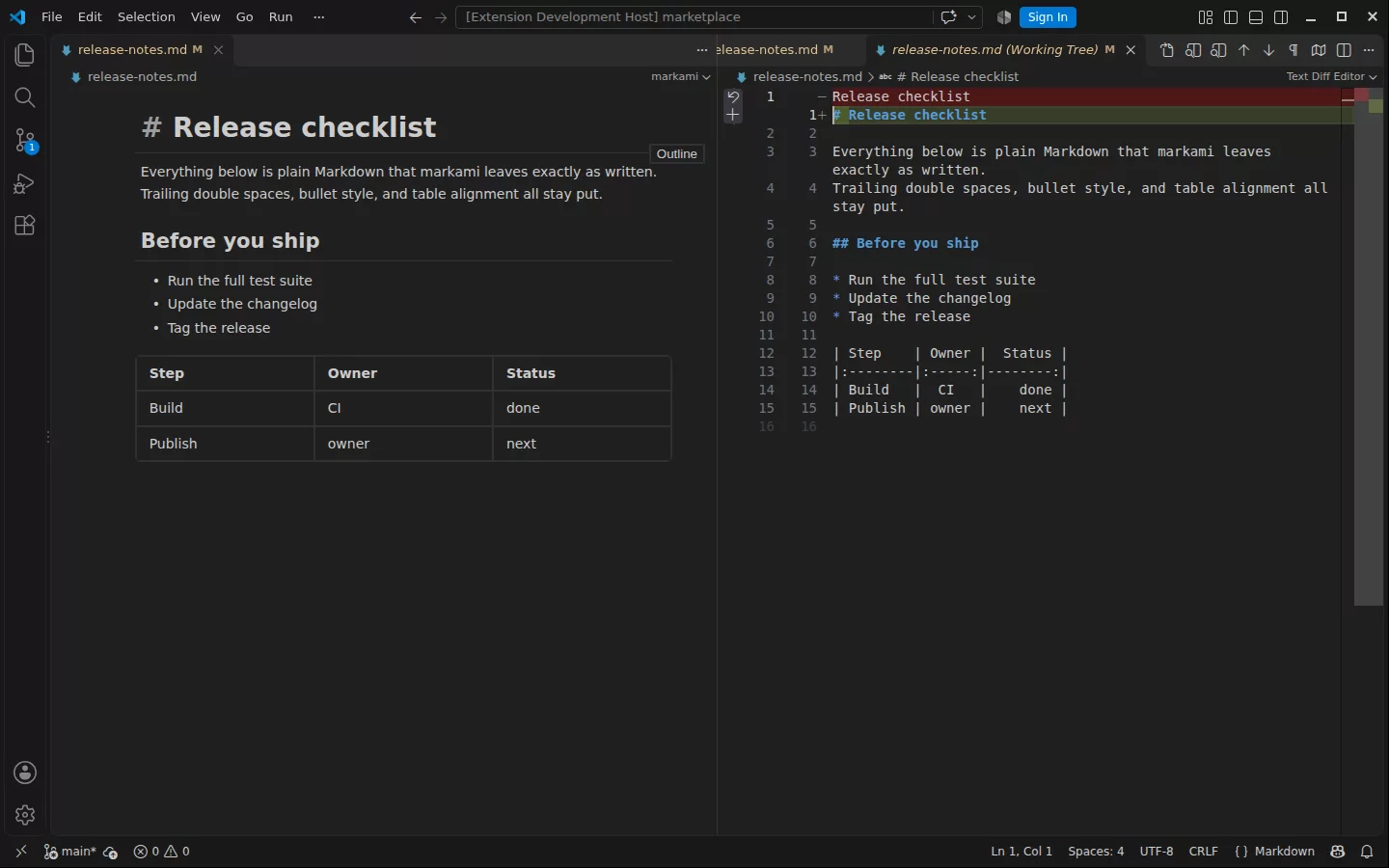
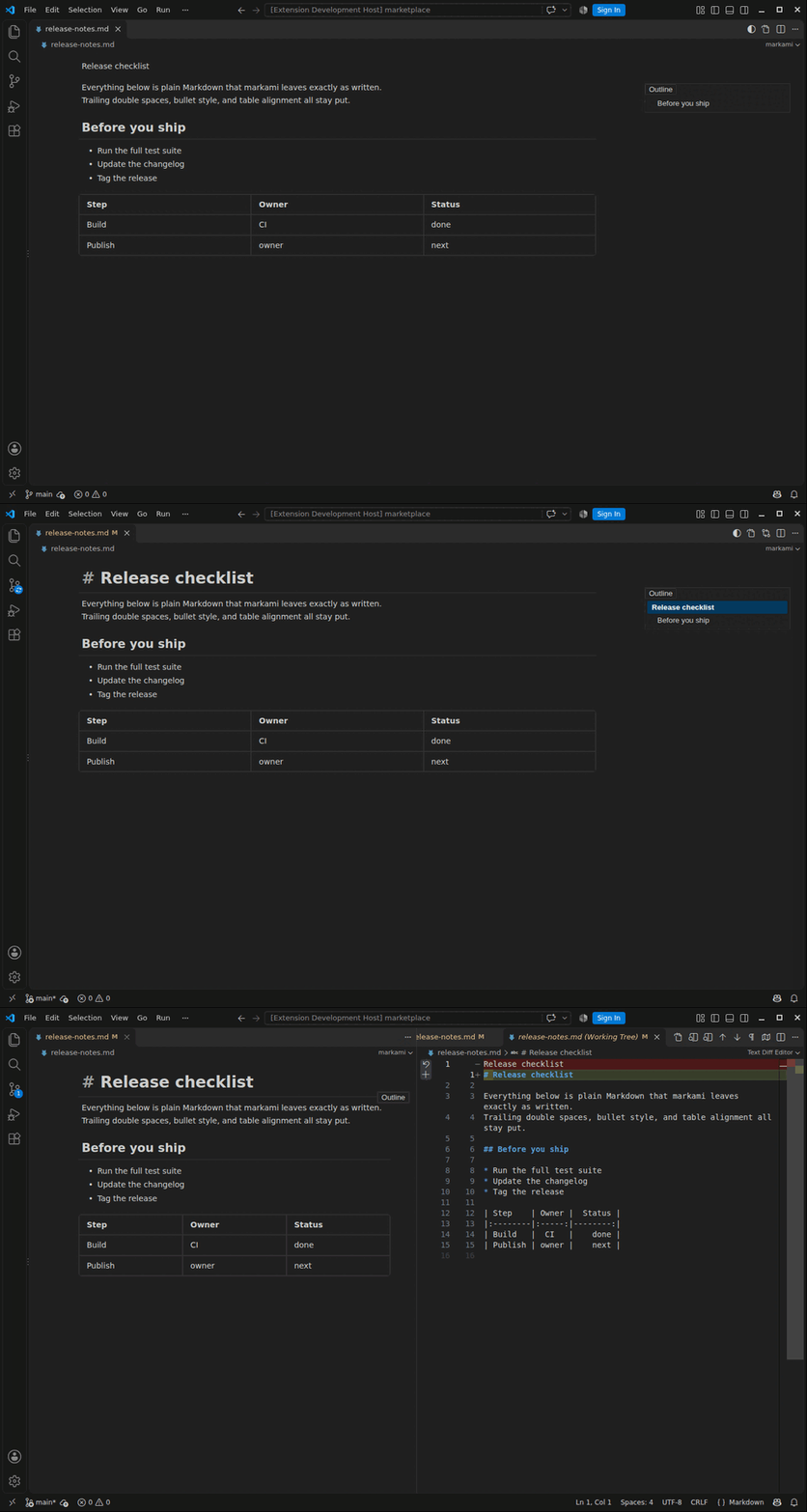
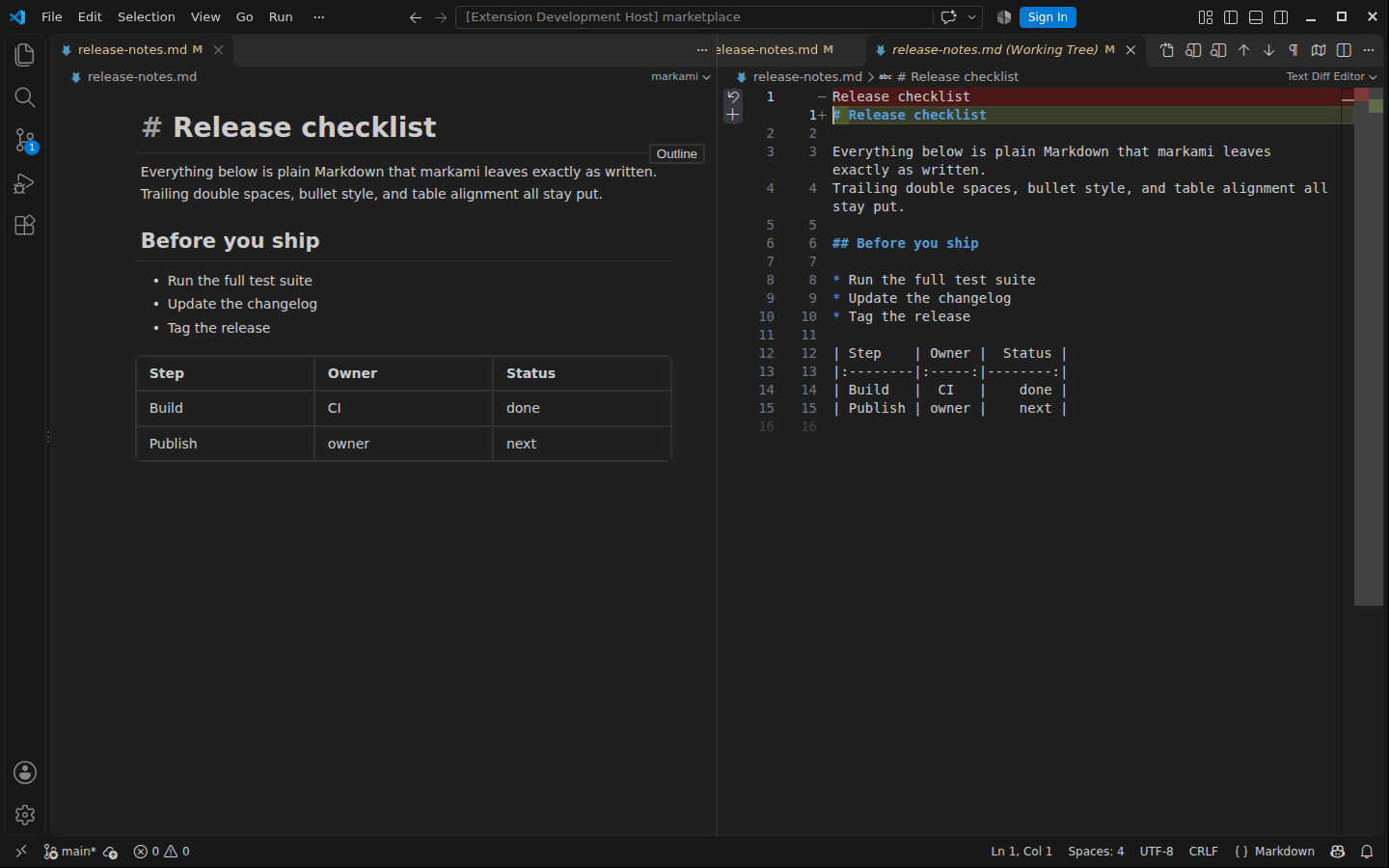
Edit, save, and check the diff
Promote a paragraph to a heading in the rendered document, save, and Git shows the single line that changed.
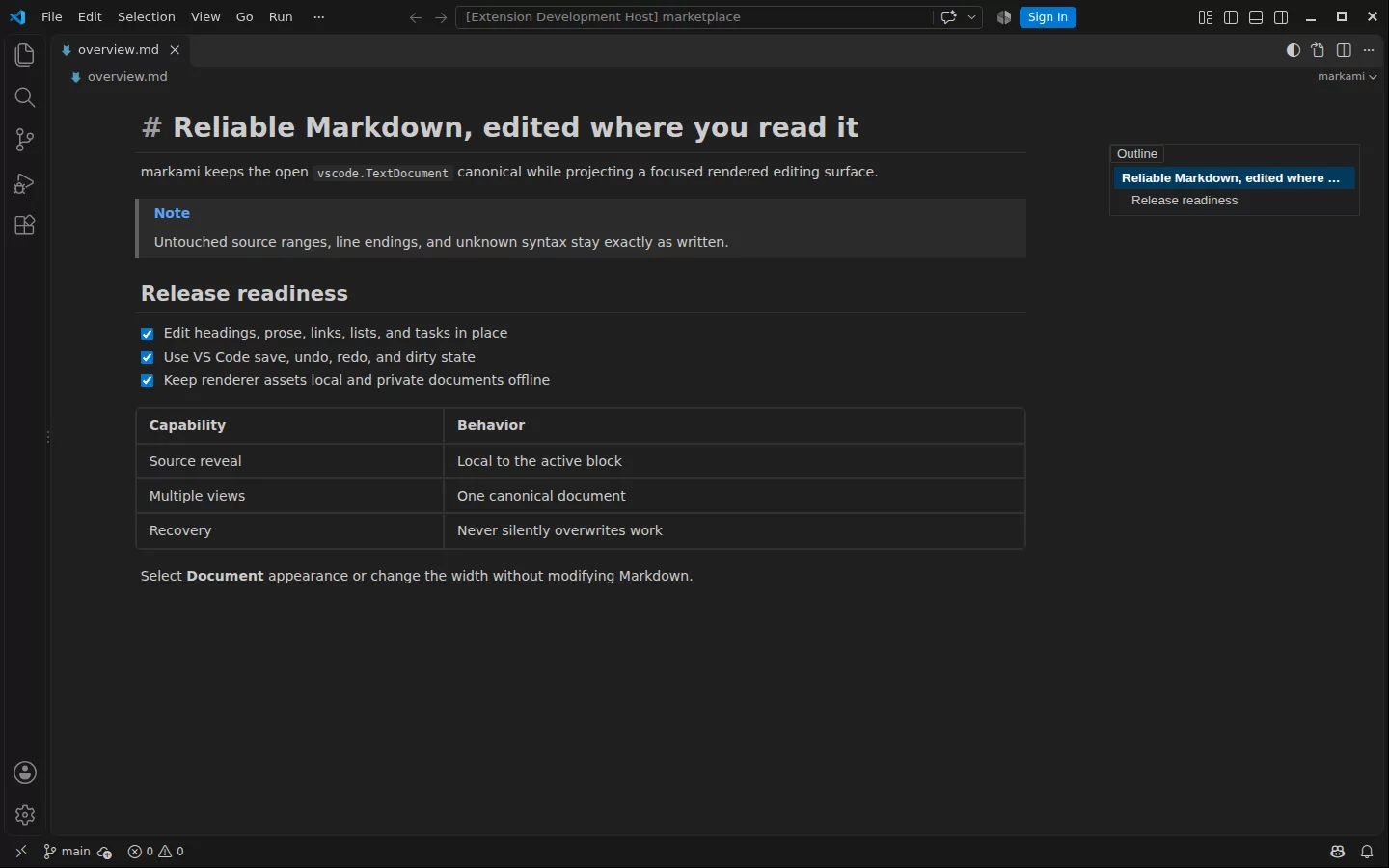
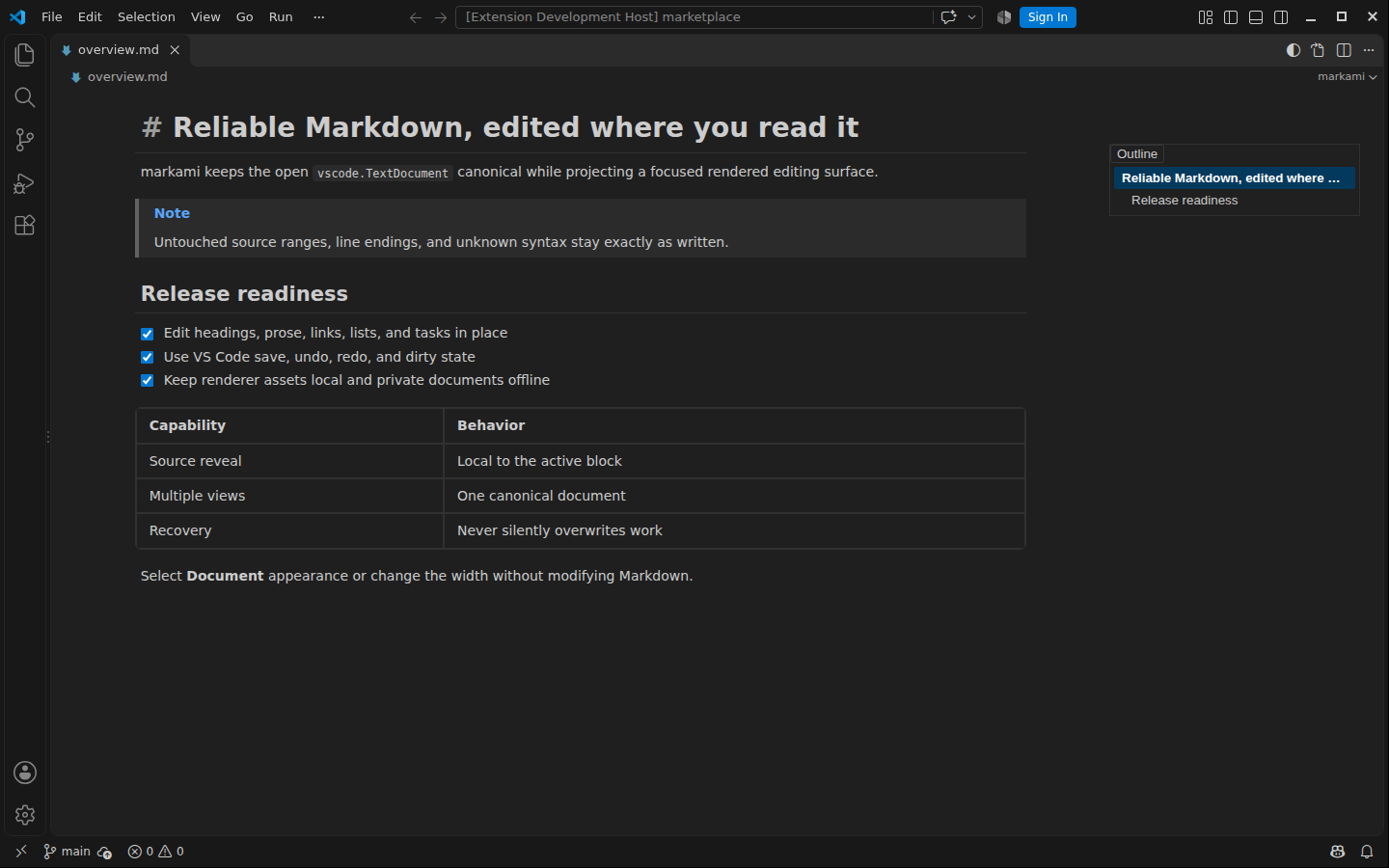
Edit in the rendered document
Read and edit Markdown in one rendered surface while VS Code keeps the source document canonical.
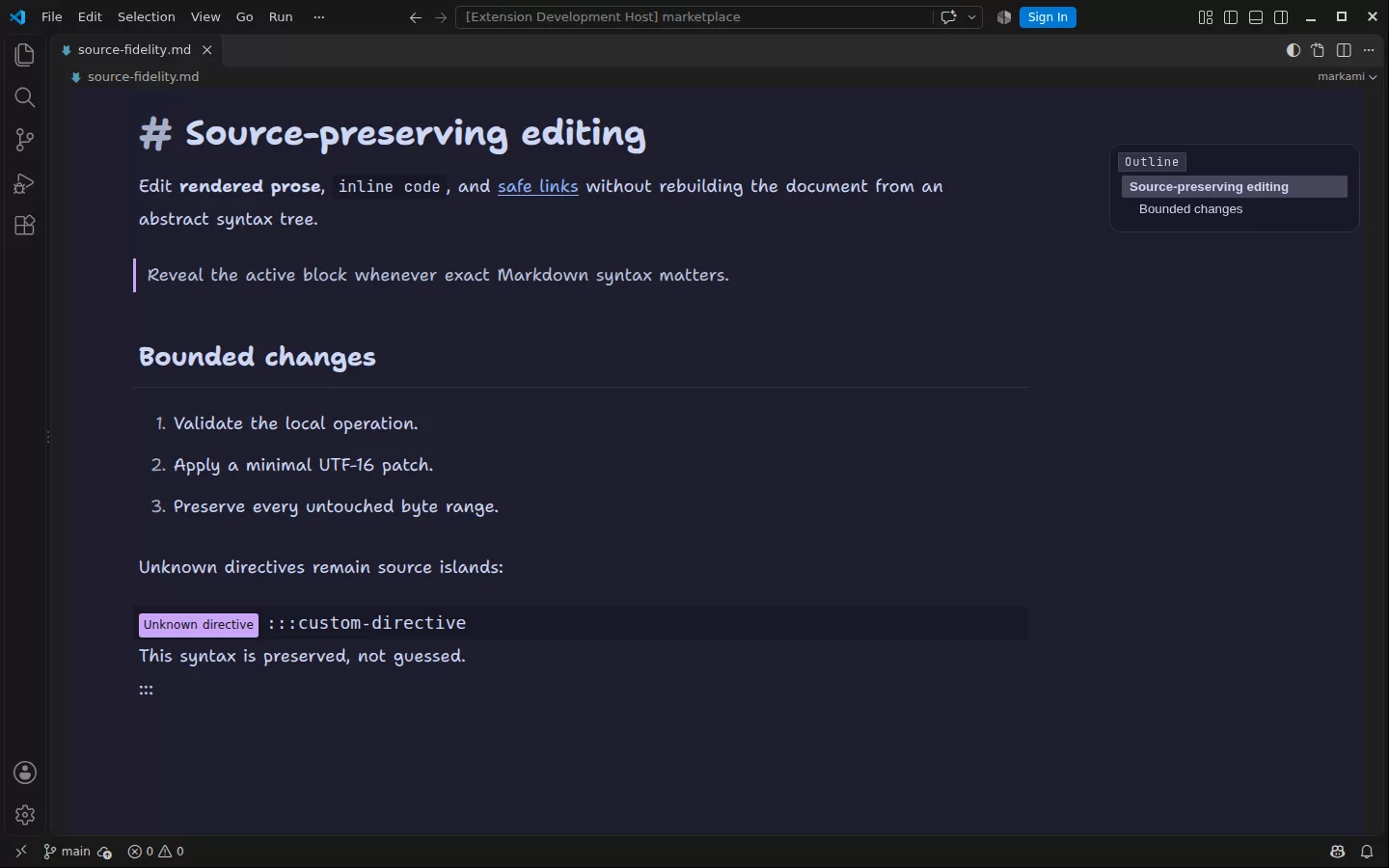
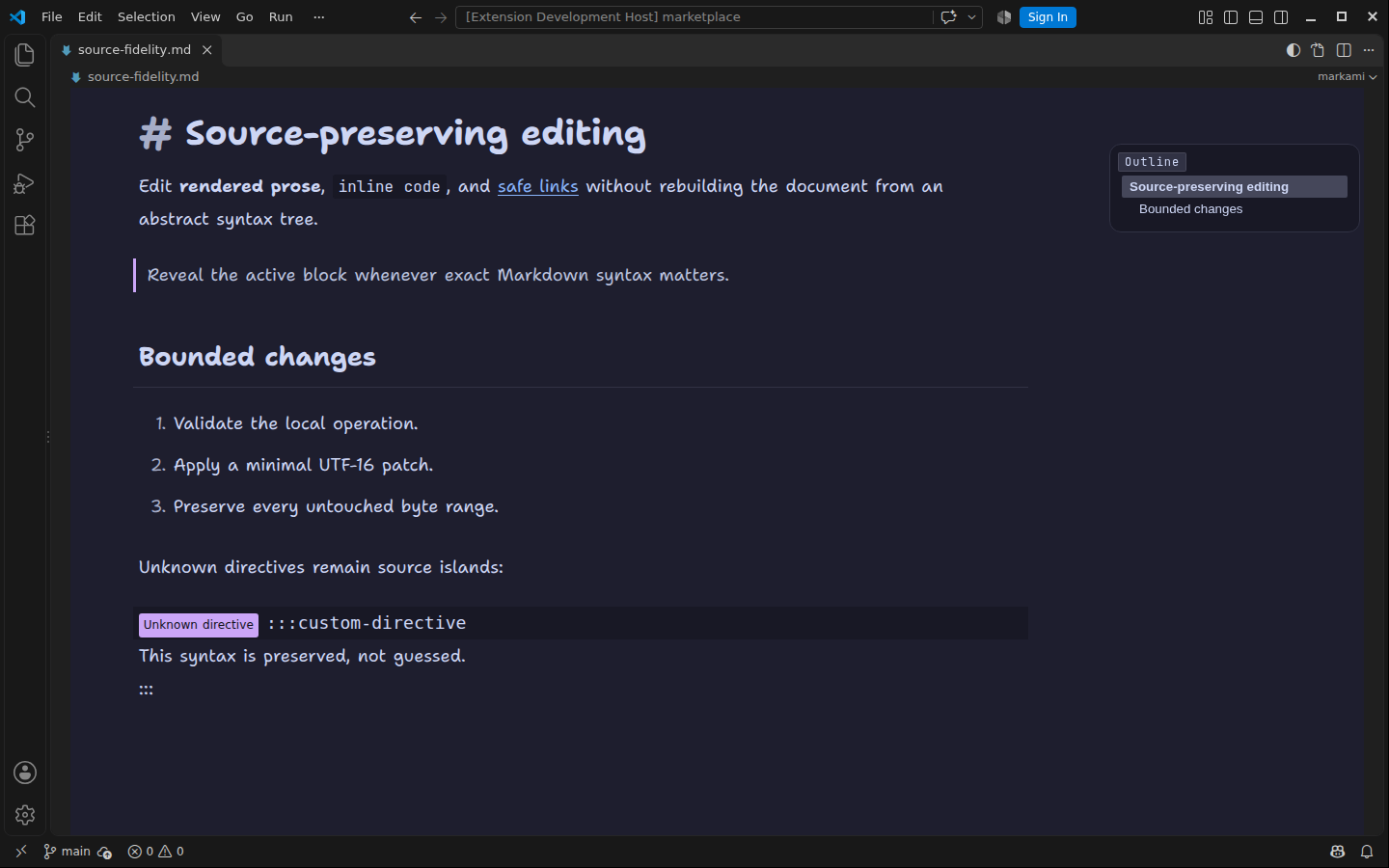
Reveal source only when you need it
Reveal exact syntax for the active block without switching the whole document away from rendered editing.
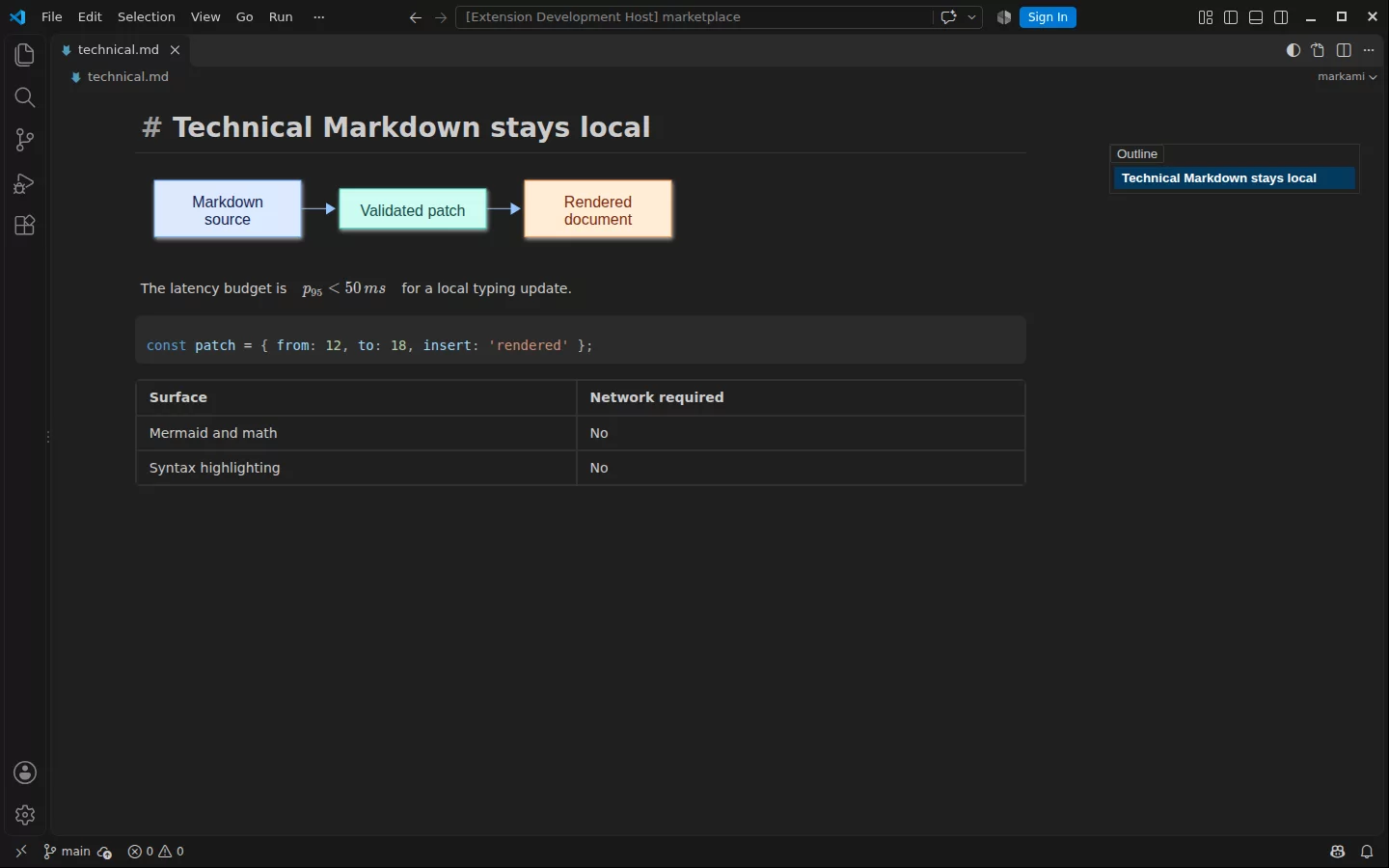
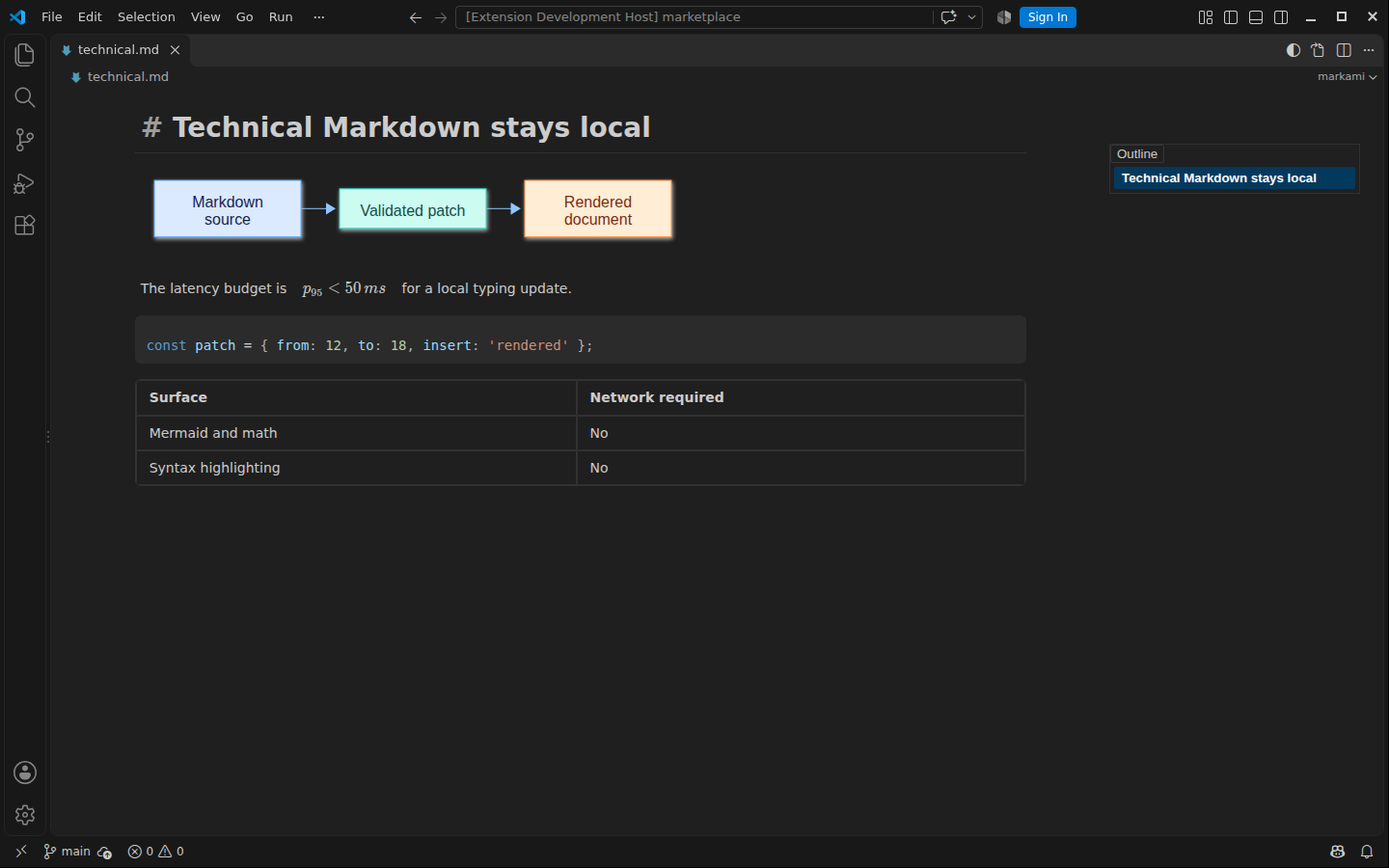
Keep technical content local
Mermaid, math, syntax highlighting, and table editing ship locally and continue to work offline.
Keep your Git diffs small
Promote a paragraph to a heading in the rendered document and the diff shows that one line. Line endings, trailing spaces, and table alignment stay as written.
Get started
Requires VS Code 1.102 or newer on desktop, with a local-filesystem workspace.
- Install markami from the Extensions view, or run
code --install-extension shipsolid.markami. - Open a
.mdor.markdownfile and click the markami icon in the editor title bar, or run markami: Open Rendered Editor. - Edit in the rendered document and save as usual. Click the title-bar icon or run markami: Open Source Editor to return to the plain text editor at any time.
New to markami? Run markami: Open Sample Document, or follow the Get started with markami walkthrough (Help → Welcome → Walkthroughs).
markami does not replace the native Markdown editor on its own. To open every Markdown file in markami,
run markami: Make markami the Default Markdown Editor; run markami: Use Native Markdown Editor by
Default to undo it. Both ask for confirmation and change only the *.md and *.markdown entries of
your user workbench.editorAssociations setting. Reopen Editor With… → Configure default editor for
'*.md' does the same through VS Code's own menu.
How it keeps your source intact
The open vscode.TextDocument remains canonical. markami applies validated local edits to the source
and never regenerates the document from a rendered tree.
How markami differs
| Approach | What you get | Trade-off |
|---|---|---|
| Rendered editors that rebuild the file from their own document model | Word-processor style editing | Saving can rewrite Markdown you never touched (list markers, spacing, table alignment), so Git diffs grow |
| Syntax hiding inside the VS Code text editor | Every text-editor feature and extension keeps working | Tables, Mermaid, and math stay as source |
| markami | Rendered tables, Mermaid, math, and block tools; each edit is a small patch to the open document | It is its own editor tab, so extensions that act on text editors (spell checkers, Vim emulation, inline lint squiggles) may not apply there |
When you need those text-editor features, run markami: Open Source Editor. The same file can also stay open in the text editor and in markami side by side; both views edit one document.
What ships
- Rendered editing for CommonMark and GitHub Flavored Markdown, including lists, tasks, tables, links, images, code, math, Mermaid, alerts, and safe HTML.
- Source reveal for the active block, selection, or explicit command; unsupported and ambiguous syntax remains editable in a source island.
- A slash-command insertion menu, selection formatting toolbar, and source-preserving block handles.
- Outline navigation and rendered-text/source-text find.
- A clean VS Code appearance (default) that follows your theme exactly, and an opt-in Document appearance with
bundled Shantell Sans and JetBrains Mono and, in dark themes, the Catppuccin Mocha palette
(
markami.document.palette). Switch styles with the editor-title icon or markami: Toggle Document Appearance; width ismarkami.document.widthor markami: Set Document Width. - Per-file presentation preferences stored outside the Markdown source and synchronized across views.
- Conflict-safe external edit handling, bounded local recovery drafts, and native source fallback for documents larger than 4 MiB UTF-8.
See syntax support for the detailed behavior and fallback matrix.
Editing
- Type and select text directly in rendered blocks.
Ctrl/Cmd+B,Ctrl/Cmd+I, andCtrl/Cmd+Kshare the same bounded source-edit operations as the toolbar. While a markami editor has focus,Ctrl/Cmd+Kcreates or edits a link, so VS Code'sCtrl+Kchords (such asCtrl+K Ctrl+S) do not start there. To keep the chords, remove or rebind markami: Create or Edit Link in Keyboard Shortcuts. - Type
/in an empty top-level paragraph for the insertion menu. The command markami: Open Slash Commands remains available when the automatic trigger is disabled. - Focus a supported top-level block to use its handle. Copy or reveal its Markdown, or move it with Move Block Up, Move Block Down, or Move Block To….
- Use Toggle Source Reveal for Current Block when exact syntax is more useful than projection.
- Use Find in Document Text for visible content or Find in Markdown Source for literal source.
- Table cells support
Tab/Shift+Tab;Tabfrom the last cell can append a row as one undoable edit.
Opening, changing appearance, revealing source, navigating the outline, and finding text do not edit the document. Accepted edits participate in VS Code save, autosave, undo, redo, dirty state, and multi-view synchronization.
Appearance and file preferences
Use the document toolbar or these commands:
- markami: Set Document Appearance — VS Code or Document typography.
- markami: Set Document Width — Auto, Readable, or Full.
- markami: Reset File View Preferences — clear overrides for the active file.
- markami: Reset Workspace View Preferences — clear remembered overrides for the workspace.
Preferences never enter Markdown or frontmatter. Disable per-file persistence with
markami.viewPreferences.rememberPerFile; session changes continue to work.
Resources, privacy, and offline behavior
- Relative links and local images are resolved by the extension host and constrained to the workspace.
- Remote HTTPS images follow
markami.remoteImages:block,prompt(default), orallow. - Mermaid, math, code highlighting, fonts, and editor assets are packaged locally and work offline.
- Unsafe URLs, executable schemes, unsafe HTML, and filesystem escapes fail closed while source stays editable.
- In an untrusted workspace (Restricted Mode) markami still opens and edits Markdown. Workspace settings
cannot change
markami.remoteImages, and an image from outside the workspace cannot be copied in until you trust the workspace. - markami has no telemetry, account, cloud sync, or document upload. Review the privacy policy and security policy.
Fidelity boundaries
markami preserves untouched UTF-16 source ranges, line endings, BOM state, final-newline state, and unknown syntax. An operation may normalize only its documented local construct (for example, a GFM table changed structurally). If a safe mapping cannot be proven, strict mode leaves source visible instead of guessing.
Files over 4 MiB UTF-8 open in the native source editor. Browser extension hosts are deferred; the initial platform is desktop VS Code with local filesystem workspaces. MDX and custom directives are preserved as source islands, not executed components.
markami is a Preview. IME composition and screen-reader behavior are covered by automated tests but have not yet been verified on native assistive technology; please report problems.
Recovery and troubleshooting
When an external edit overlaps unsynchronized local work, markami offers inspection, copy, reload, or discard choices and never silently overwrites either version. Recovery drafts are local, bounded, and separate from the Markdown file.
If rendering or editing behaves unexpectedly:
- Run markami: Open Source Editor and confirm the canonical file is intact.
- Run markami: Show Diagnostics. Diagnostics contain versions, counts, and feature state—not document content by default.
- Disable the affected optional renderer (
markami.renderMermaid,markami.renderMath, ormarkami.renderSafeHtml) and reopen the editor. - For remote images, inspect
markami.remoteImagesand workspace trust.
Report bugs at https://github.com/shipsolid/markami/issues with VS Code/OS versions, exact source or a minimal redacted reproduction, the command or keystroke used, expected/actual behavior, whether the native source changed, and reproduction steps from a clean profile. Never attach secrets or private documents.
For source, support, licensing, and release history, see the repository, issue tracker, MIT license, and changelog.
Contributing
To build markami, install a local VSIX, or run the verification gates, see docs/contributing.md. Release evidence lives in docs/delivery.
License
markami is released under the MIT License. Bundled dependency licenses are reproduced in THIRD_PARTY_NOTICES.txt.