OpenZCAD is a browser-first parametric CAD workspace: exact B-rep solid modeling, a replayable feature history, and direct on-model manipulation, with no desktop install. The canonical project document stores named parameters, sketches, and an ordered command history, and a WebAssembly solid kernel rebuilds exact geometry in a background worker. Projects live on your device first; an optional account adds cloud projects, sharing, and live collaboration.
Use the hosted beta at zcad.app.
Warning
OpenZCAD is under active development and should be used at your own risk. Features and behavior may change without notice. Do not rely on the hosted beta as the only copy of important work: cloud projects and account data may be reset, migrated, or not carried forward to a future production release. Keep independent local or exported backups of anything important.
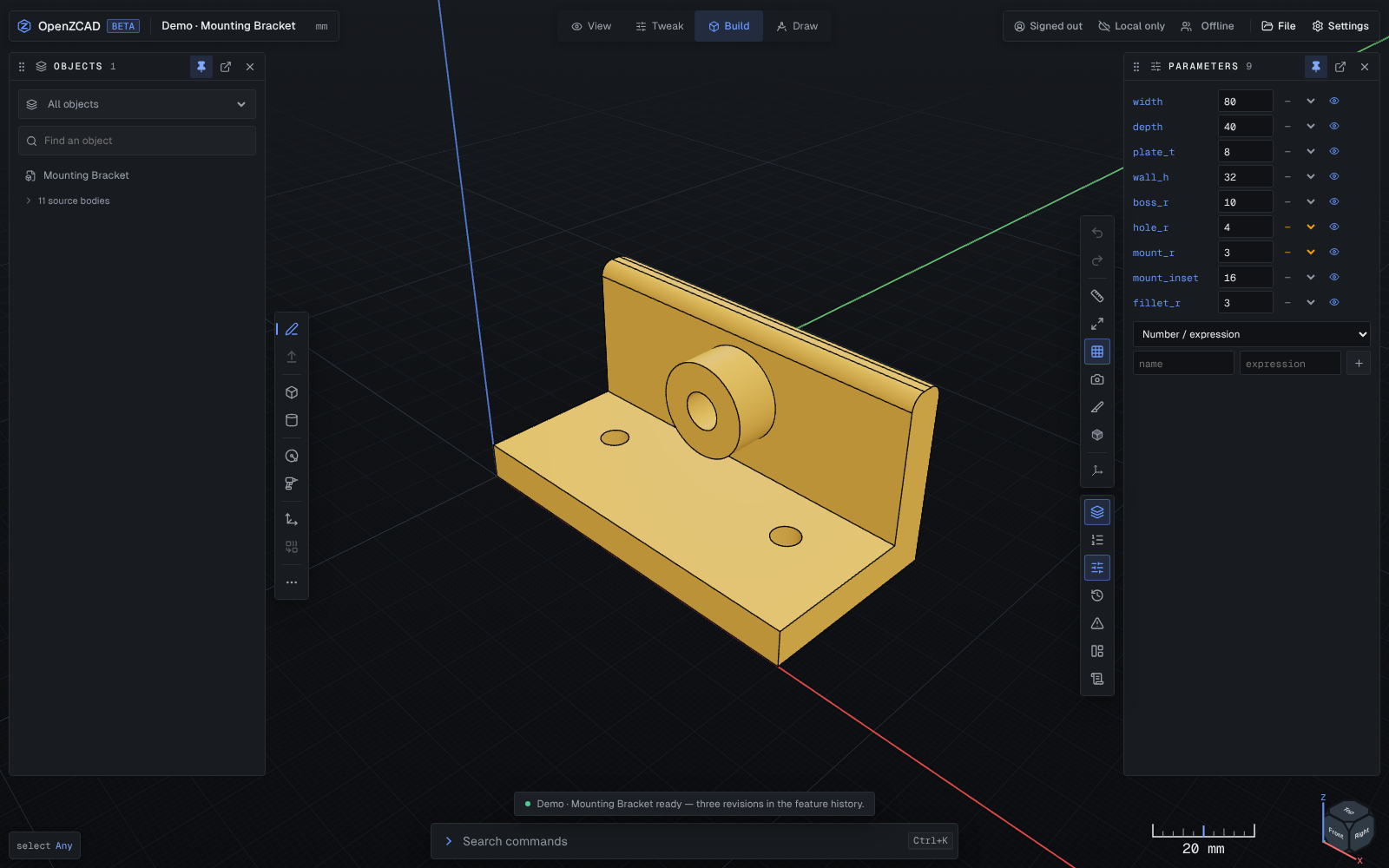
Current Build workspace in the default Essentials panel layout, captured 20 October 2026 from the built-in demos running locally.
Highlights
Exact parametric modeling. Primitives, multi-profile sketch/extrude, revolve, loft, sweep, booleans, transforms, mirror-copy, shell, solid offset, fillet, chamfer, and linear/circular patterns, built on the Remus exact kernel. Sketches carry lines, arcs, circles, rectangles, polygons, and text set in bundled font files. New face-attached sketches re-resolve an exact lineage reference at their history position instead of freezing a viewport plane. Reusable offset planes and parallel midplanes support sketches, Split, and Mirror. Parametric expressions, ordered feature history with editing, suppression and rollback, deterministic replay, transactions, and undo/redo.
Direct manipulation. Model directly on the geometry: drag a face to offset it, drag a sketch region into a solid, drag an edge to grow a fillet or chamfer, move/rotate bodies with a snapping gizmo — every drag pairs with exact numeric entry. In-viewport sketching includes snapping, live dimensions, direct tools for every schema-backed constraint kind, and placed driving distance/angle dimensions whose values accept named-parameter expressions. Box select, selection filters, a right-click menu, and an Esc ladder round out the interaction model.
A viewport-first workspace. Floating controls leave the model at the centre: a compact tool rail on the left, view and inspection instruments on the right, and command search along the bottom. Objects, History, Parameters, Revisions, and Diagnostics are independent model panels with buttons on the right-hand rail. A rail press opens a panel unpinned beside the rail; Pin docks it and Close remembers where it was. Drag a panel's header, or its rail icon, to stack it in a column at either screen edge, start a new column, or float it as a movable, resizable window over the model — a slot preview shows where it will land — and its Move menu does the same from the keyboard. View options on the rail picks a layout preset (Essentials, the default, docks Objects left and Parameters right) and holds Hide all panels (Ctrl/Cmd+\), Lock layout, Compact rows, and the panel width. The layout is remembered per device; on a stage 720 px wide or less, panels open one at a time instead of docking. Objects lists bodies and sketches with selection and visibility controls. Build exposes the full modeling tools, Tweak focuses on parameters and export, and View presents the model for inspection. Ctrl/Cmd+K opens command search; Ctrl/Cmd+, opens Settings over the workspace. The optional AI assistant shares the bottom prompt and proposes changes for review before you apply them.
One kernel, one topology language. Remus builds every document, imported STEP included. OpenCascade is absent from the modeling adapter; it is used by the non-shipping parity reference and by the separately loaded FreeCAD import converter. Remus publishes exact topology witnesses and a safe subset of semantic lineage (ADR-011, ADR-013, ADR-020). Verified primitive, sweep, transform, boolean, blend, and pattern lineage can survive upstream edits within supported subsets. Where complete evolution is not proved, references remain hash-only; ambiguous or unsupported resolution fails closed.
Import and export. Editable STEP import is stored in replayable document history and rebuilt exactly, honouring the file's own declared length and plane-angle units. Selecting an exact imported face shows its surface type and area; the shipped direct-edit subset includes validated through-hole and cylindrical-face edits. A bounded exact recognizer includes blind-hole, counterbore, countersink, boss, pocket, and taper detectors; the live imported-body pass publishes non-overlapping revolution proofs, including counterbores with a conical entry chamfer. Auto-parameterize coordinates the three hole families; the other proof families remain read-only. STEP export preserves distinct solids as a compound; STL export is always millimetres. STL, 3MF, OBJ, glTF binary and PLY imports become mesh bodies. Additional migration paths import FreeCAD saved solids and a Shapr3D project paired with its STEP export, with explicit limits on recovered history. All geometry and exports run in browser workers.
Local-first, optionally cloud. IndexedDB autosave works with no account, and File → Export project writes a complete .openzcad backup at any time (see Project backups). When local and cloud copies diverge, OpenZCAD preserves both and asks which one to keep instead of guessing from versions or timestamps. Optional passwordless profiles unlock cloud projects, synced settings, project shelves that pin, reorder, archive, and recycle across devices, and live per-project collaboration with owner/editor/viewer roles and per-browser edit leases shared by one editing account. Owners can mint revocable share links that let anyone open the model, adjust its parameters, and export without an account. Conflict recovery always writes a local recovery project before choosing the room version, keeping the leased local version, or saving the local version as a copy. Account settings show storage in use and can erase account data on request. The checked-in beta configuration enables sharing and lease enforcement for authenticated accounts; the local development configuration keeps them off.
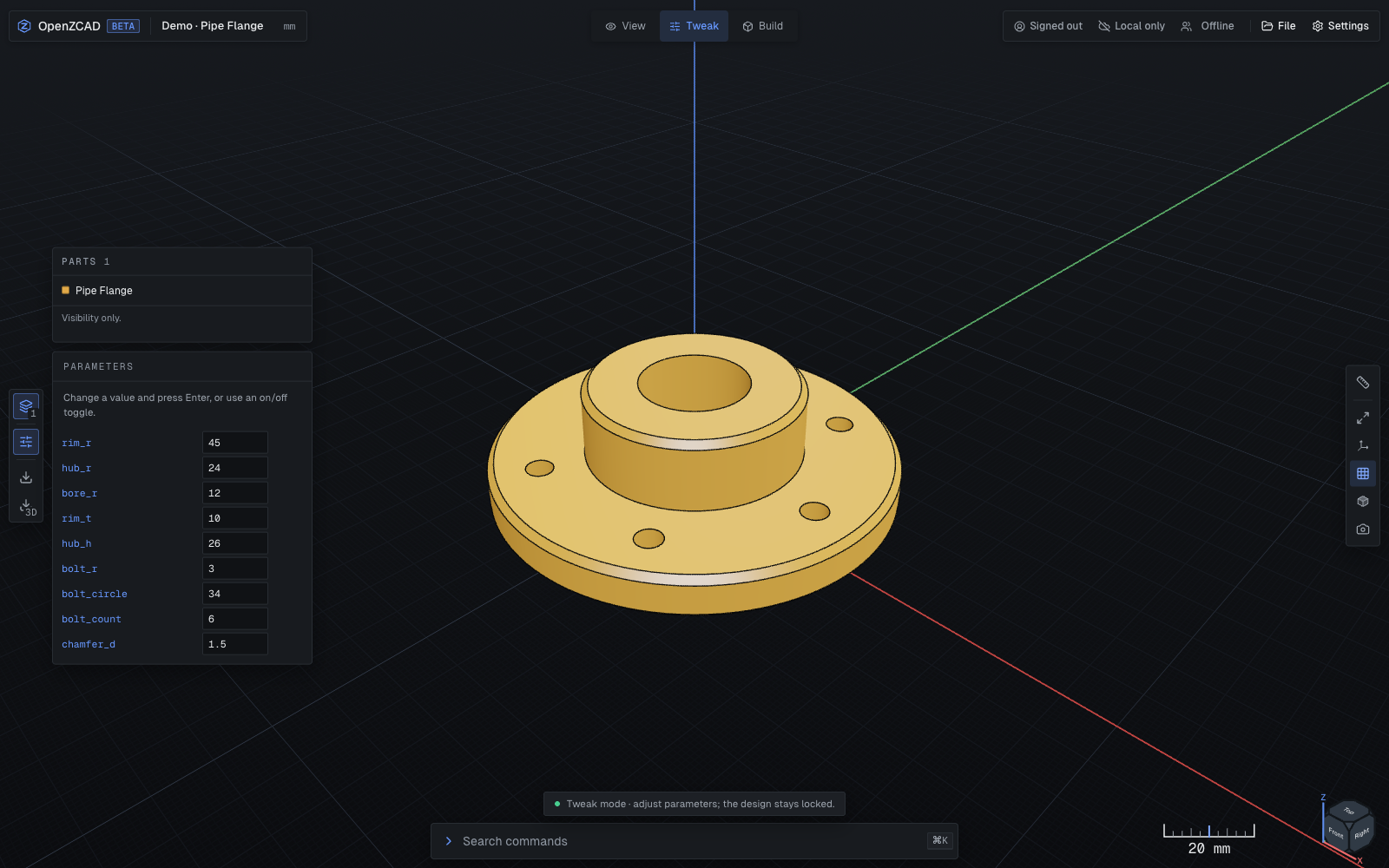
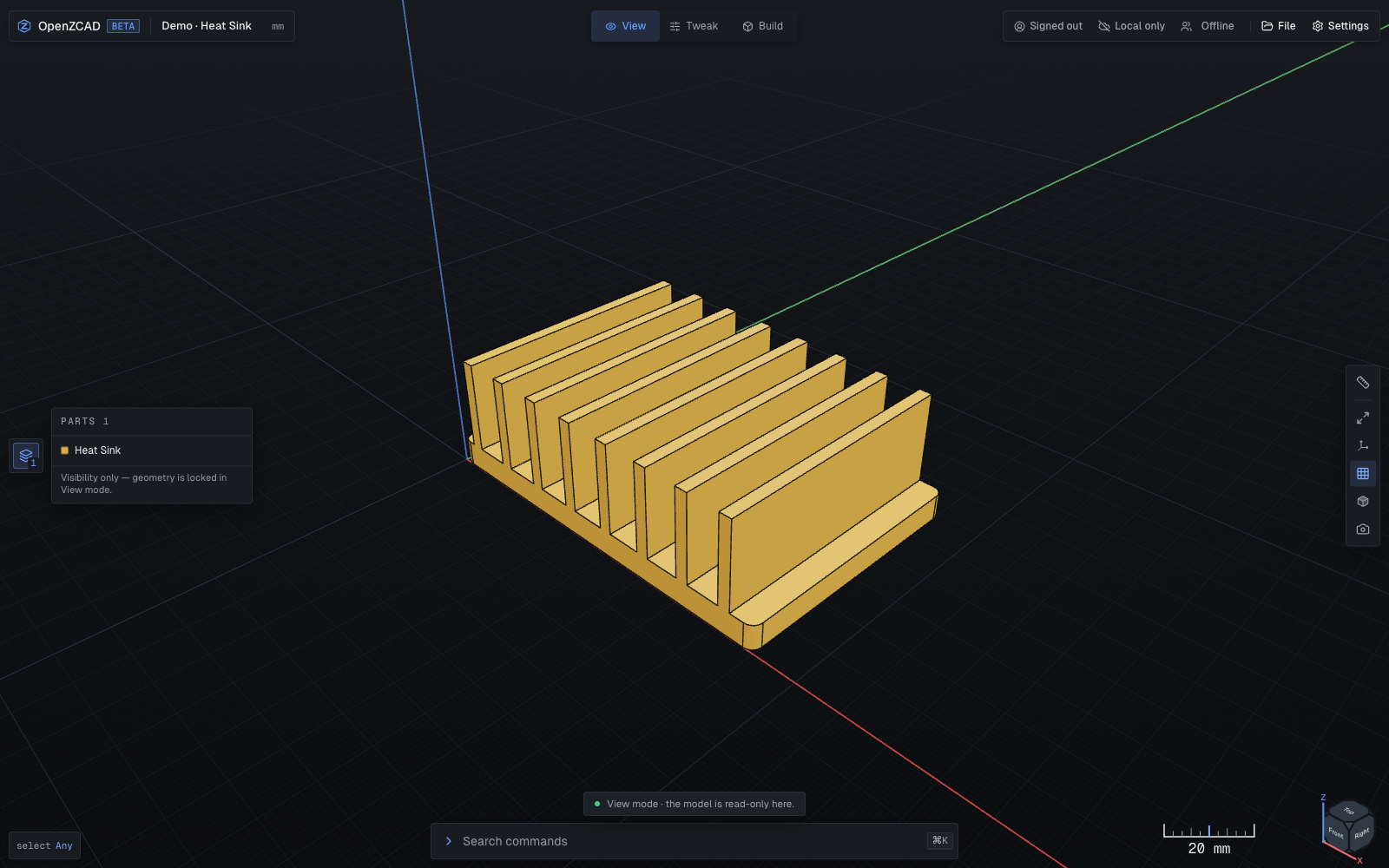
Pipe Flange in Tweak mode (left) and Heat Sink in View mode (right).
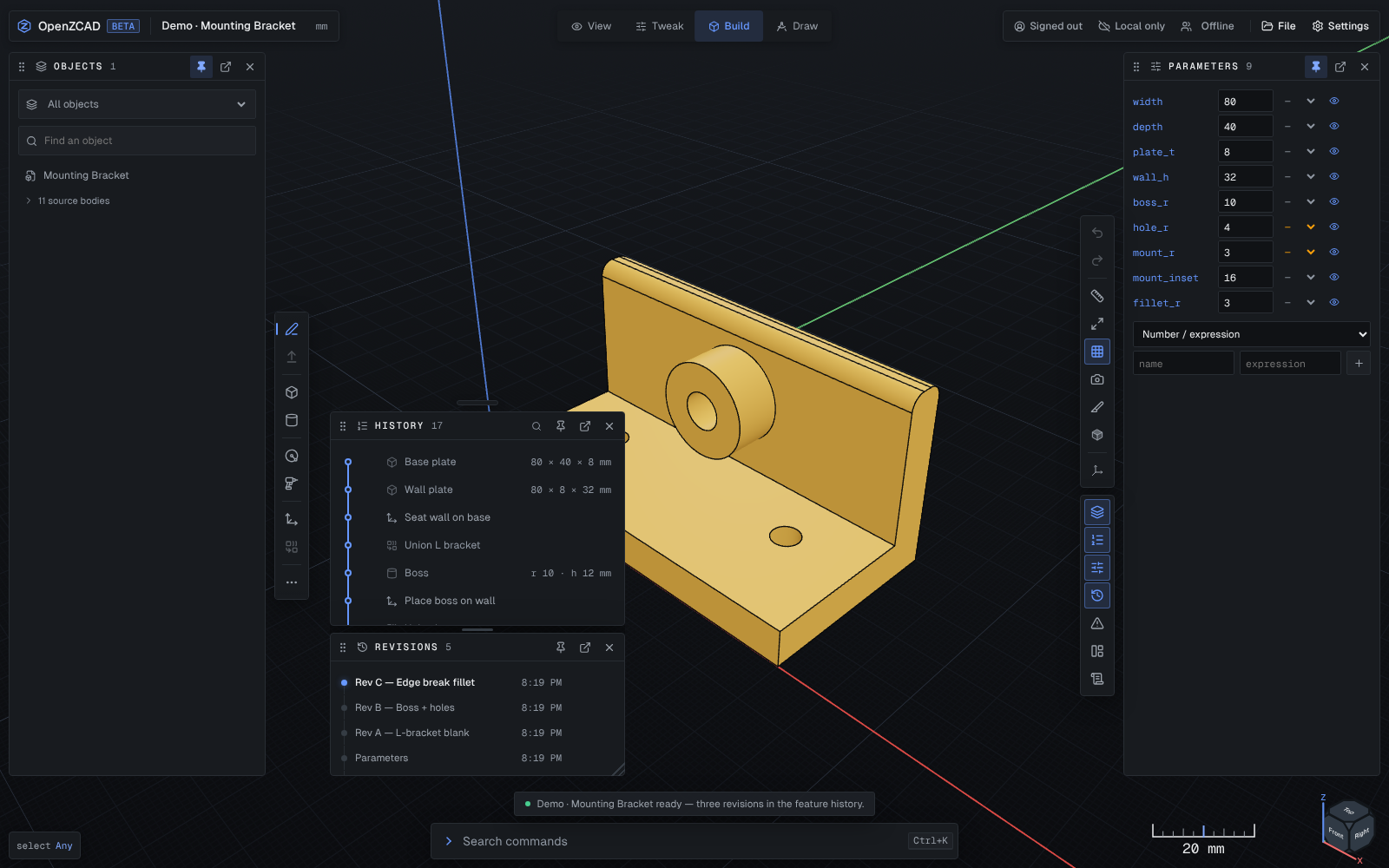
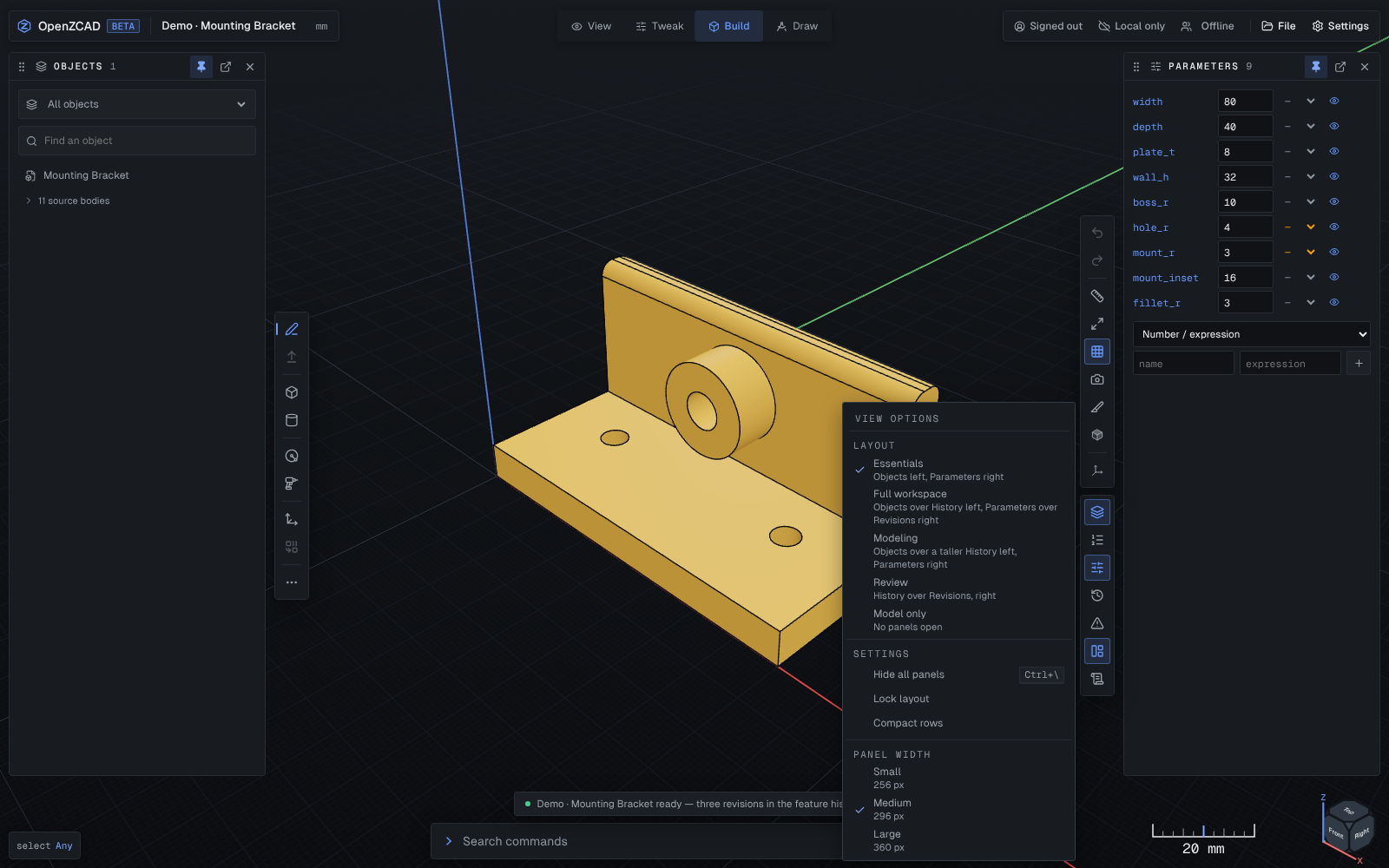
Model panels: History and Revisions stacked in a floating window (left), and the View options menu (right).
Roadmap
See the master roadmap for delivered capabilities, the ordered work queue, completion criteria and links to detailed specifications.
Quick start
See Contributing for development and pull request guidance, and Security for vulnerability reporting.
Requires Node.js 20.19+ on the 20.x line, or Node.js 22.12+, and pnpm 10.
pnpm install --frozen-lockfile
cp apps/web/.dev.vars.example apps/web/.dev.vars
pnpm dev:web
Open the URL Vite prints. The start screen offers three built-in demos: Mounting Bracket, Pipe Flange, and Heat Sink. Each includes revisions A → C so you can inspect how the model was built.
To explore the workspace:
- Open Mounting Bracket: on a new device the Parameters panel is docked on the right with its named dimensions, and Objects on the left to select and hide bodies or sketches.
- Use the right-hand rail's History and Revisions buttons to inspect features and revisions, and Pin a panel to keep it docked.
- Switch to Tweak to adjust exposed parameters, or View to inspect the result.
- Use File → Export project for an editable backup, or export STEP/STL for downstream use.
Settings are available from the start screen, the workspace gear, the command palette, or Ctrl/Cmd+, — the Settings page overlays the workspace, so the open tool, panel state, and committed work survive it, keypad drafts included; a not-yet-opened exact-entry queue does not.
Project backups
Use File → Export project to download an .openzcad backup of the entire
open project, independently of the selected body. The backup contains the
editable model, parameters, sketches, feature and command history, checkpoint
records, retained restorable save states, STEP source blobs, measurements, and
archived files. Display meshes rebuild from the model when it opens.
Use Import project… on the project screen or in the File menu to create a separate local project. Its original remains unchanged. Sources, save states, measurements, and archived files commit together; imported files remain available under Stored files after an offline reload. The copy can later be saved to your account using the existing project controls.
Backups use a versioned JSON container with SHA-256 checksums and a 256 MB limit. Cloud-backed projects need access to their archived files and retained save states; failed downloads stop export rather than create a partial backup. Previously pruned save states retain their history records but cannot regain snapshot contents that no longer exist. Account permissions, shelf placement, viewport preferences, and the transient undo/redo stack are not transferred.
Architecture
React workspace (apps/web)
  ├─ canonical ProjectDocument + CommandManager   (source of truth)
  ├─ IndexedDB autosave
  ├─ Three.js viewport                            (disposable projection)
  └─ geometry Web Worker
       └─ remus-wasm  — the exact B-rep kernel, for every document
       └─ remus-wasm-io  — its file-format translators, loaded only around import/export
                           including STEP imports

Cloudflare Worker (beta orchestration only)
  ├─ D1 project metadata, documents, sessions, settings
  ├─ R2 artifact coordination
  ├─ Email-code identity + owner authorization (optional)
  ├─ Durable Object live project rooms
  └─ AI assistant proposal stream (optional, experimental)
Boundaries that hold everywhere:
- The browser document/history model is the source of truth; meshes are disposable projections.
- Geometry and exports run in the browser worker, never in the Cloudflare Worker.
- Topology fingerprints are content-addressed and stable across rebuilds — checked in
test/kernel-seam.test.ts, and against the OpenCascade reference in bulk by the parity corpus — and resolution is fail-closed at every call site. Documents saved by the pre-fingerprint OpenCascade scheme are rejected with a re-select diagnostic rather than reinterpreted. - Schema-v1 through schema-v19 documents migrate to schema v20 on load. Schema v14 preserves bounded undo/redo history; schema v15 adds on/off parameters that control body visibility and export inclusion. Schema v16 marks the orientation of newly authored Front sketches; saved unmarked sketches retain their original basis. Schema v17 supports mesh payload references; embedded meshes stay embedded on load, and older clients must update before opening v17 documents. Schema v18 adds the symmetric, point-on-curve and lock sketch relations; older clients must update before opening v18 documents. Schema v19 adds offset and mid datum planes, which sketches, Split and Mirror can reference; older clients must update before opening v19 documents. Schema v20 adds the through-all extrude cut; older clients must update before opening v20 documents.
See architecture.md and the decision records in docs/adrs. The current implementation status and explicitly unshipped gaps are tracked in the capability matrix.
The monorepo is a pnpm workspace: apps/web, apps/desktop (a Tauri 2 macOS shell, see below), plus focused packages — document-core (canonical model), command-system (undo/redo, transactions), geometry (sketch regions, plane math), kernel-adapter (the Remus exact adapter), viewport (React-free three.js scene framework), io-step/io-stl, ai-contracts, cloudflare-adapters, persistence, and shared.
Development
pnpm dev:web          # Vite + local Cloudflare Worker
pnpm typecheck        # TypeScript
pnpm lint             # ESLint
pnpm test             # unit and integration tests (Vitest)
pnpm test:web         # web app tests
pnpm test:parity-corpus  # serial Remus parity corpus vs the OpenCascade reference
pnpm test:e2e         # Playwright end-to-end suite
pnpm test:coverage    # unit tests with coverage
pnpm build            # production web/worker bundle + bundle-size check
pnpm deploy:beta      # official deployment; maintainers only
Local development uses AUTH_MODE=development and the isolated user_beta_dev identity. Never deploy apps/web/wrangler.jsonc: it is a development-only config and deliberately binds a placeholder dev database ID so it cannot write to beta data (create a real dev D1 and replace the ID for local use). The worker refuses to start if development authentication is combined with a guarded or non-development environment. When R2/Durable Object bindings are absent, the affected routes return a clean FEATURE_DISABLED 501 before touching persistence.
The checked-in root wrangler.jsonc is the canonical configuration for the
official deployment. Its D1 ID, bucket name, Worker name, public site key, and
domains are non-secret identifiers; they do not grant access. To deploy an
independent instance, use the separate example and instructions in
Self-hosting OpenZCAD. Never copy the official resource
identifiers into a self-hosting configuration.
macOS desktop (Tauri)
apps/desktop is a Tauri 2 shell for Apple Silicon that bundles the same web
workspace; geometry still runs in the browser workers, and the Rust host stays
narrow — native menus, user-picked CAD files, exports, and window-state
restoration. The desktop app signs in through the browser: it starts a
short-lived sign-in attempt, the browser approves it, and the app exchanges it
for refreshable access tokens, so no password or session cookie ever passes
through the native shell. It needs macOS 14+, Xcode Command Line Tools, and
current stable Rust with the aarch64-apple-darwin target. The desktop crate
declares Rust 1.85 as its minimum; the current locked dependencies require
Rust 1.88 or newer:
pnpm dev:desktop      # tauri dev against the local workspace
pnpm build:desktop    # .app and DMG for aarch64-apple-darwin (ad-hoc signed)
See docs/macos/README.md for the full setup, the
WKWebView smoke test (pnpm --filter @openzcad/desktop test:e2e), and the
manual macos-desktop CI workflow.
Performance
Interaction and startup performance are measured, not guessed — see docs/performance-baseline.md for the committed baselines and history. Rendering is on demand: hover picking is coalesced to one raycast per frame and skipped during camera drags, and the shadow map only re-renders when geometry changes. Reproduce the interaction numbers with:
OZ_PERF=1 pnpm exec playwright test interaction-probe
The exact adapter and Remus WASM load lazily inside the geometry worker on the first non-empty rebuild or export. The kernel-adapter manifest pins the Remus WASM packages to immutable source commits, and pnpm-lock.yaml records their resolved dependencies for reproducible installs. The Remus update workflow proposes pin updates through pull requests. Ordinary modeling loads only Remus. FreeCAD import separately loads an OpenCascade-based BREP-to-STEP converter on demand; that converter is not part of the modeling adapter. Canonical rebuild results use a worker-local LRU capped at 8 entries and 32 MiB, with at most 4 distinct loads in flight. Cache hits are structured-cloned and exports remain uncached caller-owned work. See ADR-015 and the measured bundle inventory in docs/performance-baseline.md.
Deploying to Cloudflare
Email sign-in uses Cloudflare Email Service and Turnstile. Before enabling a real beta login:
- onboard the
zcad.esau.appsending domain and keep theEMAILbinding restricted tonoreply@zcad.esau.appfor sign-in and project invitations; - create a managed Turnstile widget allowlisting
zcad.app,zcad.esau.app,localhost, and127.0.0.1, then bind its site key asTURNSTILE_SITE_KEY; - review the pending remote D1 migrations before deploying with
pnpm deploy:beta; that guarded command applies them before publishing the Worker and then verifies the live commit and every required readiness gate; - follow the project cloud-sync release runbook for the migration gate and authenticated two-device canary;
- set
AUTH_MODE=email-code,ENVIRONMENT=beta,AUTH_EMAIL_FROM=noreply@zcad.esau.app,PROJECT_INVITATION_EMAIL_FROM=noreply@zcad.esau.app, and the canonicalPUBLIC_APP_ORIGIN=https://zcad.appused for invitation links (the checked-in beta config also setsPRODUCTION_GUARD, which makes the worker refuse development auth outright); - provide secrets, generated with
openssl rand -base64 32where appropriate and set viawrangler secret put, never committed:AUTH_OTP_PEPPER,TURNSTILE_SECRET_KEY,SETTINGS_ENCRYPTION_KEY(must stay stable across deploys), andAI_IDENTITY_PEPPER. The deployment preflight lists these required secret names without reading their values; verify the remote Worker secret list before