ProseMark VS Code Extension | Demo
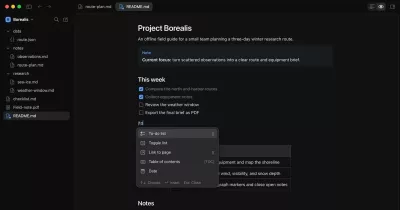
ProseMark is a modular toolkit for building "What You See Is What You Mean" (WYSIWYM) markdown editors, a type of editor that merges the look of rendered markdown into the editor itself rather than rendering the markdown in a separate window. Two of the most well-known editors of this type are Obsidian and Typora.
This project is structured as a set of extensions for CodeMirror 6, and is broken up into the following packages:
@prosemark/core: the core functionality needed for the WYSIWYM editor.@prosemark/render-html: renders raw HTML blocks in Markdown (sanitized with DOMPurify).@prosemark/latex: renders LaTeX math (inside$...$/$$...$$) using MathJax. Setup guide: prosemark.com/guides/latex-math.@prosemark/paste-rich-text: enables pasting formatted rich text into the editor.@prosemark/spellcheck-frontend: CodeMirror UI for spellcheck (underlines, suggestion tooltips, optional custom actions). You plug in your own spell engine and issue source; see the package README and demo.
Features
- Inline styling including italics, bold text,
code spans, andstrike throughs. - Links
- Headings (ATX and Setext)
- Ordered and unordered lists
- Task (checkbox) lists
- Images
- Block quotes
- Code fences with syntax highlighting
- Rendered HTML when you add
@prosemark/render-html - Dollar-delimited math (
$...$/$$...$$) when you add@prosemark/latex— see LaTeX math setup (or use the VS Code LaTeX integration below) - Spellcheck UI when using
@prosemark/spellcheck-frontend(you supply the dictionary / engine)
ProseMark for Visual Studio Code
The ProseMark extension is a custom editor for .md files: a WYSIWYM Markdown surface built on the same CodeMirror packages as this repo. It lives under apps/vscode-extensions/core and is published as vscode-prosemark.
Extension pack: installing ProseMark from the Marketplace also recommends companion extensions so common workflows work out of the box:
- Code Spell Checker — spelling engine and dictionaries.
- ProseMark - Code Spell Checker (cSpell) Integration — bridges cSpell into the ProseMark webview using
@prosemark/spellcheck-frontend. - ProseMark - LaTeX math (MathJax) integration — registers
@prosemark/latexin the webview so folded math renders with MathJax.
Optional companion (not in the extension pack):
- ProseMark - Vim mode (Open VSX) — vim-style editing in the ProseMark webview via
@replit/codemirror-vim. Toggle withprosemark.vimModeEnabled.