Score the game once, on your phone. The scorebug on your live stream, your team's season stats and a public page for the parents all come from the same taps.
Scoreboard is built for youth sports streamed with OBS (or any streaming software that takes a web page as a source). Baseball has the deepest pad, with player stats; football, soccer, basketball and volleyball are scored in full, situation and clock included. The stream page is a transparent 1920×1080 Browser Source that keeps its last picture through a dropped connection instead of going blank.
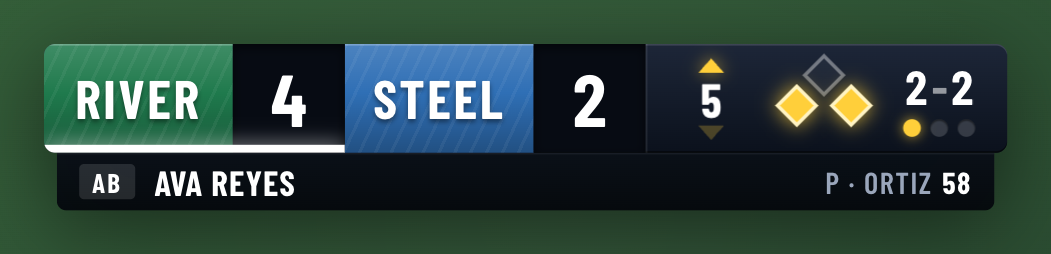
The stream: here the Prime Time scorebug, one of fourteen looks
What v5 is
v5 is Scoreboard rebuilt around the team. v4 (tag v4.47) scored one game at a time for one account; v5 keeps everything the stream did and adds:
- Your team, run by you. One account scores for its own team; the teams you play are kept on an Opponents list with their logo, colours and roster, which load into the pad and the stream for every game against them.
- Rosters, seasons and player stats. Every play names its batter and pitcher, so season lines (AVG, OBP, SLG, ERA, WHIP, W/L/SV) build themselves from scored games, on top of a GameChanger season import.
- Public team pages: schedule and results, season stats, the roster, and a live page for every game, with each player shown the way the staff chose (full name, first name and initial, or number only).
- Stat cards from the scorebug: batter, pitcher, due up, leaders, box score, lineup, defense, matchup, sponsor and the mid-inning board slide out from behind any look, or stand on their own in any of nine places on the picture.
- Team > Stats: the season's leaders, the top three in each batting and pitching category, and a Needs work view with the other end of each list for the coaches (never on the public page). Every number sits in batting and pitching tables that sort on a tap. Averages count players with a plate appearance per game.
- Where the game is: each game has the field's address and an optional tournament link. Today, the game screen and the public game page show Directions and Tournament buttons, with the forecast for first pitch (or the weather now, once the game is on) drawn as a small moving sky. The same address feeds the weather on the Starting Soon and Game paused scenes.
- Phone, iPad and desktop, each its own way: a phone scores with a thumb, with tabs along the bottom. An iPad is a booth console: on its side the pad and On Air sit next to each other with nothing to open, and stood up On Air sits under the keys. From an iPad on its side up, the team's screens get a sidebar with every section. A desktop gets wide stats and a Stream screen laid out like an editor, with the preview held beside the settings.
- Showtime scenes: Starting Soon, the mid-inning board, Final and Game paused, lit in both teams' colours with stadium beams and a moving floor. A slash of both colours wipes each one on. The countdown rolls and the final score counts up. The winner gets light rays and confetti, and a delay gets a live weather radar with a restart dial. Standard keeps the plain set for a slow streaming computer.
- The Stream screen: v4's Design picker (five layouts painted by a theme, or one of thirteen animated scorebugs with their own moments, MLBFox first), the theme as colour tiles, and every sound and position setting, over a live preview.
Everything v4 did on the stream is here too: the fourteen looks (Scoreboard's own, Classic, Prime Time, Blue Steel, Forever 20, Midnight, MLBFox, Classic Green, Pinball, Chalkboard, Comic, Split Flap, Receipt, Pixel RPG), v4's seventeen themes and five layouts with custom colours, synthesized sound in five packs, the walk-off and other stingers, Starting Soon, Final and Game paused scenes with venue weather, the announcement ticker, rotating sponsors, the on-air spots for our other apps, and OBS control from the pad.
v4's links keep working: /control opens the teams, /overlay?ch=<token> reaches the same stream, and /recap?game=<id> lands on that game's public page.
Get your own
Scoreboard runs on a free Supabase project and Vercel. Setup takes about twenty minutes.

- Create a Supabase project for this app alone. The publishable key ships to every browser; RLS keeps everyone out of Scoreboard's data, but another app sharing the project would share the key.
- Apply the schema: every file in
supabase/migrations/, in filename order (the SQL editor, orsupabase db pushwith the CLI linked to your project). It creates the tables inpublic, their policies, and theteam-logosStorage bucket.supabase/legacy/is v4's schema and is not needed for a new project. - Auth → URL Configuration: set the Site URL to your site, and add
https://<your-site>/**to the Redirect URLs. Sign-up confirmation and password reset emails return there. Supabase's built-in email sender is rate-limited; for more than a handful of staff, add your own SMTP under Auth → Emails. - Deploy: the button above, or any Next.js host. Set
NEXT_PUBLIC_SUPABASE_URLandNEXT_PUBLIC_SUPABASE_PUBLISHABLE_KEY(Project Settings → API). Locally, copy.env.exampleto.env.local. - Optional, an invite code: anyone who finds the site can create an account. To require a code, set one in SQL and switch on the hook:
then Authentication → Hooks → Before User Created → Postgres functioninsert into private.settings (key, value) values ('invite_code', 'your-code') on conflict (key) do update set value = excluded.value;public.hook_before_user_created. Staff invite links always get through.
Families, fans and leagues
A team is run by its staff and followed by everyone else:
| Who | How they join | What they get |
|---|---|---|
| League admin | Creates a league at /org/new, or takes an admin link |
Acts as team admin on every team in the league, posts to every family, sees the league calendar |
| Team admin, head coach, coach | A staff invite link (five seats) | The team: roster, schedule, people, stream and scoring |
| Scorer | A scorer invite link (a volunteer seat, apart from the five) | Lineups and batting order, a game's start time, and the pad. Coaches put scorers on each game |
| Broadcaster | A broadcaster invite link (a volunteer seat) | The stream: the scorebug link, looks, sponsor and On Air during the game, with an OBS and Mevo setup guide (Stream > OBS and Mevo setup) |
| Parent/Guardian | The team's family link (Team > People), then a coach approves | Calendar, one-tap RSVP for their own players, announcements, the parents' chat, their child's card |
| Fan | Follow on the public team page | Game times in their calendar, game start and final notifications |
Players have no accounts, and there are no private messages: every conversation sits in a channel the coaches can see and moderate (Announcements, Parents, Staff). A removed message leaves every screen and stays in the database for the league to review.
Calendar. Practices, meetings and events sit beside the games. Everyone gets a private subscription link (Calendar > Add to my calendar) for Apple, Google or Outlook; it checks they are still on the team every time it is fetched.
Notifications. Set the VAPID keys and SUPABASE_SECRET_KEY (see .env.example). On iPhone, notifications work for Scoreboard on the Home Screen (iOS 16.4 and later), turned on from the card on Home or Today. For game start and final pushes, enable pg_net (Database > Extensions) and set:
insert into private.settings (key, value) values
  ('site_url', 'https://your-site'), ('push_hook_secret', 'the PUSH_HOOK_SECRET value')
on conflict (key) do update set value = excluded.value;
Your first game
- Create an account at
/sign-upand confirm the email. On a phone, Share → Add to Home Screen opens Scoreboard full screen. - New team: name, short code and age group; then the logo (its colours are read from it), the roster (type, paste a list, or import a GameChanger season export), and a season.
- Opponents (Team → Opponents): add the teams you play, each with a logo (its colours are read from it), a short code and a roster.
- New game: pick one of your opponents (their roster becomes their lineup), another team on Scoreboard, or type a name. Set the start time, the venue, a ZIP or town for the weather, and the rules (time limit, run rule, period length).
- Lineups: tap players from the bench into the order, tap a spot on the field and then the player, or punch in the jersey numbers from the lineup card on the keypad.
- Stream: copy the Browser Source link from the Stream screen into OBS once (next section). It follows whichever game the pad is scoring.
- Score from the pad. It keeps the screen awake, saves every tap in order through a weak signal, and a second phone on the same game stays in step.
OBS setup
The broadcaster's full walkthrough, with OBS and Mevo, is in the app under Stream > OBS and Mevo setup. In short:
-
Sources → + → Browser, URL the Stream screen's link, 1920 × 1080, 30 FPS. The page is already transparent.
-
Uncheck Shutdown source when not visible, and check Control audio via OBS so the sounds reach the stream.
-
Page permissions decide how much of OBS the pad may drive; with none, everything on the stream still runs.
Page permissions Adds No access The scorebug, cards, scenes, moments and sound Basic Save replay, and auto-clip of big moments Advanced Cameras (OBS scenes) and the replay buffer Full Go live and record -
Cameras: one OBS scene per camera, each with the same Scorebug source added through Add Existing. Never a second copy: two sources mean doubled sound and two clips per replay.
-
Replay buffer: Settings → Output → Replay Buffer at 90 seconds. Auto-clip waits for the celebration before saving (a minute after a walk-off).
Place and size the bug on the Stream screen (nine positions and a size slider), not by stretching the source.
Scoring
Baseball: BALL, STRIKE, FOUL and IN PLAY as full-height keys; MORE for hit by pitch, catcher's interference, intentional walk and balk; tap a runner for a steal, caught stealing, pick-off or advance. Ball four pushes the forced runners and offers Fix runners. In play asks what happened, who fielded it and where everyone ended up, pre-filled with the likely result. Undo takes back the last play and its stats, as many times as you like. The count bar opens Fix the situation: score, inning, outs, count, pitch count, hits and errors, bases, the batter, the time-limit clock, Demo (the game plays itself, for trying the stream), End game and Start over. On a laptop: B S F I M U, and 1 2 3 H E for hits.
Football: possession, downs and distance, touchdown, PAT and two-point try, field goal, safety, turnover, kickoff, timeouts, quarters and the quarter clock. Soccer: goals, cards, halves, stoppage time and a count-up match clock. Basketball: one, two and three, team fouls with the bonus, timeouts, periods and the clock. Volleyball: rally points with the serve, aces, sets to 25, 21 or 15.
On Air
On Air on the pad is what is on the stream right now:
- Cards: batter, pitcher, due up, leaders, box score, lineup, defense, matchup, mid-inning, sponsor. The batter card can pop for each new batter, and the mid-inning board comes up by itself at the third out.
- Moments: Walk-off, Home run, Charge!, Double play (and each sport's own), once per tap; Rally is a glow that stays until turned off. Plays call their own moments as they are scored.
- Scenes: Starting Soon (countdown and the venue's weather), Final (who won and how), Game paused (lightning, rain, weather, suspended, called, with a countdown and a storm; New strike restarts the thirty minutes with a flash and thunder).
- Ticker: a message along the bottom, with an alert tone.
- Intros: the Blue Steel, Midnight and Forever 20 looks' own full-frame openings.
- OBS: the permission tier the source is on, Save replay, auto-clip, Go live, Record, the buffer, and the cameras.
- Spots for our other apps: a quick banner or a full-screen spot.
Development
npm install
cp .env.example .env.local
npm run dev                  # http://localhost:3000
npm test                     # rules, stats, and every migration on an in-process Postgres
npm run typecheck
npm run lint
npm run build
/dev/kit draws every screen from made-up data with no database: ?v=today, roster, player, season, staff, game, lineup, pad, scorepad&sport=football, stream, public-game, and ?v=overlay for the stream over a stand-in camera (&look=primetime, &card=batter, &theme=retro&style=scorebox, &sport=football, &status=final, &scene=starting (final&win=1, paused&reason=rain, mid, &ss=standard)). It returns 404 in a production build.
| Path | What it is |
|---|---|
supabase/migrations/ |
The schema, named by the version the live project recorded. Tests apply every file to PGlite and check each rule as the role a real request arrives as |
app/actions.ts, lib/data.ts |
Every write (as the signed-in user; Postgres policies decide) and every read |
lib/rules/ |
v4's rules engines, carried over unchanged with their tests: baseball (logic.js, roster.js), football, soccer, basketball, volleyball |
lib/scoring.ts, lib/stats.ts, lib/gamechanger.ts |
Who a play was about and what it added to their line; rates from counts; GameChanger imports |
lib/onair.ts, lib/broadcast.ts |
What the stream says, and its settings, commands and clocks |
components/pad/ |
The pads, On Air, the game clock and the OBS panel |
components/overlay/ |
The Browser Source (/overlay/<token>): Stage draws the feed, Scenes the full-frame scenes and ticker, Fx the stingers, ObsBridge OBS |
components/overlay/looks/ |
The looks, one component and stylesheet each on the BugProps contract. Scope every selector under the look's root class: generic names leak |
components/overlay/themes.css |
v4's themes and layouts for Scoreboard's own bug |
lib/fx/ |
v4's sound engine and weather, carried over unchanged |
public/bugs/, public/ads/ |
v4's bug pages (reference and thumbnails, at /bugs) and the on-air spots |
How it works
- A play is one transaction.
apply_playwrites the game's new state, a log entry with the state before it (so Undo is exact), and one stat row per player it touched. A play sent against an older version of the game is refused, so two phones can never write over each other. - The stream has no account. It reads everything through
overlay_feed(token), which returns only a version stamp when nothing has changed, so a page left running all afternoon costs next to nothing. The pad nudges it over Realtime after each save; it also polls. - Names follow the staff's choice. The public reads rosters and games through functions that apply each player's public-name setting; lineups are staff-only tables.
- Settings merge, commands stamp. Broadcast settings change key by key (
set_broadcast), so two people never undo each other; a moment or an OBS action is a stamped command (send_cmd) the stream acts on once. - OBS is driven from inside OBS. The pad cannot reach it; the stream page can, through
window.obsstudio, and reports back by its token.
License
MIT, see LICENSE. The fonts Barlow Condensed, Martian Mono and Anton are under the SIL Open Font License (public/fonts/OFL*.txt).