Turn a photo or an idea into a real 3D print. AI clarifies and sketches, the code calculates a fair price, PayPal handles the payment, the maker makes the real thing.
Built for the PayPal AI Hackathon on Devpost.
- Live demo: https://little-miracles.github.io/shapeprompt (PayPal Sandbox — no real money)
- Demo video: https://youtu.be/c5mIp0cKJiw
- About the project: devpost/about.md
- Scope: devpost/scope.md
- Build log: devpost/build-log.md
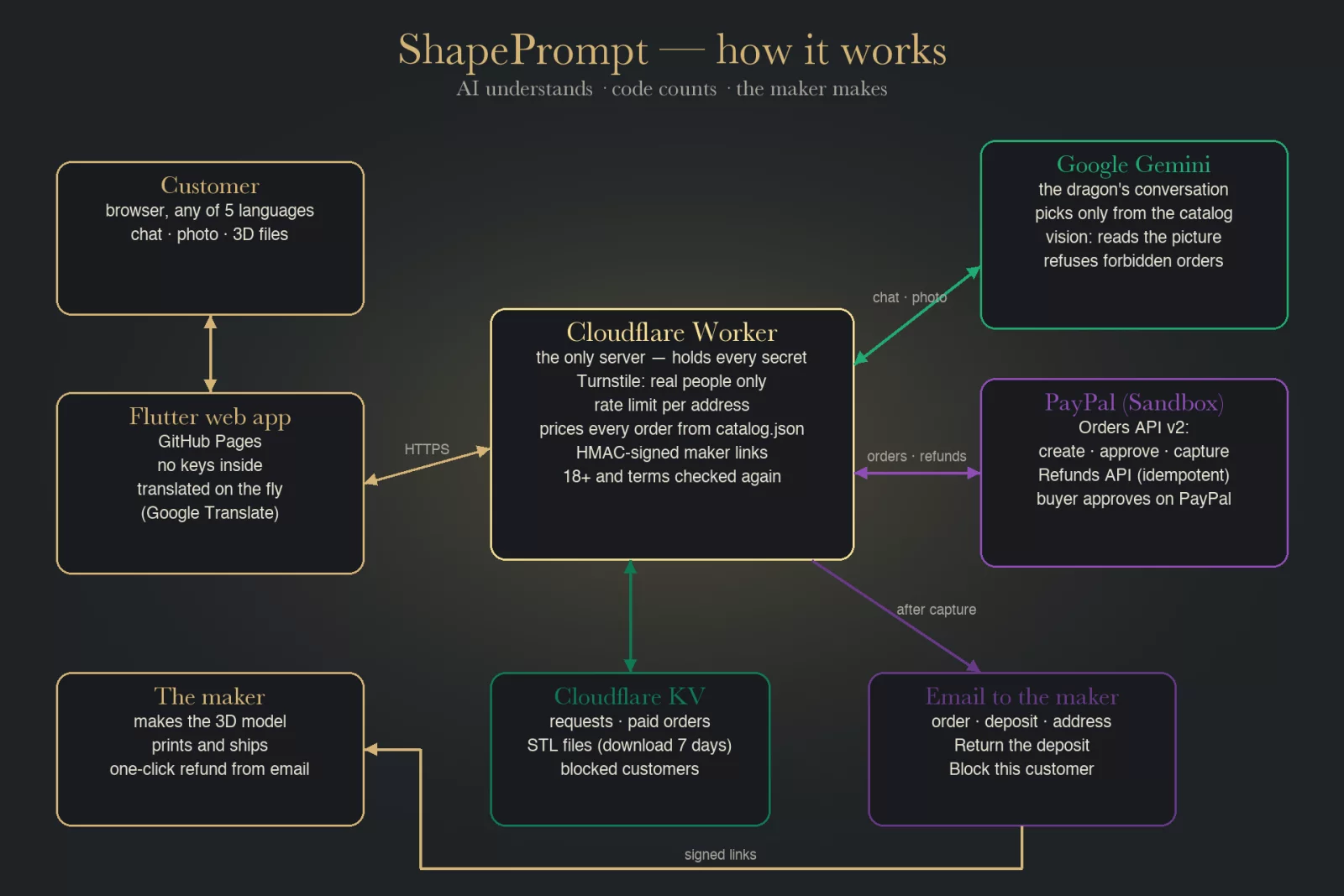
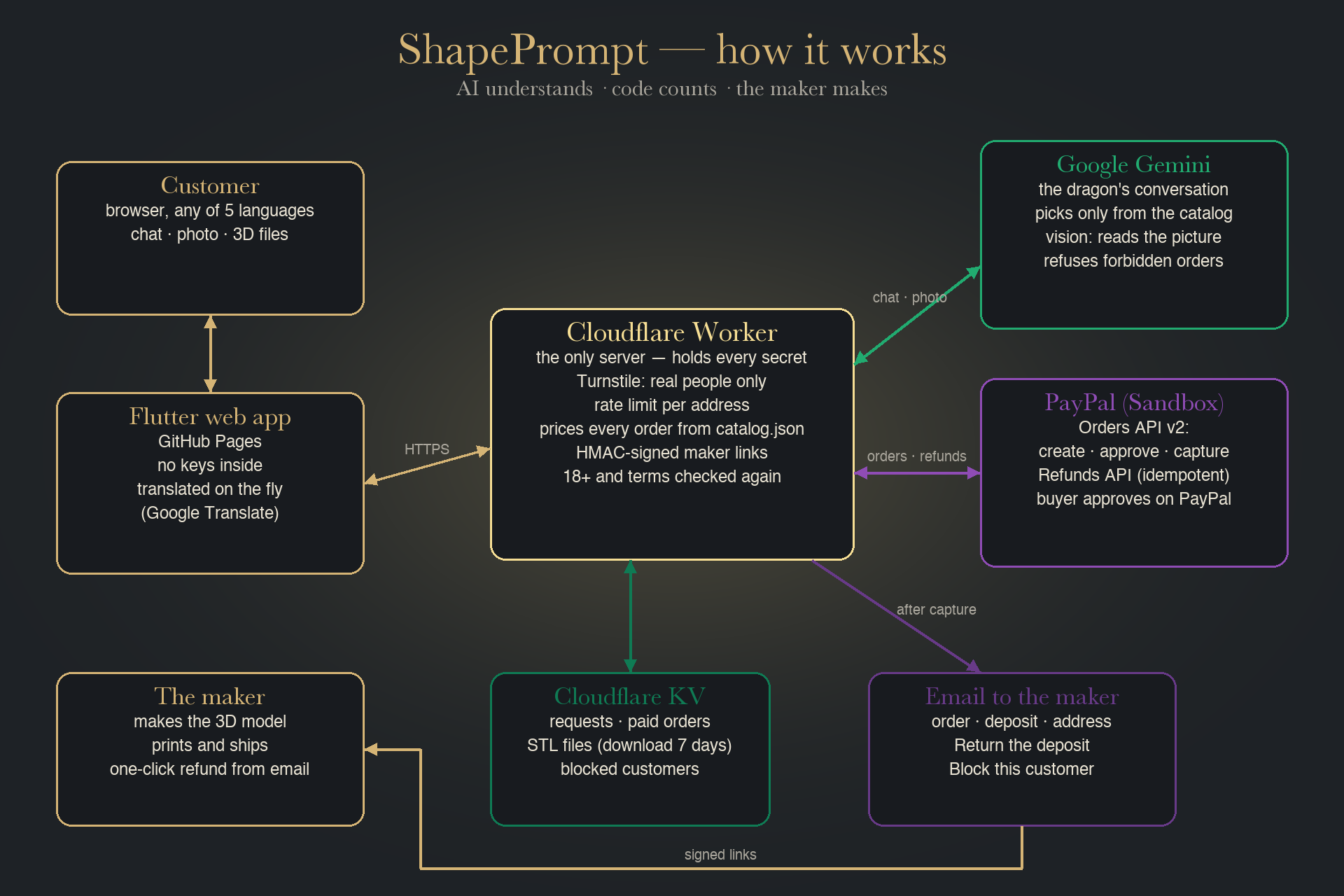
Architecture
How PayPal is used
All payments go through our Cloudflare Worker (worker/src/index.js); the
app never holds a PayPal secret.
- PayPal Orders API v2 — three kinds of payment: a ready figurine, a 3D
file, and the 15 zł deposit for a custom order. The Worker creates the
order with a price taken from
worker/src/catalog.json(never from the browser or the AI), the buyer approves it on PayPal, and the Worker captures it (POST /orders,POST /orders/{id}/capture). - After the capture: a paid 3D file can be downloaded for 7 days
(
GET /download, the payment is kept in Cloudflare KV); a paid deposit sends the request to the maker by email; a paid ready work sends the order with the PayPal shipping address. - PayPal Refunds API — the maker's email has an HMAC-signed
"Return the deposit" link (
GET /refund). It opens a page with a button, so a mail app opening a link never moves money. The refund is idempotent: a second click answers "the deposit was already returned". - Blocking — "Block this customer" (
GET /block) stops their email and PayPal account for a year; a blocked PayPal account is not captured. - 18+ and the order terms are confirmed before any payment and checked on the server again.
How AI is used
- Google Gemini (called only from the Worker,
worker/src/chat.js) is the little dragon: it talks with the customer, chooses only from the real catalog and prepares the PayPal order — the customer only presses Pay. - Gemini vision (
worker/src/photo.js) reads the customer's picture and fills in the order card; code, not the model's mood, decides whether faces and hands are blurred. - Gemini refuses forbidden orders (weapons, war drones, nudity, hate symbols) before any payment.
- The AI never sets a price. Prices come from the maker's real costs in
lib/pricing.dart, exported toworker/src/catalog.json. - Built with Claude Code as a coding partner. Art: Gemini image generation; the dragon's animation: Canva; the first 3D model of the dragon: MakerWorld image-to-3D, finished and printed by the maker.
- The video music is original, composed in code:
tool/compose_music.py.
AI and keys — demo vs. production
- The dragon's brain is Google Gemini, called only from our Cloudflare
Worker (
worker/). The key lives there as an encrypted secret; the website never sees it. Cloudflare Turnstile lets only real people talk to the dragon, and each address has a request limit. - For this demo the Gemini API runs on the free tier. It has a daily limit: when it is used up, the dragon says kindly to try again a little later.
- For real sales we switch to the paid tier. Gemini's terms allow only the paid tier for apps used by people in the EU, and on the paid tier the customers' messages and pictures are not used to train Google's models.
- AI never sets a price: prices come from the maker's own numbers in code
(
lib/pricing.dart, exported toworker/src/catalog.json), and the Worker prices every order again before PayPal sees it.
For the maker: approving the 3D model
A request arrives by email only after the 15 zł deposit. The email has two signed links: Return the deposit (PayPal refund through the API) and Block this customer (their email and PayPal account, for a year). Both open a page with a button: mail apps open links by themselves, so a link alone never changes anything.
Before printing, send the customer 2–3 pictures of the model from Bambu Studio and end the email with:
To start printing, please reply: "I approve the model as shown in the pictures."
Their reply, kept with its date, is the written approval: the figurine is printed as approved.
Run locally
The app (Flutter web) talks to the deployed Worker, so this is enough to try it with PayPal Sandbox:
flutter pub get
flutter run -d chrome
Your own Worker
- A PayPal developer account → a Sandbox app (client ID and secret) and a Sandbox personal account to pay with.
- A Google AI Studio key for Gemini, a Cloudflare Turnstile widget, and a Cloudflare account with Email Routing (for the maker's emails).
- In
worker/wrangler.tomlsetPAYPAL_CLIENT_ID,MAKER_EMAIL, the KV namespace and the allowed origins; then add the secrets:
cd worker
npx wrangler kv namespace create REQUESTS
npx wrangler secret put PAYPAL_SECRET
npx wrangler secret put GEMINI_KEY
npx wrangler secret put TURNSTILE_SECRET
npx wrangler deploy
- Point
PayPal.workerinlib/paypal.dartto your Worker URL and build:
flutter build web --release --base-href /shapeprompt/
License
Apache 2.0 — see LICENSE.