Subnotes plugin for Claude Code
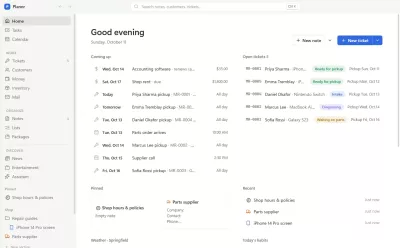
Read your Subnotes notebooks from Claude Code, and add tasks to them — so "let's put that on the backlog" lands in the notebook instead of dying with the conversation.
Requires Subnotes 1.4 or later, on macOS. Connect notebooks in Subnotes' Settings (⌘,), which lists every notebook with a switch — or right-click a single notebook and choose Connect to Claude Code. Only the notebooks you turn on are visible here.
Install
In Claude Code:
/plugin marketplace add rafrafgit/subnotes-plugin
/plugin install subnotes@Subnotes
Then install Subnotes 1.7 or later, open its
Settings (⌘,), and turn on the notebooks you want Claude to see. Run
/subnotes:help if you would rather be walked through it.
Once the plugin is listed in the Claude plugin directory it can be installed from there instead, without adding this marketplace first.
What it does
list_notebooks— names, purposes, section headings, open countsread_notebook— one notebook as plain textsearch_notes— the lines that hold every word of a query, across the connected notebooks, learnings and questions, each with where it sitsadd_task/add_tasks— append tasks to a notebookadd_subnotes— add detail lines under an existing task (needs a Subnotes that knows it; an older one sets the write aside)set_schedule— reschedule an existing task: Today, Next, Soon, Someday, Done or a date (needs a Subnotes that knows it; an older one sets the write aside)read_learnings/add_learning/correct_learning— what the skills have learned, about one notebook or about you, shared by all of them; a learning can cite the line it came from (a fingerprint, never a copy), so the prune sees when that line is gone or Doneread_questions/add_question/close_question— open questions that decisions depend on; an answered one becomes a learningread_notes/write_notes— the review's working memory per goal, or per notebook no goal linksreview_context— everything one goal's review needs, for the notebooks that serve it, in one call, with the lines scheduled Today, Next and Soon and only what changed since that goal's last review (kept as line fingerprints, never a copy of the text)journal_entries,mark_journal_read— what's new in the Journal notebook since Journal last ran, and marking it readwhats_due— what/subnotes:runruns: each goal's last review and plan check, notebooks no goal links, the last prune, and the tasks Do would pick upprune_context,remove_notebook_brain,mark_pruned— the monthly prune: every learnings and questions file, the brain kept for a notebook no longer connected, and marking it done
Ask what is on a notebook, or what to pick up next — reading is half the point. Say "put that on the backlog" mid-conversation and it lands in the right notebook and section, or name them yourself: "… in Work, under Backlog".
/subnotes:run is the one to start from, as often as you like: it talks with
you about what matters most today and works on it with you. Behind that it
catches up quietly on whatever is due — the journal when there's a new entry;
once a day, a review of the goals whose notebooks changed, with the plan check
of any goal not checked for 30 days or changed since; once a month, a prune of
what the skills have learned — and brings in only what needs you. Each still
works on its own.
/subnotes:journal reads what you wrote in your Journal notebook since
its last run, and files what the other skills need to know — dates, replies,
decisions — as learnings, with any task proposed on your yes. /subnotes:run
runs it when there's a new entry.
/subnotes:wrapup does the same for a chat with Claude that didn't start
from a skill: what it decided or found becomes learnings, and any task left
open is proposed on your yes. Claude offers it when you wrap up such a chat.
/subnotes:prune goes through everything the skills have learned and
removes or merges what's stale, duplicated or contradicted by the notebooks
as they are now, on one yes. /subnotes:run runs it once a month.
/subnotes:review [goal] goes through your goals one at a time. For each, it
reads the notebooks that serve it (the ones the goal links in Goals, or
matches by purpose), raises what would move it, and adds a next step only on
your yes. When a goal's plan check is due, every 30 days or when the goal
changes, it checks the plan first: that the goal has a measure and a date,
that there's a plan, and that it can get there in time, with the arithmetic
shown. Name a goal to review just that one, with its plan check. Notebooks
no goal links are reviewed briefly, by their purpose.
For the other direction, write what's on your mind as plain text where it belongs — "I wonder if Sam is as committed as I am" — and the review turns each new or changed line into an open question, a learning, or something to talk about.
/subnotes:do [notebook] goes the other way: it reads the Today, Next and
soon-due tasks across your connected notebooks, or just the one you name,
ranked by your Goals notebook. It sorts them into what Claude can do in this
session — code in this folder, or a draft or write-up, which it writes under
the task — what needs your input first, and what only you can do, then works
through the first group, with your usual permission prompts. A task it finishes and checks is marked Done;
one that still needs you to try it is left for you to mark.
Two rules that shape everything
Writes only add, reschedule, or edit one line. Tasks and lines under a task can be added, a task can be rescheduled or marked Done, and one line's words can be changed once you've seen the old and new line and said yes; nothing can be deleted, reordered or renamed, and notebooks cannot be created. A write that never removes a line cannot lose work, and an edited line's old words stay in the conversation.
Reads are opt-in per notebook. Only notebooks connected in Subnotes are exported to the connector folder at all. An unconnected notebook is never written to disk there, so this plugin cannot read it even if it misbehaves — it is invisible rather than private-but-visible.
The server never touches the app's database. It reads text files the app
exports and writes JSON files the app picks up, inside the app's own container.
It has no dependencies: node:fs, node:path, node:crypto and
node:readline only, speaking JSON-RPC over stdio.
If it can't read your notebooks
macOS keeps one app's files out of reach of another. If Claude Code has not been granted Full Disk Access, the plugin can see that the Subnotes folder exists but cannot open anything in it, and every tool fails with a permission error.
Grant it in System Settings → Privacy & Security → Full Disk Access, to whichever app is actually running Claude Code — your terminal, or Claude Code itself — then restart that app. The grant does not transfer between them, so running from a terminal you have not granted looks exactly like a plugin that stopped working on its own.
Configuration
None, normally. The server defaults to the folder Subnotes exports to inside
its own app container. The optional folder setting is there only for an
unusual install location.
Development
node dev/make-fixture.mjs --connect "Work,Personal"
Builds a connector folder from a Subnotes backup. This is a development stand-in only — a running Subnotes 1.4 supersedes it, exporting connected notebooks itself and deleting files for anything not connected.
node dev/smoke.mjs # exercises all four tools over stdio