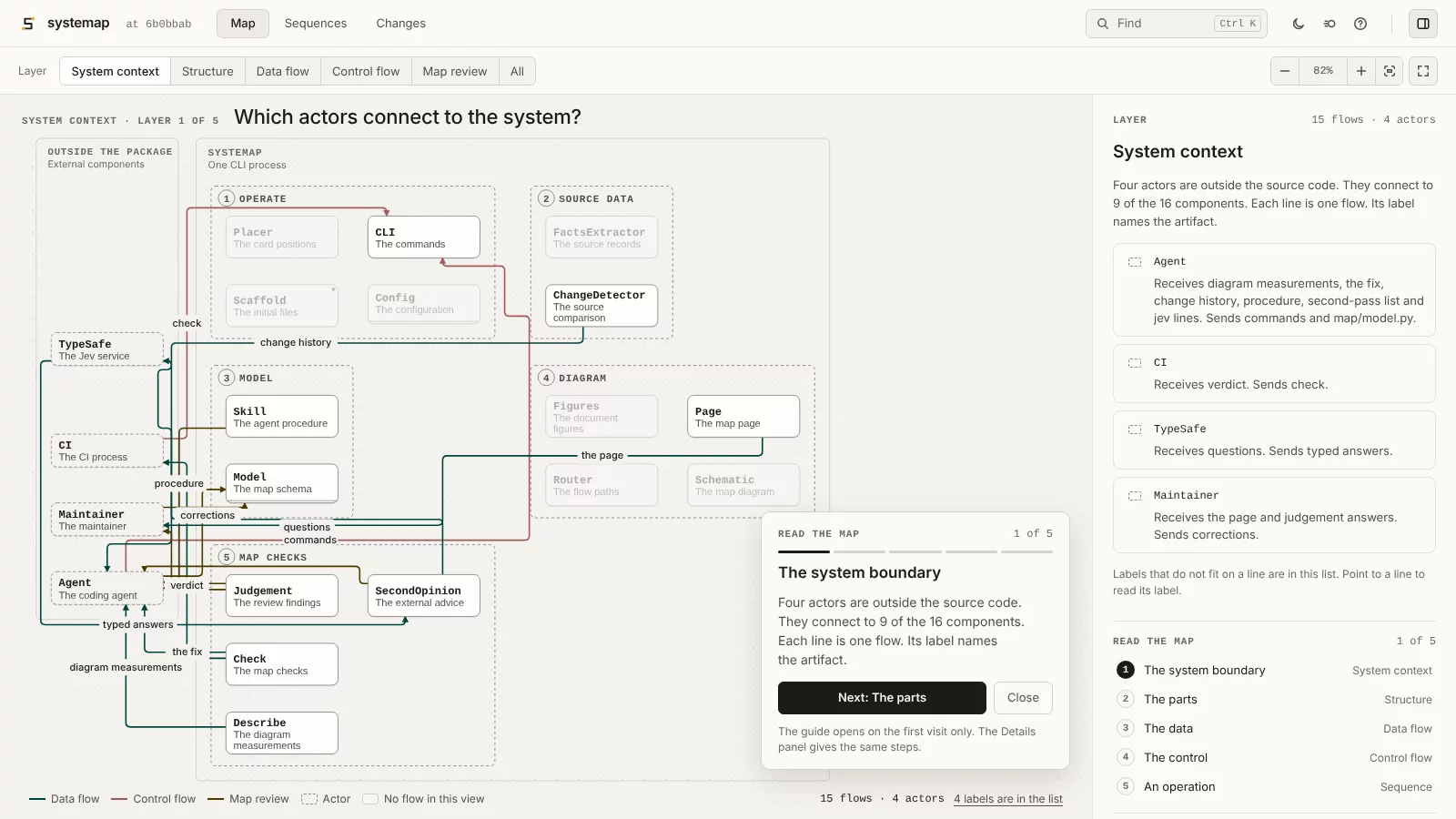

The website has the guide, the reference, and a live example: https://0xfauzi.github.io/systemap/.
A coding agent can write code faster than you can read it. After many changes, you can forget parts of your Python or TypeScript system.
systemap gives you one page that shows the parts of your system and their connections. Your coding agent writes the map from your code. Commands find changes that make the map incorrect. The Changes view shows changed parts and connections before you merge the code.
This page gives the map terms, the installation procedure, and the commands that compare the map with the code.
Open the live map, which is systemap's map of itself.
What are a component, a flow, and a sequence?
A component is a part of the system. Its modules have one function, such as code extraction, email delivery, or database access. The component shows a function, not a file or directory.
A flow is a connection between two components. Its line has a label that
shows what goes between the components: for example, a request or a file.
If each flow has an id, two or more flows can connect the same two components.
A sequence is an authored set of ordered steps for an operation. The page shows one step at a time. A sequence does not record an execution.

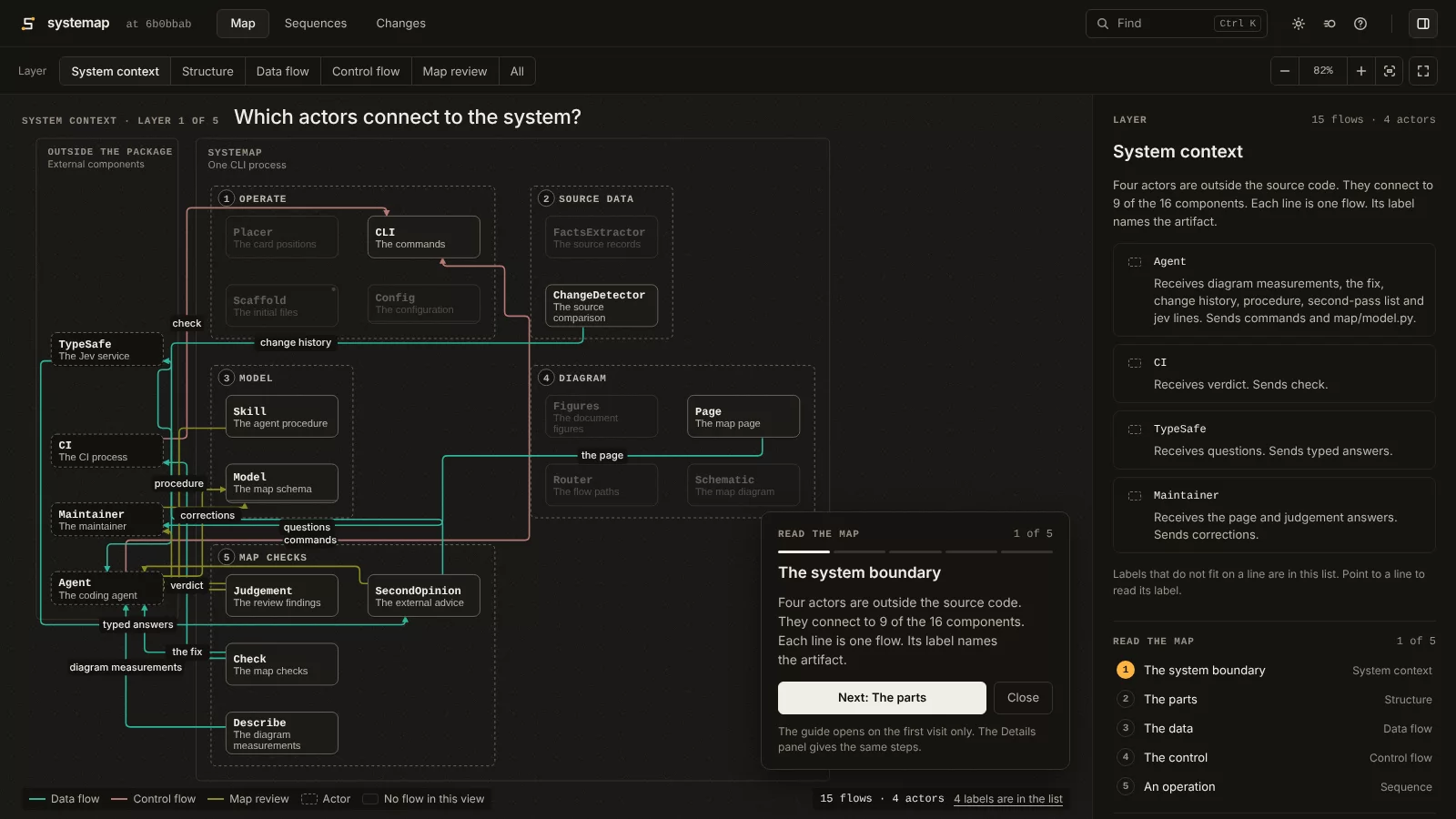
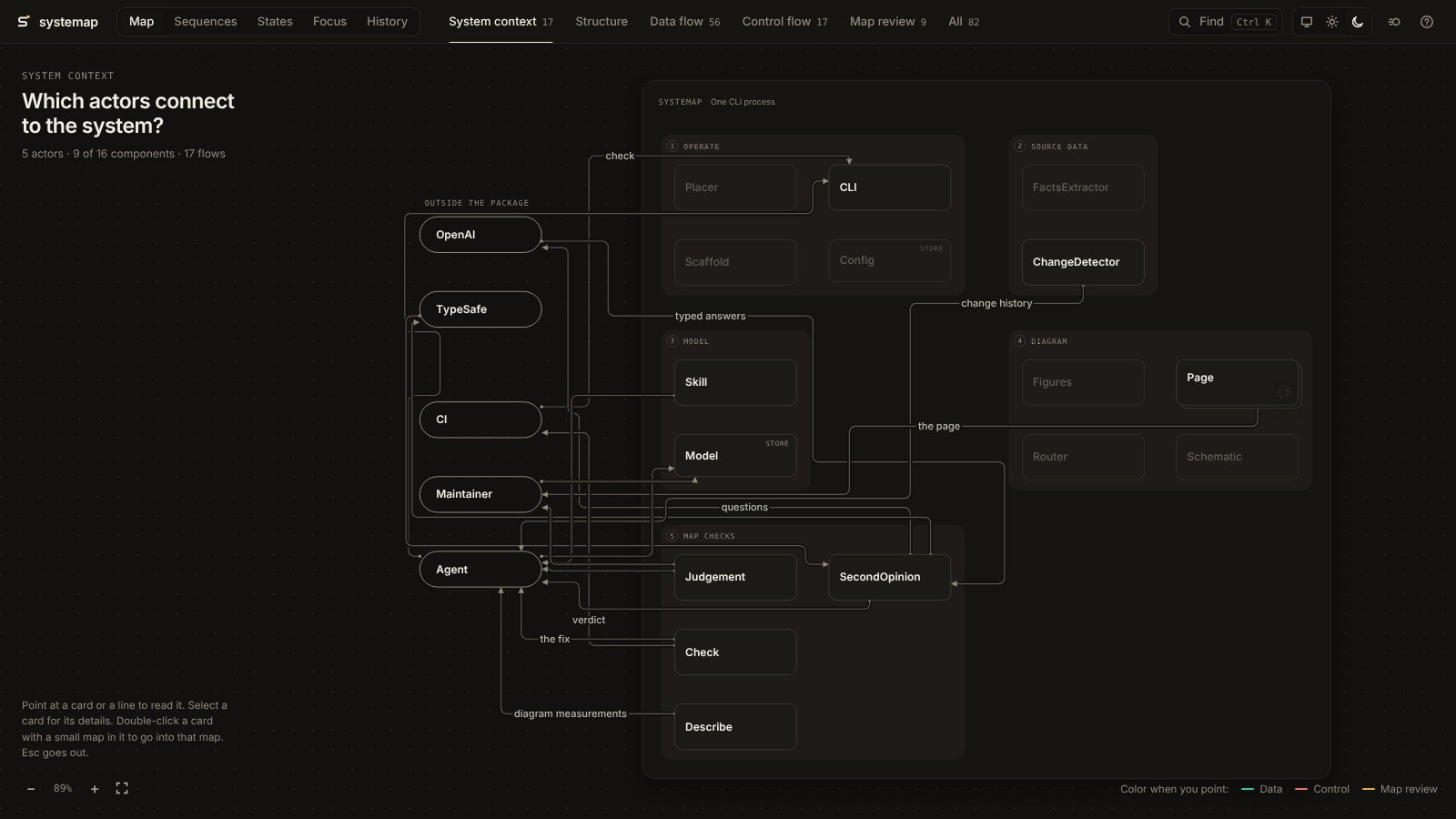
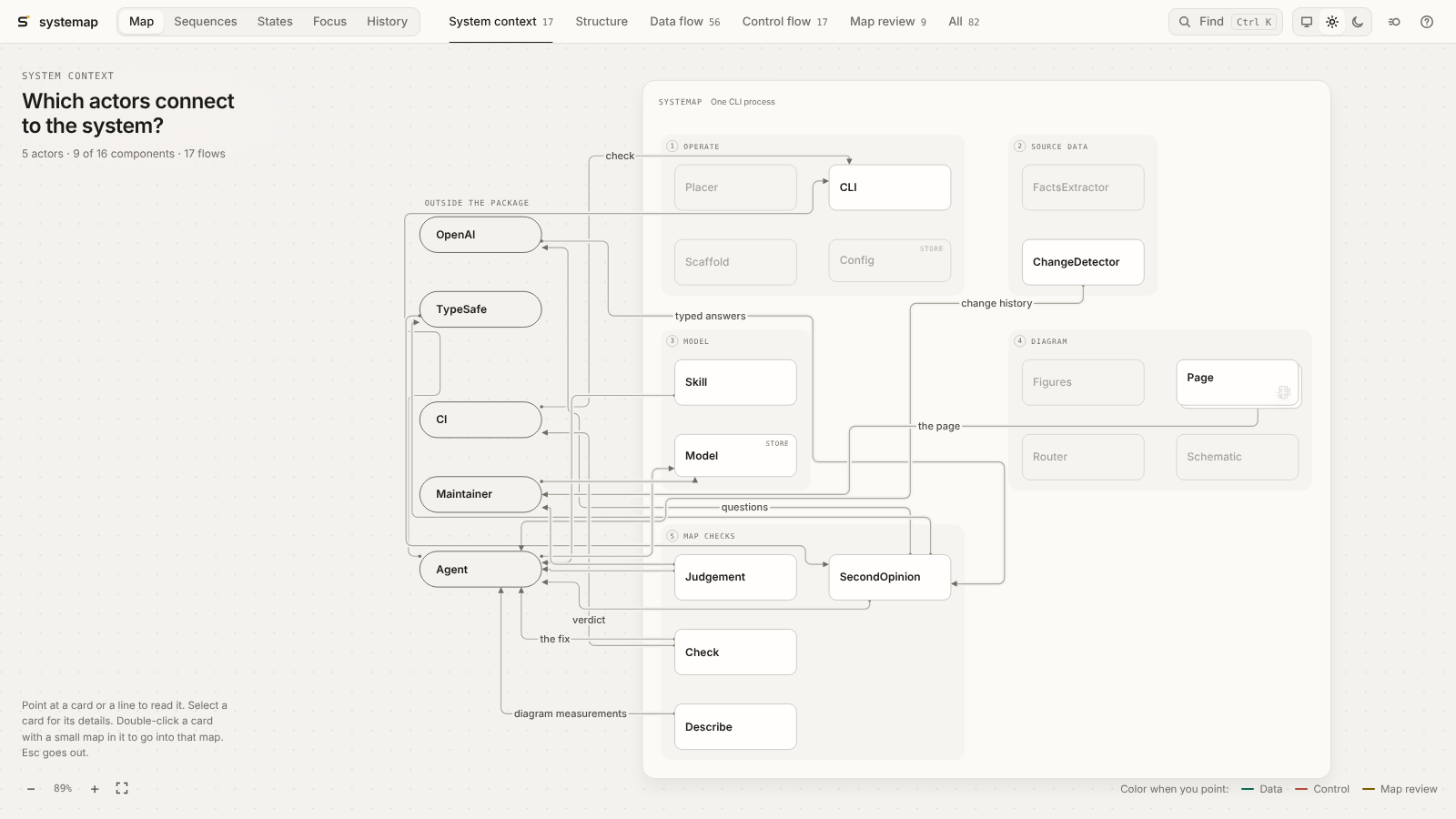
The figure shows systemap's own map with no flow lines. A layer shows the flows that answer one question. Examples include connections across the system boundary, data flow, and control flow. Select a component to see its connected components and the explanation for each connection.
Structure shows no flow lines after a component selection.
Other layers show only flow lines that connect to the selected component.
Flow labels show on their lines. A label that does not fit on its line
shows for a pointer, keyboard focus, or selection, and the Details panel lists it.
When the map is smaller than 100 percent, the labels become larger, so that you can read them. A label moves along its line to a place where it touches no card, label, or other line. A label without such a place also shows only for a pointer, keyboard focus, or selection. The Details panel keeps all component connections, with direction and evidence.
Flow lines also show evidence. A solid internal line shows a current source review. This is a recorded source review whose source records and claim digest still agree with the stored source snapshot. At least one source record is in a module of a flow endpoint. A short dashed line shows structural evidence: an import, a shared module, or a configured mechanism. A long dashed line shows a declared flow without that evidence.
Structural evidence does not show direction or the artifact that a flow carries. External flows have an actor at one end. None of these states records execution.
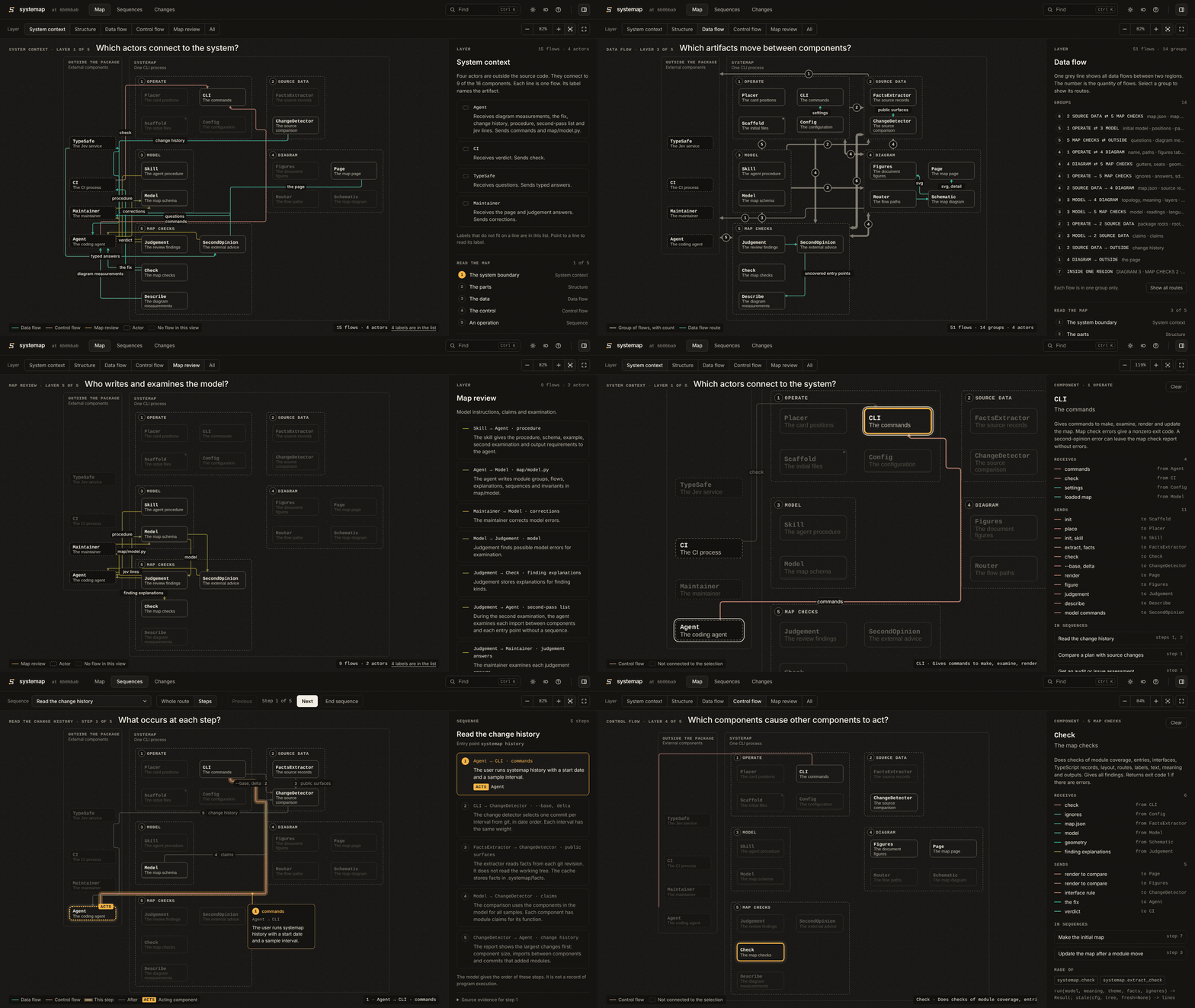
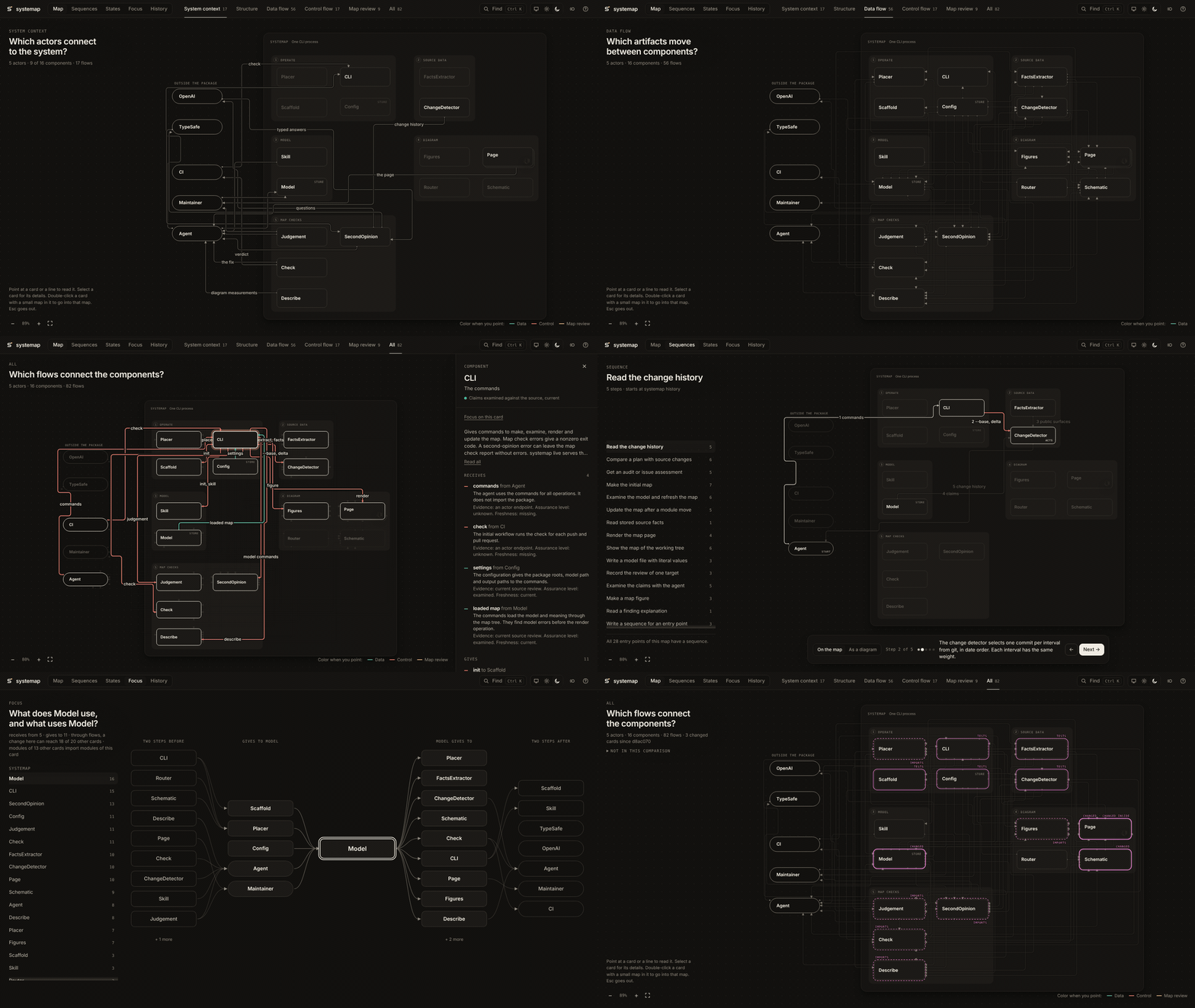
The page has three views. Map shows the layers. Sequences shows one operation as a route on the map, then one step at a time, with a note at each step. A button in its row opens the list of sequences. Changes shows the components and flows that a revision comparison changed.
On the first visit, a guide card gives up to five steps through the map. The three views have the same parts. Each has a row of controls under the header and a panel at the right. Above the map, one line gives a small label and a question. On a wide window, the Map view opens the panel with the page. With no selection, the panel shows the current layer: one card for each flow, actor, or region.
The header has no menu. Find (Ctrl+K, Cmd+K, or /) opens one search field for views, layers, components, flows, sequences, rules, and actions. Icon buttons select the theme, set Reduce motion, show the keyboard keys, and open the Details panel. Motion is on until the reader sets Reduce motion on the page.
The full-screen button and the F key show the map alone in each view. The Map panel gives all rules of the system and an explanation of the lines and cards. The commit in the header opens the source records of the page.
The themes are Ink and Paper. Ink has dark surfaces and is the default. Paper has light surfaces. The first visit uses the device theme.
Only the flow kinds, the selection, and the change have colors. A line has the color of its flow kind in all views. The selection color identifies only the current item, such as the selected card, the current step, and a wider line under the selected line. Cards, regions, text, and other lines are neutral.
The map has one flat view. Card text changes size with the zoom. Fit shows the full map as large as the map area permits.
In a sequence step, the acting component has an ACTS tag and a measurement component has a MEASURES tag. On a phone, the map shows its regions as a grid, and a sequence shows one step below the map. The map gets the height that the step and its buttons do not use. Its zoom keeps the card text at a size that you can read, and the acting component stays in view.
The panel gives source modules, entry points, related sequences, and evidence states. These values come from the current model and recorded source data.
How do you install systemap?
Install systemap. Then write the initial files:
uv tool install systemap        # or: uv add --dev systemap
systemap init                   # --no-ci: no workflow. --strict-ci: findings fail CI.
For a TypeScript repository, install the parser extra:
uv tool install 'systemap[typescript]'
After you upgrade systemap, operate systemap refresh and commit the facts file.
A facts file from an earlier version is stale, and systemap check exits 1 until you write it again.
CHANGELOG.md gives the other steps for each version.
The TypeScript adapter reads .ts, .tsx, .mts, and .cts modules. These records include:
-
Named exports, default exports, and local re-exports.
-
Imports and package
binandexportsentries. -
JSONC
tsconfig.jsonfiles and inherited path aliases.
For each source file, systemap uses the nearest tsconfig.json file above that file.
If that configuration does not select the file, systemap uses a configuration in its
references that selects the file. Thus a solution tsconfig.json with "files": []
and the tsconfig.json file of each monorepo package give their own path aliases.
A package.json file in a package directory below the root gives more bin and
exports entries.
The outDir and rootDir options connect compiled package entries to source
files. An inherited path that starts with ${configDir} uses the directory of
your own tsconfig.json. This is also the tsc behavior.
If rootDir is missing, systemap uses the rule for your TypeScript version:
-
TypeScript 5 uses the longest common directory of the selected input files. The
include,files, andexcludeoptions select these files. -
TypeScript 6 and later use the
tsconfig.jsondirectory. -
The
compositeoption uses thetsconfig.jsondirectory on all versions.
systemap reads the version from node_modules/typescript, then from
package.json. If the two files do not give a version, systemap tries the two roots.
A compiled target maps to source only if one root gives a match and the other does not.
Extraction and change analysis show common test filenames, such as .test.ts,
.spec.ts, .cy.ts, and the files in __tests__ directories. For other
filenames, add repository-specific globs, such as
test_patterns = ["**/*.check.ts"]. If a compiled target is not in the configured
outDir directory, systemap can connect the target to a unique source file.
The target directories are dist/, distribution/, build/, and lib/.
The source directories are src/ and source/.
If the parser cannot read syntax or map a package target, the facts include an
explicit unknown record. systemap check prints these records but does not
reject the map for them. Each unknown record must have a correction or
an accepted answer before systemap judgement --strict accepts it. A missing npm package in
tsconfig.json extends also gives an unknown record. Extraction can thus
continue without node_modules.
The TypeScript grammar used by the reader rejects some
correct generic call signatures, such as obj?.m<T>?.(). These modules stay in the facts
with an unknown public surface. A second parse reads export type * from and the
variance keywords in and out.
TypeScript discovery first uses src/, then the repository root. For a
monorepo or a repository without src/, configure [package_roots] for the
application packages. With this configuration, scripts and fixtures do not become
application modules. If only the package directories of a workspace have a
tsconfig.json file, init selects TypeScript and writes no package roots.
The init command writes the configuration, an empty map, the skill
instructions, and a CI workflow. The command then prints this instruction:
Make a map of this repository with systemap. Obey the systemap skill and its writing rules.
Give the instruction to your agent. The agent reads the code, selects a component for each module, writes flows, and does the checks. A second examination finds missing claims.
When the agent stops, read its completion report. It gives the recorded answers and the uncertain claims. Correct the items with which you do not agree. Then commit the page.
For Claude Code, use the repository's plugin marketplace:
/plugin marketplace add 0xfauzi/systemap
/plugin install systemap@systemap
The plugin also gives a live map in Claude Code. See What does the live map in Claude Code show?
Other agents can use the same instructions if they can read files and execute commands.
The writing profile in systemap.toml sets the writing rules for map names, sequence steps, and other map text.
The default profile is plain. Its rules limit the sentence length and require literal words and one term for each concept.
A person or a program can examine these rules without a dictionary.
To use the full ASD-STE100 Issue 9 rules, set profile = "asd-ste100" in the [writing] table.
These rules need the official ASD dictionary.
The language policy gives the two profiles, the glossary, and the examination procedure.
This repository uses the asd-ste100 profile for its map, its interface text, and its documentation.
TypeScript example
This example repository has three files. src/service.ts exports a function.
src/index.ts re-exports the function. The test imports the source module.
src/index.ts
src/service.ts
tests/service.test.ts
src/service.ts exports a function, src/index.ts makes it available to
callers, and the test imports the source module:
// src/service.ts
export function greet(name: string): string {
  return `Hello, ${name}`;
}

// src/index.ts
export { greet } from "./service";

// tests/service.test.ts
import { greet } from "../src/service";
test("greets a person", () => {
  expect(greet("Ada")).toBe("Hello, Ada");
});
Without the language key, systemap finds the language from the source files.
If the evidence for Python and the evidence for TypeScript are equal, the command stops and tells you to set the key.
After systemap init, set the language and the source root in systemap.toml:
language = "typescript"

[package_roots]
"src" = "example"
To read the extracted records, execute these commands:
systemap extract
systemap facts --names example.service
systemap facts --module example.service
The facts show greet as an export of example.service.
They also connect tests/service.test.ts to that module.
Give your agent the instruction from init to write the map.
Then execute the checks:
systemap check && systemap judgement --strict
The larger fixture in
tests/fixtures/typescript-app includes path
aliases, TSX, and a package binary.
What does the live map in Claude Code show?
The Claude Code plugin shows the map of the current files while an agent changes them.
It uses the systemap live command.
In a repository with systemap.toml, or with [tool.systemap] in pyproject.toml,
the plugin shows one line above the prompt:
map: not started · Start live map
The live map reads map/model.py without running its code, unless SYSTEMAP_TRUST_MODEL_CODE=1 is in the environment of Claude Code.
If the command option runs code of the repository, the code of the repository can run when the live map starts.
To start it, select Start live map or type /map.
The plugin then runs systemap live --port 0 --json --no-watch.
After a turn that changes files, the plugin tells systemap live to render the map again.
The line above the prompt then shows the state of the live map:
map: live · 3 map updates · Open map · Show. The map shows the current files. A map update is asystemap deltaline that needs an action.map: rendering. systemap renders the map now.map: not updated: .... systemap could not render the map. The page keeps the last correct map.
Open map opens the full page in a browser. Show and /map open a pane.
On a surface other than the terminal, the pane shows the change figure and the map update lines.
In a terminal, the pane shows the map update lines and the link.
If the figure has more than 131,072 characters, the pane shows the link and no figure.
The plugin has two options. Set them with /plugin configure systemap@systemap or in /config:
command: the command that starts systemap. The default issystemap. Another example isuvx systemap. Do not useuv run systemap. That command builds the project of the repository, and the build can run code of the repository.autostart: if true, the live map starts with each session in a systemap repository. The default is false.
If the command cannot start, the line says so and gives the name of the command option.
In a directory without systemap configuration, the plugin shows nothing.
Why does an agent write the map?
Extraction finds modules, public names, imports, and test references. These facts do not show which modules have one function. Test references also do not show test coverage. Unknown records show information that extraction cannot show.
A person or agent must make the semantic decisions. For example, four modules can form one part, but an import graph does not show that assignment. The same limit applies to a flow's direction and artifact.
systemap gives the agent a procedure and commands to compare the result with the code. The procedure includes a second pass over the modules and claims. The commands reject mechanical contradictions. They do not show that every semantic decision is correct.
How do you keep the map consistent with the code?
Execute the two commands after a change:
systemap check && systemap judgement --strict
The agent corrects the findings and runs the commands again until no open finding stays.
systemap check compares the map with the code. Its rules reject
unclaimed modules, missing entry names, incorrect geometry, and stale outputs.
Geometry findings include a line through an unrelated component and two
labels with an overlap. Each finding gives a correction.
systemap judgement prints possible map errors to examine. Examples
include a single-module component, an entry point with no sequence, and an import
across components with no flow. Change the map or record a reason in
systemap.toml. Exact answers must have evidence for the stored source snapshot. Family answers must have
an explicit policy. Changed evidence can open an exact finding again.
A component source_review digest that is not current is also a finding.
With [judgement] require_reviews = true, a component without a source_review digest is also a finding.
systemap judgement --json gives the open lines, their kinds, and their evidence digests as one JSON object for programs.
A report with no open findings does not show that every component assignment is correct. The rules use names and imports. They can miss a module in the incorrect component. Without Jev, the skill's second pass compares every claimed module with its component's function. If the facts are not sufficient, the agent or maintainer reads the source.
Six repositories completed the procedure recorded at that time. Four came from other authors. All six completed without intervention. The two commands showed no open findings. The run records are in docs/benchmarks.md.
How does an agent record a source review?
A source review is a recorded examination of the source that supports a claim.
The map records it as a digest: source_review for a component and review_digest for a flow.
A digest that is not current gives a finding again.
systemap review writes the current digest of one target into the model file:
systemap review Reader                    # source_review of the component Reader
systemap review --flow 'Reader->Writer'   # review_digest of the one flow from Reader to Writer
systemap review --flow submit-order       # review_digest of the flow with this id
The command does not examine the claims. Examine the source before you use it. It writes one target for each call, and it keeps the comments and the format of the model file.
systemap decisions gives the open claims to a coding agent in its current session:
systemap decisions pending --jsongives each decision request with its claim and its source files.- The agent examines each claim against the source. Then it writes a verdict:
supported,contradicted, orinsufficient_evidence. systemap decisions submit FILEexamines the citations of each verdict: the file, the line span, and the digest of the current file.- If each citation is correct, the command records each
supportedverdict as a review digest or as an exact answer. systemap decisions statusgives the counts and the decision requests that stay unknown.
These commands send no request to a model.
After [decisions] max_contradicted verdicts of contradicted for one target, the decision request becomes unknown. The default is 3.
After two verdicts of insufficient_evidence, the decision request also becomes unknown.
An unknown requ