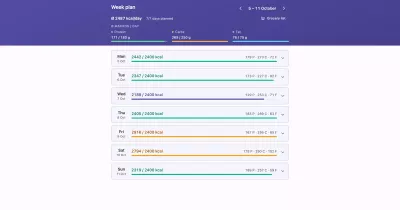

A meal planner for households. Tell Tabe what you like to eat and what a good week looks like. It plans the menu, builds the shopping list, and keeps everyone's phone in sync.
Tabe (食べ, "eat") is a mobile-first web app you install on your home screen. One instance per household, running on anything from a Raspberry Pi up.
How it's built · Self-host it · API and agents · Report a bug
What it does
- Plans the week for you. Press New menu and a constraint solver fills lunch and dinner for one or two weeks: no dish repeats, lunch and dinner on the same day are different kinds of food, seasonal dishes stay in season, every category gets a fair share of the week, and leftovers from a two-portion dish land a day or two later.
- Lets you fix it by hand. Hold and drag a meal onto another to swap them. Tap a meal to pick a different dish, or to add a second one (soup plus grilled fish).
- Builds the shopping list. Everything the planned meals need, with quantities ("4× potato"), and a tick for things already bought that is shared between phones.
- Tracks the week's nutrition. Meals per food group (fish, vegetables, red meat, chicken, processed meat, legumes…) against weekly goals you set. Green or red at a glance.
- Keeps your dish library. Each dish has a category (its main component), tags, ingredients, a role (full meal, combinable, or side only), a season, lunch or dinner, and how many meals it lasts.
- Stays in sync. Several people can use it at once. A change on one phone shows up on every other within a second.
- Works with your AI assistant. The API is documented for agents, so "add this recipe URL to Tabe" is a one-line request. See AGENTS.md.
- Is yours. One SQLite file holds everything. Export your dishes as CSV any time.
Try it
A hosted demo is on the way. Until then, run it locally in under a minute:
python -m venv .venv && source .venv/bin/activate
pip install -r requirements.txt
python app.py               # http://localhost:5001
Add a few dishes in the Dishes tab, or drop a dish_list.csv next to app.py before the first run and it's imported automatically (see dish_list_template.csv for the columns). Then press New menu.
Install it on your phone
Open the address in Safari (iPhone) or Chrome (Android) and use Share → Add to Home Screen. It opens full screen like an app. Served over HTTPS it also opens offline with the last menu.
Self-hosting
Tabe is a single Flask process with a SQLite file. It runs happily on a Raspberry Pi on your home network, which is how it was built to be used.
Needs a 64-bit OS (uname -m should say aarch64); OR-Tools has no 32-bit ARM builds. uv provides a recent Python without touching the system one.
On the Pi:
curl -LsSf https://astral.sh/uv/install.sh | sh
git init ~/tabe && git -C ~/tabe config receive.denyCurrentBranch updateInstead
From your computer (assuming an SSH host alias pi):
git remote add pi pi:tabe
git push pi main
Back on the Pi:
cd ~/tabe && git checkout main
~/.local/bin/uv venv -p 3.12 .venv && ~/.local/bin/uv pip install -p .venv/bin/python -r requirements.txt
sudo cp deploy/tabe.service /etc/systemd/system/   # edit User/paths if they differ
sudo systemctl enable --now tabe
The app is then at http://<hostname>.local. Raspberry Pi OS announces that name on the network with Avahi; if it doesn't resolve, run sudo apt install avahi-daemon. If the Pi is connected by both cable and Wi-Fi, Avahi sees its own announcements and renames itself (hostname-2.local, …): add allow-interfaces=eth0 under [server] in /etc/avahi/avahi-daemon.conf and restart it. As a fallback, give the Pi a fixed IP in your router.
To update: git push pi <branch> from your computer, then ssh pi sudo systemctl restart tabe (and uv pip install -r requirements.txt if dependencies changed). Logs: journalctl -u tabe -f. Your data lives in ~/tabe/menu.db; back it up with cp, or export dishes with .venv/bin/python db.py export > dishes.csv. Import more with python db.py import FILE.csv.
For offline support on phones, serve it over HTTPS, for example with Tailscale: sudo tailscale serve --bg 80, then use the https://….ts.net address.
Under the hood
Planning a week of meals from a list of dishes and a set of rules is a constraint satisfaction problem. Tabe hands it to the OR-Tools CP-SAT solver (menu.py), which finds a plan where:
- no dish repeats, except two-meal dishes, whose leftovers go one or two days later,
- seasonal dishes only appear in their season, lunch dishes only at lunch, dinner dishes only at dinner,
- lunch and dinner on the same day have different categories,
- each week gets a fair share of every category,
- the household rules in
config.pyhold. By default Saturday lunch is left empty (plan it by hand) and Saturday dinner is an egg dish; editconfig.pyto suit your week.
When you switch to two weeks, week one is kept and week two is planned around it. The solver stops within 5% of the best balance or after 5 seconds, whichever comes first.
The rest is deliberately small:
app.py: Flask routes. All state changes go throughdb.py, which bumps a version number; clients subscribe to server-sent events and refetch on every change. That is the whole sync mechanism.db.py: SQLite schema with numbered migrations, and every read and write.foods.py: food groups, default nutrition goals, and a built-in list of common foods so most ingredients are classified without asking.static/: the PWA. Plain HTML, CSS and JavaScript, no build step, a service worker for offline.- Tests:
pip install -r requirements-dev.txt && pytest.
The HTTP API (every route, with bodies) is in AGENTS.md.
License
AGPL-3.0. Built by Daniel Fernández.