Recipe box, weekly meal planner and grocery list for one household. Add a recipe from a link, a PDF, or a photograph of a printed or handwritten card, plan a dinner for each night from your library, and take the resulting shopping list to the shop.
Demo video
https://github.com/user-attachments/assets/f4008d4c-4334-4b36-83d7-cc69ad15a5a2
What it looks like
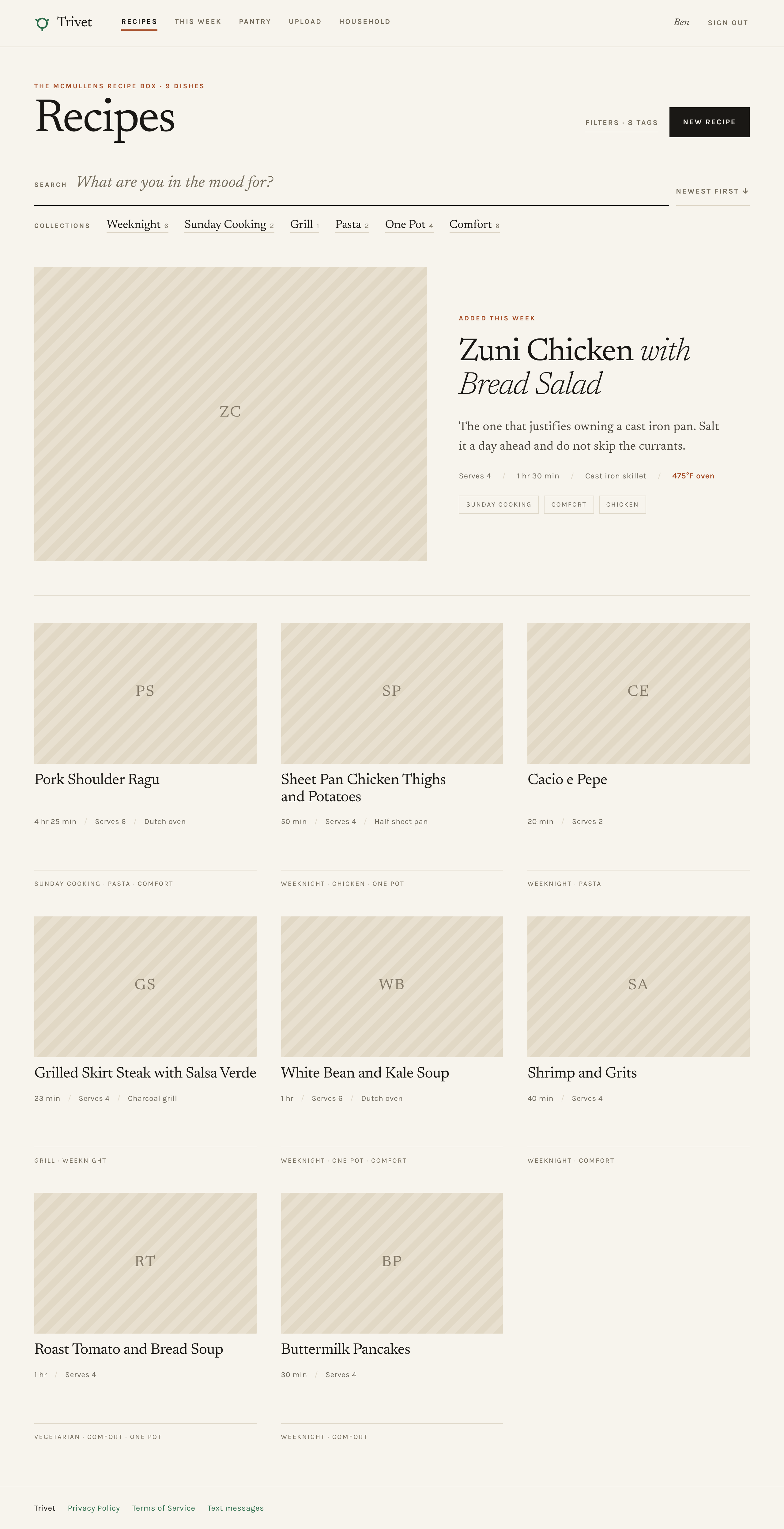
The library, newest dish given the hero and the rest in a grid. Collections are a curated way in; everything else lives behind Filters.
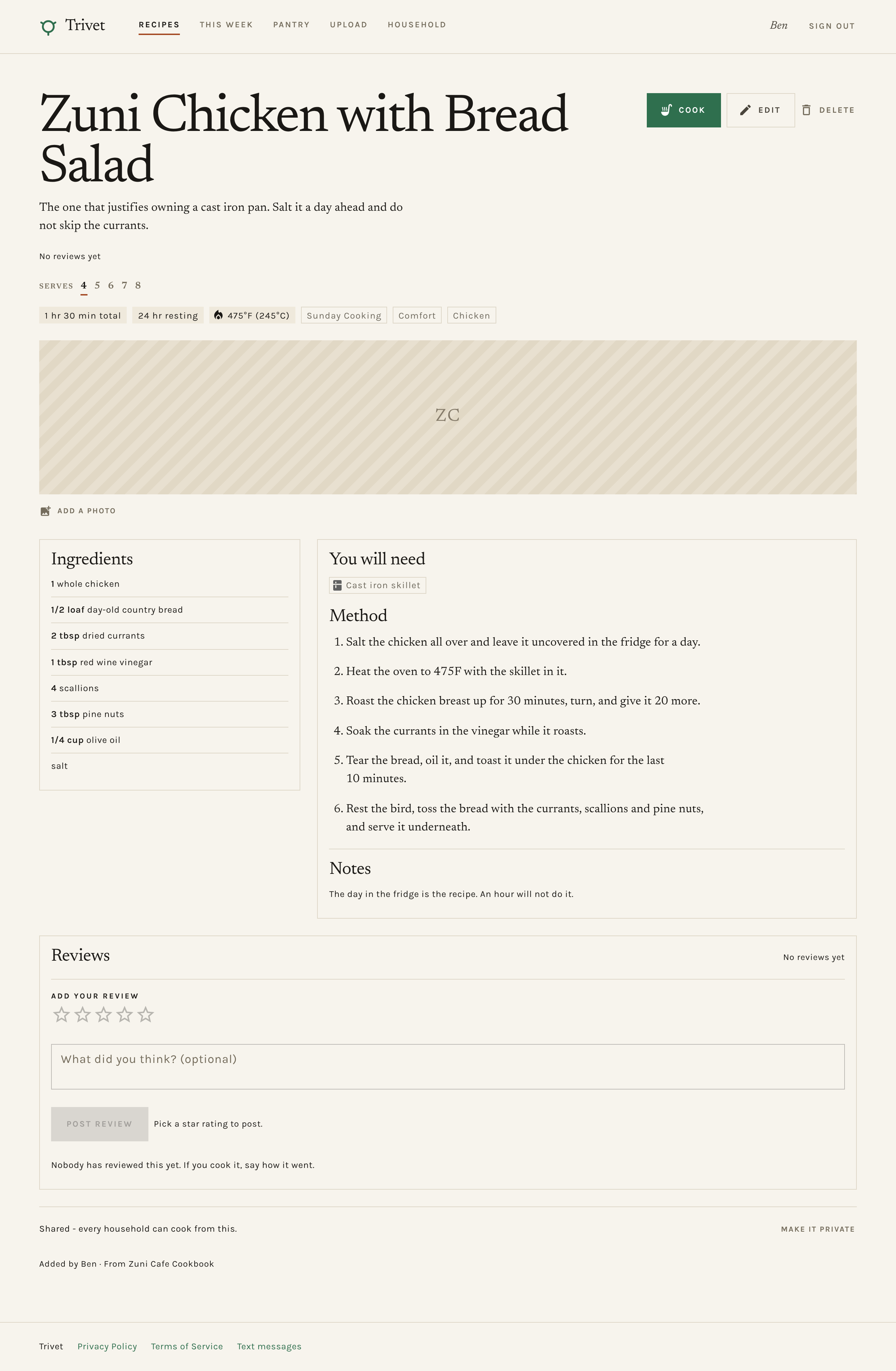
A recipe, with everything the card printed: timings, resting, oven temperature, equipment, and what the household thought of it.
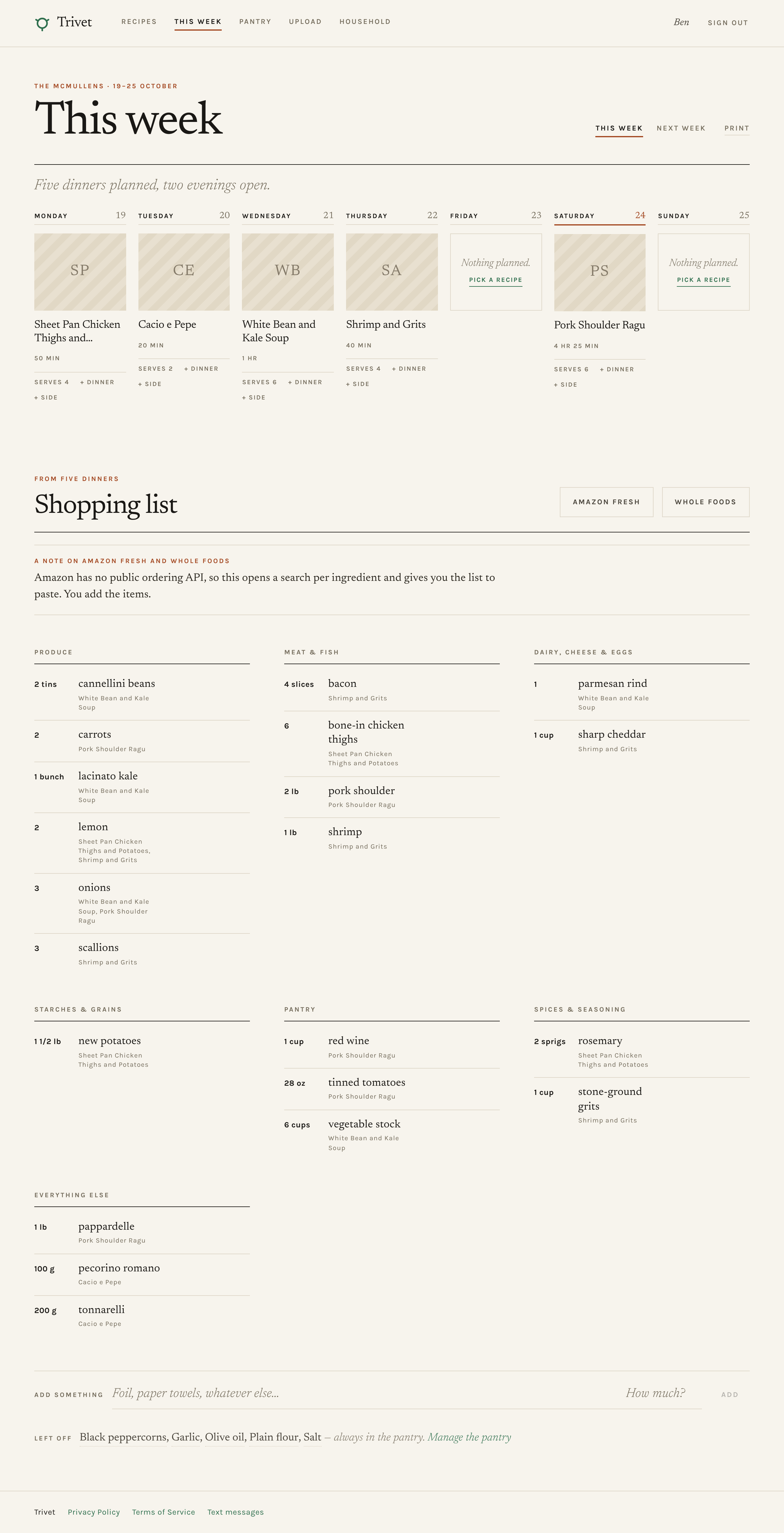
The week, and the list it produces. Ingredients roll up across the meals planned, grouped by aisle, with the dish each line came from underneath it.
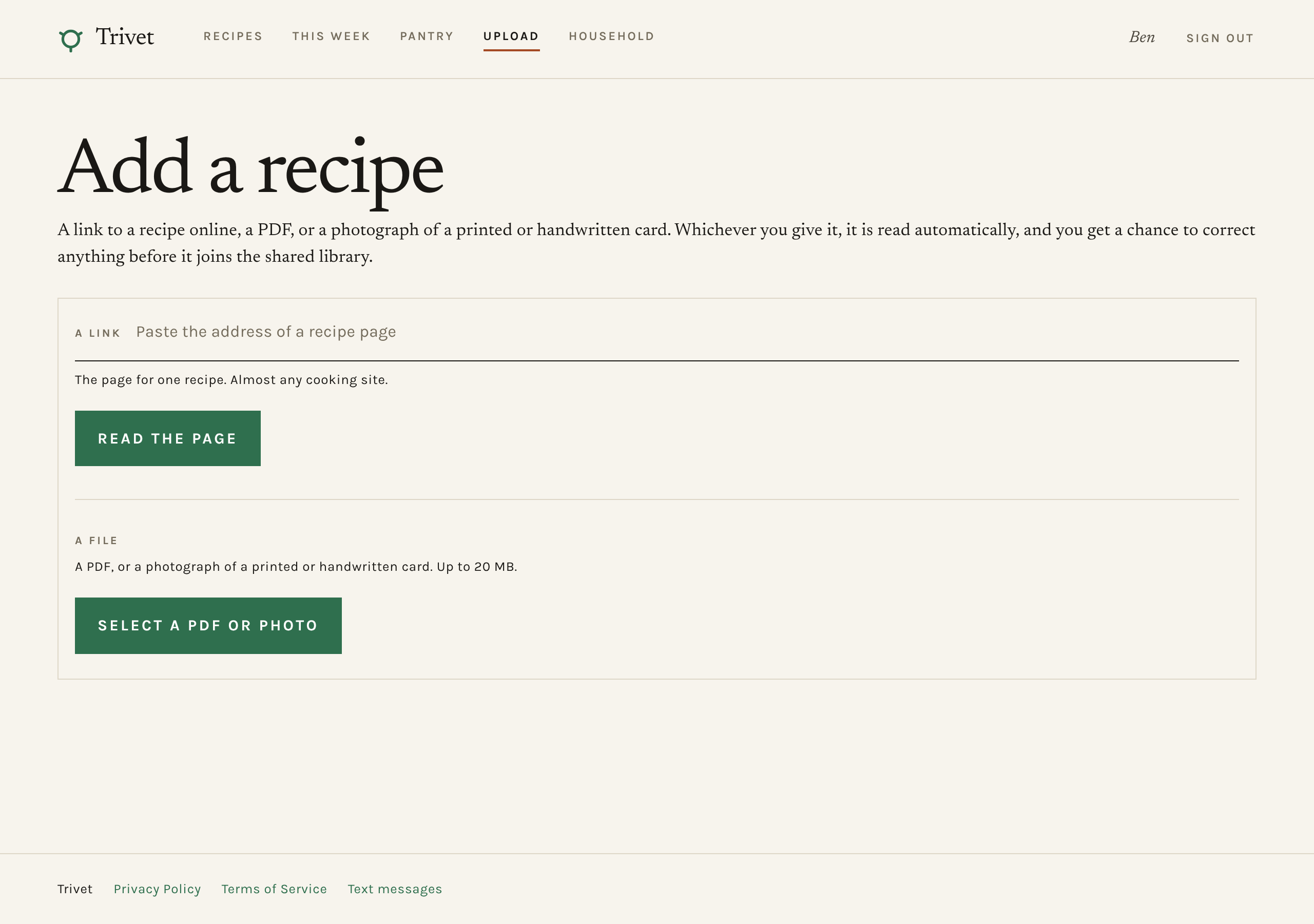
Add a recipe from a link to one online, a PDF, or a photograph of a card.
Screenshots are of a seeded demo library, so no dish photos are attached - the
striped placeholders are what the app draws when a recipe has none. They are
taken from npm run seed:demo, so retaking them is a command rather than an
afternoon:
npm run browse:seed   # once, with the app running
npm run seed:demo
npm run browse -- /recipes --shot=docs/screenshots/recipes.png
npm run browse -- /recipes/zuni-chicken-with-bread-salad-03a14891 --shot=docs/screenshots/recipe.png
npm run browse -- /plan --shot=docs/screenshots/planner.png
npm run browse -- /upload --shot=docs/screenshots/upload.png
npm run browse -- /pantry --shot=docs/screenshots/pantry.png
npm run browse -- /household --shot=docs/screenshots/household.png
The recipe's address is stable across reseeds: seed:demo derives each
publicId from a hash of the title rather than at random, so the hero keeps
the same URL and this command does not need editing every time.
What works
- Invite-only accounts. Signup requires a code minted by an existing user. A recipe belongs to the household that added it and is private to them until they share it; a shared one appears in every household's library.
- Invites by text or email. A new code comes with Text it, which opens
your own Messages with the invite written in, and Copy link for anywhere
else. Give their email address and Trivet sends the invitation itself, from
your name. Either way the link is
/sign-up?code=..., so the person you invite taps once and lands on a form with the code already filled in. - Recipe library. Create, edit and delete recipes with ingredients, method, servings, timings, oven temperature, resting time, yield, equipment and tags - everything a recipe card prints, so you never have to reopen the original. Calories, protein, carbs and fat per serving are recorded when the source states them, and never worked out when it does not.
- Search. Full-text plus substring matching across titles, descriptions, method text, ingredients and tags, with tag filters. Search state lives in the URL, so a filtered view is linkable.
- Adding a recipe: a link, a PDF or a photograph. Paste the address of a recipe page, or upload a card, and Claude reads it into fields, landing on a review screen before anything is saved. A site that only answers a real browser is named as such, with a way round it: print the page to a PDF and bring that in instead. A PDF also gives up its dish photo, which is pulled out and attached. Photographs are accepted as JPEG, PNG, GIF or WebP - the four formats the model itself accepts - so a picture of a card stuck to the fridge, or of a page in a book, works as well as an exported file. HEIC, which is what an iPhone stores by default, is converted in the browser before it is sent.
- Reviews. A star rating and, optionally, what you thought - one review per person per recipe, so the average says how many people liked a dish rather than how often its keenest fan said so. The average shows on the library cards, the planner tiles and the recipe itself.
- Duplicate detection. A re-uploaded card - PDF or photograph - is recognised by its bytes and refused before the model is called; a familiar-looking title warns rather than blocks.
- Weekly planner. A dinner a night, picked from tiles showing the dish photo, title and its rating. An evening can take up to three dinners and a side: the first is the photo, the rest are a line each under it, and every one of them scales into the shopping list the same way.
- A cooking view.
/recipes/<id>/cookis the recipe as something you are in the middle of: one step at a time in large type, ingredients a tap away without losing your place, and the screen held awake so a propped-up phone does not sleep between steps. Where you got to survives a reload. - Pantry. The staples you always have in, managed as a list of their own. Nothing in it ever reaches a shopping list, however many recipes call for it.
- Grocery list. Ingredients roll up across the week's meals, scaled to the servings planned and merged where names and units agree. Pantry staples and anything ticked off for the week drop out before the merge.
- Anything else you need. Kitchen roll, dish soap, a birthday cake - things no recipe asks for go on the week's list by hand, sorted into the aisle they'll be found in, and travel with it to the shop hand-off and the text.
- Shopping hand-off. Send the week's list to Amazon Fresh or Whole Foods (a search link per ingredient plus a copyable list). An Instacart provider that builds a real cart is written and tested but hidden until a key exists — see below.
- An activity overview.
/adminlists the households, how much each is using the planner, and how many cards they have uploaded. Counts and dates only. Reachable by the addresses inADMIN_EMAILSand answering 404 to everybody else. - Texting the list. Everyone in the household who has agreed to be texted gets the week's shopping as an SMS, split into readable parts. Giving a number is optional, and a number alone sends nothing - only those who ticked the box are texted. Live: registered with the carriers and delivering.
Stack
| Concern | Choice |
|---|---|
| Framework | Next.js 16 (App Router) + React 19 |
| Language | TypeScript |
| UI | Material UI 9 (emotion), light + dark |
| Database | Postgres via Prisma 7 |
| Auth | Better Auth (email + password, invite-gated) |
| Storage | Vercel Blob, with a local-disk driver for dev |
| AI | Claude, for reading recipe cards |
| Tests | Vitest, against a real Postgres |
Getting started
npm install            # postinstall runs `prisma generate`
cp .env.example .env   # then fill in the values below
npm run db:migrate     # creates the schema
npm run dev            # http://localhost:3000
You need a Postgres instance. Anything works locally; production is Neon.
Environment
| Variable | Needed for | Notes |
|---|---|---|
DATABASE_URL |
everything | Postgres connection string |
BETTER_AUTH_SECRET |
sessions | openssl rand -base64 32 |
BETTER_AUTH_URL |
sessions | The app's own origin |
ANTHROPIC_API_KEY |
reading a card | Without it, upload returns a clear 422 |
UPLOAD_DAILY_LIMIT |
capping the bill | Cards per person per day. Unset means 30 |
INSTACART_API_KEY |
sending a cart | Without it, the planner says so and stays usable |
INSTACART_API_BASE |
sending a cart | Dev server by default; switch for production |
BLOB_READ_WRITE_TOKEN |
uploads in production | Unset locally: files go to public/uploads/ |
TWILIO_ACCOUNT_SID |
texting the list | All three are needed; any missing hides the button |
TWILIO_AUTH_TOKEN |
texting the list | The account's auth token, not an API key secret |
TWILIO_FROM_NUMBER |
texting the list | E.164, e.g. +15085551212 |
Missing optional keys degrade gracefully — the rest of the app keeps working and the affected feature explains what is missing.
Creating the first account
Signup is invite-only and there is no bootstrap UI yet, so the first user is made by hand:
INSERT INTO "user"(id, name, email, "emailVerified", "createdAt", "updatedAt")
VALUES ('bootstrap', 'Your Name', 'you@example.com', true, now(), now());

INSERT INTO invite(id, code, "expiresAt", "createdAt", "createdById")
VALUES ('bootstrap-invite', 'PICKSOMETHINGRANDOM', now() + interval '7 days', now(), 'bootstrap');
Then visit /sign-up?code=PICKSOMETHINGRANDOM. (Delete the placeholder row
afterwards if you like — the invite survives on its own.)
Deploying
See DEPLOYING.md for the full walkthrough — Neon, Vercel Blob, environment variables, and creating the first account.
Two things that bite if skipped: migrations need Neon's direct connection
string (DIRECT_DATABASE_URL), not the pooled one, and without a Blob store
uploads land in ./public/uploads, which serverless hosting wipes on every
deploy.
GET /api/health reports whether a deploy reached its database and whether the
schema is present.
Scripts
| Script | Does |
|---|---|
npm run dev |
Dev server |
npm run build |
Production build |
npm test |
Vitest once (truncates the dev database) |
npm run lint |
ESLint |
npm run typecheck |
Route types + tsc --noEmit |
npm run format |
Prettier |
npm run db:migrate |
Create and apply a migration |
npm run db:deploy |
Apply migrations (production) |
npm run db:studio |
Prisma Studio |
The integration tests share one database and clean up after themselves, which means running them against a database you care about will empty it.
Notes and limitations
Texting works, and getting there was most of the work. The sender itself is one form-encoded POST. Everything around it exists because US carriers will not carry application-sent SMS to ordinary numbers until the sender is registered under A2P 10DLC: a Brand, then a Campaign describing what the messages are and how people agreed to receive them.
Unregistered traffic is not bounced, it is silently dropped — the API accepts
the message and the handset never rings, which is the worst failure shape there
is, and it cost a day before the Twilio console's message logs made it visible.
If this ever stops working, start there rather than in the code: 30034 means
the number is not registered against an approved campaign, 30007 means a
carrier filtered it, 21610 means that person replied STOP.
Two rejections were worth writing down, because neither is about the code:
- A privacy policy can be public, complete and correct and still fail vetting
for its wording. "Never shared with third parties or affiliates" was refused;
"do not share, sell, or provide" passed. Vetting is pattern-matching, so
src/lib/legal.tsmatches the pattern rather than reading better than it. - Naming your messaging provider without naming the relationship reads as a disclosure of data sharing and contradicts the promise above it. "Twilio, our messaging service provider, acting only to transmit messages on our behalf" is doing real work in that sentence.
The app is called Trivet; the text messages still say McMullen Meal Magic.
That is not an oversight. BRAND in src/lib/legal.ts is the name on the
approved A2P campaign, it appears in every message body, and carrier vetting
compares the two. Renaming it before the campaign is re-registered would not
produce a branding inconsistency — it would produce silently undelivered
messages, which is the same failure as being unregistered. The order is:
register the new name, wait for approval, then change that one constant and the
two tests that pin it. Those tests failing is the tripwire, and it is deliberate.
The registration is a sole-proprietor Brand, which carries low daily throughput caps. A household and a weekly list is nowhere near them.
The consent machinery is what the registration was built on, and it is the part that reads as over-engineering until a carrier asks to see it:
- A number is only ever entered by its owner.
saveOwnPhonewrites the caller's own row and nothing else — a digit wrong sends the week's shopping to a stranger. - A number is not consent.
smsConsentAtandsmsConsentSourceare stored separately, because being reachable and having agreed are two different facts, and a carrier asking to see the opt-in is asking about the second. Agreeing to texts is never a condition of having an account; carrier rules do not allow it. (A phone was briefly required to join and was made optional again: it bought no way of reaching anybody, since only members who tick the box can be texted, and gave a stranger signing up nothing to say yes to.) - Invites are texted from the inviter's own phone, never from this app's number. The campaign is registered for one purpose - the shopping list, to members who agreed - and an invitee has agreed to nothing. Sending from the app's number would break the registration that the shopping lists depend on. From the inviter's phone it is one person texting another, which needs neither, and it arrives from someone they know.
- The checkbox is never pre-ticked, and there is no prop that would let it be.
/privacy,/termsand/smsare public, deliberately outside the login, because a policy nobody can read without an account is a policy a reviewer will reject. The wording lives insrc/lib/legal.tsso the box, the pages and the campaign submission cannot drift apart.- A reply of STOP is handled by Twilio, which never tells the application. The
only notice is a
21610on the next send, and that clears the person's consent while keeping their number — so re-agreeing is a tick rather than typing it in again.
The app cannot tell you a text was delivered. Twilio answers 201 when it
accepts a message for delivery, which is not the same as a carrier handing it
to a handset, and that response is all the sender sees. So a send that is
filtered downstream is reported as a success. Real delivery state needs a
status-callback webhook, which does not exist yet; until it does, Twilio's
Messaging logs are the only place the truth lives.
Reading a card is metered per person, per day. It is the only operation
here that costs money every time it runs, and /api/upload is reachable by
anyone with an account - a theoretical problem for one household, and somebody
else's enthusiasm arriving on your bill for thirty.
The counter is a row per person per day in Postgres rather than anything new to run. It is claimed immediately before the model call and nowhere earlier: a duplicate file or a damaged one is refused for free and should not spend an allowance on a call that never happens. A refused attempt still increments, so hammering the endpoint cannot walk the count back into range.
The ceiling is not there to shape how people add recipes - a household typing
up twenty cards the evening they join should sail through it - only to stop a
runaway loop being unbounded. UPLOAD_DAILY_LIMIT moves it; a value that is
not a positive integer falls back to the default rather than becoming NaN,
which would compare false against everything and quietly switch the limit off.
A recipe is private until it is shared, and sharing means sharing with
everybody. Not with a named household: there are a handful of them, all
invited by somebody already here, and a targeting table would be machinery for
a permission nobody has asked for. Recipe.isShared can become a join table
later without the read path changing shape.
Everything that existed when the column arrived was backfilled shared. The library had been visible to every signed-in person since it was built, and defaulting it to private would have taken dishes away from households that had been cooking from them for months. Only recipes added afterwards start private.
The rule lives in src/lib/recipe-visibility.ts and nowhere else, because "who
can see this" is exactly the kind of thing that is right in four places and
forgotten in the fifth - and the fifth is the one that shows somebody another
family's dinner. Search needs it twice, once as a Prisma filter and once as SQL,
since ranking cannot be expressed in Prisma; both live in that file so the pair
is read and changed together.
Three things follow from visibility that are easy to miss:
- Ratings follow it exactly. One average per recipe, over everybody who can open it. A shared recipe pools verdicts across households, which is the point; a private one is rated only by the family that has it. Writing a review checks visibility rather than existence, or a guessed id would move an average on a dish somebody cannot read - and the response would tell them it is there.
- Tag counts are per household. The vocabulary is shared, the numbers are not: a count over the whole table offers a filter that returns nothing, and the number itself says how many recipes sit behind a closed door.
- Duplicate detection is per household.
sourceFileSha256used to be globally unique, so a widely printed card that two families both own was called a duplicate - and the refusal told the second family that a recipe they could not see existed. The constraint is now on (household, hash).
Planning a shared recipe takes a reference, not a copy. The plan stores the id, so the owner's later edits reach a meal another household has already planned. Un-sharing is deliberately not retroactive: a week already planned keeps the dish and still gets its ingredients on the shopping list. Pulling dinner out of somebody's Thursday, days later, because another family changed its mind is worse than the recipe staying readable to the few who had committed to cooking it.
An evening is a fixed list of slots, not a count. Three dinners and a side
are four enum values on MealSlot, which keeps the
(householdId, date, slot) unique key that every planner query and the side
upsert rely on. The alternative — a position column and as many rows as you
like — means changing that key, and the only thing it buys is a fourth dinner
that nobody has asked for. As values, a fourth is two lines of SQL and no
application change at all: ALTER TYPE ... ADD VALUE rewrites no table.
Sides hang off the day rather than off a dinner, which is the decision that made the slots work. One set of sides for the evening, whichever mains are on it; sides per dinner is wha